



LinkedIn ads campaign ops eat more than half the time: building audiences by hand, writing ads, launching them, checking bids, hunting wasted spend, auditing the account, building the exec report, etc.
But now with ‘formidable’ LLMs like Claude, every one of those steps can be automated with an agent, a skill, or an MCP server that does the grunt work, and most of them are free.
Just a reminder though: AI agents for LinkedIn ads only earn their keep when you point them at your own account data to get personalized results and not generic advice and tips.
This article maps LinkedIn ads campaign ops into eight jobs: audience building, audience and account research, campaign strategy and budget sizing, ad creation, landing pages, campaign management and bidding, reporting and attribution, and turning ad engagement into intent signals and outreach.
For each job, I list the agents, what they actually automate, and how to wire them together.
The short version, if you only read one block:
/abm-strategy-planning, /abm-campaign-execution, /linkedin-abm-audit, /linkedin-abm-report) install from the ZENABM/linkedin-abm-skills repo. Connect the MCP server instead, and you get 15 skills as slash commands with no install, including /budget-wasters, /ad-decay, /persona-audit, /scaling-planner, and /sales-handoff.| Tool | What it does | License and price | Worth it when |
|---|---|---|---|
| The data and agent core | |||
| ZenABM MCP server | 50+ tools over company-level engagement, live ad-set settings, reach and frequency, deals, four safe write actions, plus 15 slash-command skills | Included from $59/month, 37-day trial | You run LinkedIn ads and want agents on live first-party data |
| Zena | In-app analyst agent: chat with your ads data, expert knowledge, report building | Included in ZenABM; free trial chat | The team wants answers without a terminal |
| Zena Proactive | Scheduled weekly, monthly, quarterly summaries plus per-page reports, flags, and picks | Included in ZenABM | You want the Monday report to exist before you ask |
| Job 1: Audience building and targeting | |||
| AgentSource | Claude Code plugin for batch research, ICP filtering, enrichment, CSV export via Apollo and Crustdata | Open source, free | Cold matched-audience lists at 50+ accounts a day |
| Apollo.io MCP (Inferensys) | 27 tools over Apollo: lead search, enrichment, sequences, CRM records | Open source; Apollo free tier | You already live in Apollo’s database |
| ZenABM warm audiences via MCP | Tiered engaged-account lists with campaign evidence, ready to upload as matched audiences | Included from $59/month | You want to retarget the accounts that already engaged |
| Job 2: Audience and account research | |||
| exa-labs/company-researcher | Instant structured company profile from a domain | Open source; Exa API costs | Fast per-account profiles at list scale |
| langchain-ai/company-researcher | LangGraph company research, extensible fields | Open source, free | You want custom research fields |
| company-research-agent (guy-hartstein) | Multi-agent deep diligence pipeline per company | Open source, free | Deep passes on late-stage accounts |
| Browser Use | Most-starred open source browser agent; operates real websites | Open source (MIT), free | Research static scraping cannot reach |
| Firecrawl MCP server | Scrape, crawl, search, extract as MCP tools with JS rendering | Open source; API or self-host | The general web-data layer for any agent |
| LinkedIn MCP server (stickerdaniel) | Profiles, companies, jobs via your logged-in session | Open source, free | Buying-committee research, rate-limited, ToS caveat |
| Job 3: Campaign strategy and budget sizing | |||
| /abm-strategy-planning | Stress-tests revenue goal vs budget with real ad metrics; proposes structure, format mix, ad count | Open source, free | Before any campaign launches or budgets move |
| ZenABM free calculators | ABM budget and LinkedIn ads count models in the browser | Free | The arithmetic without an install |
| Job 4: Ad creation | |||
| /abm-campaign-execution | Strategy to launch-ready briefs, outlines, and rendered 1080×1080 mockups across 23 patterns | Open source, free | Turning a locked strategy into ads |
| LinkedIn Ad Designer | On-brand LinkedIn ad visuals in editable HTML, 23 patterns | Free skill | Ad variants without a design queue |
| ZenABM ad free tools | Single image ad creator and TLA generator in the browser | Free | One-off ads with zero setup |
| Job 5: Landing pages for your ads | |||
| Open Lovable | Clones and regenerates any page as a React app | Open source (MIT), free | Per-account landing page variants |
| bolt.diy | Open source AI app and site builder from prompts | Open source, free | Landing pages built from scratch |
| Job 6: Campaign management, bidding, and optimization | |||
| /linkedin-abm-audit | 30-day diagnostic: scorecard, ad-count model, decay, impression hogs, ordered fixes, HTML and PDF | Open source, free | The weekly operator to-do list |
| Claude Ads | 250+ checks across 7 platforms, 0 to 100 health score, runs locally | Open source, free | Cross-platform audits and second opinions |
| Google Ads MCP | Google’s official open source ads MCP server | Open source, free | The same agent loop on Google Ads |
| Meta Ads MCP (Pipeboard) | Meta server in a 5-platform family including Reddit Ads | Open source; hosted free plan | Meta or Reddit in the mix |
| Job 7: Reporting and attribution | |||
| /linkedin-abm-report | Exec-facing monthly recap: spend, pipeline, best campaigns, MoM change, recommendations | Open source, free | The monthly exec report |
| LinkedIn ABM Reporter | /abm-report over the ZenABM API with flags and PDF export | Open source, free | Reports in Claude Code without exports |
| ZenABM attribution | Deduplicated revenue attribution per campaign: pipeline per dollar, ACV, ROAS | Included from $59/month | Proving pipeline per campaign |
| Job 8: Intent signals, retargeting, and outreach | |||
| ZenABM intent and stages | First-party intent themes and customizable stage thresholds, synced to CRM, used as retargeting audiences | Included from $59/month | Verifiable triggers for every downstream agent |
| HubSpot MCP server | Official first-party server: CRM read and write over OAuth | Free with HubSpot | Agents that query and update HubSpot |
| Twenty | Leading open source CRM, self-hosted, full API | Open source, free | No CRM budget, full control |
| ZenABM Outbound Agent | ZenABM engagement to Apollo contacts to Smartlead sequences, weekly autopilot | Open source, free | Intent-led outbound without an AI SDR seat |
| Smartlead MCP (LeadMagic) | 113 tools over Smartlead campaigns, leads, deliverability | Open source; Smartlead account | Conversational control of sending |
Before the job-by-job list, the architecture, because every tool below fits into one of three layers.
Claude Code, Claude Desktop, ChatGPT, or Cursor.
This is the reasoning layer that reads data, plans, and executes.
I use Claude Code because it runs skills and plugins natively.
The MCP servers here work in any MCP client.
These are markdown instruction files that teach the agent a repeatable workflow: an audit checklist, an ad design system, a reporting format.
They install from a GitHub URL or a plugin command.
They are free.
There is no lock-in, because you can read every line they run.
These are the data connections.
An MCP server exposes a system (your ads data, your CRM, a contact database, the open web) as typed tools the agent can call.
This layer determines whether your agent works with live account data or a CSV you exported last Tuesday.

One reality check before the list.
The execution is already strong: performance analysis, budget moves, ad copy testing, competitor research. etc.
The strategy is not there yet.
So the rule for everything below is simple.
Read actions run freely.
Write actions (pausing an ad, changing a bid, applying an exclusion, sending an email) sit behind a confirmation.
Every tool I recommend supports that split.
I cover this first because every job below gets easier once it exists.
The ZenABM MCP server exposes more than 50 tools over your first-party LinkedIn Ads data, pulled at the company level straight from the LinkedIn Ads API and tied to the CRM pipeline.
It works in Claude, ChatGPT, and Cursor.
The same data is on the REST API if you are building your own agent (though I’d suggest you to skip making your own agent due to the hassle and maintenance involved).

It also ships 15 ready-made skills as slash commands, which I come back to across the jobs below.
Setup is three steps.


You connect the endpoint at https://app.zenabm.com/api/mcp (Bearer token or OAuth).
You run /init so the server writes a CLAUDE.md file that tells the agent what tools exist and how your account is built. Then you ask questions. The tools group into these families:
list_companies, list_campaigns, list_ad_sets, list_deals, list_intents, list_abm_stages, find_ad_sets_or_campaigns. These are how an agent orients itself.get_ad_set_settings reads your budgets, bid, objective, Audience Expansion, LinkedIn Audience Network, and audience size straight from Campaign Manager on every call, not from a stale sync. This is how an agent audits your bids and catches the two leaky toggles in Job 6.includeReach and the metrics tools return unique members reached and how often each saw an ad, which is what audience-penetration and saturation checks run on.update_ad_status (pause or activate one ad), update_ad_set_or_campaign_status (pause or activate an ad set or campaign), exclude_companies (drop wasteful accounts from delivery), and set_budget_saver (turn on Budget Savers to close a leak). Reads change nothing. Only these four write, and only after you approve.On top of the data tools, the server ships 15 workflows as slash-command skills, from /linkedin-abm-audit to /budget-wasters, /ad-decay, and /sales-handoff.
Ask the connected agent what it can do, and it calls list_skills (or you scan /overview) to list them.
I name the relevant ones in each job below.
The workflow I love the most is the Monday review.
One prompt replaces an hour of exports:
Using the ZenABM MCP tools, list every company that entered a new ABM stage or picked up a new intent signal in the last 7 days. For each, pull the campaigns and creatives that drove the engagement and any open deals. Then flag ads whose eCTR declined for the second week in a row, and propose (do not execute) which to pause and where to move the budget.
I ran a similar prompt for our program at ZenABM:

Two metrics run through this whole article, so I will define them now.
LinkedIn’s own CTR counts reactions and comments too, so it reads higher than the click that actually costs your page a visit.
Every threshold I use is built on eCTR.
The full connection guide, tool list, and client setup is at zenabm.com/mcp/docs.
Access starts on the $59 per month plan with a 37-day trial (current tiers are on the pricing page).


The MCP server is for teams that want the data in their own agent.
Zena is the reverse.
The agent lives inside ZenABM, so anyone on the team can ask questions without opening a terminal.
You ask which campaigns drove the most pipeline, which companies engaged this week, or which ads to pause. Zena answers from the live account, drawing on LinkedIn ads expertise it was trained on.
You can try Zena free without a ZenABM account.

Zena Proactive removes the asking.
Instead of waiting for a question, Zena surfaces the answers each page exists to give, on a schedule.
On the main dashboard that is an executive summary in a drawer: every Monday the weekly report, every first of the month the monthly, every first of the quarter the quarterly.
The summary answers a fixed question set, so it is comparable period over period:
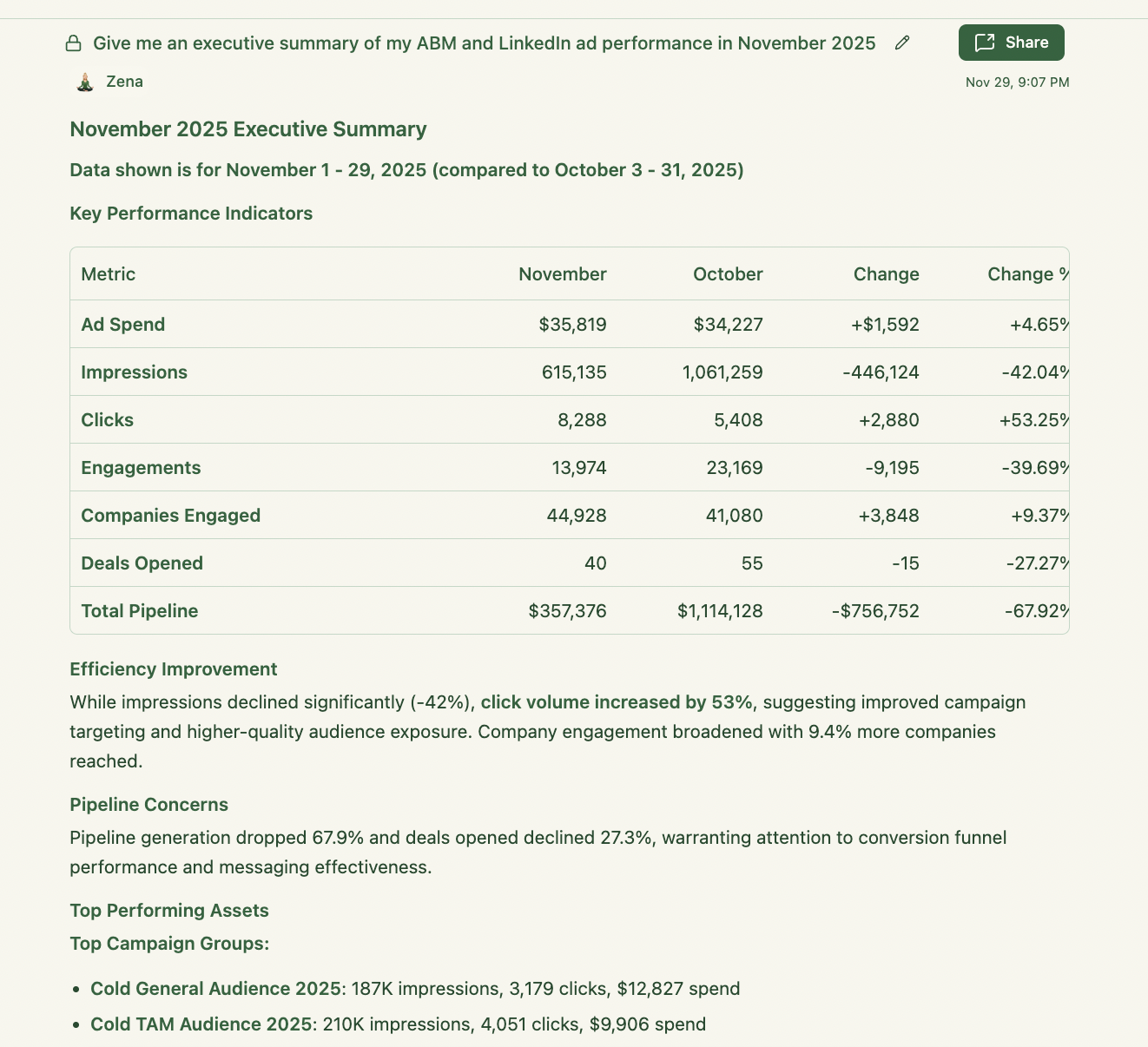
The flags are where the agent earns its keep, because each one is a rule I used to check by hand.
Beyond the dashboard, the proactive question sets are scoped per page, so the report matches the decision that page is for:
The design rule across all of it: every recommendation is built from eCTR, eCPC, stage movement, and deal touchpoints you can inspect, not from a black-box score.
Now the jobs.
Your LinkedIn ads are only as good as the list you point them at.
There are two ways to build that list, and each requires a different agent.
Cold building filters a database against your ICP, then you upload it as a matched company audience.
Warm building starts from accounts already engaging with you.
I run the warm motion first, because those accounts convert to meetings at a rate cold lists do not touch.

For cold lists, explorium-ai/agentsource-plugin is a free Claude Code plugin.
It wires Apollo and Crustdata into the agent for company research, ICP filtering, and firmographic and technographic enrichment, then exports the list as CSV, ready to upload as a LinkedIn matched audience.
If you already use Apollo (there is a free tier), Inferensys/apollo-io-mcp exposes 27 tools over the full Apollo API: lead search, contact enrichment, CRM records, and sequences, all from Claude Code.
This turns “build me a company list of 200 accounts matching this ICP” into one instruction instead of an afternoon of clicking filters.
There is an official Apollo MCP too if you do not want the open source version.

The warm motion runs on the company-level engagement data ZenABM pulls from the LinkedIn Ads API.

The agent calls list_companies over a 60- or 90-day window, tiers accounts by engagement depth, filters against your ICP in CLAUDE.md, and returns a tiered list with the evidence attached: which campaigns, which creatives, how many engagements.
Then you upload each tier as its own matched audience and message it differently.
The prompt is something like this:
Pull every company with LinkedIn ad engagement in the last 60 days. Tier them: Tier 1 is 5+ engagements plus a landing page click, Tier 2 is 3+ engagements, Tier 3 is the rest. Drop any company that fails our ICP (under 50 employees, wrong industry, wrong geography), and show the campaigns that drove each Tier 1 account’s engagement.

Good targeting needs good research.
Before you write the ad, you want to know what the company does, what changed recently, who sits on the buying committee, and which message fits.
This is the most commoditized agent category, which is good news, because the free options are strong.

Three open source repos cover the same job at different depths. exa-labs/company-researcher is the fastest.
Point it at a domain, and it returns a structured company profile built on Exa’s search API.
Langchain-ai/company-researcher is the LangGraph version of the same idea, easier to extend with custom fields.
Guy-hartstein/company-research-agent is the deepest: a multi-agent pipeline that fans research across parallel agents and merges the results.
For LinkedIn ads, I run the exa-labs version on every Tier 1 account and save the deep one for accounts entering late stages.

Browser-use/browser-use is the most starred open-source browser agent on GitHub (past 90,000 stars in 2026), and is MIT licensed.
It is the tool for research that needs you to actually operate a site: pricing pages behind clicks, careers pages, product changelogs.
It wraps Playwright with an LLM that decides what to click and type. It is slower and pricier per account than an API researcher, so I use it only where static scraping fails.

Firecrawl/firecrawl-mcp-server gives any MCP client scraping, crawling, search, and structured extraction tools, with JavaScript rendering.
This is the general web-data layer I attach next to the ZenABM MCP server.
ZenABM answers “who is engaging”.
Firecrawl answers “what is on their website”.

Stickerdaniel/linkedin-mcp-server (2,600+ stars) exposes LinkedIn profiles, companies, and jobs to MCP clients through your own logged-in session.
It is the highest-signal source for buying-committee research, with one honest caveat.
It works by automating your LinkedIn session, which sits outside LinkedIn’s terms of service.
Treat it as a research convenience you rate-limit hard, not a bulk pipeline, and never attach it to anything that writes.
For scale, the paid option is Clay, whose Claygent does waterfall enrichment across providers.
I covered Clay in more detail in the Clay for ABM deep dive.
The open source stack above covers a surprising share of what most teams pay Clay for, as long as your volume is in the hundreds, not tens of thousands.

This is the job most teams skip, and it is the mistake that costs the most.
The failure pattern from our own program: budget spread across too many campaigns, audiences split too small to serve, and more ads live than the budget could feed.
So no ad ever got enough data to prove anything.
The /abm-strategy-planning skill, one of the four free ZenABM Claude skills, exists to catch that.
You give it the revenue goal, average deal size, monthly budget, site conversion rate, and qualification and close rates.
It stress-tests whether the goal is reachable at all with real CPM, eCTR, and cost-per-click numbers, then proposes the campaign structure, format mix, and the number of ads the budget supports.
The core mechanic is the ad-count model: monthly budget / 30 / cost per landing page click / roughly 4 clicks per ad per day = the most ads you can run at once.
Run more, and you underfund every campaign, lose auctions, and never learn which message landed.
You can install all four skills in Claude Code with:
/plugin marketplace add ZENABM/linkedin-abm-skills
/plugin install linkedin-abm-skills@zenabm
On Claude Desktop or web, download the zips from the releases page and upload them under Customize, then Skills.
They run on sample data out of the box.
Pointed at a ZenABM account, they pull your real numbers through the MCP server.
If you want the arithmetic without installing anything, the free ABM budget calculator and LinkedIn ads count calculator run similar functions in the browser.

Ad creation is where the time savings are easiest to measure, because the old baseline is so slow: brief a designer, wait, review, and revise.
Emilia Korczynska, VP of Marketing at Userpilot, built templated ad-creation projects and published the number:
“This reduced the time I spend creating an ad from ~20 to 2 minutes.” Emilia Korczynska, VP of Marketing, Userpilot, on LinkedIn

Her caution in the same post matters.
As decent ads get easy for everyone, feeds fill with sameness and CPMs rise.
So cheap production is table stakes, not an edge.
The edge moves to message-market fit per audience tier, which is a data problem, not a design problem.
That is why the targeting and research jobs above come first.

The /abm-campaign-execution skill (also named ABM campaign ad design skill) turns a finished strategy into launch-ready output.
It locates the strategy (from the planning skill or your upload) and generates a campaign outline as linked Markdown, HTML, and PDF.
It interviews you for your design system (colors, fonts, logo, tone) and real Thought Leader Ad author details.
Then it writes one brief file per ad and renders 1080×1080 PNG mockups from self-contained HTML using 23 reference patterns.
Two constraints I like: it does not invent strategy (it executes the plan it is given), and TLA copy built without real author input gets bracketed placeholders instead of fake claims.
It can also stand up a campaign-management database in Notion or Google Sheets, so every asset is tracked against its intent theme, audience, format, and funnel stage.

The LinkedIn Ad Designer skill from Advanced Client is a standalone alternative (you don’t need a ZenABM account to use it).
Load it into a Claude project with your brand config once, and it generates on-brand LinkedIn ad visuals in editable HTML across 23 patterns (stat highlights, product screenshots, contrarian ads, testimonials).
Because the output is HTML, edits are text edits, not another design round trip.
For quick one-offs with zero setup, the free LinkedIn single image ad creator and TLA generator run in the browser.


Whatever makes the ad, set the benchmark expectation before you judge it.
Format choice moves outcomes more than creative polish does, so compare each ad only to others of its own format:
| Format | Median CTR | Median CPC |
|---|---|---|
| Thought Leader Ads | 2.68% | $2.29 |
| Single image ads | 0.42% | $13.23 |
| Carousel ads | 0.32% | $13.30 |
| Video ads | 0.24% | $15.61 |

Your ad is only half the click.
The page it lands on decides whether that click converts, and it feeds eCTR (which is clicks to the landing page, remember).
Two open-source projects let you build and customise those pages without a personalisation platform subscription.

Mendableai/open-lovable (MIT licensed, from the Firecrawl team) clones any public page and regenerates it as a modern React app. That makes per-account landing page variants a template job.
Build the master page once, then have the agent produce the variant for a top account with its name, industry proof points, and the right case study swapped in.
Point that account’s warm ad set at the variant, and the message match lifts conversion.
Stackblitz-labs/bolt.diy is the general-purpose open-source builder for when the page is not a variant of anything and needs building from a prompt.

Both replace the personalization-platform subscription for teams whose volume is tens of accounts, not thousands.
If your program is that size, this is the best way to get per-account pages without a five-figure contract.

This is the heart of LinkedIn ads campaign ops, and the job where a weekly agent loop replaces the quarterly cleanup.
The loop I run in Claude Code on the ZenABM MCP server: find eCPC outliers, find impression hogs, find creative fatigue, check the bid settings, propose actions, confirm, and execute.
Each step is one MCP query.


The kill threshold we ran the program on: an ad past 1,000 impressions with eCTR under 0.4% comes off.
The rule that keeps the account coherent is the replacement rule.
When you kill an ad, you replace it and hold the planned messaging-mix ratio.
If the plan is 8 ads split into themes based on stuff like offers or product features (2 analytics, 3 onboarding, and 3 AI), the replacement keeps that split.
Otherwise the account drifts off-strategy, one weekly swap at a time.

LinkedIn offers maximum delivery (automated), cost cap, and manual bidding.
The trap is that a bid set against the wrong charging model, paying per impression when you want landing page clicks, runs up cost without anyone noticing.
AJ Wilcox, founder of the LinkedIn ads agency B2Linked, discussed the math: Automated CPM bidding only beats CPC when your click-through rate runs well above the benchmark. And LinkedIn’s suggested bids (often $14 to $38 per click) can be two to six times higher than you need for budgets under $15,000 a month.
Your agent, if connected to the ZenABM MCP server, can read these settings live.
The ZenABM MCP server pulls each ad set’s bid, objective, and charging basis straight from Campaign Manager on every call (the get_ad_set_settings tool), so the check runs against your current setup, not a stale copy.
Have it line up each campaign’s objective, bid strategy, bid amount, and charging basis, then flag the mismatches:
For every active campaign, list the objective, bid strategy (maximum delivery, cost cap, or manual), the bid amount, and what that bid charges for (impression, landing page click, engagement, send, or video view). Flag any manual bid priced more than 20% above the median for its format, and any bid strategy that does not fit the campaign objective.

Two settings drain budget on most accounts, but you can tell your agent to find both.
Audience Expansion serves your ads to profiles LinkedIn thinks are similar to your audience, which waters down precise targeting – please ensure it’s turned off.
AJ Wilcox is blunt about it in his audit write-up:
“It provides no value. In fact, it’s the opposite.” AJ Wilcox, founder, B2Linked, on LinkedIn

The next one is LinkedIn Audience Network, which pushes your ads to apps and sites off LinkedIn, where they behave nothing like the in-feed audience.
For a tight ABM program, this must be off, too.
Have the agent confirm their status and show the spend running through them, so the call is made on numbers, not defaults:
List every campaign with Audience Expansion on and every campaign delivering on the LinkedIn Audience Network. For each, show the spend, impressions, and engagement from the expanded or off-network delivery, so I can decide what to switch off.
You do not have to write those prompts by hand.
Two of the MCP-server skills run this whole section for you.
/budget-wasters lists the highest-spend and lowest-eCTR ad sets, the eCPC outliers, the zero-conversion spenders, and any campaign with Audience Expansion or the Audience Network left on, ordered by monthly dollars at stake.
/persona-audit reads your configured targeting live and compares it against who the ads actually reached, so it catches spend leaking to titles outside your ICP (often through Audience Expansion) and hands back the exact exclusion list per ad set.
Both read the settings live through get_ad_set_settings, so they never guess “off” when LinkedIn did not return a value.

The /linkedin-abm-audit skill packages that whole loop as a 30-day diagnostic: a scorecard, the ad-count model run against your live account (are you running more ads than the budget supports), format grading against the benchmark medians, decaying ads, impression hogs, and prioritized red and green flags with an ordered fix list, output as branded HTML and PDF.
I run it weekly as the operator to-do list.
It is the entry point, and its fix list routes each finding to a specialised skill: leaks to /budget-wasters, targeting to /persona-audit, tired creative to /ad-decay.
Two of those are worth calling out.
/ad-decay is the strict version of the kill rule above.
It flags an ad as decayed only after eCTR falls two weeks in a row with each week over 1,000 impressions, uses real weekly reach and frequency (not an estimate), and catches the Thought Leader Ad trap where a post earns clicks but zero landing page clicks.
/scaling-planner answers the question you ask before raising a budget: will more money reach more people, or just show the same people more ads?
It measures penetration (reach divided by audience size) and frequency (impressions divided by reach) per ad set, then gives you a sequenced step-up plan with a stop condition on each step, so you do not pour budget into an ad set that is already saturated.
Both run on the reach and frequency data the MCP server now ships.

AgriciDaniel/claude-ads is the free cross-platform auditor: 250+ checks across seven ad platforms (27 of them LinkedIn-specific), a weighted 0 to 100 health score, and a prioritized action plan, all running locally.
If your LinkedIn ads sit inside a multi-channel program, the platform MCP servers extend the same loop.
Google open-sourced an official server at googleads/google-ads-mcp in October 2025.

Pipeboard-co/meta-ads-mcp covers Meta and anchors a five-platform family that includes a Reddit Ads server, which matters for teams running the LinkedIn-plus-Reddit play.
ZenABM itself ingests Google Ads, Reddit Ads, organic, and AI chatbot referrals as multi-channel intent signals on paid plans, so the account-level picture stays unified even when execution spans platforms.

Reporting is the most automatable job here, because the format barely changes month to month.
Only the numbers do.
The agent I use is Claude Code on the ZenABM MCP server plus the skills below.
The attribution layer underneath is ZenABM’s revenue attribution per ABM campaign, deduplicated, with pipeline per dollar spent, ACV, and ROAS by campaign.

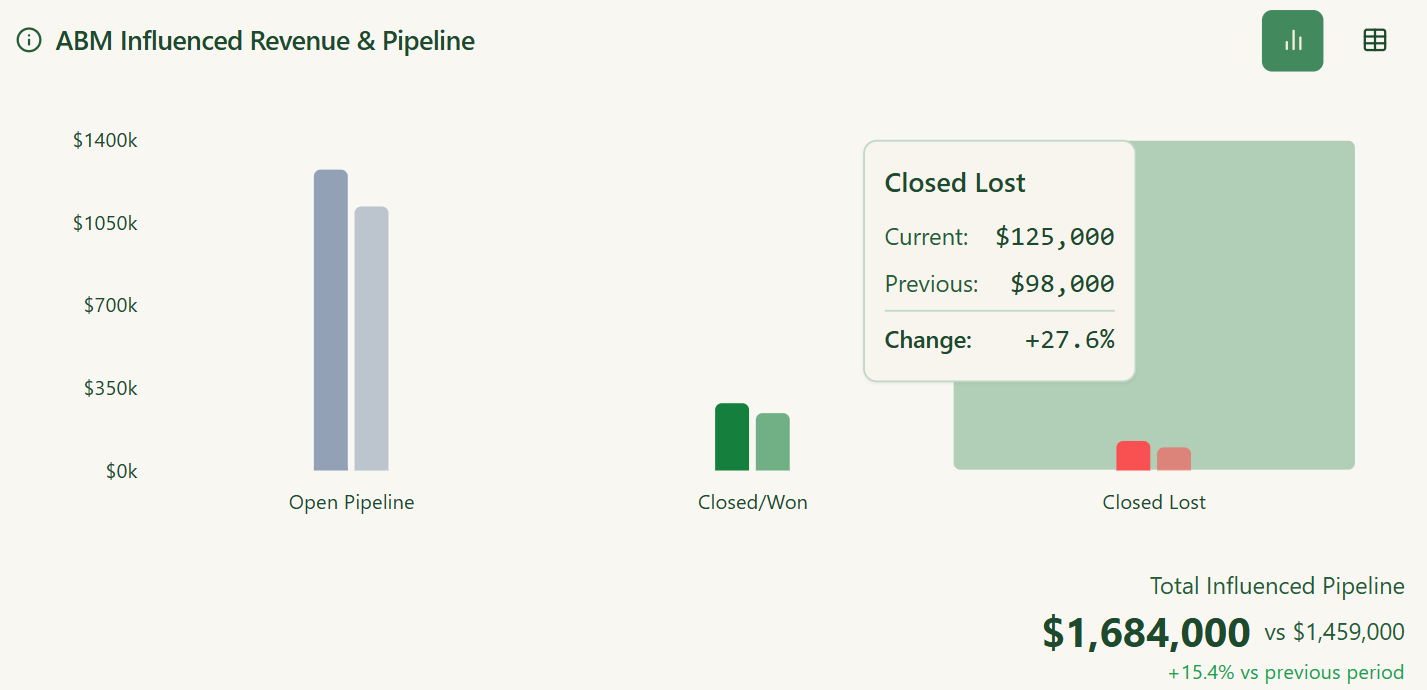
The /linkedin-abm-report skill is the exec-facing counterpart to the audit: spend, pipeline and deals influenced, best campaigns, formats, and ads, top engaged companies, ad sets graded against format benchmarks, month-over-month change, and recommendations, on the same data and math as the audit but written for a reader who will never open Campaign Manager.
Two more MCP-server skills fill in the other reporting cadences.
/weekly-digest is the Monday readout: a one-line stakeholder headline over a full operator view of what changed week over week, and it offers to schedule itself every Monday.
/revenue-attribution goes past the recap into a correlation analysis, testing which campaigns, intents, and stages predict open deals, with a deal-rate lift and a p-value on each finding and a plain “sample too small” flag under 10 companies, so you do not act on noise.


Emikor/zenabm-linkedin-abm-reporting is the community plugin.
Install from the GitHub URL, add your ZenABM API token, and /abm-report (or “give me last week’s report” in plain English) pulls live data and outputs headline metrics, pipeline ROI, campaign performance, format breakdown, top engaged accounts, stage moves, and auto-detected red and green flags, with optional PDF export.
No CSV exports, no spreadsheet assembly.
This is where LinkedIn ad engagement stops being a vanity number and starts feeding the next campaign.
Everything downstream (retargeting, routing, outreach) depends on this being trustworthy, so I will restate the standard: an agent should act on intent signals that you can verify and don’t come out of a black box like most third-party keyword intent providers.
ZenABM’s first-party intent works by tagging campaigns with intent themes (ex: Analytics, Security, AI Features).
Accounts that engage inherit the label, and you can click through to the exact engagements behind it.
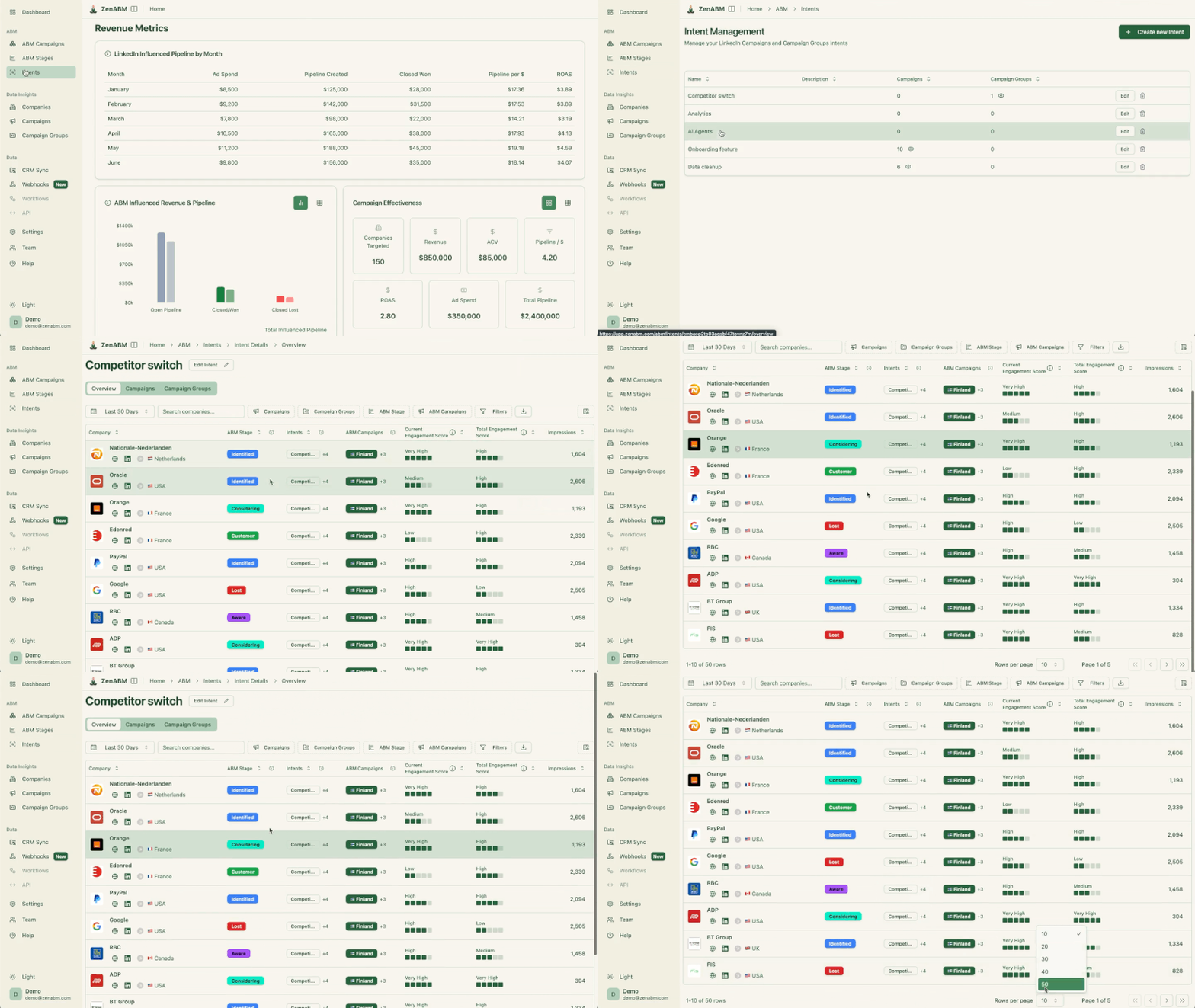
That is the difference from third-party keyword surges.
The evidence is inspectable, which means an agent acting on it is auditable.
And the same engagement data is your best retargeting audience.
The accounts that clicked a top-of-funnel ad are the ones to move into a warm ad set with a bottom-funnel message.
Stages make that automatic.

You define the thresholds (say, 5+ engagements in 30 days moves an account to Interested), and stage transitions become the events agents subscribe to.
The outbound agent below triggers on accounts entering Interested.
The exclusion recommendation in Zena Proactive triggers on accounts stuck in Aware while eating spend.
The stage lands in the CRM as a company property, so reps and CRM automations see the same state the agents act on.

The CRM side runs on bi-directional HubSpot and Salesforce sync (raw and processed engagement data as company properties) plus webhooks for Clay, Attio, and Pipedrive.
On the agent tools for the CRM itself: HubSpot ships a first-party MCP server at mcp.hubspot.com with OAuth, giving agents read and write access to contacts, deals, and engagements.
Combined with the ZenABM properties synced in, an agent can answer “which Interested-stage accounts have no open deal and no rep activity” in one query.
If you refuse a CRM subscription, twentyhq/twenty is the leading open source CRM, self-hosted, with a full API that ZenABM webhooks and agents can write into.
Five of the MCP-server skills turn this intent and stage data into a decision without you writing a prompt.
/account-engagement sorts every account into warm, cold, budget-hog, or bad-fit, tells you how much a month goes to accounts that never engage, and can drop the cut list from delivery with the exclude_companies write action after you approve.
/intent-report shows who showed intent, which campaigns feed it, and which intent actually predicts open deals.
/funnel-movement shows who moved stages, who stalled, and the clog stage that needs a fix.
/sales-handoff scores who sales should call today from stage moves, fresh intent, and engagement spikes, and hands each rep a talking point drawn from the account’s real journey (“they have been engaging with your analytics content”).
/company-deep-dive pulls everything on one account (or a list) into a single timeline and a one-word verdict: hand to sales, keep nurturing, or exclude.
These are the reason connecting the MCP server beats piping raw data into a general agent: the workflow, the thresholds, and the honesty rules are already built in.

Outbound agents work better on warm lists.
So the outreach job, done right, is the last link in the chain built above.
Intent signals identify the account, stages time the trigger, enrichment finds the person, and only then does an agent write and send.
emikor/zenabm-outbound-agent-plugin is the free plugin that runs that chain on autopilot.
It reads ZenABM engagement data, finds ICP-matched contacts at engaged accounts via Apollo (free tier includes 10,000 records a month), writes emails that reference the actual ads the account engaged with, pushes them to Smartlead, and schedules the loop weekly.
You configure the ZenABM API key, Apollo key, Smartlead credentials, ICP, and personas once.
The emails work because the personalization is real: “your team engaged with our analytics content” is verifiable, not guessed.
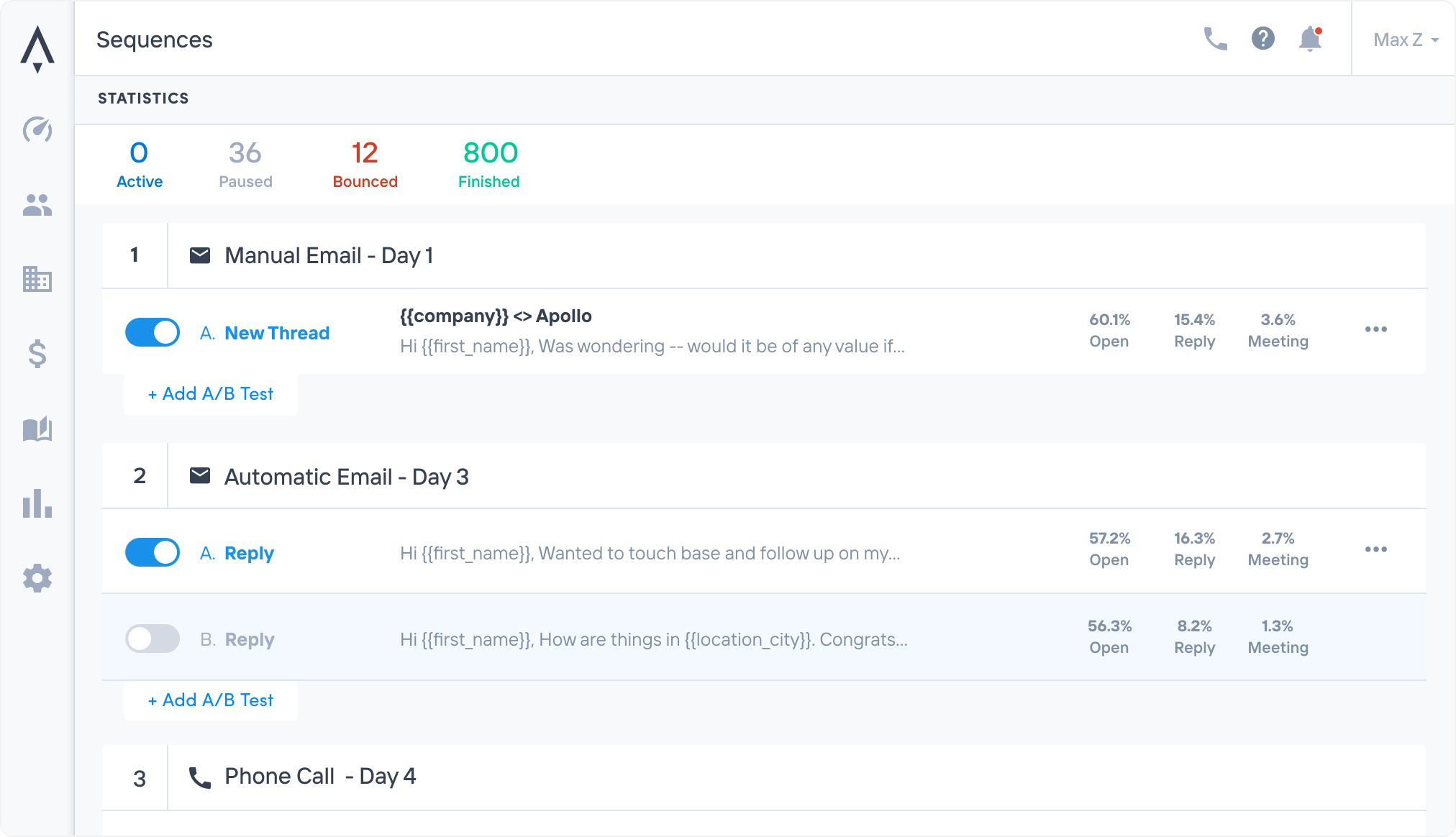
For conversational control instead of a scheduled pipeline, LeadMagic/smartlead-mcp-server exposes 113 tools over Smartlead (campaign management, lead tracking, deliverability, analytics), and the Apollo MCP server from Job 1 handles enrollment.
The combination lets you run “find every Considering-stage account with no active sequence, enroll the top 2 contacts at each, and show me the drafts first” as one supervised instruction.
The order matters more than the tool count, so here is the sequence I would run this quarter.
Connect the data layer first (the MCP server, ten minutes), because every other agent inherits its value.
Install the four ZenABM skills and run /linkedin-abm-audit the same day.
The fix list it produces is the fastest proof of what agent-driven ops feel like.
It usually surfaces a leaky Audience Expansion toggle or a bid on the wrong charging model within minutes.
Then automate one job per week in the order of your bottleneck: reporting if Mondays hurt, audience building if your lists are cold, optimization if spend is leaking.
Every agent here that runs on ZenABM’s data is available on the free trial.
The rest are open source.
Start your 37-day free trial or book a demo.
AI agents for LinkedIn ads run the manual parts of LinkedIn ads work: building matched audiences, writing ads, checking bids, auditing campaigns, producing reports, and turning ad engagement into retargeting and outreach. They are usually an LLM runtime like Claude Code connected to your data via MCP servers. They differ from AI features inside SaaS tools because you compose them yourself, most are open source, and they act on your own first-party account data rather than a vendor’s model.
No, and the practitioners running them agree. Agents execute analysis, ad production, and account checks far faster than people, but strategy, message choice, and context still need an operator. Chris Chambers documented a frontier agent operating a live ads account at a fraction of a professional’s speed. The working pattern is agents for execution with a confirmation gate on every write action (pausing an ad, changing a bid), and a human owning strategy and final calls.
An MCP (Model Context Protocol) server exposes a data system as typed tools an AI agent can call. For LinkedIn ads, MCP servers connect agents to your ads data, CRM, and the web. The ZenABM MCP server exposes more than 50 tools (plus 15 ready-made skills) over company-level LinkedIn engagement, ABM stages, intent signals, and pipeline, so agents in Claude, ChatGPT, or Cursor optimize from live account data instead of exported CSVs.
For the optimization job specifically, the strongest free options are the ZenABM /linkedin-abm-audit skill (decay, impression hogs, ad-count model, leaky toggles) and Claude Ads (250+ cross-platform checks with a health score), both running on Claude Code. The differentiator is the data underneath. An optimizer with company-level eCTR and eCPC data catches waste an ad-set-level tool cannot see, which is why the MCP data layer matters more than the agent.
The agents are mostly free. Every open source skill, plugin, and MCP server here costs only the LLM tokens it uses. The real cost is the data layer: ZenABM from $59 per month for company-level LinkedIn engagement and attribution, plus optional API costs for enrichment (Apollo has a free tier) and email sending. A full agent-driven stack runs well under the cost of a single seat on an enterprise ABM platform, which usually starts in five figures a year.
