

©2026 ZenABM - All Rights Reserved.

Most ABM segmentation advice stops at Tier 1, Tier 2, and Tier 3.
That is useful, but it is incomplete.
In practice, a Tier 1 account that has never seen one of my ads should not get the same campaign as a Tier 1 account with ten engagements and an open opportunity.
Real ABM segmentation must combine fit, value, stage, intent, persona, and engagement, and it must update as accounts move through the funnel.
What you will get from this guide:
If you only have two minutes, here is the short version of ABM segmentation as I run it.
ABM segmentation is the process of dividing target accounts into meaningful groups based on fit, value, stage, intent, and the go-to-market motion you plan to run against them.
It is the operating system for how an ABM program actually runs, not just a tab in a planning deck.
Why ABM segmentation matters in practice:
My strong opinion is that ABM segmentation is not a spreadsheet exercise that lives in a quarterly planning doc.
It is a live system where accounts move between segments every week based on what they engaged with, who at the account engaged, and what stage they are currently in.

Tiering is still the foundation of ABM segmentation because it tells me how much each account is worth and how much hand-crafted attention it deserves.
That said, I do not stop there.
These are the highest-fit, highest-value, most strategic accounts, the ones a sales leader will pin a board update to. I run one-to-one or highly personalized one-to-few campaigns here, with custom landing pages, executive outreach, gifting, events, and named-account creative.
Tim Davidson, who runs LinkedIn ABM at B2B Rizz, shared a very clean example of what one-to-one looks like in practice and how long it takes to pay back:
“I was working with a company on their LinkedIn ads who had a list of 212 target accounts they wanted to break into. We set up 1 to 1 ABM campaigns that went live for each of these accounts. Creative and messaging was specific to each account and the landing pages had some personalization but wasn’t anything crazy. Starting in June, the accounts we were running 1 to 1 campaigns to started converting over and over and over again. September was their highest month, only to be beat by October. And then November. But it took 4 months to see some consistency.”
These are strong-fit accounts with good revenue potential, but they are not the boardroom-list strategic names.
I run one-to-few campaigns segmented by industry, pain point, or buying committee, where personalized messaging, LinkedIn ABM ads, and intent-based outbound do most of the work.
These accounts have a broader ICP fit, which means the audience is bigger, the spend per account is lower, and I lean on one-to-many campaigns covering scaled paid social, content, webinars, and automated nurture.
Tier 3 is also where I let LinkedIn audience and lookalike layers do real work, because there are enough accounts for the algorithm to learn from.
Here is the part of tiering that most teams skip.
Account tier tells me value, while ABM stage tells me readiness, and I need both.
A Tier 1 account that has never seen an ad needs awareness.
A Tier 3 account with seven engagements and a pricing-page visit needs a sales conversation.
This is the segmentation layer most teams are missing, and it is the one that changes everything once you add it.
The ABM stage gives me the most leverage in ABM segmentation because it tells me what an account needs to see next.
The stages I use in ZenABM and recommend to teams:


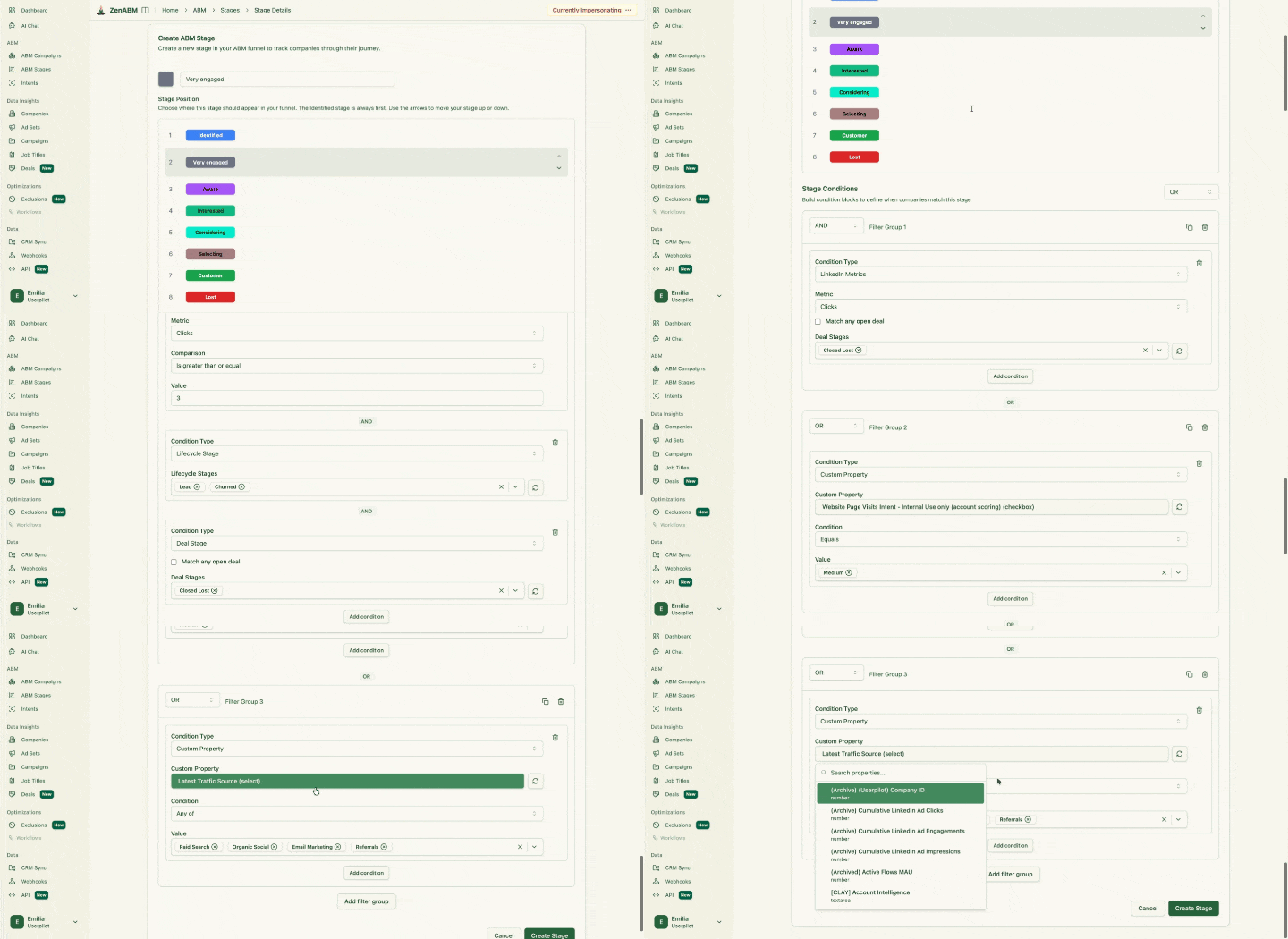
Each of these stages needs a different campaign, message, CTA, and sales motion.
If your ABM segmentation does not include a stage, you are treating warm accounts like cold accounts and burning money on the people who are closest to buying.
For a deeper walkthrough of how I move accounts between two of these stages on LinkedIn, see my post on moving accounts from Aware to Considering.
The next segmentation layer is intent, and not “intent” in the third-party data provider sense.
I mean it in the most useful sense for ABM: what did this account actually engage with on ZenABM’s LinkedIn ads, and what does that tell about what they care about right now?
Some intent themes that are run inside ZenABM as separate campaign clusters:
The use case is simple.
ZenABM tags the campaigns by intent theme and assigns intent to companies based on which ads they engaged with, so this is not manual work.
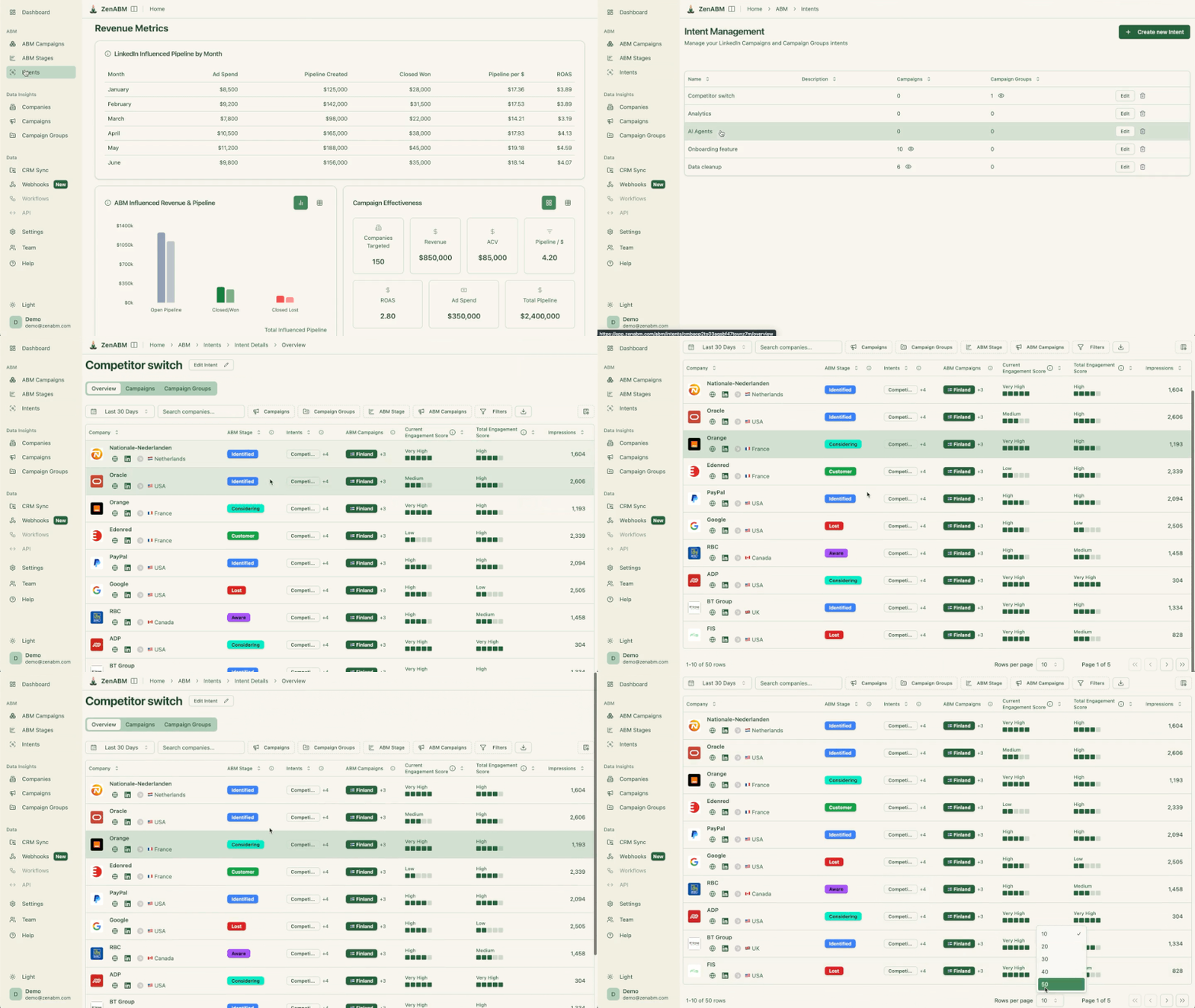
Philip Ilic put the foundation of this well when describing how he sets up demand creation accounts, starting from targeting beliefs and pains rather than job titles:
“Nail the ICP (not just job titles). VP of Marketing at a SaaS company’ isn’t an ICP. You need to dig deeper: What playbook are they running that’s failing? What pressure’s coming from leadership? What belief are they clinging to that are wrong? You’re not targeting people. You’re targeting beliefs.”
– Philip Ilic, on segmenting by belief, not just job title in his LinkedIn post
If I take that thinking into ABM segmentation, intent themes are the closest signal I have to a belief.
And you can build your own intent themes based on what you sell.
Even with strong account-level segmentation, ABM still needs persona-level relevance because the same account contains different jobs to be done depending on whether the CMO, the demand gen manager, or the RevOps lead is the one engaging.
Here’s a rough example of how ABM segmentation by persona can be done for ZenABM (you can take inspiration from it and mould it for your business):
Persona | Priorities | Message |
|---|---|---|
CMO and VP Marketing | Pipeline influence, board reporting, and efficiency. | Prove LinkedIn pipeline influence to your board. |
Demand Gen | Campaign performance, account engagement, and pipeline per dollar spent. | “See which campaigns create pipeline.” |
RevOps | CRM sync, clean properties, and workflow automation. | “Push LinkedIn engagement and stage into HubSpot or Salesforce. |
BDR and SDR Leaders | Account prioritization and intent-led outreach. | “Warm accounts, ranked by intent.” |
Sales Leadership | Account-level visibility and which deals are warming up. | |
Agencies | Client dashboards, proof of ROI, and reporting that wins renewals. | White-label ABM dashboards your clients will renew on. |
ZenABM shows audience and job-title engagement by campaign, so you can see which personas are actually engaging with which intent theme.

That feeds back into my targeting and creative.
If a campaign is supposed to hit RevOps and 80% of engagement is from demand gen, the targeting or the creative needs to change.
Pain-point segmentation is often more useful than industry segmentation because it tells me what message to show next.
Industry, on the other hand, tells very little about whether the account is actively shopping for something.
Here are some pain points ZenABM can segments by as an ABM tool and you can take inspiration to map them for your own business:
Each of these maps to a creative cluster, an intent theme, and a follow-up motion, and they cut across industry.
A series A SaaS demand gen lead and an enterprise RevOps director can sit in the same pain-point segment if they are both trying to prove LinkedIn ROI, even though they look completely different on paper.
Engagement score is the segmentation layer that tells me where momentum is.
Two scores must be tracked per account: total engagement and recent engagement.
Total tells you how familiar the account is with the brand, while recent tells me whether something is heating up right now.
The segments I use:
The actions are different for every bucket.
Spiking accounts trigger BDR follow-up.
Stalled accounts get a creative refresh, a new offer, or a different intent theme.
Highly engaged accounts move into consideration campaigns and stronger CTAs.
No-engagement accounts stay in the awareness rotation.
ZenABM scores both current and total engagement at the company level, which is the data I lean on to keep this segmentation honest.

Here is the simple matrix I use when planning a quarter.
The same account tier behaves very differently depending on stage and intent, and the matrix forces me to think about all of those dimensions at once instead of running the same playbook everywhere.
Segment | Definition | Campaign | CTA | Sales action |
|---|---|---|---|---|
Tier 1 + Identified | Strategic account, no ad exposure yet. | 1:1 awareness with named-account creative. | Account research, exec social, no outreach yet. | |
Tier 1 + Interested | Strategic account with 5+ engagements. | 1:1 consideration with case study and ROI ads. | Book a demo, download the benchmark report. | BDR personalized sequence, exec connection requests. |
Tier 1 + Selecting | Strategic account with an open opportunity. | 1:1 deal-acceleration ads to the buying committee. | Talk to customer, security or ROI page. | AE-led, multi-threaded, exec sponsor. |
Tier 2 + Aware | Strong-fit account with meaningful impressions. | 1:few thought leadership and POV content. | Read the guide, watch the webinar. | Light BDR research, no outreach. |
Tier 2 + Interested | Strong-fit account with clicks and engagement. | 1:few intent-themed campaigns and case studies. | Book a demo, start a trial. | BDR sequence on warm contacts only. |
Tier 3 + Aware | Broader ICP account with first impressions. | 1:many thought leader ads and educational content. | Subscribe, follow, free tool. | None unless self-serve trigger fires. |
Closed-Lost + Re-engaged | Previously lost account back in the engagement feed. | 1:few “what changed” campaigns and product update content. | Talk to the customer, see the roadmap. | AE re-engagement, owner of the original deal. |
The segments are illustrative, not prescriptive.
The point is that “Tier 1 account” is not a campaign assignment.
The combination of tier, stage, and intent is.
For more on tier-level segmentation specifically, see the tiered account segmentation guide.
Most of the ABM segmentation problems I see come down to a small set of repeatable mistakes.
If you only fix the ones below, your program will get sharper.
For a broader playbook of how I run all of this end-to-end, see my ultimate guide to running ABM on LinkedIn.
Tier 1, Tier 2, Tier 3 is a starting point, not a system.
The accounts closest to buying are rarely the ones you identified as “high value” in a quarterly planning doc. They are the ones that engaged with your attribution ads twice last week, went quiet, then clicked your competitor comparison ad yesterday.
That pattern does not show up in a static tier list.
The segmentation model that actually moves pipeline combines tier with stage, intent theme, persona engagement, and an engagement score that separates accounts that are spiking from accounts that have stalled.
Each of those layers changes the campaign, the CTA, and whether a BDR should reach out today or wait.
The practical problem is that maintaining this across LinkedIn, CRM, and your sales team manually falls apart by week three.
ZenABM handles the live side of it: company-level LinkedIn engagement, intent theme tagging by campaign, account scoring, stage progression, and a CRM sync that keeps sales looking at the same segmentation you are running.
Start with a 37-day free trial or book a demo to know more!
ABM segmentation is dividing target accounts into groups based on fit, value, stage, intent, persona, and engagement so each group gets the right campaign, message, budget, and sales motion. It is the foundation of any working ABM program because it decides where every dollar and every BDR hour goes.
Regular segmentation usually splits a market by firmographics like industry, company size, or region. ABM segmentation starts from a defined target account list and adds tier, ABM stage, intent, persona, and engagement on top. It is account-level, not market-level, and it updates as accounts move through the funnel.
Tier 1 is the smallest set of highest-value accounts, usually run as one-to-one or highly personalized one-to-few. Tier 2 is strong-fit accounts run as one-to-few, often grouped by industry or pain point. Tier 3 is broader ICP-fit accounts run as one-to-many. Tier tells you the value. The ABM stage tells you your readiness. Use both.
I use six stages: Identified, Aware, Interested, Considering, Selecting, and Closed Won or Closed Lost. Aware is triggered by enough ad impressions, Interested by clicks and engagements, Considering by stronger buying signals like a demo request or pricing-page visit, and Selecting by an open opportunity in the CRM. ZenABM updates these stages automatically based on LinkedIn ad data and CRM events.
ZenABM segments target accounts dynamically by ICP fit, account tier, company-level LinkedIn engagement, intent theme, account score, ABM stage, persona engagement, and CRM lifecycle. It pushes that data into HubSpot or Salesforce so marketing, sales, and RevOps all share the same segmentation. You can read the overview of what ZenABM does here or start a 37-day free trial at app.zenabm.com/signup.
