

©2026 ZenABM - All Rights Reserved.

Tracking LinkedIn ad contacts in CRM is a must for any ABM campaign.
You can do it with LinkedIn CAPI or Insight Tag.
CRMs like HubSpot also provide native pixels and integration to track LinkedIn ad contacts.
But these methods have limitations.
In this article, I’ll show you where these conventional methods fall short and how you can use ZenABM to track LinkedIn ad contacts more effectively.
Here’s why traditional methods for LinkedIn ad contact tracking fall short:
LinkedIn Conversions API (CAPI) connects to your backend to trace events, while the Insight tag drops a LinkedIn cookie to match each visitor to a member profile.
Both do a great job of tracking contacts, provided the viewer clicked the ad and filled the form in the same session.
Theoretically, the tag’s cookies might help track contacts that visited from LinkedIn ads, but in practice, they don’t (say thanks to privacy guidelines and cookies being phased out so actively).
Plus, if the form wasn’t ever filled, the contact remains completely anonymous, and if the viewer never clicked, forget knowing about them. This is a major flaw because people don’t click on LinkedIn – the CTR here is one of the lowest:

For instance, I saw a lot of ads for Relevance AI on LinkedIn. I follow the founder, too and yet never clicked on their ad. One day, when I finally sat down to try it, I searched them on Google and signed up.
Now, CRMs like HubSpot provide native conversion tracking but have the same issues as Insight tag or CAPI: no view-through attribution, and even if there’s a click but no form-fill, no contact would be registered.
Furthermore, even for CRMs like HubSpot, a form fill in the same session is required because cookies are unreliable:

Yes, there are IP matching tools (fancy name: website visitor deanonymization tools), but, well, they match IPs.
Most companies don’t even register their IPs, and most employees work remotely now. And yes, don’t forget shared wifi, VPNs, etc.
So, though these tools promise to reveal contacts at the account-level, they do it 42 times out of 100 at best:

Maybe you can look at one more anecdote to understand why I’d never like to pay for these IP matching tools:
“The accounts we were targeting simply wouldn’t show up in any website visits, even though we knew they landed on the landing pages for the ABM ads we created specifically for them.
How do we know? We’ve actually set up a separate no-index domain for our ABM ad campaigns to be sure 100% of the traffic landing there is our ‘target accounts’. And sadly, from the ~300 visitors to a certain page path on that website, in 90 days, Breeze Intelligence (based on Clearbit’s API) identified only 1 company… ourselves!”

-Emilia Korczynska, VP of Marketing, Userpilot
Plus, this method is also dependent on clicks. No click means no LinkedIn ad contact record.
While IP lookups, CRM scripts, the LinkedIn Insight Tag and Conversions API (CAPI) fail at tracking ad views and are not 100% accurate at tracking clicks either, even if they could do all this, they would still not be enough.
An expensive LinkedIn campaign needs a tool that can stitch together every interaction (ad impression, engagement, click) across all your LinkedIn ad campaigns and feed them into a dedicated engine that can:
Capture every ad impression, click, video view, reaction, comment or share, so you know which accounts were exposed and how they interacted.
Track which campaigns and creatives a contact from a company encountered, not just the one they clicked last.
Gauge intent signals by mapping engagement patterns (e.g., multiple views of a product demo, repeated clicks on pricing ads) to feature-level.
Attribute pipeline influence across the full journey—first touch, assist touches and last touch—rather than crediting only the final ad click.
Trigger real-time alerts or automated tasks for BDRs when an account’s cumulative engagement score crosses your custom threshold, ensuring outreach happens at the moment of peak interest.
By centralising all these data points in a purpose-built ABM tool rather than relying solely on session cookies or server-side pixels, you gain a panoramic view of your ad-influenced pipeline, sharper intent insights and fair, multi-touch attribution that fuels both marketing ROI and timely sales follow-up.
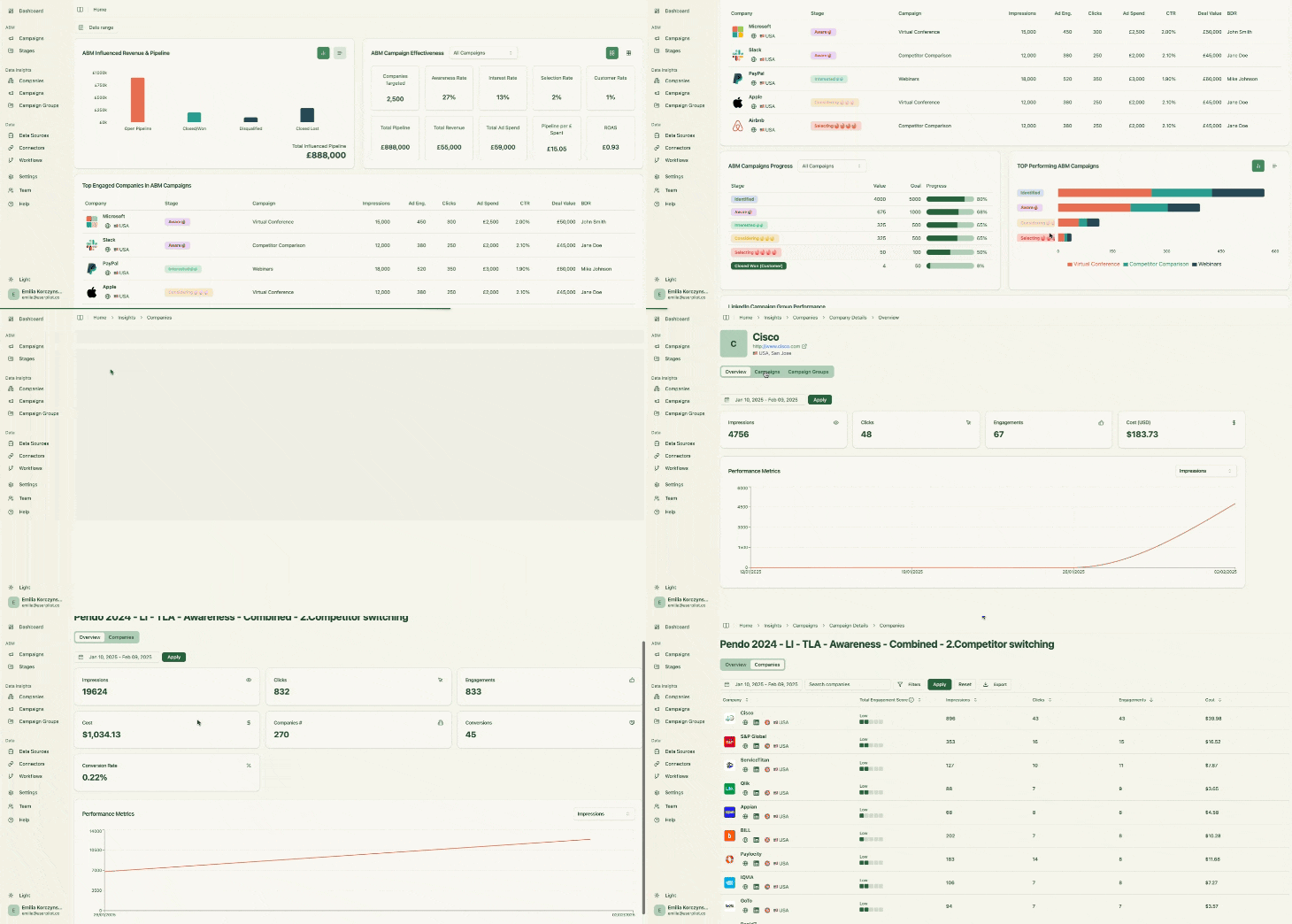
Here’s how ZenABM helps you track LinkedIn ad contacts in your CRM:

ZenABM captures all contacts at the company level that:
So it natively tracks view-through engagement from every account. For example, if a prospect’s company saw your LinkedIn post-ad 50 times, then later came inbound on its own, ZenABM would still credit those 50 impressions.
And yes, ZenABM extracts this data from LinkedIn’s official API – no reliance on cookies, IP matching or third-party data sources.
ZenABM’s CRM integration, the feature most relevant to our discussion here, is native, no-code and bi-directional:
ZenABM connects the dots: LinkedIn campaign impressions and engagement to deals in your CRM:

So you can finally say:
ZenABM pushes LinkedIn Ad engagement data to HubSpot as company properties:

ZenABM calculates a real-time “Current Engagement Score” based on impressions, clicks, and recency:
Then ZenABM assigns those accounts to your BDRs in HubSpot automatically:

Also, ZenABM helps you tag each campaign with buyer intent.
Then the tool groups engaged companies sharing a similar intent:

And the intent data is also pushed to the CRM:

So, your team puts efforts on the right accounts, at the right time and lures prospects with the right feature ;).
With ZenABM, you don’t have to build dashboards or reports on your own.
The tool offers plug-and-play ABM dashboards to calculate metrics like ROI, ROAS, etc, of your LinkedIn ads ABM campaigns:

In short, ZenABM helps you switch from click-through to view-through attribution model, while also providing a hub to do all the ABM Math!
ABM provides you with multiple pre-defined objects like ABM campaigns, campaign groups, and campaigns out of the box, so you don’t have to keep reorganising your data at different levels for different campaigns.
Also, ZenABM tracks each company’s ABM stage based on the engagement data collected and the rules you set:


Setting up the LinkedIn ads CRM integration using ZenABM to track LinkedIn ad contacts in your CRM is just a few steps:
1. Sign up for ZenABM using a company e-mail and verify that company e-mail.
2. Now, click on “Continue setup” and click the “Connect LinkedIn” button: 
3. Sign in to your LinkedIn account and complete the verification:

4. After this, you’ll be led back to ZenABM where you must choose the LinkedIn ad account you want to integrate: 
5. Similarly, click on the “Connect HubSpot” button, sign in to HubSpot, and choose the account:

6. Now, your LinkedIn ads to CRM integration is almost ready. Just choose the threshold number of impressions a company must have for the deal creation to be considered as influenced by your LinkedIn campaign. This step is necessary to ensure that companies with insufficient engagement are not pushed into your CRM.

Following all these steps, your LinkedIn ads HubSpot integration is set up, and you’ll see your accounts in CRM enriched with LinkedIn ad data:

ZenABM has three flexible plans:
All plans come with a free trial, and if you need to know more, you can book a demo here.
Relying on Insight Tag, CAPI, IP matching or CRM alone leaves gaps in your ABM tracking. ZenABM brings company-level impressions, engagement and intent data into your CRM (HubSpot and Salesforce) so you can attribute value across multiple touches and alert BDRs at the right time.
Ready to see the difference?
Try ZenABM today!
