

©2026 ZenABM - All Rights Reserved.

LinkedIn ad engagement analytics are just so insufficient if you are stuck with LinkedIn’s native solutions or the ones in your CRM.
So, we built ZenABM.
Let me explain more…
Native LinkedIn tools and CRMs are insufficient for tracking LinkedIn ads at the company level for each campaign. LinkedIn shows company data, but only aggregated at the account level. CRMs like HubSpot, when connected to a LinkedIn ads account, show campaign-level data, but not by company.
ZenABM fixes this:
The native solutions are still not enough, and here’s why:
If you are running ABM on LinkedIn, all you need to ace it is: The ability to see which companies are engaging (not just clicking) with which of your ads.
Before 2024, LinkedIn had no way to show you company-level impressions and engagement, but then they rolled up the ‘Companies Tab’ in LinkedIn campaign manager:

You can see quite a lot here: paid clicks, paid impressions, paid engagements, paid leads, organic engagements, organic impressions, and engagement level.
Good? Nope, sorry, it is not
It still misses the mark.
The tab shows company-level impressions and engagements, so you get past the limited click-through approach, yet the data is aggregated to your ad account.
So you can’t see which ads the company interacted with.
Most ABM pros run multiple ABM campaigns at a time. Each of those ABM campaigns has many campaign groups within, and each campaign group further has many ad campaigns.
All these different ad campaigns, campaign groups, and ABM campaigns usually differ from each other on the basis of:
Take this ABM campaign structure for example, which was used by Userpilot:

Within this context, engagement analytics aggregated to the whole ad account hardly help and knowing company-level impressions, clicks, and engagements for each ad campaign, campaign group, and ABM campaign becomes necessary to:
CRMs like HubSpot can be connected to your LinkedIn ads account. For instance, the LinkedIn ads HubSpot integration lets you sync ad engagement data to HubSpot that you can see in the HubSpot ads tool:

Now, here, I’d say, it’s even worse than LinkedIn campaign manager.
Here, you get a campaign-level breakdown, including impressions, clicks, etc., but a company-level breakdown is just absent.
Bottom Line: LinkedIn campaign manager won’t show you company-level metrics for each campaign, but for the whole ad account. CRMs like HubSpot will show campaign-level metrics, but not the companies. A tool that shows company-level LinkedIn engagement analytics per campaign/campaign group/ABM campaign is what you need.
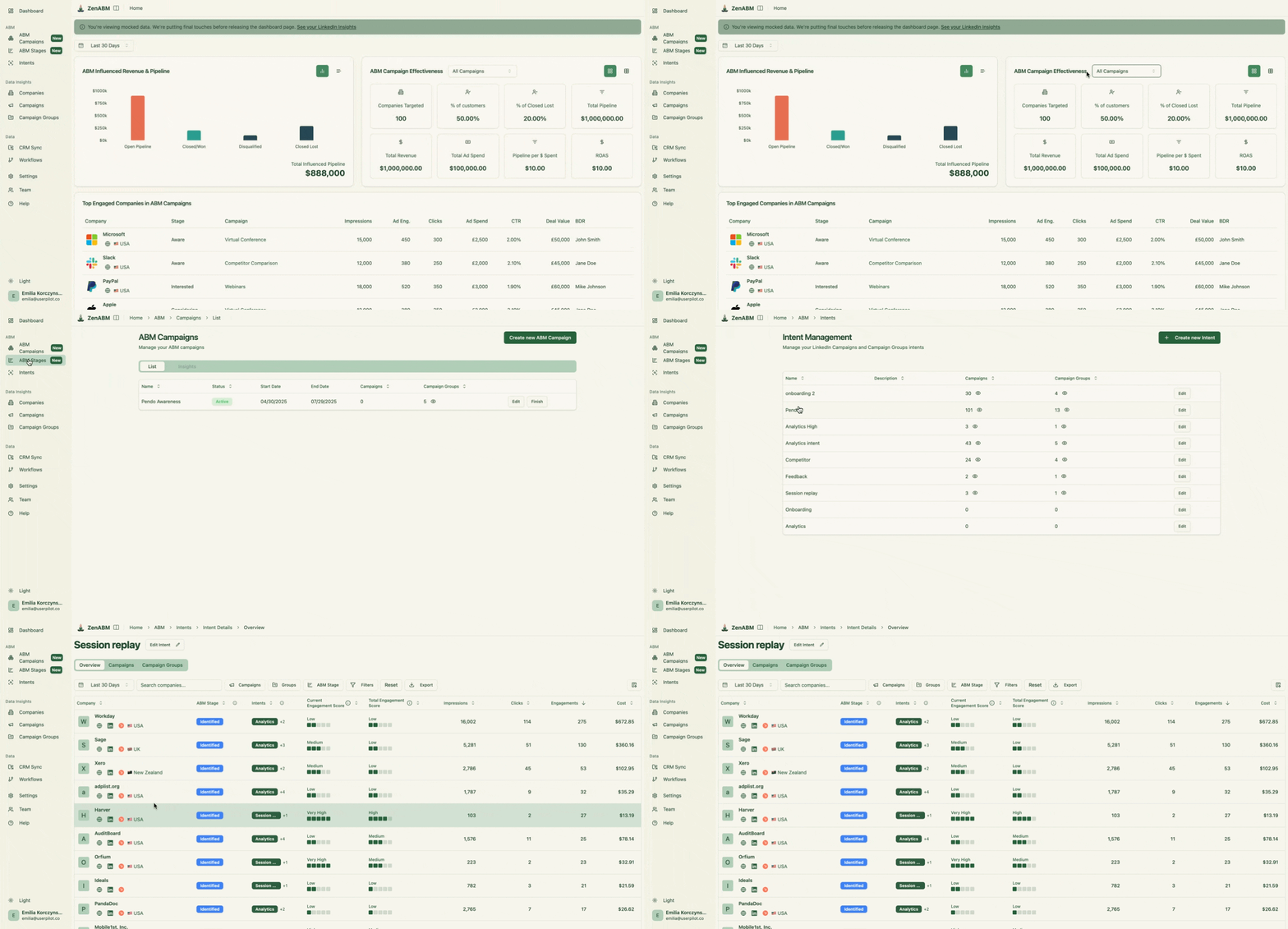
Here’s how ZenABM helps with LinkedIn ads engagement analytics:
ZenABM provides you with a company-level breakdown of ad impressions, engagements, clicks, CTR, and spend for each campaign and campaign group:


The tool connects to your CRM (HubSpot and Salesforce are available) to match the companies engaging with your ads to the ones in your CRM deals or opportunities. From there, each company’s deal value is extracted to tie ad impact to the pipeline and revenue.
Also, the tool will calculate these LinkedIn ad engagement and performance metrics for you:
Most businesses design their campaigns and campaign groups based on different features/qualities of their product/service, which is the ‘intent’.
If you do the same, ZenABM will help you tag each campaign/campaign group with an intent, and then it will group your engaged companies based on intent so your BDRs know what to talk about during the outreach:

ZenABM shows you each company’s ABM stage based on its interaction with all your campaigns and CRM data:
And you can set the thresholds for each stage on your own:

ZenABM calculates a real-time ‘Current Engagement Score’ based on impressions, clicks, and recency, and also a ‘total engagement score’ which is a historic aggregate:

We just saw what all LinkedIn ad engagement analytics are tracked by ZenABM.
All these metrics, like clicks, impressions, engagement and even intent, are also pushed to your CRM by ZenABM as company properties:


Plus, ZenABM also assign BDRs to target accounts when they cross an engagement threshold to reach the interested ABM stage and pushes that information to your CRM:

If you’re relying only on LinkedIn Campaign Manager or your CRM for ad engagement analytics, you’re flying blind. The former aggregates the data and doesn’t provide analytics per campaign, while the latter misses company-level insights entirely. But ABM success depends on knowing exactly which companies engaged with which ads, and what that means for outreach, scoring, and pipeline.
ZenABM solves this with campaign-level, company-specific engagement tracking, real-time lead scoring, intent tagging, and CRM sync.
