

©2026 ZenABM - All Rights Reserved.

Most teams call their account-based program orchestrated the moment they have LinkedIn ads running alongside a target account list in HubSpot, but that is not orchestration; it is two channels operating in the same building with the lights off.
ABM orchestration is the operational layer that connects the target account list, the ad campaigns, the sales sequences, the CRM stages, and the reporting into a single motion.
When a finance VP at a target account engages with a thought leader ad, the system needs to know about it inside an hour, because the BDR working that account needs to see it, the next ad served needs to reflect that the account is now warm, and the Notion board tracking ad creative needs to show what was served.
This guide walks through the exact stack and process that runs ABM orchestration: how to build the target account list with Prospeo, Leadmagic, Icypeas, and Claude Code, how to orchestrate ad creatives inside Notion, how ZenABM moves accounts between stages based on first-party intent signals, how to trigger follow-up via Smartlead, Instantly, and HeyReach, and how to report on the whole motion at the account level.
Here’s a quick overview for the ones short on time:

ABM orchestration is the coordination of every paid touch, sales touch, content touch, and CRM update against a fixed target account list, done in a way that respects what each account has already seen and how it has engaged. It is not a platform; it is a process held together by a stack.
The reason most ABM programs feel disconnected is that the stages live in different tools.
Marketing tracks engaged in Campaign Manager, sales tracks contacted in HubSpot, and the BDR tracks replied in Smartlead, so because none of these systems talks to each other natively, the customer experiences the same first-touch message four times across four channels.
Maximilian Herczeg (ex-LinkedIn) made this point well in his LinkedIn post:
“Traditionally, marketing generates leads and sales reaches out to close them. Simple, right? Not anymore. This old-school, linear approach is outdated. Today, marketing and sales must work together continuously, not in isolated steps. Companies need sophisticated strategies that clearly define what a ‘lead’ is. When do we engage? When do we nurture with content? When does social selling come into play?”
The following are the high-level layers of ABM orchestration:
If any of these four layers is missing, the result is not orchestration but parallel campaigns, and the job of this article is to show how to wire all four together.
Let’s look at the orchestration steps in the following sections.

Every ABM orchestration motion starts and ends with the list, because if the list is wrong, every dollar after it is wasted.
Programs spending $30k a month on LinkedIn ads against a list of 4,000 accounts where the actual ICP was closer to 600 show the pattern clearly: the CTRs were fine, but the pipeline was zero.
The combination that works is straightforward and costs almost nothing compared to a full ABM platform license:

Claude Code matters here because the cleaning and scoring logic changes every month as the signals that predict pipeline become clearer, and a static SQL query in HubSpot cannot keep up, while a repo of Claude Code scripts can.
The same pattern is covered in more detail in the Claude Code for ABM guide.
A flat firmographic list is not enough.
Philip Ilic (LinkedIn ads expert) ran an experiment that captured this neatly in his LinkedIn post:
“This month I started targeting a list plus intent with my LinkedIn ads. This dropped my cost per scheduled sales call from £333 to £184. If you have a large enough TAM, then try focusing your LinkedIn ads budget layered in with an intent. My intent was recently funded B2B SaaS. Trying some lists with companies with open job roles related to demand gen. Only works with large enough TAMs where the intent layer narrows things down meaningfully.”

What works on top of firmographics: hiring signals, technographic signals (which competitor stack they run), funding events, and first-party engagement data from prior LinkedIn ad campaigns, with that last source being the cheapest form of intent and the one most teams ignore.
Once the list is locked, the next bottleneck is creative, because ABM orchestration requires roughly 3 to 6 ad variants per stage per ICP segment.
Running three segments through three stages puts 27 to 54 ad assets in production at any given time, which spreadsheets cannot hold, but Notion can:

A single Notion database runs the asset layer, with these fields per ad asset: ICP segment, stage (aware, considering, decision), format (TLA, single image, video, document, conversation), copy variant, image asset, hook, status, performance metrics pulled from ZenABM, and the LinkedIn URN once it goes live.
One view filters by status to show what creatives are in production, and another filters by stage to surface coverage gaps.
The benefit is not the database itself but that the team can answer “do we have a video TLA for VPs of Demand Gen at considering stage?” in five seconds without opening Campaign Manager, which is what orchestration looks like in practice.
Each stage gets a different creative job, and the mapping stays simple:
Stage | Creative Job | Best Format |
|---|---|---|
Aware | Pattern interrupt, build a retargeting audience | Video TLA, single image TLA |
Considering | Educate on category and approach | Document ad, long-form TLA, carousel |
Decision | Specific proof, head-to-head comparisons | Customer story TLA, conversation ad |
The ZenABM benchmark data backs the format choices: TLAs run a 2.68% median CTR and a $2.29 median CPC, roughly 6x more efficient than single-image ads at $13.23 CPC, which is why TLAs sit at the top of every stage.
For the deeper format-by-format data, the LinkedIn ABM performance benchmarks report 2026 has the full breakdown.

The single hardest part of ABM orchestration is stage management, since deciding when an account moves from aware to considering, and when it qualifies for a sales touch, is rarely clean.
Most teams either guess through manual tagging in HubSpot or buy a $60k platform that runs a black-box score, and both are bad answers.
Almost every B2B buyer in 2026 is on LinkedIn, and the platform itself sees who scrolls past a video, who clicks a TLA, and who comments on a conversation ad.
That data exists at the company level inside the LinkedIn Ads API but stays invisible inside Campaign Manager, which is exactly what ZenABM pulls out and turns into usable stage management through its company-level impression and click tracking.


What matters in practice:
For the longer playbook on stage progression, the exact engagement thresholds and the retargeting audiences built at each step are written up on how to move accounts from aware to considering ABM stage.


The orchestration only works if the BDR can see what marketing is doing, so ZenABM writes ad engagement counts and stage progression directly into HubSpot company properties.
The BDR opens the company record and sees 47 ad impressions, 4 ad clicks, 2 contacts engaged, and a current stage of considering, which removes the need to ask marketing whether the account is warm because the data already sits in the pipeline view.
This is also where the ABM revenue attribution model comes from, because once stage data and ad engagement data are joined to closed-won deals in the CRM, the CFO’s question of which ABM campaigns drove pipeline can finally be answered.
An account that just clicked a TLA from a director-level title at a target account is the warmest a cold account ever gets, so if the BDR finds out three weeks later through a manual report, the moment is gone.
Orchestrated follow-up is what closes that gap.

The orchestration pattern that works across most clients runs like this:


Generic “I noticed your team” emails to engaged accounts get the same 1 to 2% reply rate as cold outreach, because the whole point of orchestration is that the email can say: “Saw you watched our video on bow-tie funnels. The frame in there about expansion vs. acquisition was actually the inverse of what most teams do, and I think it applies to your team because of X.”
That requires knowing what the account engaged with, which only the orchestration loop can provide.
ZenABM can help here.
It tracks company-level engagement for each ad creative and also lets you tag different camapigns or creatives with different theme-based intents.
So, your team is able to make out exactly what the prospect is interested in.
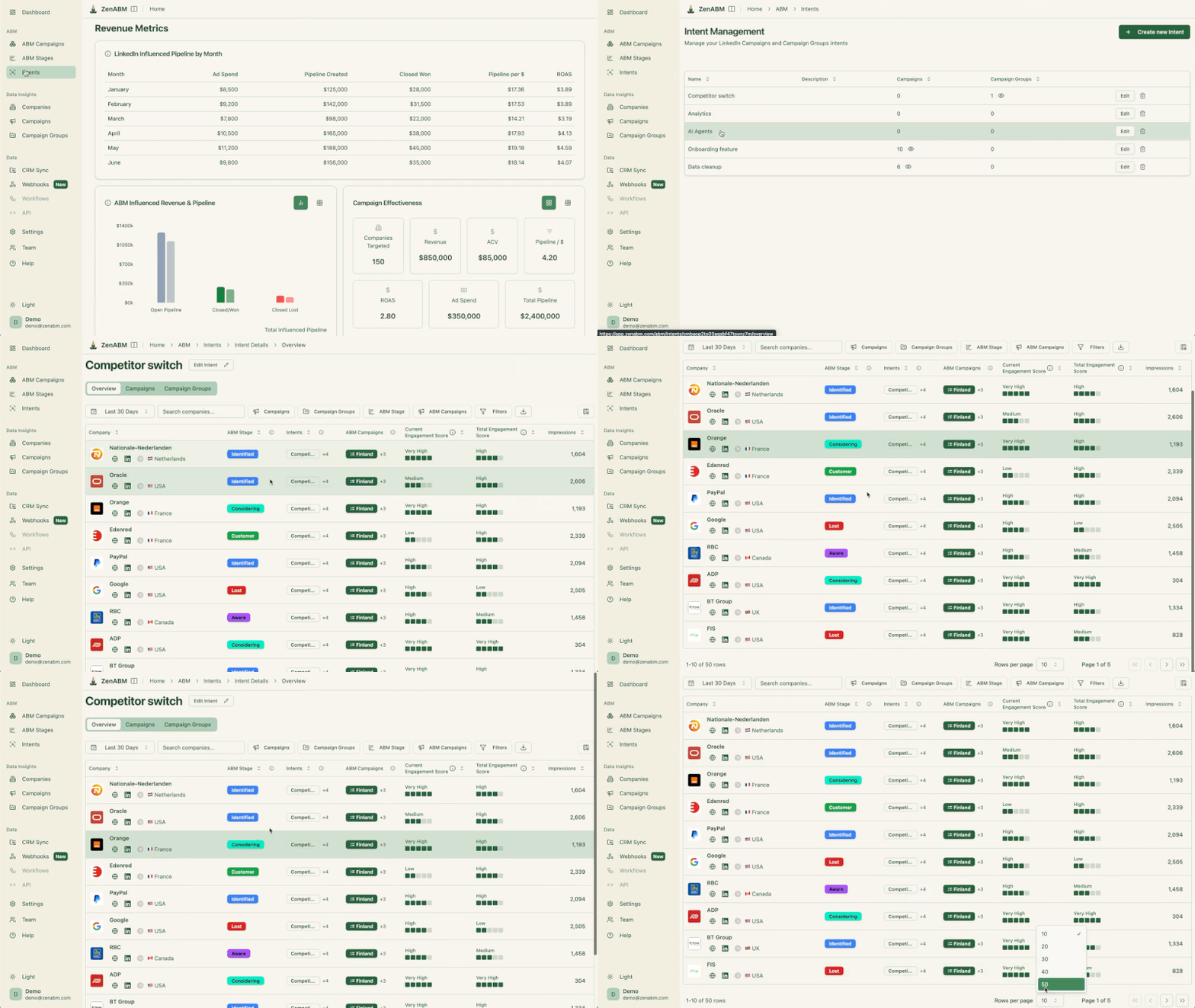
Plus, these qualitative intent details are also pushed to the CRM by ZenABM.

On top of that, ZenABM also gives a breakdown of which job titles are engaging with your campaigns to give you an even fuller picture of buyer intent.

If the program cannot report on which ABM campaigns moved which accounts, the rest of the orchestration is theatre, so reporting at the orchestration level needs to answer five questions per campaign, per account.
The five questions ABM reporting must answer:
This is the loop ZenABM was built for, because the platform pulls company-level data from the LinkedIn API, joins it to CRM data, and produces a per-campaign report that shows reach, engagement, stage movement, and pipeline impact at the account level, which is the only way to answer the CFO version of “did ABM work” without a six-figure platform.


Also, you must track the progress in a per-campaign view, and not just a per-account view
One common mistake is reporting on accounts (this account is warm) but never on campaigns (this campaign moved 14 accounts from aware to considering for a CPA of $812), when per-campaign reporting is what makes it possible to cut budget from underperforming creative and double down on what is actually moving accounts. Without it, the orchestration is unmanageable.
ZenABM gives you that.
It shows each and every campaign and channel that has made a difference to the deal:

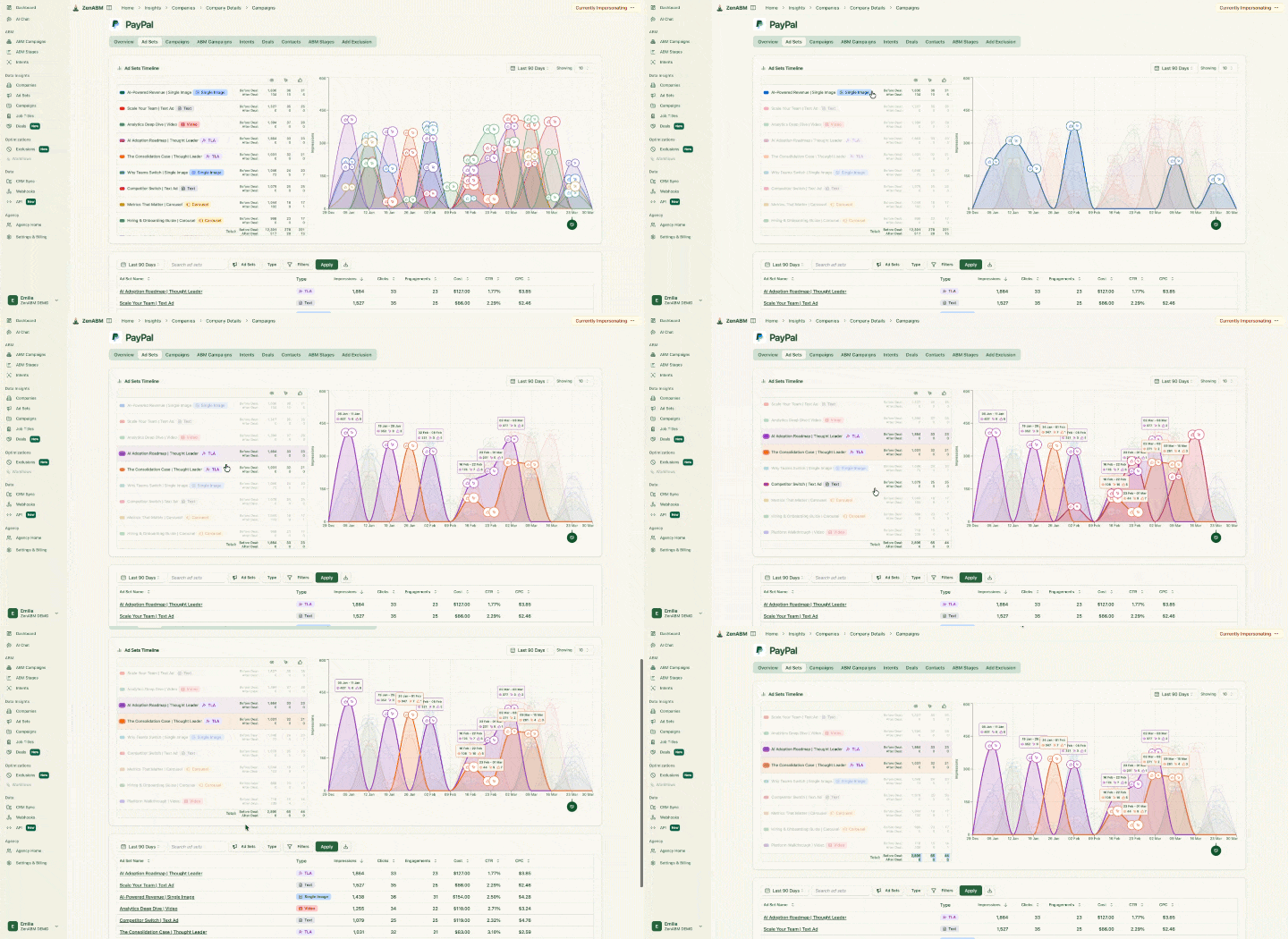
And it also gives a campaign-by-campaign performance breakdown.

Most ABM orchestration programs do not fail because of bad creative or poor targeting; they fail because the operating model is broken in one of a few specific ways.
A campaign has a start and end date; ABM orchestration does not. Accounts are continuously moving between stages, and the system needs to react to that movement on the same day rather than at the end of the quarter, because if the program runs as a 6-week sprint and then resets, the data layer never accumulates.
Philip Ilic has flagged this one repeatedly: LAN turns on by default and quietly eats budget while serving ads on third-party sites with zero ABM relevance, so audit it on day one and turn it off for any account-targeted campaign.
Not pulling company-level engagement data out of LinkedIn means scheduling, not orchestrating, because the signal layer is what separates “we ran ads and emails to this account” from “we ran ads and the email referenced the exact content they engaged with.
For more on the signal-based pattern, see intent signals for ABM on LinkedIn.
Marketing calls the account engaged while sales calls it MQL, and the handoff dies on that gap, because orchestration only works when both teams agree on what aware, considering, and decision mean, and the system reflects that single definition in the CRM.
Most ABM programs fail not because of bad creative but because the four layers never connect.
The list lives in a spreadsheet, the ads run in Campaign Manager, the sequences fire in Smartlead, and the CRM updates happen manually on Fridays.
Nothing talks to anything else, so every channel keeps treating the account as cold.
What this guide laid out is the opposite of that.
You start with a firmographic list layered with intent signals, run your ad assets through a Notion database so coverage gaps are visible in five seconds, use ZenABM to pull company-level engagement out of the LinkedIn API and write stage data directly into HubSpot, trigger personalized outreach the moment an account moves stage, and report per campaign so you can cut what is not moving accounts and double down on what is.
The stack costs a fraction of an enterprise ABM platform and produces the same signal loop, because the orchestration is not in the software. It is in the process that ties the layers together.
You can start using ZenABM for free now (37-day free trial) or book a demo to know more!
ABM orchestration is the process of coordinating ad campaigns, sales outreach, content, and CRM updates across a fixed list of target accounts so each account experiences a connected journey. It is the operational layer that ties marketing channels and sales motions together, driven by first-party engagement signals at the company level.
No. A composable stack works for most mid-market and SMB programs: Prospeo and Leadmagic for list building, Notion for asset orchestration, ZenABM for signal layer and stage management, Smartlead and HeyReach for outreach. Enterprise platforms make sense when you have 500+ accounts in active orchestration and need built-in routing.
A LinkedIn ABM campaign is a single channel motion against a list. ABM orchestration coordinates that LinkedIn campaign with sales sequences, CRM stage updates, and follow-up emails so the same account experiences a connected message across channels. The difference is the signal loop: orchestration uses engagement on one channel to inform the next touch on another.
The cleanest signals are first-party LinkedIn ad engagement (impressions, clicks, video views by company), website visits, and email replies. Move from aware to considering when a company has at least one ad click or 2+ contacts engaged. Move to decision when there is multi-contact engagement at the decision-maker level, plus a website visit or sequence reply.
Per-campaign, at the account level. The five questions to answer are: which target accounts saw the campaign, which engaged, which moved stage as a result, which converted to pipeline, and which closed. ZenABM joins LinkedIn engagement data to CRM revenue, which is the only way to attribute revenue back to specific ABM campaigns without a six-figure platform.
