

©2026 ZenABM - All Rights Reserved.

Looking for a LinkedIn Ad Library API you can query?
It does exist.
It is an official, documented, gated product, and once you have the endpoint and the correct version header, it will return structured competitor ad data that the public web tool cannot aggregate on its own.
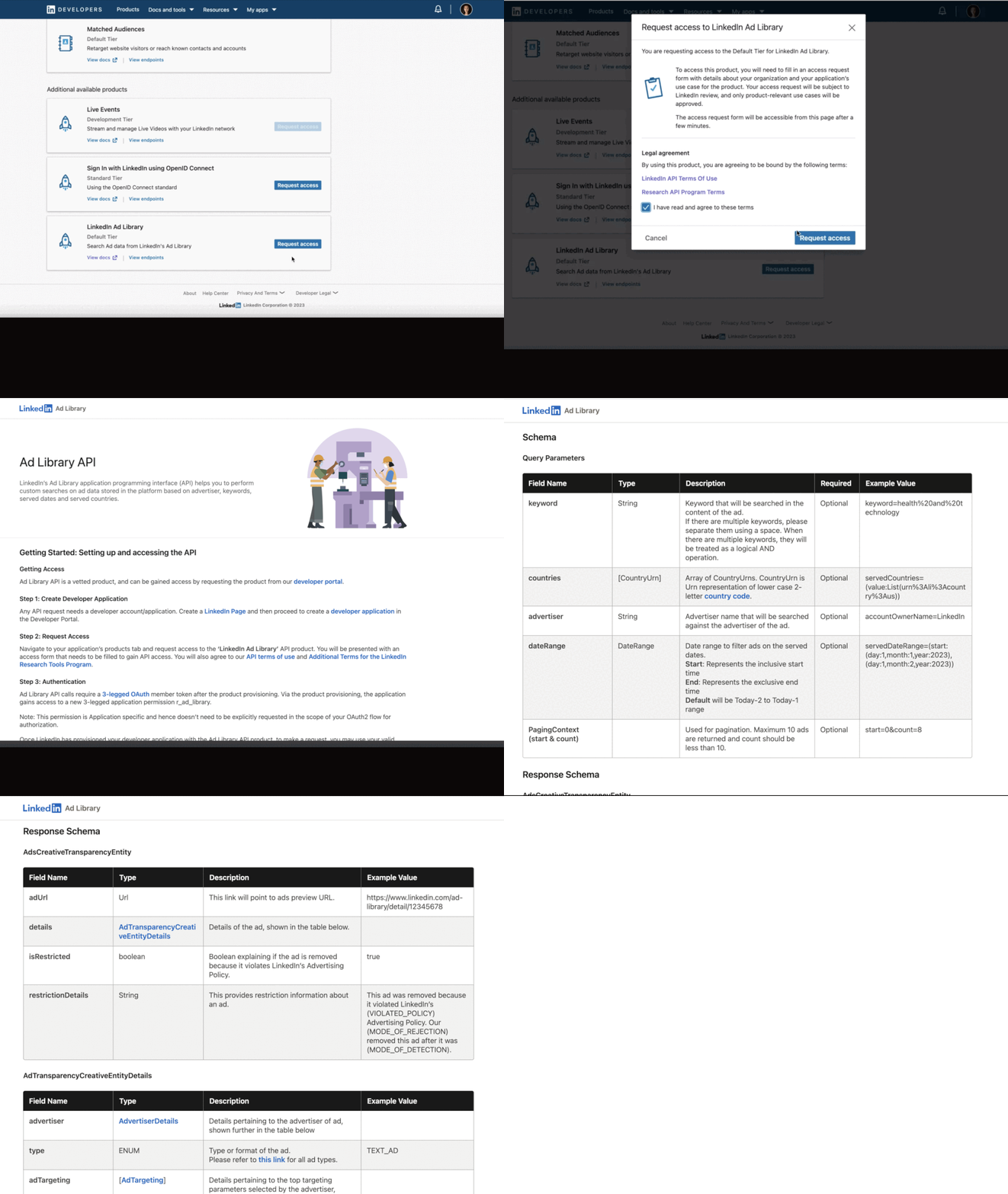
In this article, I’ll give you the technical breakdown I wanted when I started: the current state of the API, the exact endpoint and parameters, what data it actually returns, how to use it for competitor research at scale, and then the manual method for teams that want the intel without the setup.
Short on time?
Here is a quick rundown:
GET https://api.linkedin.com/rest/adLibrary, a Rest.li finder you call with q=criteria plus filters like keyword and advertiser, authenticated with an OAuth bearer token and a monthly Linkedin-Version header.The first thing to get straight is that there are two different LinkedIn products people call “the API.”
The Marketing/Advertising API is the owned-account tool: it returns campaigns, ad sets, creatives, and reporting for accounts you manage, and it has no visibility into any other advertiser.

The Ad Library API is a distinct product designed specifically for querying the public Ad Library programmatically, which means competitor data is in scope.
It is also gated, and that is by design under the EU Digital Services Act transparency regime that produced the library in the first place.
You do not get an open key the way Meta hands one out.
The access flow is four steps:

Here is the part nobody warns you about, and it is the real current state of this API in 2026.
LinkedIn’s Help centre links to an Ad Library API documentation page that returns a 404 when you open it, and developers using LinkedIn’s own official Python client get a 404 back from the /rest/adLibrary endpoint while the identical request sent as a raw cURL succeeds.
That mismatch is documented in an open issue on the linkedin-developers Python client repo.

The takeaway: the API works, but treat the Developer Portal product request as the source of truth, build your calls by hand rather than trusting a wrapper, and do not waste an afternoon chasing a documentation URL that may not resolve.
The endpoint is a single Rest.li finder.
Once your app has the product and a valid token, the call looks like this:
curl -s -G "https://api.linkedin.com/rest/adLibrary" \
  -d "q=criteria" \
  -d "keyword=attribution" \
  -d "advertiser=acme-corp" \
  -H "Authorization: Bearer $ACCESS_TOKEN" \
  -H "X-RestLi-Protocol-Version: 2.0.0" \
  -H "Linkedin-Version: 202408"
Three things in that request are non-negotiable and are exactly where most failed calls go wrong.
The q=criteria tells Rest.li which finder to run, the X-RestLi-Protocol-Version: 2.0.0 header is required, and the Linkedin-Version header is a monthly value in YYYYMM format.
LinkedIn publishes a new marketing version every month and supports each for about a year, so use a current one rather than copying an old example (the developer thread above used 202408); the rule is documented on LinkedIn’s API versioning page.

Drop the version header, and you get an error, not data.
The finder accepts the same filters the web tool exposes, so beyond keyword and advertiser, you can narrow by country, date range, and the disclosed payer.
The values you get back per ad are where the API earns its keep:
Returned field | What you do with it |
|---|---|
Ad creative and preview | The actual copy, image, or video, so you can read a competitor’s messaging without screenshotting the UI ad by ad. |
Advertiser and payer | The Page running the ad and the legal entity that paid, which separates a brand from the agency or parent funding it. |
Ad format | Single image, video, document, or thought leader, so you can quantify a rival’s format mix instead of eyeballing it. |
First and latest impression dates | How long a creative has been live, a proxy for what is working well enough to keep running. |
Restricted-ad status | Whether the ad falls under a restricted category, useful context when you benchmark regulated verticals. |
EU impression ranges and targeting | For EU served ads, the estimated impressions by country and the targeting parameters the advertiser used. This is the gold. |
Reading those fields out of structured JSON instead of clicking through the web UI is the whole reason to bother with the API.
One competitor is a manual job either way.
Forty competitors across five markets is a job only the API can do without burning a week.

The single most valuable thing in the entire library, web or API, is the EU transparency data, and it exists because of the Digital Services Act.
For any ad served to people in the EEA, LinkedIn discloses a depth of targeting detail that is normally invisible about a competitor.
Per LinkedIn’s own documentation, the library exposes twelve categories of targeting parameters: language, job, education, company, location, audience, age, gender, demographic, member interests and traits, predictive audience, and audience expansion.
For each one it tells you whether the advertiser used inclusion targeting, exclusion targeting, or both, and it reports estimated total impressions with a breakdown by country, rounded to the nearest percent (anything under one percent shows as “<1%”).
Sit with what that means for competitor research.
If a rival runs any campaign in the EU, you can often see roughly who they targeted, by job and seniority and company, whether they excluded anyone, and roughly how big the campaign was.
The API returns this in structured form, so you can pull it for a whole competitive set and build a targeting matrix instead of transcribing it by hand.
That is intelligence that used to require a leak.
The limits matter just as much because research built on data that is not there is worse than no research.
The Ad Library, through the API or the UI, will never give you these:
Treat the API as a window into a competitor’s public creative and positioning, not a performance dashboard.
It shows what they are saying, never how well it is working.
The manual UI is fine for a periodic look at one rival.
The reason to stand up the API is automation across many advertisers, and there are three plays that only the programmatic route makes practical.
Pull every active creative for your competitive set in one job, then group them by message angle (cost, speed, security, social proof) and by format.
When you do this for fifteen competitors at once, the pattern in the category jumps out: the angle everyone is crowding into, and the one nobody is running. That gap is usually where the next winning ad lives.
For every EU-served ad, capture the twelve targeting categories and roll them into one table.
You end up with a map of which competitor chases which job function, seniority, and industry, and where they exclude. No amount of manual clicking gets you that view cleanly.
Re-run the pull on a schedule and diff it against the last one.
A competitor that just shipped six new creatives is making a bet this quarter; a Page sitting on two stale ads is coasting.
The first-and-latest impression dates make the diff trivial.
If you do not want to write the plumbing, you can point an AI agent at the API and let it do the aggregation.
This is exactly the kind of job a Claude Code workflow handles well, and the prompt is the whole interface:
Using the LinkedIn Ad Library API, pull every active creative for these five competitor Pages. Group the creatives by message angle and by ad format, and for any EU served ads list the disclosed targeting parameters. Flag any advertiser that launched more than three new creatives in the last 30 days, and write a one paragraph read on the positioning gap nobody in the set is running.
That turns a week of manual library clicking into a single run you can repeat every Monday.
There is a fourth thing people mean by “LinkedIn ads library API,” and it is the riskiest: third-party scrapers that index LinkedIn creatives and expose them through their own unofficial API, often adding the history the native library lacks.
They are not LinkedIn APIs.
Scraping LinkedIn can run against LinkedIn’s Terms of Service, and responsibility for how any tool sources its data sits with the buyer, not the vendor.
For most marketers the official Ad Library API, the manual UI, or the EU transparency layer covers the job without that exposure, so I would exhaust those before touching a scraper.

If you do not need bulk data and you do not want to wait on an access review, the web tool at linkedin.com/ad-library does most of the job for free, with no login.
Here is the exact sequence I run, and it takes about thirty minutes per competitor.


That last step, the gap memo, is the one most teams skip and the one that matters most.
The goal is never to copy. Gabriel Ehrlich, founder at Remotion, frames the creative test that exposes the real gaps well in his LinkedIn post:
“Here’s a little formula I use that you can steal: Relevance, is this asset built for this audience, right now? Uniqueness, is it a fresh take or just another Ultimate Guide? Timeliness, could this have run 3 years ago, or is it on fire today? Give your content an honest review and see how it stacks up.” Gabriel Ehrlich, Founder, Remotion
Run a competitor’s whole ad set through that lens, and the “another Ultimate Guide” angles are exactly the ones to avoid cloning.
A rival’s ad worked inside their brand, their offer, and their funnel, so the value is in mining it for direction, not a script to copy line for line.
Tim Davidson, founder of B2B Rizz, put the same trap plainly in his post:
“All the playbooks and proven frameworks you see on LinkedIn are similar to your Grandma’s homemade cookies. You can steal the handwritten recipe, follow it to a tee, but they fall apart in real life. The real results come from the tiny tweaks, the pivots, the small changes you make when the plan stops working.” Tim Davidson, Founder, B2B Rizz

Competitor research is only half the work, and it is the easier half.
The Ad Library, even with the EU layer and the API, only ever looks outward.
It cannot show a single thing about your own performance, and it certainly cannot tell you which companies engaged with your ads.
You can run a perfect gap analysis, ship a smart new angle, and still have no idea whether the right accounts saw it, clicked it, or moved toward a deal.
Here is how the three surfaces actually compare:
What you want to know | Ad Library UI | Ad Library API | Your own data (ZenABM) |
|---|---|---|---|
Competitor creative and angles | Yes | Yes, at scale | No |
EU targeting parameters | Yes, manual | Yes, structured | No |
Your ad spend and efficiency | No | No | Yes |
Which companies engaged your ads | No | No | Yes |
Engagement tied to CRM pipeline | No | No | Yes |
That right-hand column is where your first-party data lives, and there are two real paths to it.
The first is the official LinkedIn Marketing API, where a private app authenticates and pulls campaigns, ad sets, creatives, and reporting for the accounts you manage.
The second, for teams that want to skip the engineering, is an MCP server like ZenABM that already sits on top of that API and joins company-level LinkedIn ad engagement to the CRM.
It pulls the data directly from the LinkedIn API as first-party intent signals, not estimated panel data, so the numbers reflect what LinkedIn itself recorded.


Two metrics show up in that view that are invisible in any Ad Library or its API: eCTR, the effective click-through rate to your landing page, and eCPC, the effective cost per landing page click.
Those measure real intent, not vanity engagement, and they belong to your ads. Knowing a competitor runs a security angle is interesting.
Knowing that twelve target accounts engaged your security ad last week and three just entered an open deal is what actually drives the next budget call.
ZenABM’s MCP server exposes 60+ tools across companies, campaigns, ad sets, creatives, deals, and intent, so the join between ad engagement and pipeline is built in rather than rebuilt by hand each time.

The LinkedIn Ad Library API is real, it is official, and it is the right tool the moment your competitor research outgrows manual clicking: create the developer app, request the product, send the call with the version header, and you get structured creative, format, date, and EU targeting data across any advertiser you choose.
The rough edges are real too, the 404 docs and the finicky client, so build the calls by hand and lean on the Developer Portal, not the documentation links.
For a periodic look at one rival, the free web UI and the thirty-minute walkthrough above still do the job. Whichever route you take, remember the one thing neither the UI nor the API can ever answer: whether your own target accounts saw the ad you shipped against that gap, and whether they moved toward a deal.
That answer comes from your first-party data, and it is the half that decides the budget.
For the inward half, ZenABM connects LinkedIn Ads data to the CRM and surfaces account-level engagement, eCTR, eCPC, and pipeline attribution in one place.
The 37 day free trial is enough time to run a full audit cycle and see which accounts are actually moving.
Yes. LinkedIn has an official Ad Library API, separate from its Marketing/Advertising API, built specifically for querying other advertisers’ publicly disclosed ads. You access it by creating a developer application, opening the Products tab in the LinkedIn Developer Portal, and requesting the “Ad Library API” product, which is reviewed before approval. It is not an open, unauthenticated endpoint like Meta’s ads_archive, so you authenticate with an OAuth bearer token. The Marketing/Advertising API is a different product that only returns data for accounts you manage.
The endpoint is GET https://api.linkedin.com/rest/adLibrary, called as a Rest.li finder with q=criteria and filters such as keyword and advertiser. Every request needs three headers: Authorization: Bearer with your token, X-RestLi-Protocol-Version: 2.0.0, and a monthly Linkedin-Version header in YYYYMM format. Omitting the version header returns an error, and note that LinkedIn’s own Python client has a reported bug where the call 404s even though the same request works as a raw cURL.
Per ad, it returns the creative and preview, the advertiser and payer, the ad format, the first and latest impression dates, and restricted-ad status. For ads served in the EU, it adds the transparency layer required by the Digital Services Act: estimated impressions broken down by country and twelve categories of targeting parameters (job, seniority, company, location, and more), each flagged as inclusion or exclusion. It does not return spend, clicks, or engagement metrics on any ad.
Yes. The public Ad Library at linkedin.com/ad-library is free and needs no login or ad account, and you can search by advertiser, keyword, payer, country, and date range directly in the browser. The official Ad Library API is also free to use, but it requires a developer application and LinkedIn’s approval of the Ad Library API product, so it is free in cost but gated in access.
Search a competitor, pull every active creative, then tag each one by message angle, format, and the persona its copy speaks to. Mine the EU transparency data where available, run keyword searches across advertisers to find everyone bidding for the same positioning, and write a one-page gap memo. Turn the gaps into ad hypotheses rather than copies. For many competitors at once, use the Ad Library API to pull and aggregate the same data programmatically instead of clicking through the UI.
The Ad Library only looks at other advertisers, so for your own performance and which companies engage with your ads, use the official LinkedIn Marketing API or an MCP server like ZenABM. ZenABM joins LinkedIn ad engagement to your CRM and surfaces account-level metrics such as eCTR and eCPC, plus which specific companies engaged each campaign and whether they progressed toward a deal, none of which any public ad library can show.
