 AI for ABM & LinkedIn Ads Week28 Sep – 2 Oct · Reserve your seatAI for ABM & LinkedIn Ads Week · 28 Sep – 2 Oct · Reserve your seat
 AI for ABM & LinkedIn Ads Week28 Sep – 2 Oct · Reserve your seatAI for ABM & LinkedIn Ads Week · 28 Sep – 2 Oct · Reserve your seat
Wondering how to use Clay for target account list building for Account-Based Marketing (ABM) campaigns?
In this article, I’ll show you how I built a small target account list for ZenABM step-by-step. We’ll also go through a case study, some SME insights and exactly why most marketers prefer Clay.
Let’s get started!
A Target Account List (TAL) includes prioritized accounts that sales and marketing teams focus on because they have the most potential to convert with a high return on investment (ROI) and align with their ICP.
For example, if you sell marketing software for large tech companies, many tech giants that need marketing software may align with your ICP. Whereas, your TAL will include specific tech giants that have recently been funded, need marketing software, are actively looking for it, and/or have engaged with your content.
So, ABM experts build a large list of accounts/companies based on their ICP. Then, they score those accounts based on various parameters like engagements and intent and assign BDRs or retarget them with more personalized ads – i.e. move the leads further in the ABM stages. For instance, if a company in your ICP repeatedly visits your site, downloads resources, or researches relevant topics, it indicates interest.
Here’s what the funnel looks like:

Pro Tip: Building a TAL in an ABM campaign isn’t a one-time thing. After the first TAL (scooped out of the ICP) is targeted with ads, marketers further filter the list based on ad engagements to create a secondary TAL and so on. Read more about how accounts move through various ABM stages by personalized retargeting here.
A TAL is fundamental to any ABM strategy, which has reported about 14% higher pipeline conversion rates in a Gartner report.
And why not?
Each account aligning with your ICP may not be ready to buy. So, building a TAL ensures you focus your ABM ads budget (or any marketing strategy’s budget in general) on leads with the highest potential to convert during the campaign – you strike when and where the iron is the hottest!
Here is a list of the primary benefits of building a TAL:
Clay is an AI-powered sales and marketing automation tool. Here is a glimpse of stuff it does in plain words:

Going in detail, it has the following features and use cases:
Here are the core features of clay:
Clay sums up data from 100+ premium sources like LinkedIn, Crunchbase, Apollo.io, Builtwith, and Hunter.
Clay keeps on trying to enrich your lead using different service providers until all data is found – the waterfall method:

Clay has its own AI agents called Claygents that:
With Clay, you can write personalized emails to target individual leads at scale using AI.
Clay updates its data, scores leads etc., by monitoring events like funding, job changes, and product launches.
Clay automatically runs workflows based on custom criteria.
In Clay, you can quickly connect enriched data with other marketing and sales tools like CRMs and messaging/e-mail automation platforms.
Here is a list of the core uses of Clay:
In short: Clay provides a hub for automation that finds and enriches leads, scores them based on engagements and other real-time intent signals for ABM, scales personalized outreach with AI, and updates lead data in your preferred CRM.
Here’s how I built a small Target Account List for an ABM campaign at ZenABM:
The Ideal Customer Profile (ICP) is a detailed description of the type of company that will benefit most from your product or service. It simply means understanding what your ideal customer looks like.
Consider these types of traits while defining your ICP:
Firmographic traits include industry (e.g. tech, healthcare), company size, location, types of businesses (product-led SaaS, sales-led SaaS, agency), etc. These traits help you identify which type of companies you want to target in your ABM campaign.
Demographic traits include key decision-making roles (CEO, CTO, Marketing Director), seniority level (Manager, VP, Executive), or departments. These traits help you define whom should you show your ads.
Psychographic traits cover a prospect’s pain points, values, goals, and buying habits (like preferring free trials or personalized demos). Knowing these helps you craft highly targeted outreach, directly addressing their unique needs.
For instance, if you sell project management software and your prospect prefers detailed demos and values collaboration, you can ensure your outreach message invites them for a demo and focuses on the teamwork features of your software.
Now, at ZenABM, our primary mission is to help marketers do ABM with LinkedIn ads, so here’s how we roughly defined our ICP:
After you have defined your ICP, its time to prepare a large rough list of prospects.
First and foremost, sign up for clay and prepare a clay table (clay’s version of a small spreadsheet). Go to the Home tab and click on “Clay Starter Table”, and here’s what you’ll get:

From here, you can opt for these approaches:
To import a list of prospects from your CRM, click “More sources” on the right panel and choose your CRM.

You can search for specific keywords like “accounting firms” on tools like Apollo.io, ZoomInfo, or LinkedIn Sales Navigator, and you’ll get a broad company list.
You can export the list into a CSV and upload it into Clay by clicking “Import from CSV” from the right panel.
If you have in-house SDRs who manually research profiles to create prospect lists or use a combination of both manual research and data mining tools, you can upload that too using a CSV.
Clay is not just a lead enrichment tool. If you don’t have a list already, you can build your prospect list from scratch within the tool.
To build a broad prospects list within Clay, click “Find Companies” and fill out this form:

I filled out the form based on our ICP for ZenABM:
If you want to find more than 1000 companies in one search, you’ll need a paid subscription.
Also, there were a lot more details one could fill but I left them blank.
You can fill in these details as per your ICP.
After this, hit the “Preview companies” button and you’ll see the companies:

If you find the list matches your expectations, hit “Import to new table”, and you’ll be asked what enrichments you want. Here you can also add external platforms if you have their API keys, but a lot is available in-house.
As I needed headcount data, the company’s completer profile, and also wanted to know if they use any ABM or website visitor deanonymization tools, I checked these options in the list:

Here’s what my table looked like (yes, it was more than satisfactory!):

So, the clay table I got contained all the company data, type, headcount, description, tech stack, and location, among other details. Clay also used various third-party enrichment tools like BuiltWith to find the company stack and other details. This is what makes Clay so desirable – plenty of tool integrations in one place.
Now that we have a broad list of prospects ready, it is time to prioritize them.
So, to prioritize leads from this list of 100 advertising and marketing companies, I used filters in the “Tech stack column” to see if the company used the LinkedIn Insights Tag.

Primarily because LinkedIn Insights Tag helps people see the demographic traits of people visiting their website through LinkedIn ads. This ensures:
These traits match our ICP at ZenABM. Also, if a marketing services company is running LinkedIn ads, they might be running these ads for their clients too – the perfect prospect for our enterprise solutions.
So, this was an example of how you can use Clay to build a broad prospect list from scratch, enrich those prospects, and finally apply filters to create your Target Account List.
You can employ SDRs/prospect researchers or use tools like Zoominfo, Crunchbase, Apollo.io, Linkedin Sales Navigator etc. for Target Account List building for ABM.
But here are the problems you’ll face with SDRs and other tools.
Hear me out: SDRs are mainly meant for intellectual tasks like handling leads at the end of the pipeline, giving the leads an excellent demo, following up leads etc.
Yet, most SDRs spend time manually researching accounts on Linkedin and other data mining tools, putting those accounts and all their enriched data in Excel, and writing creative and personalized emails etc. to leads who might never answer back. This takes no less than 15 minutes per lead. By this math, an SDR cannot realistically research more than 30 leads a day, provided that lead research is the only work they do.
Now, according to Repvue, an SDR earns about $55K annually (excluding bonuses), which is roughly $4584 per month. Assuming an SDR works 22 days a month, each researched lead costs you at least $7.
On the contrary, building an enriched list of accounts on Clay from scratch costs about 2 credits per account. So, even in their least cost-effective package – “Starter”, 3 credits will cost you about $0.22, and your list will be ready in minutes! That is 31 times cheaper!

Most data-mining and lead-enrichment tools like Apollo.io, ZoomInfo, Crunchbase, etc. will give you an accounts list with many bad fits. You need Clay to filter those bad fits and create a *truly great* Target Account List (TAL), so you don’t target unqualified leads in your ABM campaign.
Clay’s waterfall method of lead research uses 100+ third-party tools and service providers to enrich your leads. This ensures:
Also, as we saw, Clay is not just for lead enrichment but can build a broad accounts list from scratch. Then you can enrich and score those leads in the same tool, making Clay a complete solution for creating your Target Account List from scratch.
Especially now, you cannot depend on and overspend on a single data-mining tool, as LinkedIn has been cracking down on them:
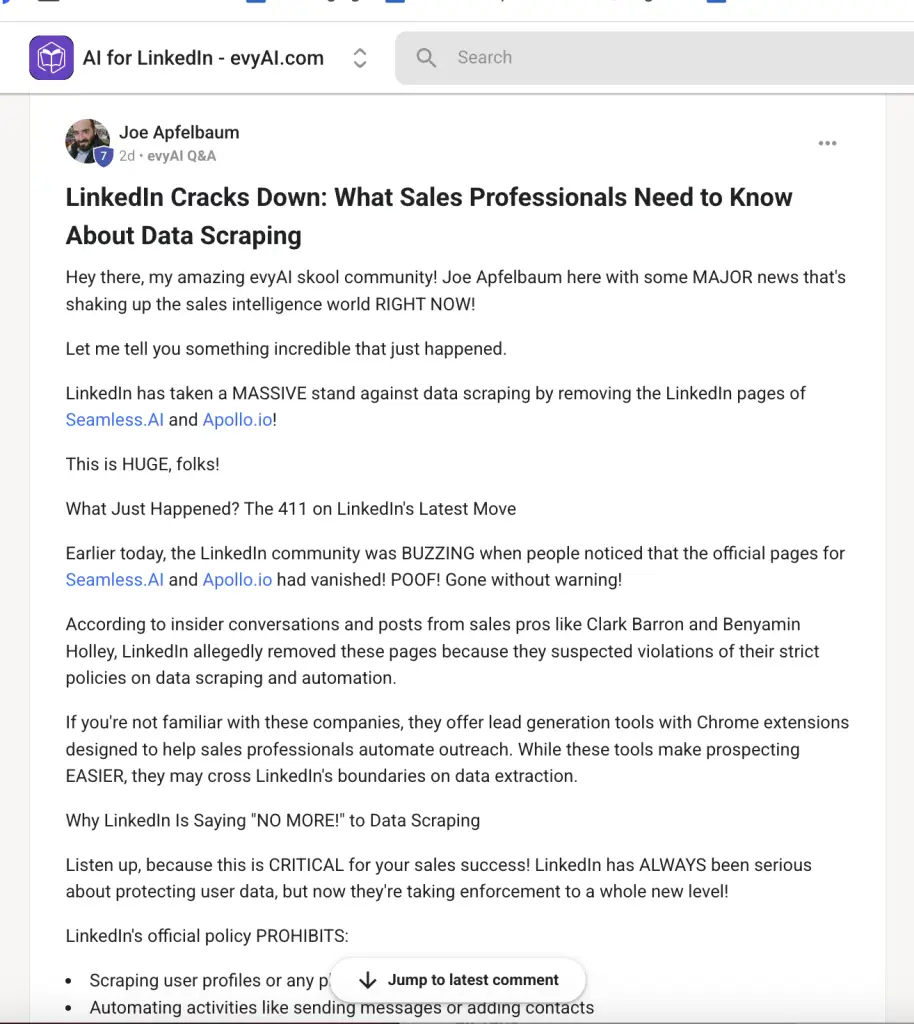
And what if Clay gets cracked down by LinkedIn?
No, It’s not Clay who owns the data. The data is scraped and owned by the service providers it has partnered with. Clay only scrapes the web on its own.
As Yeshwanth Kumarendhiran, Head of GTM Systems and Engineering at Freshworks puts it “Clay is like the Amazon of data enrichment—pulling from multiple vendors to get you the best data every time, yet owning none of it!”
Instead of learning how to use different data mining tools, scrapers, automation tools, and Excel formulas, Clay has an incredibly fun UX. It has summed up the value of all these tools in one magic table.
Clay offers 100+ service providers already, but still, if you want to integrate a tool of your own, you just need an API.
With Clay, you can easily push into or pull data from your CRMs like HubSpot or Salesforce. For platforms like Zoho CRM and Dynamics 365 that do not natively integrate with Clay, you can use Zapier to build the integration.
Adam.ai is a user-friendly meeting management tool that makes organizing, running, and summarizing meetings much easier. It helps teams plan agendas, collaborate in real-time, and track decisions.
To get more customers from big industries like government, healthcare, and finance in the UAE, Adam.ai worked closely with Blue Pencil Marketing Agency. They started a focused ABM campaign for six months using targeted LinkedIn ads, personalized outreach, and attentive follow-ups. This campaign brought in a sales pipeline worth $730,000 and closing deals valued at $260,000.
Clay, a powerful data-enrichment tool, played a critical role in the campaign’s success. It helped Blue Pencil accurately identify the perfect prospects by enriching and refining their contact information. They used clay for both enriching inbound and outbound leads and the enriched data was pushed to Slack channels so that BDRs can contact leads in the most personalized manner.
In fact, Tarek Reda, founder of Blue Pencil Marketing, emphasised the importance of clay for inbound lead enrichment and outbound workflows in his recent LinkedIn post:

So yeah, Clay is the ultimate account enrichment tool – at least for now 🙂
You can build your TALs with Clay, but what about the ABM orchestration?
Well, if your primary channel of advertisement is LinkedIn (I mean, other options like display ads are anyway so disappointing), ZenABM can help you pull it off:
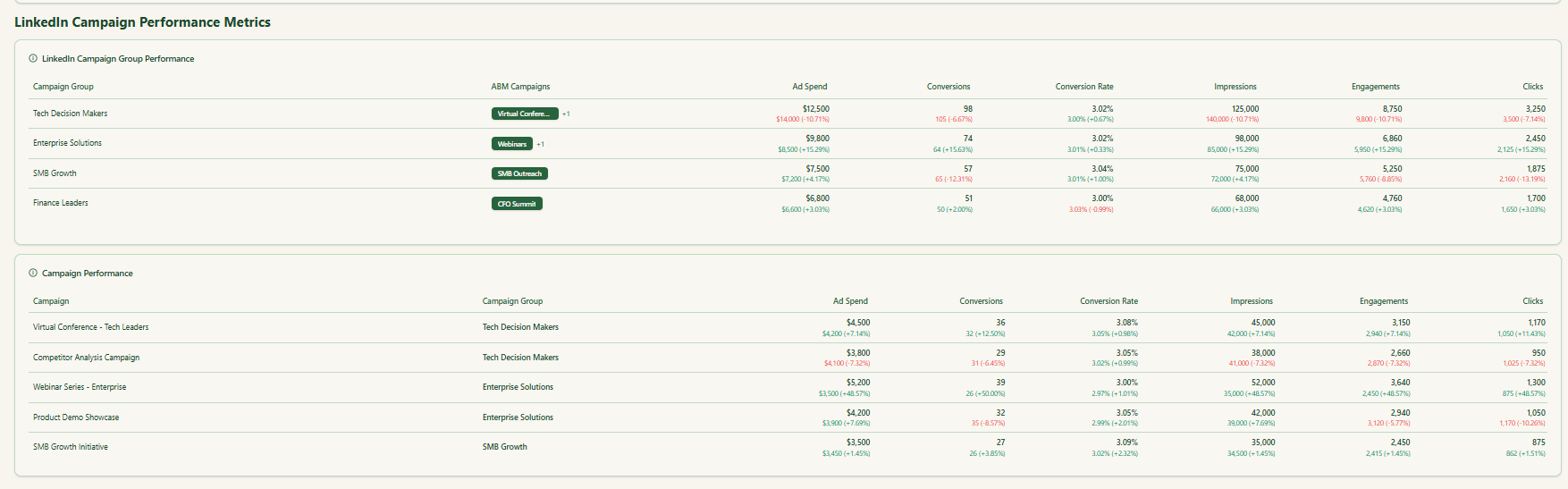
ZenABM captures company-level LinkedIn ad interaction metrics (like impressions, clicks, and engagements) along with ad spend for each of your LinkedIn campaigns:

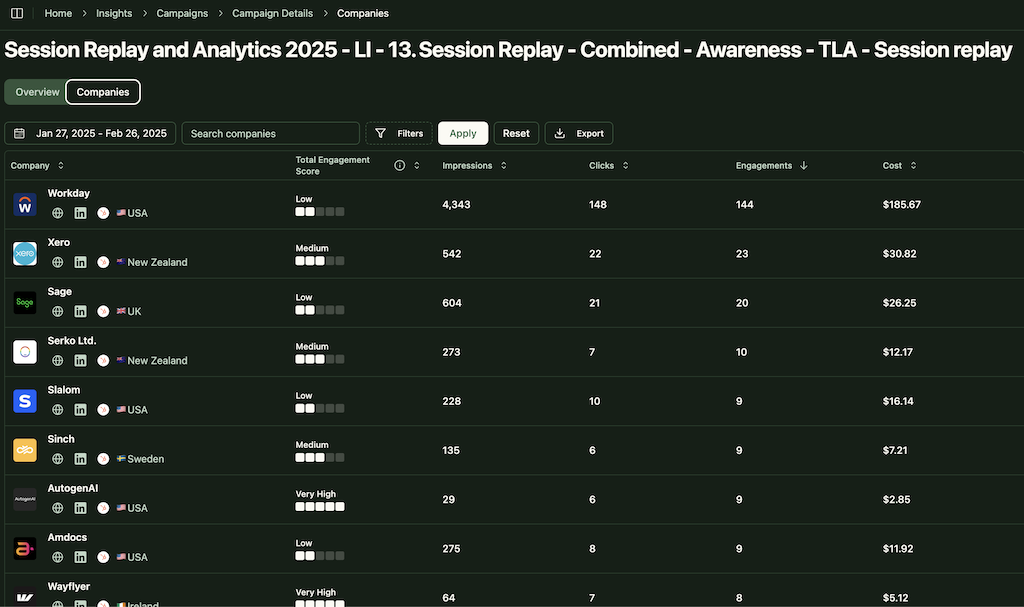
Besides providing detailed company engagement data per campaign, ZenABM aggregates both historical and recent engagement stats across all your ad campaigns to assign a lead score, helping you gauge how aware or interested a company is in your brand.
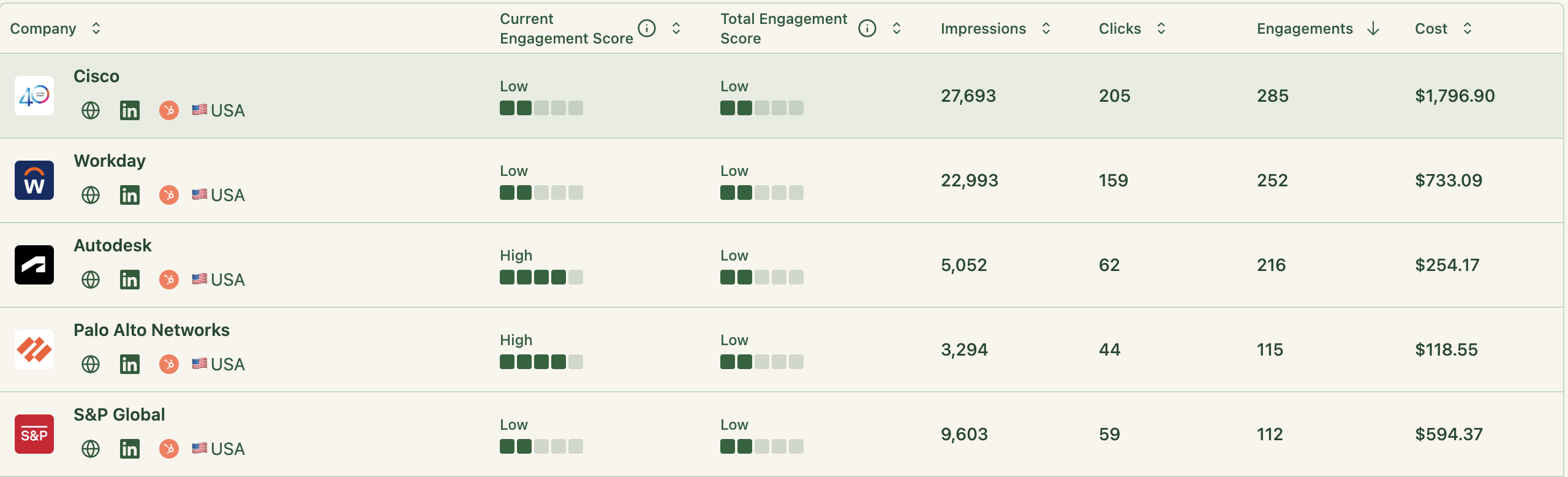
ZenABM also uses this engagement data alongside your CRM to assign an ABM stage to every account.
What’s even better? These engagement thresholds for ABM stages can be tailored as per your strategy:

We’ve seen how ZenABM identifies the ABM stage of each account from CRM and engagement data.
To help your sales team act faster, ZenABM auto-assigns hot (i.e., interested-stage) accounts to BDRs directly in your CRM:
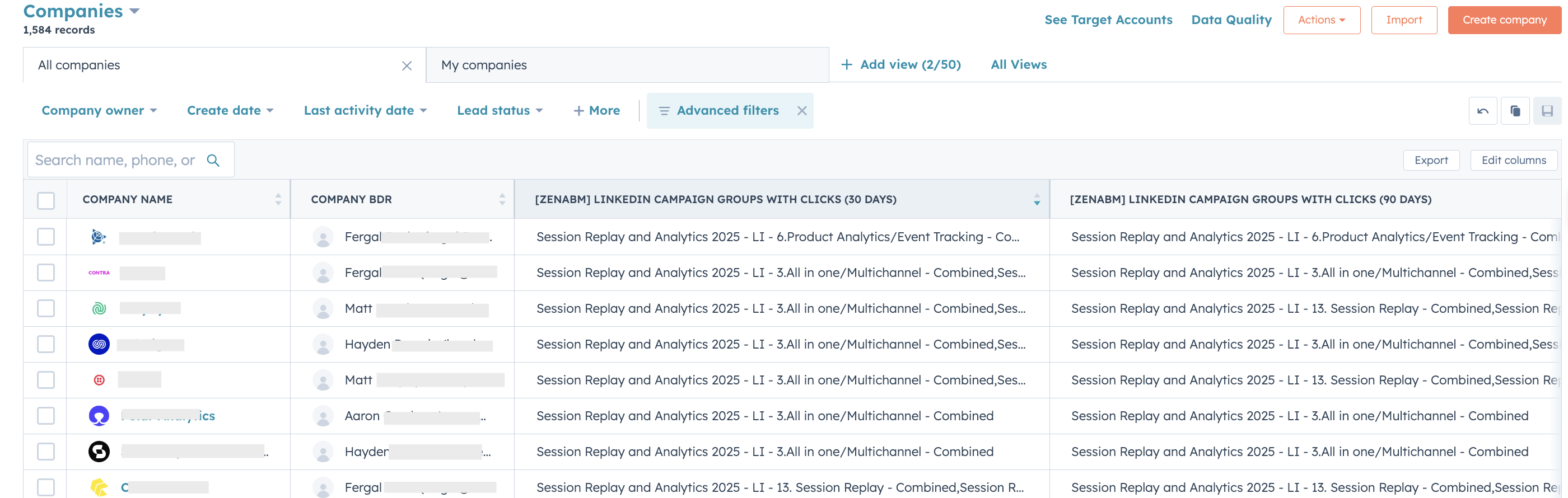
This means BDR outreach can happen instantly, without your reps having to manually check dashboards or wait for alerts in Slack.
While your marketing team works in ZenABM and MAPs to run ABM on LinkedIn, your sales folks still rely on their CRM.
ZenABM removes the need for manual syncing by automatically syncing all engagement metrics to your CRM as company properties:

In the reverse direction of this bi-directional CRM sync, ZenABM maps matched companies to deals and pulls in each company’s deal value.
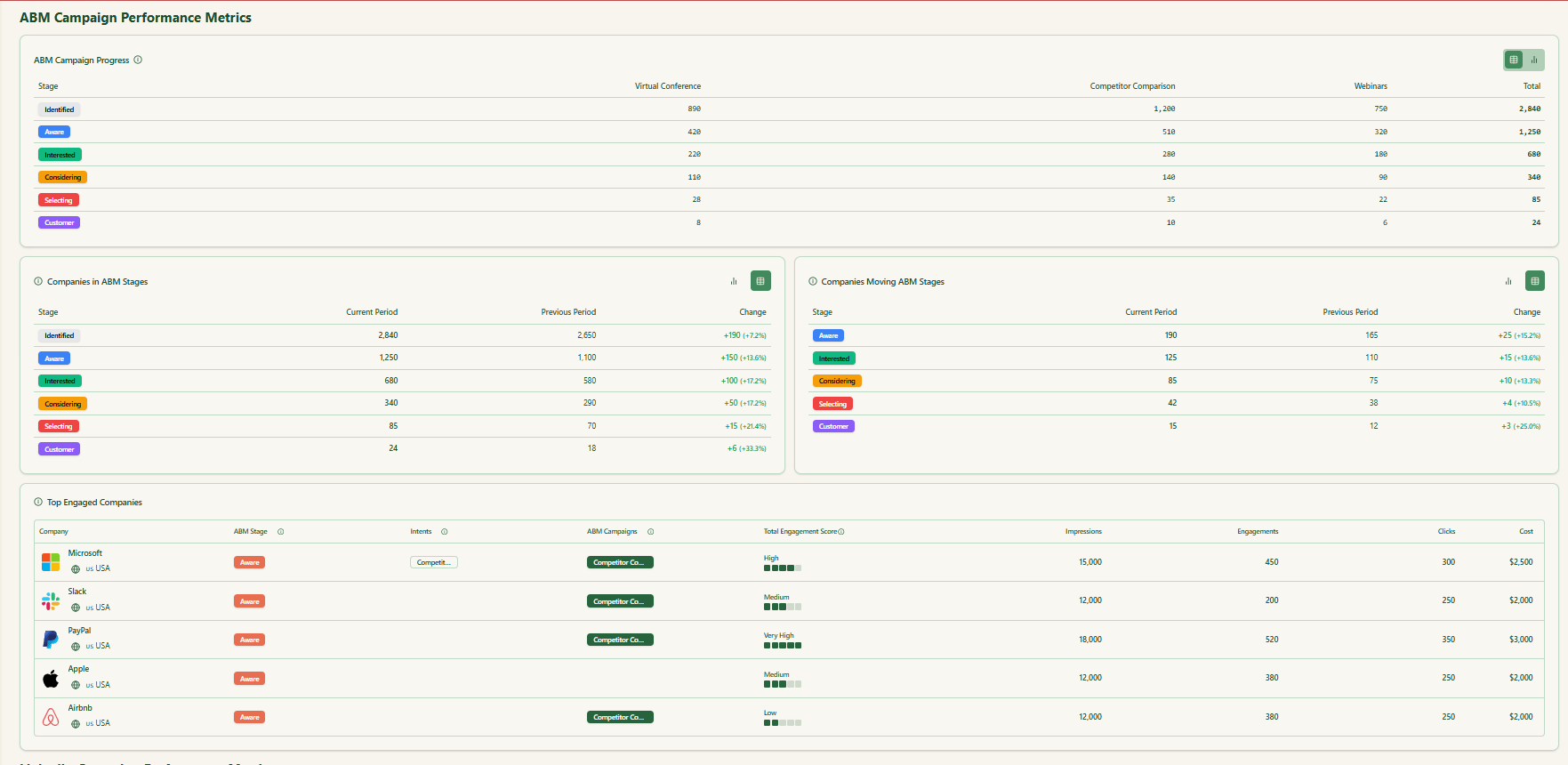
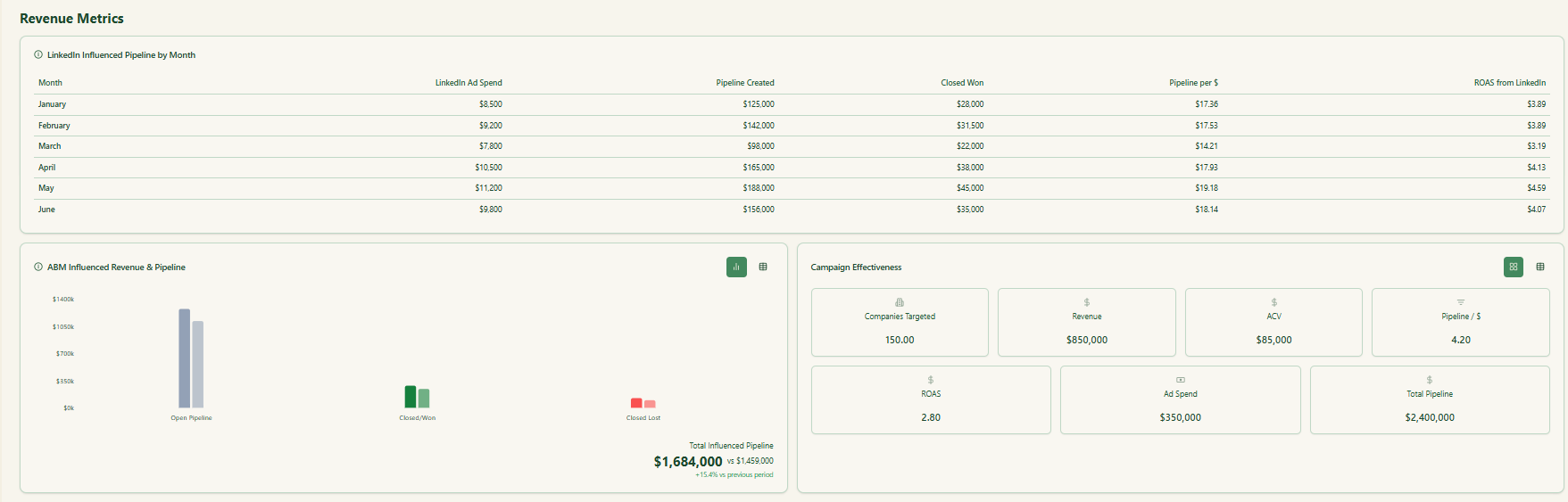
ZenABM’s company-matching and deal-tracking powers enable ready-to-use ABM dashboards and ROI attribution reporting.
Many ABM veterans use intent data tools like Bombora, Demandbase, or RollWorks to uncover buyer interest by tracking search keywords from a company’s members:
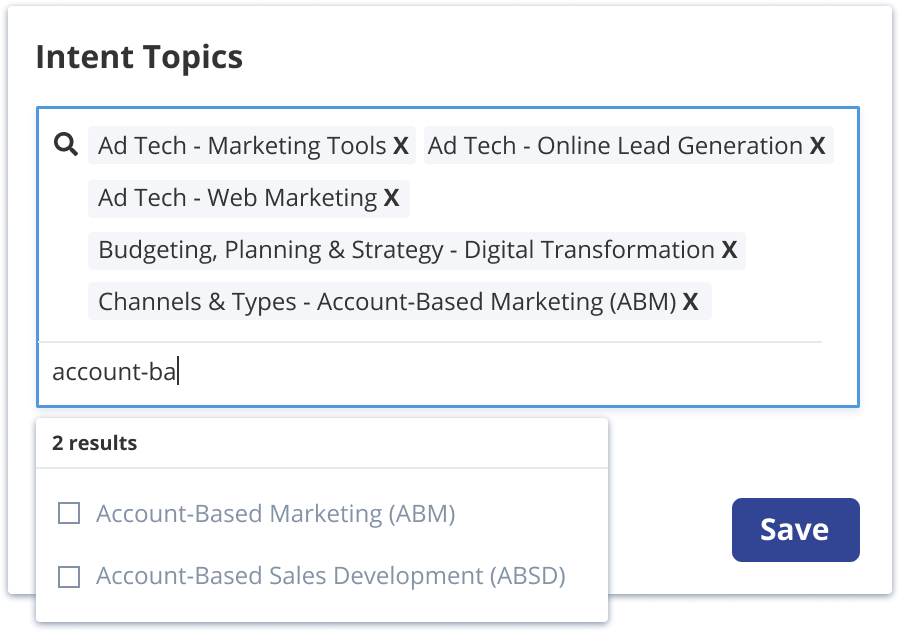
But here’s a smarter way: instead of paying for third-party intent, build it directly into your LinkedIn ads, which you’re already paying for.
If you’re a SaaS selling to product teams, make different campaigns based on intent categories like analytics, onboarding, session recording, etc.
Example:
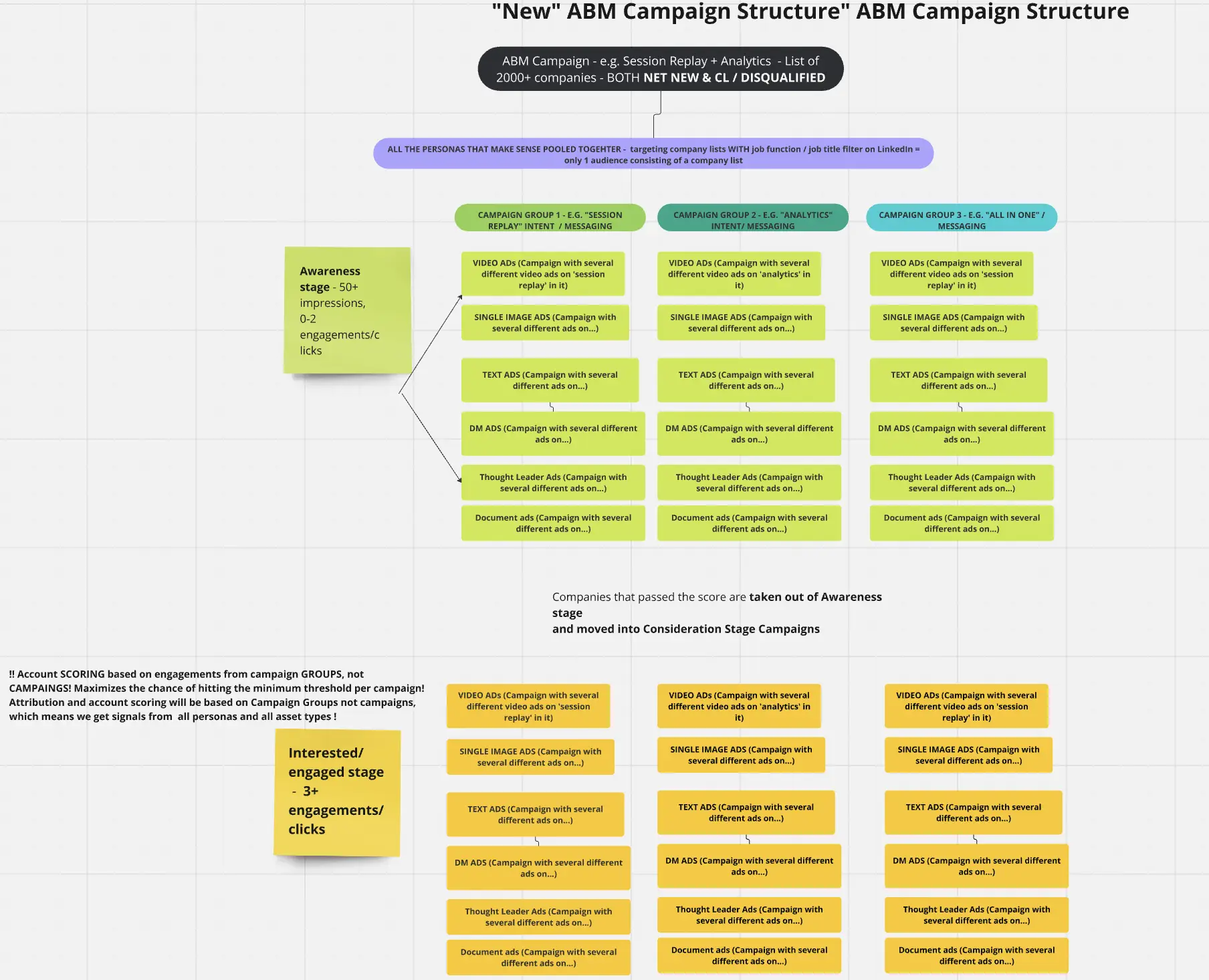
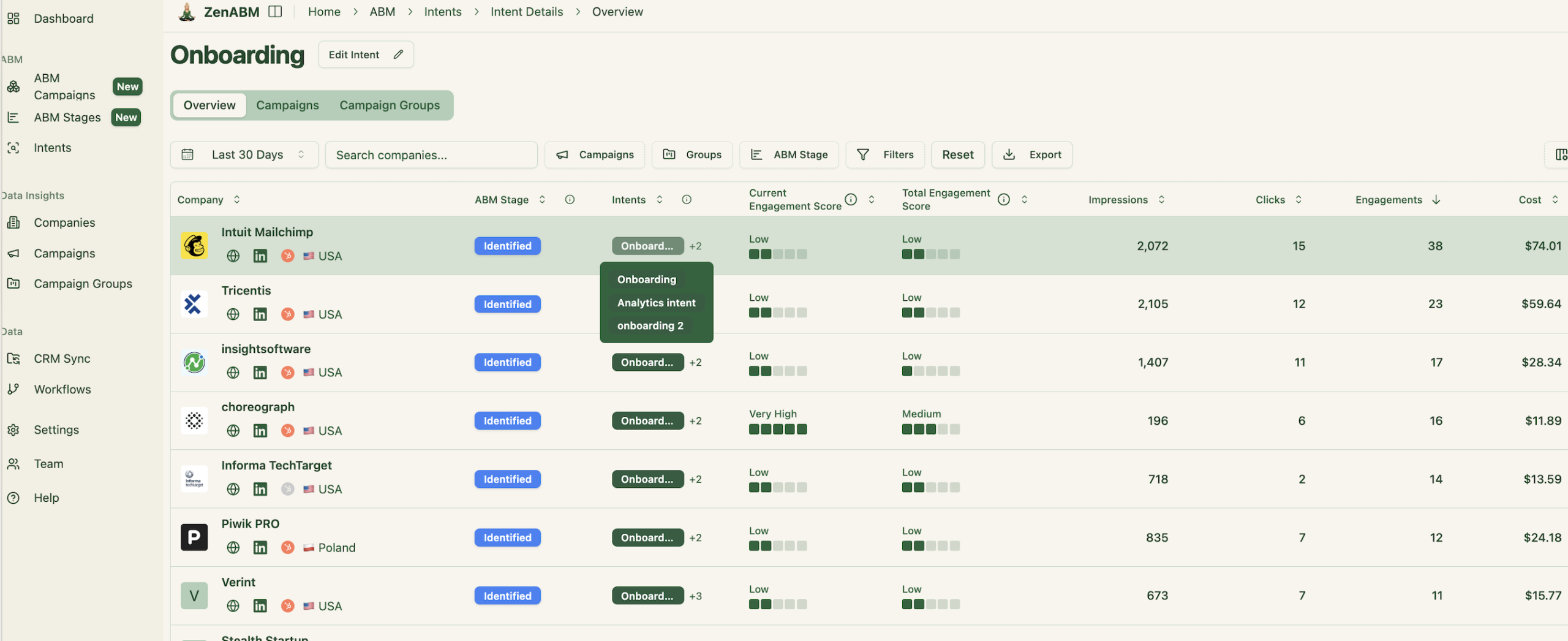
Tag each campaign by intent in ZenABM, and it will automatically detect which topics each company is engaging with:

It will also group companies showing similar intent together for you:
ZenABM then syncs this intent to your CRM as a company-level property:
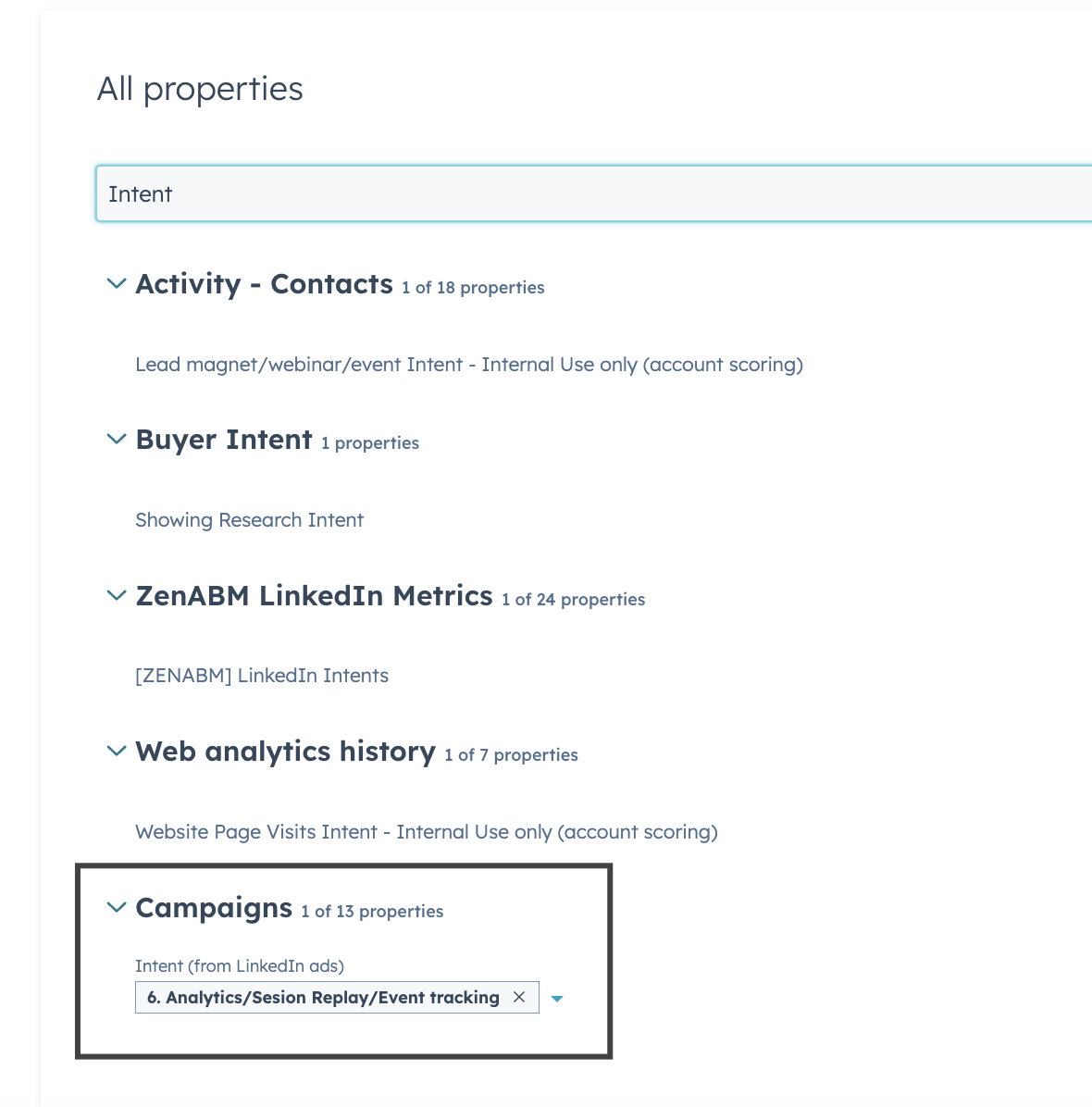
Now your BDRs won’t just see which companies are hot, they’ll also know *why* — and tailor their messaging accordingly.
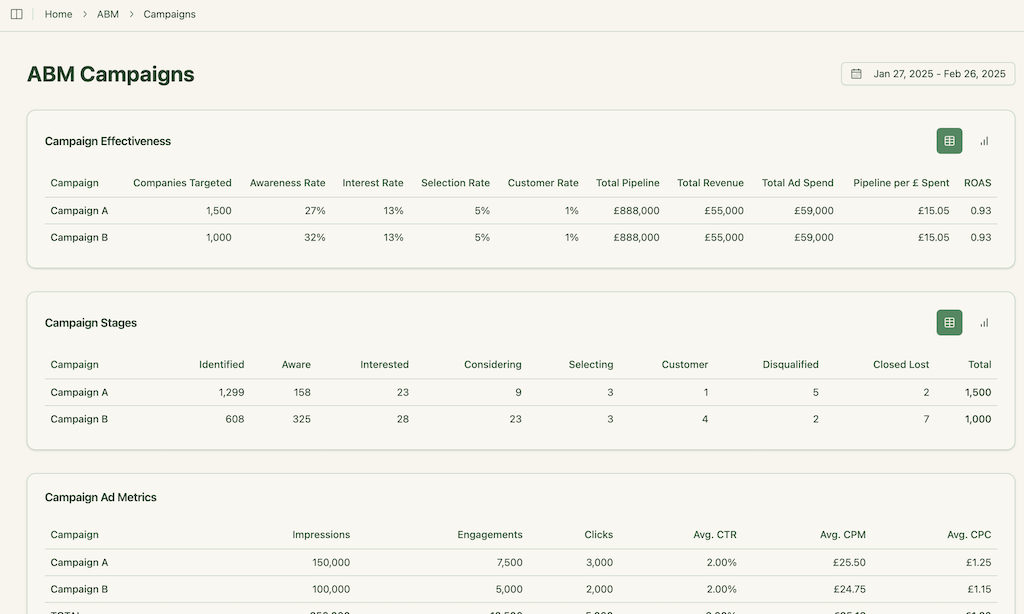
ZenABM gives a stage-by-stage view of company movement — from early to late stages — highlighting where drop-offs are happening.
Say a large number of accounts move from ‘aware’ to ‘interested’ but never go further. That’s your cue to investigate and optimize that stage.
Account-Based Marketing thrives on precision, and precision starts with a well-built Target Account List (TAL). Clay offers a modern, AI-driven way to source, enrich, and prioritize prospects at scale, transforming a traditionally slow and manual process into a streamlined, automated workflow. From real-time intent tracking to personalized outreach and CRM integration, Clay empowers marketers to build and refine TALs that drive higher engagement, conversions, and revenue.
Paired with tools like ZenABM for execution and orchestration on LinkedIn, your ABM strategy becomes not just smarter, but truly scalable.
If you’re looking to build a high-impact TAL without burning through budget or bandwidth, Clay is not just an option; it’s the edge.
