

©2026 ZenABM - All Rights Reserved.

Building ABM campaigns with Claude Code changes the unit of work, because instead of clicking through Campaign Manager and exporting spreadsheets, you describe the account-level outcome you want, and Claude Code reads your live ABM data, drafts the change, and waits for you to confirm it.
Teams like Userpilot run their LinkedIn ABM program exactly this way, and the part that surprises most operators is not the speed but the altitude at which decisions get made: accounts, lists, stages, and pipeline, rather than individual ad creatives.
This post is the operator’s how-to for the doing part of ABM, covering how to build target account lists and segments, structure campaigns so the data stays clean, and keep those lists in sync as accounts move.
It then covers generating the ad creatives with AI and keeping the whole plan organized in an ABM campaign template, before turning to the live work of optimizing campaigns with account-level actions like shifting budget toward accounts that are moving, capping the impression hogs, making stage-based calls, and handing the hot accounts to sales before they cool off.
Here’s a quick overview of the article:

Account-based marketing has always carried an execution tax.
The strategy is simple to describe, since it comes down to picking the right accounts, reaching the right people inside them, and moving them through stages toward a deal, but the execution is where teams drown, because list building, segmentation, exclusion hygiene, budget rebalancing, and the constant chore of figuring out which accounts moved this week and which stalled all pile up at once.
Claude Code collapses that tax because it can read your account-level data directly and act on it.
A generic chatbot cannot reason about your accounts, their ABM stage, or the deals they influenced, because it has never seen them, whereas connecting a LinkedIn Ads MCP server like ZenABM lets the model work from the data that actually drives revenue: companies, campaigns, ad sets, ABM stages, intent signals, and closed-won deals joined to your CRM.

ZenABM supplies that joined layer through account-level engagement tracking, company-level impression and click data per campaign, intent signals, ABM funnel stages, and CRM sync.


The difference shows up most at the account level.
Ask Claude Code which accounts moved toward interested this week and which campaign touched them, and the answer comes back assembled from stage movement and spend in one go, rather than as a screenshot you have to interpret.
That is the whole point of running ABM campaigns with Claude Code, because the answer and the next action arrive together.
Maximilian Herczeg, a LinkedIn Ads specialist and ex-LinkedIn employee, is blunt about where most programs lose the plot before any AI enters the picture in his LinkedIn post.
“The number 1 issue (next to content) companies get wrong with LinkedIn Ads is targeting. LinkedIn gives you amazing targeting precision. No other platform comes close. Yet, companies don’t know how to use it properly.”
His list of mistakes maps exactly onto the work Claude Code is good at fixing, whether that is combining company and ICP filters, uploading account lists, or using exclusions with intent rather than guesswork, none of which is creative work.
It is account and list work, and that is where the leverage lives.
Every ABM program starts with a list, and most lists are wrong in one of two directions, since they are either too broad, so you pay to reach companies that will never buy, or too static, so they never reflect which accounts are actually showing signal.
Building target account lists with Claude Code fixes both, because the list becomes a living query rather than a CSV you uploaded in January and forgot.
Start by letting Claude Code read who is already engaging, then build tiers from the data instead of from intuition. A prompt for that looks like this.
Using the ZenABM tools, pull every company that has engaged with our LinkedIn ABM campaigns in the last 60 days. For each, show:
– company name and employee count
– ABM stage (aware / interested / considering)
– total ad impressions and engagements
– whether they have an open deal in the CRMThen split them into three tiers:
– Tier 1: in interested or considering, or has an open deal
– Tier 2: engaging repeatedly but still in aware
– Tier 3: light or one-off engagementOutput each tier as a separate list to act on.
How to read it: the output is not a static export but a snapshot you can regenerate any time, and the tiers map cleanly onto how you fund and treat each cohort, so that Tier 1 gets your retargeting and your sales attention, Tier 2 gets more top-of-funnel air cover, and Tier 3 is where you decide whether to keep paying at all.


The reason tiering matters is structural, because if a single campaign mixes cold accounts, warm accounts, and accounts with open deals, you cannot tell what the campaign is doing.
Herczeg (ex-LinkedIn) makes the same point in his LinkedIn post from the targeting side, describing how a client generated qualified leads from a cold audience with carefully built segments.
“Super refined targeting (we use lists for one group and skill filters for the other). ICP and contract size: the ICPs are rather small companies (200 and less). Small audience sizes. If anything, it proves the point I am always making: testing is everything.”
The takeaway for ABM campaigns with Claude Code is that segments should be small and specific enough that the engagement data means something, which is why it is worth asking Claude Code to propose a campaign structure where each campaign owns one tier or one ICP cohort, so the account movement you measure later is attributable to a single message.
For a deeper walkthrough of structuring the program itself, the ultimate guide to running ABM on LinkedIn covers the full motion.
A list that never updates rots quietly, because accounts you targeted in spring may have gone cold while accounts you ignored may now be engaging weekly, so a weekly sync prompt keeps it current.
Compare our current target account lists against live engagement data. Show me:
– accounts on the list that have not engaged in 45+ days (candidates to pause)
– accounts NOT on the list that are now engaging repeatedly (candidates to add)
– accounts that changed ABM stage since last weekDraft the add/remove changes, but do not apply anything until I confirm.
How to read it: the last line matters, because Claude Code proposes the list changes and then waits. Write actions against your LinkedIn campaigns are flagged as destructive, so nothing changes your ad serving state without your explicit approval, which means you stay in control of the program while Claude Code does the watching.

Structure is where most of the later optimization is won or lost, because if your campaigns are organized by tier and ICP cohort, every optimization question later has a clean answer, whereas if they are not, you spend your time untangling which spend went where.
Building ABM campaigns with Claude Code does not remove the need for good structure, but it makes good structure cheap to set up and easy to keep.
The structure worth coming back to is simple, because each campaign should answer one question about one cohort: cold prospecting campaigns own the accounts that have never engaged, engagement or retargeting campaigns own the accounts already moving, and Thought Leader Ads run against the personas inside your tier 1 accounts.
Ask Claude Code to audit whether your current structure holds up.
Look at our active ABM campaigns and ad sets. For each, tell me:
– which ABM tier or cohort it is actually reaching (by company size and stage)
– whether any campaign is mixing cold and warm accounts
– which campaigns overlap on the same accountsFlag anything that would make account-level attribution unreliable, and suggest how to split or merge campaigns to fix it.
How to read it: overlap is the silent killer, because when two campaigns hit the same accounts you double-count impressions and cannot tell which message moved the account. Claude Code surfaces that overlap from the company-level data.
Maximillian Herczeg lists using only exclusions, or none at all, and not uploading company lists among the most common targeting mistakes, and the fix is to treat exclusions as a deliberate layer: customers and existing pipeline should be excluded from prospecting, closed-lost accounts may need a separate treatment, and non-ICP job titles should never be paid for in the first place.
Across our ABM campaigns, show me:
– any non-ICP job titles currently receiving impressions (e.g. student, intern, unrelated departments)
– any current customers or open-deal accounts being served prospecting ads
– companies far outside our ICP by size or industryDraft the exclusions needed to clean this up, grouped by campaign, and hold for my confirmation.
How to read it: this is one of the highest-return prompts in the whole workflow, because every non-ICP impression you remove is budget freed for an account that can actually buy. For the broader strategic frame on which accounts belong in the program in the first place, a clear 2026 LinkedIn ABM strategy is worth defining alongside this.

Building the lists and structure gets you a campaign with nothing to serve, because the creative still has to exist, and for an account-based program, you usually need several variations per cohort.
This is the one part of the build that does not run inside Claude Code against the MCP server.
It runs instead in a separate Claude project using the LinkedIn Ad Designer skill, a free Claude skill from Advanced Client that turns a short brand brief into on-brand LinkedIn ad visuals.
It works differently from a generic image generator, since you download the skill as a markdown file, add it as project knowledge in a Claude project, then fill in a short brand config covering your colours as hex values, your accent or CTA colour, your fonts and weights, your logo, and your tone.
From then on, every ad you ask for comes back in your brand system, and the output is not a flat image but live, editable HTML, so the visuals stay pixel-perfect and you can tweak the copy or a colour without regenerating from scratch.
You download the skill once and reuse it across every campaign.
The skill ships with 23 design patterns drawn from high-performing B2B SaaS ads, so you are not staring at a blank canvas, and you ask for the pattern that fits the message.
You can use a prompt like this after loading the skill:
Create a LinkedIn ad announcing our new AI feature.
Design a stat-focused ad around our 3x pipeline increase.
Make a contrarian ad that challenges booking a demo.
Generate 3 variations of an ad promoting our free audit.
The patterns cover the formats an ABM program actually uses, including stat highlights, product screenshots with a CTA, contrarian pattern-interrupts, before-and-after comparisons, social-proof logo bars, testimonials with a review badge, and report-cover promos, while the copy guidance is strict in a good way, capping each ad near 40 words and pushing numbers over adjectives, which is how LinkedIn ad copy should read.
Here is where it connects back to the data. Before generating anything, ask Claude Code which formats and hooks are already winning by eCTR in the account, then brief the Ad Designer with those patterns, because generating creative blind is guessing while generating from your own top performers compounds what already works.
Once the new ads are live, the same MCP connection reports whether they beat the creatives they replaced.
By this point you have tiered lists, a clean campaign structure, and a set of creatives, and the thing that keeps it all from sliding into chaos is a single place to plan and track every asset against the campaign hierarchy.
An ABM campaign management template does that, mapping the whole structure from the top down: ABM campaign, then campaign group, then campaign, then individual ad.
The template exists in two forms, so you can use whichever your team already lives in, with a Notion ABM Campaign database and a Google Sheets version, both walked through in the ABM strategy template guide.

Each asset gets tagged with its intent theme, its audience segment, its ad format, its funnel stage, and its budget, so the moment you want intent-level reporting the data is already organized for it.
This is the planning counterpart to the live optimization Claude Code handles, because Claude Code tells you what is happening in the account right now and drafts the changes, while the template is the durable record of what you intended each asset to do.
That record makes the weekly review faster, since you are comparing live performance against a plan rather than reconstructing the plan from memory, and filling it in before launch also forces the discipline the rest of this post depends on: one campaign per cohort, deliberate exclusions, and a clear intent theme per asset.
Once campaigns are live, optimization is a weekly rhythm of three account-level moves, namely reallocating budget toward accounts that are moving, capping the accounts eating impressions without engaging, and making stage-based decisions about what to do next.
This is the heart of optimizing ABM campaigns with Claude Code, and it is where the time savings compound.
The first move is to follow the movement, because accounts progressing from aware toward interested or considering are telling you the message is working on them, and that is where the next increment of budget should go.
Compare this period to last period across our ABM campaigns. Show me:
– which campaigns drove the most stage movement (aware -> interested -> considering)
– which campaigns drove the most pipeline per dollar spent
– which campaigns are trending up vs decayingRecommend a budget reallocation that shifts spend toward the campaigns moving accounts down the funnel, and away from the ones that have stalled. Draft the changes for my approval.
How to read it: pipeline per dollar and stage movement are the two most trustworthy signals, because a campaign with high impressions but no stage movement is not working, no matter how good the surface metrics look. Claude Code can rank campaigns by movement and propose the reallocation, then apply it only once you confirm.
The mirror image of funding movement is starving waste, because in every program there are a handful of accounts that absorb a large share of impressions and never engage, so capping or excluding them quietly pays for itself.
Show me the companies in our ABM campaigns receiving more than 5x the median impressions with no engagement and no ABM stage progression. Rank them by wasted spend. Draft exclusions for the worst offenders and hold for my confirmation.
How to read it: the 5x-median framing finds the genuine hogs rather than just the largest accounts, and excluding ten of them often frees meaningful budget you can redirect to tier 1. This is the same exclusion logic that runs across the program, and it pairs naturally with the budget reallocation above.
Stages are decision triggers, because an account that has sat in interested for six weeks past your average time in stage is not patient, it is stalled, and it needs a different action: a new creative, an extra touch, or a handoff to sales.
List accounts that have been stuck in the ‘interested’ stage longer than our average time in stage. For each, show the campaigns that touched it and its recent engagement trend. Then recommend, per account, whether to refresh the creative, add a touch, or hand it to sales.
How to read it: the per-account recommendation is what turns a report into a plan, because rather than reading a dashboard and deciding in your head, you get Claude Code proposing the move for each stalled account and you approve the ones that make sense. The ideas behind these build-and-optimize prompts come from the Claude Code for ABM use cases and plugins write-up, which catalogs the workflows in more detail.
The last account-level action is the handoff, and it is the one with the shortest shelf life, because an account spiking in intent today is a different opportunity than the same account two weeks from now.
The job is sequencing: of every account in the program, which three or four should a rep contact today.
Because ZenABM joins engagement to intent and to your CRM, Claude Code can assemble the handoff list with context attached, and that same CRM sync pushes the engagement and stage data back into HubSpot or Salesforce as company properties, so reps see it where they already work.


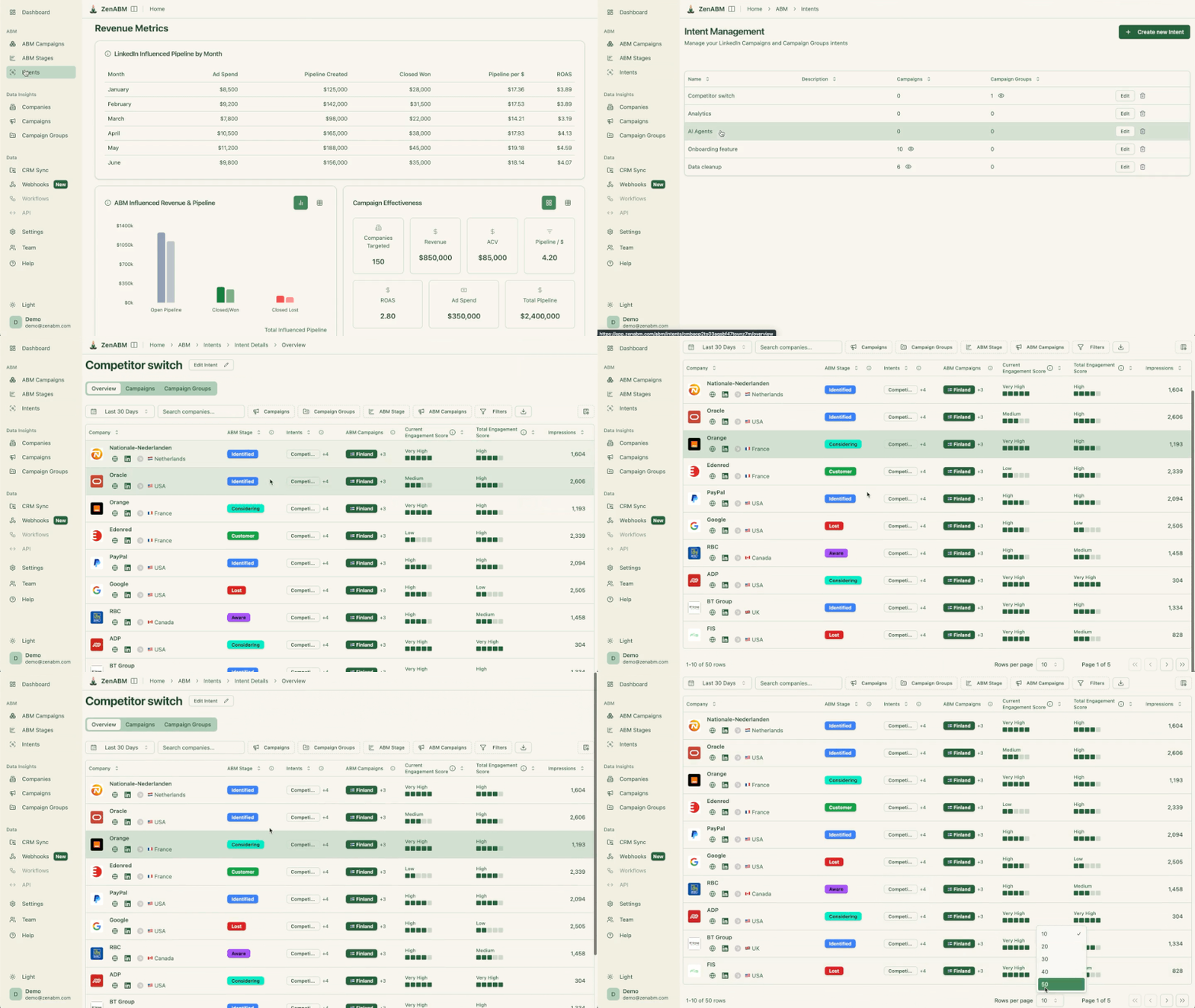

The prompt to use:
Which accounts show the strongest buying intent this period, and what intent topics are driving it? Cross-reference with ABM stage and recent ad engagement. Give me the top accounts a rep should contact this week, each with: the intent topic, the campaign or creative they engaged with, and the strongest-intent contact to reach.
How to read it: the value is the topic plus the engagement context, because a rep who opens with the thing the account is actually researching, referencing the ad they clicked, starts a real conversation instead of a generic pitch. That turns a marketing signal into a booked meeting while the timing still works.
This is also where the earlier work pays off, because clean campaign structure means the intent signal is trustworthy, synced lists mean the right accounts are even in the program, and the budget you freed by capping impression hogs is now funding the accounts your reps are about to call.
The prompts above are most useful as a routine rather than one-off questions, and the rhythm below takes well under an hour a week.
Cadence | Action | Prompt focus |
|---|---|---|
Weekly | Sync target lists | Add new engagers, pause cold accounts, flag stage changes |
Weekly | Reallocate budget | Shift spend toward campaigns moving accounts, away from decaying ones |
Weekly | Cap impression hogs | Exclude accounts above 5x median impressions with no engagement |
Weekly | Hand off hot accounts | Top intent accounts with topic and contact for reps |
Biweekly | Stage review | Stalled accounts and per-account next action |
Monthly | Structure audit | Overlap, cohort drift, exclusion hygiene |
Every row is an account-level or program-level decision, not an ad-level one, and that separation is deliberate, because ad-level analysis of waste and creative performance is its own job that stays separate from the account-based motion described here, so each remains clean.
Across all of it, the safety model holds, since read questions change nothing while write actions like pausing a campaign or applying an exclusion are proposed and wait for your confirmation.
You get the speed of an agent with the control of a human in the loop, which is exactly the trade you want when real budget is moving.
The shift here is not that ABM gets faster, it is that the unit of work moves up.
You stop clicking through Campaign Manager and exporting spreadsheets, and you start describing the account-level outcome you want while Claude Code reads your live data, drafts the change, and waits for your confirmation.
That altitude is the whole point. Lists become living queries instead of stale CSVs. Campaign structure stays clean because each campaign owns one cohort.
Budget follows stage movement instead of surface metrics, impression hogs get capped before they drain the program, and hot accounts reach a rep while the timing still works.
None of it touches your ad serving state without your explicit approval, so you get the speed of an agent with the control of a human in the loop.
The piece that makes all of this possible is the joined data layer underneath it.
Claude Code can only reason about accounts, stages, and pipeline if something feeds it company-level engagement tied to your CRM, and that is exactly what the ZenABM MCP server exposes through 60+ tools across your ABM data, sourced first-party from the LinkedIn Ads API with no third-party provider in the loop.
Point Claude Code at it, start with the weekly rhythm above, and let the account-level decisions compound from there.
Start your free 37-day trial of ZenABM now or book a demo with us to know more!
It means using Claude Code to do the account-level execution work of ABM: filtering your target account universe against ICP signals, building tiered segments, structuring campaigns so each maps to a clean cohort, and keeping lists in sync as accounts move. Claude Code reads your live ABM data through a LinkedIn Ads MCP server and drafts the changes, while you approve any action that touches your campaigns.
Run a weekly rhythm of account-level actions. Ask Claude Code to reallocate budget toward campaigns moving accounts toward interested and considering, cap the companies eating impressions without engaging, and recommend a next action for accounts stalled in a stage. Each action is proposed first and applied only after your confirmation.
Yes. Read questions never change anything. Write actions, such as pausing a campaign or applying an exclusion, are flagged as destructive, so Claude Code proposes the change and waits for your explicit approval before it touches your LinkedIn ad serving state. Nothing changes without your confirmation.
Through ZenABM’s MCP server it reads company-level engagement joined to your CRM: companies, LinkedIn campaigns, ad sets, ABM campaigns and stages, deals, contacts, job titles, sources, spend, and intent signals. That joined dataset is what lets it reason about accounts and pipeline rather than raw ad metrics, and Zena AI surfaces the same data conversationally for quick checks.

Ad-level analysis looks at creatives, formats, and wasted spend, while building and optimizing ABM campaigns with Claude Code stays at the account and program level: which accounts to target, how to structure campaigns around them, how to move budget toward accounts that progress, and when to hand accounts to sales. The two are complementary, but they answer different questions.
