

©2026 ZenABM - All Rights Reserved.

To run ABM with confidence in 2026, you need account-centric reporting that links ad exposure (yes, down to impressions and for each specific ad campaign and creative) and engagement to pipeline, opportunity stage movement, and closed-won revenue.
Click-based attribution models and relying on blanket data that leaves you wondering which creative worked the hardest won’t cut it anymore.
This guide ranks the best ABM pipeline reporting tools for LinkedIn-centric multichannel campaigns with a bias toward view-through truth, tight CRM alignment, and board-ready reporting, and explains tactically what each tool does well, where it falls short, and what it actually costs in 2026.
Strap in.
Short on time?
Here’s a quick comparison table:
Tool | Two-Way CRM Integration | First-Party LinkedIn API Data | 2026 Pricing | Summary | |
|---|---|---|---|---|---|
Yes, native | Yes, native, bi-directional | Yes, via official LinkedIn API | $59 to $479/mo | Purpose-built for LinkedIn ABM: clean campaign-by-company metrics, instant HubSpot & Salesforce sync, deduplicated revenue attribution, and an AI chatbot (Zena) that lets you query your LinkedIn data in plain English. | |
Yes | Pulls data, no native company-property write-back | Yes, via LinkedIn API (LinkedIn Marketing Partner) | $399/mo base, real cost $1,399 to $2,749/mo with AdPilot & Interest Groups | Solid view-through attribution and AdPilot for impression capping. CRM property write-back requires DIY workflows. Add-ons multiply the sticker price. | |
Yes | Yes, multi-CRM, bi-directional | Yes, via LinkedIn API | ~$65,981 median ACV (Vendr 2026) | Enterprise ABM suite with deep controls, native B2B DSP, and revenue reporting. Powerful, modular, and priced like a Bentley with optional everything. | |
Terminus (DemandScience) | Limited to Matched Audiences | Yes, bi-directional (Salesforce-first) | Limited to matched audiences | ~$23K median, $87K+ enterprise (Vendr 2026) | Good Salesforce fit and account views; impression analytics constrained to Matched Audiences. Roadmap is uncertain post-DemandScience consolidation. |
Yes | One-way pull; native workflow building needed for write-back | Yes, via LinkedIn API | ~$1,399 to $2,200+/mo (Growth tier); custom for Enterprise | Rich journeys, multi-touch attribution, and account paths. One-way CRM sync means extra work to make pipeline dashboards sing. Steep learning curve. | |
No, cookie-dependent | No, custom setup needed | No | Custom (sales-led) | Omni-channel attribution engine that’s strong for mixed media. No official LinkedIn account analytics for impressions, so it’s weak for ABM pipeline needs. | |
No, aggregate only | Yes | No, click/visit dependent | ~$58,950 median ACV; $30K to $200K+/yr | Excellent prediction, segmentation, and Bombora-style intent. Lacks impression-first, account-level LinkedIn reporting for pipeline proof. | |
No | Yes, internal only | No | Marketing Pro from $800/mo, Enterprise from $3,600/mo | Great for click and contact attribution inside HubSpot; not designed for impression-led ABM pipeline tracking. No view-through coverage. | |
No, tracks engagement only | Yes | No (different LinkedIn API for contacts, not ad impressions) | $999 to $1,999+/mo | Community signals plus LinkedIn engagement. Useful intel and enrichment, but it isn’t a substitute for impression-level pipeline reporting. | |
No | No, manual account grouping | No | $19 to $499+/mo | Great data hub and attribution model playground. Not for LinkedIn ABM impression tracking or pipeline-by-account analytics. |
Before tooling, the math. The reason this whole category exists is that B2B buying behaviour has shifted in ways that make click-based, lead-centric reporting actively misleading.
According to Dreamdata’s 2026 LinkedIn Ads Benchmarks Report, built on 66 million sessions and 3.5 million customer journeys, LinkedIn is now the only major advertising platform delivering positive ROAS for B2B at 121%, compared with Google Search at 67% and Meta at 51%.
That’s why LinkedIn captures 41% of B2B paid social budgets in 2026, up from 39% the year before.
The same report shows that the average B2B journey has stretched from 211 days to 272 days year over year, with all of that lengthening happening in the pre-sales phase, while the time from SQL to closed-won has actually shortened from 62 days to 52.
“B2B deals are essentially won before sales get involved in the process. However, proving marketing’s impact is difficult, since CRMs aren’t built to track multiple anonymous touchpoints or connect early engagement to a deal that closes months later.” Steffen Hedebrandt, Co-founder & CMO, Dreamdata
That single quote is the reason this category exists.
If 81% of the buyer journey happens before sales engagement and 88 touchpoints span 10 stakeholders across 4 channels, then any reporting system that only counts clicks or only counts contacts will systematically undervalue LinkedIn (and over-credit whatever happens to be the last UTM in the chain).
The job of an ABM pipeline reporting tool is to fix that gap by capturing exposure at the company level, holding it against pipeline movement in your CRM, and surfacing the result in a dashboard your CFO actually trusts.
Slick dashboards and long integration lists look fancy in a sales demo, but for pipeline math that stands up to a CFO, three pillars matter, and missing any one of them means your numbers wobble.
Most prospects never click.
Sponsored Content CTR on LinkedIn typically sits around 0.44% to 0.8%, depending on format and audience, which means roughly 99 out of every 100 people who see your ad never raise their hand on the platform itself.
Even the exceptionally good-performing format, which is TLA, could only garner a median CTR of 2.68% in our benchmarks report.
The rest scored below 0.45%.

That’s not a measurement failure, it’s how the channel works. LinkedIn primes demand, and someone sees your ad on Monday, Googles you on Thursday, and requests a demo on Friday, which means that demo isn’t really “organic” in any honest accounting.
To credit those assists and connect exposure to pipeline movement, you need impression logs at the company level, broken down by campaign and campaign group, and ideally with timestamps so you can see the order of events.
Two important caveats.
Your reporting must write back to the system of record and pull live deal data forward for matching, because if either direction breaks the loop closes incompletely.
You want impressions, clicks, and engagement counts written into HubSpot or Salesforce as company properties, ideally as both rolling 7/30/90-day windows and cumulative totals, because that’s the only way to kill CSV exports and make ad data filterable inside the lists, views, and reports your sales team actually uses.
Without writeback, your AEs will keep flying blind on which accounts have been warmed up and which are stone cold.
Then you want the reverse direction: CRM company records joined to LinkedIn campaign analytics so that when Company X opens an opportunity and crosses your impression threshold, your reporting tool attributes influence to the right campaigns and refreshes totals in near real time.
This is the difference between pipeline reporting and pipeline guesswork, and it’s also the line that separates purpose-built ABM tools from generic attribution platforms.
LinkedIn aggressively polices scraping and automation, and any tool relying on third-party data acquisition methods is one platform update away from breaking.

I mean, HeyReach’s company page got temporarily banned, too!
LinkedIn just banned HeyReach’s company page and their founder’s profile. if you’re building anything with LinkedIn automation, here’s what this actually means.
by
u/B3N0U in
EntrepreneurRideAlong
The alternative methods that show up in this category are deanonymization stacks based on cookies and IP ranges, which work fine for click paths but not for impressions, and which misclassify often because many companies don’t register IPs to themselves at all.

Demand-side ad networks add bot noise and false positives on top of that.
The punchline is unavoidable:
For ABM pipeline reporting in 2026, you want first-party, account-level LinkedIn engagement pulled via the official Marketing Developer Platform API, not scraped, not reverse-IP’d, and not stitched together from cookies that browsers are actively trying to kill.
Now to the tools, starting with why LinkedIn’s own native stack alone won’t give you what you need.
Fair question, and one worth answering before getting into third-party tools, because LinkedIn has built more native attribution machinery than most people give it credit for.
LinkedIn’s Revenue Attribution Report (RAR) is lead-centric by design, while ABM pipeline reporting is supposed to be account-centric, which is the structural reason native reporting struggles to do what you actually want.
You can stitch the native pieces together to see lead-level influence on revenue, but you’ll still miss the account-level insights that make ABM work, and you’ll spend a lot of ops time getting even the partial picture working.
First, the setup. To get RAR working at all, you connect your CRM to Business Manager:

Then you provide credentials, including username, password, environment URL, and security token, after which RAR may take up to 72 hours to start populating data:

You’ll need to confirm which CRM opportunity field RAR should treat as the revenue source of truth, then configure your minimum impression threshold for influence:

Then choose a lookback window:

And set your reporting time frame:

If you run multiple ad accounts you’ll need to filter by the account or combine them as needed, and you’ll have to install the Insight Tag across your site to capture web events:

Inside Campaign Manager, you’ll then configure conversions in three flavors:


Then you’ll set up CAPI (LinkedIn’s Conversions API) as well, which means mirroring the same conversions in Campaign Manager and posting server-side events to the /conversionEvents endpoint with rule URN, timestamp, value, and hashed identifiers.
With this setup done, RAR can attribute most online conversions that preserve cookies and device continuity, and to capture more you’ll upload offline conversions from your CRM into Business Manager or stream them via CAPI with timestamps and hashed emails.
That’s a lot of plumbing for what turns out to be a partial solution. The structural gaps in native LinkedIn reporting for ABM are:
ZenABM is built specifically for LinkedIn-centric multichannel ABM pipeline reporting, which means view-through coverage is native, CRM write-back is the default, ABM dashboards are plug-and-play, and intent-based scoring ships out of the box.
It’s the only tool on this list that treats LinkedIn impression data as the primary signal rather than a secondary input layered on top of website analytics, and the roadmap ships fast enough that the feature set has expanded meaningfully.
These prerequisites aren’t “nice to have” for ABM pipeline reporting, they’re table stakes, and ZenABM was designed to lead with all three.

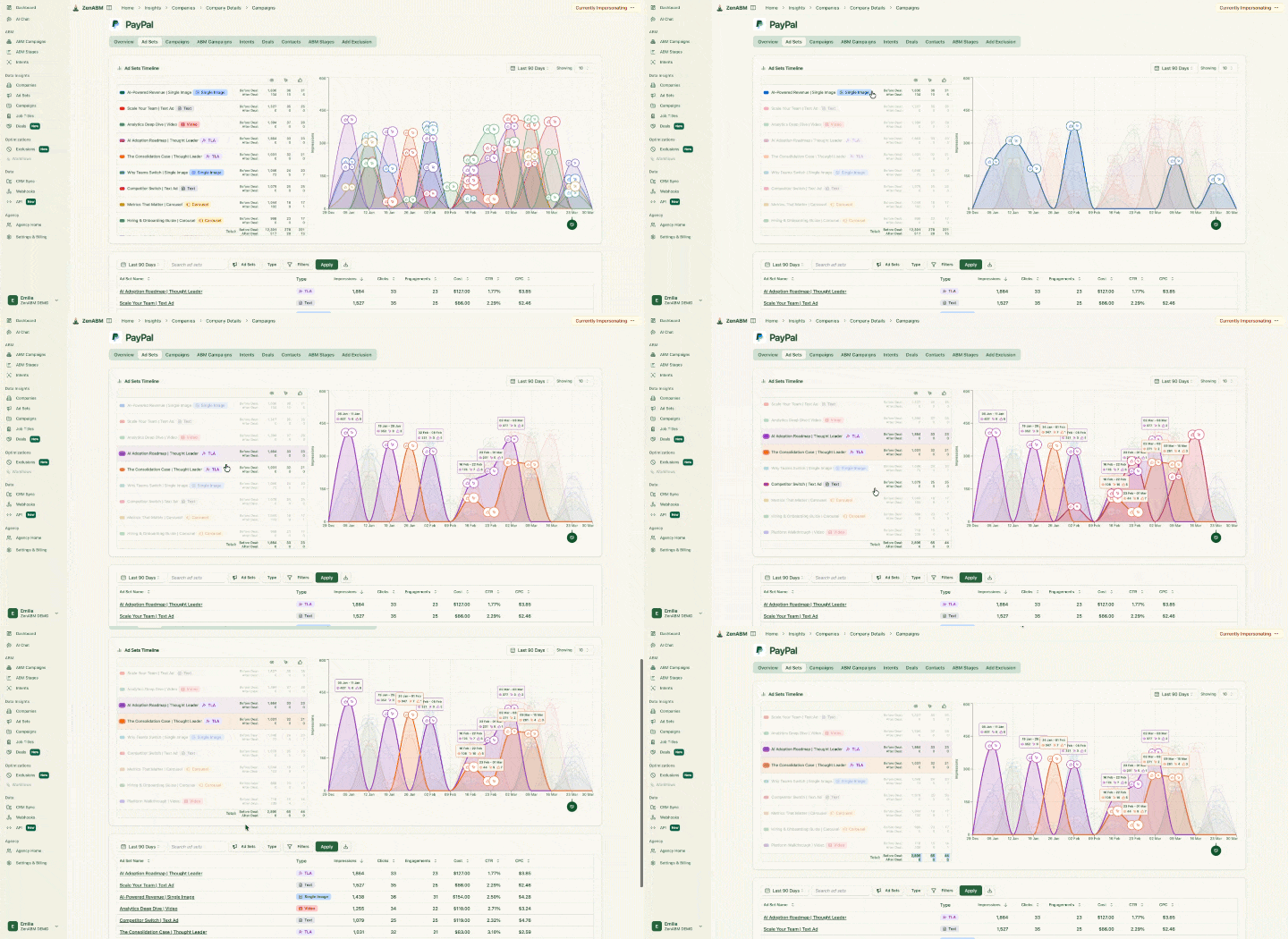
ZenABM records each account across four engagement states, which is what makes view-through accounting possible at all:
The example that makes this concrete: Company X collects 50 impressions across two of your campaigns with zero clicks, then opens a $75K opportunity two weeks later.
ZenABM shows you which specific campaigns warmed the account, breaks the engagement down by date and creative, and shares credit across all exposures.
Every one of those data points comes from the official LinkedIn Marketing API, not scraped or reverse-IP’d.
Native, no-code, bi-directional sync, which means pipeline reporting isn’t a science project, and your AEs see ad data inside the same Salesforce or HubSpot views they already use.
ZenABM maps LinkedIn engagement to open opportunities and closed-won deals inside your CRM, deduplicating revenue attribution so the same deal isn’t double-counted across overlapping campaigns.

You also see per-deal values tied to ad exposure, which means you can finally make claims like:
That’s the kind of language that survives a CFO review, because every claim is tied to a specific company and a specific campaign with timestamps you can audit.
In fact, it even tracks other ad channels now like Google ads, Reddit Ads, etc.

ZenABM writes LinkedIn engagement into HubSpot as company properties:


Here’s what other stuff ZenABM brings to the table:
ZenABM calculates a rolling “Current Engagement Score” using impressions, clicks, and recency, alongside an “All-Time Engagement Score” that tracks long-term intent baseline, so you can tell the difference between an account that’s heating up right now and one that’s been a steady but cooler audience for the past year.

The score automatically bubbles up high-heat accounts so sales hits at the right moment rather than spraying outbound across the entire ICP, and qualified accounts get auto-assigned to reps in HubSpot via workflow.

Campaign tags feed buyer-intent insights, which means if an account engages repeatedly with analytics-themed creative, ZenABM tags them with “Analytics” intent and BDRs see that signal directly in the CRM, ready for personalized outreach.
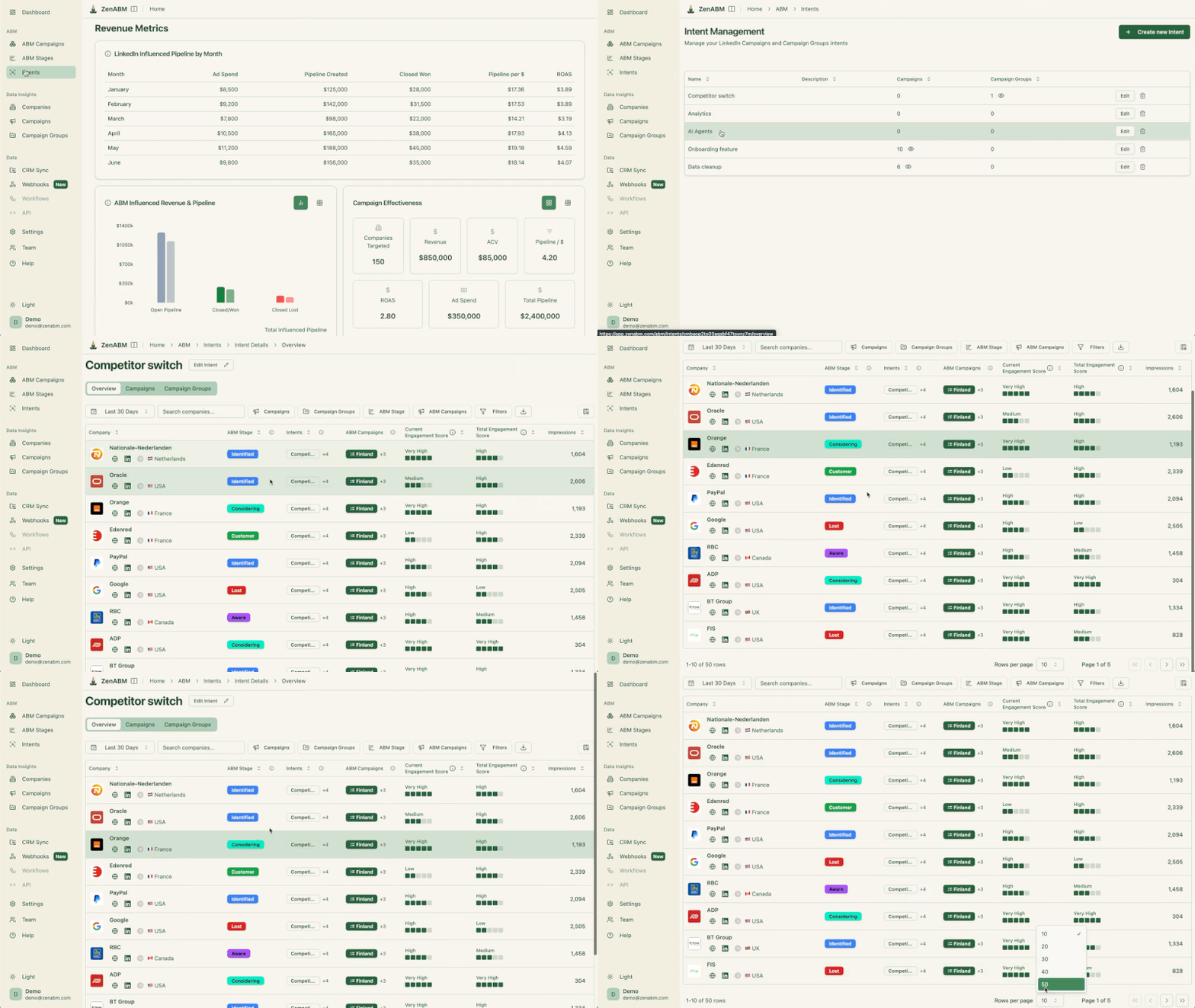

ZenABM groups accounts into customizable funnel stages (identified, aware, interested, considering, selecting, won), which are defined by combinations of LinkedIn ad engagement, CRM lifecycle stages, and custom company properties.
The stages themselves are fully editable, so you can map them to your team’s existing ABM playbook rather than fighting with the tool’s defaults, and movement between stages becomes a leading indicator that’s much more actionable than raw impression counts.
No Excel gymnastics or custom CRM builds required.
ZenABM ships dashboards that compute ROAS, lift, pipeline per dollar, account stage progression, and more, all with custom time-period comparisons.


ZenABM ships an AI chatbot called Zena, plus an MCP server, that lets you query your LinkedIn ads and ABM data in plain English without exporting CSV files into ChatGPT, Perplexity, or Gemini.
The kinds of questions Zena handles tactically:
The chatbot pulls from both raw LinkedIn engagement (impressions, clicks, CTR, spend, CPC) and ZenABM’s processed insights (intent tags, account stages, engagement scores), which means you don’t have to choose between asking about ad performance and asking about ABM outcomes; you can do both in the same conversation.

For teams running outbound on top of ABM signal, ZenABM offers webhooks that send high-intent accounts into Clay (or Attio, Pipedrive, n8n, anything that accepts JSON) the moment they cross a stage threshold or pick up an intent tag. The setup is three steps: define which campaigns to send data from, filter by intent and ABM stage (e.g., send only “Interested” companies with “Analytics” intent), and select payload format and delivery cadence (individual webhooks per company or batched).
This is what unlocks the “auto-prospect interested accounts and add associated contacts to a personalized sequence” workflow without any manual list-building, which is the actual operational payoff of ABM signal that most reporting-only tools never close the loop on.
ZenABM focuses tightly on LinkedIn-centric multichannel ABM performance tracking and attribution, which means it isn’t a programmatic display platform, and it isn’t a target list building tool.
If you want a single platform for everything ABM does, you’re going to either pay 6Sense or Demandbase numbers or stitch together a stack, and ZenABM is going to be one specific layer in that stack rather than the whole thing.
Bottom line: A LinkedIn-centric multichannel ABM pipeline reporting and attribution tool that’s lean, accurate, and affordable, with the LinkedIn-first feature set to actually do the job and pricing that doesn’t require board approval.
ZenABM has four plans, designed so you can start small and scale as your ABM program matures, with no seat limits on any plan and unlimited company-level engagement insights, CRM sync, and LinkedIn campaign insights at every tier.
Plan | Price (paid monthly) | ABM Campaigns | Intents | Best for |
|---|---|---|---|---|
Starter | $59/mo | 1 | 3 | Small teams running a single LinkedIn ABM motion who need company insights, intent, account scoring, analytics dashboards, and bi-directional HubSpot sync |
Growth | $159/mo | 3 | Customizable | Mid-market teams running multiple campaigns or audiences who need Salesforce integration alongside HubSpot, plus upcoming Slack alerts and BDR auto-assignment |
Pro | $399/mo | Unlimited | Unlimited | Larger teams that want unlimited ABM campaigns, client-ready dashboards, AI-driven features, and enterprise integrations |
Agency | $479/mo | Unlimited | Unlimited | LinkedIn ad agencies managing 3 client seats included, with $199 per additional seat, multi-client dashboards, and unlimited campaigns |
The 37-day free trial gives full functionality, including Zena (the AI chatbot) and CRM sync, and there’s no credit card required to start.
See the pricing page for full feature matrices.

Factors.ai is a multi-channel attribution and account intelligence platform that supports LinkedIn, Google, and Meta, with strong automation, intent capture, deanonymization, scoring, and multi-touch reporting.
For core data and pipeline mapping, mostly yes, but CRM property write-back is the structural gap.
Factors pulls impressions, clicks, and spend via the official LinkedIn API at the campaign-group and campaign level, so you can tie exposure to pipeline movement, and as a LinkedIn Marketing Partner the data pipeline is officially supported rather than reverse-engineered.

HubSpot and Salesforce joins bring opportunity and revenue views into the platform, and Factors layers G2 buyer intent and Bombora signals on top.
The structural caveat: there’s no native company-property write-back, so if you want LinkedIn engagement counts living as first-class properties on the HubSpot Company object, you’ll need to build the workflows yourself.

AdPilot is the LinkedIn-specific module that handles audience building, frequency capping, and CAPI feedback, and it’s a meaningful add-on for teams running serious LinkedIn budget.
It’s also a meaningful upcharge: $1,000/month on top of the Basic plan, which roughly triples the entry price.

The audience builder syncs CRM and intent data into LinkedIn as Matched Audiences, automatically updating as account scores change, which is the same pattern ZenABM webhooks support but built natively into the campaign management layer.

Per Factors’s own analysis, the top 10% of accounts in a typical ABM list eat 80% of impressions, so account-level frequency capping spreads spend more evenly across the target list and is one of the highest-leverage optimizations in LinkedIn ABM.
MAP, CRM, and Slack hooks for ops teams, plus the recently expanded “AI Agent” suite that automates account research, outreach drafting, and signal-to-action workflows.
You can benchmark LinkedIn alongside Google, Meta, and other paid and owned channels in the same dashboard, which is genuinely useful for multi-channel demand gen teams that need to allocate budget across networks.
Bottom line: Great impression controls, account-level analytics, and multi-channel coverage. Pipeline write-back to CRM requires DIY workflows, and the real cost is meaningfully higher than the sticker price suggests.
Plan | Base price | Includes | Notable add-ons |
|---|---|---|---|
Free | $0 | Up to 200 identified companies/month, basic visitor intel | None |
Basic | $399/mo | 3,000 accounts/month, 5 user seats, LinkedIn intent signals, core CRM links | LinkedIn AdPilot ($1,000/mo), Interest Groups ($750/mo) |
Growth | $999/mo | 8,000+ accounts, ABM analytics, G2 buyer intent, advanced workflows, AI features | Same add-ons available; account overages at $100 per 500 accounts |
Enterprise | Custom | Predictive account scoring, journey milestones, white-glove onboarding, SSO | Custom |

Demandbase is the full-stack enterprise ABM platform: target account lists, multi-channel ad delivery, account intelligence, intent data, advertising DSP, website personalization, sales orchestration, and revenue reporting all rolled into Demandbase One.
Demandbase is the brand; Demandbase One is the platform.
Yes, across all three pillars.
Demandbase is a certified LinkedIn Marketing Partner with official API access, so account-level reporting on LinkedIn campaigns is standard rather than bolted-on. Coverage extends beyond LinkedIn into the Demandbase B2B advertising network and connected display partners.
Bi-directional sync with HubSpot, Salesforce, Microsoft Dynamics 365, Marketo, Pardot, and Eloqua.
You can measure pipeline and revenue with proper account-level rollups, write engagement back to CRM properties, and trigger plays based on stage and intent.
A consistent Capterra note worth flagging: sales teams overwhelmingly live in Salesforce, so the Demandbase UI itself becomes a change management challenge for adoption beyond the marketing team.

Per-account frequency caps prevent over-serving any single account, which keeps your spend distributed across the target list rather than concentrated on the loudest 10% of companies.

You can prioritize spend toward in-market accounts using Demandbase’s first-party intent dataset, which is one of the largest in B2B at 2T+ signals per month, and that’s a meaningful differentiator if your ABM motion depends on third-party intent in addition to LinkedIn’s first-party signal.
Demandbase operates the only B2B-native demand-side platform, which lets you serve targeted display ads to specific accounts across the open web, not just LinkedIn.
For enterprise ABM teams running always-on display alongside LinkedIn, this is genuinely differentiated and partially explains the price tag.
Price and complexity are the obvious barriers.
Per Vendr’s 2026 transaction data across 175 tracked purchases, the median Demandbase contract runs $65,981/year, with the observed range spanning $22,860 to $164,265, and buyers negotiate roughly 13% off list on average.
The DSP often requires minimum monthly ad spend of $5,000 to $10,000 on top of the platform fee, onboarding is typically billed separately at around $29,000, and implementation timelines stretch weeks to months before campaigns run at full capacity.
Multiple G2 reviewers flag that you’ll need a dedicated Sales Ops resource to connect the dots properly, and average ROI timeline lands around 13 months per SoftwareReviews data.
Bottom line: Excellent if you run multi-channel ABM at enterprise scale with budget, dedicated ops headcount, and $50K+ ACV deals. Significantly overbuilt and overpriced for LinkedIn-only or smaller mid-market motions.
Demandbase doesn’t publish list pricing.
Based on Vendr aggregate transaction data:
Deployment size | Annual contract value | Notes |
|---|---|---|
Smaller | ~$22K to $43K/yr | Limited account volumes, basic advertising, sales intelligence only |
Mid-market (median) | ~$43K to $65K/yr | Full ABM, basic advertising, intent data, integrations |
Enterprise | $100K to $300K+/yr | Full Demandbase One stack with B2B DSP, personalization, Agentbase AI, dedicated support |
Add onboarding ($5K to $29K), per-user fees ($1,200 to $3,000/seat/year), and DSP minimum ad spend on top. Book a demo for a quote tied to your specific scope.

Terminus is an ad-first ABM engagement platform with a Salesforce-centric workflow and a LinkedIn Marketing Solutions integration that updates delivery and analytics quickly.
Terminus merged with DemandScience in late 2024, which combined Terminus’s multi-channel orchestration with DemandScience’s data and demand generation capabilities, and the consolidation is still working its way through the product roadmap.
Partly, with the structural caveat that company-level impression tracking is constrained to LinkedIn Matched Audiences sourced from your uploaded or CRM-synced lists, rather than every account that gets served.
Strong for accounts inside your uploaded or CRM-derived Matched Audience, much weaker for any account outside those lists, which means Terminus is best when your ABM motion is heavily list-led rather than discovery-led.

Salesforce-centric funnel views and exec dashboards, which work well if your sales team already lives in Salesforce, less well if you’re HubSpot-first.


You can trigger campaigns from Outreach, Salesloft, Uberflip, and Bombora intent signals, which is genuinely useful if your outbound and ABM motions are tightly coupled.
Bottom line: Good LinkedIn analytics within curated Matched Audience lists, useful Salesforce integration, and decent multi-channel orchestration. Not the cheapest if you’re LinkedIn-only, and the post-merger product story is still settling.
Now part of DemandScience and sold as part of broader DemandScience packages.
Per Vendr, median ACV is approximately $23,000 with enterprise contracts including Bombora intent and advanced analytics reaching $87,000+.
Contact sales for a tailored quote.

HockeyStack is a B2B analytics platform that blends LinkedIn Ads, site analytics, and CRM touchpoints into account and person-level paths.
In late 2025 the platform expanded into “GTM Intelligence,” adding AI sales agents (Odin, Revenue Agents) and account scoring on top of the attribution core, which has changed the positioning meaningfully versus the 2025 version of this article.
Almost, with one important architectural caveat about CRM sync direction.

HockeyStack is a LinkedIn Marketing Partner and pulls impression and engagement data via the official API, with company-level rollups across campaigns.

The structural caveat: HockeyStack’s CRM sync is one-way (pull, not push), which means you’ll need workflows or custom dashboards to write LinkedIn engagement back into HubSpot or Salesforce as company properties if your team needs that data living inside the CRM.
Reviewers also note that HockeyStack leans heavily on email as its primary identity resolution key, which can produce drift in attribution numbers when email data is inconsistent or missing across systems.


Be cautious here: cookies and reverse IP affect identity fidelity, so person-level data is best treated as supporting evidence rather than primary truth.


The “Golden Paths” feature is a genuinely strong piece of the platform, surfacing the touchpoint sequences that statistically correlate with closed-won and helping you spot which campaign combinations actually move accounts forward.
The most-cited negative on G2 is the learning curve, which gets explicit calls of “steep” in 8 out of 11 dedicated mentions. Initial setup is more involved than the marketing copy suggests, the data model isn’t always transparent (one reviewer described it as “somewhat like a black box”), and dashboards showing different totals across views require manual reconciliation in spreadsheets, which is a notable gap for a tool sold on attribution clarity.
Bottom line: Strong cross-channel analytics with account-level LinkedIn impressions, deep customization, and an expanding AI agent layer. Expect a 2 to 6 week ramp to operationalize, plan for one-way CRM sync as a structural fact, and budget for the price tier.
HockeyStack doesn’t publish prices.
Reported numbers from third-party 2026 buyer research:
Tier | Price | Includes |
|---|---|---|
Growth | ~$1,399/mo (10K monthly tracked users, 10 seats) | Multi-touch attribution, paid ads analysis, content and events reporting, lift reports, funnel reporting, visitor identification |
Platform | ~$2,200/mo | Full integration catalog, CRM/MAT/ad platforms, advanced models, journey views |
ABM Add-On | Custom | Display/LinkedIn audience sync, account/lead scoring, CRM sync |
Sales Intelligence Add-On | Custom | Revenue Agents, AI agent suite, custom agent builder |
Vendr transaction data shows entry-tier annual contracts typically land in the $12,000 to $24,000 range.
See the pricing page to request a quote.

LeadsRx is a universal pixel plus offline-ingestion platform built around multi-touch attribution, with strong reach into mixed media (radio, podcasts, events, OOH) alongside digital.
It was built to solve the omni-channel attribution problem, not the LinkedIn ABM problem, which means it’s a structurally different tool than the rest of this list.
Partially.
There’s no LinkedIn API integration for impression-level data, the identity model is cookie-centric, and company views depend on your CRM joins or form submissions. LinkedIn Lead Gen Forms need webhooks to push into LeadsRx properly.

LeadsRx excels at mixed media plus digital, with clean journey maps and ROAS views that bridge offline and online touchpoints, which is useful for B2B teams running events and broadcast alongside paid digital.


Bottom line: Great omni-channel attribution lens for marketers running mixed media. Weak for impression-first LinkedIn ABM pipeline reporting because the structural data model just doesn’t include LinkedIn API impression data.
Sales-led, custom pricing only. No published list pricing, no self-serve trial.

6Sense is best known for account identification, third-party intent (Bombora-style keyword surge), and predictive scoring, with a tighter LinkedIn connection added in 2023 and progressively expanded through 2025.
The platform’s core strength is predicting which accounts are in-market based on aggregate behavior across the open web, which is a fundamentally different signal than LinkedIn first-party engagement.
No. LinkedIn data in 6Sense remains aggregate rather than impression-by-account, attribution requires clicks or visits which under-counts view-through influence on pipeline, and the platform is not designed around LinkedIn-first reporting.
If your ABM motion is built around LinkedIn impression data as the primary signal, 6Sense is the wrong tool.

The segment builder combines firmographic, technographic, and intent signals into precise audiences, which is genuinely useful for orchestrating outbound and display alongside whatever LinkedIn motion you’re running.

Contextual targeting lets you set keyword-based intent triggers and prioritize spend toward accounts surging on those terms, which is the platform’s signature differentiator.

Persona coverage maps show which roles inside each target account you’ve reached and which you haven’t, which is a useful operational view for buying-committee orchestration where 10 stakeholders is now the average.
Bottom line: Great for predictive intent, segmentation, and display targeting at enterprise scale. Not built for impression-led LinkedIn ABM pipeline reporting, so it’s the wrong primary tool if LinkedIn is your main channel.
Not published.
Vendr median across tracked transactions sits around $58,950/year, with the Growth tier typically starting around $60,000 annually and full enterprise deployments reaching $120,000 to $200,000+.
There’s a limited free tier for basic account identification (up to 50 monthly credits).
Contact sales for a tailored quote.

HubSpot’s native ads tool plus attribution module pulls clicks and lead form data from LinkedIn into reports, which is great if your motion is HubSpot-first and click-led, but it’s structurally not designed for impression-based account analytics.
For click-based contact attribution, it’s the cleanest tool in the category. Connect clicks to contacts to revenue and flip between models (First-touch, Last-touch, Linear, U-shaped, W-shaped, Time-decay) without leaving HubSpot.
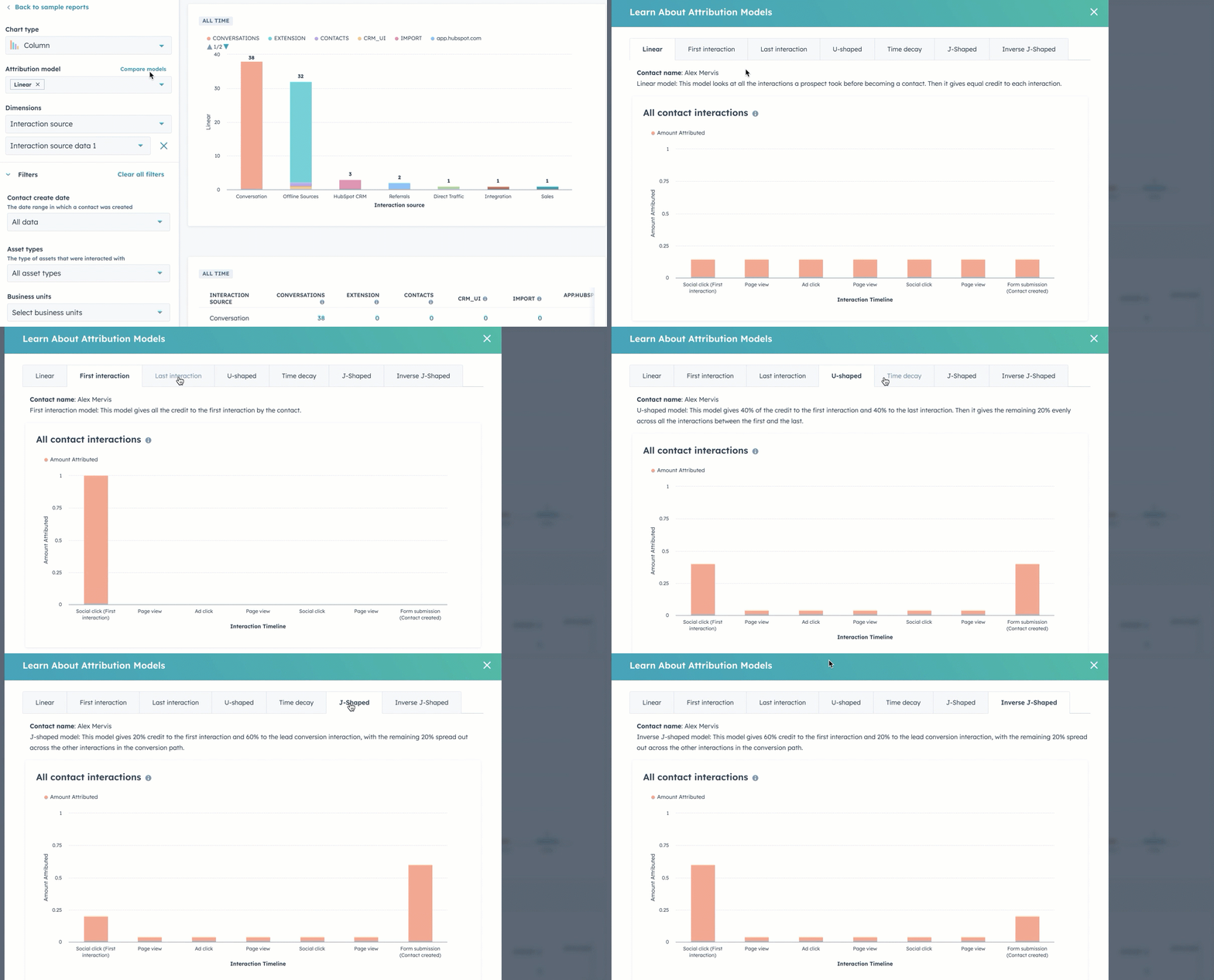
If your reporting needs are limited to “Which channels and campaigns drove form-fillers who later closed?”, this is a fast, integrated answer.
No custom attribution weights, limited LinkedIn ad type support via API, and notable practitioner constraints flagged in user reviews.

The deeper structural issue is that HubSpot Marketing Attribution wasn’t built for ABM pipeline reporting at all, it was built to credit channels and campaigns for lead generation, and patching ABM logic on top of it requires custom workflows that other tools handle natively.
Bottom line: Excellent CRM and MAP for HubSpot-native teams. Not a LinkedIn ABM pipeline reporter, and if you’re using HubSpot you’ll get more from pairing it with a tool like ZenABM that writes LinkedIn engagement into the same Company objects you already filter on.


CommonRoom is a community intelligence platform that pulls LinkedIn engagement, Slack, GitHub, social platforms, and product signals to surface warm accounts and contacts.
It’s the right tool for community-led growth motions, and it’s specifically not the right tool for LinkedIn ad pipeline reporting because it doesn’t track ad impressions at all.
No.
There’s no account-level impression tracking on LinkedIn ads, so the ABM pipeline reporting picture from CommonRoom is fundamentally incomplete.
The LinkedIn data CommonRoom pulls is engagement on organic content and contact-level activity, not paid ad impression data.

You can correlate community spikes with LinkedIn pushes and let RoomieAI surface patterns across the long tail of community activity, which is useful for product-led and community-led growth motions where the signal-to-noise ratio in raw community data is brutal.
CommonRoom turns raw community signups, GitHub stargazers, and social mentions into company profiles that map back to accounts in your CRM, which is genuinely valuable enrichment infrastructure.

The Chrome extension makes one-click LinkedIn profile capture into CommonRoom lists fast, which is useful for sales prospecting workflows but doesn’t connect to ad impression data.
Bottom line: Terrific for community-led growth motions and contact-level enrichment from social and community sources. Not a substitute for impression-level ABM pipeline reporting on LinkedIn ads.
Plan | Price | Includes |
|---|---|---|
Starter | $999/mo | 35K contacts, 2 seats |
Team | $1,999/mo | 100K contacts, 3 seats |
Enterprise | Custom | Larger contact volumes, custom seats, advanced features |

Windsor.ai is a data hub for attribution across 300+ sources, with strong normalization and BI exports, and it’s a great tool for multi-source attribution modeling.
It’s structurally not designed for LinkedIn ABM pipeline reporting because it doesn’t pull LinkedIn impression data at the account level, doesn’t write back to CRMs, and treats accounts as a manual grouping problem rather than a first-class data object.
No on all three. It needs clicks or lead forms for LinkedIn credit, leans on reverse IP for any account grouping, and there’s no impression-by-account analytics out of the box. ABM users have to build account groupings manually, which doesn’t scale.

Bottom line: Excellent attribution modeling layer for analytics-heavy teams that want custom models and BI integration. Not an ABM-first pipeline reporter, and not the right primary tool if account-level impression tracking on LinkedIn is what you actually need.
Plan | Price | Includes |
|---|---|---|
Free | $0 | 1 source, 30-day history |
Basic | $19/mo | Limited sources, basic exports |
Standard | $99/mo | More sources, deeper history |
Plus | $249/mo | Advanced models, bigger volumes |
Professional | $499/mo | Full source library, premium support |
Enterprise | Custom | Custom limits, SLA, dedicated CSM |
The “best” tool depends on what your ABM motion actually looks like, what you’ve already built into your stack, and what you’re willing to spend.
Here’s the practical decision tree:
Your situation | Recommended tool | Why |
|---|---|---|
LinkedIn-focused multichannel ABM, lean team, HubSpot or Salesforce, sub-$10K/mo LinkedIn spend | ZenABM | Cheapest tool that actually delivers all three pillars (impression tracking, two-way CRM sync, official LinkedIn API), with native ABM features and a 37-day free trial, and now it also attributes for other ad channels, organic, etc. |
Multi-channel demand gen with heavy website traffic, mid-market budget | Factors.ai | Strong cross-channel attribution with LinkedIn AdPilot, but budget for $1,400 to $2,750/mo all-in once add-ons stack up |
Enterprise ABM, $50K+ ACV deals, dedicated ops headcount, multi-channel display alongside LinkedIn | Demandbase | Native B2B DSP, deep multi-channel orchestration, biggest first-party intent dataset, 13-month ROI timeline expected |
Salesforce-first, list-led ABM motion, multi-channel orchestration alongside LinkedIn | Terminus (DemandScience) | Strong Salesforce fit and Matched Audience analytics; watch for post-merger product roadmap shifts |
Mid-market with sophisticated multi-touch attribution needs across 10+ channels | HockeyStack | Deepest customization and Golden Paths analysis; expect a steep ramp and one-way CRM sync |
Predictive intent and account targeting beyond LinkedIn alone | 6Sense | Best-in-class predictive scoring and intent modeling; not a LinkedIn-first reporting tool |
HubSpot-first, click-attribution sufficient, no view-through tracking needed | HubSpot Marketing Attribution | Simplest path inside the system you already pay for; missing impression-level account data |
Community-led growth with paid LinkedIn as a secondary channel | CommonRoom (paired with ZenABM for ad-side reporting) | Best community signal in the category; not a substitute for impression-level ad analytics |
Mixed media (events, broadcast, podcasts) plus digital, with LinkedIn as one of many channels | LeadsRx | Strong omni-channel attribution lens; weak for LinkedIn-specific ABM reporting |
Analytics team wants raw data for custom modeling in BI tools | Windsor.ai | Excellent data hub for analysts; not an ABM tool in itself |
The honest pattern: if LinkedIn is your primary B2B channel and you want pipeline reporting that actually works, you want a tool built around LinkedIn impression data as the primary signal rather than a tool that bolts LinkedIn onto a different core.
That’s a short list (ZenABM, Factors.ai, and at the enterprise end Demandbase), and the choice within that short list is mostly a function of budget, the rest of your stack, and how much complexity your team can absorb.
The 2026 ABM pipeline reporting landscape rewards specialists.
Demandbase, HockeyStack, Terminus, and Factors.ai are all strong when you’re running larger programs with multi-channel scope and deep controls, but each one carries either pricing or operational complexity that makes it overbuilt for LinkedIn-first ABM motions.
LeadsRx doesn’t use the LinkedIn API and leans on cookies, which makes it the wrong structural fit.
HubSpot Attribution remains click-centric and contact-centric.
6Sense focuses on targeting and visits over impression-level reporting. CommonRoom surfaces community engagement, not ad impression logs.
Windsor.ai is a stellar data layer for analysts, not an ABM-first choice.
If you want a cost-conscious tool that actually nails ABM pipeline reporting for LinkedIn, while also attributing for other channels in 2026, start with ZenABM.
It tracks company-level impressions through the official LinkedIn API, maps them to CRM opportunities in HubSpot or Salesforce, writes engagement counts back as company properties, and shows which campaigns moved which deals even when nobody clicked, while keeping the price below what most enterprise ABM tools charge per user per month.
It now also provides attribution data for other channels like Reddit Ads, Google Ads, and organic – pulled from your CRM.
Book a ZenABM demo to see how the best ABM pipeline reporting tools should operate in practice, or sign up for the 37-day free trial and stand it up against your current LinkedIn ad data in under three minutes.
