• Blog
  • Pricing
Login
Free TrialGet a Demo
Get a Demo
ZenABM

ABM made easy. Plug-and-play account scoring and analytics.

Follow us

LinkedInFacebookYouTubeX
Start for FreeLoginBook a Demo

Product

  • All Features
  • AI Agent - Zena
  • Dashboards
  • AI Reporting
  • Expert Skills
  • MCP Server
  • Companies Engagements
  • Multi-Channel Revenue Attribution
  • ABM Campaign Analytics Dashboards
  • Company Buyer's Intent
  • LinkedIn Ad Campaign Insights
  • Job Titles Insights
  • CRM Sync
  • Webhooks
  • API

Use Cases

  • ABM Campaign Management and Performance Tracking
  • Account Scoring
  • LinkedIn Campaign Management and Optimization
  • For LinkedIn Ads and ABM Agencies
  • Agency MCP Server

Free Tools

  • ABM Budget Calculator
  • LinkedIn Ads Count Calculator
  • LinkedIn TLA Generator
  • Experts Chat
  • LinkedIn Single Image Ad Creator

Case Studies

  • Productive's ABM Success Story
  • Valueships's LinkedIn TLA Case Study
  • Flowfuse's ABM Success Story

LinkedIn Optimization

  • Build Campaigns with AI
  • Budget Savers
  • Bidding Agent
  • Exclusions
  • Impression Capping
  • Workflows

Resources

  • Documentation
  • Release Notes
  • Reports & Templates
  • Blog
  • Case Studies
  • ABM Benchmarks Report
  • LinkedIn Ads Agencies Directory
  • ABM Clay Templates
  • LinkedIn ABM Skills for Claude
  • LinkedIn ABM Strategy
  • Running ABM on LinkedIn: The Ultimate Guide
  • Events
  • TLA Bootcamp
  • AI for ABM & LinkedIn Ads Week

Competitors comparison

  • ZenABM vs Fibbler
  • ZenABM vs Factors.ai
  • DemandSense Alternatives
  • Recotap Alternative

Company

  • Pricing
  • Contact
  • Brand Assets
  • Become a partner

Legal

  • Terms of Use
  • Privacy Policy
  • Data Policy

©2026 ZenABM - All Rights Reserved.

  1. Home
  2. Blog
  3. Campaign Structure & Strategy
Campaign Structure & Strategy

ABM Program Setup: From Zero to First Campaign

Emilia Korczynska
Emilia Korczynska
LinkedInPublished Apr 20, 2026·Updated Apr 20, 2026

Share this post

LinkedInXFacebook
ABM Program Setup: From Zero to First Campaign

Summarize with AI:

View as Markdown

Table of Contents

  • ABM Program Setup: Quick Summary
  • Why LinkedIn Should Be the Core of Your ABM Program
  • Before You Spend a Dollar: Reverse-Engineer Your Budget from Your Revenue Goal
  • Step 1: Build and Prioritize Your Target Account List
  • Step 2: Set Up Your Campaign Structure
  • Step 3: Layer Retargeting on Google Display, Meta, and Reddit
  • Step 4: Harvest Intent Signals with ZenABM Account Scoring
  • Step 5: Add Events and Gifting to Your ABM Program
  • The ABM Program Setup Checklist
  • ABM Program Setup: Final Thoughts
  • FAQs About ABM Program Setup

When Emilia Korczynska (VP of marketing at Userpilot) launched her first ABM program, she had no playbook.

Most ABM content she found was high-level strategy slides: “align sales and marketing,” “target the right accounts,” “personalize your messaging.”

Stuff like this:

Phone screenshot of an ABM ebook highlighting how to combine a scrappy tech stack with creativity for plays
Busting Silos by Hillary Carpio

None of it told her which buttons to click in LinkedIn Campaign Manager, how many ads to run, or what to do when a target account actually engages.

16 months later, that program had generated $5.29M in pipeline from $490K in ad spend.

But the first three months were painful. The team made every mistake in the book: overcomplicated the account scoring, spread the budget too thin across too many campaigns, and tried to use four channels at once before mastering one.

This post is the zero-to-first-campaign guide she wishes she had when starting out. It covers everything in the order you need to do it, with the specific tools, decisions, and configurations at each step.

What you will learn:

  • Why LinkedIn should be the core of your ABM program (and what role other channels play)
  • How to reverse-engineer your budget from a revenue goal before you spend a dollar
  • How to build and prioritize your target account list (including which accounts to target first)
  • How to structure your first campaigns, including the naming convention and four default settings to turn off immediately
  • How to set up retargeting on Google Display, Meta, and Reddit
  • How to harvest intent signals and score accounts using ZenABM
  • How to add events and gifting to your ABM program

ABM Program Setup: Quick Summary

Short on time?

Here’s a quick rundown:

ZenABM ABM program setup checklist infographic: 12 numbered steps from pipeline budget to first campaign
  • LinkedIn first, other channels later. It is the only ad platform with native company-level targeting and API-level engagement data. Do not try to launch on four platforms at once.
  • Reverse-engineer your budget from a pipeline goal before spending anything. Use the formula: pipeline goal, deal size, target account count, impressions needed, and budget required.
  • Build your account list starting with closed-lost deals, churned customers, and competitor lookalikes. Cold ICP-fit accounts come last. List quality accounts for 50% of ABM success.
  • Two campaign layers from day one: COLD (awareness to engaged accounts) and WARM (retargeting engaged accounts with product-focused content). Without the WARM layer, the program stalls at awareness.
  • Turn off four LinkedIn defaults immediately: Audience Expansion, LinkedIn Audience Network, Maximum Delivery bidding, and Budget Optimization.
  • Use Thought Leader Ads heavily (40% of mix). TLAs deliver 2.68% median CTR at $2.29 CPC versus 0.42% CTR at $13.23 CPC for single-image ads.
  • Create dedicated noindex landing pages for LinkedIn ads, install retargeting pixels, then retarget those visitors on Google Display, Meta, and Reddit at $5 to $15 CPM instead of LinkedIn’s $40 to $60.
  • ZenABM scores accounts by LinkedIn engagement thresholds (5+ clicks = Interested, triggers BDR outreach) and pushes qualitative intent (which campaign topics the account engaged with) directly into HubSpot or Salesforce.
  • Events and gifting only accelerate warm accounts. Hitting cold accounts with gifts or invitations is noise. Use ZenABM stage data to know the difference.
  • Minimum viable stack: $8K to $10K per month on LinkedIn, a CRM, Clay for list building, and ZenABM at $59 per month for scoring and intent. No enterprise ABM platform required to start.

Why LinkedIn Should Be the Core of Your ABM Program

Teams that build ABM programs with LinkedIn as the primary channel get to pipeline faster than teams that try to start with Google Display or 6sense, and here is why.

LinkedIn is the only advertising platform that gives you three things simultaneously:

  1. Native company-level targeting. Upload a list of companies, and target decision-makers at those companies by job title and seniority. No other ad platform offers this for B2B without a third-party data layer on top.
  2. Company-level engagement data from the API. See which companies received impressions, clicked, and engaged, broken down by campaign. Tools like ZenABM pull this data to build account scoring and deal attribution.
  3. Professional identity data. People use LinkedIn with their real job title and company name. On Meta or Reddit, you are targeting personal profiles. The context and the identity layer are both fundamentally different.

This means LinkedIn serves as both your primary ABM distribution and measurement channel. You run targeted ads and see which accounts respond on the same platform.

Every other channel requires workarounds (reverse IP, CRM matching, third-party identity graphs) to even identify which companies saw your ads.

As Tim Davidson (B2B Rizz) described when breaking down the 1:1 ABM approach in his post:

“Ideal audience size: 5 to 15K people. Small enough to show up often. Big enough to scale. That is how you get niche famous.”

Tim Davidson

This is exactly the logic of LinkedIn ABM: precision over volume, with a platform that can actually deliver precision.

The recommendation: build your ABM program on LinkedIn first. Get the targeting, creative, and scoring working. Then layer other channels on top for retargeting and surround sound. Do not try to launch on four platforms simultaneously. You will spread budget and attention too thin. For the complete tactical breakdown, read the full ABM on LinkedIn guide.

Before You Spend a Dollar: Reverse-Engineer Your Budget from Your Revenue Goal

Most ABM programs fail before the first ad goes live because the budget is set arbitrarily (“we have $10K per month, let’s see what happens”) rather than reverse-engineered from a pipeline target.

As Maximilian Herczeg (founder at Kamrat) covered in the ZenABM ABM Bootcamp 2026:

“Most LinkedIn ABM campaigns fail before launch because the account list is wrong, the budget is spread too thin, or the goal is vague and not tied to the pipeline.”

Here is the formula that should precede every ABM budget decision:

  1. Start with your pipeline goal. If you want $2M in pipeline, and your average deal size is $50K, you need 40 deals in the pipeline.
  2. Work backwards to target accounts needed. 40 deals divided by the median LinkedIn ABM deal open rate (0.58% based on ZenABM’s 211-company benchmarks) = approximately 7,000 target accounts.
  3. Calculate impressions needed. Website visits needed = demos needed divided by landing page conversion rate. Impressions needed = visits divided by median CTR.
  4. Calculate the budget. Budget = (impressions divided by 1,000) x median CPM. Use the ZenABM ABM Budget Calculator to run your numbers without doing this manually.
    ZenABM ABM Budget Calculator showing LinkedIn Ads budget, monthly budget and target accounts from revenue inputs

If the resulting budget exceeds what is available, adjust the goal or the timeline.

The math does not bend to accommodate wishful thinking.

Running a program with insufficient budget to reach your target account list with meaningful frequency is the most common reason that first ABM programs “do not work.”

Step 1: Build and Prioritize Your Target Account List

Funnel showing how Target Account List is built out of the broad ICP net for ABM Campaigns
Funnel showing how target account list is built from ICP for ABM campaigns

Your account list is the foundation of your ABM program.

A bad list makes every downstream step pointless. As the saying in B2B ABM goes: “Your list is your strategy.”

Define Your ICP Criteria

Start with firmographics (company size, industry, revenue range, geography), technographics (which tools they use, including CRM, marketing stack, and competitors’ products), and intent signals (hiring patterns, funding rounds, technology adoption signals).

Analyze your best closed-won customers to find common traits.

This is not a theoretical exercise: pull your CRM data and look at what your actual buyers have in common.

As Andrei Zinkevich (Fullfunnel.io) warns:

“The fact that the account fits your firmographic criteria doesn’t mean it’s a good fit. The more disqualifying ‘red flags’ you set up, the better your list will be.”

LinkedIn post outlining three ABM maturity stages: pilot, ABM operations and scaling, with tool examples per stage

A 200-person SaaS company growing 50% year-over-year is fundamentally different from a 200-person SaaS company plateauing, even though both look identical in a filter.

Prioritize Accounts by Warmth, Not Just Fit

This is the most important insight from running a real program: do not start with cold ICP-fit accounts.

Start with accounts that already have context about you.

Prioritize in this order:

  1. Closed-lost deals (they evaluated you once, context has changed since then: new budget cycle, new champion, different priority). These convert at 3 to 5x the rate of cold accounts.
  2. Churned customers (they already know the product, reactivation is cheaper than new acquisition because you do not have to build awareness from scratch).
  3. Your best customers’ competitors (if you work well for Company A, you almost certainly work well for Company A’s competitors because they face the same market dynamics).
  4. Lookalike accounts to your best customers (same industry, size, tech stack, and growth stage).
  5. Cold ICP-fit accounts (last resort, not first choice).

As Philip Ilic emphasized in his post:

“For sales-led B2B SaaS, I would always start with a list of your top companies. Putting a looooot of effort into building out your list is super important.”

LinkedIn post by Philip Ilic on warming a top-company list with thought leader ads before outbound

50% of ABM success comes down to list quality.

The creative and the budget matter, but they cannot save a bad list.

Build the List with These Tools

  • Your CRM: Start with companies already in the pipeline and closed-lost that match your ICP. These are the warmest targets and cost nothing to identify.
  • Clay: The most flexible enrichment tool for building account lists. Use firmographic, technographic, and intent filters, with waterfall enrichment across 75+ data providers. Emilia Korczynska’s team at Userpilot used Clay with BuiltWith APIs to filter accounts by specific technology stack as part of their campaign list building.
    Clay table running BuiltWith tech stack checks on target accounts, with keyword matches found per row
  • Sales Navigator: Good for identifying companies by growth signals and LinkedIn-specific data, and for validating that companies have a meaningful presence and headcount on LinkedIn before adding them to your list.

For your first ABM program, target 500 to 3,000 accounts.

Fewer than 500, and LinkedIn’s audience will be too small for efficient delivery.

More than 5,000, and you need a significant budget to reach them with meaningful frequency before engagement signals start emerging.

Step 2: Set Up Your Campaign Structure

Your ABM program needs two campaign layers from day one.

This is not optional: without the warm campaign layer, engaged accounts get the same content as cold ones, and the program stalls at awareness.

The Two-Layer Structure

  • COLD campaigns: Target your full account list with awareness and educational content. TLAs, educational image ads, video content. Goal: get accounts from “Identified” to “Aware” to “Interested.”
  • WARM campaigns: Target only accounts that show engagement signals (retargeting from your LinkedIn landing pages). Product-focused ads, case studies, ROI content, demo CTAs. Goal: convert interested accounts into pipeline.

The Campaign Naming Convention (Do Not Skip This)

Emilia Korczynska makes a critical point that most first-timers skip: without a structured naming convention, you cannot track company-level engagement data from the LinkedIn API per campaign.

The ZenABM approach uses a structured naming system that encodes the ABM campaign object, the campaign group (intent level or theme), the campaign (format-specific), and the ad, all automatically generated from properties you define.

This naming architecture is what allows ZenABM to pull intent data at the campaign-group level and push qualitative intent (not just raw clicks) into your CRM.

Emilia adds:

“If you don’t mark which LinkedIn Campaign, Campaign Group and ABM Campaign the asset belongs to when designing it, good luck uploading the right asset to the right place.”

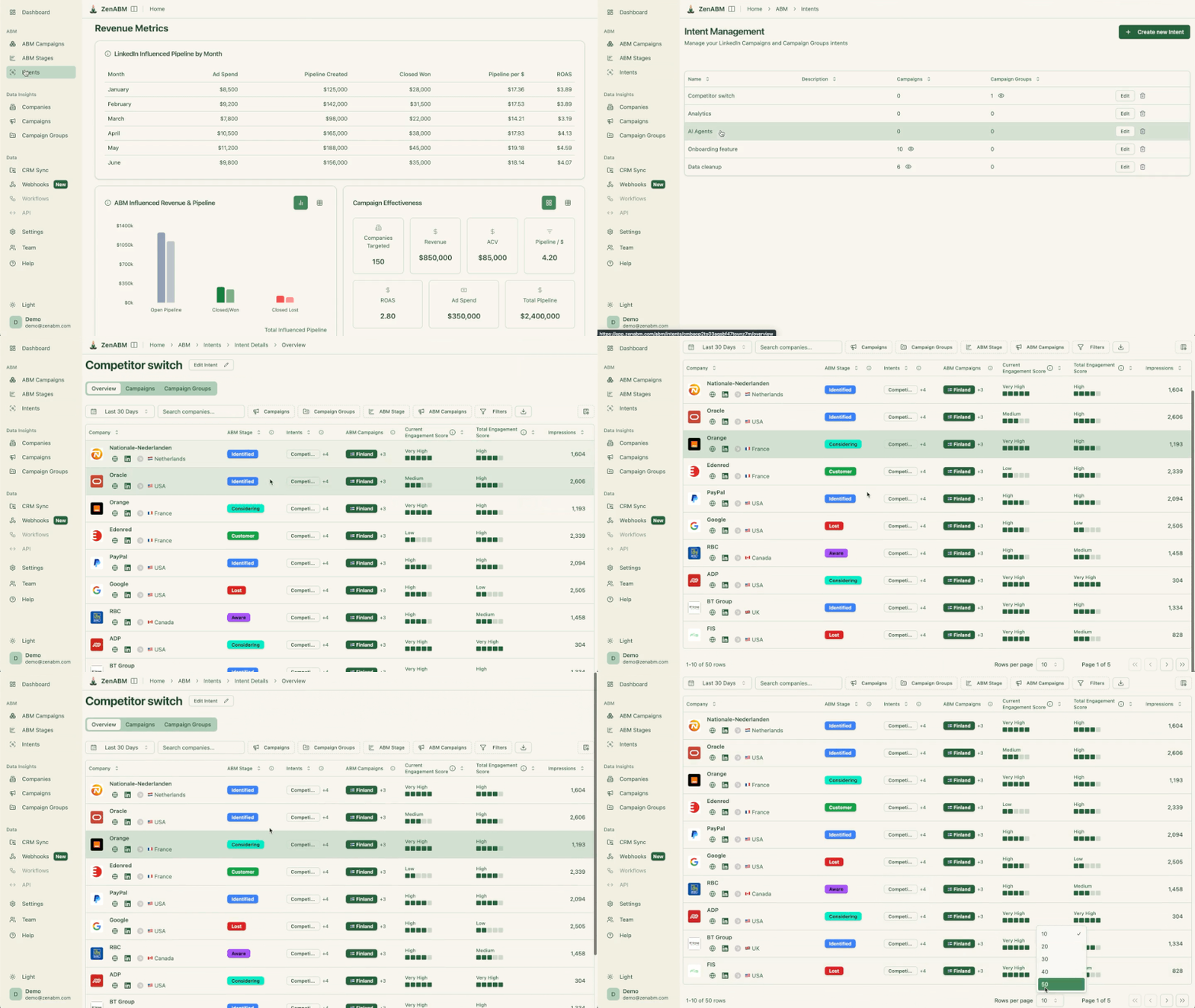
By the way, if you don’t want to name, you can just tag each campaign with an intent in ZenABM:

ZenABM screen tagging an analytics intent to LinkedIn campaigns and campaign groups for ABM targeting
ZenABM intent tagging
ZenABM revenue metrics dashboard showing LinkedIn-influenced pipeline by month and ABM campaign effectiveness
The company buyer’s qualitative intent in ZenABM, which essentially tracks that which particular messaging has resonated the most with the account.

Four LinkedIn Default Settings to Turn Off Immediately

These four settings are on by default and will silently drain your budget and dilute your targeting if you leave them on:

  1. Audience Expansion: Small toggle just below the audience section. Untoggle it. LinkedIn’s lookalike expansion dilutes your precise ICP targeting.
    Audience expansion in LinkedIn Campaign Manager
    Audience expansion in LinkedIn Campaign Manager. Source: LinkedIn

    Audience expansion in LinkedIn Campaign Manager (look at the blue checkbox at the bottom). Source: LinkedIn
  2. LinkedIn Audience Network: In the Placements section. Untoggle it. This prevents your ads from appearing on connected TV and third-party sites where professional context and click-through behavior are absent.
    LinkedIn Campaign Manager Placement section with the Audience Network checkbox ticked to turn off
    Turn LinkedIn Audience Network off in LinkedIn Campaign Manager

    Turn LinkedIn Audience Network off in LinkedIn Campaign Manager
    Reddit practitioners dislike LinkedIn Audience Network even for awareness-oriented campaigns, let alone lead gen campaigns.
    Reddit practitioners dislike LinkedIn Audience Network even for awareness-oriented campaigns, let alone lead gen campaigns.

    Reddit practitioners dislike LinkedIn Audience Network even for awareness-oriented campaigns, let alone lead gen campaigns.
  3. Maximum Delivery bidding: Change this to Manual Bidding by clicking “Show additional options” in the Bidding section. This is deliberately hidden by LinkedIn because manual bidding is better for advertisers but worse for LinkedIn’s revenue.
    LinkedIn's maximum delivery bidding setting
    LinkedIn’s maximum delivery bidding setting. Source: Magnetica Advertising

    LinkedIn’s maximum delivery bidding setting. Source: Magnetica Advertising
  4. Budget Optimization: Already turned off at the campaign group level in Step 2. Confirm it is also off at the ad set level.

The Budget Formula per Ad

Target 3 to 4 clicks per ad per day at approximately $8 CPC, which means $25 to $32 per ad per day. If your monthly budget is $10K, you can realistically run 10 to 15 ads for one persona.

Use the ABM Budget Calculator to run your specific numbers.

The Optimal Ad Mix

Performance of different LinkedIn ad formats in ABM campaigns compared based on trends analyzed in ZenABM's ABM benchmarks report 2026
Access the full LinkedIn ABM benchmarks report here

Based on the ZenABM 2026 Benchmarks Report analysis of 2,828 ads across 211 companies, favor Thought Leader Ads heavily in your mix.

TLAs deliver 2.68% median CTR at $2.29 CPC, compared to 0.42% CTR at $13.23 CPC for single image ads. They are 77% cheaper per click and feel native in the feed, which matters for building trust with target accounts over time.

For a $10K per month budget: roughly 40% TLAs, 50% single image ads, 10% text ads. Scale the mix from there as you gather data. AJ Wilcox (B2Linked) noted from his testing: “6 months into testing with clients and CTRs still remain 2x higher (or more) on Thought Leaders vs traditional company promos.”

Critically, as Emilia documents, running multiple messaging angles in parallel (one focused on productivity, another on cost savings, another comparing to a competitor) is not just good practice; it is the data source that tells you what your target accounts actually care about. The campaign they click most is the intent signal that tells ZenABM which topic to push into your CRM as qualitative intent.

Deanonymize LinkedIn ad engagements, get intent, accounts scoring (starting @$59/month!)

37 Days Free Trial

Try ZenABM Now

Step 3: Layer Retargeting on Google Display, Meta, and Reddit

ZenABM account view of Optum showing touchpoints from LinkedIn, Google, Reddit and organic plus contact data
Multi-channel attribution in ZenABM

Once your LinkedIn campaigns are running and generating traffic, add retargeting on other channels for the “surround sound” effect.

The approach: create dedicated noindex/nofollow landing pages exclusively for your LinkedIn ABM ads. Install retargeting pixels from Google, Meta, and Reddit on those pages. Anyone who clicks a LinkedIn ad and visits these pages is, by definition, a target account contact. You can then retarget them across platforms at much lower CPMs than LinkedIn.

  • Google Display: Retarget ABM landing page visitors across the Google Display Network. CPMs of $5 to $15 versus LinkedIn’s $40 to $60. Good for brand reinforcement at scale.
  • Meta (Facebook/Instagram): Retarget in Instagram Stories and Facebook feed. Personal context with your B2B message is different but effective for staying top of mind with contacts you have already warmed on LinkedIn.
  • Reddit: If your ICP frequents specific subreddits (technical, industry-specific communities), Reddit retargeting can reach them in a research and peer-discussion context that reinforces your messaging.

Keep the landing pages noindex/nofollow to prevent organic traffic from polluting your retargeting audiences. You only want verified target account visitors in those pools, not random organic searchers who happened to land on the same page.

For more detail on this approach, see our ABM social media playbook.

Step 4: Harvest Intent Signals with ZenABM Account Scoring

This is where your ABM program goes from “running ads” to “building pipeline.”

Intent signals tell you which accounts are actually paying attention and which are ready for outreach.

ZenABM pulls company-level engagement data from the LinkedIn Ads API and automatically assigns accounts to stages based on engagement thresholds.

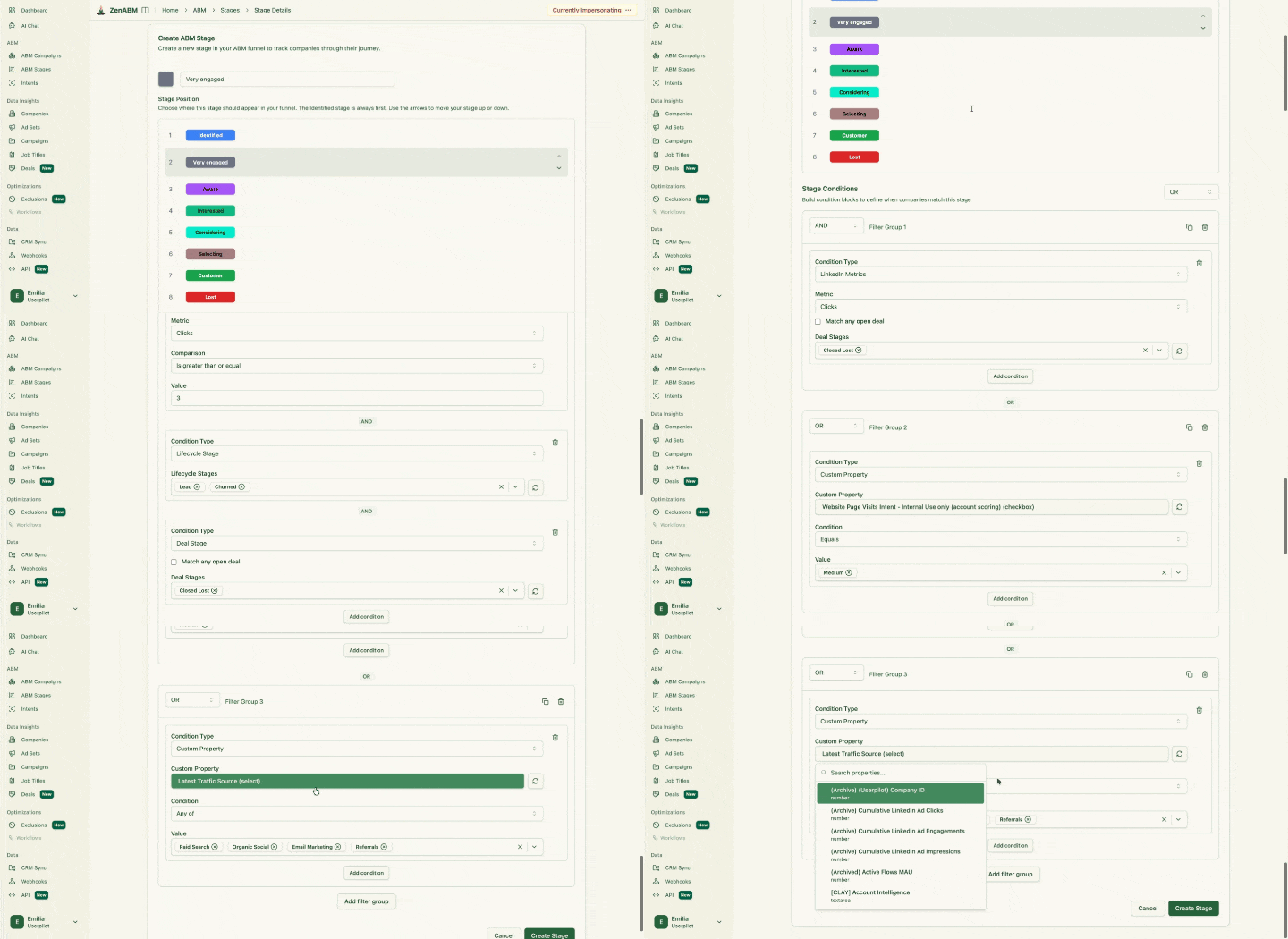
The stage framework below is the one Emilia Korczynska designed for Userpilot’s ABM program, and that is now built into ZenABM:

Stage

Threshold

What It Means and What to Do

Identified

On your target list

Account exists, not yet reached. Marketing owns this stage.

Aware

50+ impressions

Account has seen your ads multiple times. Continue COLD campaigns. Monitor for engagement escalation.

Interested

5+ clicks or 10+ engagements

Account is actively engaging with your content. BDR outreach triggers here. This is the core handover point.

Considering

Demo booked or trial started

Account has taken a conversion action. Sales takes over, shift to WARM campaign content.

Selecting

Open deal in CRM

Sales is working the opportunity. Marketing continues supporting the buying committee with ads.

ZenABM account stage editor adding a custom "Very engaged" stage to customize the ABM funnel
ZenABM account stage customization for ABM program intent harvesting

Beyond quantitative scoring, ZenABM also captures qualitative intent: which specific campaigns the account engaged with.

If your campaigns are segmented by topic (competitor displacement, product education, specific use case), you know not just that Acme Corp is interested but what they are interested in.

This is the data that makes BDR outreach specific rather than generic.

ZenABM revenue metrics dashboard showing LinkedIn-influenced pipeline by month and ABM campaign effectiveness
Company buyer’s qualitative intent in ZenABM which essentially tracks that which particular messaging has resonates the most with the account.

The intent data flows directly from Userpilot’s experience documented in Kyle Poyar’s Growth Unhinged case study:

“We can push both total engagements and which campaigns the account engaged in into company properties on HubSpot. Since the campaigns are already segmented by intent, we can then create a workflow to assign the respective intents in a custom multiple checkboxes company property on the company level based on the campaign names coming in from ZenABM.”

ZenABM pushes these stages, scores, and intent signals into your CRM (HubSpot or Salesforce) as company properties.

This means your CRM always has current data on which accounts are engaged and what they care about, powering both marketing workflows and BDR outreach without anyone manually exporting a report or checking a separate dashboard.

Step 5: Add Events and Gifting to Your ABM Program

LinkedIn ad events for ABM

Once you have identified which accounts are in the “Interested” or “Considering” stages, events and gifting become powerful acceleration tactics.

The keyword is acceleration: these tactics work on warm accounts, not cold ones.

Events for ABM

Invite engaged accounts to targeted events: webinars, roundtables, workshops, or in-person dinners. The key is selectivity. Do not blast your entire target list.

Target only accounts that ZenABM has flagged as “Interested” or above, which keeps events exclusive and high-signal rather than turning them into webinars with generic audiences.

LinkedIn Event Ads can promote these directly to your target account list.

You can also use the intent data from ZenABM to personalize the invitation based on which campaign theme the account engaged with: “We noticed your team has been looking at [topic]. We are hosting a roundtable on exactly this next week.”

The invitation feels timely because it is.

Emilia shared the timeline approach her team used at Userpilot:

“Week 1: launch ads, Week 3: start outbound emails to engaged accounts, Week 6: invite hot accounts to a webinar or send direct mail.”

Keeping the team aligned on this timeline prevents the most common coordination failure, which is marketing running ads while BDRs have no idea who to contact or when.

Gifting for ABM

Sendoso homepage

Physical or digital gifts to key contacts at interested accounts can break through the noise when the account is already warm.

Tools like Sendoso, Reachdesk, or Postal let you automate gifting workflows triggered by CRM properties, for example automatically sending a personalized gift when an account moves to “Considering” stage in ZenABM.

The principle: a $50 gift to an account that has never heard of you is spam.

The same gift to an account that has engaged with your ads 20 times and attended your webinar is thoughtful and memorable. The ZenABM stage data is what distinguishes between the two situations.

The ABM Program Setup Checklist

ZenABM ABM program setup checklist infographic: 12 numbered steps from pipeline budget to first campaign

Everything you need to launch, in order:

  1. Reverse-engineer your budget from your pipeline goal using the formula above before committing to any spend
  2. Define your ICP from closed-won analysis, not intuition (firmographic, technographic, and intent criteria)
  3. Build your target account list (500 to 3,000 accounts) starting with closed-lost deals, churned customers, and lookalikes before cold ICP-fit accounts, using Clay, CRM data, and Sales Navigator
  4. Create your campaign naming convention so ZenABM can track intent at the campaign-group level and push it to your CRM
  5. Build COLD and WARM campaign layers in LinkedIn Campaign Manager
  6. Turn off the four default settings (Audience Expansion, LinkedIn Audience Network, Maximum Delivery, Budget Optimization)
  7. Create your ad mix (approximately 40% TLAs, 50% image, 10% text for a $10K budget) with multiple messaging angles per persona to generate qualitative intent data
  8. Create dedicated noindex landing pages for LinkedIn ads with retargeting pixels installed
  9. Set up ZenABM: connect LinkedIn Ads API and CRM, configure account stages and intent mapping, upload company list 48 hours before launch for match rate optimization
  10. Set up retargeting on Google Display, Meta, and Reddit from your ABM landing pages
  11. Configure HubSpot workflows to route accounts between COLD and WARM audiences based on ZenABM stage changes
  12. Set your campaign timeline (Week 1: ads launch, Week 3: outbound to engaged accounts, Week 6: events and gifting to hot accounts)
  13. Set up intent-led outbound: webhook from ZenABM to Clay and your outreach tools for automated prospecting into engaged accounts

The full orchestration process, including bidding automation, campaign optimization, and outbound sequences, is covered in our ABM orchestration guide.

Deanonymize LinkedIn ad engagements, get intent, accounts scoring (starting @$59/month!)

37 Days Free Trial

Try ZenABM Now

ABM Program Setup: Final Thoughts

Running your first ABM program without a structured playbook means you will learn the hard way: overbuilt account scoring, budget spread too thin, too many channels running before any of them produce signal.

The zero-to-first-campaign path is simpler than most ABM content suggests.

One channel (LinkedIn) until the targeting and scoring work.

A list built on warmth, not just ICP fit.

Two campaign layers from day one.

Four default settings turned off before your first dollar spends.

And ZenABM pulling intent data from the LinkedIn API, so your CRM always knows which accounts are engaged and what they care about, without anyone manually exporting a report.

The $5.29M pipeline Emilia Korczynska built at Userpilot did not come from running a sophisticated multi-channel program from the start. It came from getting the fundamentals right, then layering complexity on top.

Start there.

And let ZenABM support your efforts: Book a demo now or try the tool yourself (37-day free trial).

FAQs About ABM Program Setup

Some common questions about ABM program setup and their answers:

What do I need to start an ABM program?

At minimum: a target account list (500 to 3,000 companies matching your ICP, prioritized by warmth not just fit), a LinkedIn Campaign Manager account with sufficient budget ($8 to $10K per month minimum for one persona), a CRM (HubSpot or Salesforce), and an account scoring tool like ZenABM ($59 per month) to track company-level engagement and intent. You do not need an enterprise ABM platform to start. Userpilot built a $5M pipeline program with this exact stack.

How long does it take to see results from an ABM program?

Expect 3 to 4 months before you see meaningful pipeline impact. The first month is setup and data gathering. Months 2 to 3, accounts start progressing through stages. By month 4, you should have enough “Interested” accounts to trigger outbound and see pipeline form. Userpilot’s program hit $900K in pipeline at month 5. Results compound over time as your engagement data and scoring model improve.

Should I use Google Display or Meta for ABM prospecting?

No. Use them for retargeting only. Neither platform has native company-level targeting, so you cannot do ABM prospecting on either. The approach is: run LinkedIn ads to dedicated landing pages, install retargeting pixels, then retarget those visitors on Google Display and Meta for brand reinforcement. Keep the landing pages noindex to maintain audience quality.

How do I know which accounts are interested in my ABM program?

ZenABM automatically scores accounts based on LinkedIn ad engagement (impressions, clicks, engagements) and assigns them to stages (Identified, Aware, Interested, Considering, Selecting). Accounts that cross engagement thresholds (5+ clicks or 10+ engagements) are flagged as “Interested” and can trigger automated BDR assignment in your CRM. ZenABM also captures which campaigns they engaged with, giving you qualitative intent data for personalized outreach.

What is the minimum budget for a first ABM program?

$8,000 to $10,000 per month on LinkedIn ad spend for one persona. This supports 10 to 15 ads getting enough daily clicks to optimize and generate meaningful engagement signals. Below this level, budget dilution prevents your ads from reaching target accounts with enough frequency to drive engagement. Add $59 per month for ZenABM. Use the ZenABM ABM Budget Calculator to get precise numbers based on your account count and revenue goals.

Can I launch an ABM program without a marketing ops person?

Technically yes, but it is difficult. As Emilia Korczynska noted from running Userpilot’s program: “Don’t even think about starting ABM without a marketing ops manager, as the amount of ops work is brutal.” The campaign naming conventions, HubSpot workflow configuration, Clay integrations, ZenABM setup, and retargeting pixel installation all require someone who can work across systems. If you do not have a dedicated ops person, plan to spend the first 4 to 6 weeks on setup before any ads launch.

Share this post

LinkedInXFacebook

Author

Emilia Korczynska

Emilia Korczynska

LinkedIn

Share this post

LinkedInXFacebook

Try Zena AI Agent

Ask our experts about LinkedIn Ads & ABM. Get instant answers with sources.

Emilia KorczynskaAli YildirimVeronika VebereTim DavidsonMaximilian Herczeg
+20 experts
Try it free

Stay up to date with ZenABM

Get the latest ABM insights in your inbox.

Latest in Blog

Back to Blog