

©2026 ZenABM - All Rights Reserved.

Buyer intent is not magic, and it does not tell you exactly who is ready to buy today.
What it actually does is point to the accounts that are researching, comparing, or warming up, which is what lets a team decide who to chase, what to send them, and when to put a human on the account.
This guide covers what buyer intent data is, the difference between first-party, second-party, and third-party intent, the signals that actually move accounts through account-based marketing (ABM) stages, and how LinkedIn ad engagement becomes account-level intent that a team can act on instead of staring at it in a dashboard.
For ABM specifically, the rule that matters most is this: intent has to be account-level, recent, specific, and easy to act on.
If it does not check those four boxes, it is just noise sitting in a tool you are paying for.
Short on time?
Here’s a quick summary:
Buyer intent data is information that suggests a company or person is interested in solving a problem, researching a category, comparing vendors, or preparing to buy.
It is a behavioral hint, not a confession, and that distinction is what keeps a program from misreading it.
The nuance matters because intent is sometimes talked about as if it were a lead-readiness oracle, when in reality it is a probability indicator.
The job of intent data is to help a team spend more time on the accounts showing the right pattern, rather than to hand over a finished list of “ready to sign” buyers.
The following signals count as intent inside a working ABM program, since each one reflects a behavior that tends to precede a purchase:
None of those signals on their own mean “buy now,” but stacked on the same account inside a tight time window, they mean “stop ignoring this company,” because the combination is far more predictive than any single touch.
This is where most teams quietly burn money, because they look at intent at the lead level, one form, one click, one demo request, and then treat the lead like the deal.
In B2B, a deal is rarely one person, and Gartner’s buying group research has shown for years that a typical purchase involves 6 to 10 stakeholders.
If you are identifying high-intent accounts from LinkedIn ads, you need to see the whole company, not just the person who happened to fill out the form.
Account-level intent is the difference between “Sarah from Acme clicked an ad” and “five people across two departments at Acme have engaged with you in the last 30 days,” and only the second one is worth a Slack alert.

The following are the main types of buyer intent data:
First-party intent comes from your own channels and systems, which makes it the cleanest, most actionable, and most underrated category.
It includes website visits, demo requests, product signups, email engagement, webinar attendance, CRM activity, content downloads, and LinkedIn ad impressions, clicks, and engagements.
First-party intent is so powerful for ABM because it is tied to your specific message, in your specific funnel, on your specific accounts, with no abstraction layer in between.
If a target account engages with your security positioning ad three times in a week, that is unambiguous intent toward your security message, not toward “the security category” in general.
LinkedIn ad engagement deserves a callout here because it is one of the only first-party signals where you can see which target accounts engaged with your brand before they ever filled out a form.
Most companies leave this data sitting in LinkedIn Campaign Manager and never connect it to their CRM, which is a mistake that shows up weekly.
Second-party intent is data from someone else’s owned platform, usually shared through a partnership or marketplace, such as review site engagement on G2 or TrustRadius, publisher content engagement, partner webinar engagement, and co-marketing event activity.
It is more specific than third-party but less specific than first-party, since the signal is “this account engaged with content about your category on a partner property,” which is useful, but you do not control the context in which it happened.
Third-party intent is data collected across external sites and networks, often used to detect topic or keyword surges, and it covers Bombora-style topic surges, G2 category activity, syndicated content consumption, and external research behavior.
Third-party can be useful for early-stage account discovery, especially when you are trying to find accounts that are not in your CRM yet, but it carries real downsides.
The signals are vague because you usually get a topic rather than a keyword, they lag because you find out an account spiked two weeks ago, and they are hard to validate, so many teams treat third-party intent as a starting point for research rather than as a sales trigger.
Here is a practical table for reading different intent signals in an ABM program.
Use it as a starting point and tune the thresholds to your audience size and deal cycle.
Signal | What it might mean | ABM action |
|---|---|---|
Account has 50+ LinkedIn ad impressions | Account is aware of you | Keep in awareness nurture, do not push to sales yet |
Account has 5+ clicks or 10+ engagements | Account is interested | Move to a warmer campaign stage with case study creative |
Account clicks ads about analytics | Analytics-related pain point | Personalize outreach around analytics positioning |
Account visits the pricing page | Commercial evaluation | Alert sales the same day |
Multiple personas from one company engage | Buying committee activity | Prioritize the account, brief the AE |
Closed-lost account re-engages | Possible reactivation | Trigger a win-back sequence |
Active vendor evaluation | Send a comparison page, proof, or a tailored demo |
What makes a table like this useful is that it forces the rules to be explicit, because once “5+ clicks or 10+ engagements = interested” is written down, it can become an automation, a Slack alert, or a CRM stage update.
ZenABM operationalizes exactly this pattern: it turns LinkedIn impressions, clicks, engagements, campaign theme, and CRM deal stage into account scoring and ABM stages without you having to glue four tools together with Zapier.


Here’s how to use buyer intent data for ABM:
Not every target account deserves the same sales attention this week, so the ones to flag are those with repeated engagement, bottom-of-funnel campaign engagement, multiple engaged personas, recent spikes, and high-fit firmographics.
Inside ZenABM, accounts are ranked by LinkedIn ad engagement, clicks, impressions, current score, total score, ABM stage, and intent theme, and the output is a sorted list, refreshed daily, of who is hot right now.
That sorted list is what should drive BDR call queues, rather than a static target account list that has not been re-prioritized in three months.
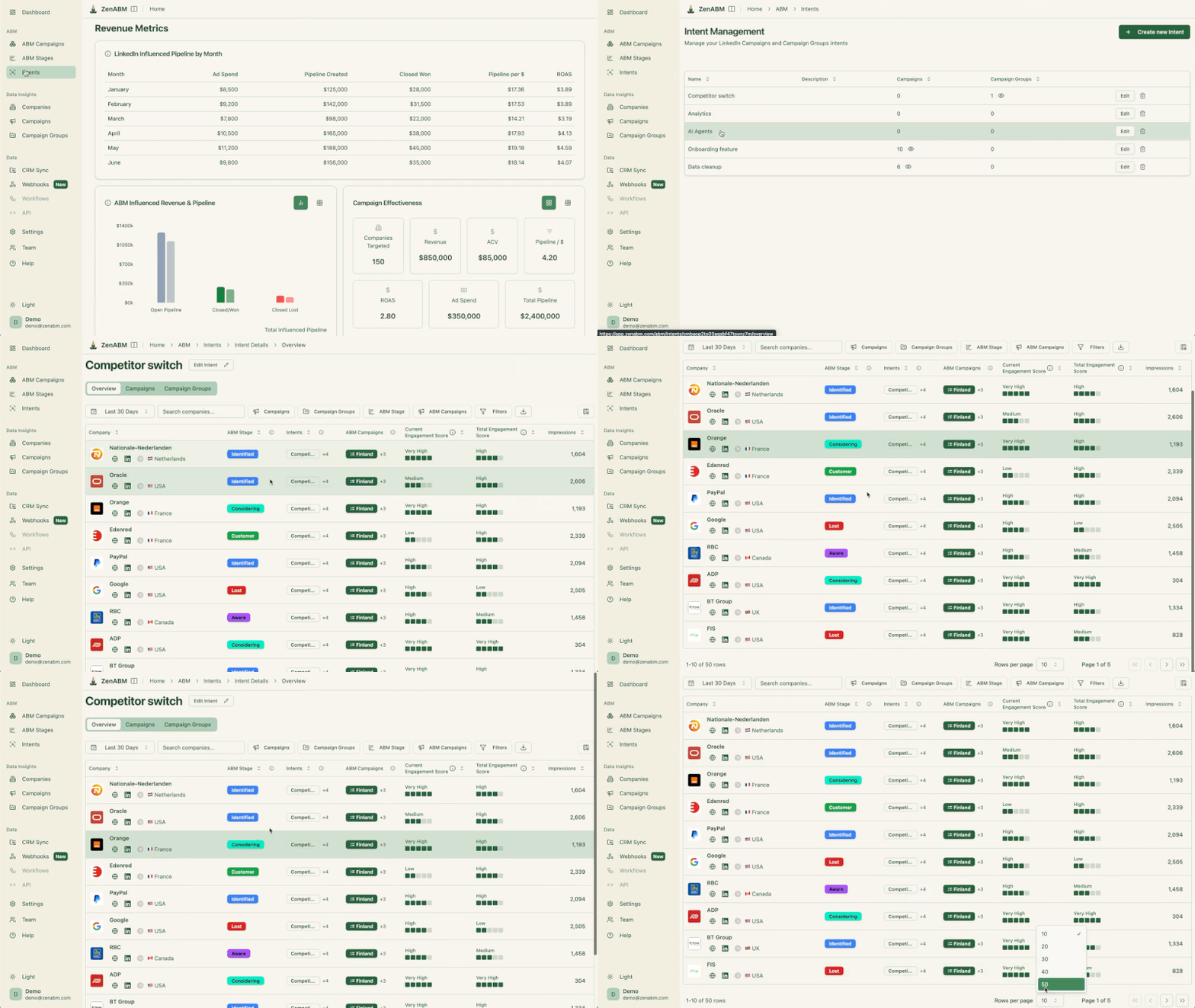
The stages worth adopting are Identified, Aware, Interested, Considering, Selecting, Customer, and Closed-lost, with accounts moving between them based on engagement and CRM signals.
A typical movement path looks like this:

To go deeper on stage logic, the ZenABM guide on account scoring and engagement signals for ABM walks through the math.
Once you know what theme an account is engaging with, the personalization gets easy, because accounts engaging with security ads get security proof points, accounts engaging with analytics ads get analytics messaging, accounts engaging with integration ads get CRM and workflow content, and accounts engaging with competitor comparison content get a battlecard or a comparison page.
The trick is to tag campaigns by intent theme up front, then let the engagement data sort accounts into themes.
ZenABM lets you tag campaigns by intent theme and then pull a report of which companies engaged with which themes, which is the difference between running one personalization play and running 17 of them off real signal.


Intent should not sit in a dashboard, because the whole point is to turn it into action, and the actions that work are Slack alerts to BDRs, CRM tasks, BDR account assignment, Clay enrichment, Smartlead and HeyReach sequences, and account-specific follow-up emails.
The line that opens those follow-ups should reference the actual signal rather than pretend the rep happened to find them, so something like “Noticed your team has been engaging with the content on LinkedIn ad attribution, usually that means a team is trying to figure out which campaigns are actually driving pipeline” works, because it is honest, it is specific, and it does not lead with a 200-word value prop.
Philip Ilic, who runs a LinkedIn ads agency, talks about combining ads with intent-led outbound as a single coherent system in his LinkedIn post:
“We’re anchoring around one high-quality ICP list and using it across LinkedIn ads, signal-based outbound, and warm outbound. The strategy is to connect LinkedIn ads and specifically lean heavily on thought leader ads plus outbound as one coherent system. LinkedIn ads are great to warm up an audience through content distribution; outbound is a great conversion mechanism.”
That framing maps perfectly to ABM, because ads create the intent, outbound converts it, and the intent data is the connective tissue between the two.
Do not retarget every account the same way, since that is the single most common mistake in ABM on LinkedIn.
If you are sending a demo CTA to an account that has seen one ad impression, you are wasting the impression, and if you are sending a problem-education ad to an account that has visited pricing twice, you are wasting the impression in the other direction.
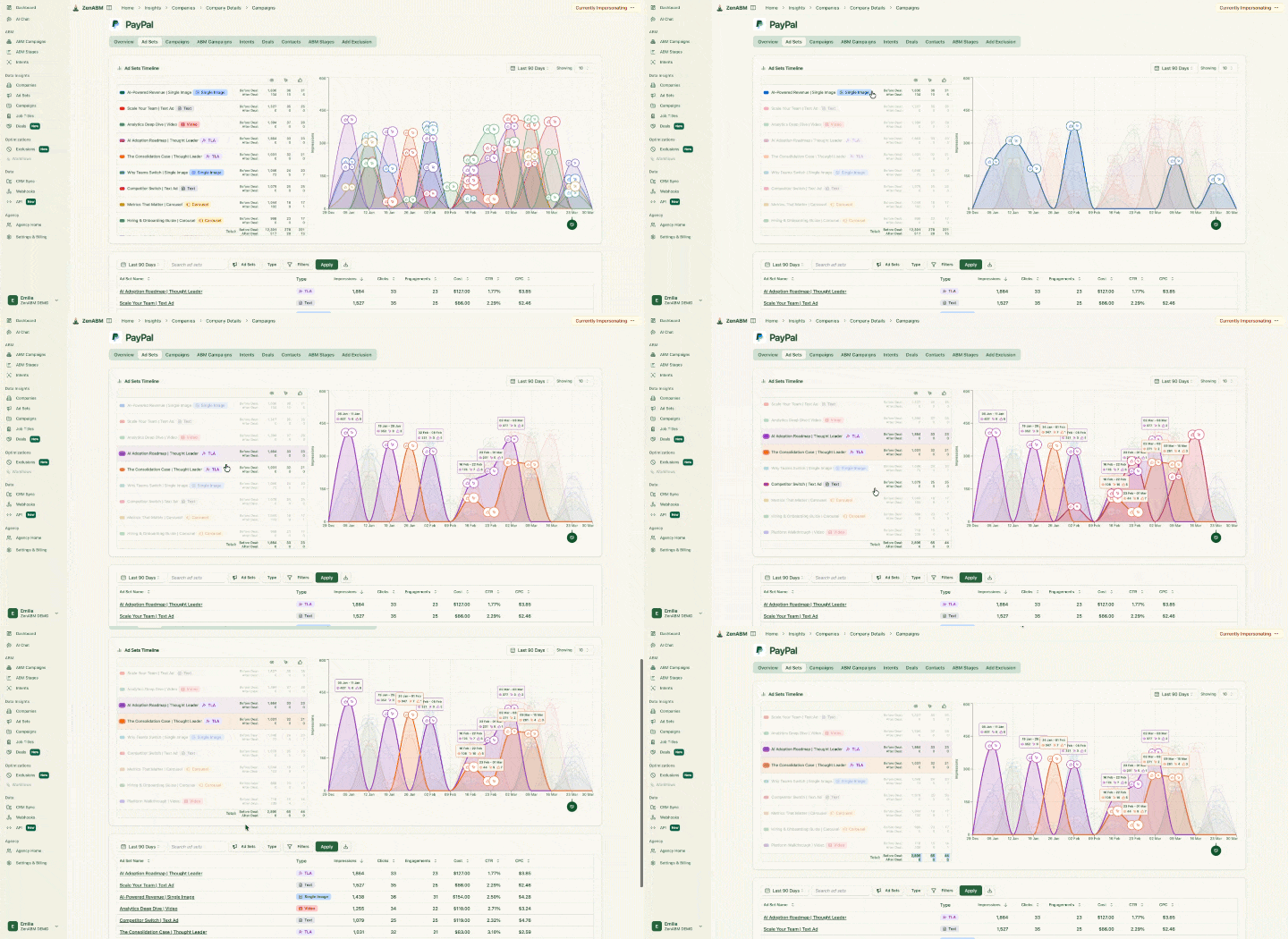
The metrics that actually matter for buyer intent in ABM are accounts reached, accounts engaged, stage movement, intent theme distribution, engaged accounts converted to pipeline, pipeline per intent theme, pipeline per campaign, and pipeline per dollar spent.
Notice what is not on that list: clicks, CTR, impressions in isolation, and lead form fills, because those are inputs rather than outcomes.
ZenABM connects LinkedIn engagement with CRM pipeline and revenue, so the question changes from whether the campaign got clicks to whether buyer intent turned into opportunities.



For a deeper read on the math, see the ZenABM guide on ABM revenue attribution and how to measure LinkedIn ABM ROI.

Neither is universally better, because they answer different questions.
Third-party intent answers “which companies are researching your category somewhere on the internet,” while first-party intent answers “which accounts are engaging with your brand, your campaigns, and your messaging.”
For ABM execution, first-party intent is usually more actionable because it connects directly to your campaigns, your CRM, and your sales follow-up, which means you can quote the signal back to the prospect since it happened on your property.
The same pattern shows up across teams that buy intent tools and feel underwhelmed:
To go deeper on the discipline side, the post on intent signals for ABM on LinkedIn walks through how to set thresholds that do not burn out your sales team.
Buyer intent data does not predict who signs this quarter.
It tells you which accounts are warming up, so you stop spreading budget and BDR hours evenly across a flat list of logos.
The four rules hold the whole thing together: intent has to be account-level, recent, specific, and easy to act on from the tool your team already lives in.
Get those right, and the workflow falls out on its own.
Score accounts by signal weight plus ICP fit, map score thresholds to ABM stages, tag campaigns by intent theme, and trigger outreach the same day an account hits a real signal instead of at month-end when the buying group is already on someone else’s demo.
First-party signals carry this, and LinkedIn ad engagement is the one most teams leave rotting inside Campaign Manager because they never wire it to the CRM.
That wiring is the part ZenABM removes.
It pulls LinkedIn impressions, clicks, engagements, and campaign themes, fuses them with CRM deal stage, and outputs account-level scores, ABM stages, and sales-ready triggers without a Zapier chain holding four tools together.
The result is a daily-refreshed list of who is hot right now, which themes resonated per account, and pipeline tied back to spend.
If you want to turn LinkedIn ad engagement into account-level buyer intent your BDRs will actually act on, start a free trial of ZenABM (37 days free, from $59/month) now!
You can also book a demo with us to know more.
Buyer intent data is behavioral information that suggests an account is researching, comparing, or preparing to buy. In ABM, it is used to prioritize accounts, personalize campaign messaging, move accounts through funnel stages, and trigger sales outreach at the right moment.
The most useful intent data for ABM is account-level, recent, specific, and easy to act on from the CRM.
First-party intent data comes from your own channels, such as website, LinkedIn ads, CRM, and content. Third-party intent data is collected across external sites and networks, often as topic or keyword surges.
First-party is more specific and actionable for ABM execution, while third-party is better for finding accounts that are not in your CRM yet.
Yes, and it is one of the most practical first-party intent sources for B2B, because LinkedIn ad engagement shows which target accounts viewed, clicked, and interacted with your campaigns before they ever filled out a form.
ZenABM turns that engagement into account-level intent signals, ABM stages, and CRM-ready workflows.
Start by listing the signals you can capture, such as impressions, clicks, engagements, page visits, demo requests, and multi-persona engagement. Assign weights based on how predictive each signal is of the pipeline, combine the score with the ICP fit, then map score thresholds to ABM stages so accounts move automatically.
The deep dive on account scoring from LinkedIn ad data walks through the model.
Strong triggers are a pricing page visit followed by a return visit, multiple personas from one account engaging in a 30-day window, an account hitting both a click and engagement threshold on bottom-of-funnel content, and a closed-lost account re-engaging with new content.
Single weak signals, such as one impression or one topic surge, are too thin to put in front of a BDR.
