



When we ran our LinkedIn ABM program, every step was manual: sizing the market, building the account list, researching accounts, writing ads, auditing the account, reporting to execs, and routing hot accounts to sales.
Well, now we have AI agents for ABM to automate most of these tasks so you focus on judgement, not grunt work.
This article maps the full workflow into ten jobs: TAM calculation, target account list building, account research and enrichment, strategy and budget sizing, ad creation, content and microsites, campaign management and optimization, reporting and attribution, intent signals and CRM sync, and outreach.
For each job, I list AI agents that do it, what they actually automate, and how to wire them together.
Best part?
Most of the agents below are open-source, free options, not SaaS subscriptions.
Below is a quick overview of the insights in the article followed by a tabulated summary of all my recommended AI agents for ABM.
/abm-strategy-planning, /abm-campaign-execution, /linkedin-abm-audit, /linkedin-abm-report) package the strategy, ad design, audit, and reporting jobs into commands you can run today on sample data or your own account. You can access them on the repo here.| Tool | What it does | License and price | Worth it when |
|---|---|---|---|
| The data and agent core | |||
| ZenABM MCP server | 60+ tools over company-level LinkedIn engagement, ABM stages, intent signals, creatives, deals, and safe write actions | Included from $59/month, 37-day trial | You run LinkedIn ABM and want agents on live first-party data |
| Zena | In-app analyst agent: chat with your ads and ABM data, expert knowledge, report building | Included in ZenABM; free trial chat | The team wants answers without a terminal |
| Zena Proactive | Scheduled weekly, monthly, quarterly executive summaries plus per-page reports, flags, and recommendations | Included in ZenABM | You want the Monday report to exist before you ask |
| anthropics/skills | Anthropic’s public skills, including docx, pptx, xlsx, pdf document production | Open source, free | Your agents produce decks, one-pagers, and PDFs |
| Job 1: TAM calculation and market sizing | |||
| GPT Researcher | Autonomous deep research with cited reports; bottom-up TAM prompts | Open source, free | Sizing and market questions, zero code |
| Open Deep Research | Configurable research agent with MCP tool support | Open source, free | You want research grounded in your own MCP data |
| CrewAI | Multi-agent framework with marketing and lead-qualification example crews | Open source, free | The research job recurs and deserves a pipeline |
| Job 2: Target account list building | |||
| AgentSource | Claude Code plugin for batch research, ICP filtering, enrichment, CSV export via Apollo and Crustdata | Open source, free | Cold list building at 50+ accounts a day |
| Apollo.io MCP (Inferensys) | 27 tools over Apollo: lead search, enrichment, sequences, CRM records | Open source; Apollo free tier available | You already live in Apollo’s database |
| ZenABM warm lists via MCP | Tiered engaged-account lists with campaign evidence per account | Included from $59/month | You want the list that already engaged |
| Job 3: Account research and enrichment | |||
| exa-labs/company-researcher | Instant structured company profile from a domain | Open source; Exa API costs | Fast per-account profiles at list scale |
| langchain-ai/company-researcher | LangGraph company research, extensible fields | Open source, free | You want custom research fields |
| company-research-agent (guy-hartstein) | Multi-agent deep diligence pipeline per company | Open source, free | Deep passes on late-stage accounts |
| Browser Use | Most-starred open source browser agent; operates real websites | Open source (MIT), free | Research that static scraping cannot reach |
| Firecrawl MCP server | Scrape, crawl, search, extract as MCP tools with JS rendering | Open source; API or self-host | The general web-data layer for any agent |
| LinkedIn MCP server (stickerdaniel) | Profiles, companies, jobs via your logged-in session | Open source, free | Buying-committee research, rate-limited, ToS caveat |
| Job 4: Strategy and budget sizing | |||
| /abm-strategy-planning | Stress-tests revenue goal vs budget with real ad metrics; proposes structure, format mix, ad count | Open source, free | Before any campaign launches or budgets move |
| ZenABM free calculators | ABM budget and LinkedIn ads count models in the browser | Free | The arithmetic without an install |
| Job 5: Ad creation | |||
| /abm-campaign-execution | Strategy to launch-ready briefs, outlines, and rendered 1080×1080 mockups across 23 patterns | Open source, free | Turning a locked strategy into assets |
| LinkedIn Ad Designer | On-brand LinkedIn ad visuals in editable HTML, 23 patterns | Free skill | Ad variants without a design queue |
| ZenABM ad free tools | Single image ad creator and TLA generator in the browser | Free | One-off ads with zero setup |
| Job 6: Content and microsites | |||
| STORM | Researched, cited long-form article generation (Stanford OVAL) | Open source, free | First drafts of gated guides and reports |
| Open Lovable | Clones and regenerates any page as a React app | Open source (MIT), free | Per-account landing page variants |
| bolt.diy | Open source AI app and site builder from prompts | Open source, free | Microsites built from scratch |
| Job 7: Campaign management and optimization | |||
| /linkedin-abm-audit | 30-day diagnostic: scorecard, ad-count model, decay, impression hogs, ordered fixes, HTML and PDF | Open source, free | The weekly operator to-do list |
| Claude Ads | 250+ checks across 7 platforms, 0 to 100 health score, runs locally | Open source, free | Cross-platform audits and second opinions |
| Google Ads MCP | Google’s official open source ads MCP server | Open source, free | The same agent loop on Google Ads |
| Meta Ads MCP (Pipeboard) | Meta server in a 5-platform family including Reddit Ads | Open source; hosted free plan | Meta or Reddit in the ABM mix |
| Job 8: Reporting and attribution | |||
| /linkedin-abm-report | Exec-facing monthly recap: spend, pipeline, best campaigns, MoM change, recommendations | Open source, free | The monthly exec report |
| LinkedIn ABM Reporter | /abm-report over the ZenABM API with flags and PDF export | Open source, free | Reports in Claude Code without exports |
| ZenABM attribution | Deduplicated revenue attribution per ABM campaign: pipeline per dollar, ACV, ROAS | Included from $59/month | Proving pipeline per campaign |
| Job 9: Intent signals, stages, and CRM | |||
| ZenABM intent and stages | First-party intent themes and customizable stage thresholds, synced to CRM | Included from $59/month | Verifiable triggers for every downstream agent |
| HubSpot MCP server | Official first-party server: CRM read and write over OAuth | Free with HubSpot | Agents that query and update HubSpot |
| Salesforce MCP servers | Community jsforce-based servers over the Salesforce API | Open source, free | Salesforce shops, with auth review |
| Twenty | Leading open source CRM, self-hosted, full API | Open source, free | No CRM budget, full control |
| Job 10: Outreach and follow-up | |||
| ZenABM Outbound Agent | ZenABM engagement to Apollo contacts to Smartlead sequences, weekly autopilot | Open source, free | Intent-led outbound without an AI SDR seat |
| Smartlead MCP (LeadMagic) | 113 tools over Smartlead campaigns, leads, deliverability | Open source; Smartlead account | Conversational control of sending |
| Mautic | Largest open source marketing automation: email workflows, scoring, landing pages | Open source, free (self-host) | Self-hosted nurture at volume |
Before the job-by-job list, the architecture, because every entry below fits into one of three layers:
Agents like Claude Code, Claude Desktop, ChatGPT, or Cursor make the reasoning layer that reads data, plans, and executes.
I use Claude Code for everything in this article because it runs skills and plugins natively, but the MCP servers listed here work in any MCP-compatible client.
Skills and plugins are markdown instruction files that teach the agent a repeatable workflow (an audit checklist, an ad design system, a reporting format).
They install from a GitHub URL or a plugin marketplace command, they are free, and there is no vendor lock-in because you can read every line they execute.
I documented the first wave of these in Claude Code for ABM: use cases and free plugins.
These are the data connections.
An MCP server exposes a system (your ads data, your CRM, a contact database, the open web) as typed tools the agent can call.
This is the layer that decides whether your agent works from live account-level data or from a CSV you exported last Tuesday.

Note: Execution capabilities of AI agents for ABM are already wild (performance analysis, budget reallocation, ad copy testing, competitor research), but the strategic thinking is not there yet, and the bottleneck shifts from execution to strategy.
So the rule for everything below is that read actions run freely and write actions (pausing ads, applying exclusions, sending emails) sit behind an explicit confirmation.
Every tool I recommend supports that split.

I am covering this first because every job in the rest of the article gets easier once it exists.
The ZenABM MCP server exposes 60+ tools over your first-party LinkedIn Ads data, pulled at the company level straight from the LinkedIn Ads API and tied to CRM pipeline.
It works natively in Claude, ChatGPT, and Cursor, and the same data is available over the REST API if you are building your own agent instead of using an off-the-shelf runtime.
Setup is three steps.


You connect the endpoint at https://app.zenabm.com/api/mcp (Bearer token or OAuth), you run /init so the server writes a CLAUDE.md file telling the agent what tools exist and how your account is structured, and you start asking questions.
The tools group into five families:
list_companies, list_campaigns, list_ad_sets, list_deals, list_intents, list_abm_stages, find_ad_sets_or_campaigns. These are the entry points an agent uses to orient itself.update_ad_status and update_ad_set_or_campaign_status, always behind a confirmation prompt. The agent can propose pausing a decayed ad; it cannot pause it until you approve.The workflow I love the most on this architecture is the Monday review.
One prompt replaces what used to be an hour of exports:
Using the ZenABM MCP tools, list every company that entered a new ABM stage or picked up a new intent signal in the last 7 days. For each, pull the campaigns and creatives that drove the engagement and any open deals. Then flag ads whose eCTR declined for the second consecutive week, and propose (do not execute) which to pause and where to move the budget.
Two metrics recur through the rest of this article, so I will define them here.
eCTR is the click-through rate to the landing page (landing page clicks divided by impressions), and eCPC is the effective cost per landing page click.
LinkedIn’s native CTR counts reactions, comments, and other engagements; eCTR isolates the click that actually costs your landing page a visit, which is why every optimization threshold I use is built on it.
The full connection guide, tool list, and client setup for Claude, ChatGPT, and Cursor is at zenabm.com/mcp/docs. Access starts on the $59 per month plan with a 37-day free trial (current tiers are on the pricing page).


The MCP server is for teams that want to bring the data into their own agent runtime.
Zena is the inverse: the agent lives inside ZenABM, so anyone on the team can ask questions without opening a terminal.
You ask which campaigns drove the most pipeline, which companies engaged this week, or which ads to pause, and Zena answers from the live account, drawing on LinkedIn ads expertise it was trained on alongside the data.
You can try Zena free without a ZenABM account.

Zena Proactive is the layer that removes the asking.
Instead of waiting for a question, Zena surfaces the answers each page of the app exists to provide, on a schedule.
On the main dashboard, that means an executive summary that overlays the dashboard: every Monday the weekly report, every first of the month the monthly, every first of the quarter the quarterly.
The summary answers a fixed question set so it is comparable period over period:
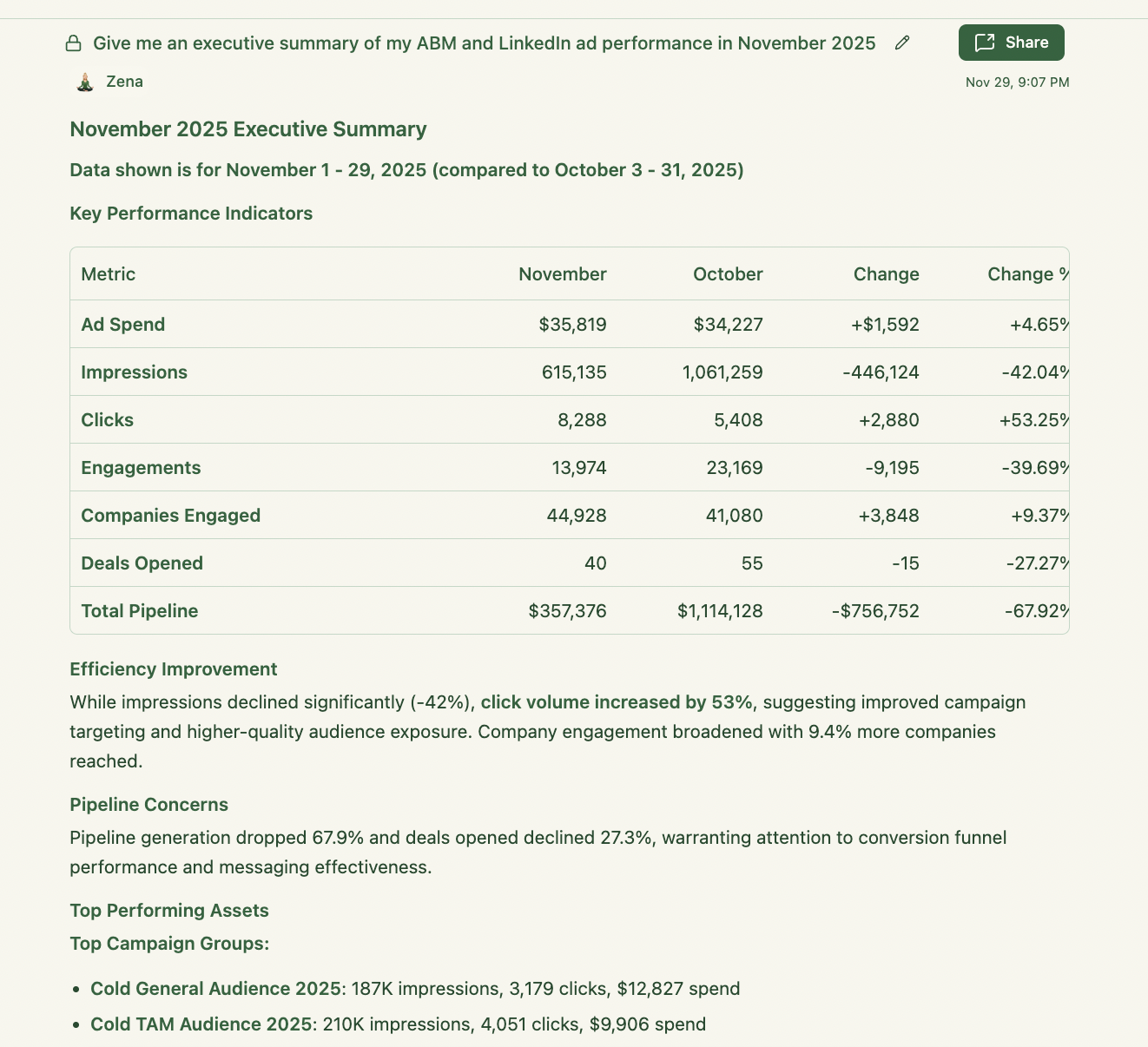
The flags are where the agent earns its keep, because each one is a rule I used to check by hand.
Beyond the dashboard, the proactive question sets are scoped per page, so the report you see matches the decision that page exists for:
The design principle across all of it: every recommendation is built from eCTR, eCPC, stage movement, and deal touchpoints you can inspect, not from a black-box score.
Now the ten jobs, with the agents for each.
TAM work is research work, and the open source deep research agents are genuinely good at it now.
The workflow that used to be a week of analyst time (define the segment, enumerate the firmographic filters, count companies per filter, size bottom-up) is a prompt against an agent with web access.

The assafelovic/gpt-researcher is the most established open source research agent (27,000+ stars at the time of writing) and the one I default to for sizing questions.
It plans sub-queries, scrapes and cross-references sources in parallel, and returns a cited report; the project site reports a typical research task finishing in around 2 minutes and cites Carnegie Mellon’s May 2025 DeepResearchGym evaluation, where it scored highest on citation quality, report quality, and information coverage against Perplexity and OpenAI’s research products.
It runs on any LLM provider, so you are not locked to one vendor’s API.
The prompt I use for a bottom-up TAM:
Build a bottom-up TAM estimate for [product category] sold to [ICP definition: industry, employee range, geography, tech stack]. Enumerate the firmographic filters, estimate the company count per filter from cited public sources, apply our ACV of [X], and state every assumption in a table I can challenge. Cite each source inline.

Langchain-ai/open_deep_research is the configurable alternative: a fully open-source deep research agent that works across model providers, search tools, and MCP servers.
The MCP support is the reason it earns a place here: you can hand it the same ZenABM MCP tools your other agents use, so its market research can reference which segments already engage with your ads rather than sizing in a vacuum.

CrewAIInc/crewAI is the framework option when the sizing job is recurring rather than one-off (a quarterly TAM refresh per segment, for example).
It orchestrates role-based agent teams in Python, has tens of thousands of GitHub stars, and its examples repo includes marketing strategy and lead qualification crews you can adapt rather than write from scratch.
The honest trade-off: it is a developer tool, and for a one-time TAM estimate, GPT Researcher gets you there with zero code.
There are two list-building motions, and they need different agents.
Cold list building filters a database against your ICP.
Warm list building starts from accounts already engaging with you, which is the motion I run first because those accounts convert to meetings at a rate cold lists do not approach.

For cold lists, explorium-ai/agentsource-plugin is a free Claude Code plugin that wires Apollo and Crustdata into the agent for company research, ICP filtering, and firmographic and technographic enrichment, then exports the enriched list as CSV.
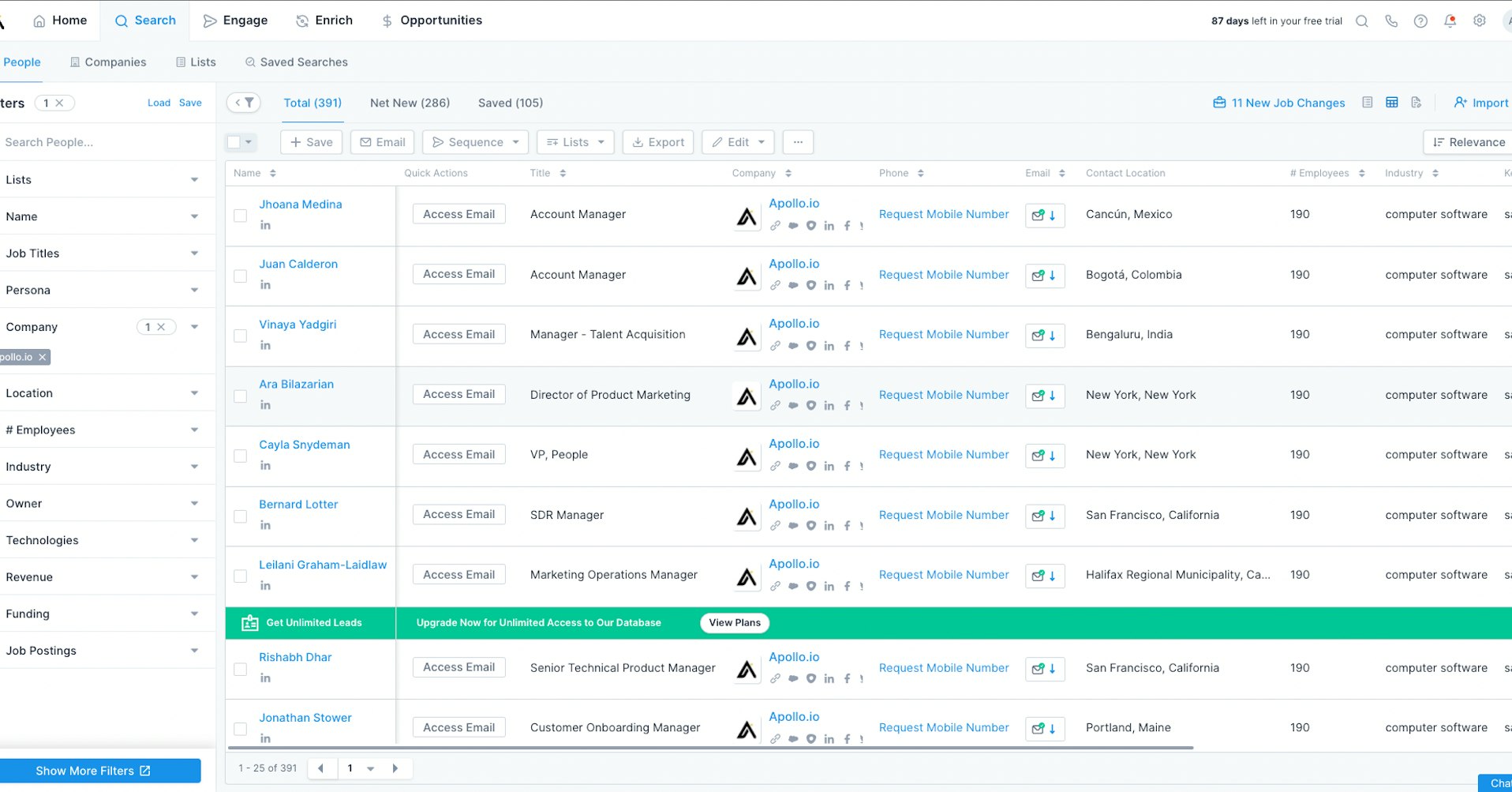
If you already pay for (or use the free tier of) Apollo, Inferensys/apollo-io-mcp exposes 27 tools over the full Apollo API: lead search, contact enrichment with verified emails and phones, CRM records, and sequence management, all callable from Claude Code or any MCP client.
This turns “build me a list of 200 accounts matching this ICP” into a single instruction instead of an afternoon of filter clicking.
Apollo, by the way. has an official version too now that you can use if you’re not looking for open-source stuff.

The warm motion runs on the company-level engagement data ZenABM pulls from the LinkedIn Ads API.

The agent calls list_companies over a 60- or 90-day window, tiers accounts by engagement depth, filters against your ICP definition in CLAUDE.md, and outputs a tiered list with the evidence attached (which campaigns, which creatives, how many engagements). The prompt:
Pull every company with LinkedIn ad engagement in the last 60 days. Tier them: Tier 1 is 5+ engagements plus a landing page click, Tier 2 is 3+ engagements, Tier 3 is the rest. Drop any company that fails our ICP (under 50 employees, wrong industry, wrong geography), and show the campaigns that drove each Tier 1 account’s engagement.


Once the list exists, each account needs a research pass: what the company does, what changed recently, who the buying committee is, and which message fits.
This is the most commoditized agent category, which is good news, because the free options are strong.

Three open-source repos cover company researching at different depths. Exa-labs/company-researcher is the fastest: point it at a domain, and it returns a structured company profile built on Exa’s search API.
Langchain-ai/company-researcher is the LangGraph implementation of the same pattern, easier to extend if you want custom fields.
Guy-hartstein/company-research-agent is the deepest: a multi-agent diligence pipeline that fans research out across parallel agents and merges the results.
For ABM, I run the exa-labs version per Tier 1 account and reserve the multi-agent one for accounts entering late stages.

Browser-use/browser-use is the most starred open source browser agent on GitHub (past 90,000 stars in 2026), MIT licensed, and the tool for research that requires actually operating a website: pricing pages behind interactions, careers pages, product changelogs.
It wraps Playwright with an LLM layer that decides what to click and type.
It is slower and more expensive per account than an API-based researcher, so I use it only where static scraping fails.

Firecrawl/firecrawl-mcp-server gives any MCP client scraping, crawling, search, and structured extraction tools, with JavaScript rendering and batch processing.
This is the general-purpose web data layer I attach to Claude Code alongside the ZenABM MCP server: ZenABM answers “who is engaging”, Firecrawl answers “what is on their website.

Stickerdaniel/linkedin-mcp-server (2,600+ stars) exposes LinkedIn profiles, companies, and jobs to MCP clients through your own logged-in session.
It is the highest-signal source for buying committee research, with one honest caveat: it works by automating your LinkedIn session, which sits outside LinkedIn’s terms of service, so treat it as a research convenience you rate-limit hard, not a bulk extraction pipeline, and never attach it to anything that writes.
For scale, the paid alternative here is Clay, whose Claygent does waterfall enrichment across providers.

I covered when it is worth the spend and how to use it in the Clay for ABM deep dive.
The open source stack above covers a surprising share of what most teams pay Clay for, as long as your volumes are in the hundreds, not tens of thousands.
This is the job most teams skip straight past, and it is the mistake that costs the most.
The failure pattern from our own program: budget spread across too many campaigns, audience segments split too small to serve, and more ads live than the budget could feed, so no ad ever got enough data to prove anything.
The /abm-strategy-planning skill, one of the four free ZenABM Claude skills at ZENABM/linkedin-abm-skills, exists to catch exactly that.

You give it the revenue goal, average deal size, monthly budget, site conversion rate, and qualification and close rates; it stress-tests whether the goal is reachable at all with real CPM, eCTR, and cost-per-click numbers, then proposes the campaign structure, format mix, and the number of ads the budget actually supports.
The core mechanic is the ad-count model: monthly budget / 30 / cost per landing page click / roughly 4 clicks per ad per day = the most ads you can support at once.
Run more, and you are underfunding every campaign, losing auctions, and never learning which message landed. Install all four skills in Claude Code with:
/plugin marketplace add ZENABM/linkedin-abm-skills
/plugin install linkedin-abm-skills@zenabm
On Claude Desktop or web, download the zips from the releases page and upload them under Customize, then Skills.
The skills run on sample data out of the box; pointed at a ZenABM account, they pull your real metrics through the MCP server.
If you want the arithmetic without installing anything, the free ABM budget calculator by ZenABM and the free LinkedIn ads count calculator by ZenABM run the same models in the browser.

Ad creation is where agent time savings are the most measurable, because the baseline is so slow: brief a designer, wait, review, revise.
Emilia Korczynska, VP of Marketing at Userpilot, built templated ad-creation projects for exactly this and published the number:
“This reduced the time I spend creating an ad from ~20 to 2 minutes.” Emilia Korczynska, VP of Marketing, Userpilot, on LinkedIn

Her caution in the same post is worth carrying: as decent ads get easy for everyone, feeds saturate with sameness and CPMs rise, so cheap production is table stakes, not an edge.
The edge moves to message-market fit per account tier, which is a data problem, not a design problem.
The /abm-campaign-execution skill (repo) turns a finished strategy into launch-ready output.
Its pipeline: it locates the strategy (from the planning skill or your upload), generates a campaign outline as linked Markdown, HTML, and PDF, interviews you for your design system (colors, fonts, logo, tone) and real TLA author details, writes one brief file per ad, and renders 1080×1080 PNG mockups from self-contained HTML using 23 reference design patterns.
Two constraints I appreciate in practice: it doesn’t invent strategy (it executes the plan it is given), and TLA copy built without real author input gets bracketed placeholders instead of fabricated claims.
It can also stand up a campaign-management database in Notion or Google Sheets, so every asset is tracked against its intent theme, audience segment, format, and funnel stage.

The LinkedIn Ad Designer skill from Advanced Client is another free standalone alternative for AI ad creation: load it into a Claude project with your brand config once, and it generates on-brand LinkedIn ad visuals in editable HTML across 23 patterns (stat highlights, product screenshots, contrarian ads, testimonials).
Because the output is HTML, edits are text edits, not another design round trip.
For quick one-offs without any setup, the free LinkedIn single image ad creator and TLA generator run in the browser.
Whatever generates the ad, the benchmark expectation setting stays the same: in the ZenABM 2026 data, Thought Leader Ads post a 2.68% median CTR while Single Image Ads sit at 0.42%, so format choice moves outcomes more than creative polish does.

ABM campaigns consume content: the guides behind Document Ads, the landing pages per segment, the one-page microsites for Tier 1 accounts, etc.
Three open source projects cover this without a content platform subscription.

Stanford-oval/storm, from Stanford’s Open Virtual Assistant Lab, researches a topic and writes a full-length cited article by simulating a conversation between a writer and a topic expert grounded in live search.
It is the strongest open source option for the research-heavy first draft of a gated guide or benchmark-style asset.
The output needs an operator editing pass for voice and claims you can stand behind, but it collapses the blank-page phase.
Relevant expectation: Document Ads, the format this content usually feeds, post a 0.43% median CTR in the benchmark, so plan distribution around warm retargeting audiences rather than cold reach.

For microsites, mendableai/open-lovable (MIT licensed, from the Firecrawl team) clones any public page and regenerates it as a modern React app, which makes per-account landing page variants a template job: build the master page once, then have the agent produce the per-account variant with the account’s name, industry proof points, and relevant case study swapped in.
Stackblitz-labs/bolt.diy is the general-purpose open source app builder for when the microsite is not a variant of anything and needs building from a prompt.

Both replace the personalization-platform subscription for teams whose volume is tens of accounts, not thousands.
Anthropics/skills is Anthropic’s public skills repo, and the document skills in it (docx, pptx, xlsx, pdf) can be used for ABM content ops: they let the agent produce the branded one-pager, the QBR deck, and the data-backed PDF guide directly, which is exactly the asset class Document Ads and sales follow-up consume.

This is the job where the weekly agent loop replaces the quarterly cleanup.
The loop I run in Claude Code connected to the ZenABM MCP server: find eCPC outliers, find impression hogs, find creative fatigue, propose actions, confirm, execute.
Each step is one MCP query.


The kill threshold we ran the program on: an ad past 1,000 impressions with eCTR under 0.4% comes off.
The rule that keeps the account coherent is the replacement rule: when you kill an ad, you replace it and hold the planned messaging-mix ratio (if the plan is 8 ads split 2 analytics, 3 onboarding, 3 AI, the replacement preserves that split); otherwise, the account drifts off-strategy one weekly swap at a time.

The /linkedin-abm-audit skill packages that whole loop as a 30-day diagnostic: a scorecard, the ad-count model run against your live account (are you running more ads than the budget supports), format grading against the benchmark medians, decaying ads, impression hogs, and prioritized red and green flags with an ordered fix list, output as branded HTML and PDF.
I run it weekly as the operator to-do list; it is deliberately separate from the monthly report skill because an operator fix list and an exec recap are different documents even when the underlying data is the same.

AgriciDaniel/claude-ads is the free cross-platform auditor: 250+ checks across seven ad platforms (27 of them LinkedIn-specific), a weighted 0 to 100 health score, and a prioritized action plan, with all analysis running locally so no account data leaves your machine.
I use it as the second opinion.
If your ABM program is multi-channel, the platform MCP servers extend the same agent loop beyond LinkedIn.
Google open-sourced an official server at googleads/google-ads-mcp in October 2025.

Pipeboard-co/meta-ads-mcp covers Meta and anchors a five-platform family that includes a Reddit Ads server, which matters for ABM teams running the LinkedIn-plus-Reddit playbook.

ZenABM itself ingests Google Ads, Reddit Ads, organic, and AI chatbot referrals as multi-channel intent signals on paid plans, so the account-level picture stays unified even when execution spans platforms.

Reporting is the most automatable job on this list because the output format barely changes month to month; only the numbers do.
And the AI agent I suggest for this is your Claude Code connected to the ZenABM MCP server and the skills below.
The attribution layer underneath it is ZenABM’s revenue attribution per ABM campaign, deduplicated, with pipeline per dollar spent, ACV, and ROAS by campaign.

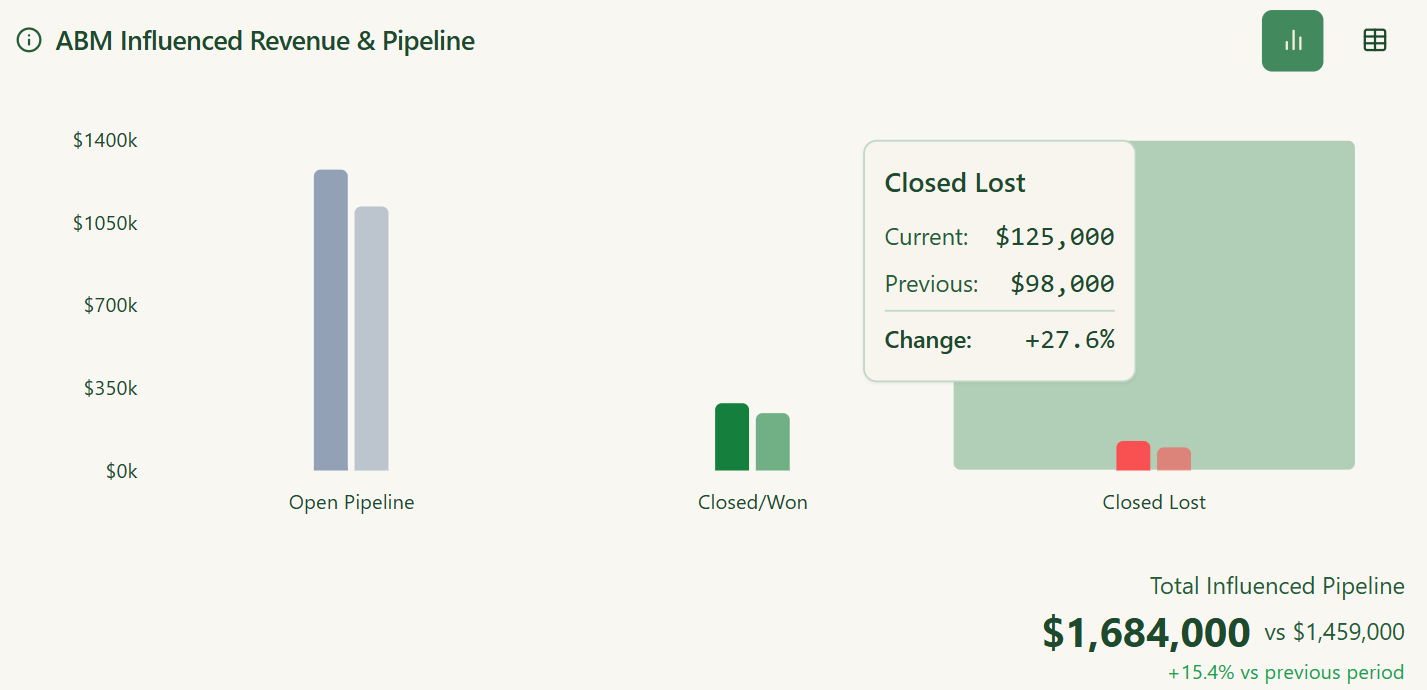
The /linkedin-abm-report skill by ZenABM is the exec-facing counterpart to the audit: spend, pipeline and deals influenced, best campaigns, formats, and ads, top engaged companies, ad sets graded against format benchmarks, month-over-month change, and recommendations, on the same data and math as the audit but written for a reader who will never open Campaign Manager.

Emikor/zenabm-linkedin-abm-reporting is the community plugin version: install from the GitHub URL, add your ZenABM API token, and /abm-report (or “give me last week’s report” in plain English) pulls live data and outputs headline metrics, pipeline ROI, campaign performance, format breakdown, top engaged accounts, stage moves, and auto-detected red and green flags, with optional PDF export.
No CSV exports, no spreadsheet assembly.

Everything agents do downstream (routing, outreach, prioritization) depends on this job being trustworthy, so I will restate the standard: an agent should act on intent signals a human can verify.
ZenABM’s first-party intent works by tagging campaigns with intent themes (example: Analytics, Security, AI Features); accounts that engage inherit the label, and you can click through to the exact engagements behind it.
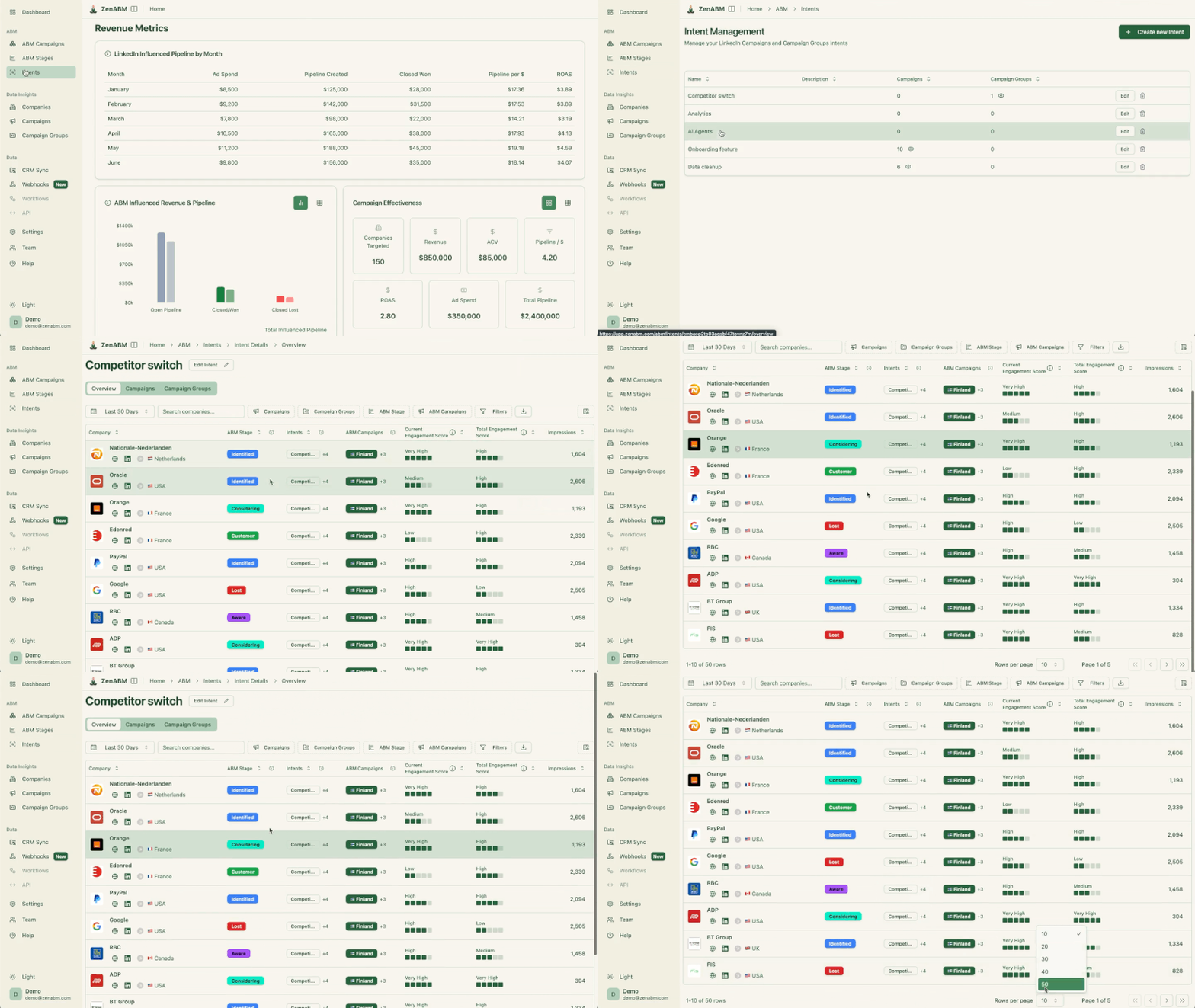
That is the difference from third-party keyword surges: the evidence is inspectable, which means an agent acting on it is auditable.
Stages in ZenABM turn engagement into workflow.
You define the thresholds (for example, 5+ engagements in 30 days moves an account to Interested), and stage transitions become the events agents subscribe to: the outbound agent in Job 10 triggers on accounts entering Interested, the exclusion recommendation in Zena Proactive triggers on accounts stuck in Aware while consuming spend.


The CRM side runs on bi-directional HubSpot and Salesforce sync (raw and processed engagement data as company properties) plus webhooks for Clay, Attio, and Pipedrive.
The agent tools for the CRM itself:
Outbound agents fail on cold lists and work on warm ones; that was the conclusion of the AI ABM tools research and nothing since has changed my mind.
So the outreach job, done properly, is the last link in the chain built above: intent signals identify the account, stages time the trigger, enrichment finds the person, and only then does an agent write and send.

Emikor/zenabm-outbound-agent-plugin is the free plugin that runs that chain on autopilot: it reads ZenABM engagement data, locates ICP-matched contacts at engaged accounts via Apollo (whose free tier includes 10,000 records per month), generates emails that reference the actual ads the account engaged with, pushes them to Smartlead for sending, and schedules the whole loop weekly.
You configure the ZenABM API key, Apollo key, Smartlead credentials, ICP definition, and target personas once.
The emails work because the personalization is real: “your team engaged with our analytics content” is verifiable, not inferred.
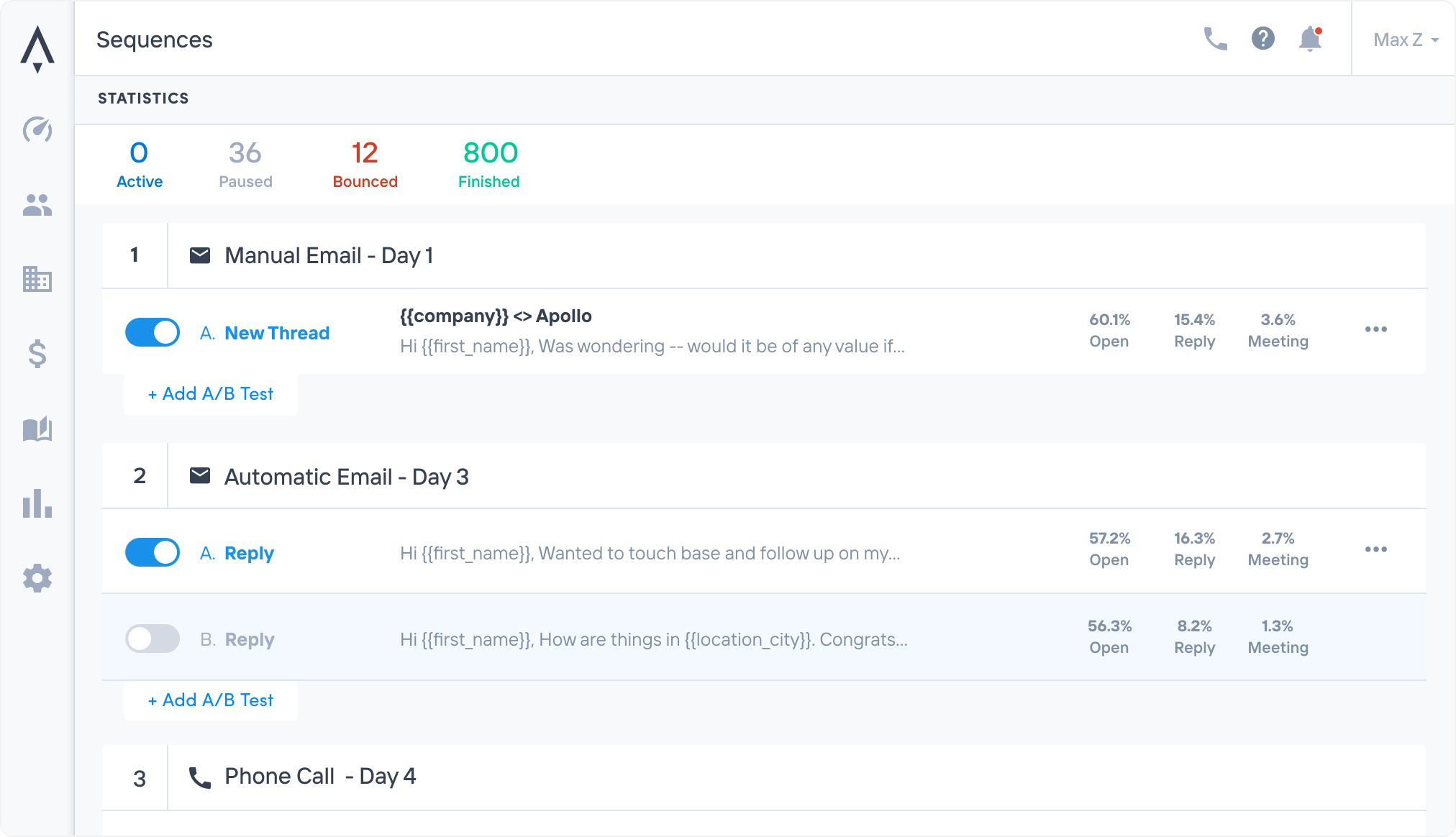
For teams that want conversational control rather than a scheduled pipeline, LeadMagic/smartlead-mcp-server exposes 113 tools over Smartlead (campaign management, lead tracking, deliverability, analytics), and the Apollo MCP server from Job 2 handles sequence enrollment.

The combination lets you run “find every Considering-stage account with no active sequence, enroll the top 2 contacts at each, and show me the drafts first” as a single supervised instruction.

Mautic/mautic is the largest open source marketing automation project, and it is the self-hosted answer for the nurture side of follow-up: email workflows, lead scoring, landing pages, and a REST API agents can drive.
It is PHP, it needs a server, and it is work to run; it earns its place when email volume or data-residency requirements rule out the SaaS senders.
On what this replaces: AI SDR platforms sell this job as a headcount substitute at four to five figures a month.
Alex Fine, co-founder at Understory, described on LinkedIn adding $1.2M in annualized ARR in 30 days with no sales reps, by building systems that automate qualification, meeting prep, and post-call admin around the humans who close.
That is the pattern the open source stack above implements: agents own the admin and the triggers; people own the conversations.
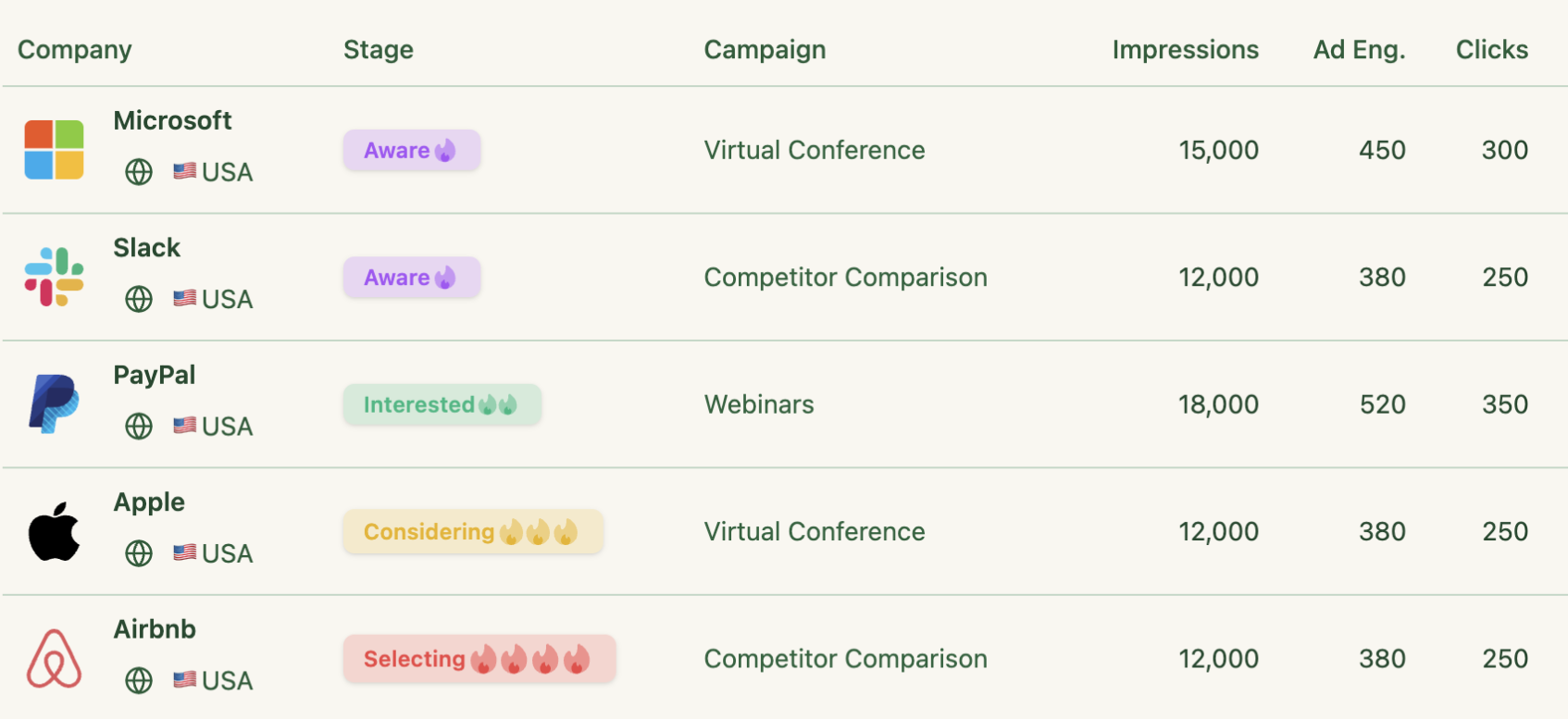
The order of operations matters more than the tool count, so here is the sequence I would run this quarter.
Connect the data layer first (the MCP server, ten minutes), because every other agent inherits its value.
Install the four ZenABM skills and run /linkedin-abm-audit against your account the same day; the fix list it produces is the fastest proof of what agent-driven operations feel like.
Then automate one job per week in the order of your bottleneck: reporting if Mondays hurt, list building if pipeline is thin, and outreach only after intent signals and stages are trustworthy.
The teams hitting $15.20 per dollar in the benchmark are not running more tools than the $5.21 median; they are closing the loop between engagement data and action faster.
Agents are simply the fastest way anyone has built to close that loop.
And all the agents in this article that are powered by ZenABM’s data are available on a free trial with the ZenABM account (the rest are open source).
Start your 37-day free trial of ZenABM now or book a demo with us to know more!
AI agents for ABM are software agents (typically an LLM runtime like Claude Code connected to data via MCP servers) that execute account-based marketing work autonomously or semi-autonomously: building account lists, researching companies, generating ads, auditing campaigns, producing reports, and triggering outreach. They differ from AI features inside SaaS tools because you compose them yourself, most are open source, and they act on your own first-party data rather than a vendor’s model.
No, and the practitioners running them agree. Agents execute analysis, production, and admin far faster than people, but strategy, messaging judgment, and context still need an operator; Chris Chambers documented a frontier agent operating a live ads account at a fraction of a professional’s speed. The working pattern is agents for execution with confirmation gates on every write action (pausing ads, sending emails), and a human owning strategy and final calls.
An MCP (Model Context Protocol) server exposes a data system as typed tools an AI agent can call. In ABM, MCP servers connect agents to ads data, CRM records, contact databases, and the web. The ZenABM MCP server exposes 60+ tools over company-level LinkedIn engagement, ABM stages, intent signals, and pipeline, so agents in Claude, ChatGPT, or Cursor optimize from live account-level data instead of exported CSVs.
It depends on the job, because no single agent covers ABM. The strongest per category: GPT Researcher for market sizing, Browser Use and the company-researcher repos for account research, the free ZenABM Claude skills for strategy, ad design, auditing, and reporting, Claude Ads for cross-platform audits, and the ZenABM Outbound Agent plugin for intent-led outreach. All are free; the differentiator is the data layer you connect them to.
The agents themselves are mostly free: every open source skill, plugin, and MCP server in this article costs only the LLM tokens it consumes. The real costs are the data layers: ZenABM from $59 per month for company-level LinkedIn engagement and attribution, plus optional API costs for enrichment (Apollo has a free tier) and sending infrastructure. A full agent-driven stack runs well under the cost of a single seat on an enterprise ABM platform, which typically starts in five figures annually.
