

©2026 ZenABM - All Rights Reserved.

LinkedIn third-party audiences are pre-built audience segments from external data providers that you can use for ad targeting in LinkedIn Campaign Manager.
These audiences are created by companies like Bombora, G2, and other intent data providers who track buyer behavior across the web and package it into targetable segments.
LinkedIn integrates these segments directly into Campaign Manager, so you can add them to campaigns the same way you add any other targeting filter.
For ABM practitioners, third-party audiences are a supplemental tool, not a primary one.
Your target account list remains the foundation.
But third-party audiences can add a useful layer, especially when you want to reach people at your target accounts who are actively researching topics related to your product.
The question is whether the data quality justifies the added complexity and cost.
In this article, I’ll answer exactly that.
Let’s go!
In case you want a quick rundown:


Third-party audiences in LinkedIn are audience segments built from data that does not originate on LinkedIn.
Instead, external data providers collect behavioral signals from across the web, like content consumption, product research, review site visits, webinar attendance, and create audience segments based on those signals.
LinkedIn then makes these segments available as targeting options within Campaign Manager.
The types of third-party audiences available include:
Intent audiences refer to people who are actively showing buying intent for a specific product category based on their online research behavior.
In practice, this means LinkedIn or a connected data source identifies signals that suggest someone is currently evaluating a solution, such as being “in-market for CRM software” or researching tools in a particular category.
For ABM, this can be useful because it helps you prioritize accounts that are not just a fit on paper, but may also be closer to an actual purchase decision.
Firmographic audiences are segments built around company-level characteristics that go beyond LinkedIn’s basic native filters like industry or company size.
These can include factors such as technology usage, funding stage, business model, growth stage, or other company traits that make an account more or less relevant to your ICP.
In ABM, firmographic audiences are valuable because they help you refine account selection using deeper business context, not just surface-level company data.
Behavioral audiences are built around professional actions and engagement patterns rather than static profile details.
This can include signals such as event attendance, publication readership, webinar participation, association memberships, or other forms of professional involvement.
For ABM, these audiences can add another layer of relevance because they help you identify people or accounts that are actively engaging with topics, communities, or activities related to the problem your product solves.

LinkedIn’s native targeting is based on data members provide directly: their job title, company, skills, education, and the content they engage with on LinkedIn.
This first-party data is generally reliable for professional attributes because members have an incentive to keep their LinkedIn profiles accurate.
Third-party audiences are based on data collected from external sources.
The accuracy depends on the data provider’s methodology, including how they collect signals, how they match those signals to LinkedIn profiles, and how frequently they update their segments.
This creates both opportunities and risks.
For most ABM programs, third-party audiences are a supplemental layer, not the foundation.
Here are the specific use cases where they add value.
You have a target account list of 1,000 companies.
Not all of them are actively in a buying cycle right now.
By layering a third-party intent audience on top of your TAL, you can prioritize the accounts that are showing research behavior related to your product category.
These accounts get higher ad frequency or different messaging (more direct, more conversion-oriented) because the intent signal suggests they are closer to a buying decision.
This is similar to the warm/cold segmentation I use at Userpilot, but with an external data signal instead of relying solely on LinkedIn engagement data.
Experts are seeing the best results from campaigns targeting closed-lost deals and churned customers, and adding intent data on top can help identify which of those accounts are actively re-evaluating solutions.
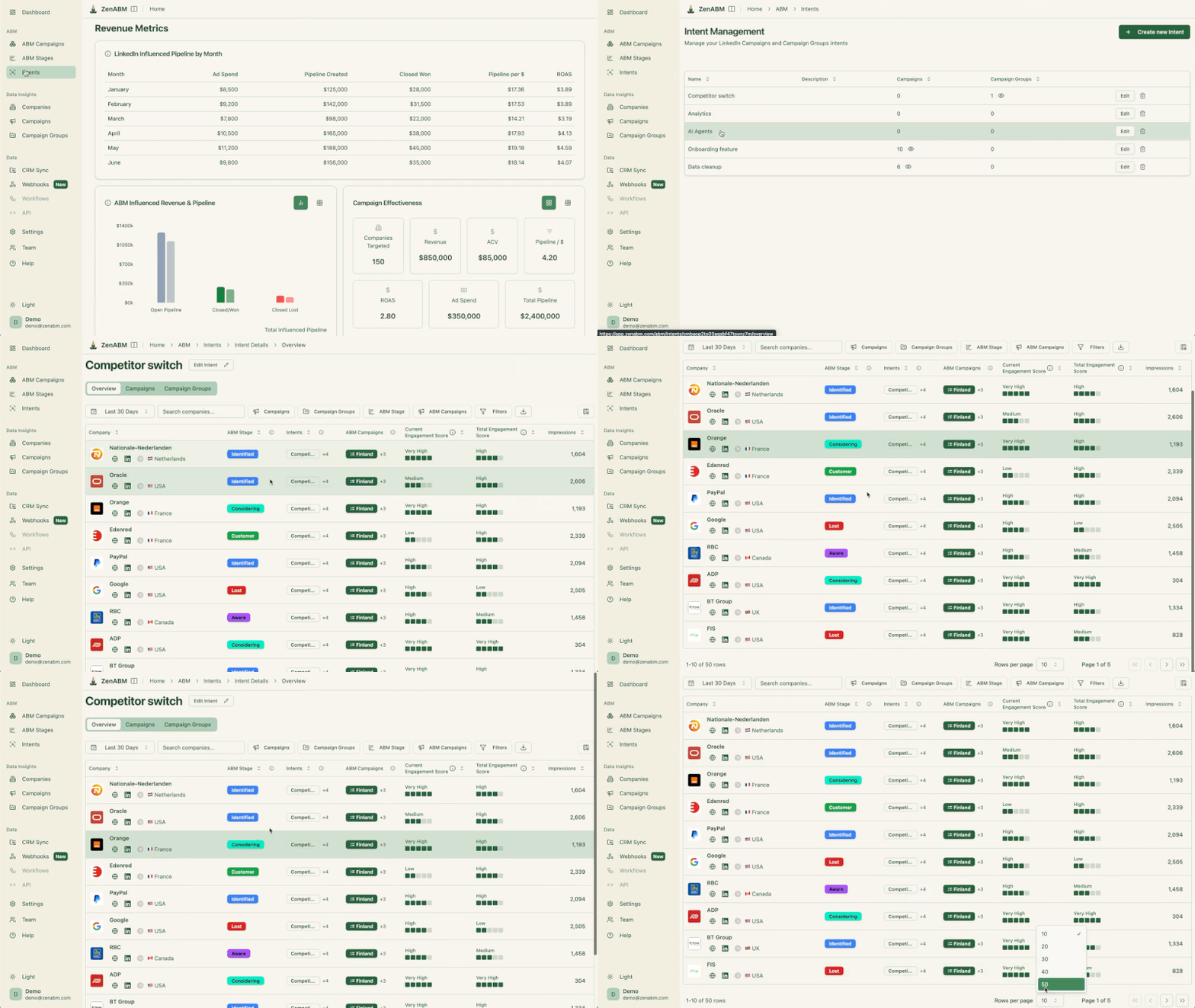
This is also where ZenABM becomes useful in a very practical way.
Its account scoring, ABM stage tracking, and CRM sync help you separate “third-party intent on paper” from “actually warming up in your funnel.”


So instead of blindly bidding harder on every account in a Bombora or G2 segment, you can prioritize the ones that also show first-party signals like ad engagement, website visits, or renewed pipeline activity.
Third-party audiences can help you find companies you missed during your ICP research.
If a company you have never heard of is actively researching your product category, that is a signal worth investigating.
Run a small discovery campaign using a third-party intent audience without your TAL, review which companies engage, and manually vet them against your ICP criteria. Companies that pass your filter get added to your TAL.
This is conceptually similar to using LinkedIn lookalike audiences for discovery, but with an intent signal instead of a firmographic similarity signal.
For more on how ABM on LinkedIn works end-to-end, see our ultimate guide.
Intent data can help you time your outreach.
If a cluster of accounts on your TAL suddenly starts showing intent signals for your category, that is a trigger to increase ad spend, launch new campaigns, or alert your sales team.
Without intent data, you are running campaigns at a steady pace regardless of whether accounts are actively researching. With intent data, you can surge when the timing is right.
When you pair that with ZenABM, the timing gets a lot sharper.
ZenABM can show company-level LinkedIn ad engagement and first-party qualitative intent in the same account view, so you can see whether an account is merely in a rented third-party segment or actually engaging with your brand.
That makes it much easier to decide when to switch from educational ads to sharper BOFU messaging.

The setup process for third-party audiences is straightforward, but there are nuances to be aware of at each step.
In Campaign Manager, create or edit a campaign.
In the targeting section, look for “Third-Party Audiences” or browse the audience marketplace.
Available segments depend on your region and the data providers with which LinkedIn has agreements.
Not all segments are available in all markets.
Browse the available segments by category.
Intent segments are typically organized by product category or topic (e.g., “CRM Software,” “Marketing Automation,” “Cybersecurity”).
Select segments relevant to your product and buyer.
Be specific, because “Enterprise CRM Software” is better than “Business Software” for reducing noise.
For ABM, add your matched audience (company list) as the primary targeting, then add the third party audience as an additional layer.
This creates an AND combination: LinkedIn will only show ads to people who work at companies on your TAL AND are in the third-party audience segment.
This keeps your targeting account-based while adding the intent signal.
Be aware that this AND combination can significantly shrink your audience. If your TAL audience is 5,000 and the third-party segment overlaps with 10% of those members, your targetable audience drops to 500.
Check the forecasted audience size before launching.
After launching, monitor the Demographics report closely for the first week.
Confirm that the companies, job titles, and seniority levels in the audience match your expectations.
Third-party segments can sometimes include unexpected profiles. Adjust exclusions or targeting as needed.
Maximillian Herczeg’s (LinkedIn ads specialist and founder at Kamrat, a marketing agency) recommendation applies here:
The audience hub, if you don’t know it, please get to know it.
Use the Audience Hub to check the composition and overlap of your third-party audience with your other campaigns.

ZenABM adds another useful validation layer here.
Its job title analytics and account-level campaign views help you check whether the third-party segment is pulling in the right personas at the right companies, instead of forcing you to rely only on top-line delivery data.


The following are the major limitations and risks of LinkedIn third-party audiences:
Intent data has a shelf life.
If someone researched CRM solutions three months ago but has already made a purchase decision, the intent signal is stale.
Most third-party data providers update their segments on a rolling basis (weekly or monthly), but there is always a lag between when the behavior occurs and when it appears in a targetable segment on LinkedIn.
For ABM, this means some of the accounts showing “intent” may already be past the buying window.
Connecting web browsing behavior to a specific LinkedIn profile involves probabilistic matching based on cookies, device graphs, and IP-to-company mapping.
This matching is not 100% accurate.
Some members in the third-party audience may not actually be the people who showed intent behavior.
This is why I always recommend layering third-party audiences on top of your TAL rather than using them standalone.
Some third-party audience segments come with a data fee on top of your regular LinkedIn ad costs.
This varies by provider and segment. Factor this into your budget calculations.
If the data fee plus ad costs make your effective CPL higher than what you achieve with native targeting alone, the third-party audience may not be worth it.
When you layer a third-party audience on top of your TAL and add job function and seniority filters, your audience can shrink rapidly.
Remember LinkedIn’s minimum of 300 members per campaign.
I have seen teams get excited about intent data, layer it on everything, and end up with audiences too small to run.
Check the forecasted audience size before committing to the budget.
Bilal’s (GTM and Revops specialist at Userpilot) advice applies here, too:
Stop trying to be perfect. Pull broad, have more accounts being pulled in, and then narrow down.
Start with a broader third-party segment and narrow based on performance data, rather than starting too narrow and having no data to work with.
An alternative to buying third-party data is building your own intent signals from first-party data.
This includes:
First-party intent signals are typically more accurate and more timely than third-party data because you are observing the behavior directly.
The downside is that first-party data only captures people who have already interacted with you, while third-party data can surface accounts that are researching but have not reached you yet.
For most ABM programs, I recommend investing in first-party intent signals first and using third-party audiences as a supplement.
The combination gives you both depth (detailed signals from accounts you are already engaging) and breadth (new signals from accounts you have not reached yet).
Do not go all-in on third-party audiences without testing.
Here is the approach I recommend:
Allocate 10-15% of your ABM budget to a test campaign using a third-party audience.
Run it for 4-6 weeks alongside your core TAL campaigns. Compare engagement rates, lead quality, and cost metrics between the third-party campaign and your standard campaigns.
Create two identical campaigns targeting the same TAL, where one has a third-party intent layer, and one does not. The intent-layered campaign should theoretically reach people who are more ready to buy.
If it shows significantly better conversion rates, the intent signal has value. If performance is similar, you may be paying for data that is not improving outcomes.
For the first 2-4 weeks, manually review the companies engaging with your third-party audience campaign.
This qualitative review tells you whether the third-party data is surfacing the right accounts or just inflating your engagement metrics with bad-fit companies.
ZenABM can make this review much easier because its pipeline dashboards, account scoring, and CRM-connected account timelines let you inspect whether these accounts are just clicking ads or actually progressing toward meetings, opportunities, and revenue.

That is a much better test than admiring a CTR and pretending the job is done, which humans adore for some reason.
If your third-party audience heavily overlaps with your existing TAL, you may be paying extra for data you do not need.
Check the overlap in the Audience Hub.
If 80% of your third-party audience is already on your TAL, the incremental value is limited to the intent signal itself, and you need to decide whether that signal is worth the premium.
For more on how to evaluate your campaign performance and avoid common mistakes, see the guide on LinkedIn ads mistakes to avoid.
The same targeting hygiene rules apply when using third-party audiences as with any other LinkedIn ABM campaign:


Maximillian Herczeg’s advice is unconditional:
Audience expansion, don’t use that. And LAN, don’t use it either.
If you are using a third-party audience to add precision, audience expansion undoes that precision by letting LinkedIn expand beyond your selected segments.
Exclude current customers, disqualified accounts, and competitors from your third-party audience campaigns just as you would from any ABM campaign.
The third-party data does not know which accounts you have already closed or disqualified.
Third-party audiences are a prospecting tool.
Do not let them cannibalize your remarketing budget, which is where you engage accounts that have already shown interest. The remarketing campaigns consistently deliver the best ROI in ABM programs.
For a detailed walkthrough of how to build your full ABM strategy on LinkedIn, including where third-party data fits in, see the ABM strategy guide.
LinkedIn third-party audiences can be useful for ABM, but only as a layer on top of a strong target account list and a solid first-party measurement setup.
They help most when you are prioritizing in-market accounts, discovering new accounts worth vetting, or timing campaigns around buying signals. They hurt most when teams treat them like magic targeting dust and ignore the usual issues of data freshness, matching accuracy, cost, and audience shrinkage.
If you want to use them intelligently, ZenABM can act as the control layer around that rented intent data. Its company-level LinkedIn ad engagement, CRM sync, ABM stages, account scoring, pipeline dashboards, automated BDR assignment, custom webhooks, and AI chatbot Zena help you verify whether third-party audience accounts are actually moving through your funnel.
Try ZenABM for free (37-day free trial) or book a demo now to know more!
Some important questions about LinkedIn third-party audiences and their answers:
No. Availability depends on the data provider and LinkedIn’s partnerships in each market. Third-party audiences are most widely available in North America and Western Europe. Check your Campaign Manager to see which segments are available in your target geographies.
Some segments include a data fee that is added to your standard ad costs. Others are included at no additional charge. The pricing model varies by provider and segment. Check the segment details in Campaign Manager before adding them to your campaigns.
Third-party audiences are primarily for prospecting, reaching people who have not interacted with you yet but are showing relevant behavior. For retargeting, use LinkedIn’s native retargeting options (website visitors, video viewers, lead form engagers), which are based on direct interactions with your content.
Test and compare. Run small campaigns with segments from different providers targeting the same TAL. Compare the engagement quality, lead quality, and conversion rates. The provider whose data produces the best outcomes for your specific ICP and product category is the one worth investing in.
No. Third-party audiences should supplement your TAL, not replace it. Your TAL is built from deliberate ICP analysis, customer patterns, and sales intelligence. Third-party data adds a behavioral signal on top. Running ABM solely on third-party intent data removes the account-level control that makes ABM different from demand generation.
