• Blog
  • Pricing
Login
Free TrialGet a Demo
Get a Demo
ZenABM

ABM made easy. Plug-and-play account scoring and analytics.

Follow us

LinkedInFacebookYouTubeX
Start for FreeLoginBook a Demo

Product

  • All Features
  • AI Agent - Zena
  • Dashboards
  • AI Reporting
  • Expert Skills
  • MCP Server
  • Companies Engagements
  • Multi-Channel Revenue Attribution
  • ABM Campaign Analytics Dashboards
  • Company Buyer's Intent
  • LinkedIn Ad Campaign Insights
  • Job Titles Insights
  • CRM Sync
  • Webhooks
  • API

Use Cases

  • ABM Campaign Management and Performance Tracking
  • Account Scoring
  • LinkedIn Campaign Management and Optimization
  • For LinkedIn Ads and ABM Agencies
  • Agency MCP Server

Free Tools

  • ABM Budget Calculator
  • LinkedIn Ads Count Calculator
  • LinkedIn TLA Generator
  • Experts Chat
  • LinkedIn Single Image Ad Creator

Case Studies

  • Productive's ABM Success Story
  • Valueships's LinkedIn TLA Case Study
  • Flowfuse's ABM Success Story

LinkedIn Optimization

  • Build Campaigns with AI
  • Budget Savers
  • Bidding Agent
  • Exclusions
  • Impression Capping
  • Workflows

Resources

  • Documentation
  • Release Notes
  • Reports & Templates
  • Blog
  • Case Studies
  • ABM Benchmarks Report
  • LinkedIn Ads Agencies Directory
  • ABM Clay Templates
  • LinkedIn ABM Skills for Claude
  • LinkedIn ABM Strategy
  • Running ABM on LinkedIn: The Ultimate Guide
  • Events
  • TLA Bootcamp
  • AI for ABM & LinkedIn Ads Week

Competitors comparison

  • ZenABM vs Fibbler
  • ZenABM vs Factors.ai
  • DemandSense Alternatives
  • Recotap Alternative

Company

  • Pricing
  • Contact
  • Brand Assets
  • Become a partner

Legal

  • Terms of Use
  • Privacy Policy
  • Data Policy

©2026 ZenABM - All Rights Reserved.

  1. Home
  2. Blog
  3. LinkedIn Ads
LinkedIn Ads

How to Choose Target Accounts for ABM: The Ultimate Guide

Emilia Korczynska
Emilia Korczynska
LinkedInPublished May 6, 2026·Updated May 9, 2026

Share this post

LinkedInXFacebook
How to Choose Target Accounts for ABM: The Ultimate Guide

Summarize with AI:

View as Markdown

Table of Contents

  • How to choose target accounts for ABM: Quick Summary
  • Why getting the target account list right matters more than anything else
  • Step 1: Start with the ICP fit
  • Step 2: Mine your CRM for warm target accounts
  • Step 3: Add sales input to your target account list
  • Step 4: Layer intent and engagement signals on top
  • Step 5: Tier your target accounts
  • Step 6: Keep your target account list dynamic
  • Step 7: Avoid the most common target account selection mistakes
  • Step 8: The tools I use to build and run the target account list
  • Step 9: Real example of how I refined a target account list with engagement data
  • How big should your ABM target account list be?
  • How to Build Your TAL for ABM: Final Thoughts
  • FAQs About Building Your TAL for ABM

ABM does not start with ads.

It starts with the target account list (TAL).

If we get the list wrong, no amount of clever, creative, personalization, or sales follow-up will save the campaign.

This guide is everything I have learned about how to choose target accounts for ABM after running programs at Userpilot and now for ZenABM, and after watching hundreds of customers do the same.

You will get a step-by-step framework for picking accounts, a tiering model, the CRM signals I rely on most, and the intent and engagement layer that finally tells me which accounts deserve more budget.

Quick map of what I cover below: ICP fit, CRM mining (closed-lost, stalled, disqualified, and reactivation candidates), sales input, intent and LinkedIn ad engagement, tiering, and how to keep the list dynamic instead of frozen on a spreadsheet.

How to choose target accounts for ABM: Quick Summary

If you’re short on time, here is the short version of how to choose target accounts for ABM:

  • Start with ICP: firmographics, technographics, geography, revenue or funding band, and buying-committee fit.
  • Layer CRM signals: closed-won lookalikes, open opportunities, stalled MQLs, closed-lost where the reason was timing, and disqualified deals worth a second look.
  • Pull in sales input: AEs and SDRs know which logos are worth the chase and which ones never pick up the phone.
  • Add intent and engagement: website visits, product or trial activity, webinar attendance, and LinkedIn ad impressions and clicks at the company level (and similar metrics for other ad channels). ZenABM can help you with tracking paid ad channels (LinkedIn, Google, etc.) and even website visitors (provided they filed a form).
  • Tier the list: Tier 1 for one-to-one, Tier 2 for one-to-few, Tier 3 for one-to-many, with a stage overlay so engagement can promote a Tier 2 above an idle Tier 1.
  • Keep it dynamic: the target account list should breathe with new fits, removals, and stage moves every week.
  • The biggest mistake I see is treating account selection as a one-time spreadsheet exercise. The list that wins is the list that updates as accounts move from Identified to Aware to Interested to Considering to Selecting.

Why getting the target account list right matters more than anything else

Most ABM pros emphasize that your list is your strategy for ABM

I will say it plainly: target account selection is the highest-leverage decision in any ABM program.

The CTR you obsess over, the creative tests, the personalization, the gifting budget: none of it matters if the wrong companies are in the audience.

I have seen teams burn $40,000 on LinkedIn ads against a list that was put together in 30 minutes from a Salesforce export, then wonder why nothing closed when the list was the problem the entire time.

The account list is, indeed, the foundation of everything that comes after.

Think about it this way: your ICP is the universe of companies that could buy, while your target account list is the subset you believe will buy this quarter or this year, and those are very different lists. The ICP can have 20,000 companies, but the target list is usually 50 to 1,500, depending on whether you are doing one-to-one, one-to-few, or one-to-many ABM.

If you want a deeper read on the underlying program design, I wrote a complete walkthrough in my ultimate guide to ABM on LinkedIn.

Step 1: Start with the ICP fit

Funnel showing how Target Account List is built out of the broad ICP net for ABM Campaigns

Every good account list starts with a tight ICP, and I do not mean a one-line description.

I mean a real definition with concrete attributes that a tool can actually filter on.

The ICP attributes I use:

  • Company size: headcount band, often 50 to 500 or 500 to 5,000, depending on segment.
  • Industry or vertical: not just SIC code, but actual buyer behavior, such as “B2B SaaS with self-serve trial.”
  • Geography: regions where I can sell, support, and price properly.
  • Revenue or funding: a funded Series B looks very different from a 20-year-old PE-backed company.
  • Tech stack: the right CRM, the right MAP, the tools that signal a mature buying process.
  • Growth signals: recent hiring, new exec hires, recent fundraises, and expansion into a new market.
  • Buying committee fit: Can I actually reach the 6 to 10 people who decide?

Tim Davidson summed up the bigger picture nicely when he was thinking about how the funnel is collapsing:

“At some point, it’s just all going to be one bucket called target accounts. But I could be wrong. Prove me wrong. Regardless, the TOFU MOFU BOFU strategy doesn’t work because that’s not how people buy.” – Tim Davidson (founder at B2B Rizz) on LinkedIn

I agree with Tim.

The bucket I care about is “fits my ICP and shows signs of being a real buyer this year.”

Everything else is theatrics.

Build the ICP from your best customers, not your hopes

Pull your closed-won deals from the last 24 months and look at win rate, sales cycle length, ACV, gross retention, and NPS, because the accounts that score well on all of those metrics are your real ICP.

Not the ones a CMO drew on a whiteboard, not the logos you wish had closed, but the ones that actually closed, paid, expanded, and stayed.

From there, the ICP becomes the filter you apply to every list source going forward.

Step 2: Mine your CRM for warm target accounts

This is the step most ABM guides skip, yet it is the one that consistently creates the most pipeline for me, because cold lists are slow by definition, while the CRM is full of accounts that already had a touchpoint with my company: accounts that already saw a demo, already replied to an SDR, already signed up for a free tool.

Those are warm leads waiting to be reactivated.

The five CRM segments I always pull

  1. Closed-won lookalikes: companies that share firmographics with my best customers but never bought from me.
  2. Open opportunities: deals already in the pipeline that need air cover from marketing.
  3. Closed-lost where reason was timing or budget: these are gold. Many of them come back if you stay top of mind.
  4. Stalled MQLs and stalled deals: someone showed intent, then went quiet. Reactivation campaigns can move them.
  5. Disqualified leads with good firmographics: sometimes an SDR disqualifies an account because the timing was wrong or the contact was junior, not because the account itself is bad.

Why closed-lost is my favorite source of target accounts

Closed-lost accounts already know who you are, because they evaluated you, their objection is documented, and the buying committee is mapped in the CRM.

Compare that to a cold list where there is zero awareness, zero context, and zero relationship.

If you map the loss reasons by deal potential and re-engage the top three, you skip months of prospecting.

As Nick V. from HeyReach was quoted by Alex Fine:

“They map closed-lost reasons by deal potential and build the top three. No market theories. No founder ego. Just fix what’s actually breaking deals.” – Alex Fine on LinkedIn

Nick V. from HeyReach was quoted by Alex Fine: "They map closed-lost reasons by deal potential and build the top three. No market theories. No founder ego. Just fix what's actually breaking deals."

The same logic applies to property history in your CRM.

If a company filled out a form three years ago, abandoned a trial last year, and visited your pricing page last week, that property history is doing the work of an entire SDR.

Surface it.

Step 3: Add sales input to your target account list

Shari Johnston advises that TAL building is a foundational part of ABM strategy and segmentation
Shari Johnston on target account list building as the foundation of ABM
B2B ABM experts like Dave Rigotti explain that marketing and sales alignment is not just beneficial to ABM but the very essence of it.

If I build the target list without sales input, the outcome is predictable: AEs reject it because “those companies will never buy,” SDRs ignore it because they have their own pet logos, and the list dies before a single dollar of media is spent.

I run a 30-minute working session per AE before locking the list.

I ask three questions:

  • Which 10 logos would change your year if you closed them? I take all of them.
  • Which accounts have you been working on but cannot crack? Those need air cover.
  • Which open opportunities need executive sponsorship to close? Those become Tier 1.

This step does two things: it surfaces logos that no algorithm would ever pick, and it gets sales bought into the list before a single dollar of media is spent, with the latter mattering more than the former.

Step 4: Layer intent and engagement signals on top

ICP plus CRM plus sales gets me a strong static list, and intent and engagement are what turn it into a living one.

The signals I prioritize the most

  • Website visits: deanonymized at the company level, weighted by page (pricing over integrations over blog).
  • Product or trial activity: if you have a self-serve motion, who signed up but stalled?
  • Webinar and event attendance: not just registration, but actual attendance and questions asked.
  • LinkedIn ad impressions, clicks, reactions, and comments: at the company level, not just the user level.
  • Campaign theme engagement: which themes resonate at which accounts, so I can route the right next ad.
  • Third-party intent (Bombora, G2, etc.): useful as a tiebreaker, but I trust first-party signals more.

How LinkedIn ad engagement moves accounts through ABM stages

This is where my program changed the most, because with ZenABM, I track LinkedIn ad engagement at the account level and use that data to move accounts through five stages:

  • Identified: account is on the list, but no ad engagement yet.
  • Aware: account has seen ads above the impression threshold.
  • Interested: account has clicked, reacted, or commented.
  • Considering: account is engaging with bottom-of-funnel themes (pricing, demos, comparison).
  • Selecting: contacts at the account are showing buying-stage behavior across channels.

Once that mapping exists, the list is no longer a static spreadsheet but a queue.

Accounts in Considering get the most budget and the most sales attention, while accounts stuck in Identified for 90 days get reviewed: I either push more impressions to them or drop them and replace them with warmer fits.

ZenABM dashboard showing company-level ads engagement data per campaign by pulling first party intent signals from LinkedIn API
ZenABM dashboard showing company-level ad engagement data per campaign by pulling first-party intent signals from the LinkedIn API
ZenABM table of FlowFuse target accounts moving down the funnel, with ad spend and engagement scores
Target ABM companies moving down the funnel by stage in ZenABM
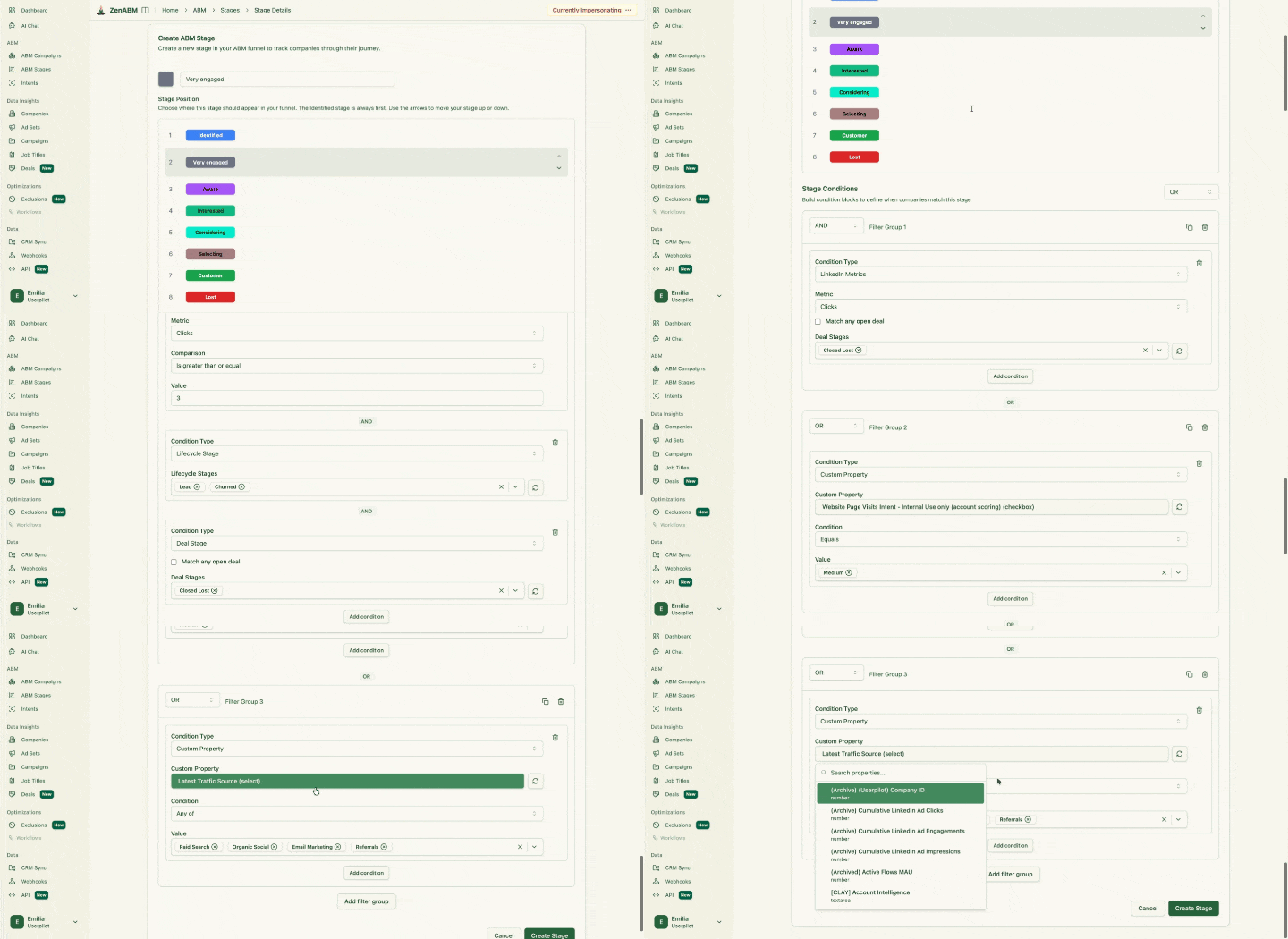
ZenABM account stage editor adding a custom "Very engaged" stage to customize the ABM funnel
ZenABM account stage customization

For more on the engagement layer specifically, my piece on account scoring and engagement signals for ABM goes deeper into the math behind the stages.

Deanonymize LinkedIn ad engagements, get intent, accounts scoring (starting @$59/month!)

37 Days Free Trial

Try ZenABM Now

Step 5: Tier your target accounts

Infographic on TAL segmentation for ABM strategy

Once I have a list of, say, 600 ICP-fit accounts with CRM context and engagement signals, I tier them, not because tiering is fashionable, but because Tier 1 and Tier 3 should not get the same treatment.

My standard three-tier model

Here’s the model I follow:

Tier

Profile

Treatment

Typical list size

Tier 1

Highest-fit, highest-revenue, named by sales as priority

One-to-one: bespoke landing pages, custom outbound, ABM ads with company name

10 to 50 accounts

Tier 2

Strong ICP fit, often grouped by industry or use case

One-to-few: vertical-specific ads, persona landing pages, pod-based outbound

50 to 300 accounts

Tier 3

Broad ICP, programmatic reach

One-to-many: matched audience ads, lead gen forms, marketing-driven nurture

500 to 5,000 accounts

Stage overlay beats static tiering

The mistake is to lock in tiers and never change them, because a Tier 2 account that is in Considering deserves more attention than a Tier 1 account that is still in Identified. Engagement is a stronger signal than how excited my CRO was when she first saw the logo, so I overlay the stage on the tier.

The accounts that get the most budget are the ones that are high tier and high stage: Tier 1 in Selecting gets a custom video and a dinner, while Tier 3 in Identified gets a single image ad and a low CPM bid.

If you want a deeper view of segmentation logic, we have written about tiered account segmentation for ABM with concrete budget splits.

Step 6: Keep your target account list dynamic

The target account list is not a deliverable; it is a living object.

If your TAL has been the same for six months, something is wrong, because you are either not finding new fits, not removing dead weight, or not letting engagement promote and demote accounts.

My weekly TAL ritual

Here’s the weekly TAL procedure I follow:

  • Add: new ICP-fit accounts from CRM (new MQLs, new inbounds, new closed-lost) and from intent providers.
  • Remove: accounts that have been Identified for 90 days with no engagement, accounts that closed-lost recently for “not a fit” reasons, accounts where the buying committee left.
  • Promote: accounts that moved up a stage in the last 7 days. Increase frequency, narrow the creative.
  • Hand off: accounts that hit Considering or Selecting get an automatic Slack ping to the AE with the engagement context.

That last step is the difference between marketing as a lead factory and marketing as a pipeline machine.

If sales does not get a real-time signal when a Tier 1 account starts engaging, the engagement is wasted.

If you want to take this further into outbound, my guide on intent-based outbound shows the exact handoff workflow.

Step 7: Avoid the most common target account selection mistakes

I see the same mistakes over and over, and if you eliminate them, you are ahead of at least 80% of ABM programs.

  • Treating ICP as the target list: 20,000 companies is not a target list. That is a marketing audience. Pick the 50 to 1,500 you actually plan to convert.
  • Building the list once and never updating it: the list should change weekly.
  • Skipping closed-lost: these are warm, and you ignore them.
  • No sales input: AEs will not run plays on a list they did not help build.
  • Confusing intent with fit: a non-ICP company visiting your pricing page is not your ICP. It is noise.
  • Targeting whales you cannot service: if you cannot win them, do not put them on the list. Aspiration is not a strategy.
  • Ignoring engagement when budgeting: an equal budget across tiers wastes money on accounts that do not care.

Step 8: The tools I use to build and run the target account list

The list lives across a few systems, and the following is the minimum stack I run with:

  • CRM (HubSpot, Salesforce): source of truth for accounts, deals, lifecycle stages, lost reasons, and owners.
  • Enrichment (Clearbit, Apollo, Clay): firmographic, technographic, hiring, and funding signals to score ICP fit.
  • Intent (Bombora, G2, first-party): third-party intent as a tiebreaker, first-party page-view signals as the main signal.
  • LinkedIn Campaign Manager: matched audience uploads for one-to-one and one-to-few campaigns.
  • ZenABM: account-level LinkedIn ad engagement tracking, ABM funnel stages, account scores, first-party intent signals, and CRM sync so engagement data flows directly into HubSpot or Salesforce.
    ZenABM campaign breakdown for the Amazon account, with a timeline chart of each ad set's engagement over 30 days

    ZenABM ABM company engagement journey – details (campaign breakdown)
    LinkedIn ad data pushed to company lists in the HubSpot CRM using ZenABM
    LinkedIn ad data pushed to company lists in the HubSpot CRM using ZenABM

    LinkedIn ad data pushed to company lists in the HubSpot CRM using ZenABM
    ZenABM's current vs total engagement score
    ZenABM’s current and total engagement scores help surface hot accounts.

    ZenABM’s current and total engagement scores help surface hot accounts.
    ZenABM table of FlowFuse target accounts moving down the funnel, with ad spend and engagement scores

    Target ABM companies moving down the funnel by stage in ZenABM
  • Outreach or Smartlead: for sequencing accounts that hit Considering.

The reason I built ZenABM is that LinkedIn Campaign Manager hides which companies actually engaged with your ads: you see the campaign-level numbers, not the account-level story.

That gap is what kills most ABM programs, because you cannot promote accounts through stages if you cannot see who engaged.

Step 9: Real example of how I refined a target account list with engagement data

Here is a concrete pattern I have seen play out repeatedly: a team starts with a 1,200-account list built from a Salesforce export filtered on industry and headcount, then runs LinkedIn ads against it for 60 days.

After 60 days, the engagement picture is brutal but useful:

  • About 30% of accounts have not seen a single impression because LinkedIn match rates are imperfect.
  • About 40% have seen impressions but never clicked, reacted, or commented.
  • About 20% are Aware, meaning they saw ads more than five times.
  • About 8% are Interested, meaning they engaged at least once.
  • About 2% are Considering or Selecting, with multiple engagements, often with bottom-of-funnel themes.

That last 10% is where the pipeline lives, which means the team should now do four things: increase budget on the engaged 10%, retarget the 40% with a different creative angle, run a fresh persona-targeted creative against the unmatched 30%, and cycle in 200 new closed-lost accounts to keep the list fresh.

Without account-level engagement data, none of those decisions is possible, and the team would just keep spending evenly across 1,200 accounts, never understanding why the pipeline stays flat.

How big should your ABM target account list be?

The honest answer is that it depends entirely on your motion.

Here are the numbers I use as defaults:

  • One-to-one: 10 to 50 accounts. Custom landing pages, custom video, named outbound.
  • One-to-few: 50 to 300 accounts grouped by vertical or use case. Persona-level personalization.
  • One-to-many: 500 to 5,000 or more accounts. Programmatic ads, lead gen forms, lookalikes.

You can run more than one motion in parallel, and in fact most strong programs do, with a common split being 25 Tier 1 accounts, 200 Tier 2 accounts, and 2,000 Tier 3 accounts, with budget split roughly 40/35/25 across the tiers.

The exact size depends on your sales capacity and average deal size.

Deanonymize LinkedIn ad engagements, get intent, accounts scoring (starting @$59/month!)

See which target accounts are actually engaging – then move budget to where the heat is 37 Days Free Trial – Starting at $59/month

Book a Demo

How to Build Your TAL for ABM: Final Thoughts

Every creative decision, every budget split, every sales play you build sits on top of it, which means a weak list does not produce a weak campaign. It produces no campaign at all, because the right message aimed at the wrong companies is just noise with a media budget attached to it.

The framework I have laid out here is not theoretical. ICP filtering, CRM mining, sales alignment, intent layering, tiering with a stage overlay, and weekly list maintenance: these are the exact steps I run for ZenABM and the steps I have watched the best ABM programs run at companies that actually close pipeline from their LinkedIn spend.

The part most teams skip is the dynamic layer.

They build the list, launch the campaign, and then watch the budget disappear into accounts that never move past Identified. The fix is account-level engagement data.

When you can see which companies are seeing your ads, clicking your ads, and engaging with your bottom-of-funnel themes, you can move budget to where the heat actually is instead of spreading it evenly across a spreadsheet that has not been touched in three months.

ZenABM tracks LinkedIn ad engagement at the account level, maps each company through the five ABM stages, and pushes that engagement data directly into HubSpot or Salesforce, so your sales team knows exactly when a Tier 1 account starts moving.

If you are running LinkedIn ABM without that visibility, you are optimizing blind.

Try ZenABM for free now (37-day free trial) or book a demo to know more!

FAQs About Building Your TAL for ABM

Some common questions about building your TAL for ABM and their answers:

How do I choose target accounts for ABM if I do not have a CRM full of data?

Start with ICP fit using firmographics, technographics, and growth signals from an enrichment tool like Clay or Apollo.

Then run a small one-to-many LinkedIn ad campaign against that list to generate first-party engagement signals. Within 60 days, you will have a real engagement layer to refine the list with.

How many accounts should be on my ABM target list?

For one-to-one ABM, 10 to 50 accounts. For one-to-few, 50 to 300. For one-to-many, 500 to 5,000 or more. Most teams run a blended program with all three tiers and split the budget roughly 40/35/25 across Tier 1, 2, and 3.

The exact size depends on your sales capacity and average deal size.

How often should I update my ABM target account list?

I update mine weekly.

New ICP-fit accounts get added, accounts stuck in Identified for 90 or more days get removed or replaced, and accounts that moved up a stage get promoted in budget and creative.

Treating the TAL as a static spreadsheet is one of the biggest mistakes in ABM.

Should I include closed-lost accounts in my target account list?

Yes, especially closed-lost where the loss reason was timing, budget, or a competitor.

Those accounts already know your brand, have evaluated you, and have a documented buying committee.

Map loss reasons by deal potential and re-engage the top-priority ones with a reactivation campaign.

How do I prioritize accounts when the budget is limited?

Combine tier and stage. Spend the most on accounts that are high tier and high stage (Tier 1 or 2 in Interested, Considering, or Selecting). Spend the least on accounts that are low-tier and low-stage.

Engagement is a better predictor of close than tier alone, so let the data move the budget for you.

Share this post

LinkedInXFacebook

Author

Emilia Korczynska

Emilia Korczynska

LinkedIn

Share this post

LinkedInXFacebook

Try Zena AI Agent

Ask our experts about LinkedIn Ads & ABM. Get instant answers with sources.

Emilia KorczynskaAli YildirimVeronika VebereTim DavidsonMaximilian Herczeg
+20 experts
Try it free

Stay up to date with ZenABM

Get the latest ABM insights in your inbox.

Latest in Blog

Back to Blog