
• Blog
  • Pricing
Login
Free TrialGet a Demo
Get a Demo
ZenABM

ABM made easy. Plug-and-play account scoring and analytics.

Follow us

LinkedInFacebookYouTubeX
Start for FreeLoginBook a Demo

Product

  • All Features
  • AI Agent - Zena
  • Dashboards
  • AI Reporting
  • Expert Skills
  • MCP Server
  • Companies Engagements
  • Multi-Channel Revenue Attribution
  • ABM Campaign Analytics Dashboards
  • Company Buyer's Intent
  • LinkedIn Ad Campaign Insights
  • Job Titles Insights
  • CRM Sync
  • Webhooks
  • API

Use Cases

  • ABM Campaign Management and Performance Tracking
  • Account Scoring
  • LinkedIn Campaign Management and Optimization
  • For LinkedIn Ads and ABM Agencies
  • Agency MCP Server

Free Tools

  • ABM Budget Calculator
  • LinkedIn Ads Count Calculator
  • LinkedIn TLA Generator
  • Experts Chat
  • LinkedIn Single Image Ad Creator

Case Studies

  • Productive's ABM Success Story
  • Valueships's LinkedIn TLA Case Study
  • Flowfuse's ABM Success Story

LinkedIn Optimization

  • Build Campaigns with AI
  • Budget Savers
  • Bidding Agent
  • Exclusions
  • Impression Capping
  • Workflows

Resources

  • Documentation
  • Release Notes
  • Reports & Templates
  • Blog
  • Case Studies
  • ABM Benchmarks Report
  • LinkedIn Ads Agencies Directory
  • ABM Clay Templates
  • LinkedIn ABM Skills for Claude
  • LinkedIn ABM Strategy
  • Running ABM on LinkedIn: The Ultimate Guide
  • Events
  • TLA Bootcamp
  • AI for ABM & LinkedIn Ads Week

Competitors comparison

  • ZenABM vs Fibbler
  • ZenABM vs Factors.ai
  • DemandSense Alternatives
  • Recotap Alternative

Company

  • Pricing
  • Contact
  • Brand Assets
  • Become a partner

Legal

  • Terms of Use
  • Privacy Policy
  • Data Policy

©2026 ZenABM - All Rights Reserved.

  1. Home
  2. Blog
  3. For ABM
For ABM

10 Best Account-Based Marketing (ABM) Tools [2027]

Emilia Korczynska
Emilia Korczynska
LinkedInPublished Apr 23, 2026·Updated Oct 16, 2026

Share this post

LinkedInXFacebook
10 Best Account-Based Marketing (ABM) Tools [2027]

Summarize with AI:

View as Markdown

Table of Contents

  • Best ABM Tools for 2027: a quick summary
  • How to choose an ABM tool in 2027
  • A note on AI: how ABM is changing in 2027
  • 1. Demandbase: best for enterprises that want display advertising at scale
  • 2. ZenABM: best for LinkedIn-first ABM
  • 3. 6sense: best for enterprises that want display advertising and a suite
  • 4. AdRoll ABM (formerly RollWorks): best for an easier entry into account-based ads
  • 5. Influ2: best for ads to named people
  • 6. UserGems: best for champion and job-change signals
  • 7. Common Room: best for community and product signals
  • 8. Dreamdata: best for the most complete revenue attribution
  • 9. HockeyStack: best for full-funnel attribution and account journeys
  • 10. Userled: best for personalised LinkedIn ads plus microsites
  • How ZenABM helps with account-based marketing on LinkedIn
  • Which ABM tool to choose for your use case
  • Frequently Asked Questions

The best account-based marketing (ABM) tools for 2027 are the ones that fit your channels, team and budget, and AI is changing what that means.

Below are 10 ABM tools, grouped by what each one is built for.

Each one ends with who should buy it and who should skip it.

Best ABM Tools for 2027: a quick summary

Short on time? Here is the short version:

  • ZenABM is a LinkedIn-first ABM tool. It creates and manages your LinkedIn campaigns with AI (in the app or from Claude through its MCP server), shows which companies engage with your ads, extracts first-party intent signals from that engagement, scores accounts automatically and ties them to pipeline. It starts from $59/month and has a 5.0 rating on G2 😉
  • Demandbase, 6sense and AdRoll ABM are the enterprise suites for display advertising at very large scale.
  • Influ2, UserGems and Common Room work at contact level, which means ads to named people, job-change signals and community signals.
  • Dreamdata and HockeyStack are attribution tools that show which channels touched a deal.
  • Userled is built around personalised LinkedIn ads plus AI microsites.
  • You should buy for your channel, team and budget, not for the longest feature list.

Here is how the 10 tools compare against the 14 criteria I explain in the next section (scroll sideways to see every column):

Tool and primary focus

G2 rating

List building

Ad execution and channels

LinkedIn-first

Signals and intent

Account scoring

Ad personalisation

Revenue attribution

Account journeys

AI and MCP

AI predictive analytics

CRM and integrations

Sales activation

Entry price

Ease of use

Best for

Demandbase (enterprise suite)

4.4 (2,012)

Company level, buying groups

Yes: own DSP, LinkedIn, Meta, Google, CTV

No

Yes: first and third-party intent

Yes: Pipeline Prediction

Yes: web personalisation

Yes: pipeline attribution

Yes

Partial: MCP (read-oriented), Mojo, Agentbase

Yes

Salesforce, HubSpot, Marketo

Yes: Demandbase for Sales

Not published (Vendr median $68,591/year)

G2 ease of use 8.5

Display advertising at enterprise scale

ZenABM (LinkedIn ads ABM)

5.0 (6)

Company level; stages sent to LinkedIn as audiences via HubSpot

Yes: creates and manages LinkedIn campaigns

Yes

Yes: first-party intent from ad engagement

Yes: kept current, stages from rules

Partial: themed ads, no web personalisation

Yes: LinkedIn, Google, Reddit, AI referrals, organic

Yes: company journey with contacts

Yes: Zena, MCP reads and writes

No: scores from engagement and CRM data

HubSpot, Salesforce, Attio

Yes: webhooks, hot accounts with talking points

From $59/month

G2 reviewers: "clean, intuitive"

LinkedIn-first ABM

6sense (enterprise suite)

4.3 (1,432)

Company level, dynamic segments

Yes: own DSP, LinkedIn, Google

No

Yes: first, second and third-party intent

Yes: predictive 0 to 100

Partial: via integrations

Yes: sourced and influenced

Yes: buying stages

Partial: MCP (read-only), RevvyAI

Yes

Salesforce, HubSpot, Marketo

Yes: next-best actions

Not published (Vendr median $62,440/year)

G2 ease of use 8.0

Display advertising and a full suite

AdRoll ABM (enterprise suite)

4.3 (655)

Import or ICP fit grades A to D

Yes: DSP, LinkedIn, Meta, CTV

No

Yes: Bombora keyword intent

Yes: ICP fit and Journey Prediction

No native web personalisation

Unknown

Yes: Journey Stages

Partial: AI Assistant, MCP unknown

Partial: Journey Prediction

Salesforce, HubSpot, Marketo

Yes: Command Center, CRM widget

Retargeting: no platform fee; others by quote

G2 usability 8.4

An easier entry into account-based ads

Influ2 (contact level)

4.6 (161)

Contact level, Cohort Designer

Yes: LinkedIn, Google, Meta on its own media

No

Yes: contact-level intent alerts

Unknown

Yes: ads to named people

Partial: limited reporting

Yes: engagement by name

Partial: MCP connector

Unknown

Salesforce, HubSpot, Marketo

Yes: Slack, Teams, Outreach, Salesloft

Quote (Vendr median $60,000/year)

G2 setup 8.8

Ads to named people

UserGems (contact level)

4.7 (145)

Contact level, job changes

Partial: audience sync from Advanced, no native execution

No

Yes: 30+ native signals

Yes: A to D scoring

Unknown

Unknown

Unknown

Partial: Gem-E agents, MCP not on Core

Partial: AI scoring

Salesforce, HubSpot

Yes: AI SDR agent

Core $40,000/year

G2 ease of use 9.2

Champion and job-change signals

Common Room (contact level)

4.5 (106)

Contact level, Prospector

Partial: audience sync via webhook and Zapier

No

Yes: community, product, Bombora

Yes: customisable

Outreach messages only

Community efforts only

Yes: Person360

Yes: MCP reads and writes

Partial: AI scoring

HubSpot, Salesforce

Yes: alerts, sequences

Essential $2,500/month

Reviewers: easy to use

Community and product signals

Dreamdata (attribution)

4.7 (271)

Audience Hub, company and contact

Partial: audience sync and LinkedIn CAPI, no campaign management

No

Yes: G2 buyer intent, third-party intent

Partial: engagement scores

No

Yes: six multi-touch models

Yes: standout journey view

Partial: Analytics Agent, MCP read-oriented

Unknown

Salesforce, HubSpot, Dynamics, Marketo

Partial: webhook syncs

Starter free; Advanced by quote

G2 ease of use 8.4

The most complete revenue attribution

HockeyStack (attribution)

4.5 (82)

Visitor-to-company matching, audiences

Partial: audience sync, campaigns built in LinkedIn

No

Partial: Bombora and G2 intent bought separately

Yes: AI scoring

No

Yes: includes pre-click LinkedIn impressions

Yes: account and person journeys

Yes: Odin and Nova agents, MCP unconfirmed

Partial: scoring vs closed-won

Salesforce, HubSpot

Partial: Slack and email alerts

Not published (Vendr median $29,702/year)

G2 usability 7.6

Full-funnel attribution and journeys

Userled (personalisation)

4.7 (54)

Named account list

Yes: native LinkedIn execution, automated bidding

Partial: LinkedIn plus microsites

Partial: engagement alerts

Unknown

Yes: AI microsites, 1:1 ads

Partial: campaign-to-pipeline

Unknown

Partial: AI content, MCP unknown

Unknown

Salesforce, HubSpot, Marketo

Yes: Sales Plugin

LinkedIn ABM Ads from $2,000/month

G2 setup 9.0

Personalised LinkedIn ads plus microsites

The tools fall into five groups:

  • Enterprise suites (Demandbase, 6sense, AdRoll ABM): they run display advertising at very large scale, which suits B2C companies especially, and they have been on the market the longest, so they are often the default choice.
  • LinkedIn ads ABM (ZenABM): it is built for running ABM on LinkedIn, so it creates and manages your LinkedIn campaigns with AI, shows which companies engage, scores them and ties them to pipeline, which is why LinkedIn-first teams choose it.
  • Contact-level (Influ2, UserGems, Common Room): these tools work with named people instead of whole accounts.
  • Revenue attribution (Dreamdata, HockeyStack): these tools show which channels touched a deal.
  • Personalisation (Userled): it pairs personalised LinkedIn ads with AI microsites.

I judged each tool against the 14 criteria below, using vendor sites, G2, Gartner Peer Insights, TrustRadius, Vendr and the demos I have sat through.

How to choose an ABM tool in 2027

Before we dive into the tools, here are the criteria I used to evaluate them, so you can make the right choice for your own team.

Numbered list of 14 criteria for evaluating an ABM tool, from list building to ease of use and implementation

Here is what to check for each one:

  1. List building: can the tool build and sync audiences at company level and at contact level?
  2. Advertising execution and optimisation: which channels can it deliver to (display, LinkedIn, Meta), and can it run several at once?
  3. LinkedIn-first fit: does it create and manage campaigns in your own LinkedIn account, or does it only send audiences to LinkedIn?
  4. Signals and intent: does it capture first-party signals from your own ads and site, third-party intent, or both?
  5. Account scoring: does it score accounts and move them through stages you can see and adjust?
  6. Ad personalisation: can the message change per account or per person?
  7. Revenue attribution: can it tie spend and touches to pipeline and closed revenue across channels?
  8. Account-level engagement and journeys: can you open one account and see everything that touched it?
  9. AI features and automations: does the MCP (Model Context Protocol) server only read data, or can it also create and change things?
  10. AI predictive analytics: does it predict which accounts will buy, and on what data?
  11. CRM and other integrations: which CRMs does it write to, and is the sync one-way or two-way?
  12. Sales activation: does it tell sales which account is hot and what to say?
  13. Entry price: is the price published, and what do buyers actually pay?
  14. Ease of use and implementation: how long does setup take, and who has to run it every week?

If LinkedIn is your main channel, add four more questions:

  • Can the tool show which companies engage, and not just how many clicks you got?
  • Does it keep LinkedIn's 300-member campaign minimum workable for your audience slices?
  • Can it keep Audience Network and Audience Expansion off?
  • Can it sync stages back to your CRM?

For my own LinkedIn program I ran a $5K ABM budget against a $105K pipeline target. I set the move from COLD to WARM at 3 engagements, 2 clicks or 18 COLD feed impressions, as I describe in my LinkedIn post. A tool that cannot show you numbers like these per company is hard to run a LinkedIn program on.

Here is what I would do when picking ABM software:

  1. Decide which of the five groups matches the job you need done.
  2. Shortlist two tools from that group.
  3. Check what you would really pay. Vendr says the typical Demandbase contract is about $68,591 a year (range $24,000 to $164,037, 187 purchases), so budget about $70K before ad spend, and Userled's modules start at $2,000/month each.
  4. Ask each vendor to show your own use case live, with your accounts and your channels.

Count the total cost as subscription, ad spend, data add-ons and your team's time.

A note on AI: how ABM is changing in 2027

AI is moving ABM from dashboards you read to agents that act, and the biggest difference between tools is whether their AI can only read your data or can also change it.

Demand Gen Report's 2026 benchmark found that 29% of respondents name content personalisation at scale as the top AI use case in ABM.

The suites now ship agents and MCP servers: Demandbase has its MCP, Mojo and Agentbase, and 6sense has its MCP and RevvyAI. Common Room, Influ2 and Dreamdata have MCPs too, and most of these are read-oriented.

ZenABM's MCP, used from Claude, ChatGPT or Cursor, reads and writes, and Zena builds LinkedIn campaigns in chat. That is the shift I expect to matter most for lean teams.

Comparison: most ABM MCPs are read-oriented, while ZenABM's MCP both reads and writes, used from Claude, ChatGPT or Cursor

1. Demandbase: best for enterprises that want display advertising at scale

Demandbase One is an enterprise account-based suite built around its own B2B ad platform, and it has been on the market the longest, which is why it is often the default choice. Its display advertising runs at very large scale, which suits B2C companies especially. I had a couple of demos with their team, and the advertising side is clearly where it is strongest.

G2 rating: 4.4/5 from 2,012 reviews

Compared with ZenABM: Demandbase runs display at scale but does not give lean teams a LinkedIn-specific campaign builder or company-level LinkedIn engagement.

Key features

  • Advertising: its native demand-side platform (DSP) runs display, retargeting, native, video and connected TV, plus LinkedIn, Meta and Google/YouTube, with account-level frequency capping.
  • List building and signals: you build target account lists from your CRM, first-party data and third-party intent, and it maps buying groups.
  • Scoring and personalisation: it predicts which accounts are likely to convert and personalises your website for target accounts.
  • LinkedIn: it pushes dynamic account and contact lists to LinkedIn Campaign Manager, and they update automatically from rules you set.
  • AI: its MCP began phased general availability in April 2026 and is read-oriented, Mojo (launched 15 September 2026) turns a strategy brief into multi-channel campaigns, and Agentbase is its suite of AI agents.

Here is the Intent Visualizer, which shows intent by account and topic:

Demandbase intent engagement view from the Demandbase Help Center

Account-level frequency capping keeps one big account from seeing your ads 100 times, as this settings screen shows:

Set per-account frequency caps in Demandbase to control exposure

Pricing: there is no list price, because it is built from a platform fee plus a flat fee per user, and Vendr's median is $68,591 a year (range $24,000 to $164,037, 187 purchases).

Vendr page showing Demandbase's median annual price of $68,591 for buyers comparing ABM platform costs
Median annual Demandbase pricing as reported by Vendr

Pros (from user reviews)

  • G2 reviewers most often cite ease of use (225 mentions), and its G2 ease of use score is 8.5.
  • Reviewers praise its lead generation, insights and intent data.
  • Its G2 quality of support score is 8.8.

Cons (from user reviews)

  • G2 reviewers cite a steep learning curve (77 mentions).
  • Recent G2 reviews describe scoring that can feel like a black box.
  • Reviewers mention contact and job data that goes stale.

Best for: enterprises looking for display advertising at very large scale, with an ABM team to run it.

Skip it if you run mostly LinkedIn ads on a small team, and choose a LinkedIn-specific tool like ZenABM instead.

2. ZenABM: best for LinkedIn-first ABM

ZenABM was designed specifically for running ABM campaigns on LinkedIn. It helps small to mid-market companies create, manage and optimise their LinkedIn ads with AI (in the app, or directly from Claude through the MCP server). It gives you account engagement at company level, extracts first-party intent signals and scores accounts automatically. It also hands you revenue attribution and the sales-ready hot accounts, with what to talk to them about.

When I was VP of Marketing at Userpilot, I struggled to run ABM on LinkedIn. My husband watched it up close and built ZenABM to fix it.

I might be a bit biased as a co-founder, but I also know first-hand what it is like to struggle to find the right tool.

G2 rating: 5.0/5 from 6 reviews, all 5 stars

A Head of Revenue writes: "What I like best about ZenABM is that they understand ABM beyond theory." Another reviewer says: "The UI and UX are clean, intuitive, and easy to navigate." A third notes: "they've built a good API and MCP that we can build stuff on top of."

Who ZenABM is for

  • In-house B2B teams: ZenABM's own ICP is companies running LinkedIn ads with 10 to 200 employees.
  • Enterprise teams: they use it to run the LinkedIn side of a bigger ABM programme next to a display suite, to sync engagement and stages to the CRM and to apply exclusions team-wide, and one MCP connection can reach every workspace.
  • Agencies: there is a dedicated Agency plan and the Agency MCP server, where one connection reaches every client workspace and each call is scoped to one client.

Exclusions for companies and job titles apply across all campaigns, including new ones:

ZenABM create exclusion form with Company or Job Title toggle to exclude accounts from LinkedIn campaigns

What ZenABM does

Create and manage campaigns with AI. You describe the campaign in chat, and Zena builds the campaign, ad sets, targeting and ads through the LinkedIn API, checking audience sizes first and confirming every change. The same works from Claude through the MCP server, with 93 tools and 15 expert skills. It can create, edit, duplicate and pause campaigns, ad sets and ads, change budgets and bids, and manage exclusions and audiences.

Here is Claude reading your live ZenABM campaign data:

Using ZenABM MCP server in Claude Code to find engaged accounts and analyzing if they match the ICP

Zena is an AI agent that can answer questions about your live data, deep-dive accounts, build reports, pause underperforming ads, change bids and budgets and build retargeting audiences, and it confirms every change first.

Zena AI chat in ZenABM listing top 10 engaged companies by ad spend with their ABM stage
Top engaged companies zena ai zenabm

Company engagements. The Company engagements view shows every company engaging with your ads, with its engagement score, ABM stage and CRM data on one row, which Campaign Manager doesn't expose.

ZenABM account level intent signals

Intent signals. ZenABM turns engagement with themed ads into intent signals per account and syncs them to your CRM, so you can see what each account is interested in from your own ads.

ZenABM intent signals table ranking target accounts by buying intent for signal-based outbound

Account scoring and ABM stages. Account scoring keeps each account's score current, and stages are computed from rules you define over ad engagement and CRM data.

Account scoring in HockeyStack

CRM sync. ZenABM writes engagement, scores, stages and intent onto your HubSpot, Salesforce or Attio company records and creates the properties for you - 100% automatically. It also pushes engaged accounts to Clay or your sales engagement tool over webhooks.

LinkedIn ad data pushed to company lists in the HubSpot CRM using ZenABM

Deal attribution. When you open a deal, you see the impressions, clicks, engagements and spend that touched the account before it opened and before it closed.
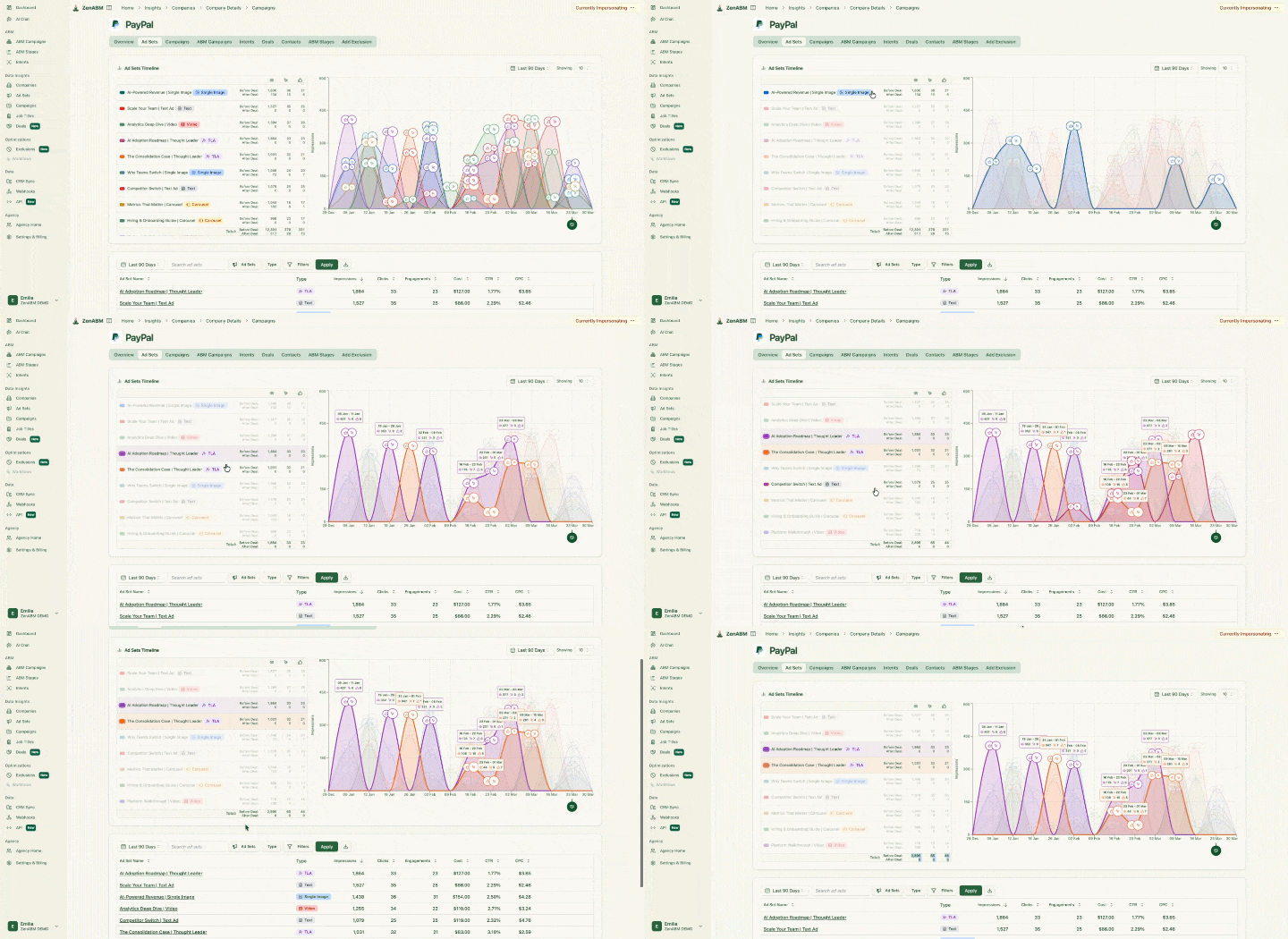
ZenABM deal view of PayPal's account timeline, with each campaign touch attributed to the deal
ZenABM deal by campaign attribution

Multi-channel attribution. LinkedIn Ads, Google Ads, Reddit Ads, AI referrals and organic visits all sit on one company journey.

Multi-channel closed-attribution in ZenABM

Contacts and journeys. ZenABM shows the contacts and leads from your target companies next to their company journey, so lead and account data sit in one place.

ZenABM account view of Optum showing touchpoints from LinkedIn, Google, Reddit and organic plus contact data

Pricing: Starter is from $59/month, Growth is $159/month, Pro is $399/month and Agency is $479/month, and ZenABM's pricing page shows what each plan includes.

Pros (from G2 reviews)

  • Reviewers say ZenABM understands ABM beyond theory and delivers pipeline-driven results.
  • Reviewers find the interface clean and easy to navigate.
  • Reviewers value the API and MCP they can build on.
  • A VP of Marketing says it lets them quickly query LinkedIn ad performance data with AI.

What to know before you choose ZenABM

ZenABM is LinkedIn-first, so it does not buy display or programmatic ads, personalise websites or sell third-party intent data. Teams that need those usually run ZenABM for LinkedIn next to a display suite.

Reviewers also raise a few mild points. ABM takes time to compound, so results are not always immediate. One reviewer who uses Pipedrive would like an integration, another says company data sometimes loads slowly, and one notes that some restrictions come from the LinkedIn side.

The team ships new features fast and keeps improving the product based on customer feedback.

ZenABM vs Factors.ai

Factors.ai is an analytics-leaning ABM platform, and its strength is data depth: its Company Intelligence API includes organic LinkedIn page engagement. Its G2 rating is 4.5/5 from 220 reviews.

It takes more effort to set up and use, and it is less focused on running ABM campaigns. ZenABM is cheaper, lets you create and manage the LinkedIn campaigns themselves, is built for ABM and is easier to use. Factors.ai's paid plan prices are not consistently published.

Best for: B2B teams running ABM mainly on LinkedIn, from lean in-house teams to enterprise programmes and agencies.

Skip it if display advertising is your main channel, and in that case pair ZenABM with a display suite.

Deanonymize LinkedIn ad engagements, get intent, accounts scoring (starting @$59/month!)

37 Days Free Trial

Try ZenABM Now

3. 6sense: best for enterprises that want display advertising and a suite

6sense is an enterprise ABM suite in the same group as Demandbase, with its own advertising platform, predictive account scoring and intent data. I had a few demos and decided against it, because it was too complex and too expensive for our needs.

G2 rating: 4.3/5 from 1,432 reviews

Other ratings: Capterra gives it 4.6 (30 reviews), Gartner Peer Insights 4.4 (295) and TrustRadius 8.4/10 (540).

Compared with ZenABM: 6sense launches LinkedIn campaigns from inside its platform, while ZenABM is built around LinkedIn, with company-level first-party engagement from your own ads, and starts at $59/month.

Key features

  • Advertising: its own DSP covers programmatic display, video and connected TV, and 6sense Campaigns for LinkedIn launches single-image or video campaigns with CPM or CPC bidding.
  • LinkedIn: dynamic segments sync to LinkedIn Campaign Manager, and you can target them by buying stage, keyword intent and account behaviour.
  • Signals and scoring: it combines first, second and third-party intent into predictive 0 to 100 scores and buying stages, and it deanonymises website visitors.
  • Attribution: it shows sourced and influenced pipeline with AI forecasting.
  • AI: its MCP server entered open beta on 14 July 2026, reached general availability in September and is documented as read-only, and RevvyAI is a natural-language interface across its agents.
  • Integrations: it connects to Salesforce, HubSpot, Marketo and Google Analytics, and its G2 ease of use score is 8.0.

Here is the screen where you pick the campaign type, including LinkedIn Ads:

6sense campaign type screen listing LinkedIn Ads, visitor retargeting and contextual targeting channels for ABM

Segments such as Top of Funnel become the target accounts for those campaigns:

6sense segment dropdown listing account segments such as Top of Funnel to target accounts in ABM campaigns

Pricing: it is not published and works as a custom quote, and Vendr's median is $62,440 a year (range $11,376 to $176,809, 385 purchases).

Median pricing of 6sense as per Vendr is about $62k annually.

Pros (from user reviews)

  • G2 reviewers praise its high-quality intent data and predictive analytics.
  • Reviewers like the easy segmentation and alert setup.
  • Reviewers get clear visibility into account buying journeys.

Cons (from user reviews)

  • G2 reviewers cite a steep learning curve and complex setup.
  • Reviewers mention inconsistent data accuracy, including false positive intent signals.
  • Reviewers call it expensive, with no transparent pricing.

Best for: enterprises looking for display advertising and a full suite.

Skip it if you run LinkedIn ads on a lean team, and choose a LinkedIn-specific solution like ZenABM instead.

4. AdRoll ABM (formerly RollWorks): best for an easier entry into account-based ads

AdRoll ABM (formerly RollWorks) is an ABM advertising platform with a built-in DSP, positioned as an easier way into account-based ads than the big suites. I evaluated it for the Userpilot ABM programme in 2024 and had several demos with the team.

G2 rating: 4.3/5 from 655 reviews

Compared with ZenABM: AdRoll ABM needs a paid package to connect LinkedIn, while ZenABM is built around LinkedIn and shows company engagement and stages on one row.

Key features

  • List building: you can import accounts from your CRM, or use ICP fit grades from A to D, with several ICP definitions.
  • Signals: it offers Bombora keyword intent and Journey Stages, and its Journey Prediction combines fit, intent and engagement to surface accounts 5x or 25x more likely to become an open opportunity.
  • Advertising: it covers display, native, video, mobile, social and connected TV, plus a LinkedIn Connector, but LinkedIn depends on the package and the Free Tier does not include it.
  • AI and sales: an AI Assistant launched in August 2025, and the Command Center recommends next steps for sales.
  • Integrations: it connects to Salesforce (bi-directional), HubSpot and Marketo, and its G2 usability score is 8.4.

Here is the account table with ICP fit grades:

RollWorks All Accounts table with a Fit Grade column scoring accounts from A to D for ICP fit

The Command Center shows where accounts sit in the buying journey:

RollWorks Command Center showing buying journey stages and 21 engaged accounts for ABM prioritization
RollWorks Command Center

Pricing: Account-Based Retargeting has no platform fee, so you pay only for media, while the other three ABM packages are custom quotes. A review on ZoomInfo's site also lists a $10,000/month minimum budget for connected TV.

AdRoll pricing page with three product packages

Pros (from user reviews)

  • A G2 reviewer says ICP scoring and journey mapping show which accounts are heating up.
  • Another reviewer calls the LinkedIn Connector a standout.

Cons (from user reviews)

  • Package prices are not published.
  • LinkedIn needs a paid package.
  • A G2 reviewer says reporting still needs manual work.

Best for: B2B teams that want account-based ads on display and LinkedIn with something easier than the enterprise suites.

Skip it if LinkedIn ads are your only channel, and choose a LinkedIn-specific tool like ZenABM instead.

5. Influ2: best for ads to named people

Influ2 is a contact-level ABM platform that runs ads to named people inside target accounts and reports engagement by name, mostly for mid-market and enterprise teams running one-to-one or one-to-few ABM. I had a demo with the Influ2 team, and the named-person approach is what it is all about.

G2 rating: 4.6/5 from 161 reviews

Compared with ZenABM: Influ2 runs ads to named contacts across channels on its own bundled media, while ZenABM builds and manages campaigns in your own LinkedIn account and also shows contacts next to the company journey.

Key features

  • List building: Cohort Designer builds a list of specific contacts from your CRM based on sales priorities, and HubSpot contacts sync as ad audiences.
  • Advertising: ads reach contacts on LinkedIn, Google, Meta and more, and they show who saw or engaged with each message.
  • Signals: it alerts you when a target person shows interest in chosen topics.
  • AI: its MCP lets your own AI agents analyse performance and make changes through plain-language prompts.
  • Integrations: it connects to Marketo, Salesforce, HubSpot, Eloqua, Dynamics 365, Outreach and Salesloft, and its G2 ease of setup score is 8.8.

Here is the dashboard with engagement metrics and signals:

Influ2 dashboard showing buying group engagement, engagement signals and influenced opportunities

Sales sees which contacts to follow up with in the priorities view:

Influ2 Sales priorities screen listing accounts by date and reason with buying group and outreach status

Pricing: it is a custom quote via a demo, priced on Slots (one prospect targeted per month) on a 12-month term, and Vendr's median is $60,000 a year (range $34,800 to $113,520).

Pros (from user reviews)

  • G2 reviewers praise the responsive support (20 mentions).
  • They value the person-level targeting of decision makers.
  • They cite an intuitive interface and smooth onboarding.

Cons (from user reviews)

  • Reviewers find the reporting structure limiting.
  • They cite limited ad group space, match-rate issues and higher pricing.
  • Some find the ad approval process confusing.

Best for: mid-market and enterprise teams running one-to-one or one-to-few ABM.

Skip it if your list is large and your budget is lean, and choose a LinkedIn-specific solution like ZenABM instead.

6. UserGems: best for champion and job-change signals

UserGems is a signals platform built around tracking customers and champions who change jobs, with AI scoring and agents on top, and it suits established revenue teams with a large CRM. I had a demo of it, and it reads as a sales-signal tool first.

G2 rating: 4.7/5 from 145 reviews

Compared with ZenABM: UserGems cannot create or manage LinkedIn campaigns, while ZenABM builds them and shows which companies engage with your ads.

Key features

  • Signals: it has 30+ native signals, plus contact-level intent across 42,000+ topics (an add-on on lower tiers).
  • Scoring: it gives A to D account and lead scoring with visible signal attribution.
  • AI: Gem-E agents act as an AI SDR and prioritise accounts, but the MCP is not on the Core plan.
  • LinkedIn: ad audience sync is included from Advanced, and there is no native LinkedIn execution.
  • Integrations: Salesforce is the anchor, the HubSpot integration is described as less mature, and its G2 ease of use score is 9.2.

Here is the signal library:

UserGems signal library showing available buying signals

The MCP workflow builder lets you automate campaigns from signals:

UserGems MCP campaign workflow builder

Pricing: its pricing page lists Core at $40,000/year, Advanced at $75,000/year and Elite at $150,000/year, all with unlimited users. Enterprise is on request, add-on prices are not published and there is no free trial.

UserGems pricing page with three tiers

Pros (from user reviews)

  • G2 reviewers say it updates CRM data automatically, which frees reps from research.
  • Its ease of use is rated 9.2 on G2.
  • Reviewers praise the champion tracking and the support.

Cons (from user reviews)

  • Price is the most consistent complaint on G2 and Capterra.
  • Reviewers flag data update delays and contact duplication.
  • Reviewers say setup takes real time for teams new to orchestrated GTM.

Best for: established revenue teams with a large CRM, high ACVs and a RevOps function.

Skip it if you have fewer than 2,000 trackable contacts or run mostly LinkedIn ads, and choose a LinkedIn-specific solution like ZenABM instead.

7. Common Room: best for community and product signals

Common Room is a go-to-market intelligence platform that turns community, product and social signals into person-level buyer intelligence. I had a demo with them, and it fits companies with an active community or developer audience.

G2 rating: 4.5/5 from 106 reviews

Compared with ZenABM: Common Room syncs audiences to LinkedIn only through a webhook and Zapier and cannot create campaigns, while ZenABM builds and manages them.

Key features

  • Signals: Person360 unifies community, product, social and CRM activity into one profile for each person and organisation, and you can use Bombora surge topics for segments and scoring.
  • List building: Prospector searches more than 200 million B2B contacts and organisations.
  • Scoring: a customisable AI scoring model ranks the most engaged people and accounts.
  • AI: its MCP server reads and writes, so you can query contacts and organisations and create or update records. ZenABM's MCP also writes, because it creates and manages campaigns, ad sets and ads.
  • Gaps: it has no website personalisation, and its LinkedIn Ads data behaves like organic posts from the company handle.

Here is account activity unified into one view:

Common Room account activities in the buyer intelligence platform

Each contact profile is enriched with data like title and LinkedIn information:

Common Room contact enrichment profile card

Pricing: Essential is $2,500/month, Advanced and Enterprise are custom quotes, and the MCP is on Advanced. Vendr's median is $27,250 a year across all purchases (76 purchases, range $10,000 to $85,800).

Common Room pricing plans comparison

Pros (from user reviews)

  • G2 reviewers cite efficient lead generation (23 mentions) and time savings (21).
  • They say it is easy to use and fits their existing sales stack.

Cons (from user reviews)

  • Reviewers mention a learning curve and limited customisation of alerts and workflows.
  • They say it needs an active community to monitor and significant configuration time.

Best for: companies with active communities, developer audiences or product-led usage.

Skip it if you have no community to listen to, and choose a LinkedIn-specific solution like ZenABM for paid ABM.

8. Dreamdata: best for the most complete revenue attribution

Dreamdata is a B2B attribution platform that unifies GTM data, including anonymous visits and ad impressions the CRM never sees, into one account-based model tied to revenue. A demo with its team showed me a tool that is strongest at reporting.

It is the most complete attribution tool of its group, but it is not geared towards managing and running ABM campaigns on LinkedIn.

G2 rating: 4.7/5 from 271 reviews

Other ratings: Capterra gives it 4.8 (55 reviews).

Compared with ZenABM: Dreamdata offers no LinkedIn campaign management (no creation, budget protection, bidding or exclusions), and its MCP is read-oriented.

Key features

  • Attribution: it has six multi-touch models plus custom ones, across paid channels, review sites, web, email and CRM, with G2 journey reporting at 9.0.
  • Journeys: G2 reviewers single out the account journey view as a standout.
  • LinkedIn: Audience Hub syncs audiences to LinkedIn, Google, Meta and Microsoft, and LinkedIn CAPI (Conversions API) sends pipeline data back so LinkedIn can optimise.
  • AI: it has an Analytics Agent and a read-oriented MCP server.
  • Integrations: it connects to Salesforce, HubSpot, Dynamics 365, Pipedrive, Marketo and more, plus warehouse export, and its G2 ease of use score is 8.4.

Here is the company journey view:

Dreamdata company journey visualisation across touchpoints

The revenue analytics dashboard ties channels to revenue:

Dreamdata revenue analytics dashboard

Pricing: Starter is free (5 seats, 2 months of history, 1 sync), and Advanced is a custom quote with a Vendr median of $35,440 a year (range $27,000 to $96,000).

Dreamdata pricing page with tier options

Pros (from user reviews)

  • Attribution accuracy is the top G2 theme (61 mentions).
  • Reviewers find it intuitive (57 mentions).
  • Reviewers praise the support (52 mentions, G2 rating 9.4).

Cons (from user reviews)

  • G2 reviewers cite a steep learning curve (26 mentions) and missing features (22).
  • They mention no custom reports and slow UI performance.

Best for: teams with a RevOps or data team and heavy spend across many channels.

Skip it if you need to build and manage LinkedIn campaigns, and choose a LinkedIn-specific solution like ZenABM instead.

9. HockeyStack: best for full-funnel attribution and account journeys

HockeyStack is a revenue analytics and attribution platform that joins ads, website, CRM and offline activity into buyer journeys, with AI agents called Odin and Nova. I sat in on a demo, and the full-funnel view is what it is known for.

G2 rating: 4.5/5 from 82 reviews

Compared with ZenABM: HockeyStack is attribution and analytics, not a LinkedIn campaign builder, so you still build and manage the campaigns in LinkedIn.

Key features

  • Attribution: it offers full-funnel multi-touch attribution that includes pre-click LinkedIn impressions.
  • Journeys: LinkedIn impressions and engagements appear in order next to other actions in the account-level journey.
  • LinkedIn: audience syncs push contacts into LinkedIn, Meta and Google audiences, and conversion data goes back to LinkedIn.
  • AI: Odin analyses data and Nova builds audiences and workflows, and a third-party directory lists an MCP server, which is not confirmed.
  • Signals: you can ingest Bombora and G2 intent, but you buy them separately, and its G2 usability score is 7.6.

Here is its LinkedIn campaign analytics:

LinkedIn ad campaign analytics and influenced pipeline in HockeyStack

Odin answers questions in plain language:

Odin AI by HockeyStack for ABM
Odin AI by HockeyStack

Pricing: it is not published (custom-built plans via demo, with startup pricing available), and Vendr's median is $29,702 a year (range $24,040 to $77,500, 33 purchases).

Pros (from user reviews)

  • G2 reviewers praise the timely, thorough support (13 mentions).
  • They value its attribution accuracy (11 mentions).

Cons (from user reviews)

  • G2 reviewers note a steep learning curve and complex setup.
  • A May 2026 Capterra review describes data connectivity failures during onboarding.

Best for: mid-market and enterprise B2B teams with long, multi-channel sales cycles and RevOps ownership.

Skip it if you need a tool that runs your LinkedIn campaigns, and choose a LinkedIn-specific solution like ZenABM instead.

10. Userled: best for personalised LinkedIn ads plus microsites

Userled is an ABM platform built around personalised LinkedIn ads, AI-generated microsites and a sales plugin. I have no hands-on experience with it, so this section comes from its site and its Gartner and G2 reviews.

G2 rating: 4.7/5 from 54 reviews

Compared with ZenABM: Userled is the closest LinkedIn-focused rival, and both create LinkedIn campaigns. ZenABM starts at $59/month and adds company engagement, first-party intent, scoring and multi-channel attribution, while Userled offers personalised microsites, which ZenABM does not.

Key features

  • Advertising: it creates and runs one-to-one LinkedIn ad campaigns at account-list scale, with automated bid optimisation.
  • Personalisation: it generates microsites and landing pages with AI, with account- and contact-level personalisation.
  • Sales activation: the Sales Plugin is a Chrome extension for one-to-one content and real-time account insights, and alerts reach Slack, email and the browser.
  • Measurement: it measures campaign-to-pipeline impact, but its scoring and journey features are not published.
  • Integrations: it connects to Salesforce, HubSpot, Marketo, 6sense, Demandbase, LinkedIn Campaign Manager, Outreach, Salesloft and Slack, and its G2 setup score is 9.0.

Here is how it detects ABM prospects and sets targeting:

Userled ABM prospect detection and targeting interface

The ad creative builder produces personalised social ads:

Userled social ad creative builder interface

Pricing: it is module-based with unlimited seats and accounts. LinkedIn ABM Ads start at $2,000/month, Microsites at $2,000/month and the Sales Plugin at $599/month for 10 seats. Userled also says its entry price is $25k/year for companies under 250 employees.

Userled pricing page with three plans

Pros (from user reviews)

  • A Gartner reviewer says the team resolves issues quickly and proactively helps expand use, and G2 rates support at 9.9.

Cons (from user reviews)

  • Gartner reviewers cite a learning curve for more traditional sales teams.
  • They mention limited third-party integrations and limited social capabilities.

Best for: teams that want personalised LinkedIn ads and microsites without dev or design resources.

Skip it if you mainly need to see which companies engage with your LinkedIn ads and tie that to pipeline, and consider a LinkedIn-first tool like ZenABM instead.

How ZenABM helps with account-based marketing on LinkedIn

Here is which ZenABM capability does which step of ABM on LinkedIn:

  • Build and manage campaigns: Zena and the MCP server create campaigns, ad sets, targeting and ads from a chat, and they check audience sizes against LinkedIn's 300-member minimum before anything goes live. LinkedIn campaign management covers the ongoing optimisation.
  • See who engages: Company engagements shows each company behind your impressions, clicks and engagements, with its score and stage.
  • Read intent: themed ads become intent signals per account, and ZenABM syncs them to your CRM.
  • Score and stage accounts: scores stay current, and stages move by the rules you set.
  • Hand over to sales: CRM sync and webhooks push stages, scores and intent to HubSpot, Salesforce, Attio, Clay or your sales tool.
  • Prove pipeline: the ABM campaign dashboards show spend, ROAS and influenced pipeline per motion, and deal attribution shows the touches behind each deal.
Six-step flow of ABM on LinkedIn with ZenABM, from building campaigns to proving pipeline with dashboards

Which ABM tool to choose for your use case

If you are choosing an ABM tool for a specific job, here is what I would pick:

  • Display advertising at very large scale: Demandbase or 6sense, or AdRoll ABM if you want something easier.
  • LinkedIn-first ABM on a lean team: ZenABM, which creates and manages your LinkedIn campaigns and shows which companies engage and what they care about.
  • Ads to named people: Influ2.
  • Champion and job-change signals: UserGems.
  • Community and product signals: Common Room.
  • The most complete revenue attribution: Dreamdata, or HockeyStack for full-funnel journeys.
  • Personalised LinkedIn ads plus microsites: Userled.
  • No target accounts, budget or owner yet: don't buy any of them.

Pick the tool for the job you need done, not the longest feature list. Otherwise you pay for the whole gym and use the treadmill 🤷‍♀️

You can try ZenABM for free or book a demo.

Deanonymize LinkedIn ad engagements, get intent, accounts scoring (starting @$59/month!)

37 Days Free Trial

Try ZenABM Now

Frequently Asked Questions

What are ABM tools?

ABM tools are software that helps B2B marketing and sales teams find, target and engage high-value accounts. A CRM tracks individual leads, while an ABM tool looks at the whole company and the people inside it. They cover ads, intent signals, scoring, attribution and CRM sync, from enterprise suites like Demandbase to LinkedIn-first tools like ZenABM.

What tools are used in ABM?

ABM teams use tools for ads, intent signals, scoring, attribution and CRM sync. Demandbase, 6sense and AdRoll ABM run display at scale, and ZenABM runs ABM on LinkedIn. Influ2, UserGems and Common Room work at contact level, Dreamdata and HockeyStack handle attribution, and Userled pairs LinkedIn ads with microsites.

What is the best ABM tool?

It depends on your channel, team and budget. For display advertising at enterprise scale, Demandbase or 6sense fit. For LinkedIn-first ABM on a lean team, ZenABM creates and manages campaigns, shows which companies engage, scores accounts and ties them to pipeline, from $59/month with a 5.0 G2 rating. For attribution, look at Dreamdata.

How much do ABM tools cost?

Costs range from $59/month to six figures a year, and ZenABM starts at $59/month. Vendr's medians are about $68,591 a year for Demandbase, $62,440 for 6sense, $60,000 for Influ2, $35,440 for Dreamdata and $29,702 for HockeyStack. UserGems Core is $40,000/year and Common Room Essential is $2,500/month, and you should add ad spend, data add-ons and your team's time on top.

Which ABM tools are best for analytics and attribution?

Dreamdata is the most complete attribution tool, with six multi-touch models and a standout journey view. HockeyStack adds pre-click LinkedIn impressions and account journeys. For LinkedIn ads specifically, ZenABM shows influenced pipeline and ROAS per campaign, and deal attribution shows the touches behind each deal, across LinkedIn, Google, Reddit, AI referrals and organic.

Share this post

LinkedInXFacebook

Author

Emilia Korczynska

Emilia Korczynska

LinkedIn

Share this post

LinkedInXFacebook

Try Zena AI Agent

Ask our experts about LinkedIn Ads & ABM. Get instant answers with sources.

Emilia KorczynskaAli YildirimVeronika VebereTim DavidsonMaximilian Herczeg
+20 experts
Try it free

Stay up to date with ZenABM

Get the latest ABM insights in your inbox.

Latest in Blog

Back to Blog