 AI for ABM & LinkedIn Ads Week28 Sep – 2 Oct · Reserve your seatAI for ABM & LinkedIn Ads Week · 28 Sep – 2 Oct · Reserve your seat
 AI for ABM & LinkedIn Ads Week28 Sep – 2 Oct · Reserve your seatAI for ABM & LinkedIn Ads Week · 28 Sep – 2 Oct · Reserve your seat
Since I had this guest post on Kyle Poyar’s Growth Unhinged blog about how we got our ABM strategy up & running and hit $650,000 in pipeline in just 90 days (you can read the full story here – we were limited to 3,000 words on Substack so I had to cut a lot out for Kyle’s post) – I got a lot of questions…especially about the budget.


This is of course a very good question. If you’re starting your ABM campaign – you don’t want to just “spend money and see how it goes” – your manager/ CEO/ board will likely *not* give you any budget to spend if you can’t project any results 🫠 but then again – how do you project results if you don’t have any previous experience? 😬 Sounds like catch 22? Well, luckily there *is* a way to estimate how much ABM budget you need to achieve a specific revenue goal with your target audience on LinkedIn.
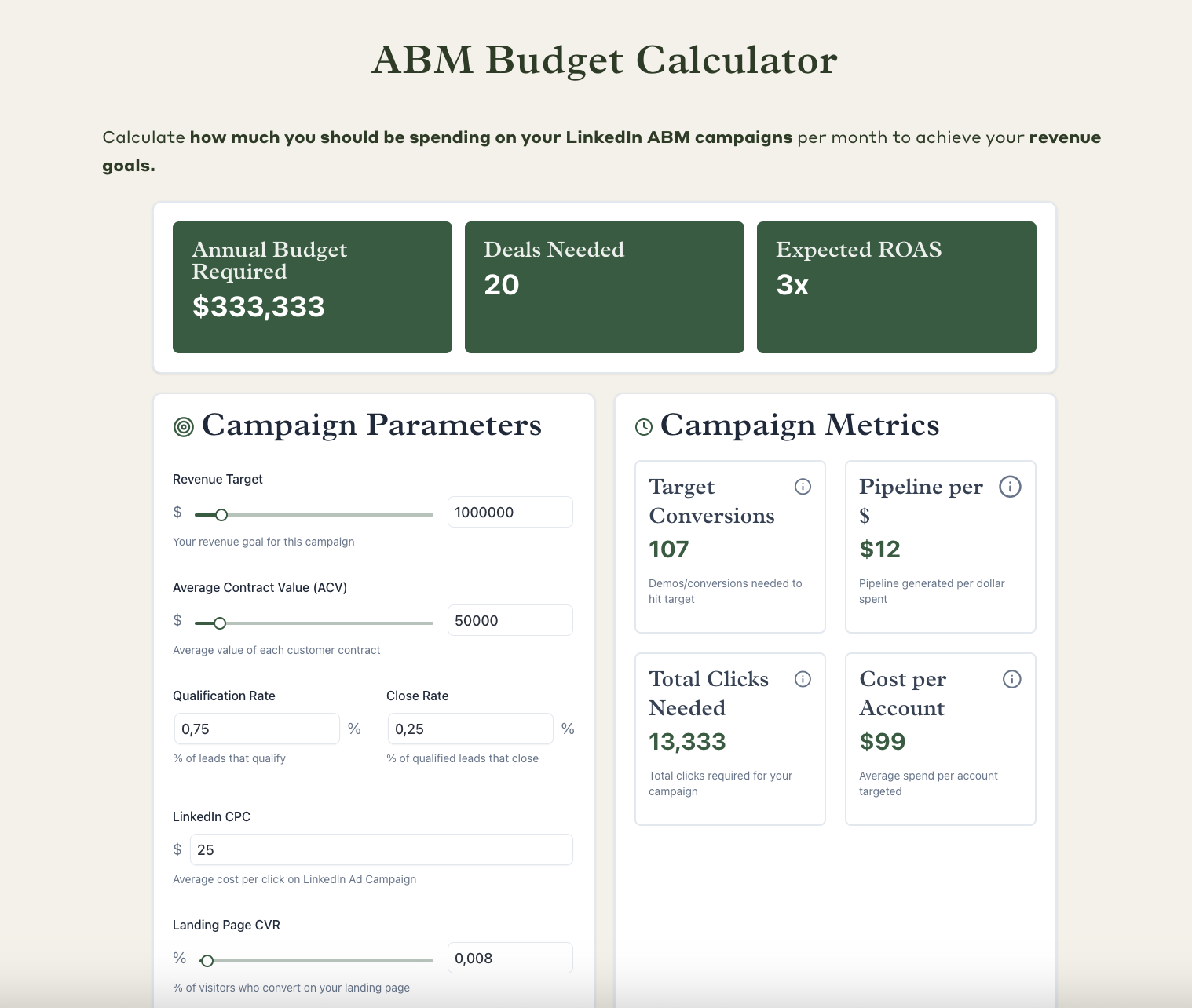
👉 Btw. Check out my ABM budget calculator here!
🎯 Start with Revenue Goal
Calculate the number of deals you need:
Example:
🔁 Adjust for Conversion Rates
Calculate how many conversions (e.g. demos) you need to hit your target:
Example:
🖱️ Calculate Clicks Needed
Use your landing page conversion rate to find how many clicks you need:
Example:
🏢 Estimate Target Accounts
Use funnel stage conversion rates to calculate the number of accounts you need to target:
Example:
💸 Estimate Total Budget (Media Spend)
Use estimated CPC to calculate your total spend:
Example:
📈 Calculate Return on Ad Spend (ROAS)
Measure gross revenue return:
Example:
💰 Calculate Pipeline per $1 Spent
Estimate how much pipeline each dollar of spend generates:
Example (assuming 4x pipeline coverage):
🏷️ Estimate Cost per Account
Calculate the average spend per account targeted:
🧪 Optimize Ad Inventory
Run multiple LinkedIn campaign formats (video, image, text, doc) and shift budget toward those with higher CTR and lower CPC.
⚖️ Use Impression Capping
Cap impressions by company size (using tools like Factors.ai + HubSpot) to prevent overserving large accounts and ensure smaller ones see your ads too.
📊 Monitor Pre-Closed Metrics
ROAS takes time—track these earlier:
🧾 Final Tip: Save Baselines
Your first campaign sets your real-world benchmarks. Record all key conversion rates, CPCs, and cost per stage for future forecasting.
Ok so before you come up with a realistic-ish budget – you need to ask yourself what results you actually want to achieve.
In our case, it was a number the Operations team gave us based on the company’s revenue goals for 2025 (can’t say what it was of course 😉) – based on the expected shortfall in revenue from pure Inbound and Outbound.
So we had a number, and we got a budget…simple…but was the budget even realistic, at all? 🤔 This is something we still had to determine, of face just missing our target and looking stupid at the end of the year (and all the other unpleasant consequences of a team missing their target…).
So here’s how you go about it:
So let’s assume you want to close $ 1 million in revenue from ABM in 2025.
Your ACV is $50k. How many new customers do you need to win to get to $1 m in gross new revenue with that ACV?
1,000,000 in ARR / 50k in ACV = 20 deals
Ok, and now – what is your deal close rate? And what is your deal open rate and deal qualification rate from your main conversion event? (demo, trial etc.)
Let’s say your close rate is 25% and your qualification rate is 75%. How many conversion events do you need?
20 closed-wons / 0.75 / 0.25 = ~ 107 TARGET conversions
From these you’ll be getting: 80 qualified deals.
Ideally you will be using a landing page for your conversions where you already have some conversion rate history (e.g. your demo booking / trial signup page). If you’re running a specific very campaign you may want to create a very specific landing page – like e.g. this “switch from Pendo” landing page we used for one of our competitors campaigns:
If your landing page converts at 0.8% rate to your conversion event, it means you need 125 clicks to this page to drive one conversion.
So in our example above – you’d need 107 / 0.8% = 107 / 0.008 = 13,375 visitors to that page.
Now – how much would it cost you to drive so many page visitors?
Right, here we need to bring another element of the puzzle into the ring – how many of the
If you need 20 deals to win $ 1,000,000 in revenue – how many accounts do you need to target to get
You need to make some estimates as to how many account out of your “total target list” will become “interested” in your ads enough to click.
Based on campaign stage conversion benchmarks, e.g. Kyle Poyars’ other post:
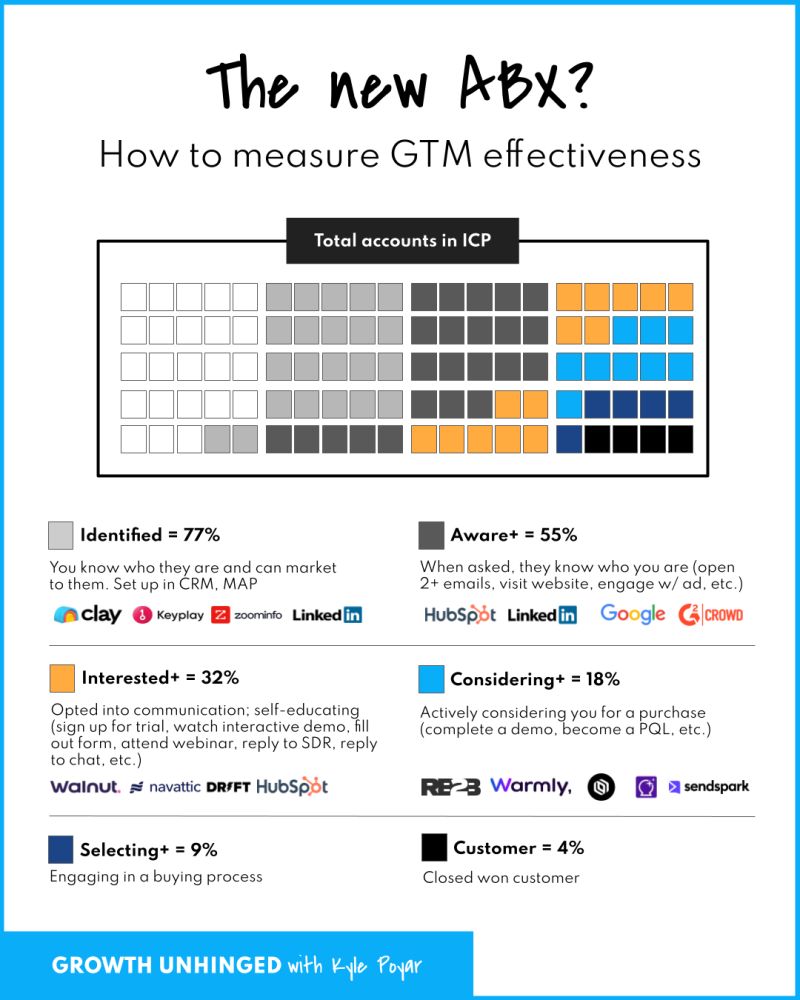
Based on this model, you need: 20 / 0.25 / 0.75 / 0.18*/ 0.32/ 0.55 = 3367 accounts that you need to target to hit your revenue target.
You need 107 demos, 80 qualified opportunities (deals) and 20 wins from these 3367 accounts.
This is a conversion rate of 0,59% from account targeted to closed won (again, quite a bit lower than the 1% benchmark for ABM you may have read about) and a 2.37% CVR to pipeline created.
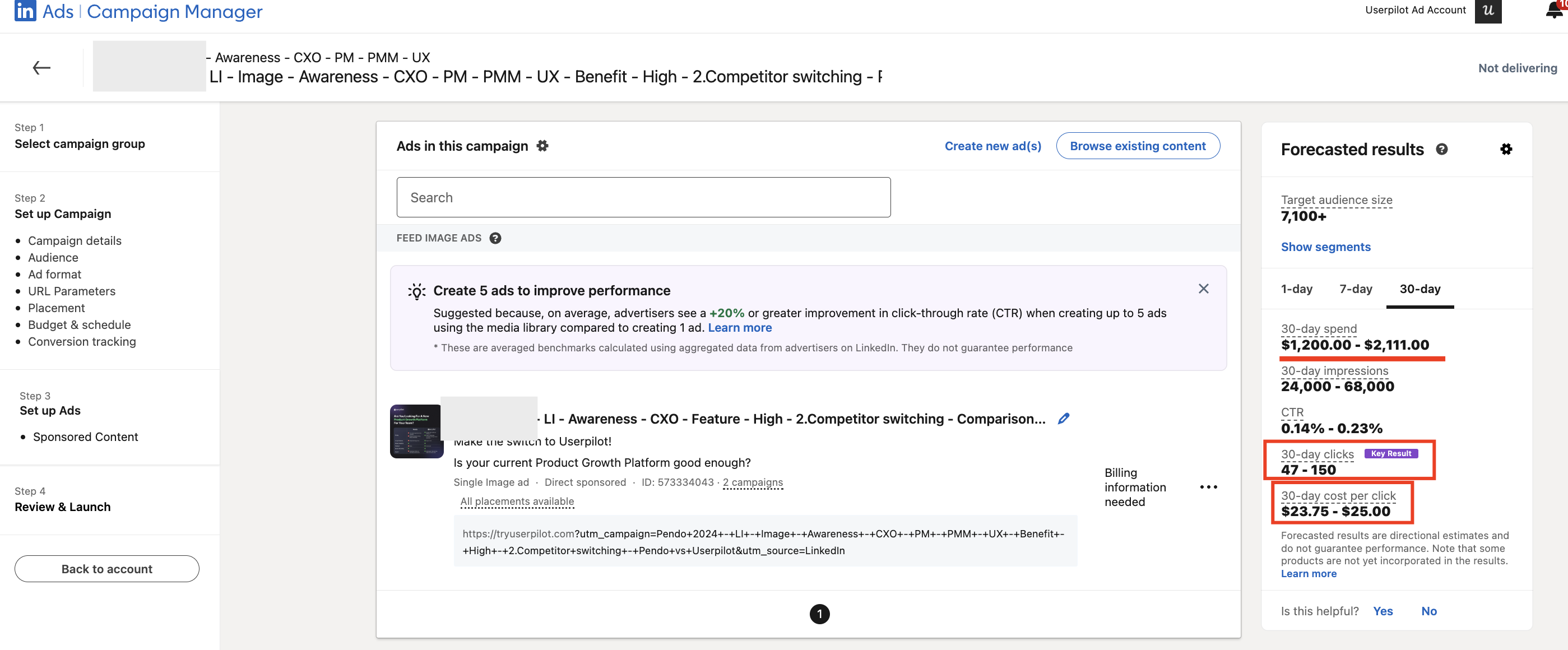
After uploading your company list and selecting job titles / functions to narrow down your targeting, and creating your first campaign (say, single image ad campaign) – you will see some “Forecasted results”.
This campaign will likely drive 47-150 clicks, which will cost on average ~ $25 per click.
From STEP 2 you know you need 13,375 visitors to your landing page to drive 107 conversions, which will then likely result in 20 Closed-Won Deals of $50,000 ACV, totalling $1 M in gross new ARR.
Based on this campaign, the TOTAL cost would be 25 * 13,375 = $334,375
A lot? Don’t freak out. It’s actually *very good* ROAS – $ 1,000,000 / $334,375 = almost exactly 3 x ROAS!
ROAS is a good metric to track, but it’s a very, very lagging metric.
Another metric I like to track (as you may know from reading this post) – to monitor the performance of my campaigns before they close – is pipeline per dollar spent. If – as per our assumption on pipeline generated above – to close $1M in revenue, you will need $4 M in pipeline. So here – you will need $4,000,000 / $334,375 = $12 pipeline per dollar spend (this is quite high – e.g. at Userpilot, we are aiming for $10 pipeline per $ spent)
With 3367 accounts, this means you need to be prepared to spend $334,375/ 3367 = $99 per account.
Again, quite a lot. But presumably with $50k ACV, you’re targeting larger companies with
Obviously, in real life – you will be probably running ABM campaigns with multiple LinkedIn Campaign Groups (e.g. organized by intent or JTBD – you can then easily gauge the intent behind specific accounts’ interactions using ZenABM) and Campaigns – with different inventories, like videos, document ads, text ads etc.
As you create your campaigns – optimize for the range of campaigns with different inventories that give you the best CTR at the lowest cost per click.
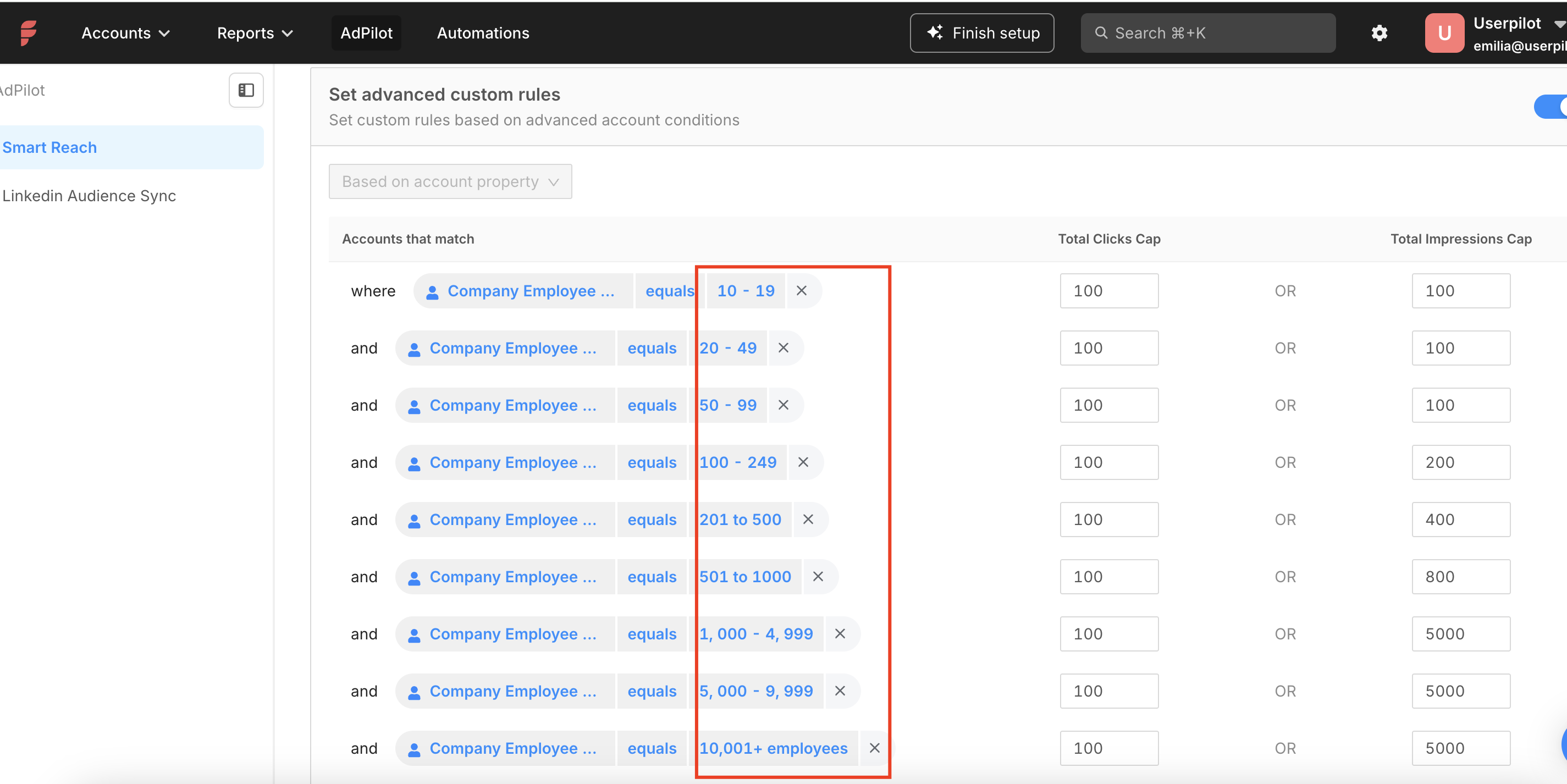
Also – if you target a range of accounts (companies) of different sizes – one way you can squeeze more conversions from your campaigns is capping impressions based on company sizes in the campaigns. This is important because otherwise LinkedIn’s algo distributes impressions very unevenly – showing your ads mostly to the larger accounts and sometimes completely not showing them to the bottom 20-40% of the smallest accounts. We’ve done it with Factors.ai (which allows you to cap impressions based on company sizes from Hubspot):
OK – that’s it. That’s how we’ve estimated our campaign budget, and how we monitor if our campaigns are on track so far (by looking at the “pipeline per dollar spent” metric and the “conversion rate to pipeline” metric.)
How did you go about setting your ABM budget? Would love to hear some more ideas on this – hit me up on LinkedIn!
