

©2026 ZenABM - All Rights Reserved.

LinkedIn ad ROI tracking is a tricky business (hello, B2B and its buyer complex buyer journeys).
It is difficult to credit specific LinkedIn ads with the revenue they influence, especially when conventional ROI tracking methods, like LinkedIn’s native solutions or the ones in your CRM, don’t help.
In this post, we’ll examine why conventional ROI tracking methods fall short on LinkedIn and the solution.
What makes tracking LinkedIn ad ROI so challenging?
Start with the platform’s fundamental nature: LinkedIn is an awareness channel, not an intent channel.
People don’t click here.
I mean, just look at the CTR:
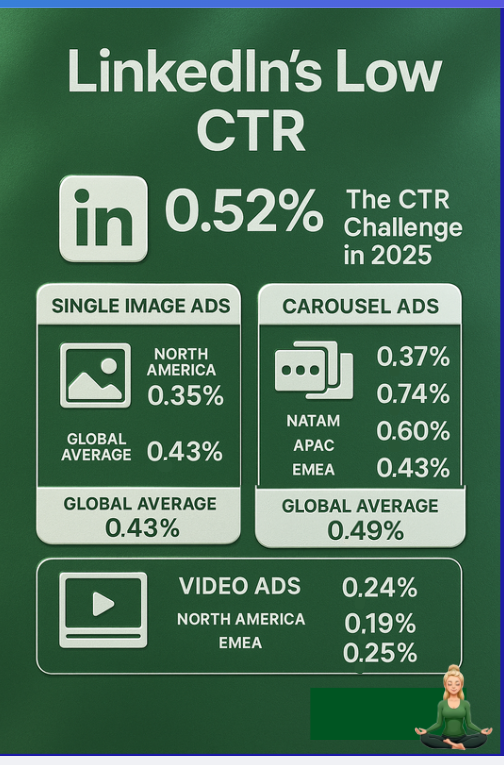
Unlike Google Search, where a user actively seeks something and clicks an ad with intent, on LinkedIn, your ideal buyers might just be scrolling their feed.
They could see your ad, become interested, then later Google your company or navigate directly to your site.
You might then attribute that visit or conversion to SEO or direct traffic, completely missing LinkedIn’s influence on the decision.
The solution is not to abandon LinkedIn.
It’s to stop evaluating it like Google.
To truly track ROI, you need to capture the impact of view-through interactions, meaning you need to track impressions and engagement at the account level, not just clicks, and you surely need to ditch the last-touch attribution model.

And the data makes this urgent: according to the Dreamdata LinkedIn Ads Benchmarks Report 2026 (covering 66 million sessions and 3.5 million complete customer journeys), B2B buyer journeys now average 272 days and 76 touchpoints across 6.8 stakeholders.
Including LinkedIn Ads engagement data in revenue attribution modeling increases measured ROI accuracy by 7.7 times compared to click-only models.
Many B2B marketers understand view-through attribution in theory, but how to do it is another story.
Conventional tools aren’t up to the task, for a variety of reasons.
LinkedIn’s own Campaign Manager has historically provided very limited insight into account-level engagement.
It wasn’t until 2020 that they introduced the Company Engagement Report, and in late 2024, this evolved into the Companies tab:
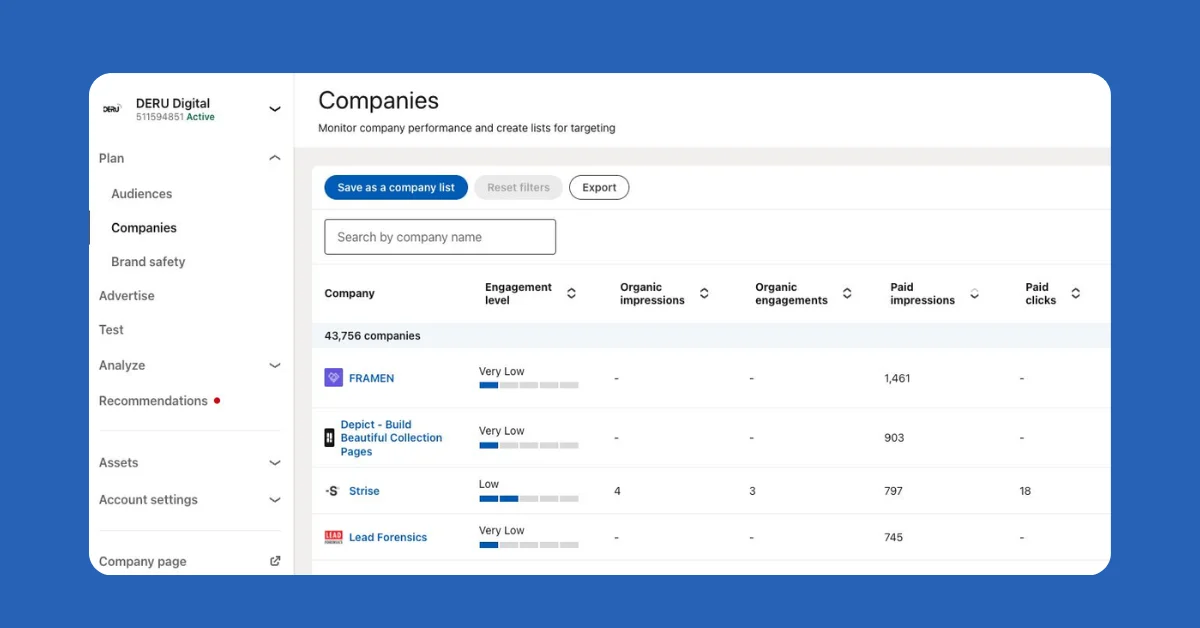
This feature shows quite a lot of engagement data for companies, including paid clicks and paid impressions, which takes you past the click-through tracking model.
But it doesn’t tie engagement to specific ads or campaigns. All the engagement metrics it shows are rolled up to the whole ad account.
So yes, you’ll see company-level impressions and engagements, but you can’t see which individual ads or campaign groups the company actually saw.
Most marketers run several ABM campaigns at once, each branching into many campaign groups, with every group hosting numerous ad creatives.
Those campaigns differ in:
Without campaign-level, company-specific data, you can’t map buyer intent or attribute revenue accurately.
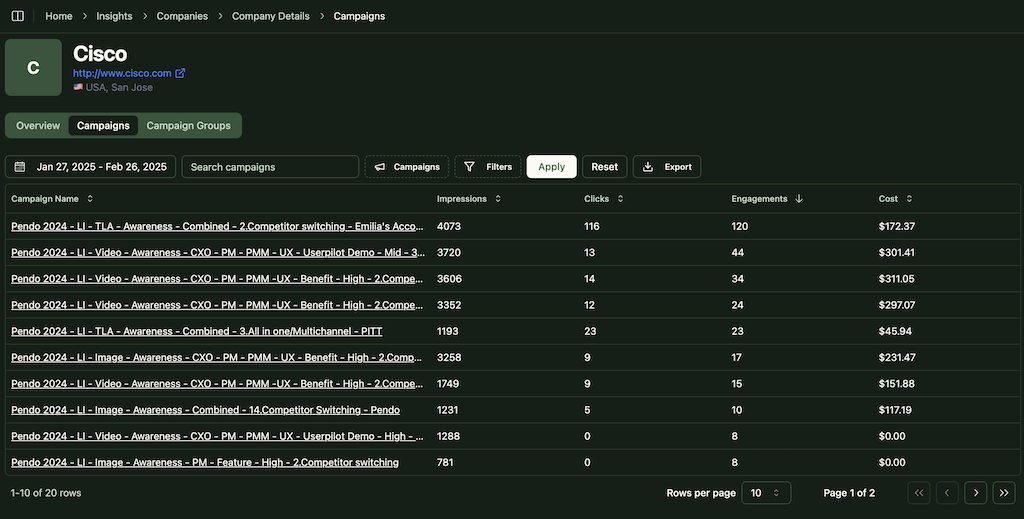
Just look at the layered structure Userpilot uses, for example:
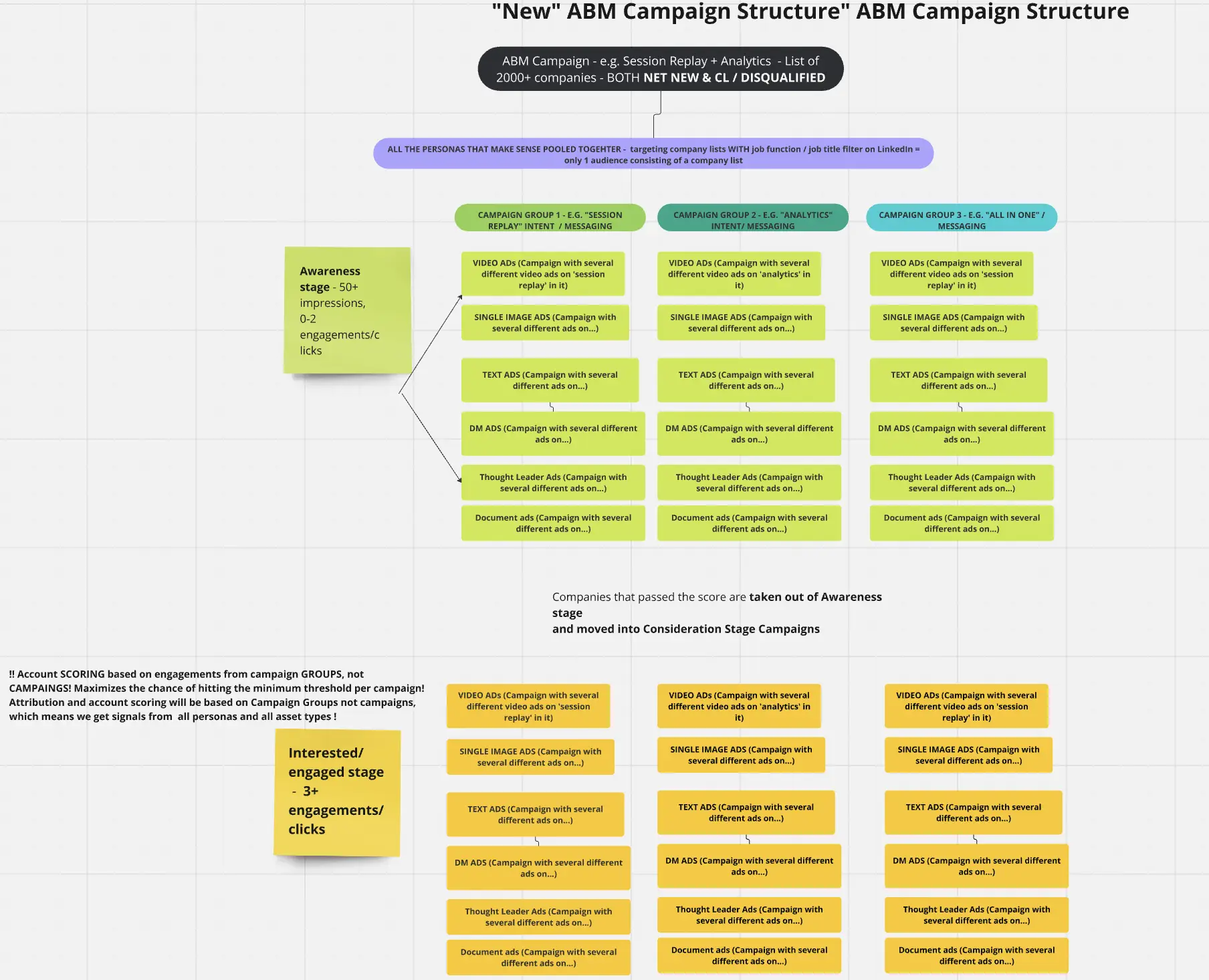
Having engagement data lumped together at the ad account level is, for all practical purposes, useless for attribution.
What you need is a breakdown of impressions, clicks, and engagement by company for each individual campaign, campaign group, and ABM initiative.
Without that campaign-level breakdown, you cannot track the ROI of each ad campaign or campaign group, you can never know which ads worked and which didn’t, and you cannot do real A/B testing across creatives or messaging themes.
Attribution at the account level for each ad is the prerequisite for all of it.
What about third-party tools that claim to reveal which companies visit your website?
These website deanonymization tools (wrappers for reverse IP tracking services) can identify some visitors’ companies by matching their IP addresses to corporate network registrations.
However, they only work when someone actually clicks your ad and lands on your site, which means they fail to track anyone who saw the ad but didn’t click, a huge blind spot for LinkedIn given its sub-1% CTR.
Even for the visitors who do click through, these tools are often disappointingly inaccurate, at around 20 to 40% accuracy at best, according to a study by Syft:
Why?
Because IP matching is unreliable: if a visitor uses a VPN or a shared network (think of someone working from a coffee shop or a co-working space), the IP address won’t correctly map to their company.
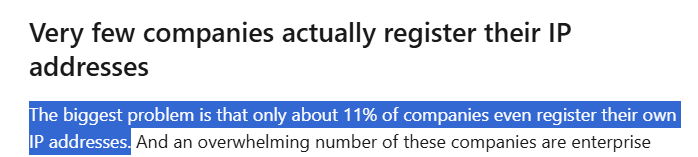
And most companies don’t even register their own IP addresses, so there’s nothing to match against:
A real-world example: one B2B company (Userpilot) tried using Clearbit, which is touted as one of the more accurate IP tracking tools, to identify companies visiting their site from LinkedIn ads.
The result?
The tool managed to reveal just one company, and it was their own:
The traditional deanonymization approach, in this example, barely moved the needle for LinkedIn ad ROI tracking.
It’s a click-dependent measurement model layered onto a platform where almost nobody clicks.
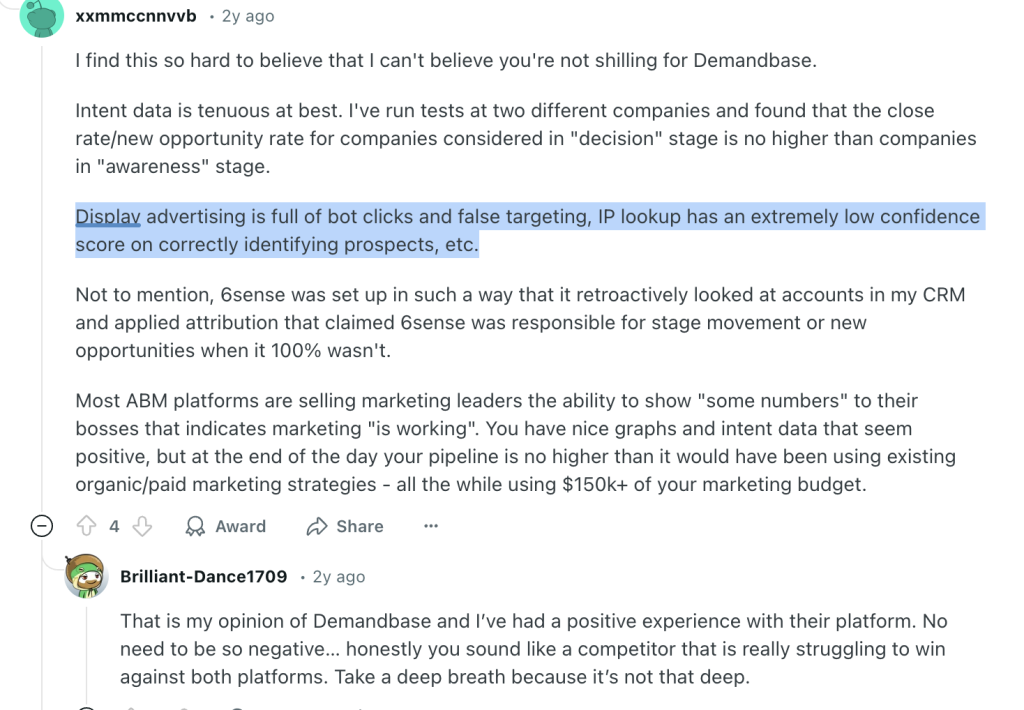
Some marketers turn to display ad networks like AdRoll and Criteo, hoping to glean LinkedIn insights by retargeting and matching audiences.
These networks use third-party cookies and device fingerprinting to follow people around and infer their company from data platforms.
Unfortunately, this doesn’t solve the LinkedIn ROI tracking problem for several structural reasons:
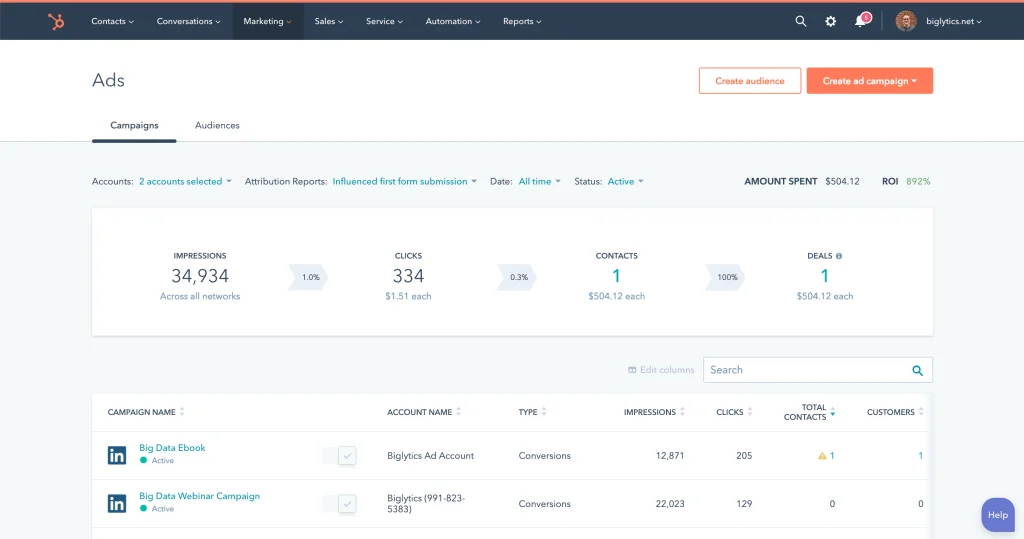
Another common approach is using your marketing automation or CRM platform’s ad integration, for example, HubSpot’s LinkedIn Ads integration.
HubSpot’s ads tool lets you connect your LinkedIn Ads account, sync lead form submissions, and even manage campaigns from within HubSpot.
But when it comes to ROI tracking, it won’t tell you:
You might ask whether HubSpot’s tracking script or the LinkedIn Insight Tag captures some of that.
The reality is there are still significant limitations that make the picture incomplete:
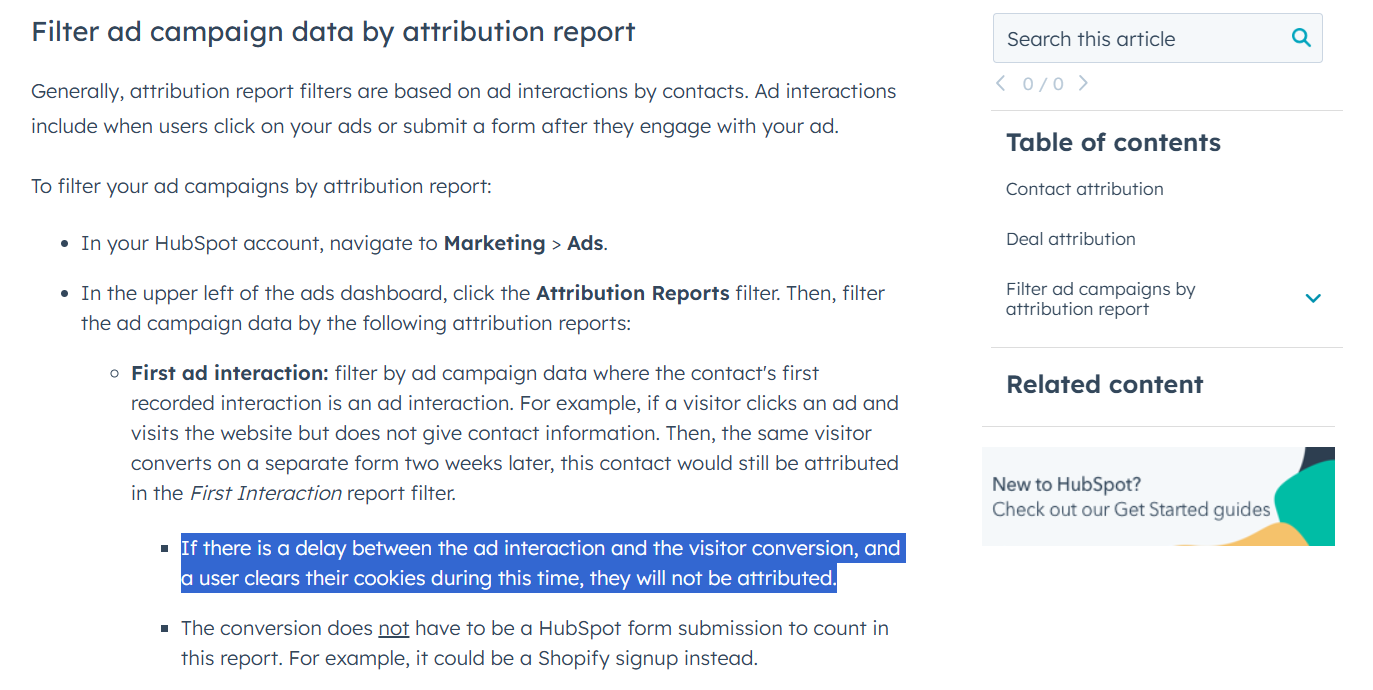
The bottom-line failure modes of conventional tools come down to three compounding gaps.
What you need for true LinkedIn ad ROI tracking is a tool that tracks company-level ad engagement, including impressions, not just clicks, for each specific campaign and campaign group, and connects that engagement data to your CRM and pipeline.

ZenABM uses LinkedIn’s official APIs to pull in rich, account-level engagement data for your campaigns.
No guessing games, no browser cookies, no reverse IP lookups.
It’s a first-party approach to capturing what really happens with your LinkedIn ads at the campaign level, per company, across your entire ICP.
Here’s how ZenABM makes tracking LinkedIn ad ROI a tractable problem:
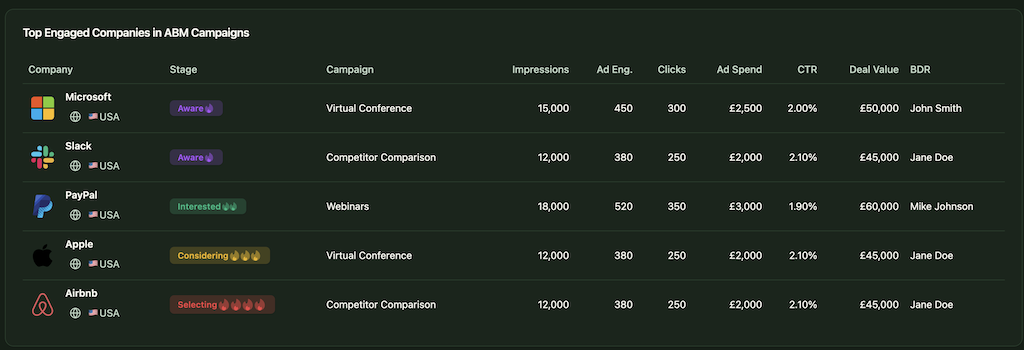
Whether a target account clicks or not, ZenABM logs their engagement.
It captures every company that:
This means you can attribute influence even when there’s no immediate form-fill or click conversion.
If Company X saw your LinkedIn ad 50 or more times but never clicked, and later someone from Company X Googles you and fills out a demo request, ZenABM shows you that those ad impressions played a role in planting the seed for that visit. If multiple campaigns were shown to that account over time, you’ll see each one that contributed to warming them up.
ZenABM supports true view-through attribution for your LinkedIn campaigns, not just last-click attribution.

Marketers often default to giving all credit to whichever ad was last clicked before a lead converted, which systematically overvalues retargeting and bottom-funnel ads while making awareness campaigns look like a waste.
ZenABM takes a more balanced approach: it shows you all the LinkedIn campaigns an account interacted with on the path to becoming a customer, so you can spread the ROI credit fairly across the full journey.
Maybe a prospect first engaged with a thought-leadership ad, later clicked a product-focused ad, and finally converted after a demo-offer ad. You’ll see each campaign’s engagement on the account timeline.
This means early-stage awareness campaigns get the credit they actually deserve for influencing the pipeline, instead of being cut in the next budget review because last-click attribution never acknowledged their role.
Moreover, ZenABM now also attributes deals to other channels like Reddit Ads, Google Ads, organic, etc.


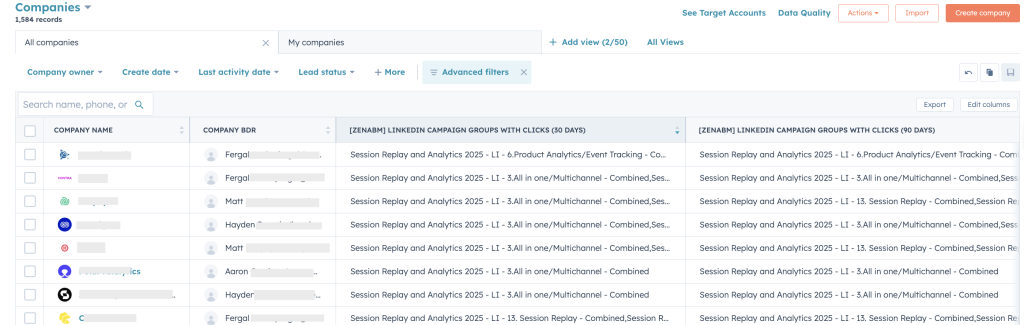
ZenABM pushes LinkedIn ad engagement data directly into your CRM as company-level properties, updated continuously. You get fields such as “LinkedIn Ad Impressions, Last 7 Days” and “LinkedIn Ad Clicks, Last 7 Days” for each account, alongside processed ABM data: the account’s current ABM stage, engagement score, and intent tag.
These let you report on ad influence and trigger CRM workflows (BDR assignment, sequence enrollment, Slack alerts) based on real engagement signals rather than a form fill.
For teams that are also using Clay for prospecting, ZenABM’s webhook integration lets you pipe high-intent accounts directly into Clay workflows the moment an account crosses a stage or intent threshold, so auto-prospecting and personalized outreach can start without manual export or copy-paste.


ZenABM calculates a real-time engagement score for each account based on how many ads they’ve seen, how many times they clicked or interacted, and how recently those interactions happened.
This score functions as a proxy for buying intent: an account that’s surging in engagement against a product-specific campaign is a very different signal from one that saw a few awareness ads months ago.
ZenABM gives you two score variants.
The current engagement score reflects active engagements in the selected time period divided by total impressions in that same window, giving you a real-time heat indicator.
The total engagement score uses all-time engagements divided by all-time impressions, providing a long-term intent baseline.
Both sync to your CRM as company properties, so your BDR can see at a glance whether an account is warming up or cooling off before picking up the phone.
When an account’s score crosses a threshold you define, ZenABM can automatically assign that company to a BDR in your CRM:
Beyond the score, ZenABM gives your BDRs the qualitative layer they need to personalize outreach: buyer intent tags based on first-party LinkedIn ad engagement.
You define which campaigns indicate which intent themes (for example, “Analytics,” “Onboarding,” “Security,” “Integrations”), and ZenABM automatically assigns those intent labels to companies when they engage with the corresponding ads.
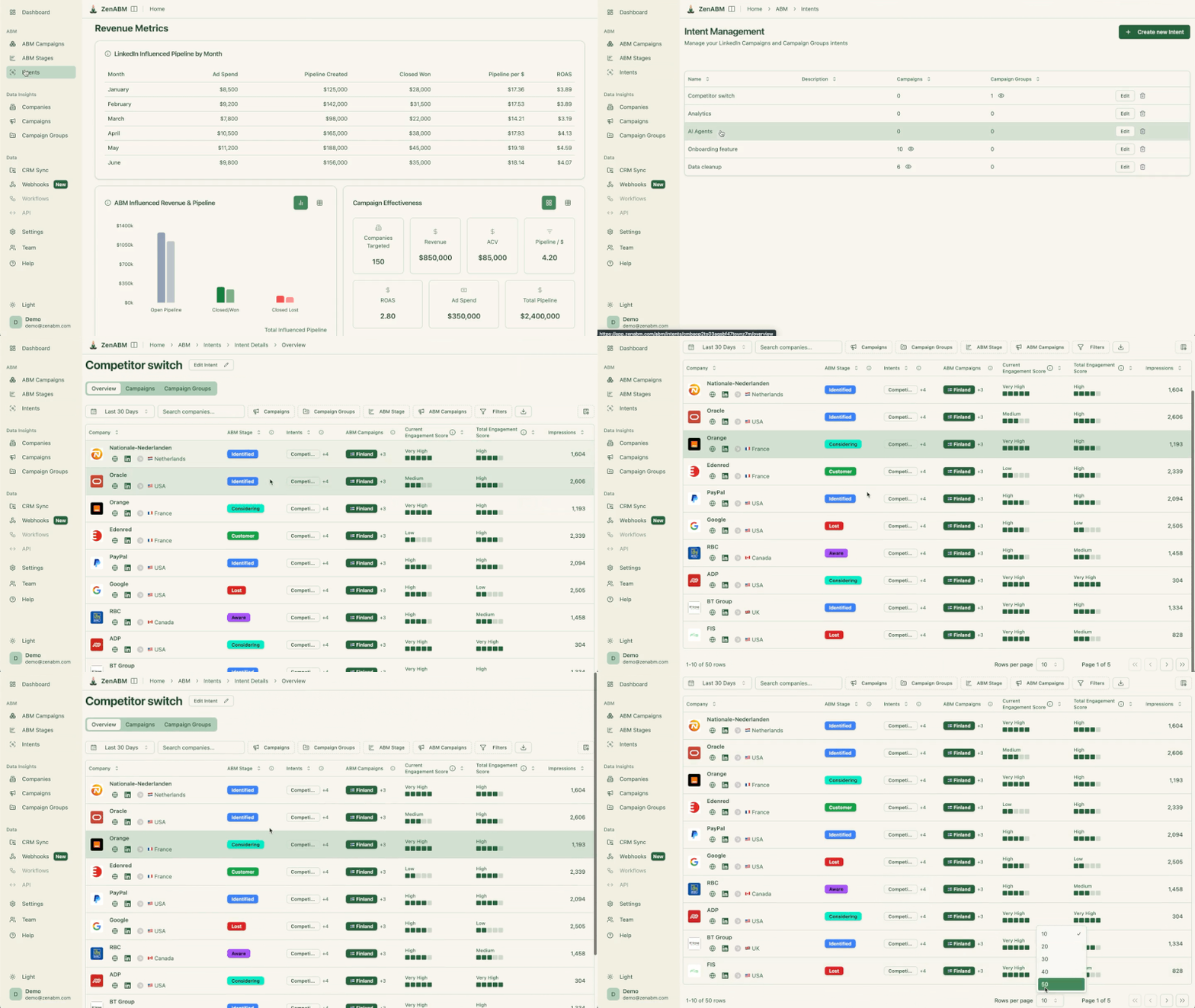
This means if an account repeatedly engages with your analytics-focused ads, ZenABM tags them with an “Analytics” intent, which then syncs to your CRM as a company property.
Your BDR can open an outreach with “I noticed your team has been engaging with our analytics content” and have a genuine reason for saying so, backed by first-party signal rather than a guessed keyword surge from a third-party intent vendor.
The setup takes about a minute per intent tag.
No data science required, no vendor onboarding process, no multi-week implementation cycle.
At the end of the day, tracking ROI is about connecting ad spend to revenue outcomes, not clicks to cost-per-lead.
ZenABM closes this loop by mapping LinkedIn ad engagement data to your pipeline in the CRM.
It matches accounts (and specific opportunities) that engaged with your ads to any deals those accounts have in progress or won, giving you a clear line from ad campaigns to closed revenue, with deduplicated attribution so the same deal doesn’t get counted across multiple campaigns.
This is the output that justifies LinkedIn ad spend to a CFO: pipeline per dollar spent, influenced revenue by campaign, and ROAS based on actual deals, not cost-per-form-fill.

ZenABM comes with out-of-the-box dashboards to visualize all these metrics without building custom BI reports or exporting spreadsheets.
The platform gives you ready-made ABM dashboards that highlight pipeline influenced, ROAS, top engaged accounts, account stage progression, campaign-level performance by persona or market, and time-period comparisons (this quarter vs. last, this month vs. the same month last year).
The data is also stored and processed in-app, which means you can compare performance across custom time ranges, something Campaign Manager doesn’t support.

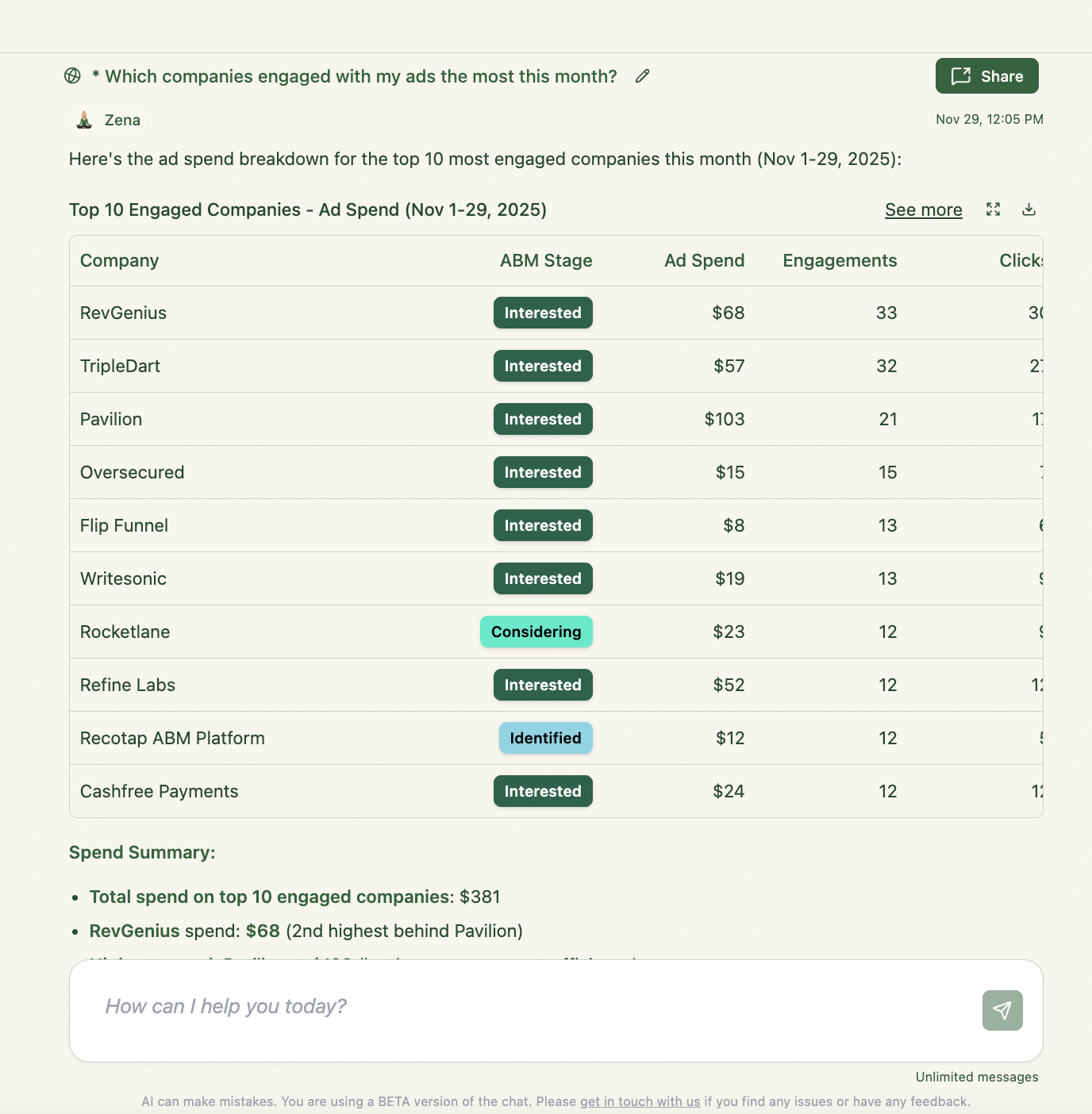
ZenABM also includes Zena, an AI chatbot and MCP server that lets you query your entire LinkedIn ad and ABM dataset in plain English, no dashboards, no CSV exports, no uploading data to ChatGPT.
You can ask Zena questions like:
Zena pulls from both raw LinkedIn engagement data (via the LinkedIn Ads API) and ZenABM’s processed insights (intent, account stages, engagement scores), giving you on-demand, context-aware answers and optimization recommendations across any timeframe, campaign, persona, or inventory type.
For teams managing multiple campaigns across multiple markets, this is the difference between weekly data digs and a 30-second answer in chat.
ZenABM’s approach is fully sanctioned by LinkedIn.
In recent times, LinkedIn has aggressively cracked down on unauthorized scraping tools:
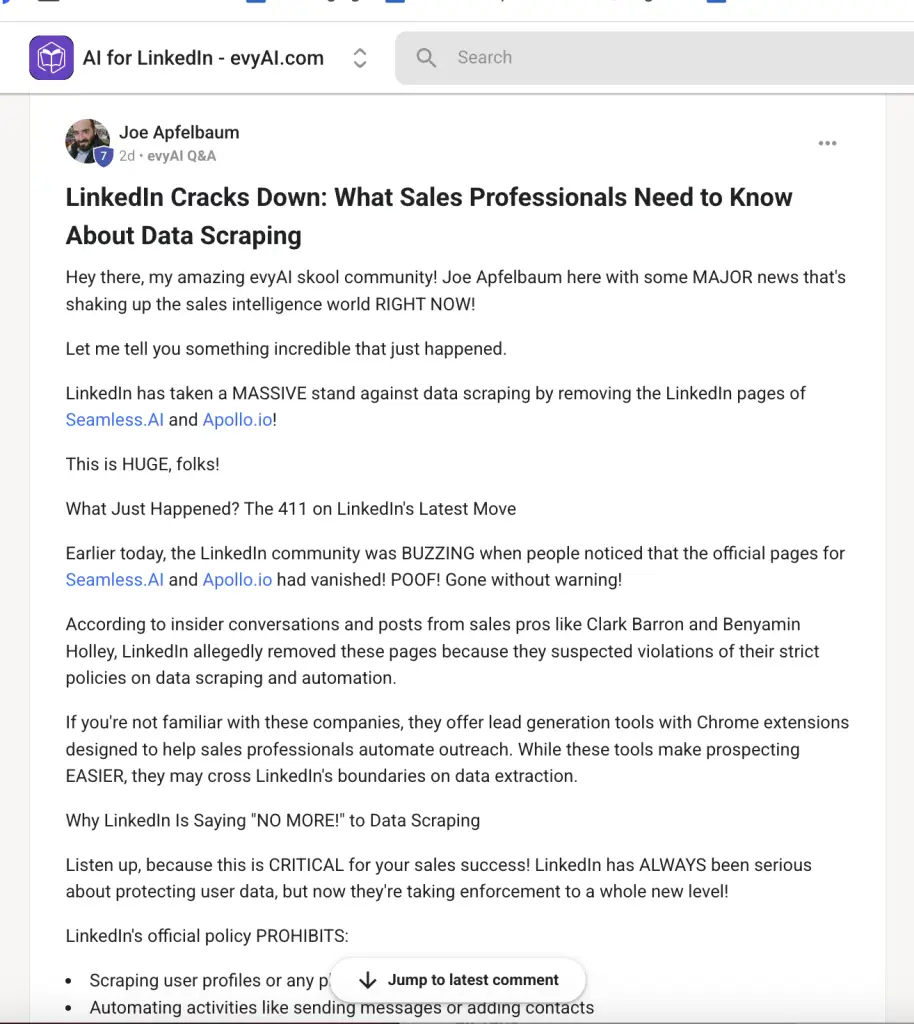
And even automation bots:

I mean, even Heyreach’s company page disappeared a few days back.

With ZenABM, you’re on the safe side.
It pulls data via LinkedIn’s official API, adhering to the platform’s terms.
You get the rich company-level engagement data without any risk to your LinkedIn account or data compliance.
It’s first-party, reliable data straight from the source, which also means it’s the same data LinkedIn itself uses in Campaign Manager, just made actionable at the campaign-by-campaign, company-by-company level that Campaign Manager doesn’t expose.
LinkedIn ad ROI tracking isn’t just about tallying clicks or form fills.
It’s about understanding the full buyer journey from the first impression to the closed deal.
In B2B, where Dreamdata’s 2026 benchmarks show buyer journeys averaging 272 days, 76 touchpoints, and 6.8 stakeholders per deal, traditional last-click models don’t just underperform.
They structurally misrepresent which channels and campaigns are working.
They consistently make awareness investments look wasteful and attribution-friendly retargeting look indispensable, even when the opposite is true.
By shifting to an account-level tracking mindset, you capture those hidden ROI drivers.
ZenABM makes that shift operational: it provides the company-level, campaign-level engagement data that Campaign Manager won’t surface, connects it to CRM pipeline and revenue, scores and stages accounts automatically, tags them with intent signals your BDRs can actually use, and lets you query all of it through Zena without a data analyst or a spreadsheet.
When you know which campaigns actually move target accounts through the funnel (and not just which ads got a click), you can optimize your LinkedIn strategy for what’s really working.
Ready to stop guessing and start measuring what truly works?


