

©2026 ZenABM - All Rights Reserved.

Most ABM programs treat LinkedIn ads and outbound as two entirely separate motions, and the gap between them is where the pipeline goes to die.
Marketing runs the ads, sales runs the outreach, and the two teams share a CRM and occasionally a spreadsheet, but the connection between who is engaging with your ads and who actually gets a follow-up call is manual, slow, and usually incomplete.
A predictable result is that engaged accounts get contacted weeks after their peak intent, with generic messaging that ignores everything the ad engagement data told you about what they care about.
This post covers the core session on automated ABM follow-up sequences from the ZenABM ABM Bootcamp 2026, presented by Bill (CEO at Sales Captain) and Bilal Ahmad (GTM Engineer at Userpilot).
You can watch the full session on YouTube here.
In case you want a quick rundown:

Bill opened with a framing that reorients how most B2B teams think about outbound:
Data is the new creative. Relevance always beats persuasion.
What this means in practice is that a mediocre email referencing exactly what a prospect has been researching will convert better than a perfectly written cold email that could have been sent to anyone.
The signal data from your LinkedIn ABM campaigns (which accounts are engaging, which specific ads they are clicking, which landing pages they are visiting) is more valuable than your best copywriting, because it tells you what to say, not just how to say it.
In fact, the follow-up sequences that work are not the ones with the most polished copy; they are the ones that demonstrate you know what the prospect has been researching and that you have something specifically relevant to that research to offer them.
That demonstration of relevance is the creative advantage, and everything else is execution.

Bill’s framework for prioritizing which engaged accounts get which level of follow-up attention is built on three scores that each measure something different:
Account Fit score measures how closely a company matches your ICP based on company size, industry, revenue, product fit, and technographics.
It is calculated at the point of adding the account to your target list and updated quarterly, which means it is not a real-time signal but rather a measure of how good a customer this company could be if they converted.
Behavious score captures how engaged the account is right now, based on impressions, clicks, ad types engaged with, website visits, and page-level behavior.
Unlike the fit score, this is a real-time signal that changes daily: 1 impression is low, while 500 impressions plus 3 ad clicks plus a pricing page visit is high.
The key is to weight your scoring toward recent behavior, because a click from 90 days ago is far less relevant than a click from yesterday.
This estimates the revenue potential from the account based on company size, historical deal data from similar companies, and expansion potential. When combined with ICP fit, the contract value score determines whether a high-engagement account is worth Tier 1 full multi-channel outreach or just a lighter-touch email sequence.
ZenABM supports this prioritization model well because it combines company-level LinkedIn engagement data with account scoring, ABM stages, first-party intent signals, and CRM sync.


That gives you a much clearer view of which engaged accounts are merely active and which ones are both high-fit and commercially worth immediate follow-up.
The decision matrix:
Engagement Level | High ICP Fit | Low ICP Fit |
|---|---|---|
High Engagement | Full multi-channel outreach: email + LinkedIn + call | Email only, low-commitment ask (“Would you like to see a demo?”) |
Low Engagement | Light periodic touches, educational content, 90-day check-in | Deprioritize or exclude from active sequences |
Bilal walked through the exact automation workflow they use at Userpilot to turn LinkedIn ad engagement into outbound sequences without manual intervention, and the whole thing runs on five steps that chain together so the output of each becomes the input for the next.
ZenABM monitors the LinkedIn ad engagement data of your target accounts continuously (no manual checking involved) using the LinkedIn ads official API.
As soon as an account reaches 3 or more clicks in 30 days, plus at least one high-intent page visit (pricing, demo, competitor comparison, or specific product pages), it is determined to be in the ‘interested’ stage in ZenABM.

Once an account hits the interested stage, ZenABM fires a webhook to a Clay table.
The webhook payload includes the company name, domain, LinkedIn company URL, the specific campaign names they engaged with, click counts, and the intent signals detected.

This happens automatically, within minutes of the account crossing the threshold.
For each account that arrives via webhook, Clay automatically runs:


Based on the enriched account data and tier assignment, Clay routes the account to SmartLead (for email sequences) or HeyReach (for LinkedIn connection and message sequences).
The critical detail here is that the sequence selected matches the specific ad content the account engaged with, not a generic one-size-fits-all sequence.
The first email or LinkedIn connection goes out within hours of the account hitting the Interested stage, not after a weekly manual review by a BDR.
The messaging references the specific problem area the account has been researching, based on which ads and campaigns triggered the threshold, which is what makes it feel relevant rather than random.
For the full technical setup of this workflow, see the intent-based outbound guide.
The key differentiator between generic outbound and effective ABM follow-up is intent-based personalization, and the mechanism is straightforward.
ZenABM identifies which specific campaigns an account engaged with, and the campaign name tells you which job-to-be-done or pain point they were researching.
In fact, ZenABM lets you put a tag on each campaign with a specific intent within its interface.
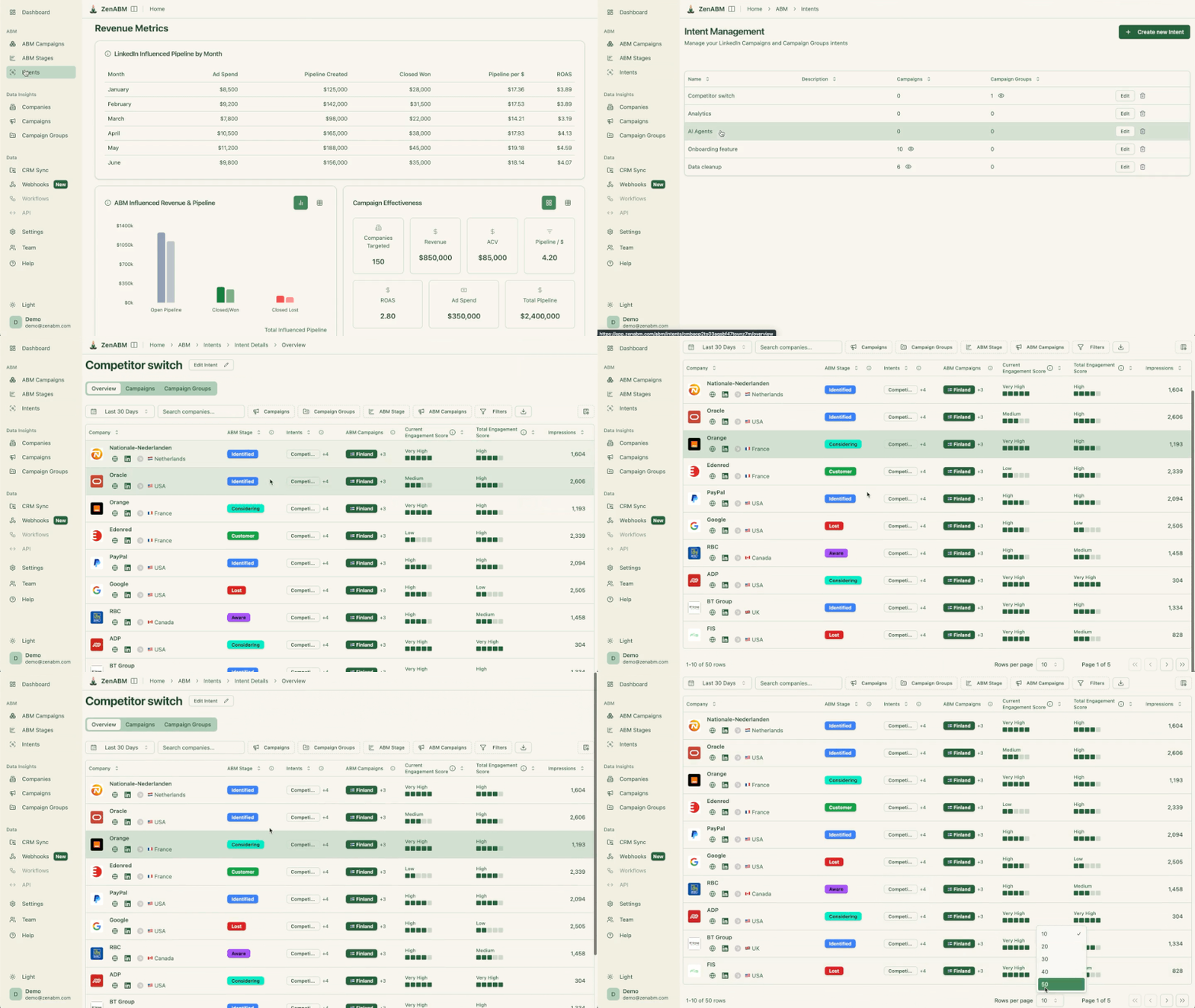

Example: At Userpilot, Bilal runs campaigns organized by job-to-be-done: onboarding analytics, product adoption tracking, churn prevention, and feature discovery. When a company engages with the onboarding analytics campaign specifically, the follow-up sequence leads with onboarding analytics, not with Userpilot’s full feature set, because the whole point is to match the outreach to the signal rather than defaulting to a generic product pitch. That gives the outbound workflow better source material for personalization than “this company clicked an ad at some point.”
Intent-based sequence structure:

The reason ZenABM pushes all engagement data to HubSpot as company properties is not just about reporting; it is about giving sales the context they need to have relevant conversations, and ensuring that ABM engagement data continues to influence deals even after the deal is open and the handoff to sales has already happened.
When a target account has been engaged with your LinkedIn ads for 6 weeks before a BDR reaches out, that history should be visible to the AE who eventually takes the deal.
The company property in HubSpot shows which campaigns they engaged with, when they first saw your ads, and which specific ads drove them to high-intent pages, so the AE can reference this context in early sales calls rather than starting from scratch as if the relationship began at the point of handoff.
See how to push LinkedIn ad engagements into HubSpot for the full technical setup of the CRM sync (spoiler: the one-time setup hardly takes two minutes using ZenABM, and then it is automated forever!).
The biggest takeaway from this workflow is that ABM follow-up should not begin when a rep finally gets around to reviewing a spreadsheet. It should begin the moment an account shows meaningful engagement, while the intent is still fresh and the message can still be matched to what that account actually cares about.
That is what makes the difference between outbound that feels random and outbound that feels timely and relevant.
The real advantage of this setup is not just automation for its own sake. It is the quality of the trigger and the context behind it.
ZenABM helps provide that context through company-level LinkedIn ad engagement, intent signals, ABM stage tracking, CRM sync, and webhook-based routing into tools like Clay.
If you want your LinkedIn ABM campaigns to influence the pipeline more directly, and not just generate disconnected ad engagement, ZenABM is a strong layer to put in place.
Try ZenABM for free (37-day free trial) or book a demo now!
Some common questions about ABM follow-up sequences, answered based on the workflow and principles covered in this session:
Set up ZenABM to detect when accounts hit your Interested stage threshold (typically 3 or more clicks in 30 days plus a high-intent page visit), then configure a webhook to send account data to Clay, where it gets enriched and matched to ICP contacts. From there, SmartLead or HeyReach launches an intent-personalized outbound sequence automatically. The entire flow runs without manual BDR intervention once configured.
Within 24 to 48 hours of the account hitting your engagement threshold, because intent signals decay quickly. An account that visited your pricing page yesterday is far more receptive to outreach than one that visited 2 weeks ago, and automated workflows are essential for hitting this window because manual review processes typically create delays of days to weeks.
Reference the specific problem area the account has been researching, based on which campaigns they engaged with, and do not open with a demo ask. Share something relevant to their specific interest in the first two touches, then move to the demo ask in touch 3 or 4 after you have established relevance. Intent-personalized messaging based on ad engagement data consistently outperforms generic ICP sequences because it demonstrates that you actually know what the prospect cares about, rather than treating them as another row in a spreadsheet.
The core stack is ZenABM for detecting LinkedIn ad engagement at the account level, Clay for enrichment and contact finding, SmartLead or LemList for email sequences, HeyReach for LinkedIn outbound, and HubSpot or Salesforce as the CRM where all engagement data lands. The ZenABM-to-Clay webhook is the key integration that connects the LinkedIn engagement signal to the outbound execution, and without it, the rest of the stack has no trigger to act on.
