

©2026 ZenABM - All Rights Reserved.

Claude is the new cool kid of the block, and context engineering using Claude code is now the differentiator between actually successful AI-powered LinkedIn account-based marketing (ABM) campaigns and bogus ones.
So, if you’re up to ABM, but new to Claude (or have been using Claude without utilising its context engineering capability), this article is the perfect beginner’s guide for you.
Here, I have first discussed the importance of context engineering with data-backed claims, then have briefly touched on some theory, and finally have shared real steps to set up Claude Code for ABM, a Claude.md template, some real ABM examples, and more.
Let’s go!
Short on time?
Here’s a quick overview:

In February 2026, Maja Voje (GTM Strategist, author of GTM Strategist, Claude partner) and Kyle Poyar (Growth Unhinged) published their 2026 State of AI for GTM report.
The findings were brutal:
Well, the last point is the exact problem that context engineering solves.
And for LinkedIn ABM specifically, where personalization quality directly determines response rates, pipeline velocity, and win rates, the difference between these two approaches is much more than just ‘significant.’
The term ” Context Engineering” went mainstream on June 18, 2025, when Shopify CEO Tobi Lutke posted on X: he preferred “context engineering” over “prompt engineering” because it better described the core skill.

The post hit 2 million views and counting.
A week later, Andrej Karpathy endorsed it, mapping context engineering to the components that fill an LLM’s context window: task descriptions, examples, retrieved data, tools, state, and history.

But the most actionable definition for GTM teams came from Phil Schmid (formerly Hugging Face):
“Context Engineering is the discipline of designing and building dynamic systems that provides the right information and tools, in the right format, at the right time, to give a LLM everything it needs to accomplish a task.”
His critical follow-up: “Most agent failures are not model failures anymore. They are context failures.”
Anthropic’s engineering team published the canonical treatment in September 2025, defining context engineering as the strategies for curating and maintaining the optimal set of tokens during inference.
Their key insight: bigger context windows don’t solve the problem. You need the smallest possible set of high-signal tokens that maximize your desired outcome. Irrelevant context doesn’t just waste space. It actively degrades output quality through what they call “context rot,” where model accuracy drops as token count increases.
Here’s what this means in plain English for ABM practitioners:
As Maja Voje frames it in her GTM Guide to AI Context Engineering:
“Prompt engineering is writing a clever brief for every single task. Context engineering is building the team that doesn’t need a brief, because the institutional knowledge, the playbooks, the quality standards, and the tool access are already baked into how the operation runs.”
To better understand the difference between prompt engineering and context engineering for account-based marketing, let’s see how they work for a common task.
The task: Research Acme Corp and generate a personalized LinkedIn outreach sequence.
Prompt engineering approach (what most people do):
Research Acme Corp and write a 5-message LinkedIn outreach sequence for their VP of Marketing. We sell an ABM analytics platform.”
What you get back: generic company overview pulled from Wikipedia, bland messages like “I noticed your company is growing” and “Would love to connect about ABM,” no awareness of your brand voice, product positioning, or what makes your solution different from competitors.
Context engineering approach (what the 24% do):
Claude Code reads your CLAUDE.md at session start.
It already knows:
Now, when you type the same task, Claude Code:
The output references specific details about Acme Corp, uses your exact product language, follows your proven 5-message cadence, and sounds like your best BDR on their best day. Every. Single. Time.
Here’s the comparison in a table:
Dimension | Prompt Engineering | Context Engineering |
|---|---|---|
Setup time | 0 minutes (just type) | 2-4 hours (one-time investment) |
Time per task | 5-10 min re-explaining context each time | 30 seconds (context is pre-loaded) |
Output quality | Inconsistent, generic, off-brand | Consistent, personalized, on-brand |
Brand voice | Different every session | Same every session (enforced by rules) |
Learning over time | None. Starts from zero each time. | Compounds. System improves weekly. |
Tool access | Copy-paste between tools manually | Reads CRM, Clay, LinkedIn via MCP |
Scalability | Linear (more tasks = more re-explaining) | Exponential (better context = better everything) |
Four components make context engineering work in Claude Code.
Think of them as layers of a system, each one making the next more powerful.
CLAUDE.md is a plain text file that Claude Code reads automatically at every session start.
It’s persistent memory.
Whatever you put in this file, Claude knows before you type your first prompt.
For a LinkedIn ABM team, your CLAUDE.md contains:
The key insight from the r/ClaudeAI community: keep it under 80 lines. One practitioner reported that reducing from 200 lines to 45 actually improved output quality. The reason is technical: Claude Code’s system prompt already contains ~50 built-in instructions, and frontier models reliably follow approximately 150-200 total instructions. Every CLAUDE.md line competes against that budget.
You’ll find the complete fill-in-the-blank CLAUDE.md template in Section 7 of this article below.

Skills are SKILL.md files that encode specific marketing workflows into reusable playbooks.
Unlike CLAUDE.md (which is always loaded), Skills activate automatically only when the task matches their description.
This means you can have dozens of specialized playbooks without wasting context space.
For LinkedIn ABM, your Skills library might include:
Skills use a three-level progressive disclosure architecture (documented in Anthropic’s engineering blog on Agent Skills): only the skill name and description load at startup (costing minimal tokens), the full instructions load only when triggered, and reference files load only when needed.
This means zero wasted context.
Anthropic’s insight: “Building a skill is like putting together an onboarding guide for a new hire.”
If you’ve given the same instructions to Claude 3 times, it’s time to turn it into a Skill.
Pro Tip: For a head start, you can install Corey Haines’ open-source marketing skills library (12 skills covering SEO, CRO, copywriting, paid ads, growth engineering) with one command:
npx skillkit install coreyhaines31/marketingskills

The Model Context Protocol connects Claude Code to your existing tools.
Instead of copy-pasting data between platforms, Claude reads directly from your CRM, enrichment tools, and analytics.
ABM-relevant MCP connections available right now:
# | Tool | What Claude Can Do | Setup |
|---|---|---|---|
1 | Clay | Search contacts, trigger enrichment, create records, and run waterfall enrichment across 75+ providers. | Claude connector in Settings. |
2 | HubSpot | Read contacts, companies, deals, tickets, products, orders, invoices, quotes, and subscriptions via OAuth. Developer MCP Server also adds CMS and serverless functions. |
|
3 | Salesforce | 60+ tools for DevOps, LWC development, code analysis, deployment, CRM record management, reporting, and customizations via natural language. | Salesforce Hosted MCP Servers (GA early 2026). |
4 | Apollo.io | Search for people and companies, enrich records, create or update contacts, add prospects to sequences, and check analytics. | Claude connector (Settings > Connectors > Apollo). |
5 | Amplemarket | Search prospects, enrich contacts, build lead lists, pull CRM context, and check outreach analytics. | Claude connector, requires active Amplemarket account. |
6 | Gong | Pull call transcripts, deal insights, engagement data, and activity logs. Query Gong directly for customer and deal intelligence. | Gong MCP Gateway. |
7 | Brave Search | Run web search for account research, competitive intel, and content gap analysis. |
|
8 | Slack | Send ABM alerts, share research summaries to channels, post approval requests, and deliver automated reports. | Incoming webhook or Claude connector. |
9 | n8n | Trigger complex multi-step automations from natural language and orchestrate CRM-to-outreach workflows. |
|
10 | Ahrefs | Compare domain keyword overlap, identify content gaps, pull declining keywords, and run competitive analysis. |
|
11 | Google Analytics 4 | Pull exact real-time data, remove 5,000-row export limits, avoid stale data, and reduce manual cleaning. |
|
12 | Windsor.ai | Connect Claude to 325+ marketing data sources including Meta Ads, Google Ads, GA4, Instagram, Shopify, and LinkedIn Ads. | Windsor MCP connector. |
13 | 1ClickReport | Access 30+ marketing tools across GA4, Google Ads, Meta Ads, GSC, Stripe, and Keyword Planner. Analyze campaigns, audit spend, and get keyword ideas. | Copy MCP server URL from 1ClickReport settings. |
14 | SegmentStream | Run cross-channel attribution, anomaly detection, outcome forecasting, and budget change execution. | SegmentStream MCP setup. |
15 | Google Search Console | Query keyword rankings, impressions, clicks, CTR, and position data. Identify ranking losses or AI Overview gains. | Google native GSC MCP or Stape GSC MCP. |
16 | Zapier | Push data to existing apps and trigger workflows across thousands of SaaS tools without custom API integrations. | Zapier MCP, included with Zapier subscription. |
17 | Make (Integromat) | Run visual multi-step automations and trigger scenarios from Claude via MCP. | Make MCP server. |
18 | Workato | Connect Salesforce, Jira, Google Drive, Slack, HubSpot, Notion, ServiceNow, Zendesk, and more with identity-aware execution and audit logging. | Workato MCP server. |
19 | SMARTe | Use a 290M+ verified B2B contact database to find ICP-matched contacts, direct dials, buying groups, and buying signals. | SMARTe MCP setup. |
20 | SyncGTM | Use an all-in-one GTM MCP with waterfall enrichment across 50+ providers and native CRM sync. | SyncGTM ($99/mo). |
21 | ConnectSafely | Find decision-makers at target companies via LinkedIn and build, launch, and iterate multi-touch LinkedIn outreach campaigns. | ConnectSafely MCP server via Claude Cowork. |
22 | LinkedIn Ads (via ads-mcp) | Read-only analytics for bid recommendations, exclusion lists, budget reallocation, and ABM engagement reports across named accounts. |
|
23 | Google Ads | Query campaign performance, ROAS, CPA, keyword data, and ad group metrics, then cross-reference with GA4 conversion data. | 1ClickReport MCP or Windsor MCP. |
24 | Meta Ads | Pull campaign spend, ROAS, audience performance, and creative metrics, then compare against LinkedIn and Google performance. | 1ClickReport MCP or Windsor MCP. |
25 | Notion | Read and write workspace pages, databases, and project trackers. Sync ABM plans and research notes. | Notion MCP server. |
26 | Google Drive | Search, read, and create docs, sheets, and presentations. Pull SOWs, campaign briefs, and competitive analysis files. | Google Workspace MCP. |
27 | Gmail | Draft, send, and organize emails. Automate follow-up sequences and send campaign reports to stakeholders. | Gmail MCP connector in Claude. |
28 | Google Calendar | Schedule ABM review meetings, set intent review cadences, and create event-triggered workflows. | Google Calendar MCP connector in Claude. |
29 | Firecrawl | Extract content from competitor and target account websites with markdown extraction, screenshots, structured data extraction, and web search. |
|
30 | Composio (Tool Router) | Get dynamic just-in-time access to 20,000 tools across 850+ apps through a single MCP endpoint. | Composio MCP setup. |
ZenABM also provides an MCP server, which allows you to connect your LinkedIn ads performance and ABM data directly to any LLM that supports the Model Context Protocol – most notably, you guessed it right, Claude Code.
This means you can:


Here’s the critical difference: CLAUDE.md rules are advisory.
Claude can ignore them.

But hooks are deterministic.
They always execute.
No exceptions at all!
Hooks are automated checks that fire at specific points in Claude Code’s lifecycle:
For marketing teams, hooks solve the “Claude forgot my rules” problem permanently.
If your brand voice guide says never use the word “leverage,” a hook will catch it every single time, even when CLAUDE.md instructions get lost in a long session.
The hooks system supports 16+ lifecycle events, including PreToolUse (block or modify actions before they happen), PostToolUse (auto-format after writes), and Notification (desktop alerts).
Configuration lives in .claude/settings.json as a simple JSON structure.
So, this example is based on GrowthSpree’s documented Claude ABM workflow, one of the most complete production ABM systems built with Claude Code.
Without context engineering (generic prompt):
You type: Research Acme Corp for our ABM campaign.
You get back: a Wikipedia-style company summary, generic industry challenges, no connection to your product, no personalization hooks, no outreach angles. Useful for a school report. Useless for pipeline generation.
With context engineering (CLAUDE.md + Skills + MCP) based on GrowthSpree’s framework:
You type the same thing.
But Claude Code already has your CLAUDE.md (knows your ICP, product, voice), your account research Skill (knows the 6-section brief format), and Brave Search MCP (can access current web data).
What Claude Code actually does:
GrowthSpree documented this system mining 35+ contacts across 15 companies in a single session, replacing 3-4 hours of manual BDR research.
Here’s their video demonstration (starts at 00:45):
Result?
As per their claims, their personalized outreach sequences achieved 2-3x higher response rates versus generic templates.
Let’s set this up right now.
You need: a computer with Node.js installed, an Anthropic account (Pro plan at $20/month is sufficient to start), and 15 minutes.
Open your terminal (Mac: Terminal app; Windows: PowerShell) and run: npm install -g @anthropic-ai/claude-code
It should return something like this:

If it returns something on the lines of “npm not found”, you haven’t installed Node.js.
You can download it from nodejs.org (choose the LTS version).


Run the installer, then retry the npm command above.
Verify it worked: claude --version
You should get something like this:

Run these commands to create the recommended folder structure:
mkdir ~\abm-campaignmkdir ~\abm-campaign\datamkdir ~\abm-campaign\researchmkdir ~\abm-campaign\outputsmkdir ~\abm-campaign\brandmkdir ~\abm-campaign\templatesmkdir ~\abm-campaign\.claudemkdir ~\abm-campaign\.claude\skillsmkdir ~\abm-campaign\.claude\agentsmkdir ~\abm-campaign\.claude\commandscd ~\abm-campaign
You should get something like this:

Create a file called CLAUDE.md in your project root.
You can do that just after the previous step:

Copy the complete template from Section 7 below, then fill in your specific details.
This should take about 5 minutes.
nano CLAUDE.mdnotepad CLAUDE.mdThen, paste the template from Section 7, fill in your details, and save.
Start Claude Code from your project directory: claude
Claude Code will authenticate via your browser on first run.
Note: If you get something like “Claude Code on Windows requires git-bash (https://git-scm.com/downloads/win). If installed but not in PATH, set environment variable pointing to your bash.exe, similar to: CLAUDE_CODE_GIT_BASH_PATH=C:\Program Files\Git\bin\bash.exe” like in the result below, it means you need to first install git-bash from: https://git-scm.com/downloads/win


Once you’re in, run this test:
Research [YOUR TARGET COMPANY] as a potential ABM target account. Score them against our ICP criteria. Output a structured brief with pain points and outreach angles.
Replace [YOUR TARGET COMPANY] with an actual company from your prospect list.
Notice how the output references your product, uses your terminology, and scores against your ICP criteria from CLAUDE.md.
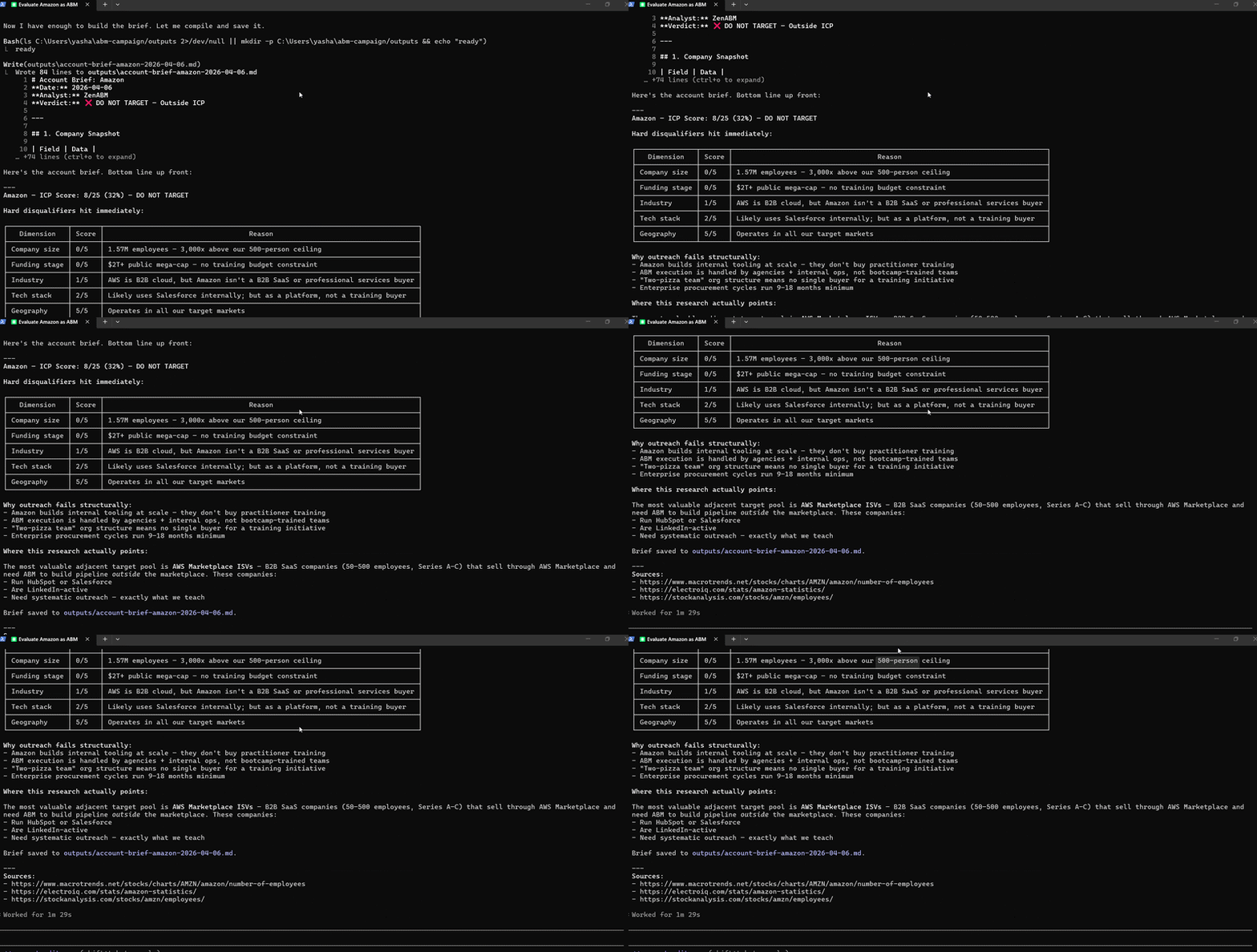
Now, leave the abm-campaign folder and open Claude outside it, and again run the same test and compare the two outputs side by side, or simply go to a Claude chat and attempt the test there.
The difference is the entire argument for context engineering.
In fact, as our test prompt talks about “score them against our ICP”, Claude, without context, may ask you to give your ICP guidelines,
Well, that’s the whole point of context engineering.
It ensures you don’t have to give detailed context for repetitive tasks ten times a day.
This not only saves you time but also improves output quality, because we often end up producing lazy, low-quality prompts when we have to do it manually repeatedly, but context engineering ensures all your tasks get the original detailed context each and every time, ensuring consistent output.
Checklist before moving on:
☐ Claude Code installed and running (claude –version shows a version number)
☐ Project folder created with the recommended structure
☐ CLAUDE.md written and saved in project root
☐ First research task completed with context
☐ Comparison completed: context vs. no-context output reviewed
Copy this entire template.
Replace everything in [BRACKETS] with your specific information.
Save as CLAUDE.md in your project root.

# ABM Campaign System
## Identity
You are a senior ABM strategist and content specialist for [YOUR COMPANY NAME].
We sell [ONE SENTENCE: what your product does and who it’s for].
Our positioning: [ONE SENTENCE: why you’re different from alternatives].## ICP Definition
Primary ICP:
– Company size: [e.g., 50-500 employees]
– Industry: [e.g., B2B SaaS, professional services]
– Tech stack signals: [e.g., uses HubSpot, runs LinkedIn ads]
– Funding stage: [e.g., Series A-C]
– Geography: [e.g., US, UK, DACH]Anti-persona (do NOT target):
– [e.g., companies under 20 employees]
– [e.g., government agencies]
– [e.g., direct competitors]## Brand Voice Rules (5 maximum)
1. Write like a practitioner sharing what they learned, not a thought leader pontificating
2. Use short sentences. Be direct. No fluff.
3. Always use specific numbers over vague claims (“3x pipeline” not “significant improvement”)
4. First person. Say “we tested” not “it was determined”
5. Never use these words: [leverage, synergy, revolutionary, game-changer, unlock, delve]## Competitors
– [Competitor A]: [their angle]. Our counter: [why we’re better for our ICP].
– [Competitor B]: [their angle]. Our counter: [why we’re better for our ICP].## Content Rules
– LinkedIn posts: max 1,300 characters, hook in first line, one sentence per line
– Emails: subject under 50 characters, body under 120 words, one clear CTA
– Account briefs: use the 6-section format in skills/account-research/SKILL.md## Quality Standards
– Never fabricate data. Mark unknown fields as “Not Found”
– All factual claims must include source attribution
– ICP scores must include one-line justification per dimension
– Run quality checks before delivering any final output## Connected Tools
– MCP: Brave Search (web research), [add others as you connect them]
– Skills: see .claude/skills/ for available playbooks
– Outputs: save all deliverables to outputs/ folder
That’s 42 lines.
Well under the 80-line recommended maximum.
You can expand sections later as your system matures, but start lean.
Every line should earn its place.
Score yourself on each item. 1 point per “yes.”
Scoring:
Context engineering is what turns Claude Code from a clever writing assistant into a real operating system for LinkedIn ABM.
Once your positioning, ICP, playbooks, tool access, and quality checks are built into the system, you stop re-briefing AI and start compounding output quality across research, outreach, reporting, and campaign analysis.
And if you want to connect that setup directly to real LinkedIn ads and account engagement data, ZenABM makes the workflow much more powerful through its MCP server, which lets you pull ABM performance into Claude Code, build custom reporting, trigger actions from engagement thresholds, and generate much more useful campaign intelligence.
