



ChatGPT for ABM usually means asking it to write ad copy, and that is the smallest thing it can do.
When we ran our first LinkedIn ABM program, every step was manual: sizing the market, building the account list, researching accounts, auditing the account, reporting to execs, routing hot accounts to sales, and more.
Most of that is now a prompt.
The catch is that ChatGPT on its own has never seen your ad account, so a prompt against an empty context just guesses.
The whole game is connecting ChatGPT to your first-party ad and CRM data through a LinkedIn Ads MCP connector, and then running the account-based motion as prompts and workflows.
This guide gives you both halves: the ChatGPT-native setup (connectors, Skills, Custom GPTs, Projects, and scheduled Tasks) and the copy-paste prompts for all ten ABM jobs, from TAM to outreach.
Note: The prompts are model-agnostic, so they work the same whether you paste them into ChatGPT, Claude, or the Zena chat inside ZenABM.
Here is the whole guide in one quick block:
list_skills./abm-campaign-execution: strategy to briefs plus 1080×1080 mockups across 23 patterns), and Advanced Client’s LinkedIn Ad Designer is a free 23-pattern skill. Both are Claude skills today, so in ChatGPT you run them in Claude or have ChatGPT scaffold a ChatGPT Skill. Format beats polish: Thought Leader Ads run a 2.68% median CTR versus 0.42% for single image ads.Before the prompts, let’s discuss the tools ChatGPT gives you, because each ABM job maps to one of them.
ChatGPT is not a terminal, so the Claude Code way of installing plugins from a marketplace does not apply here, but ChatGPT now has its own equivalents.
What it has is six primitives, and they are enough to run the program.
Connectors are how ChatGPT reaches an outside system, and this is the one that matters most for ABM.

Through Developer Mode, you point ChatGPT at a remote MCP server and every tool that server exposes, both reads and writes, becomes callable in your chats.

This is the layer that decides whether ChatGPT works from live account-level data or from a story it made up. Alex Fine, co-founder at Understory, framed the idea in one line worth keeping.
“MCPs are basically secure bridges between Claude and your business tools. Think of them like translators that let you use plain English.” Alex Fine, Co-Founder, Understory, on LinkedIn
He said it about Claude, and the point holds for ChatGPT too, because MCP is an open standard that ChatGPT now supports through Developer Mode.
Skills are ChatGPT’s reusable workflow packages, and they are the closest thing to a Claude Code skill.
A Skill packages instructions, resources, and optional scripts into one unit that ChatGPT can follow reliably every time (per OpenAI’s own docs).
You create one by describing it (“build me a skill that runs my monthly ABM report”), by recording the workflow once, or by writing a short SKILL.md file yourself.
You invoke it by @-mentioning it, by picking it from the slash-command list, or by letting ChatGPT run it automatically when a request matches its description.
The detail that matters for ABM is that a Skill can declare a connector dependency, so you can wire one to the ZenABM MCP connector and run a full workflow, the weekly audit or the monthly report, as a single invocation instead of a pasted prompt.
Skills live in the ChatGPT desktop app and in ChatGPT Work.

A Custom GPT is a saved configuration: a set of instructions, some reference files, and optionally a connection to your data.
It was the closest thing to a reusable skill before ChatGPT shipped Skills, and it is still useful as a lighter, shareable helper for a whole team.
The workflows that suit a Custom GPT are the ones you run repeatedly with stable inputs, which describes the monthly report and the weekly audit, though a Skill now does that same job with a cleaner invocation and can run inside a scheduled Task.

A Project is a persistent workspace where custom instructions and files carry across every chat inside it.
This is where you park your standing context: your ICP definition, your messaging mix, your kill thresholds, your benchmark targets.
In Claude Code, that context lives in a CLAUDE.md file; in ChatGPT it lives in a Project, and it means you do not restate your account every time.

Tasks let you set a recurring prompt that runs on a schedule and notifies you by push or email.
As of mid-2026, a scheduled Task can use your connectors and your Skills, which is what makes an automated Monday report possible without a terminal.
One caveat to plan around: Custom GPTs and file uploads are not available inside a Task, so you schedule a Skill or a plain prompt with the connector, not a Custom GPT.

Deep Research is ChatGPT’s autonomous research mode, and it is genuinely good at research-heavy ABM jobs such as market sizing and per-account diligence.
It plans sub-queries, reads across sources, and returns a cited report, which is exactly what TAM work and account research need.
Every prompt below assumes ChatGPT can see your account, so this is the step that unlocks the rest.
There is no official LinkedIn Ads connector for ChatGPT, and ChatGPT cannot read Campaign Manager on its own, so the connection runs through an MCP server that reads the LinkedIn Ads API and joins it to your CRM.
The ZenABM MCP server is built for this, and it exposes 57 data tools plus a set of safe write actions over your company-level LinkedIn engagement, ABM stages, intent signals, creatives, and deals.

Here is the setup, which takes about five minutes.
Start a ZenABM account and connect LinkedIn Ads and your CRM, because without the CRM sync, the ad metrics still flow, but the pipeline context that makes ABM reporting worth reading is missing.
Then, in ChatGPT on the web, open Settings, go to Apps, open Advanced settings, and turn on Developer mode.
Developer mode is available on the Plus, Pro, Business, Enterprise, and Education plans. Add a connector, paste the ZenABM MCP endpoint at https://app.zenabm.com/api/mcp, and authorize over OAuth.

One thing to know: ChatGPT only connects to remote servers over HTTPS, which the ZenABM server is, so there is nothing to run on your own machine.
Once it is connected, the ZenABM tools appear in the composer’s Developer Mode tool, and you pick which ones a conversation can use.
After that, you never call a tool by name.
You ask a question in plain English, and ChatGPT selects the right tools.
If you want to know what it can do, ask it, and it calls the connector’s list_skills tool to list the full set of ABM workflows the server ships.

The full connection guide and tool list lives in the ZenABM MCP docs, and access starts on the $59 per month plan with a 37-day free trial (current tiers are on the pricing page).

ChatGPT connected to nothing gives you generic advice.
ChatGPT connected to your LinkedIn ads account gives you decisions, and the reason is the data ZenABM exposes that Campaign Manager and the raw LinkedIn API do not.
The biggest gap is company-level engagement.
LinkedIn’s own campaign reporting tells you impressions, clicks, and spend, but it does not tell you which companies engaged with exactly which campaign, and for ABM that is the entire point.
ZenABM pulls that company-level engagement straight from the LinkedIn Ads API and ties it to your CRM deals, so ChatGPT can reason about accounts, stages, intent, and closed-won revenue rather than aggregate metrics.

Two derived metrics come with it and run through every reporting prompt below: eCTR, the share of impressions that become an actual landing-page click, and eCPC, the real cost of each of those clicks. LinkedIn’s native CTR counts likes and comments, so it reads higher than the click you are actually paying for.
Note: Wiring the LinkedIn Marketing API to ChatGPT or even other models like Claude yourself is also a poor trade, and the table shows why most teams connect through a server that has already done that work.
| Factor | LinkedIn API direct | ZenABM MCP connector |
|---|---|---|
| Time to first data | 2 to 4 weeks (Marketing Developer Platform approval) | About 5 minutes |
| Company-level data | Not available | Full company engagement per campaign and creative |
| Deal attribution | Not available | CRM deals with LinkedIn influence flags |
| ABM stages and intent | Not available | Stage progression and first-party intent signals |
| Access in ChatGPT | Build your own tool wrapper | Native connector, plain-English tools |

A LinkedIn-centric ABM program breaks into ten jobs, and ChatGPT has a prompt or a workflow for each.
Treat the prompts as starting points and adjust the thresholds to your account.
Where a job leans on your live data, it assumes the ZenABM connector is on.
TAM work is research work, and Deep Research does it well.
The workflow that used to be a week of analyst time is now a prompt that enumerates the firmographic filters, counts companies per filter from cited sources, and sizes bottom-up.
Use Deep Research to build a bottom-up TAM estimate for [product category] sold to [ICP: industry, employee range, geography, tech stack]. Enumerate the firmographic filters, estimate the company count per filter from cited public sources, apply our ACV of [X], and put every assumption in a table I can challenge. Cite each source inline.
There are two list motions.
Cold list building filters a database against your ICP, which Deep Research handles from a prompt.
Warm list building starts from accounts already engaging with you, which is the motion I run first because those accounts convert to meetings at a rate cold lists do not approach.
The warm list runs on the connector.
The prompt for the warm list
Using the ZenABM tools, pull every company with LinkedIn ad engagement in the last 60 days. Tier them: Tier 1 is 5 or more engagements plus a landing-page click, Tier 2 is 3 or more engagements, Tier 3 is the rest. Drop any company that fails our ICP (under 50 employees, wrong industry, wrong geography), and show the campaigns that drove each Tier 1 account’s engagement.

Once the list exists, each account needs a pass: what the company does, what changed recently, who the buying committee is, and which message fits.
Deep Research produces the dossier, and if you connect a CRM connector alongside ZenABM, it can note which accounts already have an open deal.
For each company in this list [paste domains], build a one-page account dossier: what they do, recent funding or leadership news, likely tech stack, the three most probable buying-committee roles with titles, and one specific personalization hook I could use in outreach. Flag any account that already engaged with our ads.

This is the job most teams skip, and it is the mistake that costs the most: budget spread across too many campaigns, audiences split too small to serve, and more ads live than the budget can feed.
The fix is the ad-count model, and ChatGPT can run it against your real numbers.
Here is my program: revenue goal [X], average deal size [X], monthly budget [X], site conversion rate [X], and close rate [X]. Using my real CPM, eCTR, and cost-per-click from the ZenABM tools, tell me whether the goal is reachable, then propose the campaign structure, the format mix, and the number of ads the budget actually supports. Use the rule that ad count equals monthly budget divided by 30, divided by cost per landing-page click, divided by roughly 4 clicks per ad per day.
If you would rather not prompt it at all, the free ABM budget calculator and LinkedIn ads count calculator run the same models in the browser.


Ad creation is the one job where I reach for a skill rather than a one-off prompt, because the value is a repeatable, brand-locked design system, not a single clever ask.
Emilia Korczynska, VP of Marketing at Userpilot, built templated ad projects and published the number.
“This reduced the time I spend creating an ad from ~20 to 2 minutes.” Emilia Korczynska, VP of Marketing, Userpilot, on LinkedIn

The reusable version of that is an ad-design skill: your brand, your proof points, and a library of ad patterns baked into one workflow, so every variant comes out on-brand.
Two are worth knowing, and one of them is ours.
/abm-campaign-execution): yes, ZenABM ships its own ad-design skill. It takes a locked strategy and returns launch-ready output: a campaign outline, per-ad copy and design briefs, and rendered 1080×1080 mockups built from HTML across 23 reference patterns. Two guardrails I like: it does not invent strategy (it executes the plan you give it), and any Thought Leader Ad copy written without a real author quote comes back as a bracketed placeholder instead of a fabricated claim. It is one of the four free skills in the ZenABM skills repo. 

Both of these are packaged as Claude skills today, so in ChatGPT you have two paths: Run them in Claude, or build the equivalent as a ChatGPT Skill, which ChatGPT will scaffold for you from your brand guide and a pattern list.
You can, in fact, just upload these to ChatGPT and tell it to build ChatGPT-compatible versions.
For one-off ads with zero setup, the free single image ad creator and TLA generator run in the browser.


Emilia’s caution in the same post above is worth carrying whichever skill you use: as decent ads get easy for everyone, feeds saturate, and CPMs rise, so cheap production is table stakes, and the edge moves to message-market fit per account tier, which is a data problem, not a design one.
That is where format choice earns its keep.
In the ZenABM 2026 benchmark, Thought Leader Ads post a 2.68% median CTR while single image ads sit at 0.42%, so which format a skill outputs moves outcomes more than how polished it is.

ABM campaigns consume content: the guides behind Document Ads, the landing pages per segment, the one-pagers for Tier 1 accounts.
ChatGPT drafts the research-heavy assets, and its data-analysis tool can turn a draft into a downloadable document.
Draft a 1,500-word gated guide on [topic] for [ICP]. Research it with citations, structure it for a busy buyer with a clear takeaway per section, and end with a one-paragraph summary I can lift into a Document Ad. Then give me a shorter, account-specific version for [named account] that swaps in their industry and one relevant proof point.
ABM campaigns consume content: the guides behind Document Ads, the landing pages per segment, and the one-page microsites for Tier 1 accounts.
ChatGPT drafts the research-heavy assets and produces the documents natively, since its data-analysis tool exports a finished docx, pptx, pdf, or xlsx, and Canvas is where you edit long copy in place.
Start with a prompt like this for the guide.
Draft a 1,500-word gated guide on [topic] for [ICP]. Research it with citations, structure it for a busy buyer with a clear takeaway per section, and end with a one-paragraph summary I can lift into a Document Ad. Then give me a shorter, account-specific version for [named account] that swaps in their industry and one relevant proof point.
When you want more than ChatGPT gives you on its own, there is a strong open-source layer for content and microsites, and all of it is model-agnostic, so it runs on whatever model you point it at.


Specifically for documents, you have two routes: ChatGPT’s own data-analysis tool for the branded one-pager, the QBR deck, and the PDF guide, or Anthropic’s open docx, pptx, xlsx, and pdf skills if you are working on the Claude side.
Both cover the asset class that Document Ads and sales follow-up actually consume.
This is where a weekly loop replaces the quarterly cleanup: identify eCPC outliers, impression hogs, and creative fatigue, then propose actions.
Because the connector exposes write actions, ChatGPT can go one step further and offer to pause the worst, which it does only after you confirm.
Audit my LinkedIn ads with the ZenABM tools. Show me the ad sets with the most spend and lowest eCTR, any ad set with rising spend and falling engagement over 4 weeks, and the 10 companies with the most impressions and least engagement. Then flag ads whose eCTR has declined for 2 or more consecutive weeks above 1,000 impressions, and propose which to pause and which company exclusions to apply. Do not make any change until I approve it.

The kill threshold we ran the program on is simple: an ad past 1,000 impressions with eCTR under 0.4% comes off.
When you kill one, replace it and hold your planned messaging mix, or the account drifts off-strategy one weekly swap at a time.
Reporting is the most automatable job here, because the format barely changes month to month; only the numbers do.
Run two cadences: a Monday operator digest and a monthly exec recap.
Using the ZenABM tools, give me my weekly LinkedIn ABM review, last 7 days versus the previous 7. Start with a one-paragraph headline on whether the program got healthier or worse and why, using eCTR and eCPC, not just CTR and CPC. Then list the 3 biggest movers, the stage changes, and the decaying ads to pause. Keep it tight.

For the CMO, lead with pipeline and progression, not clicks, because that is the slide that lands in an exec review.
Build a monthly ABM exec summary, last month versus the month before. Three sentences at the top: spend and its trend, influenced pipeline and pipeline per dollar and its trend, and one decision for next month. Then a table of the campaigns that touched new deals, how much pipeline, at what spend. Then which accounts moved into buying stages, and the top 3 risks and top 3 opportunities, each with its number.

The report that answers “what is the ROI” is the attribution one, and it is where the model matters.
Click-based last-touch attribution makes ABM look broken because it credits only the final ad and ignores every awareness touch before it.
Influence-based attribution asks a better question: which campaigns touched this account before the deal opened.
ChatGPT can run that join in one pass because ZenABM already ties account-level engagement to CRM deals.
Which campaigns and ad sets were the most common touchpoints before open deals and before closed-won deals this quarter? Which spend produced no pipeline at all? Report this as influence, credit every campaign that touched an account before the deal, and state clearly that this is correlation, not proof of cause.
Underneath these prompts is ZenABM’s revenue attribution per ABM campaign, deduplicated, with pipeline per dollar, ACV, and ROAS by campaign, so the numbers ChatGPT reads are the same ones in the dashboard.


Everything downstream depends on this job being trustworthy, so the standard is that an agent should act on intent signals that don’t come out of third-party black boxes.
ZenABM’s first-party intent works by tagging campaigns with intent themes (for example, Analytics, Security, AI Features); accounts that engage inherit the label, and you can click through to the exact engagements behind it.
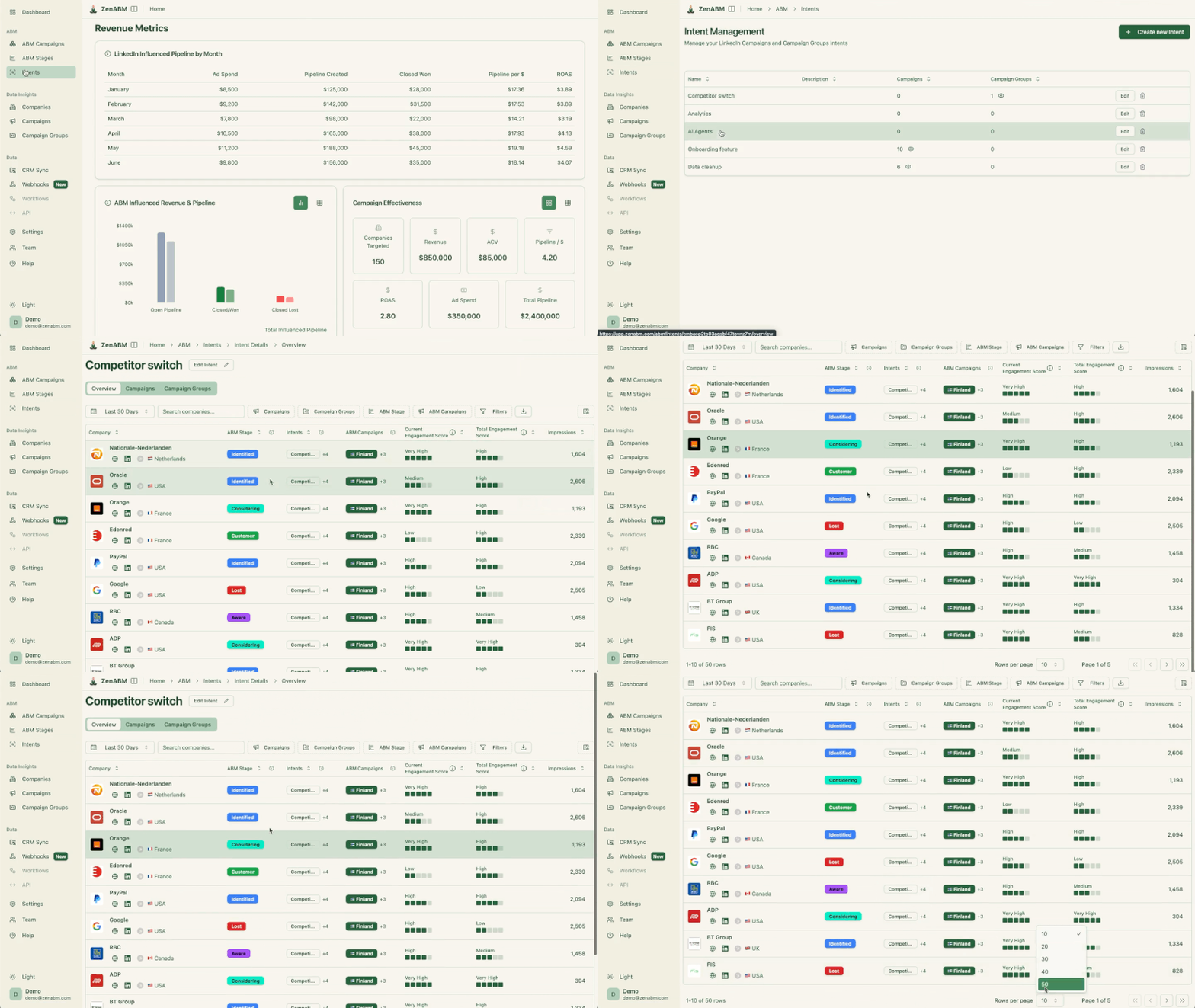
That is the difference from third-party keyword surges, where the evidence is a black box.
Stages turn that engagement into workflow: you set the thresholds, and stage transitions become the triggers the outreach job listens for.

The prompt:
Using the ZenABM tools, show me the intent report for the last 30 days: which accounts showed which intent themes, which campaigns drove the most fresh intent, and which intent correlates most with open deals. Then list the accounts that entered the Interested or Considering stage this period and have no open deal in the CRM.

Outbound agents usually work better on warm lists than cold ones, so the outreach job is the last link in the chain: intent identifies the account, stages time the trigger, enrichment finds the person, and only then does ChatGPT write.
And ChatGPT can help here, starting with a prompt like this:
Take the accounts that entered the Interested stage this week from the ZenABM tools. For each, draft a short outbound email to the most likely buyer that references the specific ad or theme they engaged with, states one relevant proof point, and endswith a soft ask for a 20-minute call. Keep each under 90 words and give me the drafts to approve before anything is sent.
If you want to completely automate this job, ZenABM’s intent-led outbound agent can help.
What it does:
One note for ChatGPT specifically: The agent is a Claude Code plugin and does not drop into ChatGPT, since the two are different ecosystems. In ChatGPT, you rebuild this workflow (just upload it to ChatGPT and tell it to build a ChatGPT-compatible scaffold).

Running these prompts by hand is fine once.
To run the recurring ones without retyping, package the workflow as a Skill in ChatGPT.
Write one yourself, or just tell ChatGPT to build it (“build me a skill that runs my weekly ABM audit against the ZenABM connector”), and it drafts the SKILL.md and installs it.
From then on, you invoke the whole workflow with an @-mention or from the slash-command list, and because a Skill can declare the connector as a dependency, it runs against your live data in one call.
Two pieces sit around the Skill.
Not everyone on the team will connect a developer connector, and they should not have to.
Zena is the same reporting engine running inside the ZenABM app, on the same company-level ad, stage, intent, and CRM data. Every prompt in this guide works pasted into Zena’s chat box, and you can try Zena free without a full account.

The part that matters most is Zena Proactive, which removes the asking entirely.
Every Monday it has the weekly report waiting on the dashboard; on the first of the month, the monthly; on the first of the quarter, the quarterly; each answering a fixed question set so the reports are comparable period over period.
It also runs the flags I used to check by hand: the green flags (the ads and formats winning on eCTR, the accounts surging into buying stages) and the red flags (decaying ads, defined as an eCTR decline four weeks in a row, and the accounts hogging impressions without engaging).
Each flag carries its action, so a decaying ad comes with a pause button and an impression hog comes with an exclusion, and nothing changes until you confirm.
All three run on the same MCP data layer, so the question is never which has the data; it is what you want the output to be. Here is how I split them.
| Surface | Best for | The trade-off |
|---|---|---|
| ChatGPT | ABM prompts and workflows for teams that live in ChatGPT: connector access, Deep Research, Skills, Custom GPTs, Projects, and scheduled Tasks, no terminal needed. | No terminal, so you do not get dated files written to a repo or charts generated from a script as fluidly as Claude Code; the recurring work lives in Skills, Projects, and Tasks instead. |
| Claude Code | The fully automated routine: chained reports written to dated files, charts from a script, and the four installable ZenABM ABM skills as Claude Code plugins. | Terminal comfort required, and a working folder to set up. |
| Zena | In-app reporting for non-technical teammates: scheduled exec summaries, benchmark-aware answers, and one-click pause and exclude recommendations. | Lives inside ZenABM rather than your own agent, so it does not chain with your other connectors. |
My recommendation: run the prompts in ChatGPT if that is where your team already works, give sales and leadership Zena because nobody has to set anything up, and reach for Claude Code when you want file history and scripted charts.
The data underneath is the same, so you can mix them without losing anything.
Do not try to automate everything at once.
Connect the data layer first, because every prompt inherits its value, and it is ten minutes in ChatGPT Developer Mode.
Then pick the job that hurts most.
If Mondays are a scramble, start with the weekly review prompt and package it as a Skill you schedule with a Task.
If the CMO keeps asking for pipeline, start with the monthly exec recap.
If pipeline is thin, start with the warm-list prompt and work the accounts already engaging with you.
The teams hitting the top of the benchmark are not running more tools than the median, they are closing the loop between engagement data and action faster, and a connected ChatGPT is one of the fastest ways to close it.
And for that connected ChatGPT, the ZenABM MCP server you need has a free trial for 37 days – try it now.
You can also book a demo with us to know more!
Yes, through a custom connector pointed at an MCP server, because there is no official LinkedIn Ads connector for ChatGPT. Turn on Developer Mode under Settings, Apps, Advanced settings, add the ZenABM MCP server at https://app.zenabm.com/api/mcp, and authorize over OAuth. After that, ChatGPT answers questions about your account in plain English: top ads by eCTR, decaying ads to pause, which campaigns touched open deals, and which accounts are surging in intent.
Yes. ChatGPT Skills are reusable workflow packages you invoke by @-mention, from the slash-command list, or automatically when a request matches. A Skill can declare a connector dependency, so you can build one that runs your weekly ABM audit or monthly report against the ZenABM MCP connector in a single call, and you can even ask ChatGPT to build the Skill for you. Skills live in the ChatGPT desktop app and ChatGPT Work, and unlike Custom GPTs they can run inside a scheduled Task.
They run on the same data, so it depends on how you work. Both now have skills and connectors. ChatGPT is better for teams that want prompts and workflows in a chat window, with Deep Research, Skills, Projects, and scheduled Tasks. Claude Code is better when you want a terminal that writes dated files, generates charts from scripts, and installs the ZenABM ABM plugins. Most teams use ChatGPT for the day-to-day and reach for Claude Code when the automation needs files and scripting.
Only with your approval. The ZenABM connector exposes write actions such as pausing an ad or excluding a company alongside the read tools, and every write waits for an explicit confirmation. Read questions never change anything, so an ABM workflow in ChatGPT is safe to run daily, and the worst a bad suggestion can do is get declined.
Not directly. The ZenABM reporting and outbound plugins are packaged as Claude Code plugins, and Claude Code and ChatGPT are different ecosystems, so you cannot drop those plugin files into ChatGPT. ChatGPT has its own Skills, though, so you get the same workflows a different way: connect the ZenABM MCP server, run the prompts, and package the recurring ones as a ChatGPT Skill, which ChatGPT can build from your prompt. Or use Zena in-app. The prompts are model-agnostic, so they behave the same across ChatGPT, Claude, and Zena.
Lead with eCTR and eCPC, because they measure the landing-page click you are actually buying and Campaign Manager shows neither. Around them, report influenced pipeline, pipeline per dollar, ROAS, ABM stage movement, and the account-level reads (top engaged companies, first-time engagers, intent themes). Grade the numbers against published benchmarks, like the 5.21 dollar median pipeline per dollar from the ZenABM 211-company report, so every figure carries a verdict rather than sitting there as a bare number.
