Pushing LinkedIn ad leads into Marketo will ensure that all the hot leads captured by your LinkedIn ads will enter your marketing funnel before they go cold.
In this article, I’ll walk you through two approaches:
- Using LinkedIn’s native integration and tracking stack (Lead Gen Forms, Revenue Attribution Report, etc.) to push leads to Marketo,
- Adopting an account-centric strategy using ZenABM to focus on Marketing Qualified Accounts (MQAs) instead of Marketing Qualified Leads (MQLs) for better ABM results.
I’ll also explain why I prioritize MQA over MQL, and why the first approach of using LinkedIn’s native toolkit is flawed, even when it comes to tracking leads effectively, let alone accounts.
Let’s go!
How to Push LinkedIn Ad Leads into Marketo: Quick Summary
- Native LinkedIn–Marketo integration works for Lead Gen Forms but misses non-form ad engagements because LinkedIn’s own stack is cookie-dependent, and weak for tracking leads that don’t follow the golden path of an ad click and a form fill in the same session (This golden path is as rare as gold. Most people don’t even click LinkedIn ads!).
- So, if LinkedIn’s own stack can’t track all LinkedIn ad leads effectively, what will you push to Marketo?
- Alternative approach for ABM: Shifting focus from MQLs to MQAs. B2B decisions are taken by buying committees, not individuals, anyway.
- For this, ZenABM can help: ZenABM connects directly to the LinkedIn Ads API for company-level engagement data. Its webhooks can help push MQAs (with engagement, impressions, ABM stage) into Marketo in real time.
Deanonymize LinkedIn ad engagements, get intent, accounts scoring
Track LinkedIn Ad Engagement by Company for Each Ad Creative 37 Days Free Trial
- No setup fees
- Cancel anytime
- Full support included

Integrating LinkedIn Ad Lead Generation with Marketo (Native Method)
The quickest way to push LinkedIn ad leads into Marketo is by using LinkedIn Lead Gen Forms together with Marketo’s native integration.
LinkedIn Lead Gen Forms are ads cum forms that allow LinkedIn users to submit their contact info there and then:
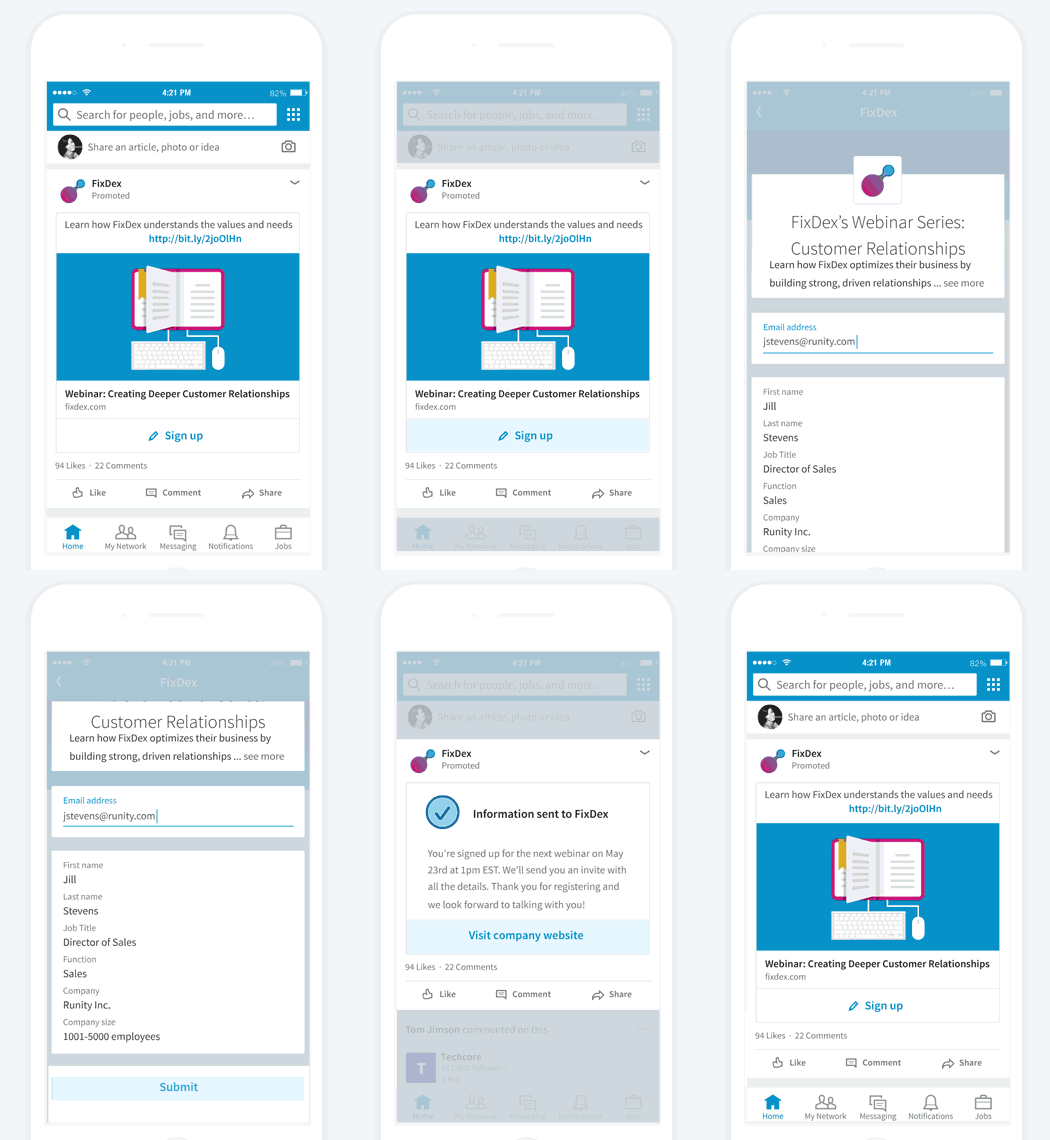
And Marketo can capture those submissions in real-time via a LaunchPoint service.
Follow these steps to set up the integration:
Create a LinkedIn Lead Gen LaunchPoint Service in Marketo
In Marketo, go to Admin → LaunchPoint.
Then, click “New Service” and select “LinkedIn Lead Gen” as the service type.

Give the service a name and proceed to authorize it.

Authorize Marketo to Access LinkedIn
You have done the authorization in the Marketo platform, but you need to do the same in LinkedIn.
And Marketo will open LinkedIn in the browser for you on its own.
Sign in with the LinkedIn account that has access to your LinkedIn Ads (Campaign Manager) account(s).

Remember: The signed-in LinkedIn account must have access to all the business accounts that you are creating a sponsored campaign for, or you’ll miss leads from those accounts.
Well, after you have logged in, return to Marketo and click Authorize to grant permissions.
You’ll be asked to ‘Allow’ the Marketo app to integrate with LinkedIn. Accept this request.
Select Ad Accounts and Lead Forms
Once the authorization is complete, Marketo will ask you to choose which LinkedIn ad accounts you want to connect to Marketo (i.e. from which accounts’ Lead Gen Forms leads should flow).
Ensure the LinkedIn user you authorized has Lead Gen Form Manager permission for those ad accounts so they appear in the list.
Select the desired accounts and proceed.

Map Form Fields between LinkedIn and Marketo
After you have selected the accounts, Marketo will display the field mapping between LinkedIn Lead Gen Form fields and your Marketo fields.
You can accept the default mappings or customize them (adding or removing mappings as needed) so that each piece of lead data from LinkedIn (name, email, job title, company, etc.) maps to the correct field in Marketo.

Complete Setup and Test
With all this done, Marketo must now automatically fetch new leads from LinkedIn Lead Gen forms.
It’s good practice to run a quick test:
- go to LinkedIn Campaign Manager,
- submit a test Lead Gen Form submission (LinkedIn allows you to test your forms),
- and verify that the lead appears in Marketo (e.g. in the Lead Database with the fields populated).
The integration works in near real-time. Every time a LinkedIn ad form is filled, Marketo will receive the lead details almost instantly, eliminating the need for manual CSV uploads and avoiding data entry errors.
Pro Tip: This Marketo LinkedIn Ad integration isn’t just one-way. You can also push data from Marketo to LinkedIn. For example, you might create a Smart List in Marketo of high-quality leads (based on lead score, job title, etc.) and sync that list to LinkedIn as a Matched Audience. In Marketo LaunchPoint, after setting up the LinkedIn service, you can choose to sync a Marketo Static List to LinkedIn. This allows you to target those leads with LinkedIn ads (great for nurturing or account-based advertising). To do this, ensure your Marketo list is ready, then in LinkedIn Campaign Manager, create a Matched Audience by connecting to your Marketo list, and the integration will continuously update the audience.
This way, Marketo and LinkedIn work in tandem: leads from LinkedIn feed into Marketo, and your marketing-qualified leads in Marketo from other sources can feed back into LinkedIn ad targeting.
You can get more information about this integration in Marketo’s documentation.
What About Pushing Leads from Other Types of LinkedIn Ads into Marketo?
Well, apart from Lead generation forms, LinkedIn on its own doesn’t provide lead data for other types of LinkedIn ads, and hence there’s no straightforward way to push leads from other ad types (say, text ads, image ads, though-leader ads…) into Marketo.
For this, you’ll need a complex workaround:
- For other types of ads, LinkedIn gives no lead-level data, so if they don’t click the ad, it’s impossible to get the lead’s data.
- If the lead clicks the ad and fills a form on your site, CRMs like HubSpot will be able to catch it then. But again, if the session of ad click and form-fill are different (imagine they clicked your ad to browse the website, then came some other day organically and filled the form), your CRM won’t map the lead to the LinkedIn ad. Such scenarios are very common in the B2B buyer journey.
- Yes, theoretically CRMs like HubSpot can map cross-session form-fills to LinkedIn ad clicks, but that’s usually blocked by cookies, so it’s not accurate:

Source: HubSpot Knowledge Base
Source: HubSpot Knowledge Base - If you are thinking of using IP-based website visitor deanonymization tools, they don’t work either. Their accuracy tops at 42%, says a study by Syft:

- Another way is to set up LinkedIn Insight Tag on your site and then track leads using LinkedIn’s Revenue Attribution Report. RAR can attribute most online conversions that preserve cookies and device continuity. One edge case remains: the ad clicker/viewer and the form-filler from the same company are different people. To connect this, list the converting company and check in Campaign Manager that the firm had impressions, clicks, or engagement before the conversion date. If they did, you could still credit LinkedIn exposure for bringing that lead, but you won’t know the lead from the company that viewed or clicked the ad. You’lll only reveal the one who filled the form.
Also, the leads that will be captured this way (CRM + IP-based tools + RAR), you’ll still have to download the CSV of leads from your CRM and IP-based tools and upload them into Marketo.
I Don’t Bother About LinkedIn Ad Leads for B2B ABM
In the previous section, I showed you how pushing leads from LinkedIn ads (except LinkedIn lead gen forms) is complex, and many leads slip through the cracks.
This is especially true for leads that only saw the ad and came from some other channel later – you’ll never know LinkedIn ad contribution in bringing that lead, unless you ask them 😉
So, for ABM – Let’s skip this whole lead-level obsession and start tracking accounts because that is provided by LinkedIn itself! Anyway, it’s buying committees that decide stuff in B2B and not individual leads, right? Also, this way, you’ll at least know all the accounts that are seeing, engaging, or clicking with your ads – you can always find decision makers at that account using enrichment tools like Clay and reach out to them.
Now, tracking accounts is easily possible with the LinkedIn Campaign Manager. You can see all the accounts seeing, engaging or clicking with your ads in its companies tab:

There’s still a problem: LinkedIn Campaign Manager won’t show you exactly which ads were seen/clicked by the account.
That’s possible in ZenABM!
Using ZenABM to Push LinkedIn Ad Marketing Qualified Accounts into Marketo
I hope I have convinced you to focus on MQAs and not MQLs for ABM, not only because you won’t be able to capture every LinkedIn ad lead accurately, but also because ABM is about accounts, not individuals.
My colleague, Michal, has a whole rant about it:
So, rather than chasing every single form fill from LinkedIn, an ABM strategy looks at which target companies are showing intent and engagement across their buying committee.
ZenABM is a tool purpose-built for this job.
It’s a LinkedIn ads analytics and automation platform designed for ABM, which tracks engagement at the company level for each specific ad creative and campaign group (and this data is pulled from LinkedIn’s official ads API):

And syncs that data to your CRM/marketing automation system:

Plus, with the newly launched ZenABM webhooks, pushing MQAs into tools like Marketo has become even more easier.
You can set up the ZenABM webhook by filling in stuff like the name of the webhook, the number of minimum LinkedIn ad clicks for an MQA to be pushed to Marketo, etc.

This will ensure only highly-engaged accounts that are truly marketing qualified will be pushed to Marketo.
Also, ZenABM can be used to not just push the name of the MQA, but also:
- Account’s LinkedIn ad engagement, impressions, and clicks.
- ABM stage. By the way, the thresholds for ABM stages are customizable in ZenABM:

ABM stage tracking in ZenABM - Company buyer’s intent – which of your ad/messaging did the account engage with:

- Deal size of the account (if already lodged in your CRM).
Over to You
If you are running B2B campaigns, don’t stop at just capturing LinkedIn leads through native Marketo integration.
That works fine for form fills, but it misses the bigger picture of how entire accounts engage with your ads. For ABM, the real edge comes from knowing which companies are warming up, not just which individuals clicked.
With ZenABM’s account-level tracking and webhook push into Marketo, you can stop guessing, stop uploading CSVs, and instead get real-time MQAs enriched with engagement, impressions, and intent right inside your marketing funnel. That means sales can act while the account is still hot.
Ready to move beyond leads?
Start pushing MQAs into Marketo with ZenABM and give your sales team the account-level clarity they’ve been missing.
About the author