 AI for ABM & LinkedIn Ads Week28 Sep – 2 Oct · Reserve your seatAI for ABM & LinkedIn Ads Week · 28 Sep – 2 Oct · Reserve your seat
 AI for ABM & LinkedIn Ads Week28 Sep – 2 Oct · Reserve your seatAI for ABM & LinkedIn Ads Week · 28 Sep – 2 Oct · Reserve your seat
Demandbase One is an enterprise-grade, account-based go-to-market (ABM) platform.
It is a complete hub for ABM pros. From TAL building and AI-powered account intelligence to multi-channel ad analytics and personalised micro-sites, it has it all.
But with a gigantic suite of features comes a steep learning curve and a huge price tag.
So, in this article, I’ll show you all the ABM features covered by Demandbase One, help you decide if you actually need a tool as comprehensive as Demandbase One, and suggest a lighter but effective alternative: ZenABM.
Let’s get started!
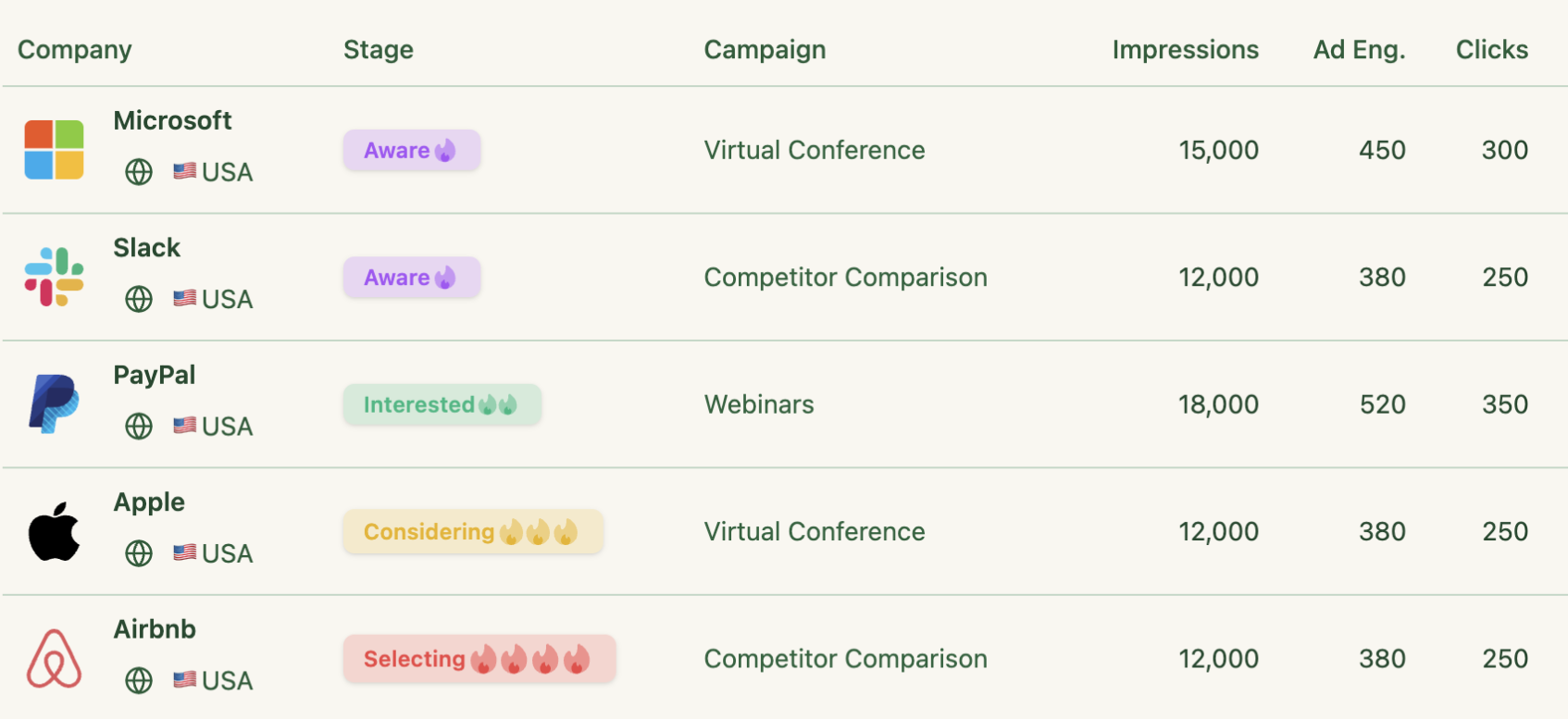
Demandbase is loaded with advertising features and has a native Demand-Side Platform (DSP) of its own, especially tuned for B2B ABM.
Let’s go through it all:
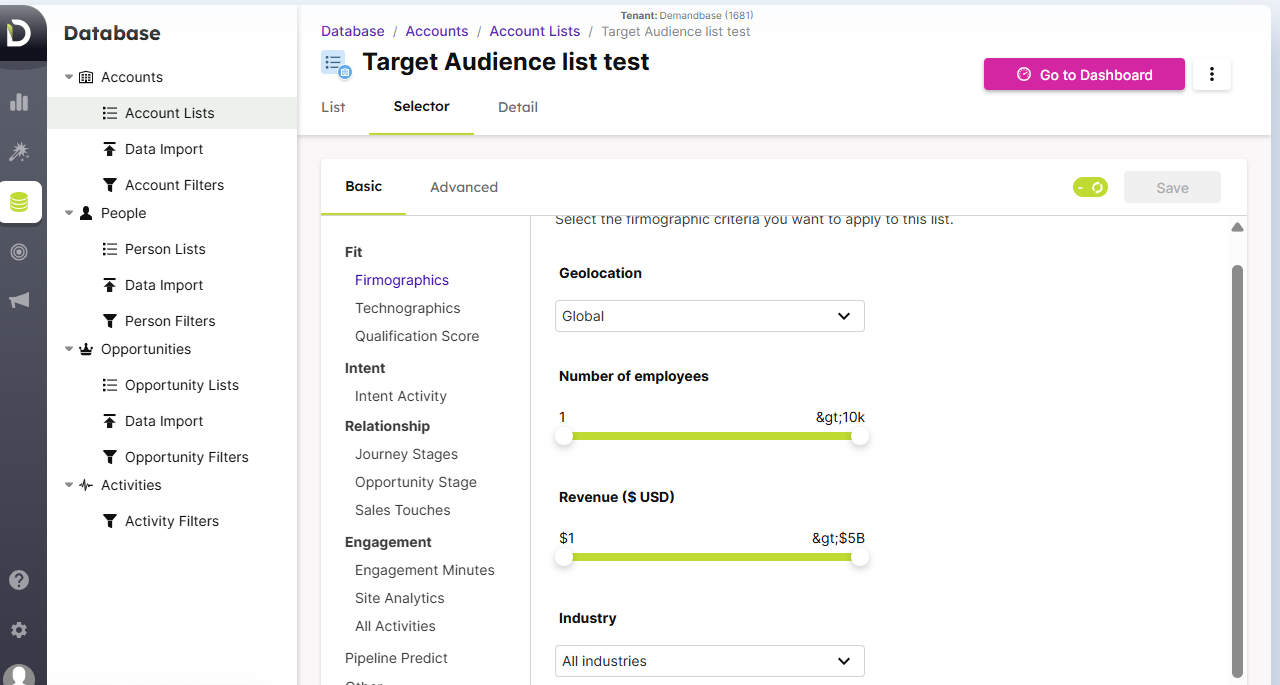
Most marketers either throw a small amount of their budget on display ads and networks like LinkedIn for a short period. Then go on to enlist engaged companies to build their target list and advertise more aggressively.
Others use account intelligence tools, download a Fortune 500 companies CSV file, deanonymize their site visitors’ companies or scrape job openings.
There are ways and ways…
Now, with Demandbase, you can employ almost all of these:
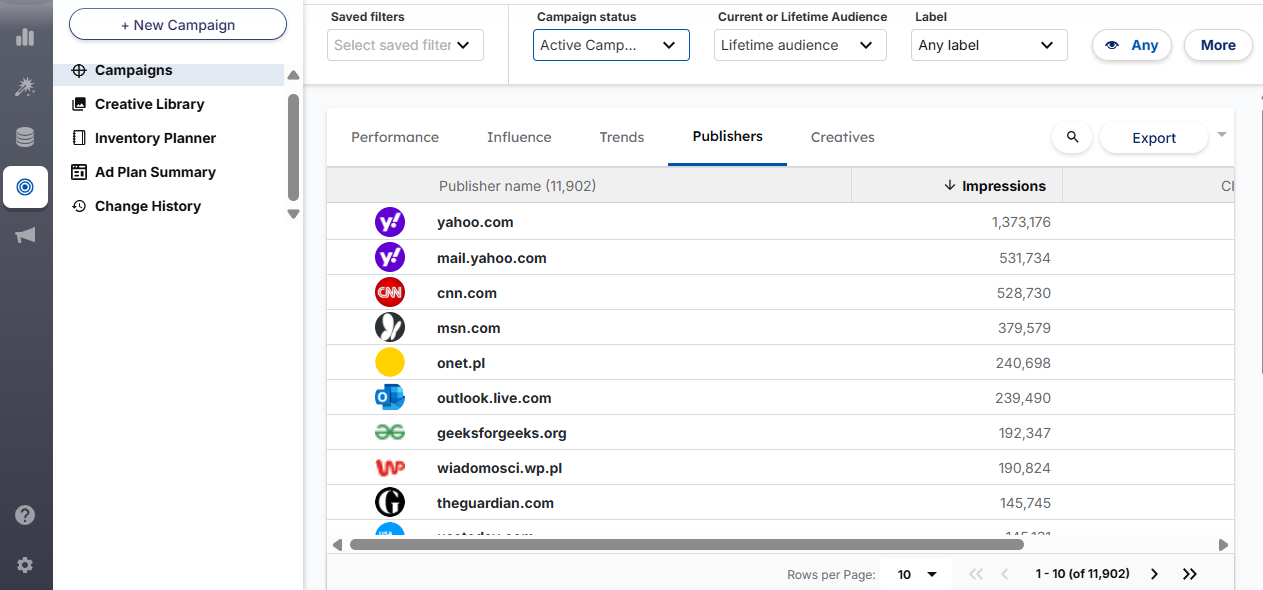
Display, retargeting, native, video, TV ads (yes, TV ads!), you can run them all from Demandbase.
Campaigns on major ad networks such as LinkedIn, Facebook/Instagram, Twitter, Google (including YouTube and Bing) and Adobe Advertising are also available to be created, modified, reported and attributed natively from Demandbase.
With Demandbase, you can not only target ads to specific account lists or segments, but also drill down to key personas (e.g. decision-makers) within those accounts – people-based targeting.
You can also define buying groups (B2B decisions are made by entire committees, right?):
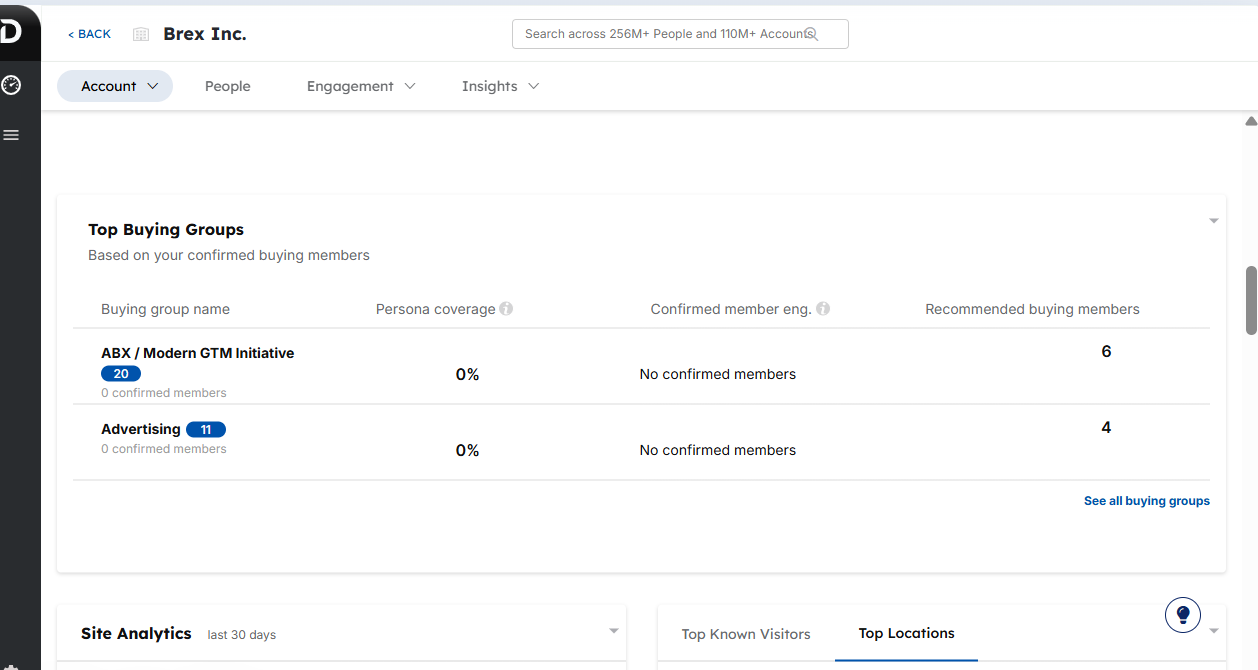
And exclude certain job levels/functions to refine who sees the ads – you might not want to waste impressions on interns.
Demandbase’s DSP is AI-driven, so it automatically optimises bids and budget allocation based on account-level intent signals. It can increase bids for accounts showing high purchase intent and throttle spend on low-interest ones.
Also, you can put ad frequency capping at the account level to prevent wasting impressions on large accounts (platforms like LinkedIn are indeed infamous for serving too many impressions to large accounts):
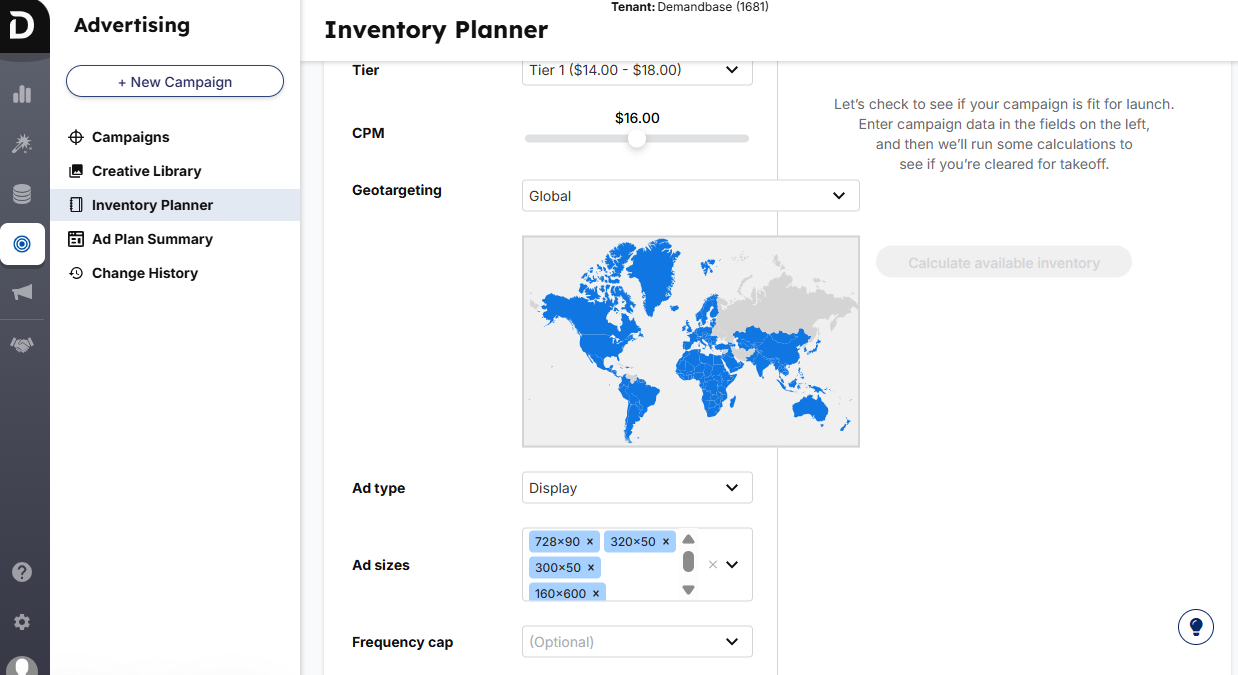
This frequency capping is available for all types of ads, be it Display ads or ads on LinkedIn, Twitter, Facebook, etc.
If you are running ads on LinkedIn/Facebook, you don’t care about security as much as you do when you show Display ads on domains. No one wants their ad to be on a spammy site – it harms reputation, can cause Google penalties and whatnot.
Good news: Demandbase only serves ads on a curated list of ~5,000 vetted B2B-friendly websites.
Additionally, its proprietary IP-to-account identification delivers ads even in a cookie-less environment. Targeting accuracy is never compromised.
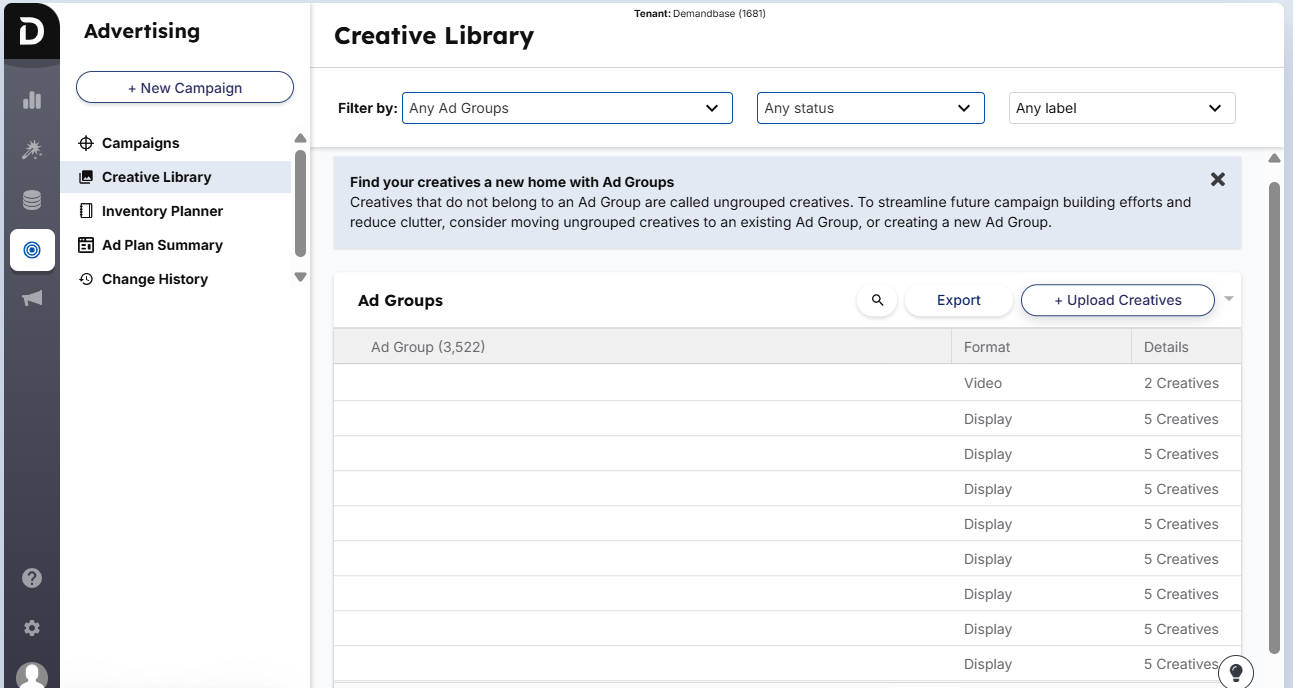
Demandbase One has an in-built Ads Creative Library where you can upload, modify in-flight, and reuse ad creatives across campaigns.
Plus, you can gauge each ad creative’s performance metrics.
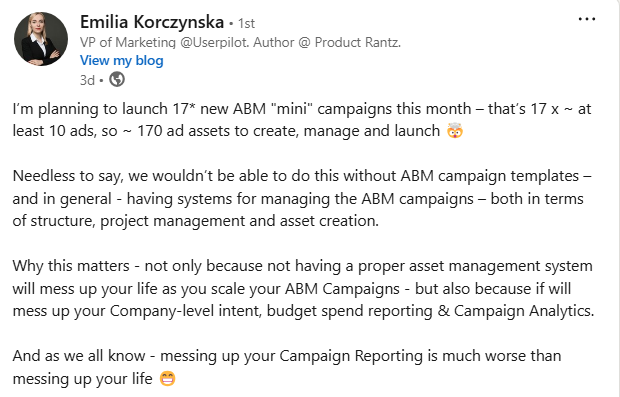
Giveaway: You can steal my colleague Emilia Korckzynska’s free, ready-to-copy templates she uses for managing 100s of ad creatives. Our pleasure 😉
Coming back to Demandbase, you can also edit your ad creatives/landing pages in real-time within the tool.
The reporting dashboard in Demandbase One gives you transparency into account-level ad engagement.
You can account-level impressions, clicks and engagement and spend for each ad, along with info like which job roles interact most, and how ad engagement impacts the pipeline (we’ll dive into attribution and ROI measurement even deeper… hold on).
ABM is all about throwing ads to the right accounts.
Constantly refined audience = ABM battle half-won!
And yes, you can do that very well with Demandbase:
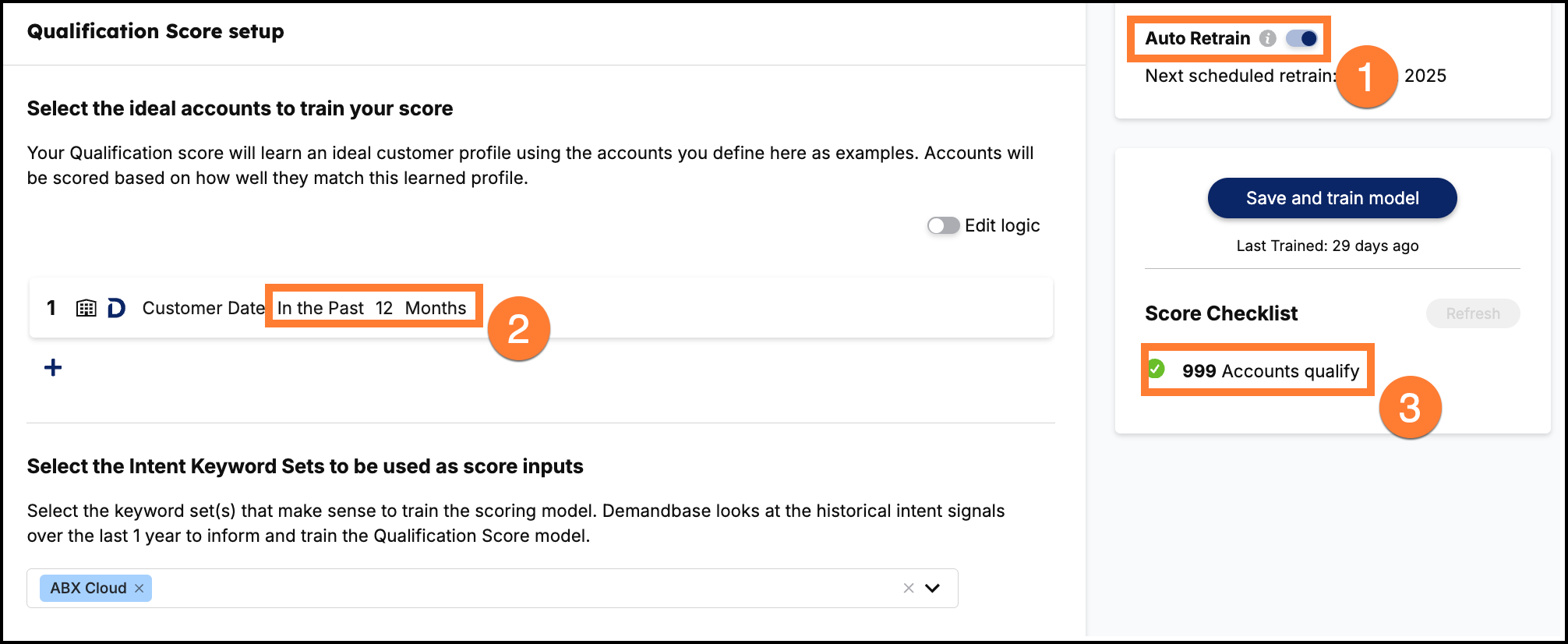
Demandbase can ingest your TAM/ TAL and layer on its data to surface the best targets with a Qualification Score. Thanks to its AI-powered predictive models (it’s trained on your CRM/MAS data, past wins, and characteristics of your ICP that you set on your own):
But the data-scraping for scoring ain’t basic at all.
Demanbase taps into its ever-refining gigantic proprietary data pool (104 million companies and counting) to assess each account’s attributes in detail and then surfaces out the top accounts that your sales team should reach out to:
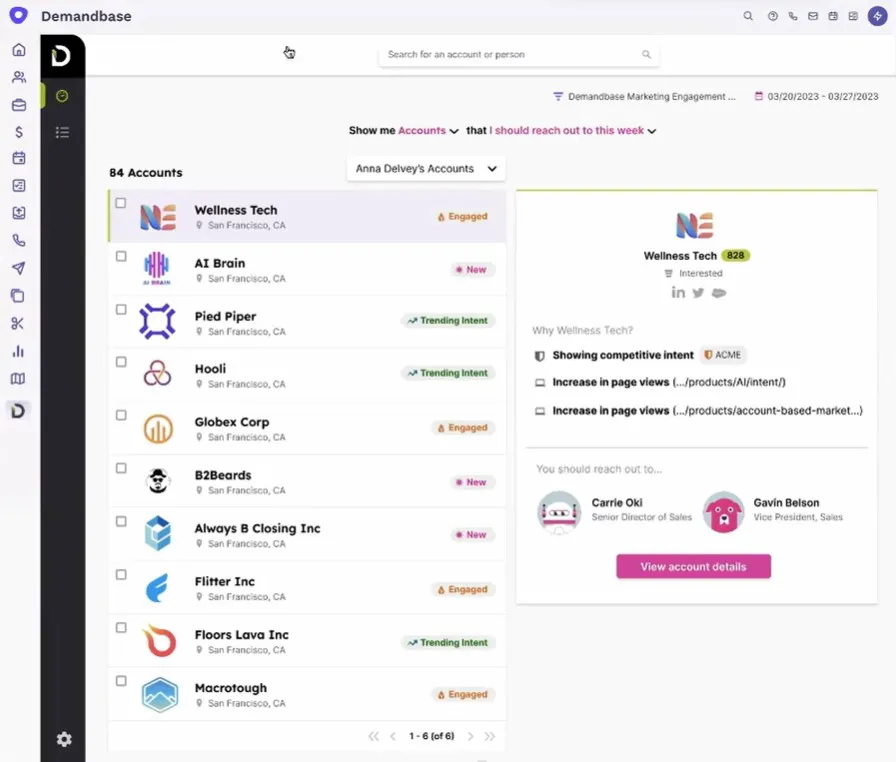
Demandbase not only monitors first-party behaviour (e.g. visits to your site) but also third-party web activity (research across the web).
It tracks what keywords the individuals from your target accounts are searching for:
You can set up this intent monitoring by choosing your intent keywords from a list of 650,000! Demandbase suggests selecting 40-100 keywords at once.
These buying signal insights help you identify accounts that are “in-market” for your solutions even before they fill out a form. For example, you can see if a target account is spiking on searches or content consumption around a keyword related to your product.
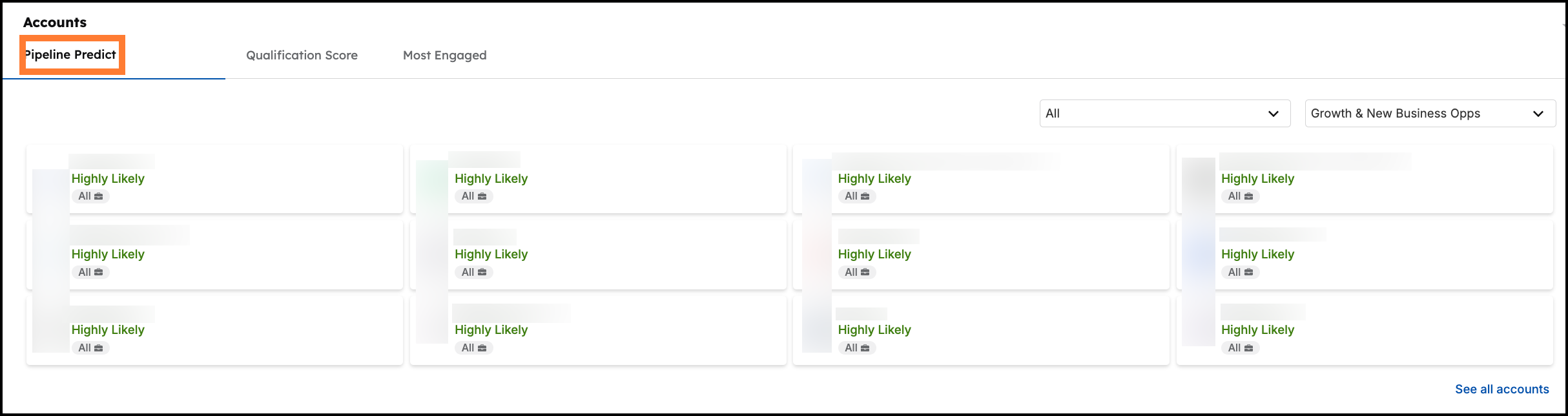
Demandbase One offers a Pipeline Predict score that indicates which accounts are most likely to turn into real opportunities soon.
This predictive prioritisation considers intent, engagement, and historical conversion patterns to flag “highly likely” accounts.
Demandbase’s account intelligence is more than comprehensive. To add to the sweet, you can segment your audience based on a combination of n number of filters.
For instance, you can create an audience segment of marketing directors at high-fit U.S.-based accounts showing intent for ABM.
Audience in Demandbase ain’t static.
For example, if a new account surges in intent and meets your criteria, it can be automatically added to an active campaign or sales alert list. The converse is true too.
Demandbase is an open, connected hub for account data and workflows, with integrations spanning CRM, marketing automation, analytics, sales tools, and more.
I have enlisted all of them for you in a table:
| Integrated Platform | ABM Use Cases Enabled |
|---|---|
| Salesforce CRM | Gives sales teams instant visibility into target account insights, helping prioritise outreach. |
| HubSpot (CRM & Marketing Hub) | Aligns sales and marketing efforts, enables personalised email nurtures, and tracks account engagement. |
| Microsoft Dynamics CRM | Helps sales teams prioritise accounts with real-time intent and engagement data synced automatically. |
| Marketo | Enables targeted email nurturing and campaign automation for specific accounts and contacts. |
| Pardot (Salesforce Marketing Cloud) | Uses prospect activities (email, forms, web) to score and segment accounts for tailored marketing. |
| Eloqua | Tracks email and form engagements to improve account scoring and personalise ABM outreach. |
| Google Analytics | Provides insights into how specific accounts interact with your website, aiding in content personalisation. |
| Adobe Analytics | Allows segmentation and reporting by account to measure ABM website engagement effectively. |
| Bombora Intent | Identifies accounts by researching relevant topics, enabling timely marketing and sales outreach. |
| G2 Intent | Highlights accounts actively comparing solutions to trigger timely ABM outreach. |
| TrustRadius Intent | Captures accounts in research mode for targeted marketing and timely sales interactions. |
| LinkedIn Ads | Runs targeted LinkedIn ad campaigns specifically for chosen accounts, increasing ad relevance. |
| Facebook (Meta) Ads | Enables targeted ads on Facebook/Instagram to decision-makers at selected accounts. |
| Google Ads | Runs Google Ads tailored specifically to contacts at your ABM accounts for efficient ad spend. |
| Adobe Audience Manager (DMP) | Uses Adobe’s ad ecosystem for precise targeting of programmatic ads to selected accounts. |
| Gong | Enhances sales follow-up by combining sales call insights with account intent and engagement data. |
| Outreach | Automatically triggers personalised email sequences based on account engagement levels. |
| Salesloft | Instantly starts sales sequences for high-intent accounts, streamlining personalised outreach. |
| Slack | Delivers real-time ABM account updates to sales/marketing teams for immediate action. |
| Folloze | Creates personalised microsites tailored to each target account for better content engagement. |
| PathFactory | Dynamically personalises content tracks for targeted accounts, boosting interaction and insights. |
| Uberflip | Provides personalised content hubs automatically tailored to specific account segments. |
| Hushly | Delivers customised landing pages for specific accounts, enhancing content relevance and conversions. |
| Intellimize | Personalises website experiences dynamically, optimising content shown to target account visitors. |
| Optimizely Data Platform (ODP) | Enriches customer profiles for targeted segmentation and more effective ABM campaigns. |
| Drift | Powers real-time, personalised chat interactions for key accounts visiting your website. |
| Qualified | Offers instant live chat engagement with high-value accounts as soon as they visit your site. |
| Acquia Personalization (Lift) | Personalises Drupal-based websites specifically for target accounts, improving engagement rates. |
| Adobe Target | Creates customised website experiences for ABM accounts, increasing onsite relevance and interactions. |
| Optimizely Web Experimentation | Runs ABM-focused web tests and personalised experiments to improve account-specific engagement. |
| Sendoso | Automates sending personalised gifts and direct mail to engage high-priority accounts. |
| Reachdesk | Sends timely personalised gifts triggered by ABM account activities and milestones. |
| Alyce | Delivers tailored gifts to individual contacts at key accounts to spark deeper engagement. |
| PFL | Triggers automated mail campaigns based on account intent signals or journey stages. |
| Postal | Integrates offline gifting campaigns with online ABM signals, ensuring synchronised outreach. |
| TechTarget Priority Engine | Finds actively researching accounts and contacts, expanding ABM reach beyond your website data. |
You can explore these integrations in more detail in the Demandbase official docs.
We have already talked about account intelligence in Demandbase briefly in the previous sections, but it’s all over the place.
So I have conjured it all up in one place with greater detail because, saying it again, premium account intelligence is what Demandbase is famous for among marketers:
Demandbase’s data cloud (boosted by acquisitions like InsideView and DemandMatrix) contains detailed firmographics on millions of companies worldwide, such as industry classifications, company size, revenue, location, subsidiaries, and more.
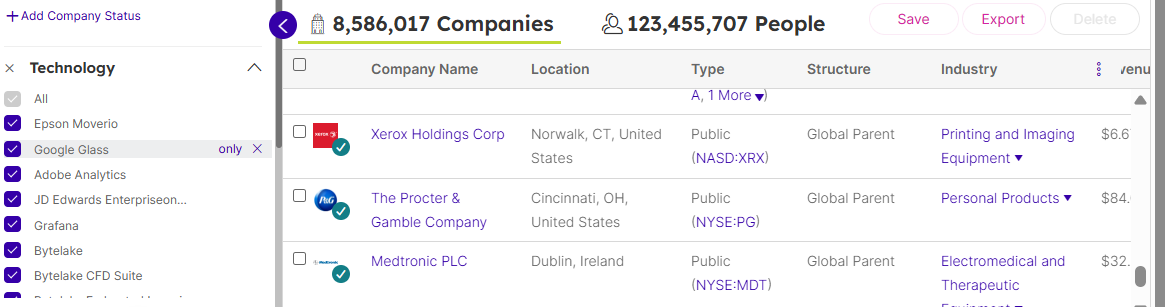
It also includes technographic data (21K+ technologies) about what tools and technologies each company uses in their stack. This data is surfaced in the platform so you can quickly understand an account’s profile (e.g. a fintech company with 500-1000 employees using AWS and Salesforce). These attributes are used in scoring and segmentation, but are also directly visible for research.
Demandbase monitors activity of your target accounts on B2B content sites, search engines, and publisher networks for spikes in relevant keywords.
You can choose your preferred keywords from their pool (62,500+ keywords). For example, you might see that Acme Corp has a high intent score for “cloud security” in the last 2 weeks, indicating they are actively exploring it.
Also, you can visualise intent data using engagement and intent heatmaps:
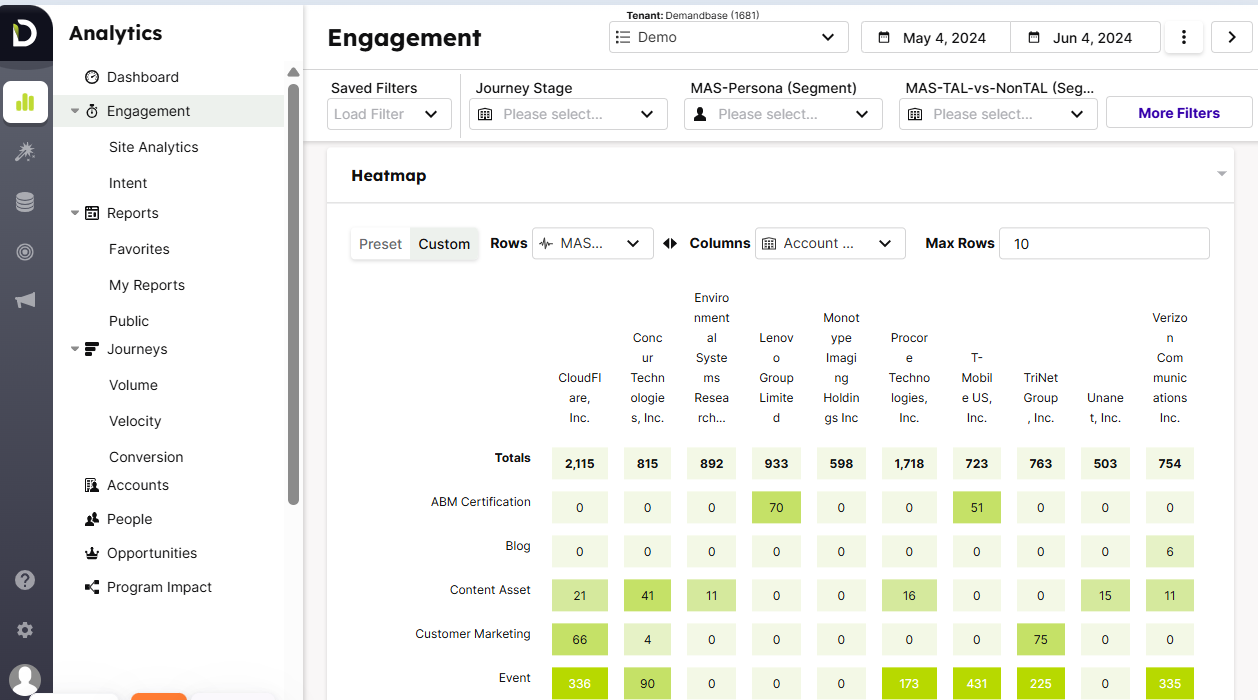
Beyond third-party intent, Demandbase also tracks first-party engagement of accounts with your brand’s campaigns. So, wherever you are running ads (display ads or LinkedIn/Facebook), you can track company-level impressions, clicks, and cost.
It integrates web analytics and has its tracking pixel to log visits to your website (and identify which account the visitor belongs to – based on cookies, reverse IP lookup and Demandbase’s proprietary technology).
The tool also tracks email responses, webinar attendance, content downloads, etc.
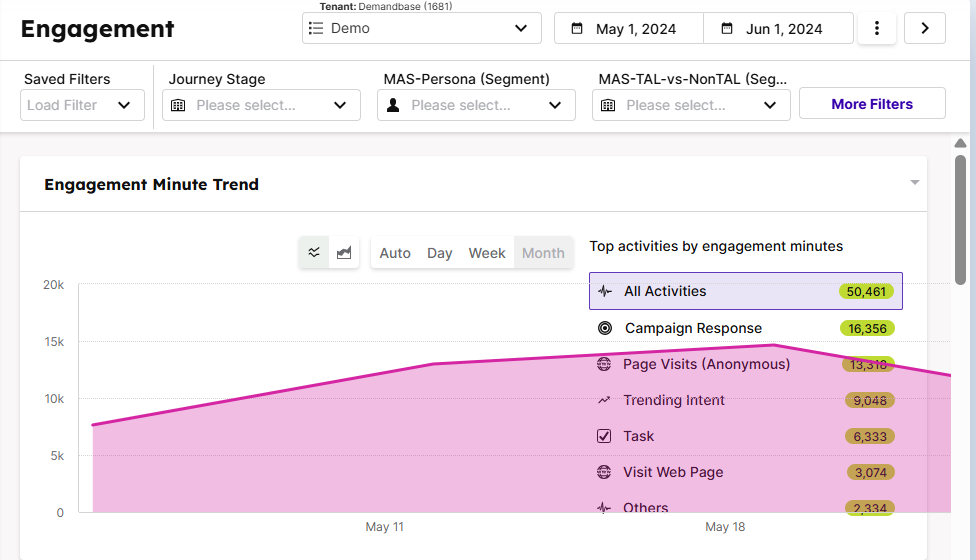
Finally, all this data is rolled up into an Account Engagement score (often quantified in Engagement Minutes) that measures how engaged an account is with your marketing.
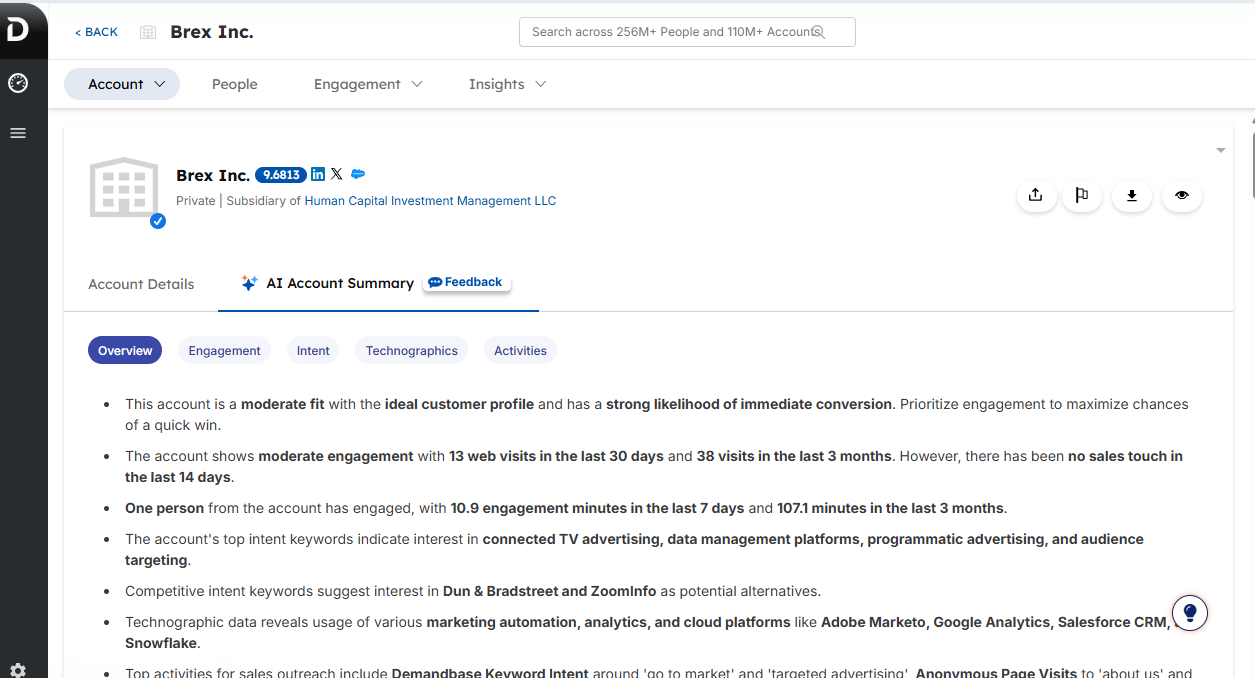
Demandbase One provides a unified Account Overview for each target account:
This dashboard combines all first-party, third-party and Demandbase’s proprietary data in one place. Some data points you can see include:
Users can set up automated triggers – for example, an alert when an account’s intent surges beyond a threshold, or when a target account visits the website for the first time. You can get these alerts on Slack, email, etc., per your preference.
Demandbase also offers Snapshot reports for sales, summarising key account changes (new intents, big spikes in engagement, new contacts identified, etc.) regularly. This helps your go-to-market team be proactively informed about account developments.
I was amazed to read that some tools can make separate landing pages/microsites for different accounts or groups of accounts – perfect for 1:1 or 1:many ABM strategies. Demandbase one does that too!
When the individual visits your site, their company is identified and enriched, and personalisation begins.
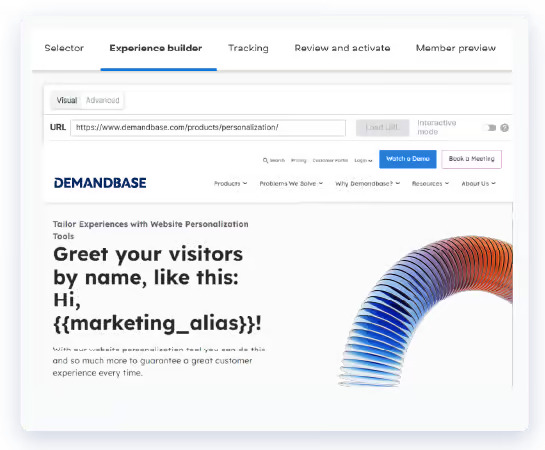
Depending on who is viewing, you can swap out hero banners, copy text, images, calls-to-action, and even forms on your website pages and even A/B test he results. For instance, you might show a manufacturing-focused message and case study when a Manufacturing industry account visits, versus a tech-focused message for Software industry visitors.
Or you could put “Hi <Company Name>” for your top ABM accounts to give a white-glove feel:
You can also shorten the forms on your site (for example, only asking the visitor for name and email) while Demandbase automatically fills in other fields on the backend using its database. It can populate the company name, industry, company size, location, etc., behind the scenes as the visitor submits the form, passing that info into your CRM/MAS.
Benefit?
Shorter Forms = Fewer forms abandoned midway = higher conversion rate.
Yes, all this impressive personalisation stuff is no-code and natively available in Demandbase One.
Buying cycle and stage tracking for each account is, well, the very foundation of ABM.
Let’s see how Demandbase One helps with this:
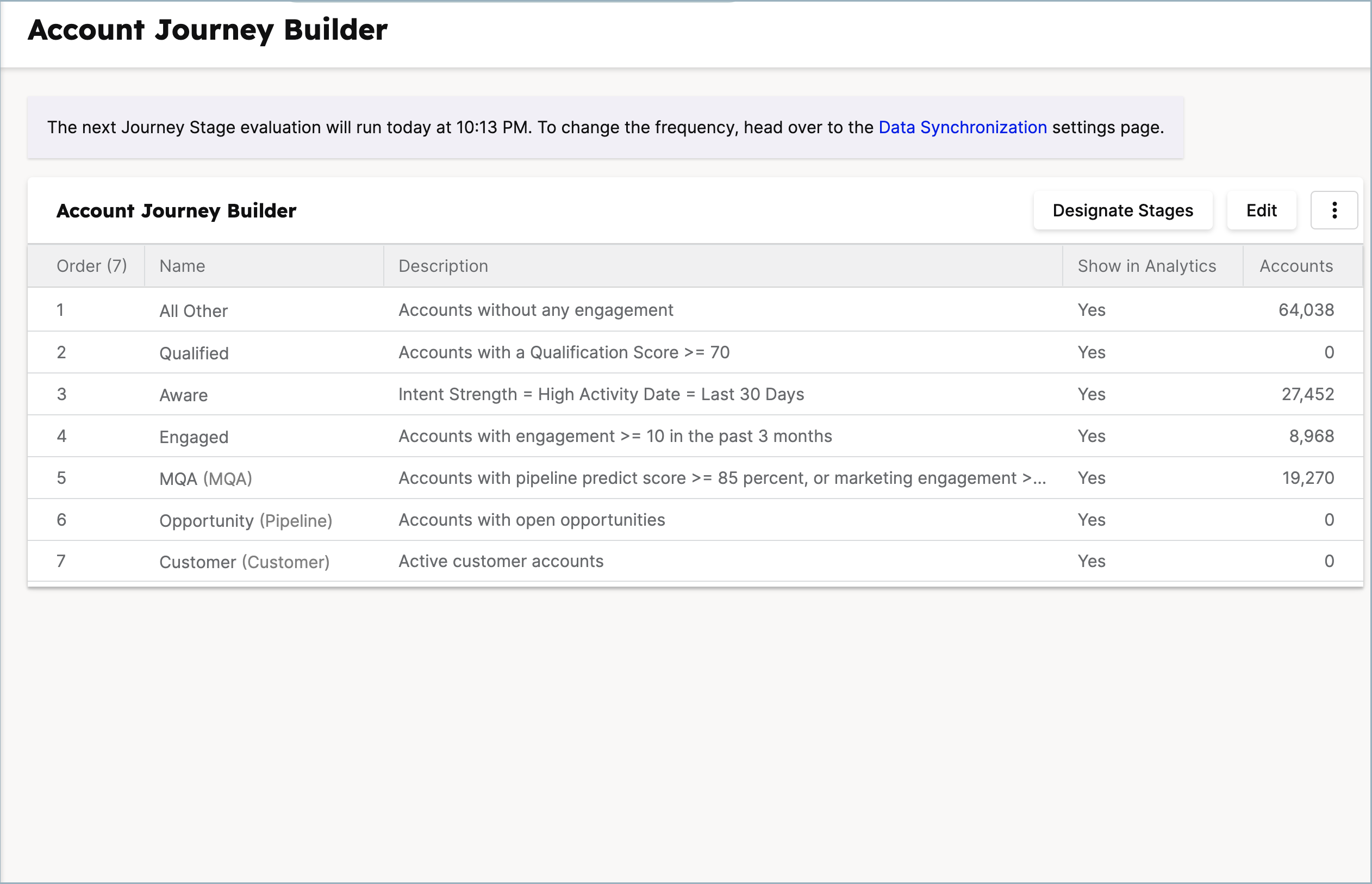
In Demandbase, you can define the stages of your account journey (often called an “account funnel” or pipeline stages) based on your own thresholds.
You might have stages like Target > Aware > Engaged > Marketing Qualified (MQA) > Sales Qualified > Opportunity > Customer. You can configure these stages and the entry/exit criteria for each based on your specific business rules.
The criteria can include combinations of intent level, engagement score, and CRM status. For instance, an MQA (Marketing Qualified Account) might be defined as an account with an engagement score above X and intent surging on your product category, but not yet an open opportunity – your campaign, your rules.
Yes, once you set the criteria, Demanbase’s AI will do the account progression on its own.
In fact, if engagement drops but the account is still ‘in market,’ Demandbase can do reverse progression and shift the account to earlier stages.
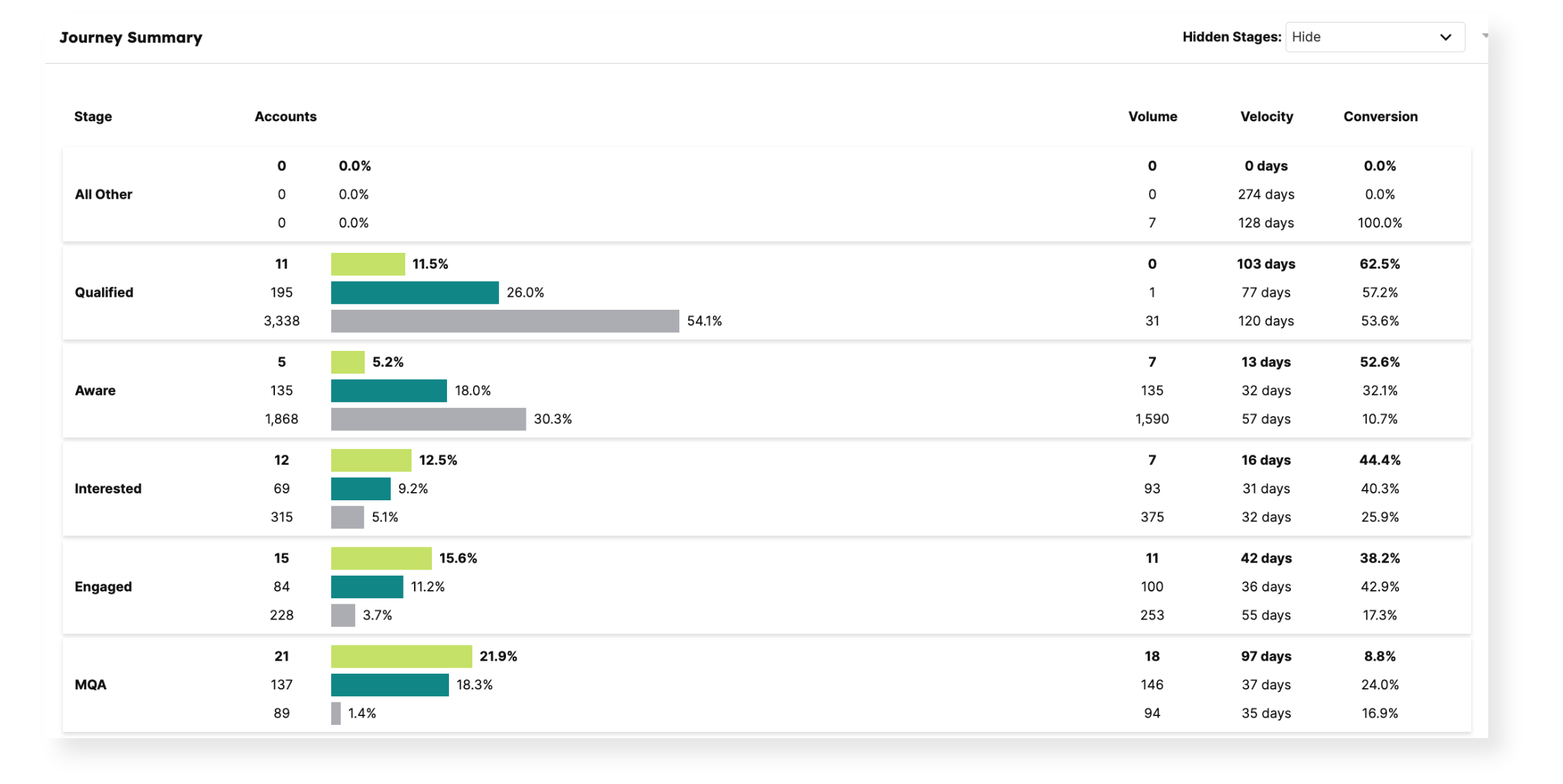
In the journey analytics dashboard, you can view the volume of accounts at each stage, the velocity (how fast accounts convert from one stage to the next on average), and the conversion rates between stages.
This helps with identifying both strengths and weaknesses. For example, you might see that a lot of accounts get “stuck” in the Engaged stage and do not become MQAs – you pinpoint where the strategy needs fixing.
For a given account, you can see a timeline of important events (e.g., first website visit on Jan 10, attended webinar on Feb 5, became an opportunity on Mar 1).
You can literally see the account journey in a chronological story!
With its account-based focus and multiple integrations, Demandbase does take attribution of ROI to the next level:
Demandbase measures attribution at the account level across multiple touches. Instead of just saying “this lead source gets credit,” you can see all the marketing and sales touches across all channels (ad campaigns, site content, YouTube videos, webinars, lead magnet downloads, social,s etc.) that occurred on an account before it became a closed deal.
The platform supports models that weigh different touches (first touch, last touch, even spread, etc.), and rolls up the data to the account/outcome. For example, if an account saw a targeted ad, then attended a field event, then met with sales before closing, you’ll see those contributions in one place
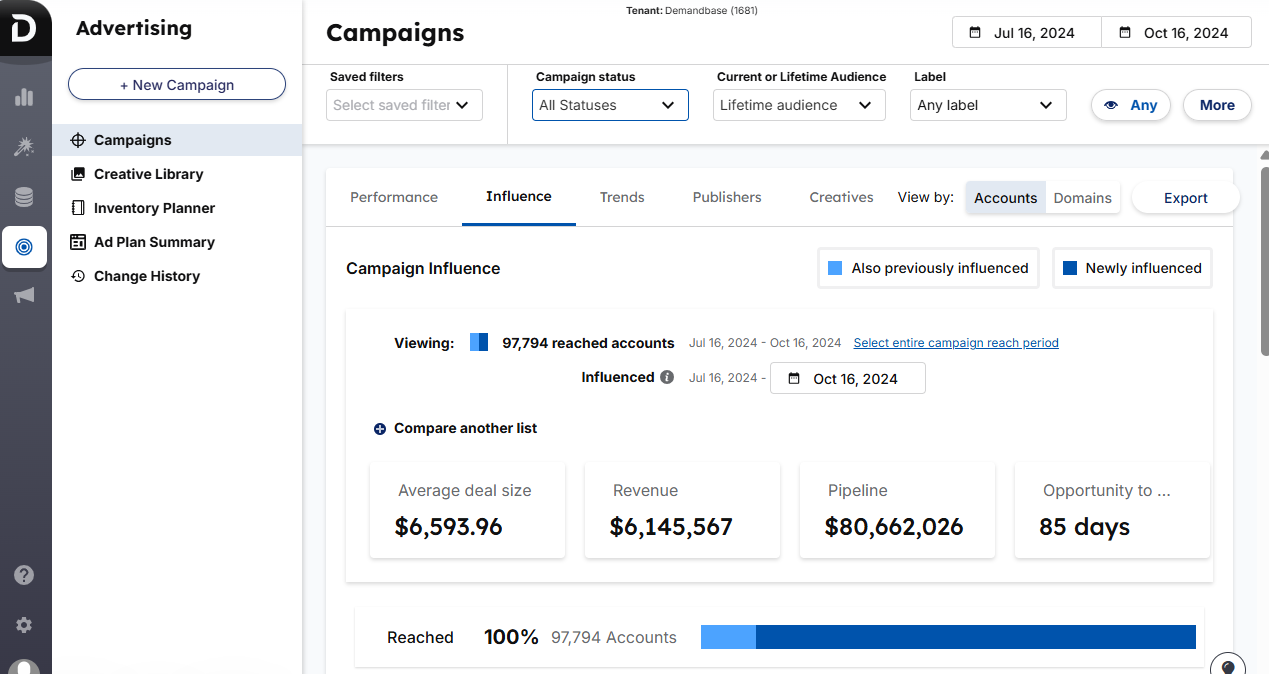
With the integration to CRM, it knows when opportunities are created and deals are won (and their dollar value).
As Demandbase can track all touchpoints and channels, it can give both broad attribution reports and even focused ones, like, influence of a particular ABM ad campaign on the pipeline in a given period.
Yes, my lazy peers, you don’t have to build these dashboards. Demandbase’s ROI dashboards cover most ABM KPIs you’ll need:
And many more…
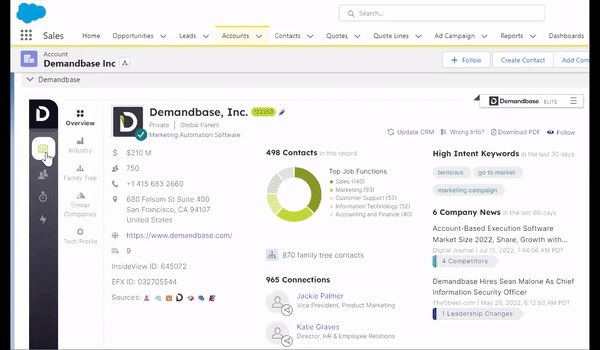
We saw all that could be done with Demandbase One, but it’s for marketing. Your sales team does not need to be overwhelmed with this gigantic suite of features.
The Demandbase for Sales is a separate platform so your sales team can concentrate on actionable sales insights like whom to outreach, their intent, context, etc.
In this platform sales team can:
Demandbase hasn’t publicly disclosed its pricing packages, and you’ll have to book a demo.
But one thing’s for sure: It is premium ($10,000+/year).
Well, users have these complaints against Demandbase One on G2:
Industrial equipment isn’t meant for cosy little workshops, while it can be insufficient for industries!
Demandbase One is for:
You might want to consider other alternatives if:
If your primary platform for running ABM is LinkedIn, ZenABM might be the most affordable yet complete alternative for premium tools like Demandbase.
ZenABM, purpose-built for LinkedIn ads ABM, has these features:
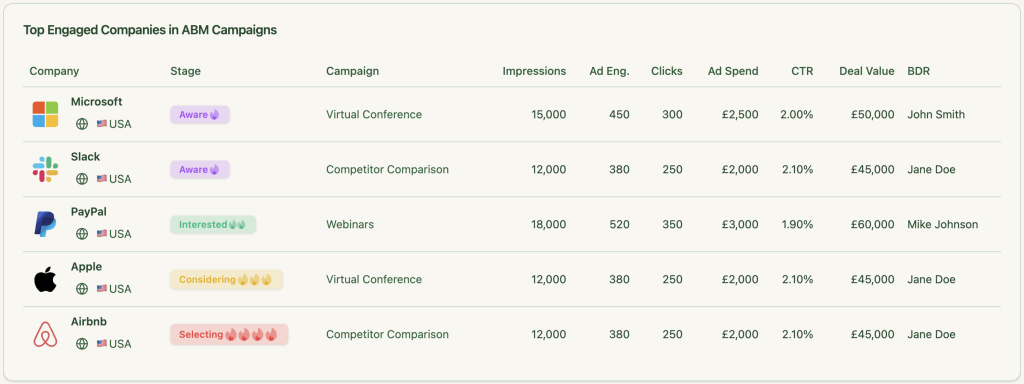
ZenABM pulls company-level first-party data per campaign using LinkedIn’s official API.
This ensures:
Scoring your leads is essential to any ABM campaign. It ensures your BDRs won’t spend time reaching out to inactive leads.
ZenABM automatically scores company engagement based on recent LinkedIn interactions, not just historical engagement. It calculates a Current Company Engagement Score within your selected timeframe (e.g., the last week). Hottest accounts are identified instantly, and their ABM Account Stages update in HubSpot automatically.
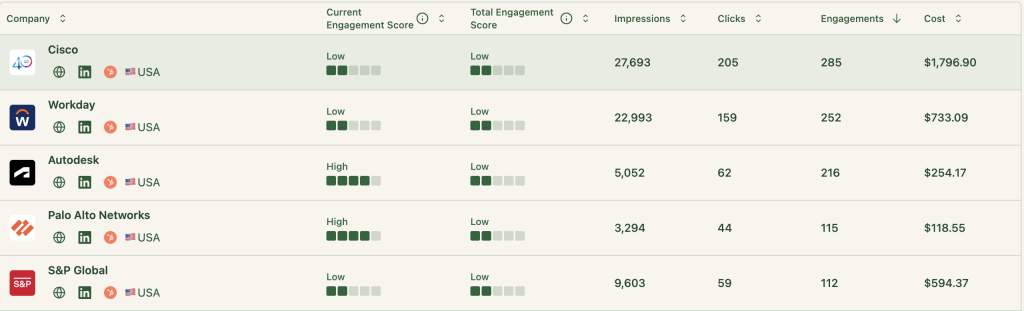
With ZenABM, your marketing and sales team stay on the same page.
ZenABM assigns your BDRs to accounts in the “interested” stage automatically and pushes this information instantly to your HubSpot CRM:
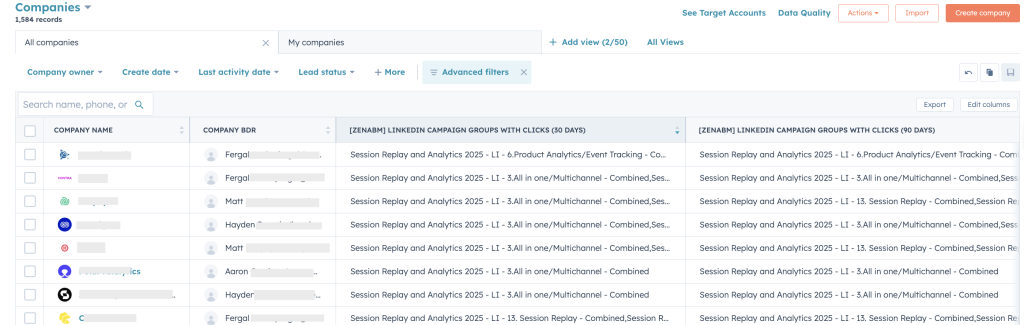
ZenABM pushes all engagement data into HubSpot (more CRM integrations coming soon) as a single company property (text string). It syncs both quantitative data (e.g., impressions, clicks) and qualitative data (e.g., each company’s engagement metrics with each specific campaign) from LinkedIn Campaign Manager to HubSpot:


These engagement metrics are pushed to HubSpot as company properties like “LinkedIn Ad Engagements – 7 days” and “LinkedIn Ad Clicks – 7 days,” and are updated weekly.
Also, LinkedIn refuses to show engagement data if the interactions per company are less than 3 in a specific time period. Zenabm solves this by aggregating data at the campaign-group level.
This ensures your marketing and sales folks can see each company’s engagement with each specific campaign, without manually updating these details in HubSpot.
If you build different LinkedIn ad campaigns based on user intent/use case, this will help your BDRs reach out to your leads with highly personalised messages.
Say, you sell a product analytics software. Now, if you see a company significantly engaging with your “path analytics” ad and not “session replay” ad, you know what to talk about in your outreach email/message.
Once you have made your campaigns based on different intents, you can label them intent-wise in ZenABM and push intent as company property to HubSpot:
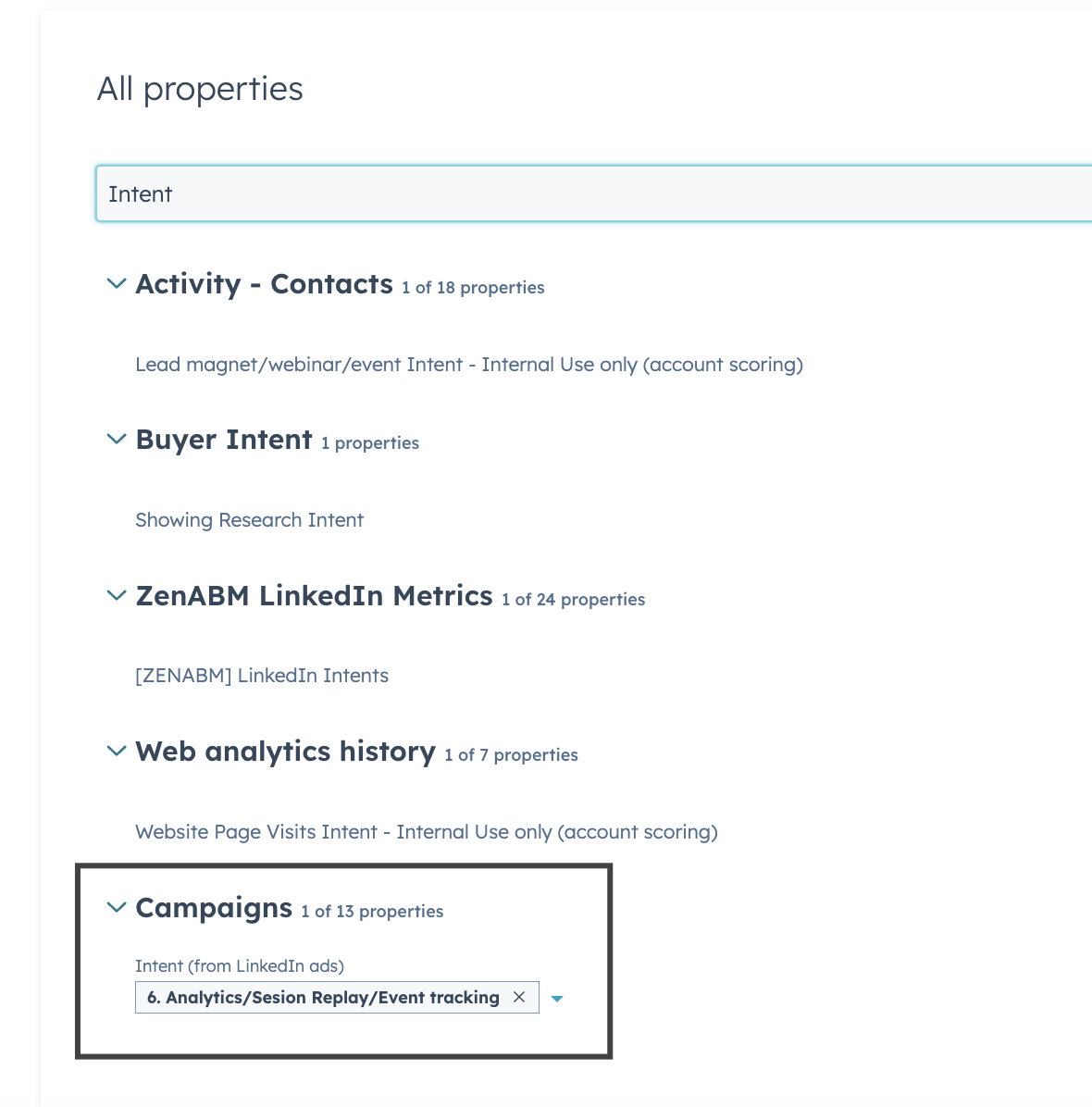
So now your BDR will not only know the company’s engagement level with your ads but also what feature/use-case of the product entices the company!
ZenABM, using its two-way connection between LinkedIn ads and HubSpot, matches the deals in your CRM with the companies that engaged with your ad campaigns.
So, you can see the influence of your LinkedIn campaigns on your sales pipeline and measure the ROI of ad spend.
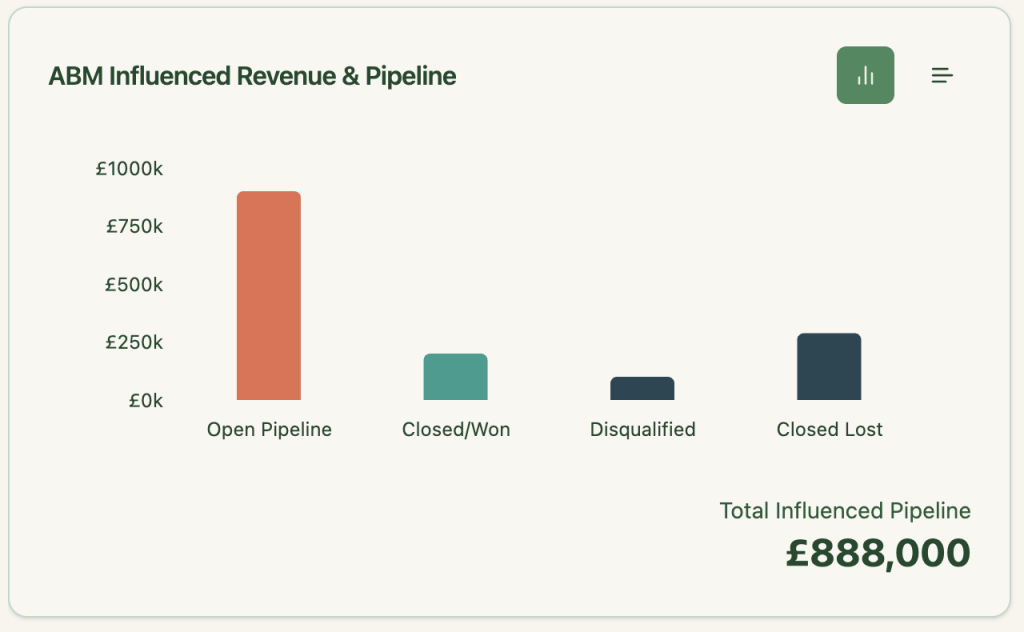
ZenABM hosts comprehensive out-of-the-box account intent & ABM campaign effectiveness analytics dashboards:
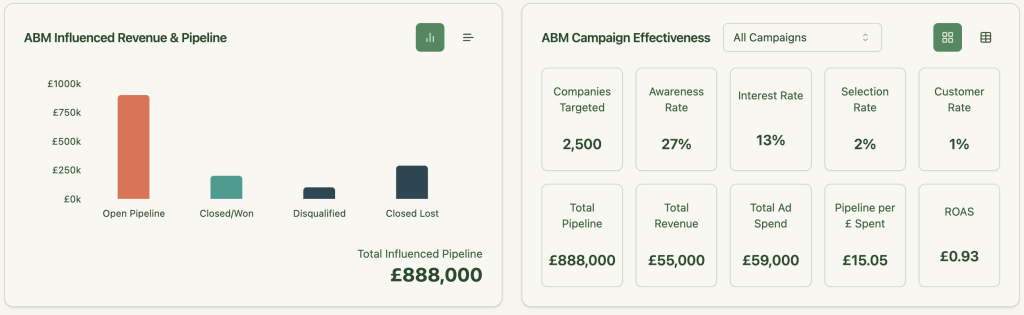
From calculating ROI, Total Revenue, Total Pipeline and ROAS to the Number of companies targeted and their ABM stage, ZenABM does the heavy lifting for you!
As ZenABM lets you see which companies interacted with which exact campaigns/campaign groups, you can retarget them using personalised ads.
Here’s an example of how you can go about it:
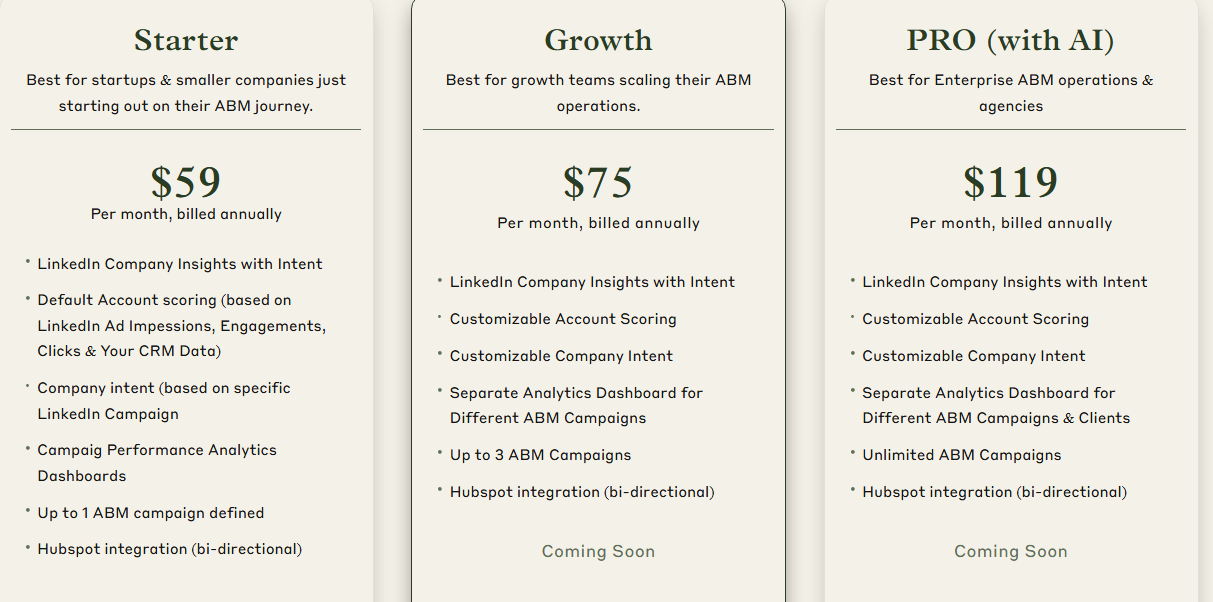
ZenABM offers three straightforward plans designed to grow with your ABM journey.
The Starter plan at $59/month (billed annually) is perfect for early-stage teams, offering LinkedIn company insights, default account scoring based on ad and CRM data, campaign-level intent, one ABM campaign, and native HubSpot bi-directional sync.
The Growth plan, at $75/month, adds customizable scoring, separate dashboards for up to 3 campaigns, and upcoming features like BDR assignment, Slack alerts, and weekly email reports.
For enterprise teams and agencies, the Pro plan at $119/month unlocks unlimited campaigns, client-specific dashboards, and upcoming AI-powered workflows like smart impression capping and campaign automation.
All plans come with a free trial, and if you need to know more, you can book a demo here.
Demandbase is a complete hub for multi-channel ABM. From the TAL building and AI-powered account intelligence to multi-channel ad analytics and personalised micro-sites, it has it all.
But with its premium pricing, overwhelming amount of features, onboarding time and learning curve, most small businesses won’t be able to justify buying it.
Especially, marketers running only LinkedIn ads can try an affordable and lighter alternative – ZenABM.
If you’d like to know more about the tool, you can start your free trial or book a demo now!


