

©2026 ZenABM - All Rights Reserved.

Attributing LinkedIn influence in ABM cannot live in spreadsheets, static dashboards, or scattered note apps.
Buyers move across paid social, search, direct visits, communities, dark social, and sales touches before the pipeline shows up in your CRM.
That means a modern LinkedIn ad analytics stack has to do two jobs at once.
It has to show serious LinkedIn performance at the account level, and it has to place those signals inside a wider revenue story.
This guide ranks the best LinkedIn ad analytics tools for ABM in 2026, with a stricter lens on first-party data, account-level visibility, CRM sync, and how well each product holds up once leadership starts asking pipeline questions instead of CTR questions.
Let’s get into it.
Short on time?
Here’s a quick comparison table:
Tool | Company + Campaign-Level Impression Tracking | Two-Way CRM Integration | First-Party LinkedIn API Data | Pricing | Summary |
|---|---|---|---|---|---|
✅ | ✅ (native, bi-directional) | ✅ | Starts at $59/mo | Strongest for LinkedIn-first ABM and also extends into multichannel revenue attribution, CRM sync, intent, scoring, webhooks, and AI analytics. | |
✅ | ⚠️ (strong CRM matching, limited native property write-back) | ✅ | Free + custom | Very good for LinkedIn plus Google programs, impression control, audience sync, and cross-channel measurement. | |
✅ | ✅ | ✅ | Custom | Enterprise-grade GTM platform with B2B advertising, intent, buying groups, and broad orchestration. Best fit for bigger teams and bigger budgets. | |
⚠️ | ✅ | ⚠️ | Custom | Relevant for ABM advertising and Salesforce-heavy workflows, but public product detail is thinner now, so buyers should validate current fit in a demo. | |
✅ | ⚠️ | ✅ | Custom | A broader revenue data and attribution platform now, with strong journey analysis and multi-touch reporting across the stack. | |
❌ | ❌ | ❌ | Contact sales | Omnichannel attribution product, but not a fit for impression-led LinkedIn ABM. Also scheduled to sunset in 2026. | |
⚠️ | ✅ | ⚠️ | Custom | Excellent for intent, segmentation, and ad orchestration. Less compelling if your main problem is proving LinkedIn view-through influence at the account level. | |
❌ | ✅ (native) | ⚠️ | From $15/seat, advanced attribution in higher tiers | Useful for ad performance and CRM-native reporting, but still not an ABM-grade solution for company-level LinkedIn exposure analytics. | |
❌ | ✅ | ❌ (focuses on LinkedIn signals, not ad impression reporting) | $1,700/mo starter + custom | Powerful buyer-intelligence platform for community, social, and product signals. Not built for LinkedIn ad impression analytics. | |
❌ | ❌ | ⚠️ | Usage-based / custom | Great ELT and reporting connector for LinkedIn Ads data into BI tools, spreadsheets, and AI workflows, but not opinionated ABM software. |
Plenty of tools can show ad clicks, campaign charts, and blended dashboards. That is not the same thing as ABM analytics. If you are running LinkedIn to move named accounts, there are three requirements you should treat as non-negotiable.
Most buying committees do not click the first ad they see. In many B2B programs, the real job of LinkedIn is to create repeated account exposure, shape recall, and make later direct, search, outbound, or demo activity more likely. If your stack only credits clicks, you will undercount the channel that did much of the early persuasion.
That is why the best LinkedIn analytics tools for ABM show which accounts saw which campaigns, how often, and what happened later in the pipeline.
Without that, you end up debating anecdotes instead of reading evidence.
Contact-level impression logs are still not something LinkedIn widely exposes the way marketers wish it did.
So when vendors lean too heavily on cookie stitching, reverse IP, or vague deanonymization language, treat those claims carefully.
Good analytics cannot stop at a dashboard. They need to move data into the system where sales and RevOps already work.
The right setup sends account-level engagement, impression, click, and scoring data into HubSpot or Salesforce as usable properties or related records. That makes the data available for lists, routing, workflows, handoff logic, and reporting without another CSV ritual.
The tool should also pull deal and company context back in, so ad exposure can be tied to opportunity creation, progression, and revenue. That is the point where LinkedIn stops looking like a brand-only channel and starts looking like a measurable pipeline channel.
LinkedIn remains strict about scraping and automation tools.

That matters because many so-called account identification products still depend on assumptions, browser behavior, and IP matching that break down fast in real B2B environments. They can be useful for directional insight. They are not the same thing as solid LinkedIn analytics.

If you want cleaner measurement, prioritise tools that rely on first-party platform integrations and then map those signals back to accounts and revenue.
In other words, for LinkedIn ABM analytics, first-party account-level data plus CRM context beats deanonymization theatre.
Now to the tools.
ZenABM started as a LinkedIn-first ABM analytics product.
That is still the center of gravity.
The difference now is that it no longer presents itself as a single-channel reporting layer.
It has expanded into a multi-channel ABM attribution platform that combines LinkedIn engagement with Google Ads, Reddit Ads, organic touchpoints, CRM sync, scoring, intent, webhooks, and AI-powered analysis.
That matters because the old objection to focused LinkedIn tooling was simple: “great for LinkedIn, but what about the rest of the journey?”
ZenABM now has a more complete answer.
Yes.

ZenABM tracks company and contact-level ad engagement around your LinkedIn programs, including accounts that:
You can finally tell the difference between “this campaign did not drive clicks” and “this campaign was not influencing target accounts.” Those are not the same thing.
For LinkedIn-first ABM teams, that view is useful because it makes invisible assists visible.
ZenABM treats CRM sync as product infrastructure, not an afterthought.

ZenABM maps account engagement and ad influence to CRM opportunities and revenue outcomes.
That means the reporting conversation can move past vanity numbers and toward questions like:
This is especially helpful for teams trying to defend LinkedIn to finance, sales leadership, or a skeptical founder who only trusts last-click numbers.
ZenABM pushes account-level ad engagement back into the CRM, which remains one of its cleanest operational advantages.


You can also keep cumulative properties for longer-range account history and reporting.


Beyond impression tracking and CRM sync, ZenABM now solves a broader operational problem.
It does not just show which accounts were exposed to LinkedIn campaigns.
It helps teams score those accounts, route follow-up, operationalise intent, and answer performance questions in plain language. That makes the platform more useful in day-to-day ABM execution, not just in end-of-month reporting.


This is the biggest strategic update.
ZenABM now publicly positions multichannel revenue attribution as part of the core product.
That includes account engagement across LinkedIn, Google Ads, Reddit Ads, organic traffic, CRM signals, and related workflow outputs. For teams that still run LinkedIn as the main ABM channel but need a wider revenue story, that makes the product much more complete than the older “LinkedIn-only analytics” framing.
ZenABM computes live account scoring from engagement signals and syncs those signals back into the CRM.

It can then route or surface those accounts for follow-up.

Intent is also part of the product layer now, not just a nice extra.
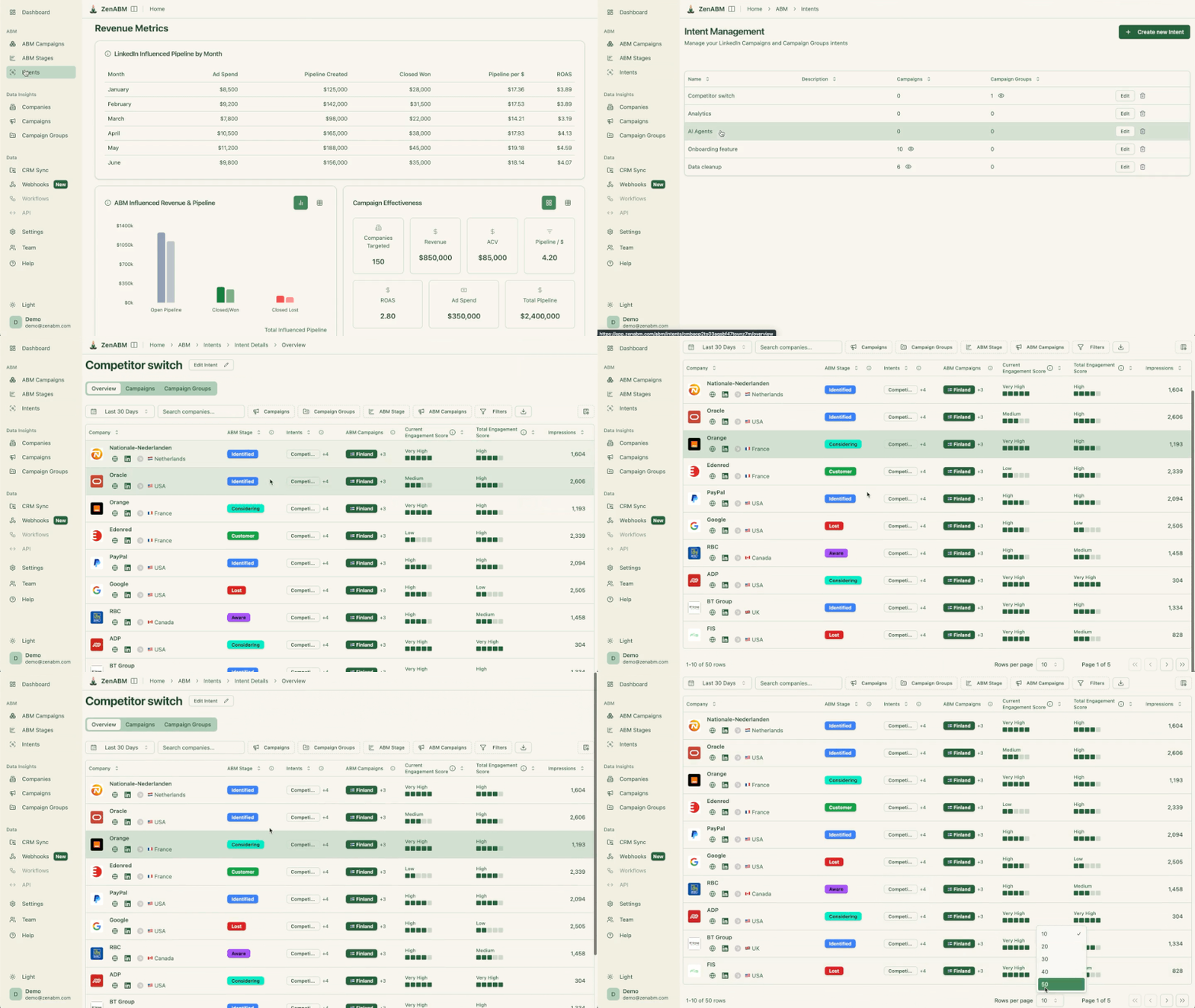
You get native ABM dashboards instead of having to recreate the same reporting logic in BI or CRM tools.


The product also has AI-powered analytics, the Zena AI agent, API access, MCP support, and webhooks, which make it easier to operationalise the data outside the app.

In short, ZenABM has become more than a clever LinkedIn attribution tool. It now looks like a leaner multichannel ABM operating layer built around account engagement and revenue.
ZenABM feels most natural for LinkedIn-first ABM teams.
If you want a giant all-in-one enterprise suite for DSP media, broad third-party data procurement, deep website deanonymization, and massive programmatic operations, that is not really its positioning.
Bottom line: What used to be an affordable LinkedIn-first ABM analytics tool is now better described as a LinkedIn-led, multichannel ABM attribution platform. It wins on clarity, CRM sync, and affordability. It just now covers more of the journey.

Pricing starts at $59 per month, which keeps ZenABM unusually accessible compared with most ABM tooling. The appeal is not just the price point. It is the amount of ABM-specific value you get before the usual enterprise markup kicks in.
Every plan includes a free trial. Details are on the pricing page.

Factors.ai supports LinkedIn plus Google and Facebook, and it layers on workflow automation, intent capture, deanonymization, lead scoring, and multi-touch reporting.
Yes for core data and mapping. One gap in CRM write-back.
Pulls impressions, clicks, and spend from the LinkedIn API at campaign group and campaign level. You see who viewed, not just who clicked.

Integrates with HubSpot and Salesforce to match engaged accounts to open and closed revenue.
Note: Factors.ai does not natively push company-level engagement back as CRM properties. You can build a workflow for this use case.

AdPilot adds smart audience building and delivery controls.

Build and refresh audiences from multiple data sources and send them to LinkedIn via CAPI. Tune conversion segments from online and offline signals.

Balance spend across accounts by setting per-company caps for impressions or clicks.
Factors.ai gets more interesting once you stop treating it as just a reporting layer. The product also gives teams more control over audience building, impression pacing, workflow automation, and cross-channel comparison. That matters if LinkedIn is an important channel, but not the only one you need to manage and explain.
Integrate MAP, CRM, and Slack with native workflows.
That means engaged accounts do not have to sit inside a dashboard waiting for someone to notice them. You can turn those signals into Slack alerts, CRM updates, routing logic, and audience refreshes, which makes the data easier to act on.
Compare LinkedIn against other channels and see where it influences the journey.
Bottom line: Excellent for impression control, audience precision, and company-level impression analytics. Lacks out-of-the-box CRM property write-back.

Free plan offers basic visitor insights for up to 200 identified companies. Basic ($399 per month) adds LinkedIn intent tracking and core CRM links. Growth ($999 per month) brings ABM analytics, G2 links, and workflows. Enterprise is custom.

Demandbase is a full ABM platform. It covers lists, ad delivery, analytics, and ROI reporting across channels. Demandbase is the brand. Demandbase One is the platform.
Yes. It checks every box.
Certified LinkedIn partner with access to the official API. Account-level reporting is native to its design.
Bi-directional sync with HubSpot, Salesforce, Microsoft Dynamics 365, Marketo, Pardot, and Oracle Eloqua. You can measure pipeline and revenue impact and write engagement into CRM. A Capterra reviewer highlights heavy Salesforce reliance for sales teams that avoid the Demandbase UI.
Demandbase earns its enterprise reputation here. Beyond measurement and CRM sync, it gives teams more ways to control exposure, shift spend toward higher-intent accounts, and manage LinkedIn as part of a broader account-based advertising system. For larger programs, that extra control matters almost as much as the reporting itself.
This is especially useful in named-account programs where overserving the same few companies can quietly drain budget. Account-level frequency controls help you reduce fatigue, protect reach, and distribute impressions more deliberately across the accounts that matter most.


Use intent keywords to prioritise spend toward in-market accounts. Demandbase sources data from thousands of sites and its own signals to find research activity tied to your topics.
High price and a heavy learning curve. Teams need time in seat to realise value.
Bottom line: A strong choice if you run multi-channel ABM with real budget and want deep control and insights.
Pricing is not public. You will need to book a demo.

Terminus focuses on advertising and multi-channel engagement. Its LinkedIn Marketing Solutions integration syncs data in real time, which helps with analytics and delivery.
Partially.
Tracks impressions for uploaded or CRM-sourced Matched Audiences. It will not cover every account outside those lists.

Strong Salesforce fit. Accounts move through funnel stages as impression and engagement milestones accrue. Executive dashboards show pipeline and win data.

Where Terminus adds value is in the layer between campaign execution and account progression. It is not just showing ad activity. It is helping teams coordinate multi-channel reporting, list-based targeting, creative launch, and triggered follow-up from a more unified ABM workflow.


That matters for teams that do not want LinkedIn campaign setup living in total isolation from the rest of their ABM motion. Building campaigns inside Terminus makes it easier to keep audiences, account stages, and reporting aligned instead of jumping between disconnected tools.
Use Outreach, Salesloft, Uberflip, and Bombora intent to trigger ad sequences.
Bottom line: Strong LinkedIn analytics within lists you control. Not the cheapest if you only run on LinkedIn.
Terminus is now part of DemandScience. Pricing is by demo. Contact the team.

HockeyStack is a B2B analytics platform that blends LinkedIn Ads with site and CRM touchpoints. It supports account and person-level paths.
Almost.


Note: CRM sync is one way. You can build workflows to push data back, but it is not plug and play.
HockeyStack stands out less for media control and more for analytical depth. The extra value is in how it reconstructs journeys, compares channels, and surfaces patterns across account and person-level activity. For teams that care deeply about influence analysis, that makes the platform more compelling than a native ad dashboard alone.


Be cautious with cookie and reverse IP reliance. Treat it as supportive, not authoritative.
This is useful because LinkedIn does not play the same role in every deal cycle. In some journeys it creates early awareness. In others it supports a later conversion or re-engagement moment. Looking at multiple models side by side helps teams understand whether LinkedIn is initiating demand, assisting conversion, or doing both.
The funnel view helps answer a harder question than raw engagement volume, are LinkedIn-touched accounts actually moving? For RevOps teams trying to defend paid spend, that progression view is often more persuasive than CTR, CPC, or click counts on their own.

Golden Paths are useful because they reveal recurring journey patterns among accounts that advance or close. If LinkedIn consistently shows up before certain high-value actions, you get a much stronger basis for budget decisions than a generic channel report can provide.

One-way CRM sync. Person-level identity depends on cookies and reverse IP. Users also report UI and insight gaps on G2.
Bottom line: Strong cross-channel analytics with account-level LinkedIn impressions. Consider the CRM pushback gap and learning curve.
Sales-led. See the pricing page to book a demo.

LeadsRx handles multi-touch across online and offline with a universal pixel.
Only partly. It does not use the LinkedIn API and leans on cookies. Company reporting depends on your CRM join logic and form data. Lead Gen Forms need webhooks to sync cleanly.

Strong for mixed media and complex journeys. Radio, events, podcasts, web, and paid all land in one place. Journey maps are clear.


Bottom line: Great omni-channel views. Not ideal for ABM-grade LinkedIn impression analytics.

Pricing is not publicly transparent, so you need to speak with sales for an exact quote. That adds friction here because the product does not solve the main account-level LinkedIn impression problem this article is centered on.

6Sense is known for account ID, intent, and predictive scoring. In 2023 it tightened its LinkedIn connection.
No. LinkedIn analytics remain aggregate. Account-level impression logs are not exposed. Click and visit are needed for attribution, which undercounts view-through influence.
6sense is strongest when the job is market prioritisation and orchestration. It helps teams identify in-market accounts, segment them with precision, and coordinate targeting across channels. That is a different strength from pure LinkedIn impression analytics, but it is still very valuable if your ABM program lives higher up the GTM stack.
This is one of 6sense’s clearest strengths. You can segment accounts by firmographics, buying stage, intent, technographics, and behavioral signals, which gives media teams a much richer targeting layer than static uploaded account lists.

Contextual targeting gives 6sense another way to align spend with live research behavior. Instead of only targeting accounts based on who they are, you can also prioritise what they appear to be actively exploring right now. That can make ad delivery more relevant when intent is shifting quickly.
Persona mapping is useful when deal progression depends on buying committee coverage, not just one engaged contact. It helps teams see which roles are active, where coverage is thin, and whether ads and outbound are reaching the right mix of stakeholders inside each account.

Bottom line: Excellent for display and targeting. Not built for impression-first LinkedIn ABM analytics.
Not public. Contact sales.

HubSpot has a native ads tool and an attribution module. It pulls clicks and lead form data from LinkedIn into reports.
If you only need click-based contact attribution, HubSpot is easy. Connect clicks to contacts, attach revenue, and flip between models like First Touch, Last Touch, Linear, U-Shaped, W-Shaped, and Time Decay.
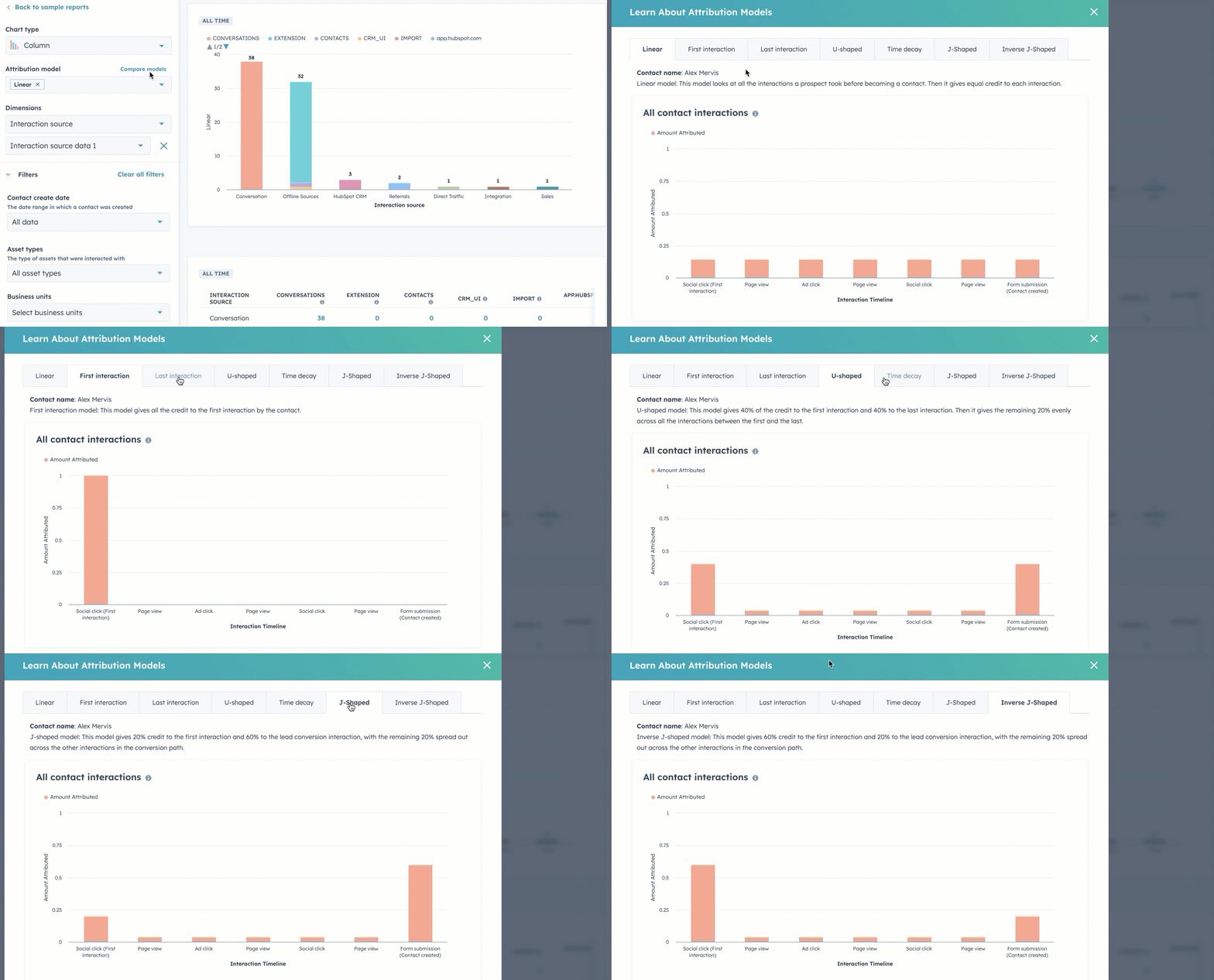
No custom weighting for models. Limited ad types via API. Practitioners note constraints on LearnG2 and elsewhere.

Bottom line: Great CRM and MAP. Not a full LinkedIn ABM analytics solution.


CommonRoom is community intelligence. It tracks LinkedIn engagement, Slack communities, social signals, and product usage to surface warm accounts.
No. It does not capture account-level LinkedIn ad impressions. CRM sync exists, but without impressions the ABM analytics story is incomplete.
CommonRoom becomes valuable when your signal set extends far beyond paid media. It helps GTM teams connect social, community, product, and human activity into one account view, which makes it easier to spot real momentum before a formal hand-raise shows up in the CRM.

Correlate spikes in community activity with marketing moments. Ask RoomieAI questions about patterns and lift.
Turn bare email signups into enriched company profiles to connect engagement back to accounts.

Bottom line: Useful for community-led growth signals. Not a substitute for ABM-grade LinkedIn impression analytics.

Starter from $999 per month for up to 35k contacts and 2 seats. Team from $1,999 per month for 100k contacts and 3 seats. Enterprise is custom with higher contact and seat limits.

Windsor.ai is a data hub for attribution across 300 plus sources. Think modeling, normalisation, and export to BI tools.
No. It requires clicks or lead form fills for LinkedIn credit and leans on reverse IP for account grouping. No account-level impression analytics. No native account grouping for ABM without external prep.

Bottom line: Excellent for measurement teams that want a flexible data layer. Not an ABM-first LinkedIn analytics tool.

Free tier for one source and 30-day history. Basic at $19, Standard at $99, Plus at $249, Professional at $499, and Enterprise custom with more sources, accounts, and refresh rates.
ZenABM is a multichannel ABM analytics and attribution tool with the most LinkedIn-first analytics depth
Factors.ai is the most interesting alternative when you want LinkedIn plus Google control, impression pacing, and stronger cross-channel execution.
Demandbase is the heavyweight choice for large enterprises that want one broad GTM operating layer. HockeyStack works well for teams that care deeply about journey analysis and attribution depth.
6sense is powerful for intent and orchestration, but less specialized for LinkedIn impression-led reporting. HubSpot is convenient but incomplete.
CommonRoom and Windsor.ai are useful adjacent tools, not substitutes.
LeadsRx is the easiest one to rule out because it is not built for this use case and is already scheduled to sunset.
If your priority is still this exact question, “which accounts saw our LinkedIn campaigns, how did those exposures influence pipeline, and how do we push that truth into the CRM?”, ZenABM is still the best place to start.
And with its new multi-channel abilities, it now gives you that LinkedIn-first answer without forcing you to ignore the rest of the journey.
Book a ZenABM demo and see how a modern LinkedIn ad analytics tool for ABM should actually work.
We also offer a 37-day free trial – sign up now!
