

©2026 ZenABM - All Rights Reserved.

When I first read about ABM and saw how most ABM tools (ZenABM excluded) cost no less than $10K+ per year, I wondered what’s the entry point.
Like, I don’t have the guts to run to my superiors and say, “Fund me $30K for an ABM campaign to pay for tools and talent, and no, I haven’t done it before. It’s my first time.”
So, if you even have such restraints as:
Or anything similar that’s stopping you. I have laid down this lean ABM strategy for LinkedIn campaigns.
And why on LinkedIn? I have answered that too.
Read on…
Account-Based Marketing traditionally involves big budgets and extensive resources to target key accounts with personalized campaigns.
“Lean ABM” reimagines this playbook for smaller teams and budgets, achieving strategic impact without the hefty price tag.
In lean ABM, every effort is highly targeted and purposeful, ensuring you invest only where it counts.
And LinkedIn excels as an ABM channel for lean ABM (in general, too) due to its rich professional data and targeting options.
You can segment audiences by company, industry, job title, seniority, and more, meaning your ads reach precisely the right people at your target accounts.
I mean, look at the filters available in LinkedIn Sales Navigator:

You can make your TAL with it, and then LinkedIn Campaign Manager will let you target that exact list of accounts, look-alikes, etc.
This makes it possible to run one-to-many ABM plays at scale on LinkedIn: you upload a list of target companies or contacts that match your ICP and serve ads only to those accounts.
Note: LinkedIn ads are expensive on a CPC/CPM basis, but their impact makes them worthwhile if you stay lean. The key is to tightly define your target list, use smart segmentation, and coordinate ads with sales touches – all to avoid wasting spend on people or companies that won’t move the needle.
Before diving in, ensure you’ve answered some fundamental planning questions for your ABM program.
With groundwork laid, let’s get hands-on with building a lean ABM strategy for a LinkedIn campaign step by step.
A solid Target Account List (TAL) is the backbone of ABM, and especially vital when you have a limited budget.
In lean ABM, every account on your list must truly fit your ideal customer profile (ICP) and have high potential value.
If your account list is wrong or too broad, everything else will flounder.
Here’s how to get it right:
Work closely with sales and leadership to nail down the firmographics and other traits that define a high-value account for you.
Think company size, industry, region, tech stack, revenue, growth stage, etc.
Don’t just dream of landing Fortune 500 logos; base your criteria on where you’ve actually seen success.
For example, the Userpilot marketing team analyzed their past win-loss deals to find commonalities among the customers that closed and those that didn’t.
They identified segments where their product fit best (e.g. SaaS companies of 50–2,000 employees in certain regions), then built the enriched account list using Clay with Builtwith’s API and focused on it:
The lean way to build a TAL is to mine your own data.
Look at your CRM for:
Also, loop in your sales team early. ABM lists built in a silo often miss the mark.
Sales reps can name their “dream accounts,” but also validate whether those big logos are realistic or if mid-tier accounts might convert better. For instance, don’t just grab the top 50 biggest companies in your space; cross-check which types of companies progressed furthest in your funnel historically.
In lean ABM, less is more.
You might start with just 50–100 high-priority accounts for your first LinkedIn campaign.
It’s better to deeply engage 50 right-fit accounts than to marginally touch 500 random ones.
So, while deciding on your TAL, have more disqualification criteria than qualification criteria.
For finding net-new accounts that fit your criteria, LinkedIn Sales Navigator is a powerful ally.
Free Resource: We interviewed many GTM/Clay experts to know how they were using Clay for ABM. Learn the 7 pro methods here.
Don’t rely blindly on automated list builds.
Go through the list and spot-check each account.
Remove subsidiaries or very low-revenue companies if those aren’t viable customers.
Ensure no obvious mismatches (e.g., if you only sell to SaaS companies, drop any manufacturing firms that slipped in).
This upfront hygiene saves budget later.
Also, data hygiene is critical: One pro tip is to standardize company naming in your CRM and deduplicate records before launching ABM, so all contacts from one account roll up correctly. Clean data in = clean targeting out!
Now that you know which accounts to target, the next step is identifying whom to target within them.
A lean ABM strategy focuses on the key personas who matter and uses tools to reach them efficiently.
For each target account, map out the roles you need to engage.
Common personas include the economic buyer (e.g. CXO or VP), the champion/user (maybe a director or manager who would use your product), and other influencers (IT, security, etc., depending on what you sell).
If you’ve developed buyer personas, align them to your target accounts now.
For example, a SaaS ABM campaign might target the Head of Product (economic buyer), a Product Manager (user champion), and maybe a UX Lead or Engineer (influencer) at each account.
Build mini “account profiles” noting these people’s pain points and current solutions – this will inform your ad messaging and sales outreach later.
The lean approach to gather contacts is using LinkedIn itself.
With your Sales Navigator or even basic LinkedIn, search each target company’s employees for titles that match your personas (e.g. filter by “current company = X” and title contains “Product” or “UX”).
This manual step can be time-consuming for hundreds of accounts, so prioritize top-tier accounts for bespoke research.
For a broader approach, LinkedIn allows Matched Audiences by company without needing individual emails: you can simply upload a list of company names to LinkedIn Campaign Manager and then layer targeting for specific job titles, functions, or seniorities.

This method is highly recommended for scale.
Why?
Because uploading a company list yields a 95–100% match rate on LinkedIn (LinkedIn knows nearly all company names), and then LinkedIn will automatically include all relevant people at those companies who meet your role criteria.
In contrast, uploading individual contact emails often results in only 30–70% match and can go stale as people change jobs.
A lean strategy avoids that maintenance headache.
Bottom line: Upload your target companies as a list to LinkedIn, then use filters (like “Job Function = Marketing” + “Seniority = Director+”) to zero in on the personas at those firms. LinkedIn will handle including new employees or excluding departed ones automatically, which is gold for keeping your audience fresh.
If you do need specific contact info (say, for email outreach or to meet the 300-member minimum on LinkedIn), tools like Apollo.io or ZoomInfo can help.
Apollo, for instance, has a free plan that lets you pull a limited number of contacts by filtering by company and title.
The Userpilot team utilized Apollo and Clay to find persona contacts for each account and even enriched them with attributes like “Persona” and “Seniority” in their CRM.
They created separate lists in HubSpot CRM for each persona and stage – for example, “Target Account – Product Managers – Identified stage” and synced those as audiences to LinkedIn Campaign Manager using HubSpot Ad Audiences.
This ensured their ads could be tailored by persona segment.
To maximize impact at an account, try to include 2-5 contacts for SMBs and 5-10+ for bigger enterprises in your LinkedIn targeting.
Remember: LinkedIn requires at least 300 individuals in an audience to run ads. If your account list is very small, you might not hit that number. That’s another reason to ensure you have a few personas at each account. For example, 50 accounts × 4 personas each = 200 contacts, still below the threshold; you’d want ~75 accounts or expand personas. You can also combine multiple account lists into one campaign to meet the size requirement if you plan to show them the same ads. Just be mindful not to lump totally dissimilar accounts together; maintain some coherence for your messaging.
As a final step, sanity-check that the people you’re targeting are current and relevant.
LinkedIn’s Demographics breakdown in Campaign Manager can show you which job titles, industries, etc., your ads are actually hitting.
Use this to spot anomalies once your campaign runs: if you see a chunk of “Interns” or unrelated job functions, you may need to adjust filters or exclusions (more on exclusions later).
By now, you should have a crisp list of target accounts and the personas to target on LinkedIn at those accounts.
You’ve effectively defined who you’ll reach. Next, we tackle how to reach them with LinkedIn ads in the most efficient, impactful way possible.
A lean ABM campaign on LinkedIn usually involves multi-stage advertising: you’ll run highly targeted ads to your list, monitor engagement, and then follow up with more personalized touches.
Here’s how to execute it:




Even if you upload the perfect target list for your lean ABM strategy, you’ll still need exclusions.
Like, cutting out current customers unless it’s an upsell or dropping job roles that don’t matter, like HR or Accounting.
Also, exclude job seekers, interns, or random industries that slip in. This saves spending and keeps ads only in front of real buyers.
Pro Tip: Block competitors so they don’t spy.
Sales and marketing alignment is pretty fundamental to Lean ABM or ABM in general.
Achieve it this way:

Getting a target account to click is just the start. Lean ABM makes that click count by retargeting only the right accounts.
Aggregate activity matters more than one lead.In a lean ABM campaign, data is your best friend. You’ll want to rigorously track what’s happening at the account level and quickly iterate based on what the data tells you.
Because your scale is smaller, you can often spot patterns and adjust on the fly.
Here’s how to measure and optimize effectively:
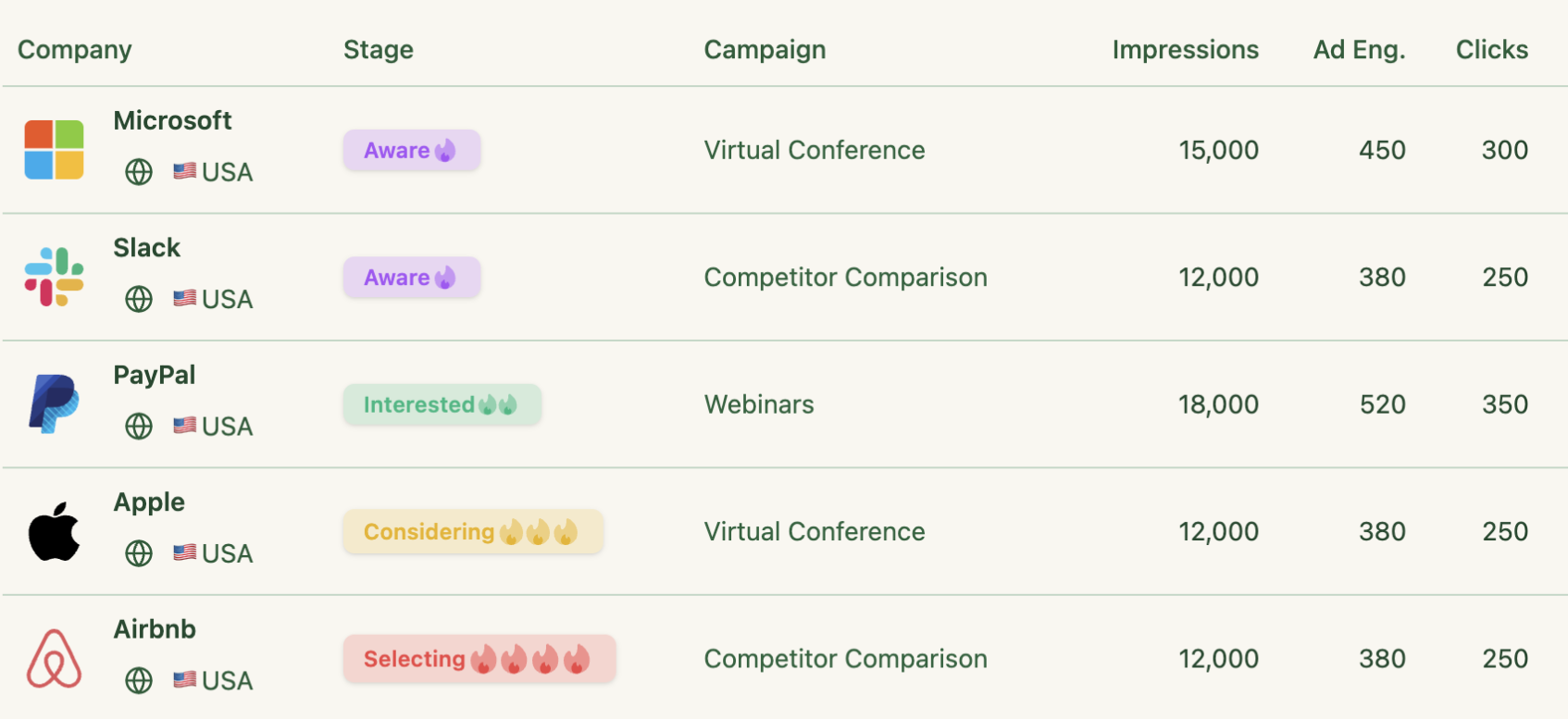
In lean ABM, focus on account progression, not just ad clicks.
Define stages like Identified, Engaged, Interested, Opportunity, and Won.
You can use Kyle Poyar’s ABM stages framework for that:

Track how many accounts move between these stages weekly. If accounts stall, fix the bottleneck (content, targeting, or sales tactics). These conversion rates reveal what’s working and where to optimize.
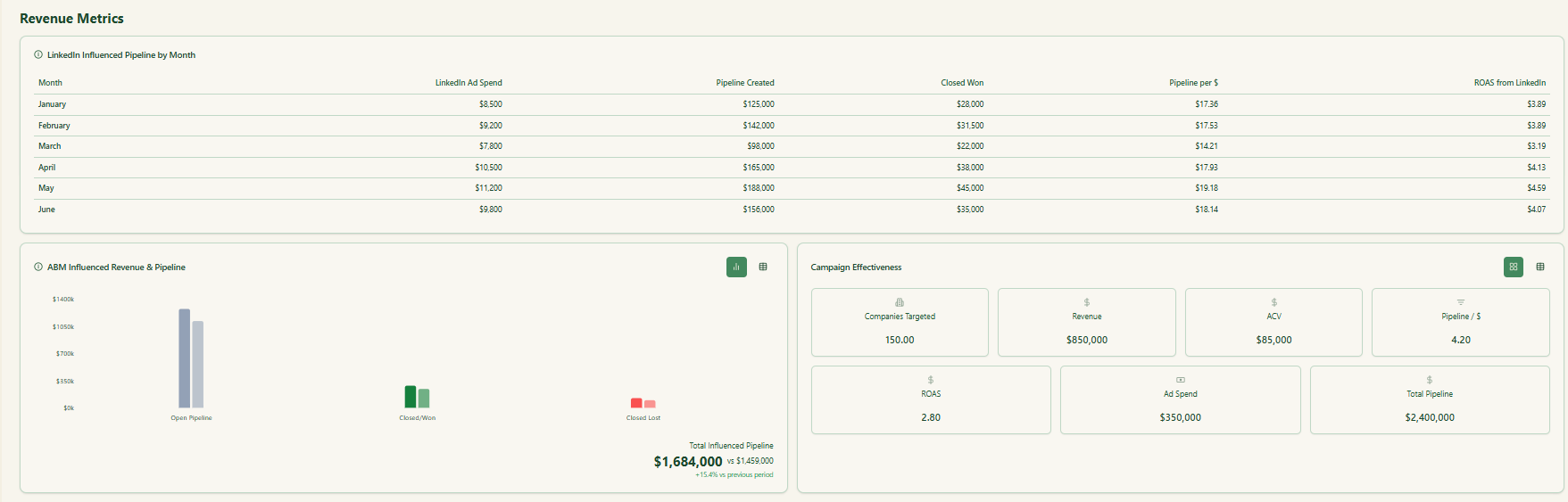
Pipeline and revenue are the real success metrics. Calculate pipeline per dollar spent, including ad, tool, and time costs. Compare outcomes against cold outbound or other channels to see where ABM delivers efficiency gains.
And if you don’t want to build such dashboards on your own, ZenABM provides plug-and-play, ad-influenced pipeline and revenue reporting dashboards:
Look for clear ad winners by message, format, or offer, then double down.
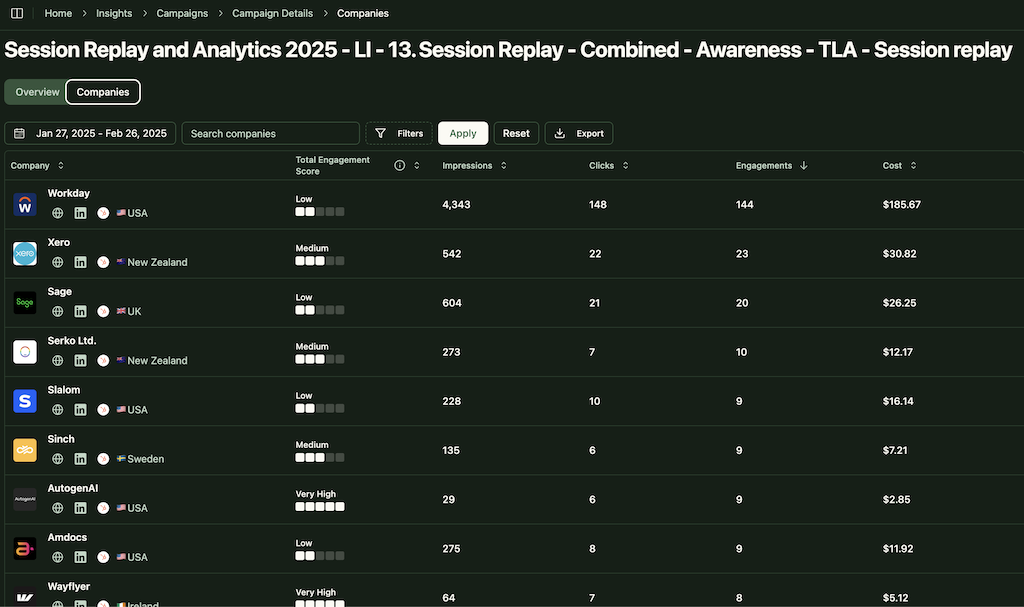
Use ZenABM to see account-level engagement for each ad creative and the performance of each individual ad creative and campaign group:
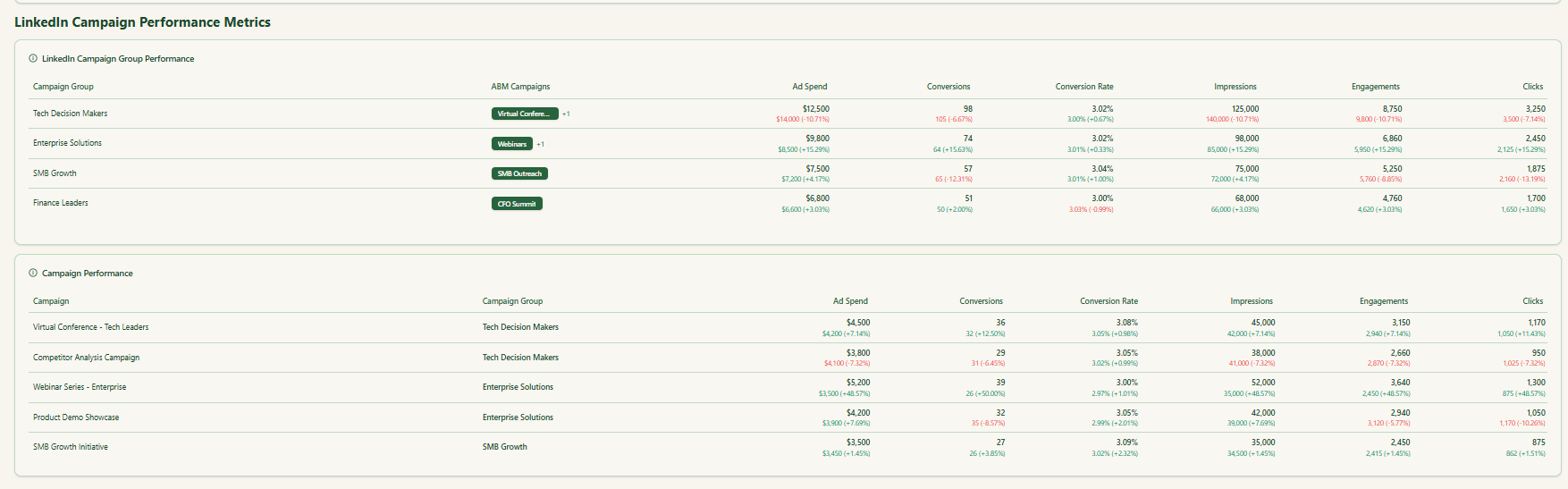
Attribution is messy in ABM, so track results at the account level—clicks, views, and eventual deals. Even simple CRM cross-checks can reveal which accounts your ads influenced.
Lean ABM works best when you adapt quickly. Swap underperforming accounts, test new content, and fix weak landing pages. Document patterns you see in ICP behavior and refine each cycle.
Celebrate key account wins to keep momentum high: quality meetings and pipeline from target logos matter more than raw lead counts.
If you are running Lean ABM on LinkedIn, do two things:
Why ZenABM for Lean ABM on LinkedIn:
ZenABM pulls company level LinkedIn ad engagement data (impressions, clicks, and engagements) and ad spend for each LinkedIn ad campaign. You see which accounts are warming up by campaign and time window, without guessing.
Apart from showing raw engagement data per company, ZenABM sums historic and current activity into a company score that reflects awareness and intent. You get an at-a-glance signal to prioritize accounts. 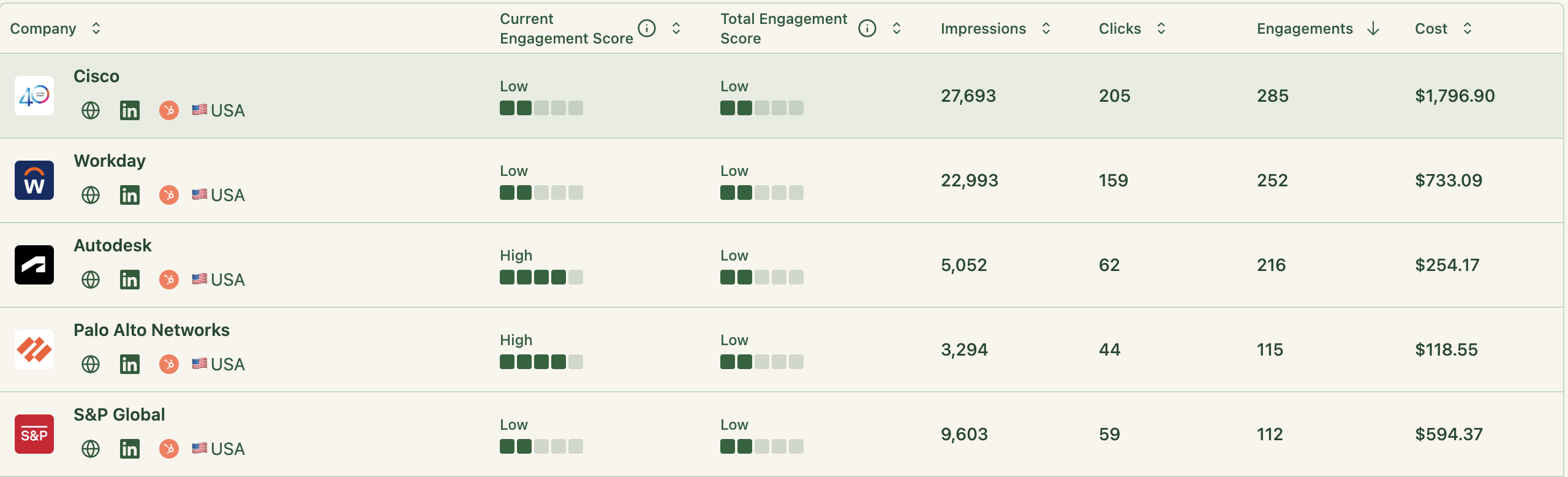
Based on engagement and your CRM data, ZenABM assigns an ABM stage to each account. The engagement thresholds for these stages are fully customizable.

We just saw that ZenABM tracks the ABM stage of each account based on engagement and CRM data.
To keep sales motion instant, ZenABM assigns hot accounts that hit your Interested threshold to BDRs in your CRM:
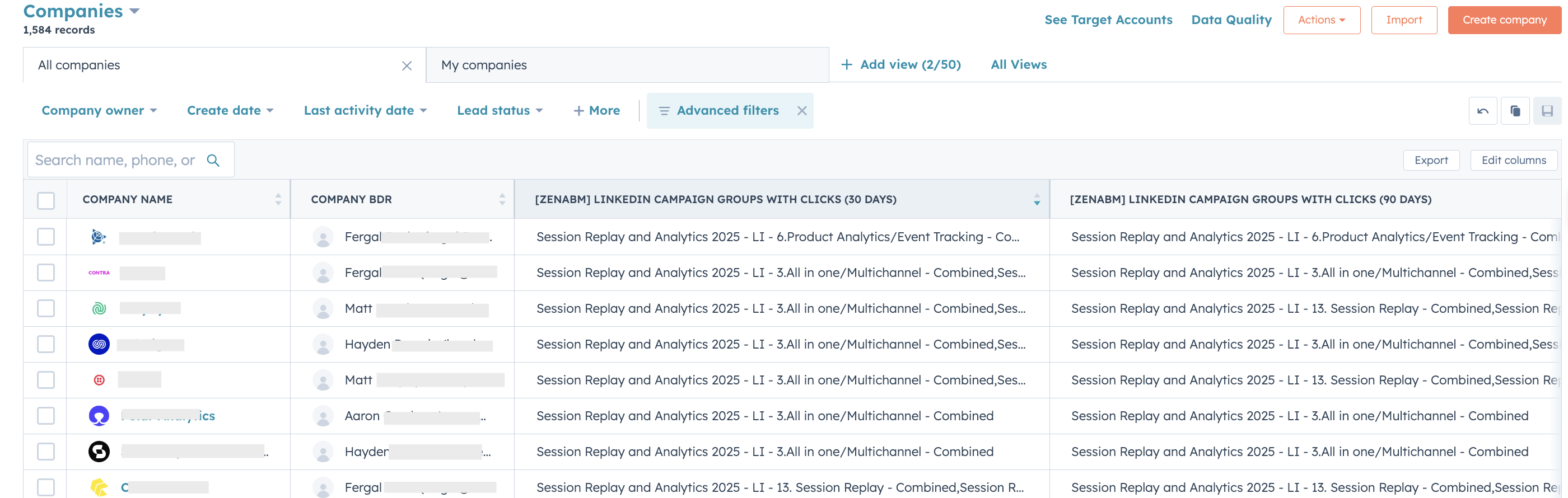
Your BDR outreach starts immediately without daily lookups or manual Slack alerts.
While you run ABM on LinkedIn, marketing can live in ZenABM and MAPs, and sales can stay in the CRM. ZenABM automatically pushes engagement as company properties to your CRM so reps see signals in their workflow.
For the other side of the sync, ZenABM matches engaged companies to deals in your CRM and pulls deal value for revenue context.
ZenABM, powered by company matching and deal value, gives you ready-made ABM analytics and ROI dashboards.
Many ABM teams buy third-party intent like Bombora or use Demandbase or RollWorks to infer topics from keyword spikes. That adds cost and delay.
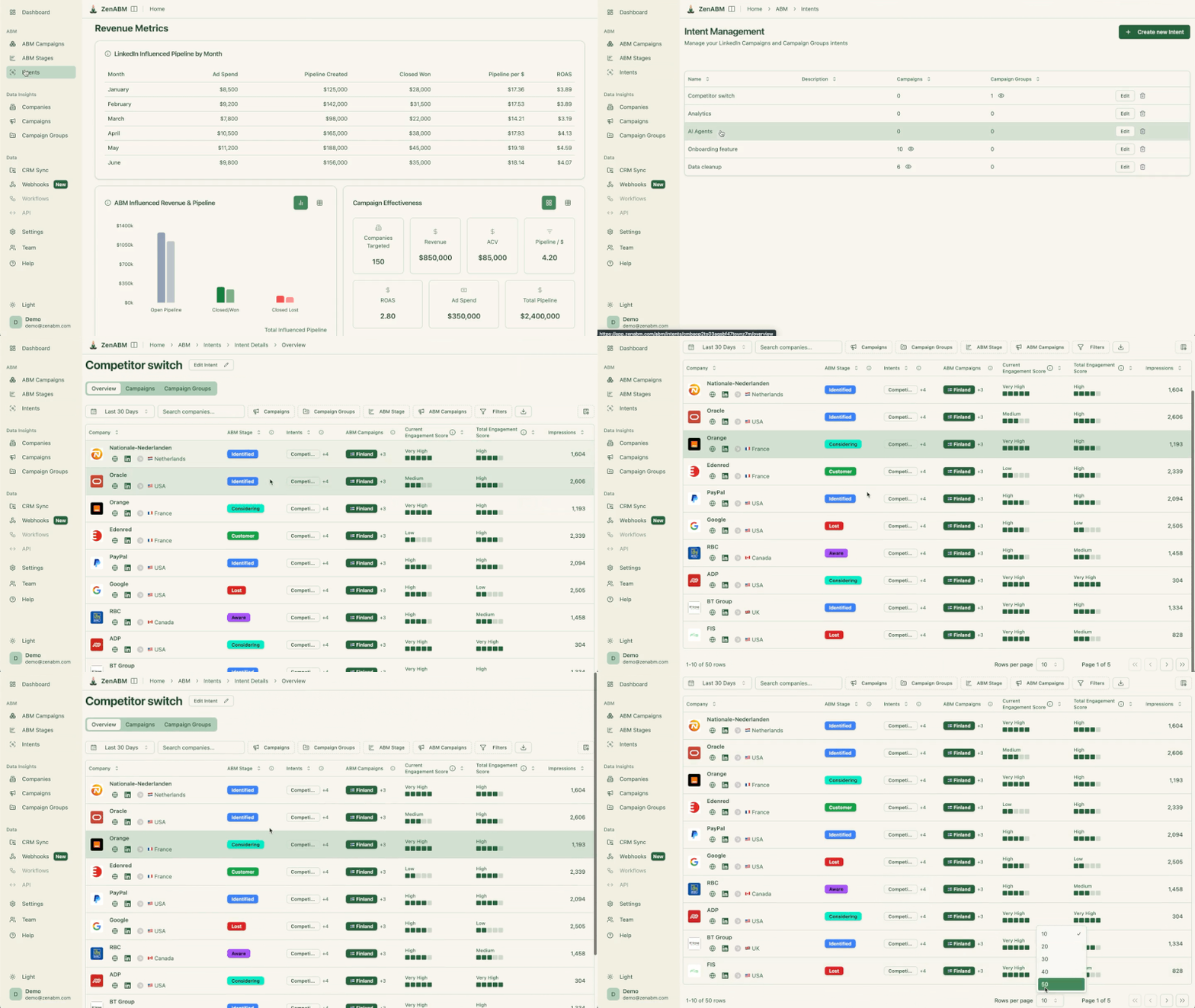
A leaner way is to encode qualitative intent in your ads themselves and tag campaigns by intent in ZenABM. For a product management SaaS, create campaigns for intents like product analytics, onboarding, session recording, or all-in-one.
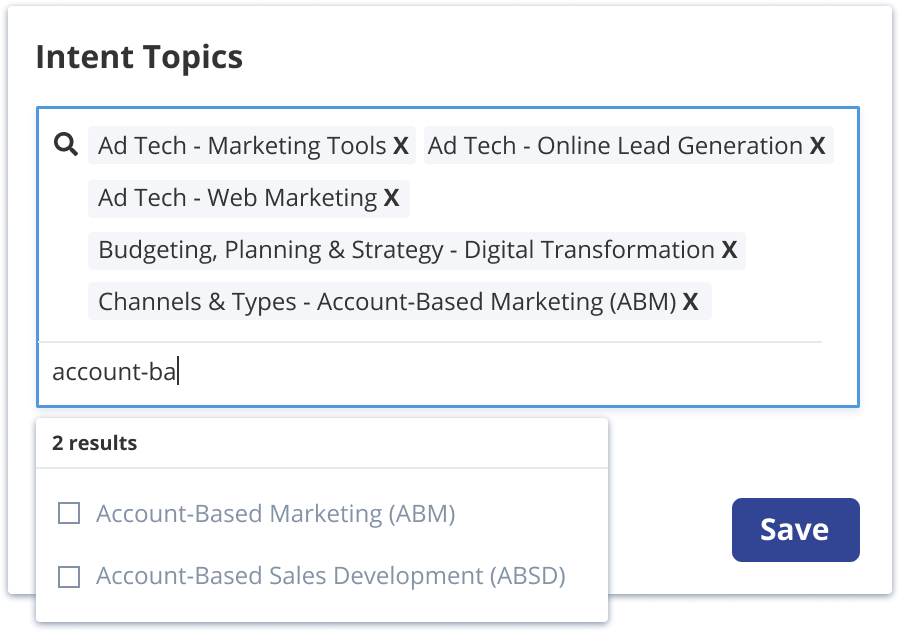
Something like this:
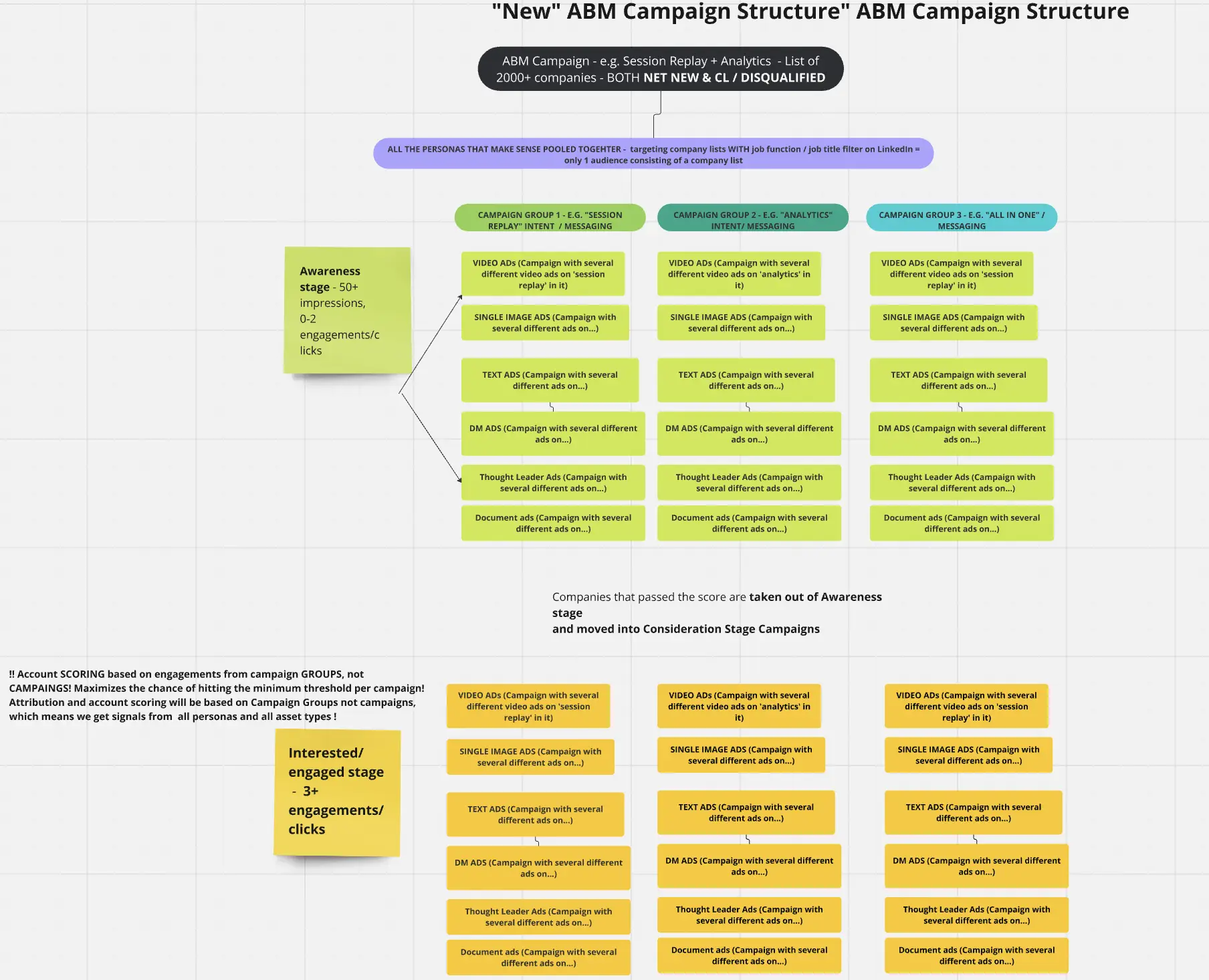
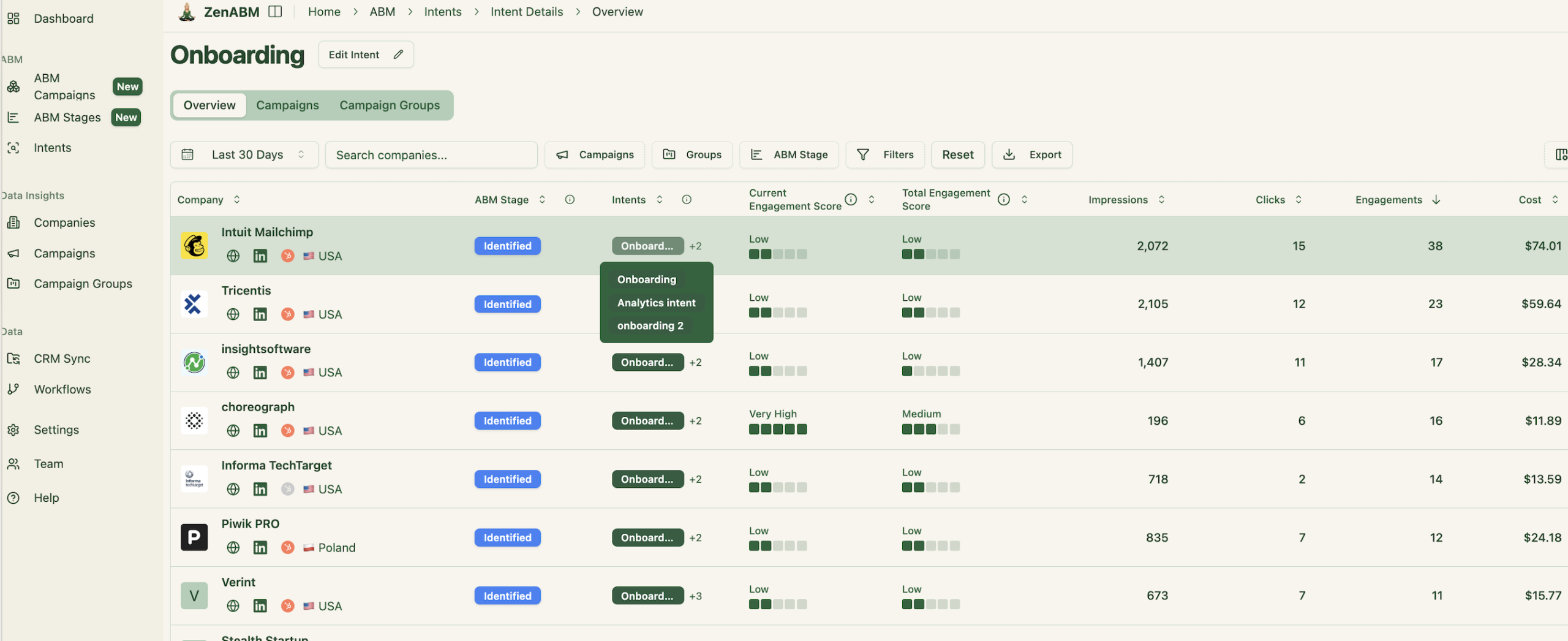
Then tag each campaign with intent in ZenABM so you see the qualitative intent per company:

It will also group companies with similar intent for faster prioritization:
Plus, ZenABM will push intent as a company property to your CRM:
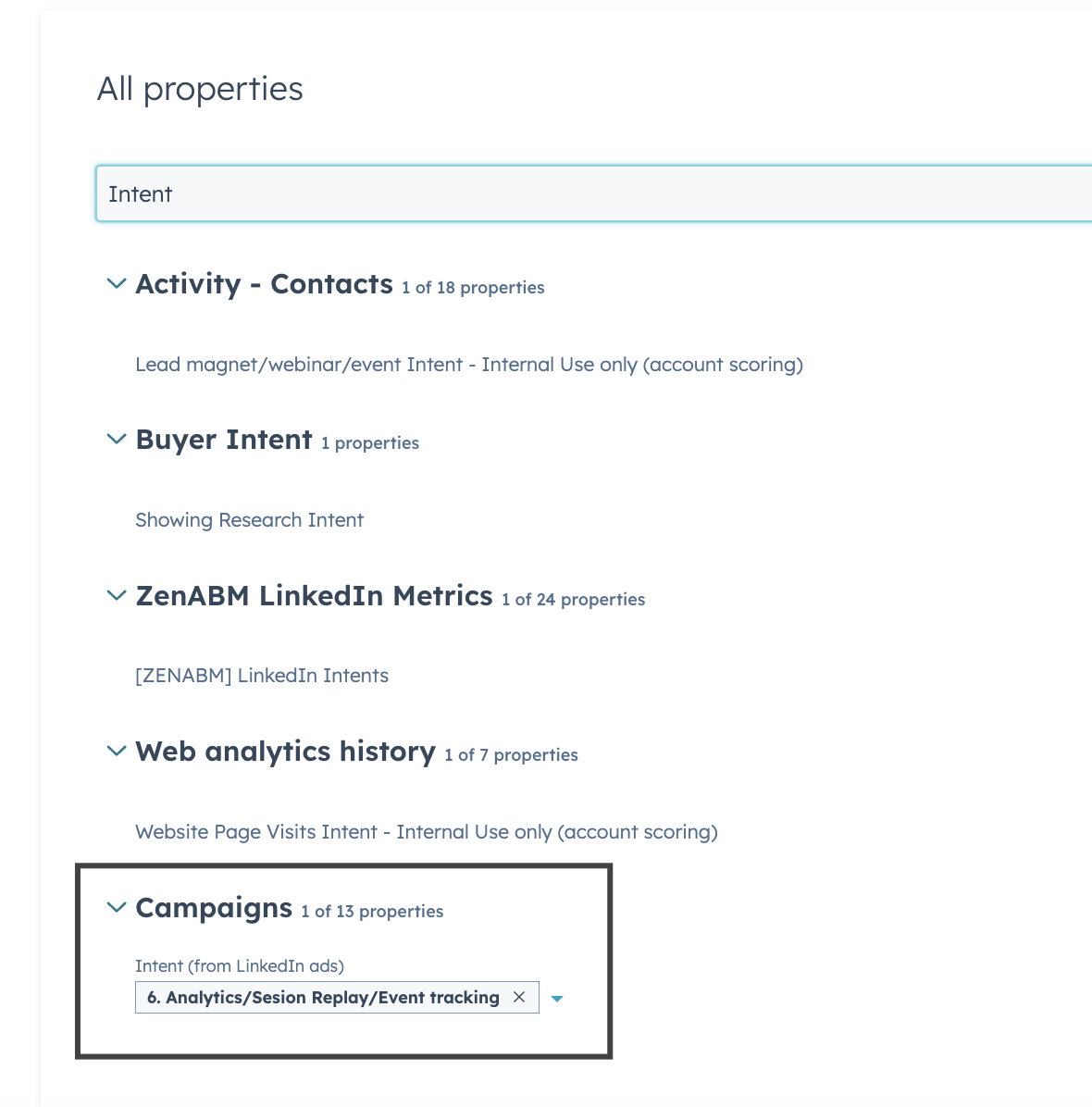
Your BDRs will know which accounts are hot and what to talk about on outreach.
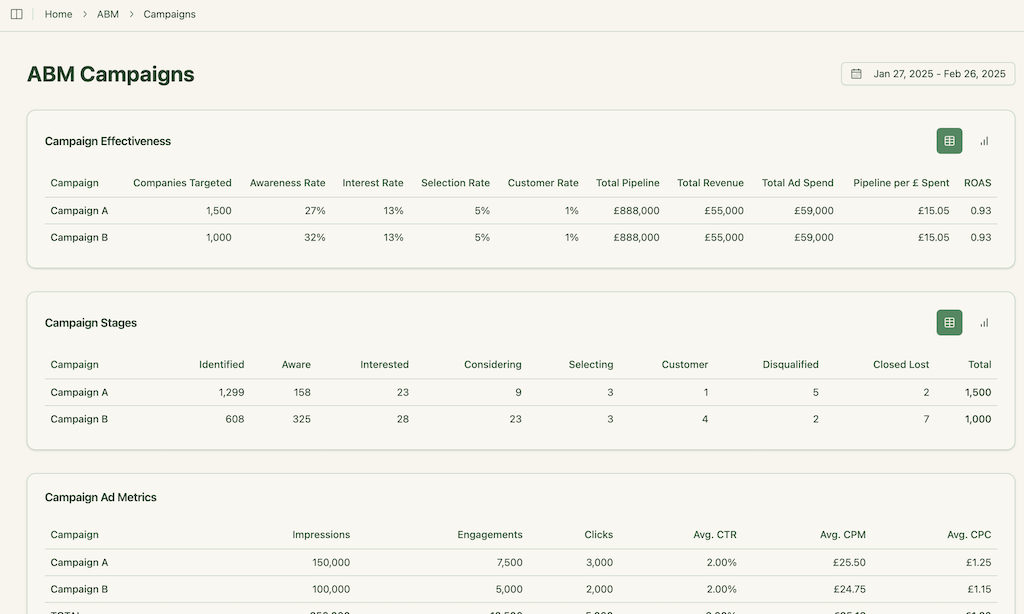
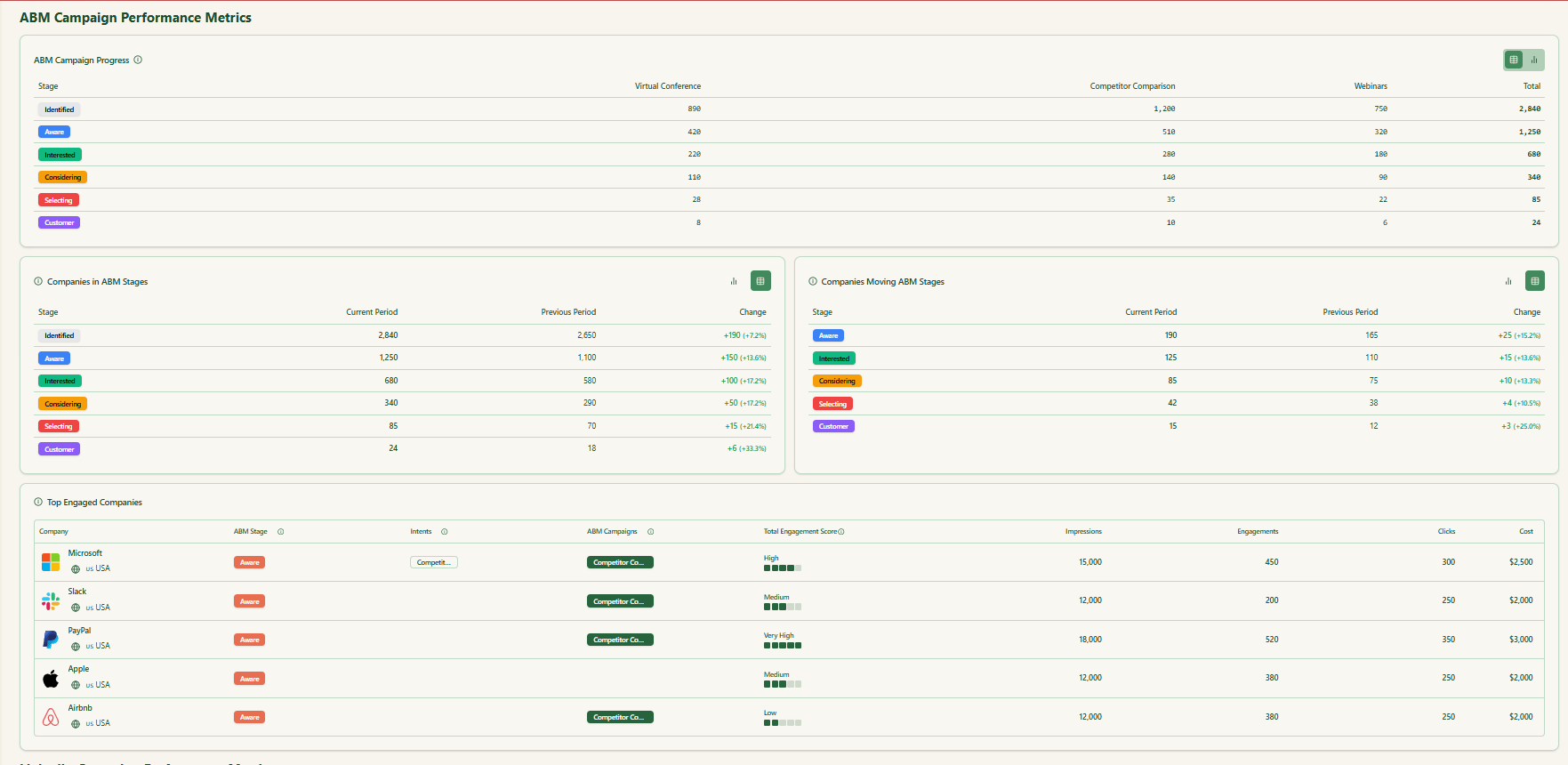
ZenABM maps how many companies sit in each stage and how they move. You spot friction fast and fix it.
For example, if many companies move from Aware to Interested but stall there, update your sales follow-up or retargeting offer to push them to Meeting.
You do not need a six-figure stack to run ABM that works. You can go for a pretty lean ABM strategy (yes, even in this economy!).
Start with a tight TAL, show relevant messages to the right personas, and use engagement to time human outreach.
Keep frequency in check, exclude junk, and retarget only the accounts that lean in.
Measure progression from Identified to Won and report pipeline per dollar so leaders see impact fast.
When an account crosses your MQA line, act within 24 to 48 hours and reference the exact themes they engaged.
ZenABM makes this easier by surfacing company-level impressions, clicks, and intent inside your CRM and by triggering BDR handoffs and making revenue attribution dashboards automatically.




