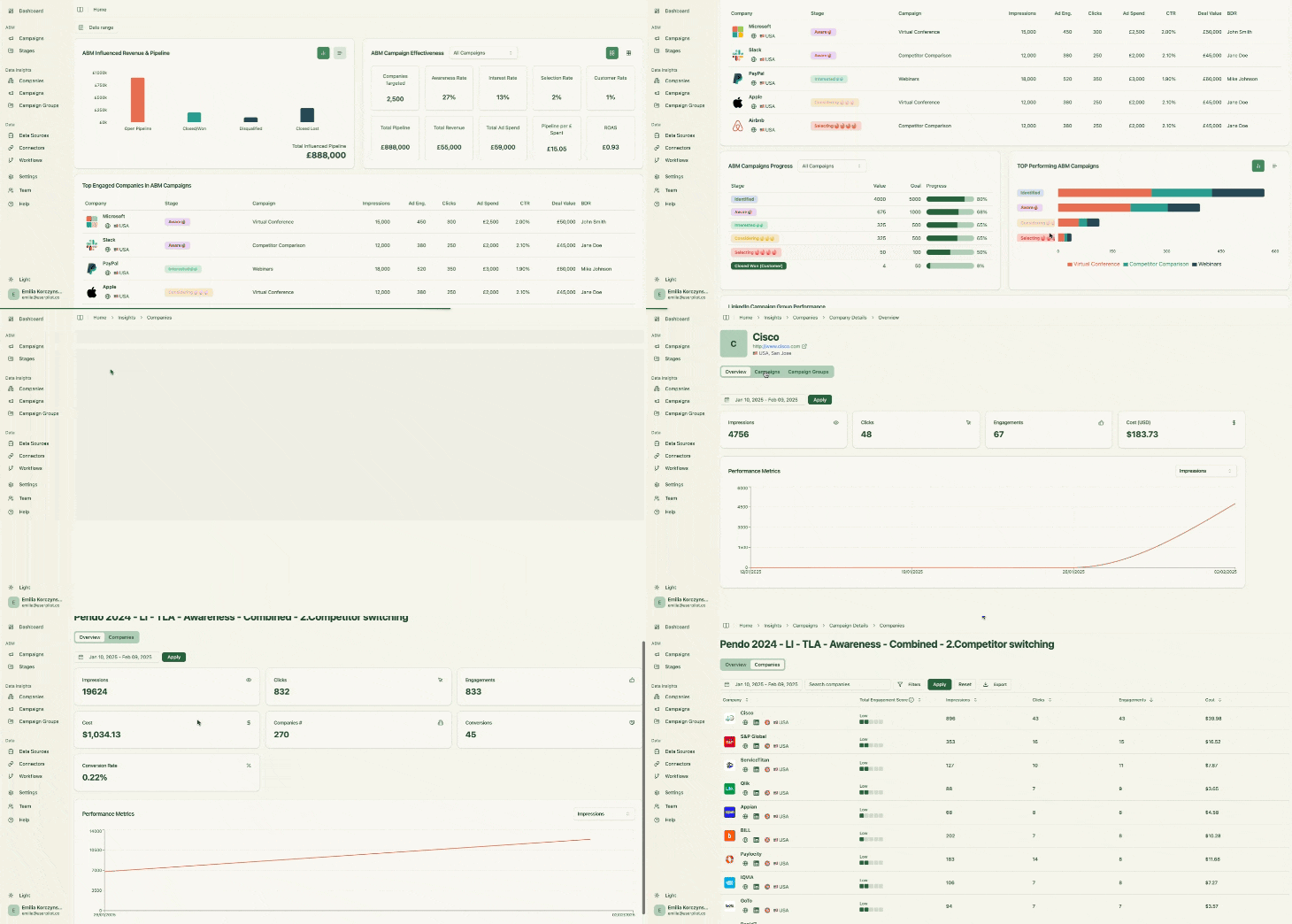
LinkedIn ads often serve awareness goals more than direct clicks, with average CTR around 0.44%. To measure true ad influence, you must track how many accounts saw your ads, even if no click occurred. Only LinkedIn’s official API offers reliable, first‐party impression data.
Two-Way CRM Integration
Your software should:
Push account‐specific ad metrics—impressions, clicks, spend—into your CRM automatically
Cons: Limited to LinkedIn ads (no multi-channel tracking), no visitor deanonymization, no list building.
Factors.ai
Factors.ai: strong AI-driven controls
Factors.ai is an AI-powered LinkedIn ABM advertising platform. It pulls impression and engagement data from LinkedIn’s API into its AdPilot module for audience building and impression capping. It integrates with CRMs but does not push data automatically. You must build workflows yourself.
Key Capabilities
AdPilot: AI-driven audience builder, LinkedIn CAPI integration for conversion signals, and impression capping per account.
Intent Capture: Combines ad engagement with website behavior to identify rising accounts.
Workflow Automation: Zapier-style connectors to MAPs, CRMs, Slack, etc.
Pros: Advanced audience control, impression capping, and AI-powered optimizations.
Cons: High entry price, no native CRM push, some UI/workflow quirks reported.
Demandbase One
Demandbase One: end-to-end ABM platform
Demandbase One delivers full LinkedIn API access for company impression tracking, frequency capping, intent-based bidding, and extensive CRM integrations (HubSpot, Salesforce, Dynamics, Marketo, and more). It is feature-rich but comes with enterprise-level complexity and cost.
Standout Features
Frequency Capping: Prevents ad overexposure to individual accounts.
Intent Bidding: Adjusts bids based on account intent signals from 40,000+ data sources.
Multi-Channel Orchestration: Coordinates LinkedIn ads with website personalization, display, and email.
Pricing
Custom enterprise pricing. You must request a demo.
Pros & Cons
Pros: Deep ABM feature set, robust integrations, granular controls.
Cons: Steep learning curve, high cost, overkill for smaller teams.
Terminus
Terminus: matched audience approach
Terminus integrates with LinkedIn Marketing Solutions for matched audience impression tracking. It syncs account engagement and funnel stage updates back into Salesforce and HubSpot, but only for accounts you upload or that exist in your CRM.
Main Features
Matched Audiences: Only tracks impressions for CRM-sourced or uploaded lists.
Account Hub: Centralises ad and site engagement with Salesforce integration.
Multi-Channel Attribution: Unifies data from display, digital, and offline touchpoints.
Pricing
Pricing undisclosed, demo required.
Pros & Cons
Pros: Deep Salesforce sync, campaign creation within Terminus, executive dashboards.
Cons: Limited impression scope, cost can be prohibitive for LinkedIn-only use cases.
HockeyStack
HockeyStack: multi-touchperson‐level attribution
HockeyStack offers first‐party LinkedIn impression tracking and CRM deal matching for attribution. It excels at combining LinkedIn data with 17+ other touchpoints like G2 intent, email, forms, calls, into custom dashboards. Native CRM push workflows must be built manually.
Golden Paths: Visualises the most common engagement sequences leading to conversion.
Multiple Models: Compare attribution across time decay, linear, position-based, and more.
Pricing
Sales-led, demo required. No public pricing.
Pros & Cons
Pros: Rich multi-channel insights, flexible attribution, and visual funnel analytics.
Cons: No out-of-the-box CRM push, person-level data may be inaccurate via reverse IP, UI complexity.
LeadsRx
LeadsRx: omnichannel attribution hub
LeadsRx uses a proprietary pixel for LinkedIn impression tracking and cookie-based user journeys across online and offline channels. It imports CRM deals for revenue mapping but does not leverage LinkedIn’s API, so account accuracy depends on form fills and CRM identification.
Core Strengths
Universal Pixel: Tracks radio, podcast, display, and LinkedIn impressions alike.
User Journey Mapping: Timeline of multi‐channel interactions leading to conversion.
ROAS Dashboards: Prebuilt revenue dashboards for any channel combination.
Pricing
Sales-led, contact for a quote. No public pricing.
Cons: No official API data, account grouping relies on CRM identity, and setup complexity.
6Sense
6Sense: intent-driven ABM
6Sense combines web deanonymization (6Graph), predictive intent scoring, and CRM integration. Its LinkedIn connection supports campaign audience management but not account‐level impressions. Attribution depends on site visits and identifiable clicks.
Key Strengths
Predictive Segments: Build audiences based on intent signals and AI forecasts.
Contextual Targeting: Place ads near relevant content using keyword policies.
Persona Mapping: Identify job roles within engaging accounts.
Pricing
Custom; demo required.
Pros & Cons
Pros: Advanced AI segmentation, multi-touch integration, robust predictive analytics.
Cons: No true impression tracking, high cost, steep learning curve.
HubSpot Marketing Attribution
HubSpot: contact-level click attribution
HubSpot’s native ads integration records LinkedIn ad clicks and form submissions for contact‐level attribution across first-touch, last-touch, linear, U-shaped, W-shaped, and time decay models. It does not record impressions or account metrics.
Notable Points
Multiple Models: Toggle between six built-in attribution frameworks.
All-in-One: CRM, MAP, and reporting in one system.
Pros: Seamless for HubSpot users, easy reporting, fixed cost.
Cons: No impressions, only contact-level credit, limited customisation.
CommonRoom
CommonRoom: community and engagement signals
CommonRoom aggregates community forums, social media, and product usage signals to surface engaged accounts. It pulls LinkedIn engagement data like reactions and comments, but does not track paid ad impressions. CRM sync pulls contact and company lists for enrichment and segmentation.
Core Advantages
Firmographic Enrichment: Turns emails into full company profiles.
RoomieAI: An AI bot that answers queries on community trends and engagement.
Chrome Extension: One-click addition of LinkedIn contacts to CommonRoom lists.
Pricing
Starter: $999/mo (35k contacts, 2 seats)
Team: $1999/mo (100k contacts, 3 seats)
Enterprise: Custom
Pros & Cons
Pros: Deep community insights, firmographic data, and AI assistance.
Cons: No paid ad impressions, high cost, reported bugs in AI features.
Windsor.ai
Windsor.ai: data hub for 300+ sources
Windsor.ai centralises data from CRMs, ad platforms, MAPs, analytics tools, and more—over 300 sources. It offers fully customisable attribution models and manual account grouping. It does not natively support LinkedIn view‐through impressions at the account level.
Strengths
Custom Attribution: Build your own model or use predefined ones with adjustable weights.
Data Exports: Raw data access for BI or data science work in Python or R.
Multi-Touch Reports: Compare channel performance side by side.
Account-level impression and engagement data via LinkedIn’s API
Seamless, bidirectional CRM integration
Automated revenue and pipeline mapping
ZenABM meets these requirements at an accessible price point and with an ABM-centric design. If your needs extend beyond LinkedIn or include multi-channel analytics, consider Factors.ai, Demandbase One, or HockeyStack, but prepare for higher complexity and cost. Also, a lot more features that you might not use will come with the bundle.