

©2026 ZenABM - All Rights Reserved.
Emilia Korczynska is Head of Marketing and co-founder at ZenABM. Before that she was VP of Marketing at Userpilot for nearly 7 years, where she ran a large ABM program primarily on LinkedIn ads.

LinkedIn company targeting lets you put ads in front of people at specific companies, and for a named account list I would always upload the list. LinkedIn accepts up to 300,000 companies in an upload, while typing names into the audience builder stops at 200.
The part I got wrong was trusting the reported match rate 😅 LinkedIn showed over 90% on one of our audiences. When I checked, only about a third to 43% of the companies I intended to reach were actually in it. ZenABM Audiences can keep a company audience updated as accounts meet your rules, but you still need to know who belongs in it and check what LinkedIn matched.
If you are new to the wider setup, our guide to how LinkedIn ads work for ABM explains where audiences fit. Here, you will leave with a list you can upload, a way to check it, and a sensible audience size for the people you need to reach.
Yes, you can target specific companies on LinkedIn. For a named account list, I would upload the companies and then use LinkedIn's targeting options to reach the right people inside them.
Method | How it matches | Limit | Best for |
|---|---|---|---|
Company list upload | Matches name, domain and LinkedIn company URL to LinkedIn Pages | Up to 300,000 companies | Named account lists |
Typed company names | Uses the employer members list on their profiles, taken from LinkedIn Pages | Up to 200 companies | A short list or quick test |
Industry | Uses the self-selected industry tag on the company Page | No fixed limit | Discovering accounts when you do not have a list |
Company size | Uses the employee count on the company Page | Not published | Narrowing a list, not replacing it |
Company category | Uses LinkedIn-derived company segments | Options vary | Layering on top of a list |
Here is the decision in one view, from choosing the companies to checking the audience:

Yes. Upload a company list in Campaign Manager and LinkedIn will try to match each row to a LinkedIn Company Page. The result is a matched audience that you can use in your ad set.
LinkedIn then reaches members based on the employer they list on their profiles. That distinction matters: your file contains companies, but your ads are delivered to people associated with those companies.
I would include the company name, website domain and LinkedIn company Page URL on every row. Add headquarters city, state, country and stock ticker where you have them. The URL is the strongest signal because similar company names can point to different Pages.
The upload path in Campaign Manager looks like this:
Allow about 48 hours for LinkedIn to build and match a synced audience, and put that wait in your launch plan rather than assuming a list saved today is ready today.
You can also type company names directly into the audience builder. I would use that for a handful of accounts or a quick test, not as the way to maintain a long list. The limit is 200 companies.
A contact list is a different audience: LinkedIn matches individual email addresses, not the companies in your file. A file with names and companies but no emails matches nobody.
Maximilian Herczeg compares the approaches: he reports company lists with the LinkedIn profile attached matching above 90% as standard, while contact lists reach about 60% at best. Work emails match badly because most people use a personal email for LinkedIn. Those are reported match rates, though, so I would still check which companies actually made it into the audience.
Ali Yildirim reports 90% with Clay's Ads integration against 60 to 70% for work-email-only lists, and he thinks building B2B audiences natively in LinkedIn leaves money on the table. I see his point on contact lists, which is another reason my default is a company list with LinkedIn's own filters on top. Contact enrichment and CRM marketing contacts get expensive, so I treat contact lists as an add-on for a short, specific campaign like a webinar.
The upload itself is straightforward. The harder question is which companies should be in the file.
Start with companies that fit your customers, then separate the accounts that need different messages. A list can match perfectly and still waste budget if it contains companies that cannot buy from you.
I would build it in this order:

Your CRM and sales team can supply the starting accounts, and you can use Clay, Apollo or Cognism to find company details. Review the list against your fit criteria before you upload it.
I like keeping the tiers simple enough that each one has a clear use:
Tier | Who belongs | Campaign and message |
|---|---|---|
Cold fit accounts | Companies that fit your customer criteria but have not shown relevant engagement | Introduce the problem and the reason to pay attention |
Engaged accounts | Good fit companies that have interacted with relevant ads or shown intent | Follow up on the topic they engaged with |
Active opportunities | Companies with an open opportunity or active sales work | Coordinate the message with sales and the context of the deal |
Customers | Existing customers | Keep them out of prospecting when the offer is not relevant to them |
These are planning groups, not a reason to create an ad set for every small segment. Each audience still needs enough matched members to run, and your budget needs to cover the segments you choose.
For the engaged tier, the manual work continues after you identify the companies: find the right contacts at each one and prepare outreach. ZenABM's free Clay templates turn Interested stage companies and intent signals into enriched contacts and tailored sequences, so you do not have to export lists and prospect by hand.
A list takes work, though. So why not skip it and let LinkedIn find the companies by industry and size?
These filters are useful for finding or narrowing accounts, but I would not use them as a substitute for a named list. They depend on company information in LinkedIn that does not always describe the business the way you would.
Targeting option | Where the value comes from | Main weakness | Use it for |
|---|---|---|---|
Industry | The industry the company selected on its Page | The company chooses the label, so it may not describe what it sells | Discovery and narrowing |
Company size | The employee count on the Page | A selected range can still deliver to sizes you did not pick, and members can list multiple positions | Narrowing, with exclusions and checks |
Company category | LinkedIn company segments, including funding stages, business types and regions served | The category may not match your exact buying criteria | Testing an extra layer |
LinkedIn has about 400 industry codes, but the company picks its own and LinkedIn does not verify it. Tim Davidson put it this way: "When I created my company page, I could have chosen anything I want and still can switch it to whatever I want."

He gave examples of the problem: Klaviyo and Terminus appear under Advertising Services, Gusto and Divvy under Financial Services, and Spotify under Musicians. If you target Financial Services to reach Gusto or Divvy, you also pay to reach banks and financial planners you cannot sell to.
Ali Yildirim adds that "Technology, Information and Media" lumps newspapers, Hollywood, cable, telecoms and software startups, and one company can carry several tags. That does not make industry targeting useless. It makes the company breakdown worth checking, especially when you use industry targeting to discover accounts before you have a list.
A selected size range does not keep smaller companies out. In a 2025 test, Philip Ilic targeted companies with 11 to 200 employees. Businesses with 1 to 10 employees still took 40% of the budget within 24 hours, and adding an explicit exclusion cut his audience by 30%.
Size also breaks at the member level: a person with two current positions can be classified under a different company size. If size is part of your buying criteria, check the companies receiving spend instead of treating the selected range as proof.
In our own campaign, I changed the company size range from 2 to 500 employees to 2 to 200 and capped impressions on each ad set to improve reach across the list. That was a decision for our audience, not a universal size range.
Company category gives you extra segments, such as funding stages, business types and regions served. Kirill Vdov rates it 5/10: basic but functional. He notes that Regions Served depends on the legal entity, not the company's real strategy. Anthony Blatner suggests testing the Recently Received Funding segment because companies that just raised are actively buying. I would treat that as a hypothesis, then check who actually receives the ads.
LinkedIn's company size targeting uses employee count, not a revenue figure for every account. If revenue is part of your definition of a good account, enrich the list externally and upload it. Our guide to company attributes for ABM covers the wider set of options.
These limits raise a fair question: does the extra work of building a list change the business result?
In Tim Davidson's test, the company list produced 3.02x the revenue and 2.9x the ROI, even though industry targeting generated more demo requests at a lower cost per lead. I would judge this decision on revenue and pipeline quality, not on the cheapest lead.
Davidson compared the approaches over 7 months, using the same ads, job titles, locations, offers and objectives. The account list contained 8,531 companies.

Targeting | Ad spend | Revenue | ROI reported | Demo requests | Cost per lead |
|---|---|---|---|---|---|
Company list | $190k | $1.3M | 6.7 | 297 | $639 |
Industry | $175k | $403k | 2.3 | 486 | $360 |
The industry audience brought in more demos for less per lead, but the list brought in far more revenue. The likely reason is that the bigger audience meant more reach and more demos, much of it from companies that could never buy.
That is why I would not turn off the list just because the industry campaign has a lower cost per lead. Look at what happens after the demo, and compare results over the same period with the same definitions. ZenABM's Dashboards show ad spend next to influenced pipeline, ROAS and pipeline per dollar, so you do not have to join spend exports to CRM deals every month.
The test makes a strong case for a good list. It also makes the next check more important: did LinkedIn match your companies?
Check Your LinkedIn Company Targeting With ZenABM
See how ZenABM shows account engagement and helps keep company audiences current.

Compare the companies LinkedIn reports with the list you uploaded. A high reported match rate tells you that LinkedIn linked rows to Pages; it does not prove every Page is the one you intended.
That caught me with a HubSpot pushed audience. LinkedIn reported over 90% matched, but our check found only about a third to 43% of the intended companies, along with some wrong ones. Demographics reports gave it away: similar looking company names and odd employee sizes. After we uploaded a fuller file with every field and cross-checked it, we reached 87%.
A match can also go wrong when companies have duplicate Pages. Acquired companies get mapped to their new parent, so I have seen Google and Microsoft appear in an audience even though I never put them on the list.
I would run this check before launch and repeat it while the campaign is active:
ZenABM's Exclusions applies your exclusions across campaigns, including new ones, and lets you list or lift them from the same chat, so you do not have to re-upload the list each time you launch.

Tim Davidson shared a 2026 example of a 78-account list with a 100% reported match rate. When he checked, 9 of the 78 had matched the wrong company, a fake or duplicate Page, or another department.
Re-uploading with headquarters location and stock ticker instead of the URL fixed all but two. Adding the URL back on top gave a fully correct match and grew the audience from 8,000 to 13,800 people. The lesson I take from that is to test the full set of identifying fields when a URL alone produces the wrong Page. Kristof Bardos goes the other way. He reports a 100% match using only the LinkedIn Company URL column. That is one more reason to compare against your own list instead of trusting a rule of thumb.
There is another issue to check even when the names are right. In a separate 2025 audience, Davidson found that 2 of roughly 540 companies made up 46% of the audience and would have taken about 40% of the budget.
A clean match gives you a better starting point. Now you need enough eligible people inside those companies for the audience to run without a needlessly high CPM.
LinkedIn needs at least 300 matched members before an audience can be included as targeting. That number refers to people, not companies, so an account list can contain many companies and still be too small after you apply your people filters.
I would treat 300 as a minimum to clear, not a comfortable size. In our accounts, a 3,500 member audience had CPMs 7 times higher than a 170,000 member audience. Below about 7,000 members, I consider an audience very small.
The size zones below show the difference between LinkedIn's minimum and the ranges practitioners report. They are not promises of a particular CPM.

The number of fitting people at each company changes how many accounts you need. If your buyer is a specialist role, you may have only a few suitable members per company.
Estimated members = companies × fitting people per company
For example, if 2,500 companies each have 3 to 5 fitting people:
2,500 × 3 = 7,500 members
2,500 × 5 = 12,500 members
That estimate helps you plan the list, but the audience in Campaign Manager is the number to trust after matching and filtering. For a cold campaign, I would not go below about 2,500 companies if only 3 to 5 people per company fit your persona. When we added 24,942 good-fit companies, our CPMs and conversions improved.
Marc Woodland describes 10,000 to 40,000 members as the usual sweet spot, and says the most common ABM mistake is going after too small an audience. He also looks for 5 to 15 impressions per member per 30 days and over 60% audience penetration, meaning the share of the target audience you reach.
Bigger is not unlimited, though. Kirill Vdov says LinkedIn's 50,000 recommendation misleads. He sees real problems begin at 100,000 or more people. Philip Ilic puts budget first: a budget that can influence 2,000 companies should target 2,000, not 50,000. Jack Cleere points out that great campaigns exist at 1,000+ and at 200,000+ people. I agree with his qualification: size matters only if the people still fit your ICP and your budget can reach them.
Work through these in order:
The LinkedIn Ads minimum audience size guide goes deeper on these workarounds. If penetration is low rather than size, widen reach. We cut the company size range to 2 to 200 from 2 to 500 and capped impressions on each ad set. Our guide to increasing audience penetration covers more. My rule is to widen with relevant accounts and roles, never with irrelevant ones.
Once the company audience is large enough, the next job is deciding which people inside it should see the ads.
Start with the uploaded companies, then narrow to the people involved in the purchase. I prefer specific job titles when they cover the buying group. Titles already contain seniority and let you go narrower. I still check delivery, because LinkedIn does not interpret a title as narrowly as I do.
I moved towards broad title targeting in 2025, then went back to company lists with people filters. The list gives me control over the accounts, and the filters stop me paying to reach every employee at them.
The audience estimate tells you who could be reached. After launch, check the demographic reports in the first week, and exclude competitors, your own employees, current clients and misfit titles such as Intern, Student, Unemployed, Retired and Job Seekers. Also check the top 1 to 3 companies by spend so a few accounts do not absorb the budget.
ZenABM's Job title engagement groups ad engagement by job title, so you can check whether your spend actually reached the buying committee.
Our guide to LinkedIn targeting options covers the broader set of people filters. The catch is that a company list changes as customers sign, sales opens opportunities and other accounts engage, and a CSV does not update itself.
ZenABM shows which companies engage with your LinkedIn ads, using LinkedIn's official API and no form fills. It can also build a dynamic company audience from rules and refresh it as accounts meet or stop meeting them. I would use that for audiences that need to change with engagement or customer status, instead of re-uploading a file every time.
The manual version is to check each company's engagement and CRM status, update the list, then upload it again. ZenABM covers these parts:
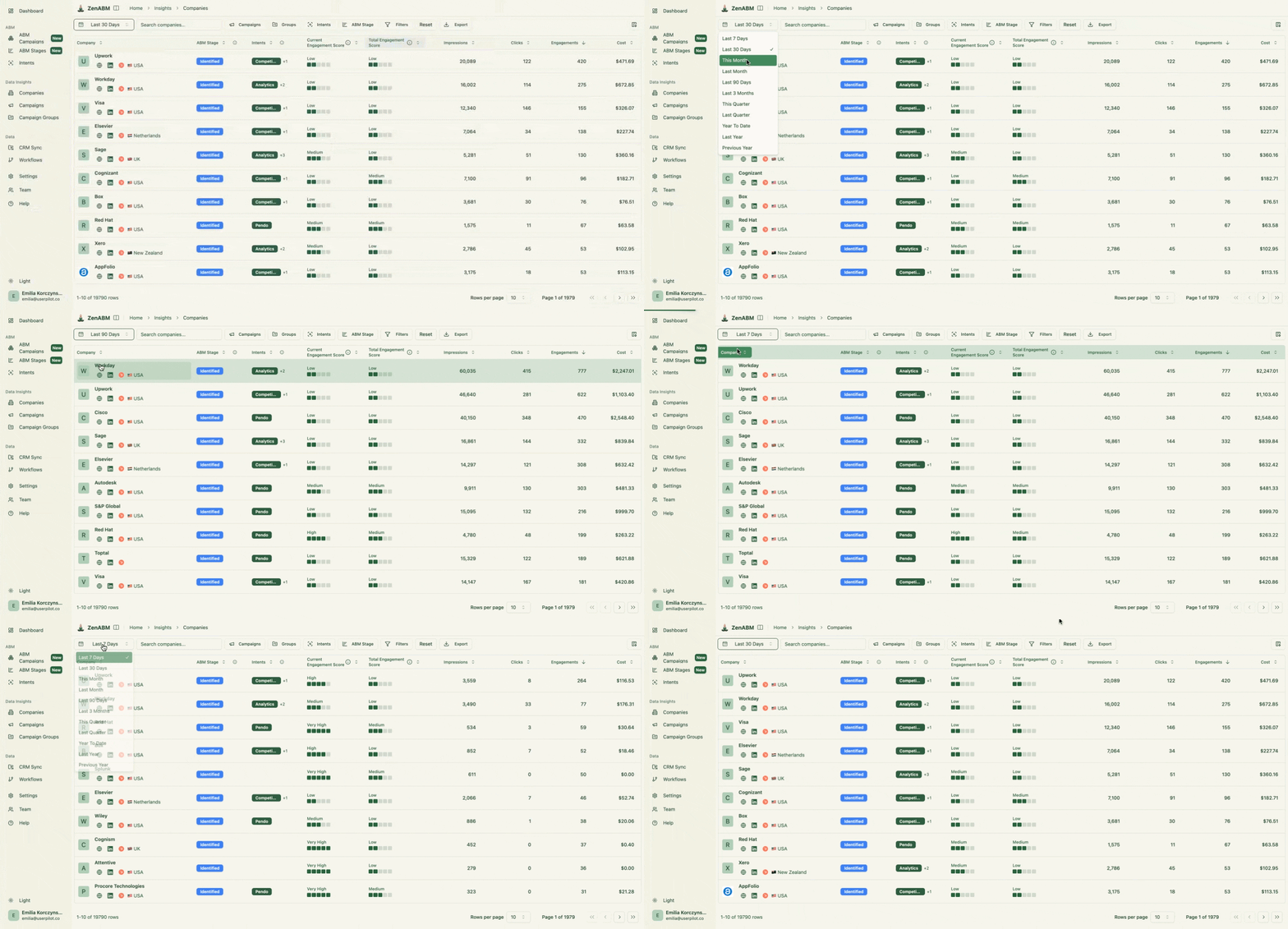
The Companies view brings account details together in one table:
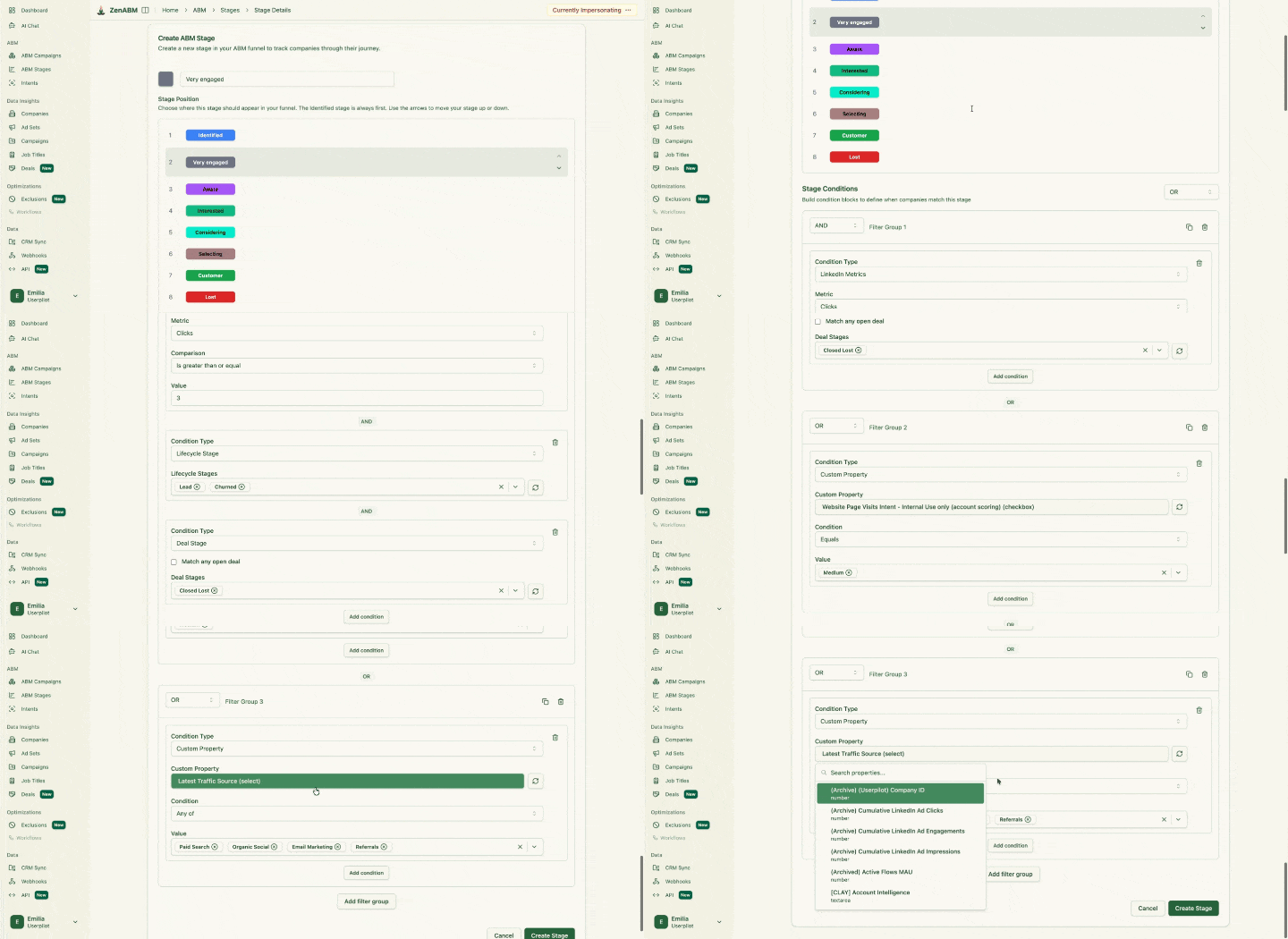
The stage editor shows the ordered stages you define for scoring accounts:
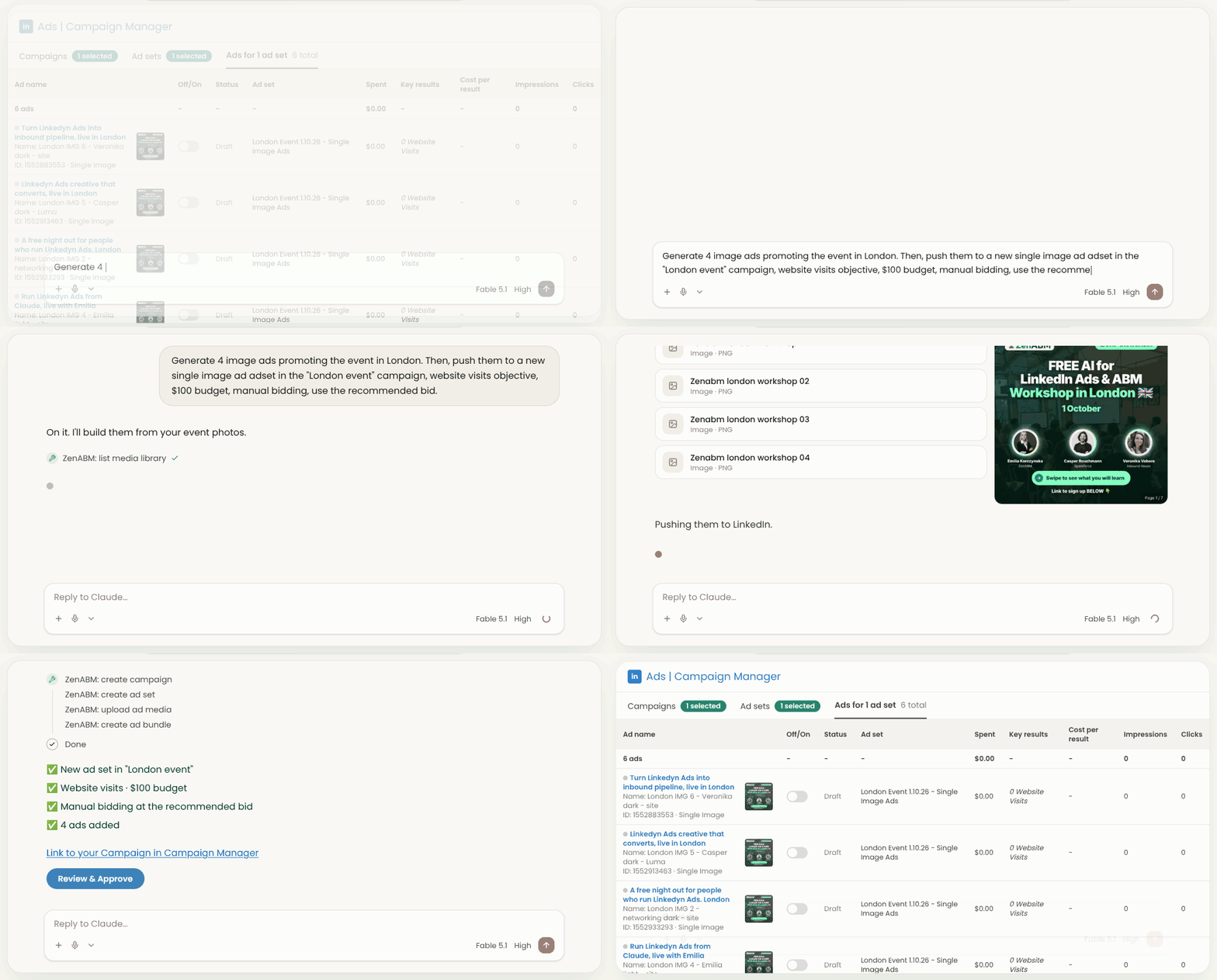
Here, Claude is creating ads and an ad set through the MCP connection:
Keep LinkedIn Company Audiences Current
Build a company audience from account rules and refresh it daily with ZenABM.

Use a company list when you know the accounts you want to reach. The other methods fit smaller jobs, or the stage where you still need to discover which companies belong on the list.
Situation | Method | Why | Watch out for |
|---|---|---|---|
You have a named account list | Upload a company list and add people filters | You control the companies in the source file | Check the Pages LinkedIn matched |
You have a handful of accounts for a quick test | Type company names into the builder (up to 200) | Quick to set up without a file | The audience still needs 300 matched members |
You do not have a list yet | Test industry and size filters | You can discover companies that engage | Much spend lands outside your ICP, so build a list from who converts |
Your audience is too small | Add relevant titles, group accounts or pair with a large passive company | Keeps targeting focused while adding members | Do not add irrelevant accounts just to raise the estimate |
You have a short, specific campaign like a webinar | Add a contact list | Supplements company targeting for a defined group | Email matching and enrichment have their own limits |
Your account status changes often | Use a dynamic company audience | Accounts join or leave as they meet your rules | Check LinkedIn's matched member count before including it |
Predictive and lookalike audiences are a separate topic from company targeting, so I leave them to our guide to lookalike audiences for ABM. If you still need to build the list itself, start with building the account list with Clay.

Before launch, I would check the following:
After launch, check the company and job title breakdowns rather than waiting for the campaign to end, and audit company sizes, titles and wrong matches weekly. Our wider guide to LinkedIn audience targeting for ABM covers how these choices fit together.
My verdict: upload the list, filter it, check the match and keep it fresh. A matched list deserves the same scrutiny as the list you built.
You can type up to 200 company names into the audience builder, or upload a company list of up to 300,000 companies as a matched audience. Either way, the audience needs at least 300 matched members before you can include it as targeting. I would plan well above that minimum and check the estimated audience after applying your role filters.
Yes. You can upload a company list as a matched audience or type company names in the audience builder. I prefer an upload for an ABM list because it holds more companies and is easier to maintain. Whichever method you use, check the matched Pages and the resulting member count before launch.
Upload a company list in Campaign Manager using LinkedIn's template, then include the resulting audience in your ad set. Add the company Page URL to help identify each account, and apply relevant people filters. Before spending, compare the audience breakdown with the source list and exclude Pages that matched incorrectly.
Not reliably. It is a reported count, and it does not prove every row matched the right company Page. In our audience, LinkedIn reported over 90% matched while our check found only about a third to 43% of the intended companies. Compare the companies shown with your source list and investigate similar names and parent companies.
Use a company list when you know which accounts you want to reach. Industry can help you discover accounts, but its labels include businesses that cannot buy from you. In Tim Davidson's 7 month test, the company list generated 3.02x the revenue of industry targeting despite a higher cost per lead.
Yes. ZenABM Audiences can build a company audience from conditions such as account engagement, ABM stage or CRM properties, then refresh it daily. Companies join or leave as they meet the rules. LinkedIn still needs up to 48 hours to build and match the audience, and it must report at least 300 matched members before you can include it as targeting.
About the author

