LinkedIn ads industry targeting was the first thing we set up when we launched our LinkedIn ABM program, and the last thing we thought to question, which cost us real money.
Here is what almost nobody explains before you spend: the industry LinkedIn assigns to a person is not something that person chose.
It is inherited from their employer’s Company Page, where one admin picked a single option from a dropdown, possibly years ago, and LinkedIn’s own documentation says it cannot update those codes on request.
So when you target “Software Development,” you are not targeting people who do software development.
You are targeting everyone who works at companies whose admin once selected that label, which includes the facilities manager and the receptionist.
That gap between what you think you selected and who actually sees the ad is where most industry-targeting budget dies.
This guide covers the real setup, the three settings that undo it, and the exact point at which you step up from industry targeting altogether.
In case you want it short:

Notice where LinkedIn files industry targeting.
Industry lives under company attributes, next to company size and company revenue, not under member attributes like job function or skills.
That placement is the whole mechanic, and it has three consequences worth understanding before you select a single checkbox.
A member’s industry is derived from their current employer’s Company Page.
When an admin created that page, they picked one industry from LinkedIn’s predefined list.
Every single employee now carries that label: the CFO, the SDR, the warehouse staff.
Nobody at the company was consulted, and most employees have no idea what their company is classified as.
Each Company Page holds a single primary industry.
A conglomerate running aviation, healthcare, and energy divisions gets one label, and every employee across all of them inherits it.
The same is true in reverse: a company that sells to twelve verticals is filed under the one thing it does, so industry tells you where a person works and never who the company sells to.
That distinction sounds academic until you realize most B2B targeting logic assumes the opposite.
This is the part I did not expect.
LinkedIn’s V2 industry codes reference states plainly that it is currently unable to accommodate updates to the industry code or the list of industries.

So misclassifications are not temporary bugs waiting on a support ticket.
They are the permanent state of the dataset you are targeting against, and you plan around them, or you pay for them.
LinkedIn’s V2 taxonomy is a tree.
“Technology, Information and Internet” is a parent; “Software Development” and “IT Services and IT Consulting” sit beneath it.
Select the parent industry in Campaign Manager, and you get every child industry underneath it, which is the single most common way a targeting setup balloons beyond what you intended.
Always expand the parent category and select the specific children industries you want.
One correction worth making, because it circulates constantly: LinkedIn’s industry IDs are not modelled like other databases, like the North American Industry Classification System (NAICS) codes.
The reference is explicit that its IDs are LinkedIn-defined and differ from NAICS, with a separate mapping table for the correspondence.
If you are handing a list of NAICS-classified accounts to a media team expecting a clean match into Campaign Manager, that assumption breaks, and you get an audience you didn’t plan.
People conflate these because both exist.
Your personal profile has an industry field, and it influences things like search and content distribution.
Ads targeting is built on the company industry, derived from your employer.
In Campaign Manager, open your campaign, go to Audience, choose Audience attributes, then Company, then Company Industry.
Search or browse the tree, expand any parent industry you are considering, and select the specific children industries rather than the parent.
Then check the audience size that appears on the right.
Two numbers govern whether the setup is viable at all.
LinkedIn will not run a campaign under an audience of 300 members, and in practice, anything close to that floor prices badly because a thin audience means fewer auctions and higher CPMs.

The three settings that widen what you just narrowed:
This lets LinkedIn serve your ads to people it considers similar to your audience, which means the industries you spent an hour selecting become just suggestions.
On a precise ABM audience, it is the fastest way to lose the precision you just built.
Turn it off.

LAN pushes your ads onto third-party apps and sites.
It is on by default; it inflates impressions and flatters your CPM, and the clicks it produces are the ones you least want to pay for on an ABM budget.
Keep it turned off unless you have a specific, tested reason.

Covered above, and it belongs here too because it is a setup mistake, not a strategy one.
Selecting the parent industry includes every child industry.
So, choose the preferred children industries directly instead of selecting the entire parent category.
Here is the thing about all three: LinkedIn hands you an unusually precise targeting toolkit precisely because its delivery algorithm will not find the right people for you.
Meta’s AI, for comparison, is genuinely good at finding buyers inside a huge audience, and it offers far fewer targeting controls for exactly that reason.
LinkedIn is the opposite trade.
Handing your precision back to its algorithm through Expansion and LAN undoes all your industry targeting efforts.
Ask anyone who runs LinkedIn ads for a living what they think of the industry segments, and you get a version of the same answer.
Philip Ilic, a LinkedIn ads specialist, is direct about it:
“LinkedIn’s native industry targeting is a little messy. You get random segments bundled together, and it’s nearly impossible to isolate something like B2B SaaS properly.” Philip Ilic, LinkedIn ads specialist, on LinkedIn
That B2B SaaS example is the one that catches most ABM programs, because “B2B SaaS” is how half of us describe our ICP, and LinkedIn has no such industry.
The closest options bundle software companies together with IT consultancies, agencies, and hardware vendors, which is not one market and does not share one message.
You cannot select your way to precision when the category you need does not exist in the taxonomy.
Stack that on the mechanics from the first section, and the failure modes are predictable:
| The failure | Why it happens | What it costs you |
|---|---|---|
| The conglomerate spill | One label covers every division and every employee of a huge company. | You pay to reach thousands of people at an account whose relevant division is 2% of headcount. |
| The misfiled account | An admin picked the wrong or a lazy category, and LinkedIn will not update it. | Real ICP accounts are invisible to your campaign, permanently, and you never see the miss. |
| The missing category | Your ICP (B2B SaaS, for instance) is not a LinkedIn industry. | You over-select adjacent industries and dilute the audience with companies that will never buy. |
| The parent sprawl | Selecting a parent includes every child underneath it. | Audience size looks healthy while relevance quietly collapses. |
| Where they work, not what they need | Industry describes the employer’s sector, not a buying trigger. | Perfect delivery to companies with no reason to buy right now. |

Here is the reframe that fixed this for us.
Industry is a discovery layer: it helps you find candidate accounts.
It is not a targeting layer: it should not be the thing deciding who sees the ad.
Treat it as the wide end of the funnel above, then narrow with attributes that describe the company rather than its sector.
Company size does more work than industry in most B2B ICPs, because a 40-person software company and a 40,000-person software company are not the same buyer in any respect that matters.
Pair it with industry first, before anything else.
Company revenue matters when your ICP is really about budget rather than headcount, which is common for anything priced off seats or usage.

Company growth rate is the most underused of the three and the closest thing in the native toolkit to a buying trigger, because a company growing headcount fast has problems it did not have last year.
Industry tells you what a company does; growth rate hints at whether it is about to need you.


The person layer is where industry targeting either becomes useful or falls apart, and titles are a trap.
Targeting a single title reaches a far wider set than the one you picked, because LinkedIn maps your selection onto a much wider band of related titles you never reviewed.
Job function paired with seniority is more stable, and it is how you stop paying to reach the wrong half of an account you correctly identified.

And once your campaigns run, ZenABM’s job title insights close the loop on this layer: they show which personas actually engaged with each campaign, so you can see whether your function and seniority filters held or whether the spend bled into adjacent roles.


This is the move, and it is the one thing I would change about how we started. Industry targeting answers “who might my buyers be.”
Once you can answer “who exactly are my buyers,” the industry has done its job and should get out of the way.
Ilic’s whole argument is that you can upload a list of companies into Campaign Manager and show ads only to those exact companies, which he considers wildly underrated, and pairing it with an enrichment tool lets you add layers industry cannot express: recently funded, actively hiring SDRs, running three or more sales reps.

Read related: LinkedIn Matched Audiences: How to Use Them for Your ABM Campaigns
The trigger I use is simple: the moment you can name the accounts, stop targeting the category.
Concretely, that means when your target account list exceeds roughly 300 companies (enough to clear the audience floor once you layer function and seniority), upload it as a matched audience and let industry targeting become the thing that feeds the list rather than the thing that runs the campaign.
Both layers can run at once, and should.
The structure that works:
| Layer | Targeting | Job it does |
|---|---|---|
| Prospecting | Industry plus company size, revenue, or growth rate, plus job function and seniority. | Finds accounts you did not know about and surfaces which companies engage, feeding the list. |
| Core ABM | Matched audience of your named target accounts, plus function and seniority. | Reaches the buying committee at accounts you actually chose, with no sector guesswork. |
| Retargeting | Engaged companies and site visitors from the two layers above. | Converts the accounts that already raised a hand. |
The prospecting layer is where industry earns its keep permanently.
It keeps discovering accounts, and the accounts that engage get promoted to the list.
That is the loop, and it is why I said industry targeting is a discovery layer rather than something to delete.
The engine of that loop is knowing which companies engaged with the prospecting layer, and that is exactly what ZenABM’s companies view gives you: every account your industry campaigns touched, ranked by engagement, ready to be promoted into the matched audience.

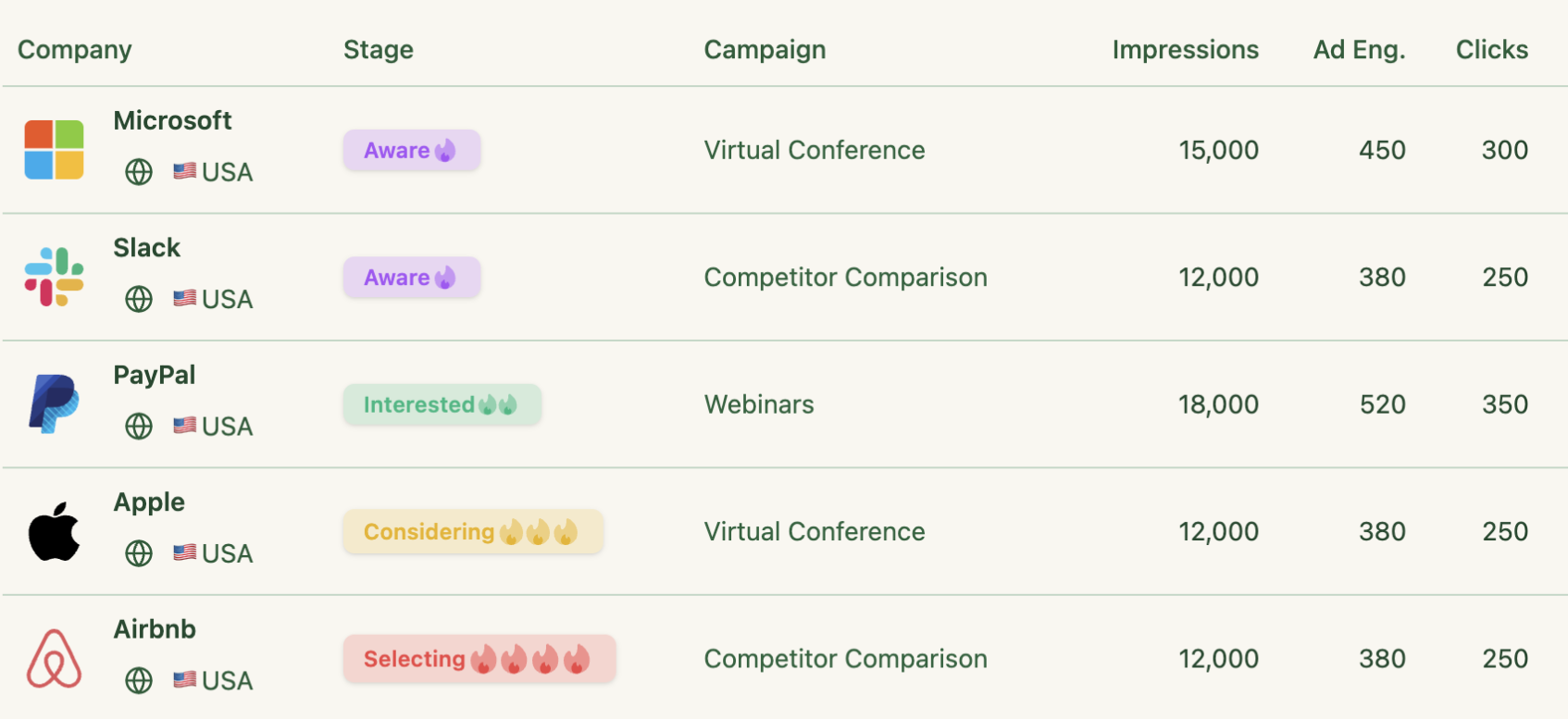
Everything above is a hypothesis until you check who the campaign actually reached, and this is the step Campaign Manager cannot give you, because it breaks down company-level engagement at the whole ad account level and not the campaign level.
That is where ZenABM helps.
It pulls company-level ad engagement straight from the LinkedIn Ads API, so you get impressions, clicks, and engagements per company, per campaign, which turns an industry selection from a guess into something with a scorecard.

And every one of those capabilities is available in your terminal too, because ZenABM ships an MCP server that connects the whole dataset to Claude Code, Codex, ChatGPT, or Cursor.
MCP (Model Context Protocol) is the open standard that lets an AI agent call external services and pull live data, and the connection is a one-time, five-minute step: point your client at the ZenABM endpoint with your API token as a Bearer header (OAuth works too), then run /init so the agent writes the account context it needs.
{
  "mcpServers": {
    "zenabm": {
      "url": "https://app.zenabm.com/api/mcp",
      "headers": { "Authorization": "Bearer YOUR_ZENABM_API_TOKEN" }
    }
  }
}
Once connected, the server exposes 60+ tools across five groups, so the agent can answer almost any question about your account on its own:
| Tool group | What the agent uses it for | Example tools |
|---|---|---|
| List and search | Find companies, campaigns, ad sets, creatives, CRM deals, contacts, job titles, intent themes, and spend. | list_companies, list_campaigns, list_deals |
| Company intelligence | Read company-level engagement, ABM stage history, activity logs, and timelines for any account. | get_company_overview, get_company_timeline |
| LinkedIn ads performance | Pull CTR, CPC, eCTR, eCPC, spend, and engagement across campaigns, formats, and job titles. | get_campaign_overview, get_creative_performance |
| ABM and revenue | Read program pipeline, ROAS, stage movement, and influenced deals. | get_abm_campaign_overview, get_abm_stage_history |
| Safe write actions | Pause or activate ads, ad sets, and campaigns, each gated behind an explicit confirmation. | update_ad_status, update_ad_set_or_campaign_status |
Everything starting with get or list only reads data and changes nothing; the two write tools are the only ones that touch ad serving state, and the agent proposes each change and waits for your approval before executing.
The full reference, including the OAuth flow and every tool, lives in the ZenABM MCP docs.

The prompt to run after 30 days of an industry-targeted campaign in your terminal using the ZenABM MCP server:
List every company that engaged with my LinkedIn ads in the last 30 days, with impressions, clicks, eCTR, and estimated spend for each. Group them by whether they match my ICP (describe yours: industry, employee range, buying personas). Show me the share of impressions and spend that went to non-ICP companies, and list the top 20 ICP-fit companies that are not yet on my target account list.
I ran a similar prompt for our program at ZenABM:


That output does two jobs at once.
The non-ICP share is your industry-targeting waste number, and the second list is your promotion queue for the matched audience.
If the waste share is high, your industry selection is too broad, or the category is not isolating what you need, and no amount of creative fixes it.
For the worst offenders (the non-ICP companies absorbing real spend), ZenABM lets you exclude them from your campaigns in one click, so the fix ships the moment the diagnosis lands.

Reaching the right company and the wrong people inside it is the specific failure the inheritance mechanic causes, so it needs its own check.
Job title insights show which personas engaged per campaign, which tells you whether your function and seniority filters are holding or whether the conglomerate spill is real in your account.


Audience penetration is the test of whether your industry selection and your budget are compatible.
Kathleen Bunshoft, reviewing the best LinkedIn ads guidance of the month, highlighted the goal of getting in front of enough of your buyers enough times, pointing at Tim Davidson’s work on pushing audience penetration past 40%.
If you have selected six industries and are penetrating 4% of the resulting audience, the selection is too wide for the money, and the fix is a narrower audience rather than better creative.

Two of these jobs are packaged, so you do not have to do the math or the audit by hand.
Both are free Claude skills in the ZenABM LinkedIn ABM skills repo, and both read your real numbers through the ZenABM MCP server.
/abm-strategy-planning answers the question this whole article circles: is the audience you just selected compatible with the budget you have?
You give it your revenue goal, average deal size, planned budget, site conversion rate, and qualification and close rates, and it pulls your live CPM, cost per landing-page click, and eCTR to work backwards to how many accounts and members you need to reach, how many ads your budget supports, and how long the goal takes.
Run it before you finalize an industry selection, because it is the fastest way to learn that six industries and $2k a month cannot coexist.
/linkedin-abm-audit is the 30-day diagnostic that catches targeting drift: it grades formats against benchmarks, flags decaying ads, and surfaces impression-hog accounts, which on an industry-targeted campaign is usually a conglomerate eating your delivery.
In Claude Code, two commands install all four skills in the repo:
/plugin marketplace add ZENABM/linkedin-abm-skills
/plugin install linkedin-abm-skills@zenabm
On Claude Desktop or the web app, download the zips from the releases page and upload them under Customize, then Skills.
Everything above, compressed into the order I would actually do it:
Industry targeting is the cheapest way to find out who might buy from you, and the most expensive way to keep talking to them.
Use it for the first job, graduate off it for the second, and check the company-level data to know when you have crossed from one to the other.
Steps 7 and 8 in the setup checklist are the ones you cannot do from Campaign Manager alone, and they are the two that make the rest of the checklist pay off, which is where ZenABM earns its place in this workflow: it names the companies behind every campaign, scores and intent-tags them, syncs them to your CRM, and hands you the exclusion and the promotion queue in the same view.
The 37-day trial is deliberately longer than the 30-day verification loop in step 7, so you can run the whole cycle on your own data (setup, first campaigns, the ICP-fit check, the graduation call) before you pay anything.
You can also book a demo with us to know more!
It inherits it from the member’s current employer’s Company Page, where an admin selected one industry from LinkedIn’s predefined list. It is a company attribute, not something the member chose, so every employee of that company carries the same label regardless of their actual role or department. Your personal profile industry field is a separate, member-level attribute that influences things like search, and it is not what ads targeting filters on.
No. Each Company Page carries a single primary industry, which is why conglomerates operating across aviation, healthcare, and energy all sit under one label. LinkedIn’s V2 industry codes reference also states it is currently unable to accommodate updates to industry codes, so misclassified companies stay misclassified. Plan around it by layering company size, revenue, and growth rate, then graduating to list-based targeting once you know the accounts.
No. LinkedIn’s industry IDs are LinkedIn-defined and differ from NAICS codes, though LinkedIn publishes a separate table mapping its codes to NAICS. The taxonomy is hierarchical, so parent categories contain child industries and selecting a parent includes everything beneath it. If you are matching a NAICS-classified account list into Campaign Manager, use the mapping table rather than assuming the categories line up.
Both, for different jobs. Use industry (plus company size and function) as a prospecting layer to discover accounts you did not know about, and run your named target accounts as a matched audience for the core ABM layer. The trigger to graduate is simple: once you can name the accounts, stop targeting the category. A company list plus ICP filters is sharper than any industry selection and stays accurate as people change jobs.
Usually one of four causes: you selected a parent category and inherited all its children, Audience Expansion is on and LinkedIn is serving lookalikes, the Audience Network is on and serving off-platform, or the companies are genuinely misfiled by their own admins. Check company-level engagement data to see which companies your ads actually reached, since Campaign Manager reports audience sizes without naming the companies behind them.
Bigger than LinkedIn’s 300-member floor, and small enough that your budget can penetrate it meaningfully; practitioners target 40% or more audience penetration rather than maximum reach. The floor is a technical minimum, not a goal. If you have selected several industries and are reaching a few percent of the resulting audience, the audience is too wide for the money, and narrowing it beats raising the budget.
Want to see which companies your industry targeting is actually reaching before you spend another month on it? A free 37-day ZenABM trial pulls company-level engagement per campaign straight from the LinkedIn Ads API, or book a demo and I will run the ICP-fit check on your own account with you.