

©2026 ZenABM - All Rights Reserved.

The LinkedIn Ads minimum audience size is 300 members per ad set, and that one number breaks more ABM programs than any creative or bidding mistake I see.

You build a tight list of 40 dream accounts, layer on the two job titles you actually care about, add the location, and Campaign Manager throws back a forecast under 300 with a message that your audience is too small to run.
So you widen it, and now you are paying to reach people who were never on the list.
If you want the full program context first, our ultimate guide to running ABM on LinkedIn covers the whole build; this piece is the narrow, tactical fix for the floor.
Here is the position I will defend for the rest of this article: past a certain point, the 300 floor is not a targeting problem you should keep hacking with narrower audiences.
It is a sign you are segmenting at the wrong layer.
By the end, you will know:
The short version, with the numbers you need and where ZenABM fits:
Let me get the mechanics exact, as “the minimum to run an ad set” and “the minimum LinkedIn recommends” are very different numbers.
The hard rule, straight from LinkedIn’s own docs: the minimum audience size required for an ad set is 300 member accounts. Below that, the campaign will not serve.
The same page recommends a minimum of 50,000 to drive results, and 300,000 for Sponsored Content, which is guidance for broad demand-gen, not ABM.
For an account-based program, you are deliberately running small, so the 50,000 recommendation is noise. Treat 300 as the floor you must clear and nothing more.

Two settings shrink your number before you even see the forecast.
Here is the minimum for every audience type you might build, so you can check the right number before you spend a dollar:
Audience type | Minimum to run | What the 300 resolves against | Practical note |
|---|---|---|---|
Attribute targeting (industry, title, seniority) | 300 members | LinkedIn members matching your filters plus the required location | Narrow titles on a small account set is where most ABM audiences die. |
Company list (Matched Audience) | 300 matched members | Members who work at the matched companies, after you layer targeting | Upload up to 300,000 companies; match rates run 90% to 98% with name plus domain. |
Contact list (Matched Audience) | 300 matched members | Members matched from your email or LinkedIn URL rows | List must be 300 to 300,000 rows; match rates are lower and decay fast. |
Website retargeting | 300 members | Insight Tag visitors who match to LinkedIn members | You accumulate this over time; a low-traffic page may never reach 300. |
Engagement retargeting (video, form, page, ad) | 300 members | Members who took the engagement action in the lookback window | Pools build from live spend, so cold accounts start at zero. |
Predictive audience | Source of 300+ | A contact list (300+ rows), conversion, or Lead Gen Form with 300+ members | You can combine multiple sources to reach the 300 seed. |
One more thing to check before you build: LinkedIn retired lookalike audiences in early 2024 and replaced them with predictive audiences, which still need that 300+ seed.
If an old playbook tells you to spin up a lookalike from a 50-account list, it will not work anymore.
The math is unforgiving, so run it before you build anything.
A target account with 350 total employees might only have 4 or 5 people in the function you sell to, and only some of those are on LinkedIn and active.
Stack 40 of those accounts, filter to two senior titles, and add a single country, and you can land at 200 matched members from a list that felt like a real audience.
The buying committee is real (Gartner puts the average B2B buying group at 11 people), but LinkedIn only counts the ones your filter actually captured.
Contact lists make it worse, and this is the part people miss. Tim Davidson, founder of B2B Rizz, ran an audit of a company doing full ABM across 351 accounts entirely on uploaded contact lists, and the issue was not the account selection; it was the match rates:
“the big reason I usually don’t recommend contact lists is because of the match rates” Tim Davidson, Founder, B2B Rizz, on LinkedIn

His audited list matched at around 70% to 85%, which sounds fine until you remember the list had not been refreshed in six months and people change jobs constantly.
A contact list is a snapshot that decays; a 400-row list can quietly fall under the 300-matched floor as your prospects move companies.
So here is the check to run before you commit to spending:
This is the first fix I reach for, and the one that recovers the most audience for the least precision lost.
Instead of building attribute targeting on a handful of titles, or uploading a contact list, upload a company list and layer function and seniority on top.
You keep account precision (only your target companies see the ad) while widening the persona enough to clear 300.
Before you build, here is where the matched audiences live in Campaign Manager:

The steps, click by click:
This is where Tim Davidson and other operators land: keep the account list as the spine, layer the persona on top. It is also what stops the classic mistake of running “full contact list” ABM that silently rots.
Maximilian Herczeg, an ex-LinkedIn employee and an ads specialist, is blunt about why the platform rewards this precision when you use it right:
“LinkedIn gives you amazing targeting precision. No other platform comes close.” Maximilian Herczeg, LinkedIn Ads consultant, on LinkedIn
Herczeg’s warning in the same post is the other half of this: he sees audiences “artificially inflated because LinkedIn recommended it,” since the platform pushes you toward 50,000+.
Do not take that bait to clear the floor. Loosen the persona, not the account list, and stop the moment you clear 300 with room to spare.
For very tight lists, skip the upload entirely.
AJ Wilcox of B2Linked, on episode 56 of The LinkedIn Ads Show, makes the case that for lists under about 200 companies you should type the company names directly into the campaign targeting instead of uploading a file.
Manual entry gives you a 100% match rate because LinkedIn confirms each company as you select it, so there is no resolution gap to eat into your 300. It also activates immediately, with none of the 48 to 72 hour processing wait that an uploaded list needs.
The tradeoff Wilcox talks about: it is tedious. But he points out that once you have entered 200 of anything, you save it as an audience and reuse it across every future campaign, so the pain is a one-time cost.
The workflow:
Use this when your list is small enough that a match-rate haircut would push you under the floor.
A 60-account list at a 90% match rate loses 6 companies you cannot afford to lose; typing them in loses none.
When individual accounts are too small to ever hit 300 on their own, stop trying to run them individually.
This is the difference between 1:1 ABM (one campaign per account), 1:few (a small cluster of similar accounts per campaign), and 1:many (one campaign across hundreds).
The floor is what pushes most teams from 1:1 to 1:few, and that is usually the right move.
Wilcox recommends grouping related accounts into a single campaign that clears 300 collectively, and grouping them by a dimension that would change your message or bid: large versus enterprise, warm versus cold, or by industry.
The rule is to keep accounts together that you would speak to the same way, so the cluster still supports one relevant creative.
How to structure it without over-segmenting:
If you genuinely need funnel progression but a retargeting pool is too small to build, Wilcox suggests flighting instead.
run one message to the cluster for a set period, then swap to the next message on a schedule, rather than relying on a retargeting audience that will not reach 300.
Here is the reframe that changed how I run this.
Every workaround above is you fighting to make the targeting layer as precise as your account list. But you do not actually need the targeting to be surgical; you need to know, per account, who saw the ads and who engaged.
That is a measurement job, and once you solve it there, you can run a deliberately broad audience that clears 300 easily and still report and act at the single-account level.
LinkedIn gives you a start on this natively. In Campaign Manager, a Companies tab in reporting shows which companies your campaign reached and engaged, so a broad audience is not a black box.

The native view is limited though. It reports at the ad-account level, does not tie back to specific campaigns or creatives or to your CRM pipeline, and does not persist an account-level score you can act on.
This is exactly where ZenABM’s company-level engagement tracking does the job the targeting layer cannot. It pulls impressions, engagements, and clicks per company straight from the LinkedIn Ads API, per campaign, per ad, across 7, 30, or 90-day windows, so a broad audience still resolves down to “these 12 of your 40 target accounts engaged this month.”


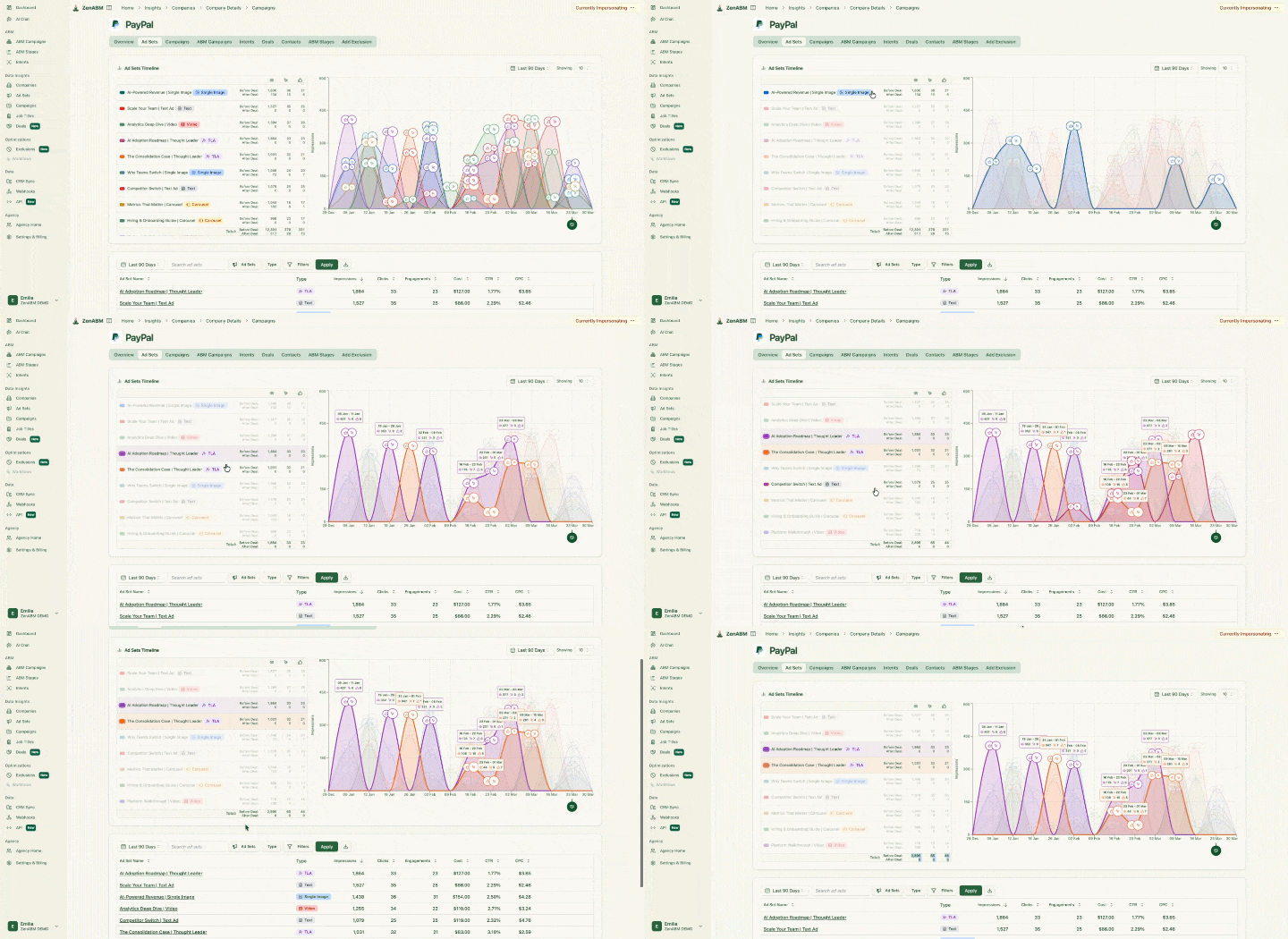
You no longer need to split into 20 tiny campaigns to know which accounts responded, because the reporting already separates them. You run one clean audience that clears the floor, and the account-level truth comes from the data layer.
Widening the persona to clear 300 means some off-ICP people get in. You handle that with exclusions and impression capping, not by narrowing back down.
ZenABM lets you exclude companies straight from the interface, and LinkedIn supports company-level impression capping so a broad audience does not burn budget over-serving a handful of large accounts.


Once measurement is per-account, you can act on it. Set ABM funnel stages in ZenABM with your own thresholds, built from any mix of ad engagement, form fills, and CRM deal stages, so an account that hits, say, 5 or more engagements in 30 days moves to an “Engaged” stage and fires a task for the BDR.

This is the precision you were chasing with narrow targeting, delivered where it belongs. A broad audience does the reaching; the stage logic does the routing.
If you connect Claude Code or ChatGPT to the ZenABM MCP server, you can query all of this without opening Campaign Manager. It exposes 60+ tools across list and search, company intelligence, LinkedIn ads performance, ABM and revenue, and a few confirmation-gated write actions, over an endpoint (https://app.zenabm.com/api/mcp, Bearer-token or OAuth auth, with an /init command that writes a CLAUDE.md so your agent knows the tools).

Zena, the built-in chatbot, does the same over chat.

A prompt I actually use after a launch:
Pull my last 30 days of LinkedIn ad engagement at the company level. List every target account that engaged, grouped by total engagements, and flag any account in my list that got fewer than 100 impressions so I can see who the broad audience is under-serving.
That answers the question the 300 floor made you afraid of: if I widen the audience, do my real accounts still get reached. You check it in one prompt instead of guessing.
Retargeting is where the floor hits hardest, because you cannot upload your way past it.
Video-view, form-open, page-visit, and ad-engagement pools all start at zero and only build from live spend, and each needs 300 members before it will serve.
On a small ABM program that can take weeks.
A few ways to handle it:


ZenABM’s approach here is to identify the companies engaging from high-intent pages and feed them into retargeting, so your retargeting pool is built from verified first-party intent signals rather than a thin, slow-building native pool.
It does not eliminate the 300 floor, but it gives you more qualified members to clear it with.
Read a related resource: LinkedIn retargeting audiences: how to use them for ABM
These are the patterns I see wrecking small-audience ABM, and each has a direct fix.
The 300 floor is real and you cannot argue with it, but you also should not spend your energy building ever-narrower audiences to squeeze under it.
Clear the floor the clean way: a company list layered with function and seniority, or manual entry for the tiniest lists, or 1:few clusters when accounts are too small alone.
Then stop treating targeting as the place precision lives.
Run the audience broad enough to serve, and pull your account-level truth from company-level engagement data, exclusions, and stage thresholds.
That is how a program stops stalling at “audience too small” and starts reporting on the accounts that actually matter.
ZenABM can help you with all this and more.
Try ZenABM’s 37-day free trial or book a demo to know more!
The minimum audience size to run a LinkedIn ad set is 300 member accounts, per LinkedIn’s own documentation. Below 300, the campaign will not serve and Campaign Manager flags the audience as too small. LinkedIn separately recommends 50,000+ members to drive results for prospecting, but that is guidance for broad demand-gen, not a requirement, and it does not apply to tight account-based programs where you run small on purpose.
LinkedIn enforces the 300 member floor to protect member privacy and keep delivery statistically viable. If audiences could be tiny, advertisers could infer or target individuals, and the auction could not optimize with so few people. The same logic is why Matched Audiences must resolve to 300 matched members rather than 300 uploaded rows, and why website and engagement retargeting pools have to accumulate to 300 before they can serve.
Upload a company list, then layer job function and seniority (not narrow titles) to widen the persona while keeping account precision, which is the fastest way to clear 300. For very small lists, type company names in manually for a 100% match rate. If accounts are individually too small, group similar ones into 1:few clusters that clear 300 together. Then use company-level engagement tracking to report at the single-account level despite the broader audience.
A Matched Audience must resolve to 300 matched members before it can serve, whether it is a company list, contact list, or retargeting audience. You can upload up to 300,000 companies (company list) or 300 to 300,000 rows (contact list), but the 300 counts matched members after LinkedIn resolves the file, not the rows you uploaded. Include company domain or LinkedIn Page URL to hit 90% to 98% match rates and avoid falling short.
For ABM, aim to clear 300 with modest headroom rather than chasing LinkedIn’s 50,000 recommendation, because account precision matters more than raw scale. Many operators run 1:few clusters in the low thousands of members, large enough to serve with frequency and small enough to stay on-ICP. In the ZenABM 2026 benchmark of 211 companies, 161,256 ads, and $5.5M in spend, the gap between the median 1.62x ROAS and top performers is largely an audience-precision problem, so tighter beats broader as long as you clear the floor.
Yes. Location is a required targeting facet on every LinkedIn campaign, so it is ANDed with the rest of your targeting and reduces your final audience size. A global account list that clears 300 can drop below it the moment you restrict to one country or region. Always add your location first, then read the forecasted results, so the 300 you are checking is the number you will actually run against.
