Black Friday: up to 30% off ZenABM 💥Get up to 30% off ZenABM with our massive BlackFriday sale! 💥 - only 27-30 November!Get the deal12 Days of ABM Christmas · Report on your 2026 LinkedIn ABM & plan 2027 · Free webinars, 26 Nov – 9 DecSave your seat


Emilia Korczynska is Head of Marketing and co-founder at ZenABM. Before that she was VP of Marketing at Userpilot for nearly 7 years, where she ran a large ABM program primarily on LinkedIn ads.

The best ABM tools for account-based marketing fit your channels, team and budget. ABM software and ABM platforms help you target companies and track their progress, but they do different jobs.
If LinkedIn is your main channel, you also need to know which companies respond to your ads. ZenABM shows which companies engage with your ads and connects that activity to account stages and pipeline.
I compared the tools on channel fit, team needs and total cost. ZenABM is my own product, so the order puts its LinkedIn campaign capabilities first for readers running ABM on LinkedIn.
The best choice depends on whether you need to run ads, find buying signals, personalise pages or measure revenue.
The groups below match each tool to the job it does, from LinkedIn campaign management to display, signals and attribution:

Compare the tools on the work they do, their G2 ratings and what you can expect to pay:
Tool and focus | G2 rating | LinkedIn campaign management | Signals and scoring | Revenue attribution | AI and MCP | CRM sync | Entry price | Best for |
|---|---|---|---|---|---|---|---|---|
ZenABM: LinkedIn ABM | Creates and manages campaigns | Ad-based intent, scores and stages | Deal and multi-channel touchpoints | Zena and MCP read data and change campaigns | HubSpot, Salesforce, Attio | Free plan; paid from $59/month | LinkedIn-first ABM, from campaign build to pipeline | |
Demandbase: enterprise suite | Creates campaigns and syncs audiences | First- and third-party intent, predictive scoring | Multi-channel attribution | Mojo and read-oriented MCP | Salesforce, HubSpot, Marketo | Custom quote | Enterprise display at scale | |
6sense: enterprise suite | Launches campaigns and syncs segments | Intent, predictive scores and buying stages | Sourced and influenced pipeline | RevvyAI and read-oriented MCP | Salesforce, HubSpot, Marketo | Custom quote | Enterprise display and a full suite | |
AdRoll ABM: account-based ads | LinkedIn Connector on paid packages | Bombora intent and fit grades | Campaign-to-pipeline measurement | AI Assistant | Salesforce, HubSpot, Marketo | Retargeting has no platform fee | Account-based display and retargeting | |
Influ2: named-person ads | Runs ads across channels | Contact-level signals | Influenced opportunities | MCP accesses signals and programmes | Salesforce, HubSpot, Marketo | Custom quote | Reaching named people | |
UserGems: champion signals | Audience sync from Advanced | Job changes and account scoring | Sourced, assisted and suspected pipeline | Gem-E agents; MCP above Core | Salesforce, HubSpot | Core: $40,000/year | Champion tracking | |
Common Room: buyer signals | Audience sync through Zapier | Community, product and intent signals | Community reporting | MCP reads and updates records | Salesforce, HubSpot | Essential: $2,500/month | Community and product signals | |
Dreamdata: attribution | Syncs audiences; does not manage campaigns | Engagement and third-party intent | Multi-touch models | MCP reads and saves reports and audiences | Salesforce, HubSpot, Dynamics | Free Starter plan | Multi-channel revenue attribution | |
HockeyStack: attribution | Syncs audiences; does not manage campaigns | Scoring and optional intent data | Includes pre-click LinkedIn impressions | MCP creates reports and dashboards | Salesforce, HubSpot | Custom quote | Full-funnel account journeys | |
Userled: personalisation | Creates and runs campaigns | Engagement alerts | Campaign-to-pipeline measurement | AI content generation | Salesforce, HubSpot, Marketo | Ads from $2,000/month | Personalised ads and microsites |
ZenABM is built for teams that want to run ABM campaigns on LinkedIn and see how target companies respond.
When I was VP of Marketing at Userpilot, I struggled to run ABM on LinkedIn. My husband watched it up close and built ZenABM to fix it.
I might be a bit biased as a co-founder, but I also know first-hand what it is like to struggle to find the right tool.
Build and manage campaigns with AI. You can describe a campaign to Zena, ZenABM's AI agent, or use the MCP server from Claude. Both can create campaigns, ad sets and ads after you approve the changes.
Claude can create LinkedIn ads through the ZenABM MCP, as this recording shows:
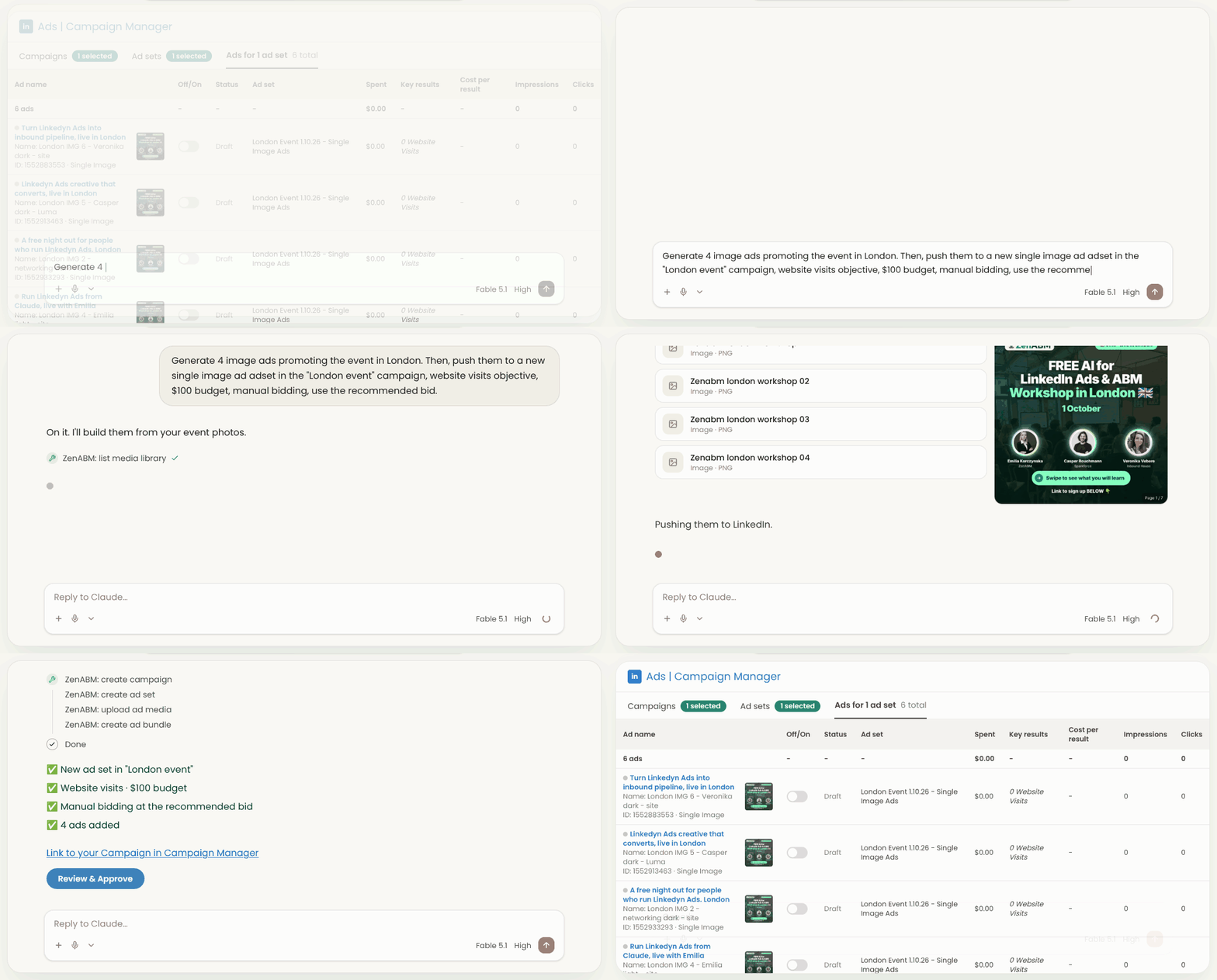
The MCP has 129 tools and 45 expert skills. Of those tools, 36 can change the ad account, and MCP access starts on Growth.
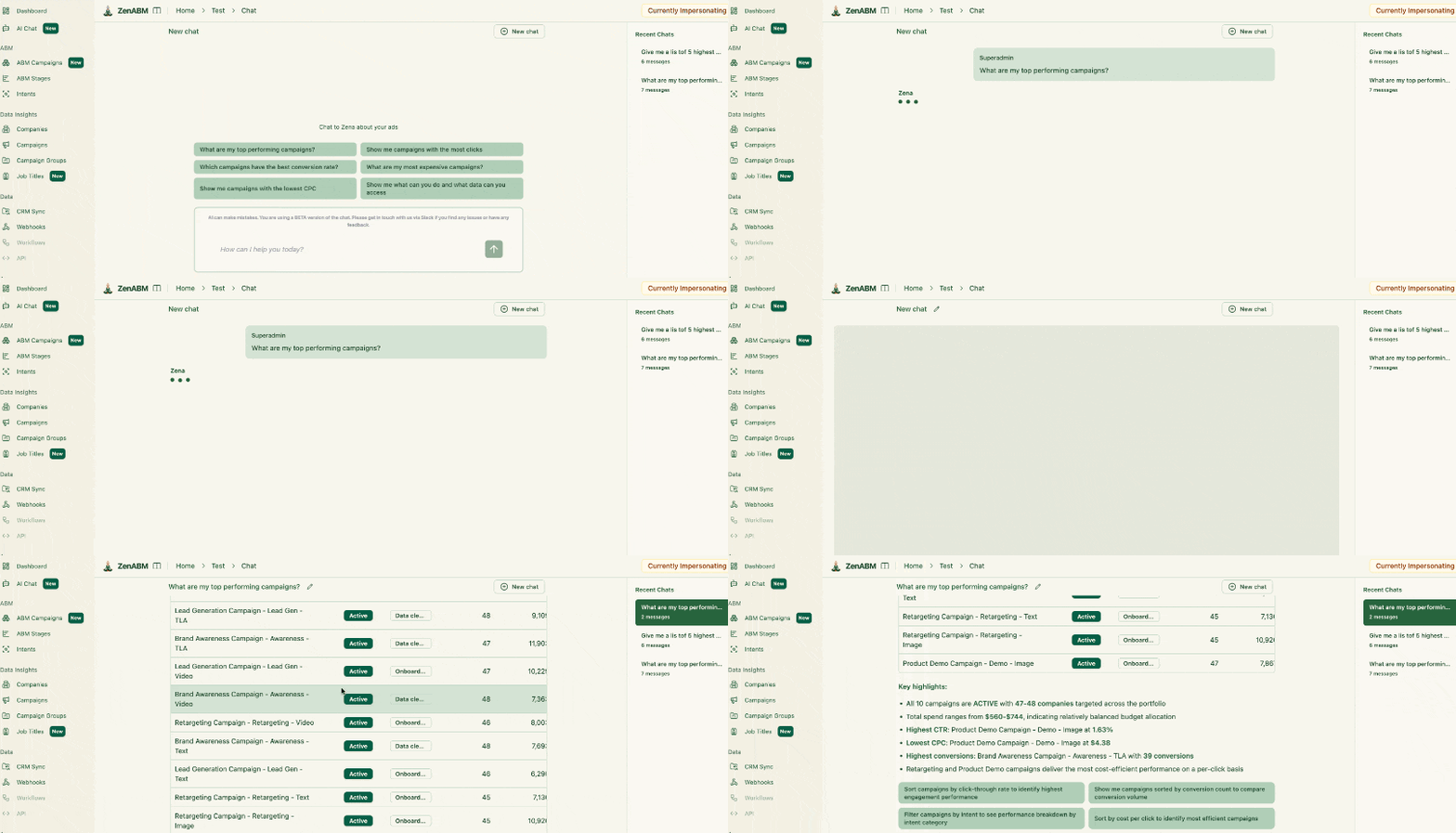
Ask questions about your campaigns. Zena can answer questions about your LinkedIn performance, build reports and propose changes to bids or budgets.
The Zena chat below shows questions about LinkedIn campaign performance:
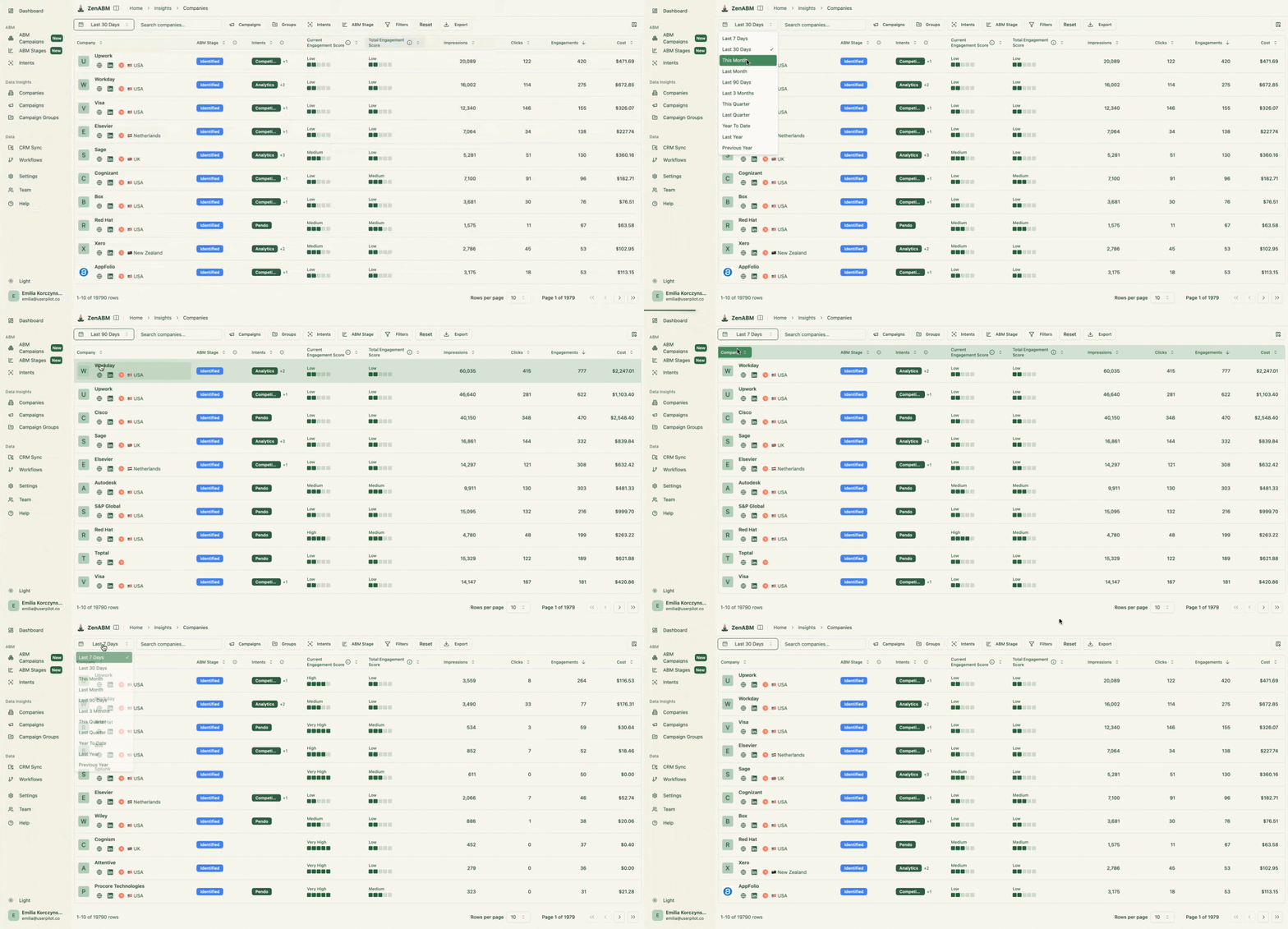
See company engagement. ZenABM uses LinkedIn's official API to show company-level ad activity, without cookies or IP matching. LinkedIn hides company data below its privacy threshold of three interactions in a selected period.
The Companies table shows stages, engagement scores, impressions, clicks and cost for target accounts:
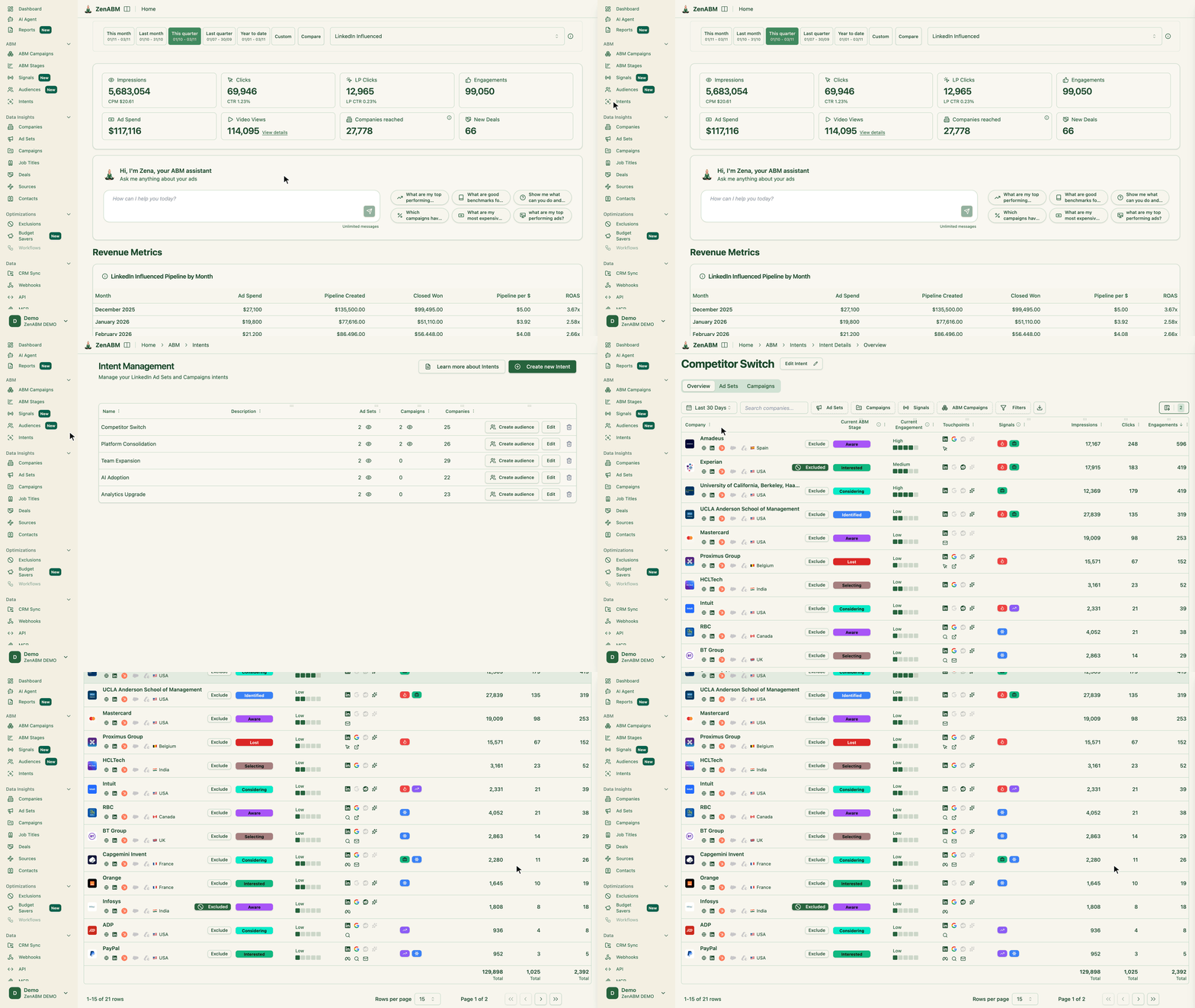
Find intent. You attach a topic to a campaign or ad set, and ZenABM assigns an intent signal when a company clicks an associated ad. Sales can use that topic to make its follow-up relevant.
The Intents view shows a selected intent and the companies associated with it:
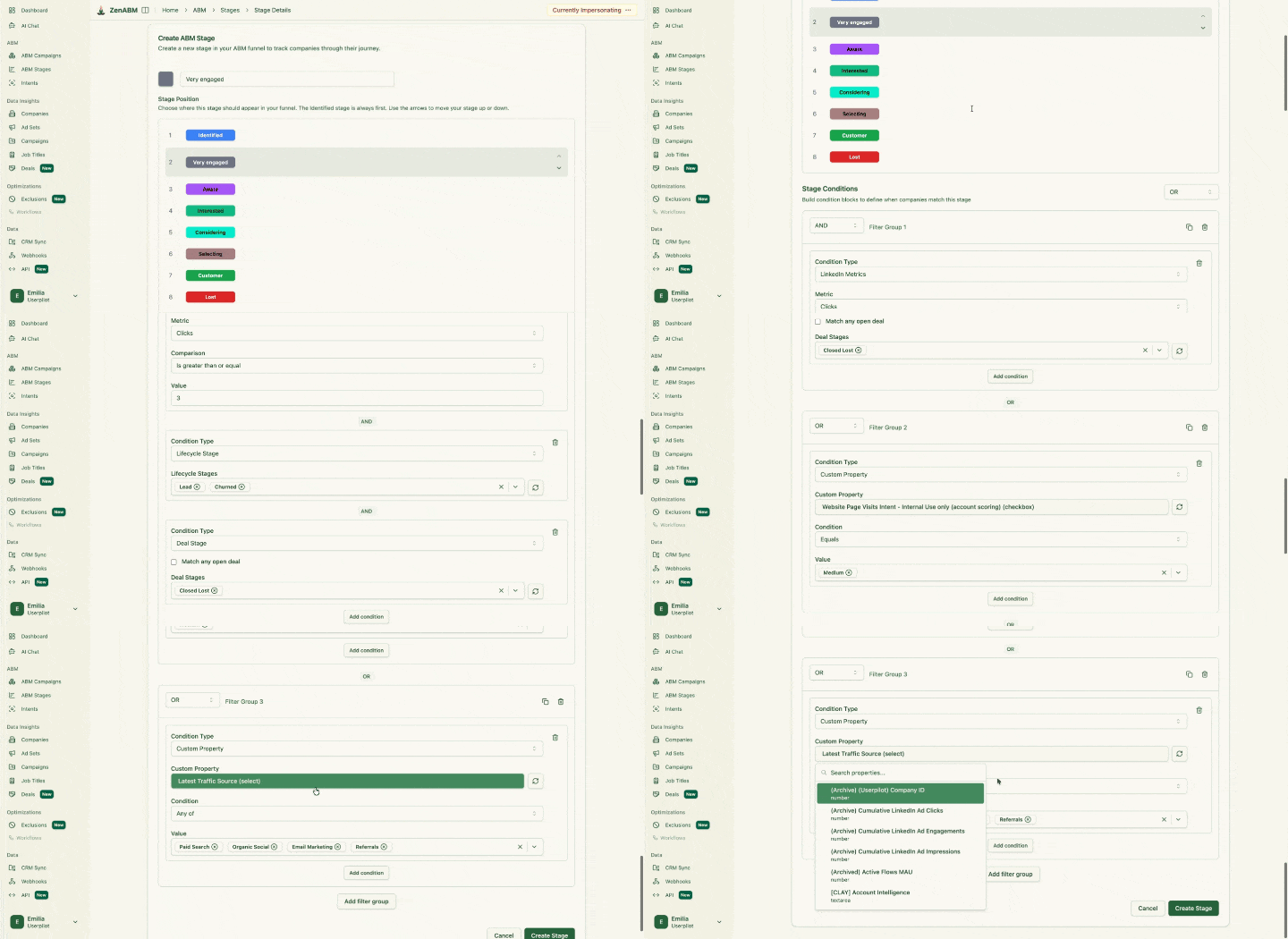
Score accounts. You can define account scoring and ABM stages from LinkedIn engagement and, optionally, CRM conditions. Stages recalculate daily.
The stage editor lets you customise the stages an account can enter:
Sync data to sales. ZenABM writes selected engagement, stages and intent fields to HubSpot, Salesforce or Attio. Webhooks can send qualifying companies to Clay and sales tools after the weekly LinkedIn data sync.
The HubSpot sync screen lets you select which fields to write:

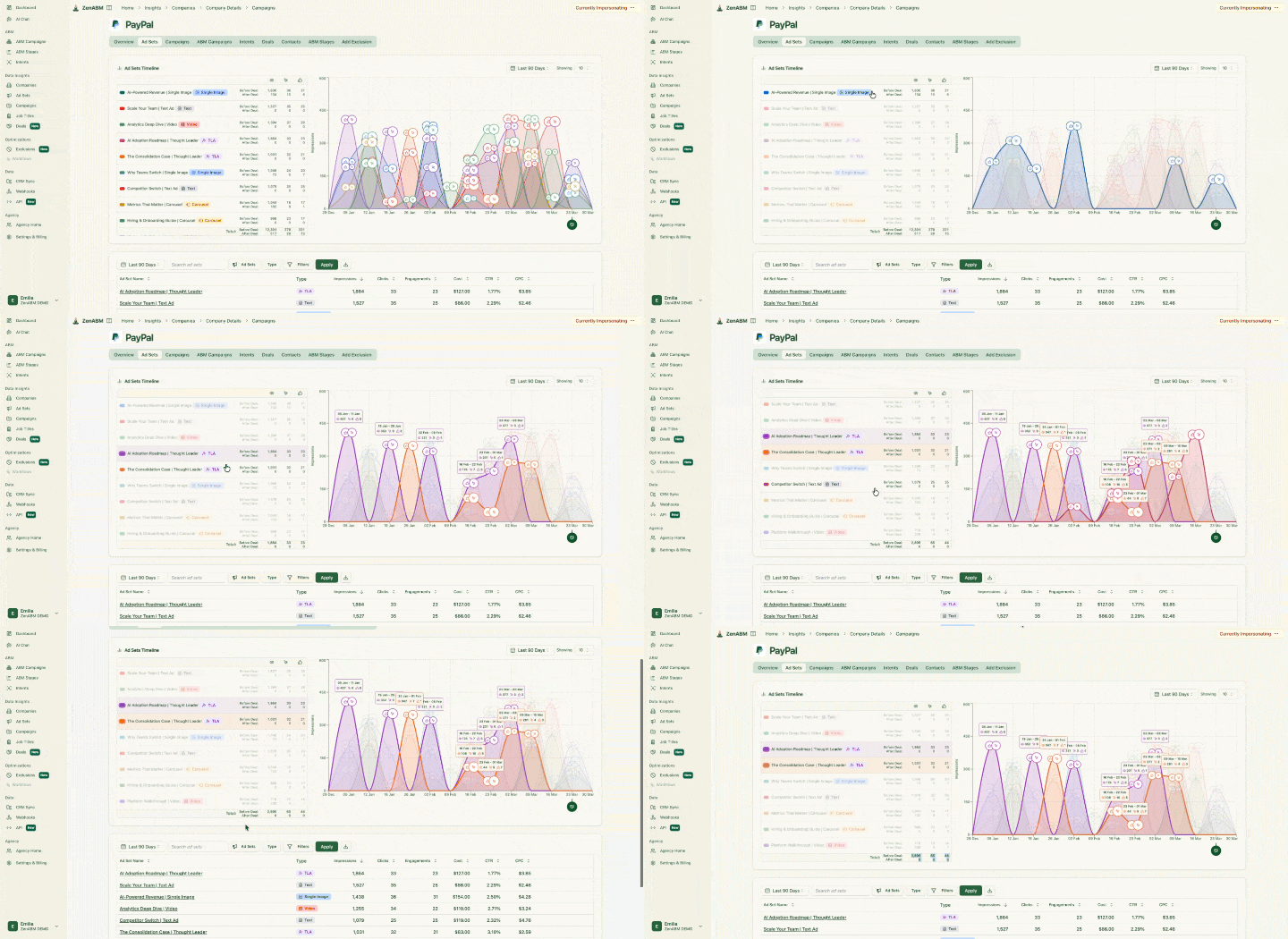
Connect ads to deals. The deal dashboard shows impressions, clicks, engagements and spend before a deal opened or closed. With HubSpot connected, the company journey also includes non-LinkedIn touchpoints from contact source history.
ZenABM's deal attribution view shows LinkedIn campaign touches over time:
One influence rule counts a deal when the account had 10 or more ABM impressions in the 180 days before the deal was created. ZenABM can test this rule against your own deal open rate, and beta teams get that feature first.
Protect targeting. ZenABM applies company and job-title exclusions across the scope you choose. Its two Budget Savers can keep Audience Expansion and the LinkedIn Audience Network off, and they check those settings every hour.
See contacts. With HubSpot connected, ZenABM shows CRM contacts and their source histories alongside the company journey. It does not identify the individual LinkedIn member behind every ad impression.
ZenABM has a free plan after its 37-day trial. The paid plans are Starter at $59/month, Growth at $159/month, Pro at $399/month and Agency at $479/month, on annual billing.
Pricing is per workspace, with unlimited seats and no markup on ad spend. The MCP and REST API are available from Growth.
The G2 reviews give ZenABM 5.0/5 from six reviews, all five stars. One Head of Revenue values the practical approach to ABM:
"What I like best about ZenABM is that they understand ABM beyond theory."
A small-business reviewer highlights ease of use: "The UI and UX are clean, intuitive, and easy to navigate."
A VP of Marketing values asking AI about performance: "ZenABM allows me to quickly query my LinkedIn ad performance data with AI."
Another reviewer says "they've built a good API and MCP that we can build stuff on top of."
ZenABM focuses on LinkedIn execution. It does not buy display ads, personalise websites or sell third-party intent data, so you can pair it with a display suite when those are part of your programme.
Reviewers note that ABM results take time, that company data can sometimes load slowly, and that they would like more CRM integrations. We keep improving the product based on customer feedback, without promising dates.
Best for: In-house teams running LinkedIn ads, including companies with 10 to 200 employees, can use ZenABM to manage campaigns and see account progress.
Enterprise teams can run their LinkedIn programme next to a display suite, sync stages to their CRM and apply exclusions across campaigns. Agencies can use the Agency MCP server to reach client workspaces through one connection.
Skip it if: Your immediate need is buying display inventory, in which case you should pair ZenABM with a display platform if LinkedIn is also part of your plan.
Factors.ai is an analytics-oriented platform with a strength in data depth. Its Company Intelligence API includes organic LinkedIn page engagement, and its Scout Patrol MCP supports account research and CRM updates.
Factors.ai has a 4.5/5 G2 rating from 220 reviews. Its Lite plan costs $199/month after a free trial, and it covers 1,500 companies a month and three seats.
ZenABM also shows company engagement, but its focus includes creating and managing LinkedIn campaigns. Factors.ai has a broader analytics focus, and G2 reviewers mention a learning curve.
For the detailed differences, compare Factors.ai vs ZenABM.
Demandbase One is an enterprise ABM suite with its own advertising platform. I had a couple of demos with its team, and display is where I see the strongest fit.
Compared with ZenABM: Demandbase vs ZenABM compares a display-led suite with a tool for managing LinkedIn campaigns.
The Demandbase audience builder shows how a team can assemble a target list:

The Intent Visualizer shows intent by account and topic:

Demandbase uses custom quotes. Vendr's median is $68,591 a year, with a range of $24,000 to $164,037.
Ad spend and other services can add to the subscription, so use the median as a budget reference rather than a quote for your team.
G2 reviewers praise the intent data, insights and lead generation. They also cite ease of use and support.
G2 reviewers mention a steep learning curve and complex reporting. Some also report stale contact or job data.
Best for: Enterprise teams with a display programme and people available to manage a broad platform.
Skip it if: Your team only needs to manage LinkedIn campaigns and see account engagement.
6sense combines enterprise advertising, intent data and predictive account scoring. I had a few demos and decided against it because it was too complex and too expensive for our needs.
Other ratings: Capterra gives 6sense 4.6/5 from 30 reviews. Gartner Peer Insights rates it 4.4/5 from 295 reviews, and TrustRadius scores it 8.4/10 from 540 reviews.
Compared with ZenABM: 6sense vs ZenABM compares the enterprise suite with LinkedIn campaign management and first-party ad engagement.
The SearchSense report shows accounts and their search-related activity:

The pipeline influence report shows the revenue view:

6sense uses custom quotes. Vendr's median is $62,440 a year, with a range of $11,376 to $176,809.
Ask for the platform subscription, data credits, implementation and advertising fees separately.
G2 reviewers praise intent data, segmentation and visibility into buying journeys. Capterra reviewers also value the support team.
Reviewers mention a steep learning curve and complex setup. They also report false-positive intent signals.
Best for: Enterprise teams that want display advertising, intent data and a broad ABM suite.
Skip it if: You need a focused tool for a lean LinkedIn programme rather than a multi-channel suite.
AdRoll ABM, formerly RollWorks, is an advertising-led ABM platform. I evaluated it for the Userpilot programme in 2024 and had several demos with the team.
Compared with ZenABM: RollWorks vs ZenABM compares AdRoll's display offering with ZenABM's LinkedIn campaign and company-engagement tools.
The Command Center shows accounts across buying-journey stages:

The account table shows fit grades for target accounts:

Account-Based Retargeting has no platform fee, so you pay for media. The other ABM packages use custom quotes.
Ask AdRoll for current connected TV budget terms before budgeting for that channel.
G2 reviewers praise ease of use and audience targeting. One reviewer also highlights a clean HubSpot integration.
G2 reviewers mention a learning curve for advanced campaigns and limits in reporting depth. Some say costs rise as campaigns expand.
Best for: Mid-market teams getting started with account-based retargeting and display ads.
Skip it if: LinkedIn is your only paid channel and you do not need display inventory.
Influ2 runs ads to named contacts within target accounts and reports engagement by person. I had a demo with the team, and that contact-level approach is its main distinction.
Compared with ZenABM: Influ2 runs named-person ads across channels, while ZenABM manages campaigns in your LinkedIn account and shows CRM contacts alongside company journeys.
Influ2's revenue dashboard shows pipeline metrics:

The sales priorities view lists accounts for follow-up:

Influ2 uses custom quotes and prices by slots, with a 12-month term. Vendr's median is $60,000 a year, with a range of $34,800 to $113,520.
G2 reviewers value person-level targeting and responsive support. They also describe the interface and onboarding positively.
Reviewers mention limits in reporting and ad group space. Some also report match-rate issues and a confusing ad approval process.
Best for: Mid-market and enterprise teams that need to reach specific buying-group members.
Skip it if: You have a large account list but do not need named-person ad delivery.
UserGems tracks customers and champions who change jobs, then helps sales act on those signals. After a demo, I see it primarily as a sales-signal platform.
Compared with ZenABM: UserGems can sync ad audiences from its Advanced plan, while ZenABM creates and manages LinkedIn campaigns.
The signal library shows the buying signals available to a team:

The workflow builder shows how UserGems can organise campaign activity:

UserGems lists Core at $40,000/year, Advanced at $75,000/year and Elite at $150,000/year. Enterprise is custom, and add-on prices are not published.
G2 reviewers value champion tracking and automatic CRM updates. They also praise the support and ease of use.
Reviewers cite pricing, data-update delays and duplicate contacts. Some say setup takes time when a team is new to signal-based workflows.
Best for: Established revenue teams with a large CRM and an owner for champion-tracking workflows.
Skip it if: Your immediate problem is creating and managing LinkedIn ads rather than finding job-change signals.
See which companies engage with your LinkedIn ads
Connect campaign activity to account stages and pipeline in ZenABM.

Common Room brings community, product and social activity into buyer profiles. A demo with the team showed me the fit for companies with an active community or developer audience.
Compared with ZenABM: Common Room vs ZenABM compares buyer-signal workflows with LinkedIn campaign management.
Common Room's buyer intelligence view brings account activity together:

The contact profile shows enrichment fields for an individual:

Common Room Essential is listed at $2,500/month on annual billing. Advanced and Enterprise use custom quotes, and the MCP is on every plan.
Vendr's median across Common Room purchases is $27,250 a year, based on 76 purchases.
G2 reviewers praise lead generation and time savings from bringing signals together. They also describe the platform as easy to use.
Reviewers mention a learning curve and limited customisation of alerts and workflows. Some say configuration takes time.
Best for: Teams with community, developer or product activity they can turn into sales signals.
Skip it if: You do not have those signals to work with and mainly need to run paid campaigns.
Dreamdata joins marketing and sales touchpoints into account-based revenue reporting. A demo with its team showed me a product built around attribution.
I consider it the most complete attribution tool in this group, but it is not geared towards running LinkedIn ABM campaigns.
Other ratings: Capterra gives Dreamdata 4.8/5 from 55 reviews.
Compared with ZenABM: Dreamdata vs ZenABM compares multi-channel attribution with LinkedIn campaign management and deal reporting.
The revenue dashboard reports results by channel:

The company journey shows touchpoints over time:

Starter is free, with five seats, two months of history and one sync. Advanced uses a custom quote.
Vendr's median for Advanced is $35,440 a year, with a range of $27,000 to $96,000.
G2 reviewers praise attribution accuracy and the account journey view. They also value the support team.
Reviewers mention a steep learning curve and missing features. Some report slow interface performance or limits in custom reporting.
Best for: Teams with a RevOps or data owner and substantial activity across several channels.
Skip it if: You need the same product to create and manage LinkedIn campaigns.
HockeyStack combines ad, website, CRM and offline activity into buyer journeys. I sat in on a demo, and its full-funnel reporting is the main reason to consider it.
Compared with ZenABM: HockeyStack vs ZenABM compares attribution reporting with LinkedIn campaign execution.
The campaign dashboard shows LinkedIn performance and influenced pipeline:

Odin's interface accepts questions about performance:

HockeyStack offers custom-built plans and startup pricing. List prices are not published.
Vendr's median is $29,702 a year, with a range of $24,040 to $77,500 across 33 purchases. Ask whether the LinkedIn data and warehouse add-ons are included in your quote.
G2 reviewers praise attribution accuracy and thorough support. They also value the flexibility of its reporting.
G2 reviewers mention a steep learning curve. Some recent low-rated reviews describe data connection problems and support that did not meet their expectations for the price.
Best for: Mid-market and enterprise teams with long sales cycles, multiple channels and RevOps ownership.
Skip it if: Your priority is building and managing campaigns rather than reporting on their touchpoints.
Userled creates personalised ads and AI-generated microsites for named accounts. I have no hands-on experience with it.
Other ratings: Gartner Peer Insights gives Userled 4.7/5 from seven reviews.
Compared with ZenABM: Userled combines campaign execution with personalised microsites, while ZenABM focuses on LinkedIn campaign management, account engagement and pipeline.
The targeting view shows how Userled detects prospects:

The pricing view shows the product modules:

LinkedIn ABM Ads start at $2,000/month, and Microsites start at $2,000/month. The Sales Plugin starts at $599/month for 10 seats.
Enterprise pricing is custom, so ask which modules are included in your quote.
G2 reviewers say personalisation is manageable without extensive technical help. Gartner reviewers praise responsive support and alignment between marketing and sales assets.
Gartner reviewers mention a learning curve for traditional sales teams. They also cite limited third-party integrations and social capabilities.
Best for: Teams that need account-personalised ads and microsites without building every page by hand.
Skip it if: You do not need personalised pages and mainly want company-level ad engagement.
For personalised landing pages for ABM and LinkedIn campaigns, ZenABM partner Tinct is another option.
Two more names come up in almost every ABM shortlist. Neither made my top 10, but you should know where each one fits before you decide.
HubSpot is a CRM, not a standalone ABM platform, but its premium tiers include solid ABM features: a Target Accounts home, an account engagement score that rolls up activity from everyone at a company, ICP tier recommendations for building lists, and a LinkedIn Sales Navigator integration. Breeze, HubSpot's AI, adds prospecting and content agents on top.
Who should choose it: teams that already run marketing and sales in HubSpot and run one-to-many ABM. Nothing has to be integrated, so ABM data and CRM data stay in one system.
What to know: the ABM features come with a premium HubSpot tier rather than as a separate product, and HubSpot does not show which companies saw your LinkedIn ads without clicking. Many HubSpot teams keep the native ABM tools and add ZenABM for the LinkedIn layer, because ZenABM writes LinkedIn engagement, scores and ABM stages onto HubSpot company records.
Here is a HubSpot company list with ZenABM's LinkedIn engagement columns next to each company:

Terminus, now part of DemandScience, runs display ads, email, chat and website personalisation from one platform, with account-level measurement on top. It suits mid-market teams that want several channels coordinated in one place.
What to know: pricing is not published and the platform is modular, so display, web personalisation and intent data arrive as add-ons. Vendr's median is about $24,840 a year across 69 purchases. For LinkedIn, its company impression views are limited to Matched Audiences or CRM lists, so the account-level LinkedIn picture is narrower than a tool reading LinkedIn's API directly. On G2, Terminus holds 4.4/5 from 121 reviews.
Here is the Terminus Account Hub, where accounts and their engagement sit in one view:

Choose an ABM tool by the work you need it to do, then check whether your team can run it.
These 14 questions cover the criteria I would use:
Two shortcuts narrow the list before you go through every question. The first is company size. Above roughly $100M in revenue, with a RevOps team and an enterprise sales motion, the intent and prediction depth of 6sense or Demandbase can pay off. Below about $50M, an enterprise suite is usually more platform, cost and implementation than the team can absorb.
The second is the CRM and channels you already run. On Salesforce with an enterprise motion, 6sense and Demandbase fit naturally. On HubSpot, the native ABM tools may cover one-to-many ABM on their own. If most of your ABM budget goes to LinkedIn, a tool built for LinkedIn like ZenABM fits better than a general display platform, because company-level LinkedIn reporting is its own discipline.
For LinkedIn-first ABM, the next four questions help you check whether the tool can reach and report on the accounts you chose:

LinkedIn requires at least 300 matched members before an audience can be used for targeting, so check that every audience slice stays large enough.
Audience Expansion can broaden targeting beyond your chosen audience. The LinkedIn Audience Network places ads beyond LinkedIn, so decide whether either setting fits your account list.
For my own LinkedIn programme, I ran a $5K ABM budget against a $105K pipeline target. I moved an account from COLD to WARM at three engagements, two clicks or 18 COLD feed impressions.
A platform needs to show those figures per company if you want to use rules like that. 👩🏫
Before committing to a subscription, I would take these steps:
Casper Rouchmann makes the foundation point in our February 2026 London meetup: internal alignment, messaging and a defined target customer come before a tool purchase.
At the same meetup, Joana Petrova warns against buying a platform without budgeting for the work needed to manage it.
If you have not proved the motion yet, Liam Collins recommends using a spreadsheet and CRM to compare accounts exposed to LinkedIn ads with an unexposed group.
An ABM platform helps you select target companies, reach them, track their engagement and connect that activity to sales progress.
The core loop usually includes:
For LinkedIn ads, check whether the platform shows company engagement, supports exclusions and can work within the 300-member audience minimum.
The loop below connects account selection to the pipeline reporting you need to assess the programme:

The useful AI question is whether a platform can act on your campaign, or only answer questions about it.
Demand Gen Report's 2026 benchmark found that 29% of respondents named content personalisation at scale as their top AI use case in ABM.
Here is what each platform's AI connection can do, from reading data to changing campaigns:

Demandbase and 6sense have read-oriented MCP access. Dreamdata can save reports and audiences, HockeyStack can create reports and dashboards, and Common Room can update records.
Influ2's MCP gives agents access to buyer signals and programmes, and Factors.ai's Scout Patrol supports research and CRM updates.
ZenABM's MCP can create and manage LinkedIn campaigns, ad sets and ads after you confirm. I would still keep dashboards available, because a chat window alone does not teach people what data exists or which questions to ask. 👀
To connect ZenABM to Claude, open Settings, choose Connectors, select Add custom connector and enter https://app.zenabm.com/api/mcp. Sign in through OAuth; ChatGPT uses developer mode for custom MCP connections.
ZenABM connects the steps of a LinkedIn ABM programme, from choosing accounts to seeing the deals those accounts opened.
Here is the Companies view, where every engaging company shows its ABM stage, engagement level, touchpoints and LinkedIn ad impressions:
You can use ZenABM's free Clay templates to find contacts at Interested-stage companies or route accounts into outreach by intent. Copy a template into Clay, then connect an outreach tool such as Smartlead or HeyReach.
The top ABM tools are useful for different jobs, so choose the one that fits the work and the team you have.
The decision map matches each job to a starting point, including the option to wait:

Pick the tool for the job you need done, not the longest feature list. Otherwise you pay for the whole gym and use the treadmill 🤷♀️
You can start a 37-day ZenABM trial or book a demo to see the LinkedIn workflow.
See LinkedIn account engagement and pipeline
Connect your LinkedIn ads and see which target companies respond.

ABM tools help marketing and sales teams select, reach and track target companies. ZenABM does that for LinkedIn ads by showing company engagement alongside account stages and pipeline.
An ABM platform is software for coordinating account selection, outreach, engagement tracking and reporting. Some platforms run several ad channels, while ZenABM focuses on executing and measuring LinkedIn ABM.
The best platform fits your channel, team and budget. ZenABM fits teams running LinkedIn-first ABM, while Demandbase or 6sense may fit an enterprise display programme.
ZenABM helps teams create LinkedIn campaigns and connect company engagement to pipeline. Influ2 focuses on named-person ads, while Dreamdata and HockeyStack focus on attribution.
ZenABM has a free plan and paid plans from $59/month. Enterprise subscriptions can cost substantially more: Vendr's Demandbase median is $68,591 a year, before ad spend and other costs.
Dreamdata offers multi-touch attribution models, and HockeyStack includes pre-click LinkedIn impressions in account journeys. ZenABM shows LinkedIn-influenced pipeline and deal touchpoints for teams that also want to manage campaigns.
For a small team, an enterprise suite is usually too much platform, cost and setup. If your ABM runs mainly on LinkedIn, ZenABM shows company-level engagement, scores accounts and reports pipeline from $59/month, and it connects to LinkedIn and your CRM in about 10 minutes. If you already pay for a premium HubSpot tier, its native ABM tools are a reasonable start.
Not always. HubSpot's premium tiers cover target accounts, account engagement scoring and ICP recommendations for one-to-many ABM. You need a specialist tool when the programme leans on advertising or intent data, or when you need company-level results from LinkedIn ads, which HubSpot does not show. ZenABM syncs that LinkedIn data onto HubSpot company records.
AI features are assistants added to a dashboard. An AI-native platform exposes its data for AI tools to query directly, usually through an MCP server, so you can ask questions in Claude or ChatGPT and get answers from live data without exports. ZenABM's MCP server also lets AI create and change LinkedIn campaigns after you approve the change.
Yes. Every platform in this list is cloud software you use in the browser, with nothing to install. The bigger difference is setup time: enterprise suites can take weeks or months to implement, while ZenABM connects to LinkedIn and your CRM in about 10 minutes.
About the author

