

©2026 ZenABM - All Rights Reserved.
Emilia Korczynska is Head of Marketing and co-founder at ZenABM. Before that she was VP of Marketing at Userpilot for nearly 7 years, where she ran a large ABM program primarily on LinkedIn ads.

Dreamdata and ZenABM both show how your marketing influenced pipeline, but they are built for different teams. Dreamdata is a multi-channel B2B revenue attribution platform: it joins CRM, ad platform and website data into one account model and shares the credit for each deal across paid channels, review sites, web, email and CRM. ZenABM is a LinkedIn-first ABM tool: it shows which companies engage with your LinkedIn ads, turns that engagement into intent signals and account stages, attributes deals to your campaigns and can change the campaigns themselves after you confirm.
Choose Dreamdata if a RevOps or data team needs multi-touch attribution across many channels and you can budget around $35,440 a year, Vendr’s median contract. Choose ZenABM if LinkedIn is your main ABM channel and you want to act on which accounts engage, from $59 per month. ZenABM also offers multi-channel revenue attribution for the other channels that reach your CRM. We build ZenABM, so weigh my view accordingly 😉 If neither fits, our ZenABM alternatives guide covers the wider field.
The two can coexist: Dreamdata for board-level attribution, ZenABM for running LinkedIn ABM. The table compares them on use case, cost, setup, channels, CRM sync and AI (prices as of November 2026).
Dimension | ZenABM | Dreamdata |
|---|---|---|
Main use case | LinkedIn-first ABM: company engagement, first-party intent, account stages, campaign changes | Multi-channel B2B revenue attribution and account timelines |
Not built for | Display buying, third-party intent data, reporting on every channel | Creating, editing, scheduling or bidding on LinkedIn campaigns |
Licence price | From $59/month billed annually ($69 billed monthly) | Starter free; Advanced: Not published (Vendr median $35,440/year) |
Campaign budget it needs | Your existing LinkedIn ad spend, no markup | Ads run in the ad platforms; benchmark data likely from advertisers spending $20K+/month |
Setup time and people | LinkedIn connects in about 2 minutes, 90 days backfilled | Server-side tracking, several weeks; implementation $5,000 to $10,000 or more |
Best company and team size | Lean LinkedIn-first teams, no seat limit | RevOps or data team; Vendr puts mid-market (5,000 to 20,000 tracked accounts) at roughly $25,000 to $45,000/year |
Main channel | LinkedIn, plus Google Ads, Reddit Ads, organic and AI referrals via HubSpot | Paid channels, review sites, web, email, CRM |
LinkedIn support | Company engagement, intent, and creating, bidding, budgeting, excluding and capping campaigns | Matched Audiences sync and conversions sent through CAPI; no campaign management |
Display and programmatic | Not offered | Not a buying tool |
Best-fit ABM strategy | One-to-many LinkedIn with first-party intent and sales handoff | Board-level, multi-channel attribution |
CRM sync | HubSpot, Salesforce, Attio; engagement, scores, stages, intents, every field opt-in | Salesforce, HubSpot, Dynamics 365, Pipedrive; writes to Salesforce and HubSpot |
AI and MCP | Zena; MCP server with 129 tools, 36 can change the ad account | Analytics Agent and MCP server (launched 22 Sept 2026), no ad or campaign actions |
Contract and free trial | 37-day trial, no credit card, free plan after | Free Starter plan; Advanced: Not published |
G2 rating | 5.0/5 from 6 reviews (October 2026) | 4.7/5 from 279 reviews (November 2026) |
Here is the whole post on one picture.

Here is what each tool does, starting with Dreamdata.
Dreamdata is built for multi-model attribution. It runs first, last, linear, U, W, data-driven and custom models across paid channels, review sites, web, email and CRM. It also unifies anonymous visits and ad impressions your CRM never sees. The catch is what you can do with the output, because it cannot create, edit, schedule or bid on a LinkedIn campaign. I almost chose it for our ABM program, but the missing two-way CRM sync would have forced a data warehouse and extra tooling to push data back into the CRM, which I couldn't resource.
Its company timeline shows one account's touches over time, filtered by channel:

Dreamdata pulls data from your CRM, your ad platforms and its own website tracking script into one account-based model. It covers LinkedIn, Google, Meta, Microsoft, Reddit, G2, Capterra and TrustRadius, plus web, email and CRM, and CRM integrations cover Salesforce, HubSpot, Microsoft Dynamics 365 and Pipedrive, with Salesforce syncing daily.
Here is its revenue attribution view, where the model output lands:

Dreamdata has two plans. Starter is free, with 5 seats, 1 sync, 3 stage models, 2 months of user history and a monthly tracked-user limit that Dreamdata does not state, and exceeding it means upgrading. The Advanced plan's price is Not published, so you need a quote from Dreamdata's sales team.
The Vendr median contract is $35,440 a year, with deals from $27,000 to $96,000 and an Enterprise tier that often starts around $50,000. One analysis of Vendr buyer data (updated February 2026) reports implementation fees of $5,000 to $10,000 or more on top, and Dreamdata's own pricing page does not state them. Renewals often carry 5 to 10% annual escalators, monthly billing is generally unavailable to new customers, and activations, the Data Warehouse and SCIM login are unpriced add-ons. Ivars Krutainis notes that a price point of roughly $1K a month means Dreamdata's benchmark data likely comes from advertisers spending at least $20K a month on B2B ads.
Read related: Top Dreamdata alternatives
ZenABM covers those gaps by writing changes to the ad account itself, after you confirm.
Choose Dreamdata if a board or RevOps team needs multi-touch attribution across many paid and organic channels and you have the data staff and budget to run it (see also our Dreamdata vs HockeyStack comparison). Skip it if LinkedIn is your main channel and your team is lean, and ask yourself what you would do with a W-shaped model you can't act on.
ZenABM is where I would start a lean LinkedIn team, because it turns the same ad spend into company lists, intent signals and deal attribution, and it can change the campaigns itself. The trade-off is breadth: it covers LinkedIn, Google and Reddit ads plus organic and AI referrals, not every channel Dreamdata reports on. We build it, so read that verdict with that in mind.
The Companies view is where it starts, with every engaging company, its stage and its engagement on one table:
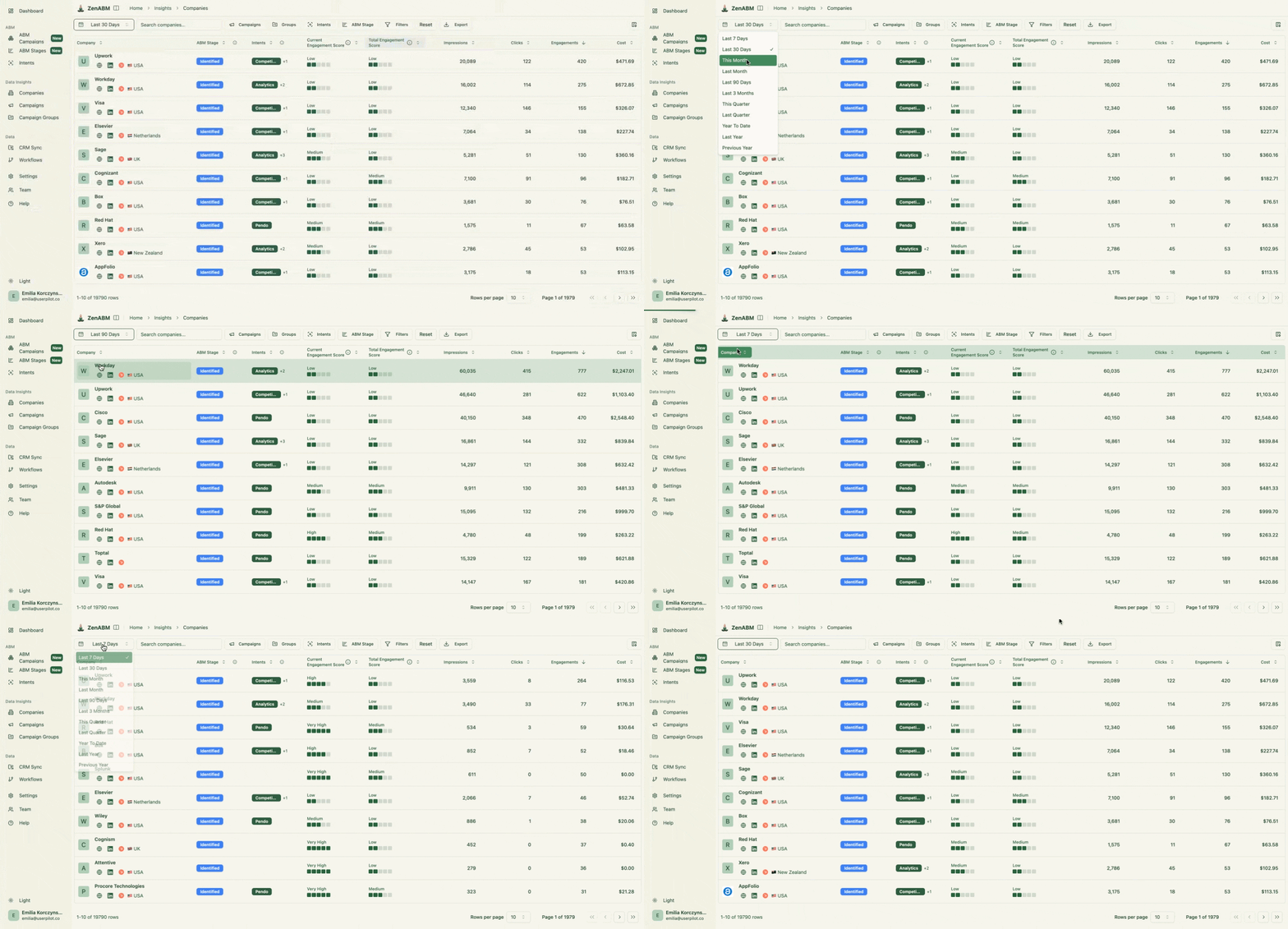
ZenABM matches LinkedIn ad impressions, clicks and engagements to the company behind them, scores each account and writes engagement, scores, stages and intent into HubSpot, Salesforce or Attio. ZenABM's Company engagements view shows every company engaging with your ads, with its engagement score, ABM stage and CRM data on one row, which Campaign Manager doesn't expose.
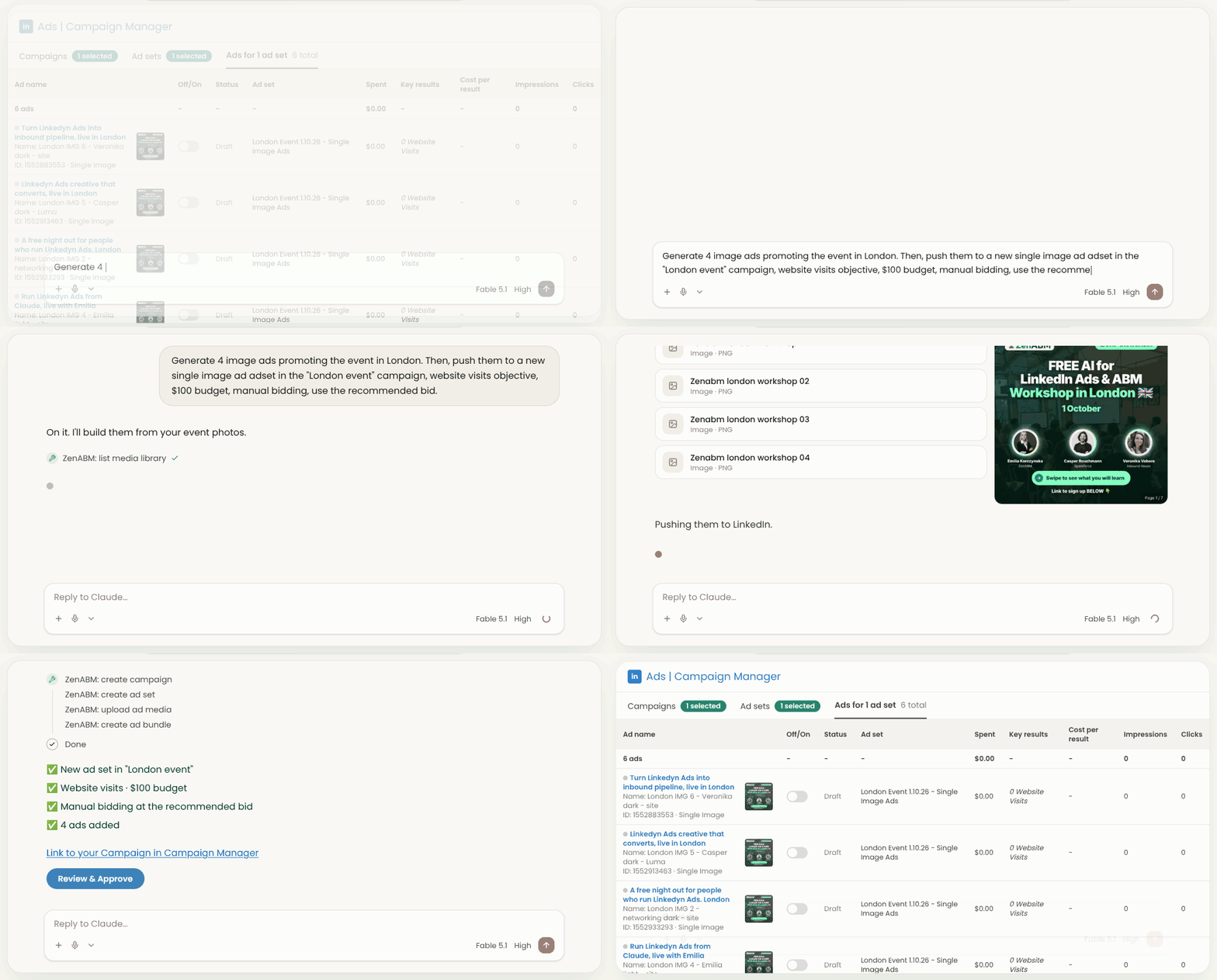
Here is Claude connected to the ZenABM MCP server, building ads end to end:
Starter is $59 per month billed annually ($69 billed monthly), Growth is $159 ($199), Pro is $399 ($499) and Agency is $479 ($599). Pricing is per workspace, with unlimited seats on every plan, no per-feature add-ons and no markup on your ad spend. The trial lasts 37 days with no credit card, and a free plan with company-level engagement data and CRM sync follows it. Zena is included on every plan, with 10 chats a day on Starter, 50 on Growth and unlimited on Pro and Agency, while the MCP server and REST API start at Growth. Every plan is on the ZenABM pricing page.
Choose ZenABM if LinkedIn is your main ABM channel, your team is lean and you need to know which accounts your spend moved and change campaigns, bids and exclusions this week. Skip it if your board needs multi-model attribution across every channel or you plan to buy display and third-party intent data.
See deal attribution and campaign execution on your own LinkedIn accounts
Book a demo and we will walk through ZenABM on your target account list.

Check money, people and channel before you count features, because the classic mistake is buying for the demo instead of for the job.

With that frame, here is the same comparison category by category.
Here is the same comparison on the ZenABM Features menu, with a table and a winner for each category. The through-line is that Dreamdata is a measurement layer and ZenABM is an execution layer, and a measurement layer only pays off when someone can act on it.
ZenABM wins the ABM core because it shows which companies engage and captures intent from your own ads. Dreamdata sees the full account timeline across channels but cannot change the campaigns behind it.
Capability | ZenABM | Dreamdata |
|---|---|---|
Company-level engagement | Yes: impressions, clicks and engagements matched to the company, one row with score, stage, intents and CRM data | Yes: a unified account model that includes anonymous visits and ad impressions the CRM never sees |
Intent signals | Yes: first-party, from themed campaigns and ad sets | Yes: AI Signals from web, LinkedIn and G2 activity, plus 6sense or Demandbase intent bought separately |
Account stages and scoring | Yes: your own AND/OR rules over LinkedIn and CRM conditions, recalculated daily | Yes: stage models from CRM and engagement events, 3 on the free plan |
Job title and buying committee | Yes: job title engagement with exclusion controls | Partial: titles, roles and seniority for known contacts from CRM and web data; LinkedIn ad engagement by title is limited |
With Dreamdata the intent is inferred from web and review-site activity or bought in, whereas with ZenABM the theme you attached to the ad lands on the account when it engages.
Winner: ZenABM.
Build LinkedIn audiences from the accounts that engage
ZenABM turns engagement, intent and ABM stages into dynamic audiences that sync to LinkedIn every day.

ZenABM is the only tool here that can build, bid on, budget, exclude from and cap LinkedIn campaigns. Dreamdata's Audience Hub covers audiences only.
Capability | ZenABM | Dreamdata |
|---|---|---|
Building campaigns | Yes: campaigns, ad sets and ads via Zena, MCP or REST API, nothing live until you confirm | No |
Audience sync | Yes: dynamic audiences refreshed daily | Yes: Audience Hub to Matched Audiences, daily |
Budget controls and waste alerts | Yes: Budget Savers switch off Audience Expansion and the LinkedIn Audience Network and re-apply hourly; schedules checked every 15 minutes | No budget protection |
Bidding | Yes: bidding agent reads LinkedIn's suggested bid, writes the new bid after confirmation | No bidding agent |
Exclusions | Yes: across all campaigns, daily at midnight GMT | No |
Impression capping and frequency | Yes: audiences per company size, excluded from ad sets | No impression capping |
Valentin Dimitrov points out that Dreamdata discounts repeat impressions on the same company rather than stopping them, which leaves practitioners to cap frequency by hand. He does it with weekly exclusions of 50 to 100 impressions and a rolling 90-day list at roughly 700 impressions. That is a lot of manual list work, and it is the kind of task a tool that can write to the ad account removes.
Winner: ZenABM.
Build and adjust your LinkedIn campaigns in ZenABM
Zena and the MCP server create campaigns, ad sets and ads and set budgets, bids and exclusions. Nothing goes live until you confirm.

Dreamdata is built to report across more channels, while ZenABM stays LinkedIn-first by choice and buys no display or programmatic ads.
Capability | ZenABM | Dreamdata |
|---|---|---|
Paid channel reporting | LinkedIn Ads, plus Google Ads and Reddit Ads via HubSpot contact history | LinkedIn, Google, Meta, Microsoft, Reddit |
Review-site intent | Not offered: intent comes only from your own LinkedIn ads | G2, Capterra, TrustRadius |
Web, email and organic | Organic visits, organic social, AI referrals via HubSpot | Web, email, CRM |
Display and programmatic buying | Not offered | — |
If your board asks about every channel, Dreamdata's reporting covers more ground. If most of your effort is LinkedIn, that breadth is mostly shelf space.
Best fit: Dreamdata for teams that report on many channels; ZenABM for LinkedIn-first teams.
Dreamdata is built for attribution models and ZenABM for acting on LinkedIn data the same week, so I call this one a tie, because they answer different questions.
Capability | ZenABM | Dreamdata |
|---|---|---|
Dashboards | Ad spend, influenced pipeline, closed revenue, ROAS and pipeline per dollar on one screen | Reporting suite including B2B benchmarks |
ABM campaign reporting | Yes: dashboard per ABM campaign | — |
Deal and pipeline attribution | Yes: touchpoints before each deal opened and closed | Account timelines show the touches before pipeline and closed won deals; no dedicated deal dashboard documented |
Multi-channel revenue attribution | Yes: LinkedIn, Google Ads, Reddit Ads, organic and AI referrals on one company timeline (non-LinkedIn via HubSpot) | Yes: first, last, linear, U, W, data-driven and custom models |
Winner: Tie. Dreamdata is built for multi-model attribution across channels, and ZenABM for deal reporting you can act on the same week.
ZenABM wins because its AI writes to the ad account and Dreamdata's does not.
Capability | ZenABM | Dreamdata |
|---|---|---|
AI assistant | Zena, on every plan (chats per day depend on the plan) | Analytics Agent, read-only |
Automated AI reports | Ten reports, weekly, monthly and quarterly | Report summaries only; no full AI-generated report by email |
MCP server | 129 tools; 36 can change the ad account; 24 flagged destructive; 45 expert skills | Can save reports, audiences and dashboards, cannot run ad or campaign actions |
Winner: ZenABM.
ZenABM wins on writing LinkedIn engagement back to your CRM, though Dreamdata also writes to two CRMs and adds a warehouse option.
Capability | ZenABM | Dreamdata |
|---|---|---|
CRMs | HubSpot, Salesforce, Attio | Salesforce, HubSpot, Dynamics 365, Pipedrive |
What it writes | Engagement, scores, stages, intents; ZenABM creates the properties; every field opt-in | Engagement data, scores, AI signals, audience membership to Salesforce and HubSpot; reads from Dynamics and Pipedrive |
Webhooks | Yes: every Monday after the weekly LinkedIn sync, to Clay, n8n, Zapier, Make, Outreach, Salesloft or your endpoint | Slack or Teams notifications on high-intent accounts; general webhooks not documented |
API | REST API with a Bearer token | — |
Warehouse export | REST API and MCP instead | Data Warehouse add-on |
Winner: ZenABM.
ZenABM wins for agencies running LinkedIn for several clients. Its Agency MCP server reaches every client workspace from one connection. Each call is scoped to one organization, so a report on one client cannot pull rows from another. Clients log into their own dashboards and see only their own data. The partner program gives clients 20% off and the agency 30% recurring commission, while Dreamdata's agency strength is board-level reporting across channels.
Winner: ZenABM.
ZenABM is far cheaper, and that is before you count Dreamdata's implementation.
ZenABM | Dreamdata | |
|---|---|---|
Plan or tier | Starter, Growth, Pro, Agency | Starter (free), Advanced |
Price | Starter $59/month annually ($69 monthly); Growth $159 ($199); Pro $399 ($499); Agency $479 ($599) | Starter free; Advanced: Not published (Vendr median $35,440/year) |
What's included | Unlimited seats, no per-feature add-ons, no markup on ad spend | Starter: 5 seats, 1 sync, 3 stage models, 2 months of history |
Limits | Plan-based limits, such as Zena chats per day | Activations, Data Warehouse and SCIM login are unpriced add-ons |
Contract length | Monthly or annual billing | Monthly billing generally unavailable; renewals often carry 5 to 10% escalators |
Free trial | 37 days, no credit card; free plan after | Free Starter plan |
First-year cost, with the arithmetic. For Dreamdata, $35,440 + $5,000 = $40,440 at the low end of implementation, and $35,440 + $10,000 = $45,440 at the high end, before any renewal escalator. For ZenABM, $59 x 12 = $708 on annual Starter, or $159 x 12 = $1,908 on annual Growth. In both cases your LinkedIn ad spend is separate and unchanged, because ZenABM adds no markup.
Paying five figures for attribution that cannot touch your LinkedIn campaigns is the buying decision I would challenge hardest, because the campaign budget is the part that actually moves accounts. To judge whether any tool's price buys pipeline, read it next to the 2026 LinkedIn ABM benchmarks report and your own cost data.
Winner: ZenABM.
The review sites will not flag these, so here are the catches I would want raised before signing, from partner calls and practitioner posts.
My view: detecting the right signals and acting on them matters more than chasing perfect credit in the CRM, so attribution is not the first job a lean team should buy for.
The numbers above in one picture:

If ZenABM fits, here is which capability does which step. The point is that the signal arrives as a company you can message, not a chart you can forward.
For a monthly report, install the free /linkedin-abm-report skill for Claude and run it against your connected workspace.
See your own company engagement, intent and deal attribution
Connect your LinkedIn ad account and see which companies engage in minutes.

Pick the tool for the job you need done this quarter. If LinkedIn is where your budget sits, ZenABM is the more direct fit, and Dreamdata makes sense when a board needs multi-channel proof and you have the people to run it. Before any demo, write down one job, one campaign budget, one owner, and if one of those is blank, don't buy either tool yet. Attribute when the board needs it, and act when the sales team needs accounts.
Dreamdata is a multi-channel B2B revenue attribution platform from Denmark. It unifies CRM, ad platform and website data, including anonymous visits and ad impressions your CRM never sees, into one account model tied to revenue. It runs first, last, linear, U, W, data-driven and custom models, but it does not create or manage LinkedIn campaigns.
Only partly. Dreamdata is a multi-channel attribution platform for RevOps teams, while ZenABM is a LinkedIn-first ABM tool that attributes campaigns and can also execute them through AI. They overlap on LinkedIn attribution. Many teams could run both: Dreamdata for board reporting, ZenABM for the campaigns.
ZenABM is far cheaper. It starts at $59 per month billed annually, with unlimited seats. Dreamdata's Vendr median is $35,440 a year, with deals from $27,000 to $96,000 and implementation often $5,000 to $10,000 on top. Your LinkedIn ad spend is the same either way.
It is worth it for a RevOps-led, multi-channel program with the people to run it and a board that needs the models. For a lean LinkedIn-first team, a five-figure contract and several weeks of setup are usually overkill. A free Starter plan exists if you want to test its models first.
Plan for the licence (Vendr median $35,440 a year), implementation of $5,000 to $10,000 or more, and your ad spend. Ivars Krutainis notes that its benchmark data likely comes from advertisers spending at least $20K a month on B2B ads, so teams spending $5K to $10K a month should expect different results.
HockeyStack, Ruler Analytics and ZenABM. HockeyStack is a lighter-touch multi-channel option, Ruler Analytics focuses on calls and offline conversions, and ZenABM is the LinkedIn-first alternative that also executes campaigns.
About the author

