Black Friday: up to 50% off ZenABM 💥Get up to 50% off ZenABM with our massive BlackFriday sale! 💥 - only 24-30 November!Get the deal12 Days of ABM Christmas · Report on your 2026 LinkedIn ABM & plan 2027 · Free webinars, 26 Nov – 9 DecSave your seat


Emilia Korczynska is Head of Marketing and co-founder at ZenABM. Before that she was VP of Marketing at Userpilot for nearly 7 years, where she ran a large ABM program primarily on LinkedIn ads.

A LinkedIn ad engagement report for sales only works as a CRM task list. It holds the engaged accounts, each one's ABM stage, the topic it responded to and the rep who owns it.
In my experience sales doesn't want a report. They want triggers and a list of priority accounts in the system they already use, so a PDF in their inbox gets ignored.
You can build that list from a CSV or by syncing company engagement into your CRM. ZenABM shows which companies engage with your LinkedIn ads, from the official LinkedIn Ads API, without form fills. This guide gives you four ways to get that list to sales, the steps for each and when to skip it.
Way | What you get | Setup time | Cost | Main job |
|---|---|---|---|---|
Companies tab CSV | A company engagement snapshot | Manual, each week | No extra tool | A monthly marketing review |
CRM list built by hand | A static list matched to company records | Manual, each week | Depends on your CRM | Sales teams starting manually |
ZenABM CRM sync | Engagement, stage and intent fields on CRM records | About 10 minutes | Free plan available; paid plans from $59/month billed annually | A recurring CRM handoff |
ZenABM webhooks | Selected account fields sent to an outreach tool or endpoint | Add a URL, pick a range and fields, send a test | The receiving tool may cost extra | Automated outbound workflows |
The table shows where the data lands. You still need a CRM workflow or an outreach process to turn it into a task.
Bring engaged accounts into your sales workflow
See how company engagement and intent can support your CRM handoff.

The four ways differ mainly in where sales receives the account and how much work you repeat every week:

Four things need to be in place before you choose a way, and the last one is the one teams skip.
Two practitioners use different thresholds for the warm rule. Justin Rowe of Impactable counts an account as Aware once it has been served impressions, Engaged when it shows signal activity such as 30 or more impressions, 3 or more clicks, video views or company page visits, and Warm when several personas engage in a bottom of funnel window. Miles Beard counts LinkedIn influence at 100 or more paid impressions plus 3 or more paid clicks, paid engagements or organic engagements within 90 days of an account becoming an MQL.
They measure different levels of activity, so I would pick one rule with the reps who will use it instead of mixing them. Check company size too, because the same impression count reaches a much bigger share of a 3-person company than of an enterprise with 200 target members.
Here are the two rules side by side:

With one rule agreed, you can pull the first snapshot.
A Companies tab CSV gives sales a snapshot of the companies your LinkedIn ads reached. It is the simplest place to start, but someone has to turn the export into a follow up list.
Keep your target list and last week's export open while you work through these steps:
The Companies tab is the native way to see which companies engaged with your LinkedIn ads.
The Companies tab in Campaign Manager lists engaged companies with their impressions and engagement level:

You get named companies and the engagement measures the tab shows for the selected view, which is enough for sales to decide which accounts deserve a closer look. You can also compare companies reached with the contacts generated from them, which shows where an account engages but you still lack the right person.
The export is a snapshot. It does not know who owns an account in your CRM, and it will not remove a company you already sent last week.
The tab shows engagement per company, not per ad, so reps cannot see which ad drew a company's response. I would leave the intent field blank rather than guess. The weekly diffing is exactly what LinkedIn ads to CRM automation takes off your plate, so the next step is to put matched companies where sales already works.
A hand-built CRM list puts the LinkedIn snapshot next to the records sales already uses, and it is worth it if you can accept refreshing it yourself.
The manual list starts from the same CSV, checked against your existing company records:
A rep needs engagement and stage next to the CRM context to decide whether an account is worth a call. ZenABM's Company engagements view shows each engaging company with its engagement score, ABM stage and CRM data on one row, which Campaign Manager does not expose.
ZenABM's company table lists each account with its ABM stage, intents, engagement score, impressions, clicks, engagements and cost:
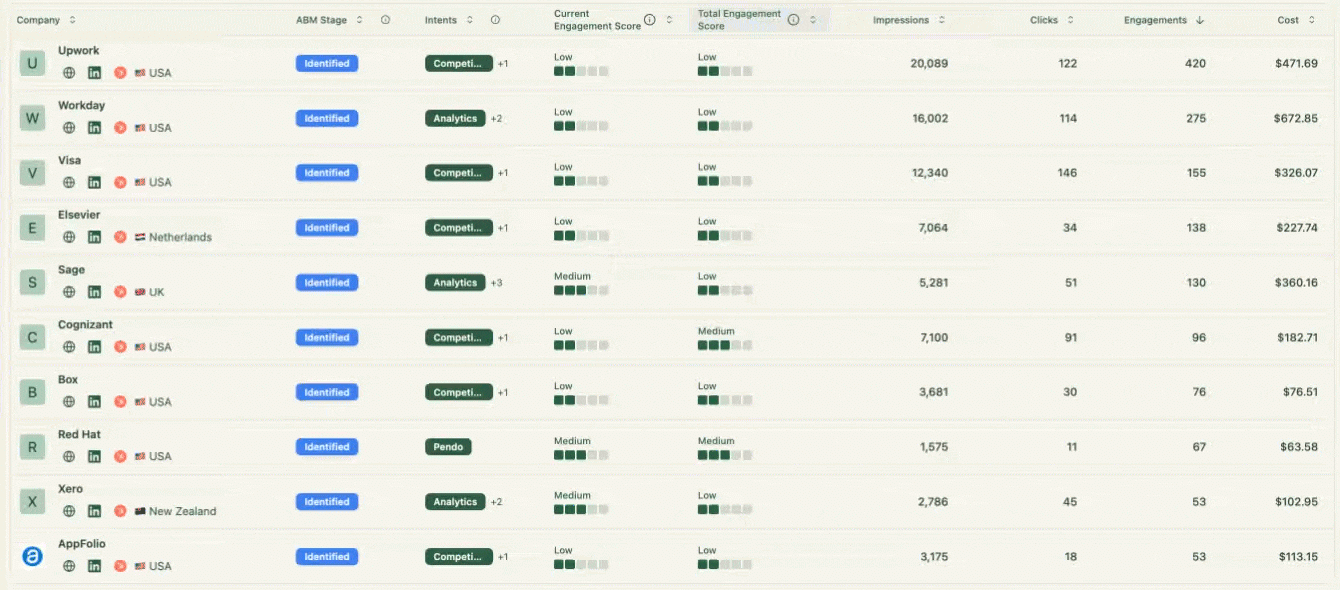
Sales gets a place to work from instead of a file in an inbox. A rep opens the company record, sees the owner and deal state, and reads the imported engagement as context.
The static list stays as it was the day you built it. A company that heats up later only joins if someone repeats the export, match and import. Stage and intent have the same problem, because your CRM can only use the values you added by hand. That weekly upkeep is the reason to move to a sync.
A CRM sync writes company engagement onto CRM records, so you build the list from properties that update on their own. This is the route I would pick when sales works from HubSpot, Salesforce or Attio and expects a recurring handoff.
You connect the ad account and the CRM, then choose the properties sales needs:
The engagement data behind those fields comes from ZenABM's Companies screen:
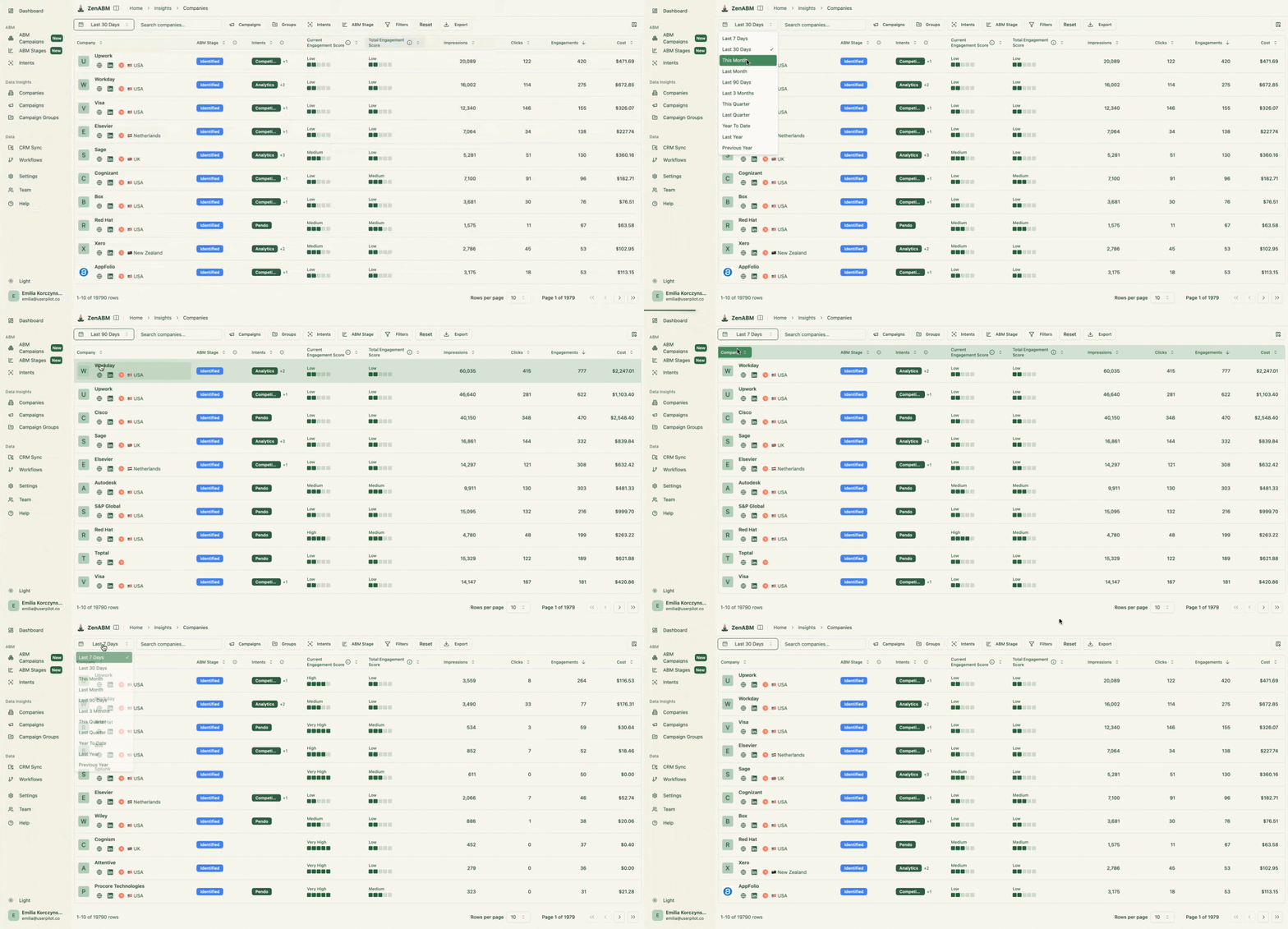
Sales cares about three things, in my view. How hot the company is (the ABM stage) decides who gets called first, what it is interested in (the intent) personalizes the outreach, and signals feed both and can trigger tasks and automated outreach. Start with these fields and add more only when a rep has a use for them.
Property | What it means for sales | When it updates |
|---|---|---|
ABM stage | How far the account has progressed against your rules | Recalculated daily and synced once a day, at midnight |
Engagement score | A relative measure of engagement for ordering accounts | Follows the weekly LinkedIn data sync (Monday, 00:00 GMT) |
Intent | The theme of the campaign or ad set the account engaged with | Written by the CRM sync as new engagement arrives from LinkedIn |
Signals | Named rules on ad engagement and CRM data that label a company, used to prioritize and to personalize | Synced to the CRM every day once the Signals field is on in CRM sync settings |
Impressions and clicks | Exposure and action over the selected period | HubSpot analytics write once a week, Monday at midnight GMT |
The engagement score is calculated like this:
Engagement score = (clicks × 2 + engagements) ÷ impressions
ZenABM shows the result on a 1 to 5 scale. I use it to order accounts within a list, then look at the underlying activity and company size before a rep reaches out.
A rep might open a CRM list filtered to Interested accounts, sort by score and read the intent theme before choosing whom to call. The list is only as useful as its owner and follow up rule.
The sync does not create a sales task just because a property exists. You still configure the list or workflow and decide who owns the follow up.
Stages recalculate daily, but the LinkedIn ad data feeding them syncs weekly on Monday, so never describe a new click as an instant alert. Stages can run on LinkedIn data alone, while a stage rule with CRM conditions needs a connected CRM. The Attio integration needs the Growth plan or up (lower plans get a read-only preview), and Growth starts at $159 per month billed annually.
A webhook sends selected engaged accounts to an outreach tool or another endpoint, so nobody uploads a fresh list by hand. I would add it when the follow up happens outside the CRM.
You need a receiving URL and a rule for which accounts to send:
Without a webhook someone exports the qualifying accounts and uploads them to the outreach tool. ZenABM's webhooks skip that step.
Here is what a ZenABM webhook does each week, and what stays with your team:

The receiving tool gets the account context it needs for the next step. A Clay workflow, for example, can take Interested accounts, find contacts and prepare a sequence around the intent theme. The two free Clay templates in the summary are a starting point: one finds contacts at Interested companies and the other routes companies into sequences by intent signal. Review the contacts and the message before anything goes out.
The webhook fires every Monday after the weekly LinkedIn data sync, and you can also trigger it manually. It is not a notification for each new click.
A filter for accounts currently at Interested does not prove they got there this week. To send only newly qualifying accounts, keep a record in the receiving workflow and suppress accounts it has already processed. The webhook documentation says a 429 response is retried up to 8 times and a 404 turns the webhook off, so check the destination after setup. Otherwise a broken endpoint leaves sales waiting for a list that never arrives.
I would choose the handoff first and the automation second, because the right way depends on who owns the follow up and where they work.
Your situation | Way to use |
|---|---|
Marketing needs a monthly snapshot for review | Companies tab CSV |
Sales needs a CRM list and someone can refresh it manually | Hand-built CRM list |
Sales works from the CRM and needs a recurring account list | CRM sync plus a CRM list or workflow |
Outbound runs in Clay or a sales engagement tool | Add webhooks to the handoff |
The free CSV is enough for a monthly marketing review if someone matches it against the target list. A sales team that needs a fresh task list every week will usually get more from synced fields, and an outbound team adds webhooks once it is ready to act on those fields elsewhere. Either way, I review which accounts were reached and which moved stage, instead of sending sales every company with an impression.
Here is the same choice as a picture:

The data matters once it changes the next action on an account. I would start with a weekly list and add a workflow once the reps trust the fields.
A weekly task list holds the accounts that meet your Interested rule, with an owner and the evidence behind the stage. In your CRM, filter companies to that stage, sort by engagement score where the CRM allows it, drop accounts already in an open deal and assign the rest to their reps.
Put the intent theme in the task note. ZenABM's intent signals turn engagement with themed campaigns or ad sets into account intent that syncs to the CRM, so the rep sees what each account cares about from your own ads.
The Intents view lists the companies tied to the Competitor Switch theme, with their ABM stage and engagement:
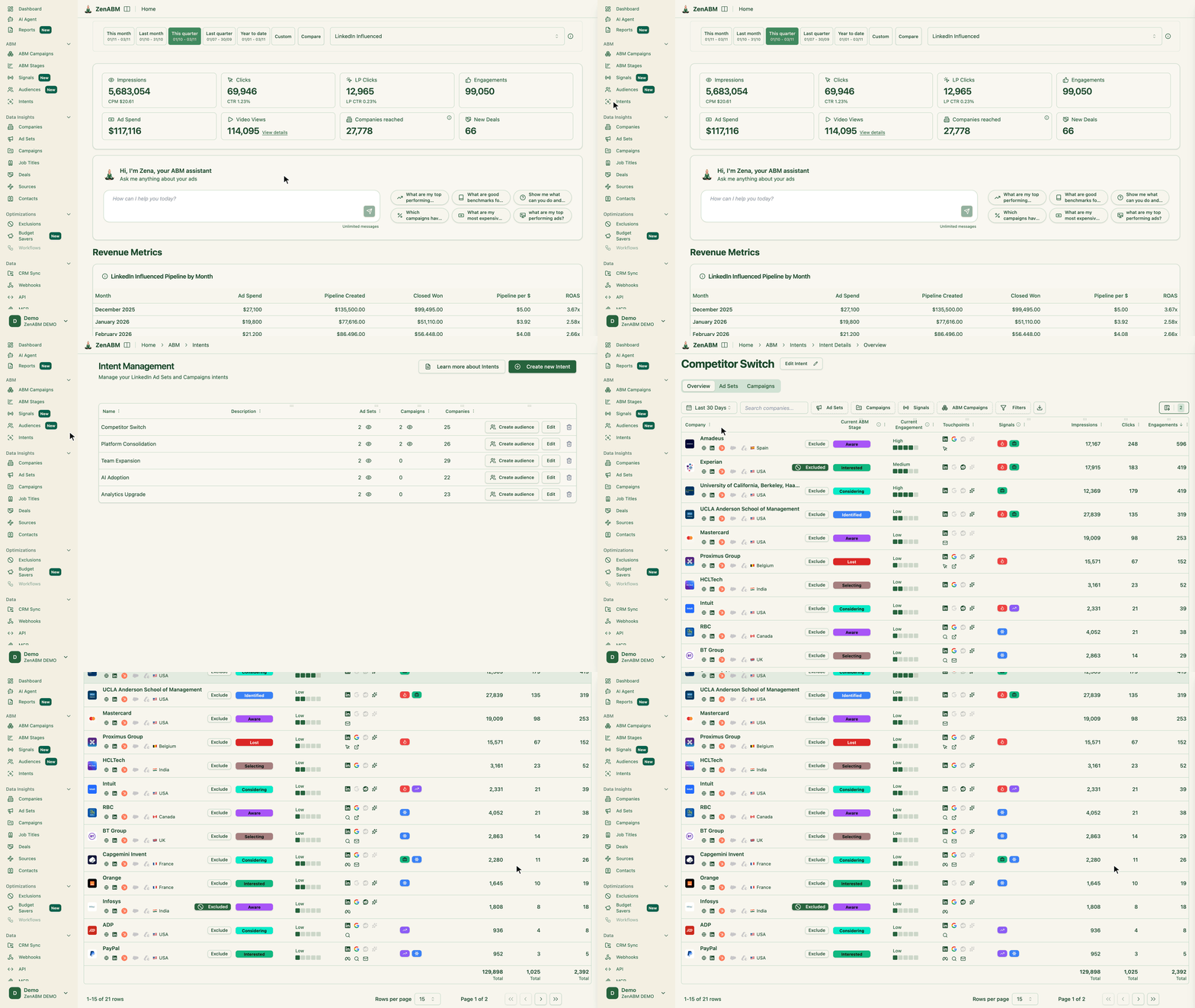
A CRM workflow can create a task when an account moves into the stage sales agreed to work. I would begin with a task for a rep rather than an automatic sequence, so the team can check the rule produces useful accounts. Use the synced stage as the enrollment condition, assign the task to the company owner and include the intent in the note. If you later route the same accounts into an outreach tool for intent-based outbound, add suppression for accounts already contacted.
A brief lets a rep prepare without pretending to know which person clicked. Include the account's stage, the topics it engaged with and the existing CRM relationship, and use the company page for detail on the campaigns involved. The goal is to ask a relevant question about the topic, not to open with "I saw you clicked."
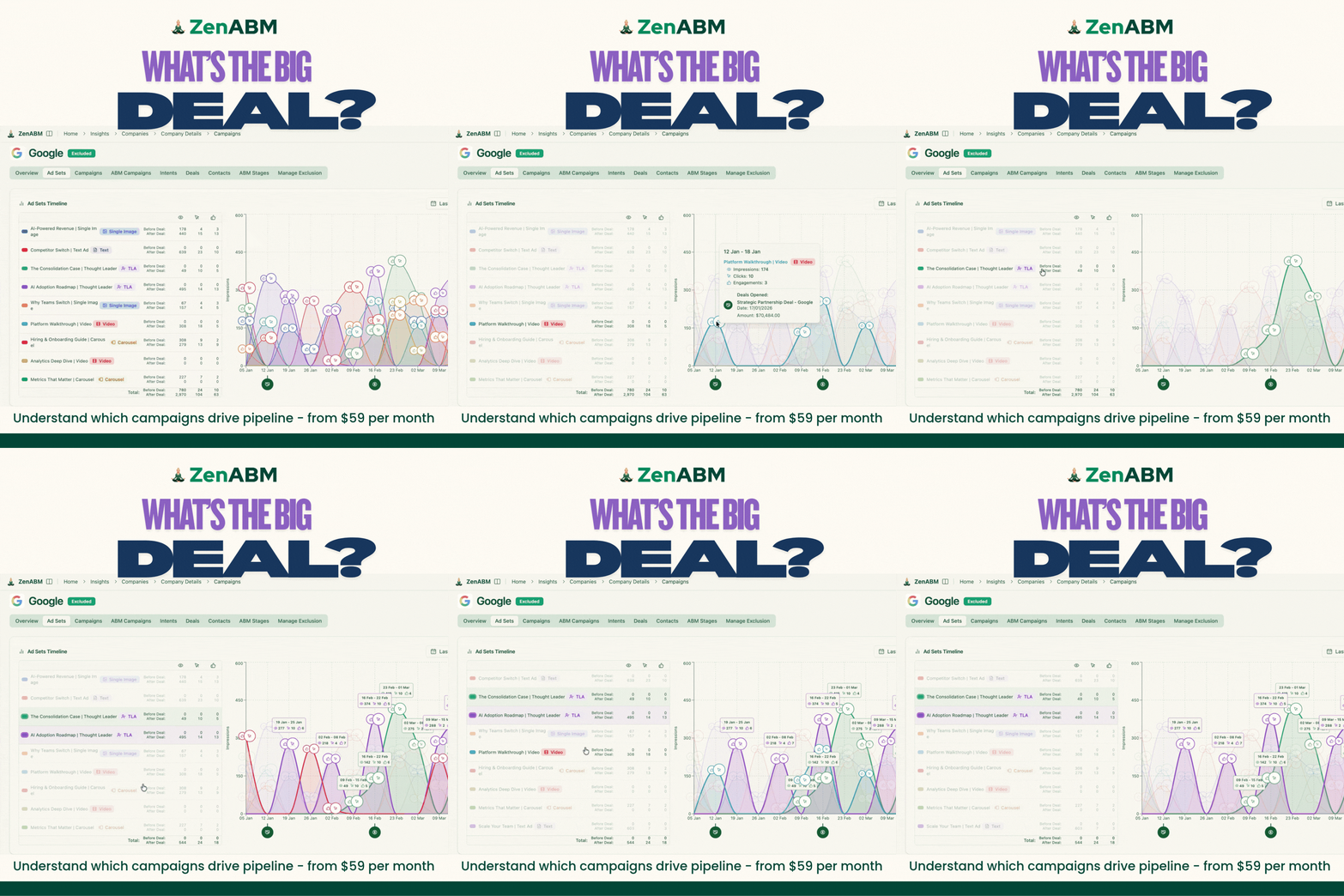
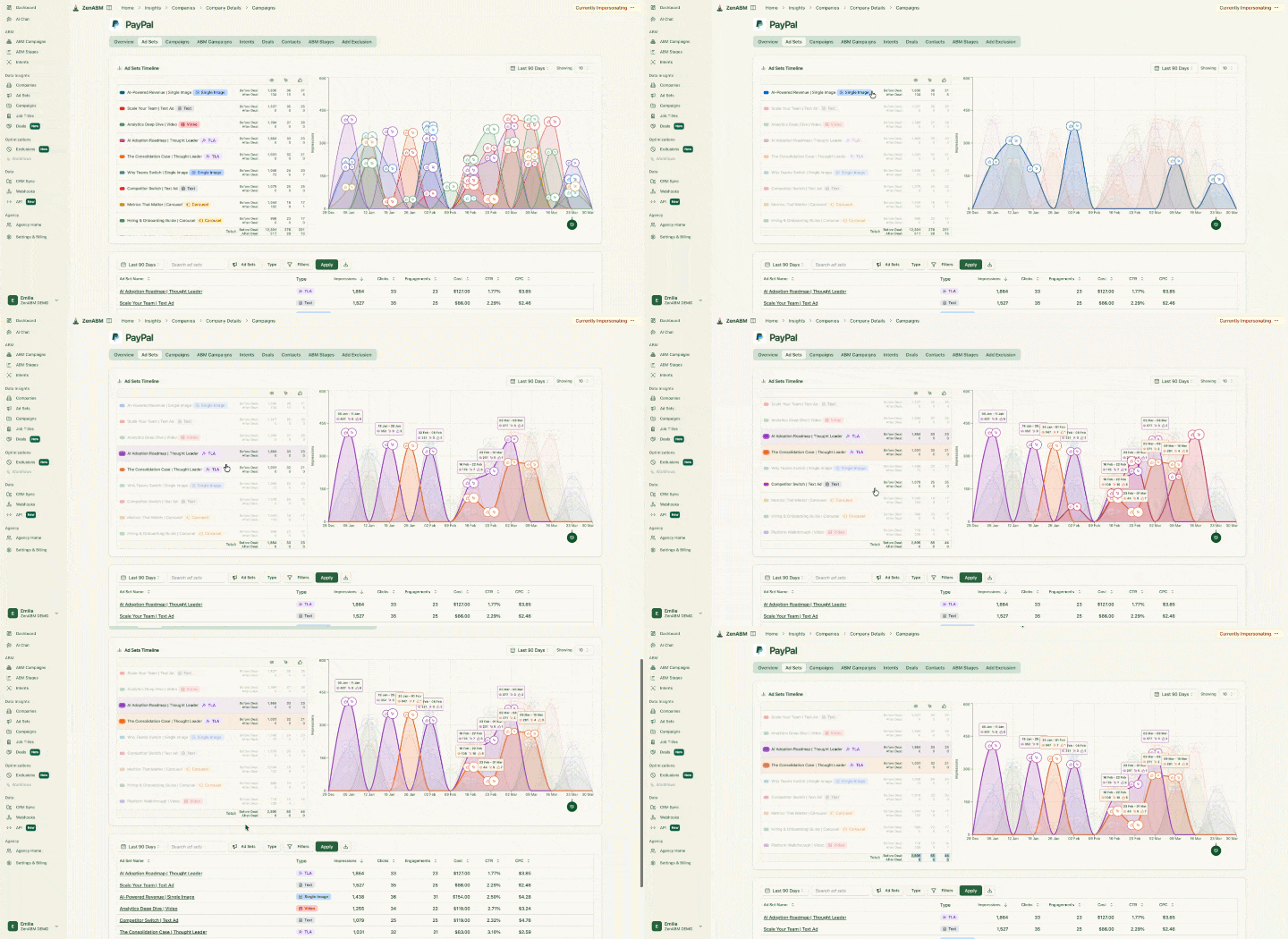
An ad set timeline in ZenABM shows impressions per campaign for one company, before and after a deal:
Bring engaged accounts into your sales workflow
See how company engagement and intent can support your CRM handoff.

These mistakes make a list look busy without giving sales a reliable reason to act, and I check for them before asking reps to trust a new handoff.
An impressions total can rise while some target accounts get no exposure. Compare the report with the original target list and flag zero-impression accounts for marketing to investigate. That is a marketing question, while the rep only needs accounts to work.
An impression tells you an ad was served, not that the company wants a call. Apply your stage rule and check for real engagement before sending an account to a rep. Compare similar company sizes too, since a large company collects impressions across many employees without the same concentration of interest.
LinkedIn hides company engagement data when a company falls below its minimum engagement threshold in a specific period. A missing company or metric is therefore not proof that nobody engaged, and the gap shows up most with small accounts and narrow date ranges.
Ivars Krutainis found that paid clicks in the Companies tab can be overestimated by 20 to 30%, because LinkedIn counts one person once per active role. A click is a reason to look closer, so check the campaign topic before using it to personalize outreach, and never tell a prospect they personally clicked.
Customers and accounts with open opportunities need attention, but not the cold sequence a new prospect gets. Check CRM status and route them to the existing owner. Keeping an account out of a sales list is a different decision from excluding it from ads, which you manage in your exclusions.
A quick check before every send keeps the list focused on accounts sales can work:

An account can show a lot of LinkedIn engagement before it becomes a lead. That is why I would not judge progress by lead gen forms alone. Miles Beard shared an example: the company had 61 organic impressions, 47 organic engagements, 2,552 paid impressions and 24 paid engagements, and no lead gen form fills.
Then someone from the company came through a website contact form and became a qualified lead. That engagement history is context for a sales conversation. It does not prove which interaction caused the form fill, and it does not identify the person behind each ad interaction.
My takeaway for your report is to keep account engagement visible even when there is no form lead yet. A deal attribution view like ZenABM's shows each campaign touch tied to a deal on one timeline:
ZenABM turns company engagement into fields sales can use, though your team still has to define the threshold, the owner and the follow up action.
In ZenABM's CRM sync settings you choose which fields land on the HubSpot company record:

Put LinkedIn engagement on your company records
Try the CRM sync and build a list around the accounts your sales team wants to work.

Start with the smallest list sales can act on, even if you build it by hand. Once the reps agree the accounts and context are useful, automate the handoff, because a report nobody owns will sit unread however it is built.
Open Campaign Manager, click Plan, then Companies. The tab lists every company that engaged with your ads, with paid impressions, clicks, leads and organic data. Choose the period and filters you want, and make sure a Company Page is connected to the ad account so the tab populates. You still need CRM ownership and follow up context to make it a sales handoff.
Yes, you can export the Companies tab as a CSV. Filter it to your target list or campaign first, then match the companies to your target list and CRM records. The file is a snapshot, so compare it with your previous export and add owners before sending it to sales.
No, LinkedIn reports engagement at company level, not as a named list of people. It also hides company engagement data when a company falls below LinkedIn's minimum engagement threshold in a period. Use the company and campaign context to pick a relevant topic, then find the right contact through your CRM or prospecting process.
Weekly is a practical starting point if sales can review and act on the accounts each week. Agree the cadence with the reps and make sure the list separates new accounts from ones they already received. A monthly snapshot is enough for a marketing review when nobody needs a recurring sales task.
Include the company, its owner, the ABM stage or engagement evidence, and an intent theme when you have one. Add the reporting period so the rep knows how recent the activity is, and check customer or deal status before routing it. A short list with those fields beats a long list of impressions with no action.
Sync engagement, stage and intent onto CRM company records, then build a list or task workflow from those properties. If follow up happens in an outreach tool, a webhook can send the same fields there after the weekly LinkedIn sync. Set an owner and suppress accounts already processed, or the automation will send the same companies repeatedly.
About the author

