If you are a traditional demand-gen team shifting to account-based marketing, it’s going to be easier for you than it was for most teams when AI didn’t exist or wasn’t good enough.
I’m talking about the operational tax: researching accounts one by one, checking engagement account by account, rebuilding the same report every Monday, writing outreach that references what each account actually did, etc.
That tax is what kept real account-level rigour exclusive to teams with enterprise budgets and spare headcount.
AI removed it.
This guide walks through every step of an AI-powered ABM program (with extra depth on the LinkedIn advertising step) and shows exactly how to automate each one today, with the prompts, the tools, the thresholds, and the four free Claude skills we packaged the whole workflow into.
Short on time?
Here is a quick overview of the article:
/abm-strategy-planning sizes the budget and campaign plan, /abm-campaign-execution turns it into launch-ready ads, /linkedin-abm-audit runs the 30-day diagnostic, and /linkedin-abm-report writes the exec-facing monthly recap. All four run on sample data out of the box and on your real numbers once connected to ZenABM./linkedin-abm-report turns the same math into a shareable report.When it comes to ABM, AI changed the economics more than the strategy.
ABM has always meant treating a defined set of accounts with more precision than the rest of the market.
The three classic tiers still stand, and what AI changes is different for each:
| ABM type | The old constraint | What AI changes |
|---|---|---|
| One-to-one (strategic) | Deep research and bespoke content per account meant a handful of accounts per marketer. | Account dossiers in about 2 minutes instead of 20+, and personalized assets drafted from live engagement data, so one marketer can run one-to-one depth on dozens of accounts. |
| One-to-few (ABM Lite) | Segment-level campaigns with manual weekly reporting and hand-built persona variants. | Creative variants per persona generated in minutes, and the reporting loop (who engaged, who moved stage) runs itself. |
| One-to-many (programmatic) | Account-level tracking was too expensive, so teams fell back to campaign-level metrics and lost the “account-based” part. | Company-level engagement, scoring, and stage automation make one-to-many programs genuinely account-based for the first time. |
That last row in the table above is the most significant.
Most self-described ABM programs were running demand gen with a target list stapled on, because checking what 500 accounts did every week wasn’t that feasible.
Now it is an agent’s job, and 78.7% of companies already use AI somewhere in their ABM programs, according to the State of ABM 2025 report.
The people doing this best treat it as an engineering discipline, not a tool purchase.
Noah Adelstein, who runs the GTM Engineer podcast, described how Understory’s Alex Fine closes over $1M in ARR per month as the company’s only sales rep by automating every manual step of his sales process.
The pattern to copy is not any single tool; it is the habit of asking, for each step of the program, “what here is judgment, and what here is grunt work?”
The judgment stays with you.
The grunt work goes to the machine.
If you want the full vendor comparison before committing to a stack, I keep it updated in the AI ABM tools roundup; this article is about the program itself, step by step.
Your ABM program is as good as your list, for which you need to nail your ICP definition first.
The classic move teams pull is a workshop that produces a fictional persona with a name and a stock photo.
The AI-era move is to let your own deal history define the ICP, because the patterns are already sitting in your CRM.
Kamil Rextin, founder of the B2B marketing agency 42 Agency, made this argument on the ABM Bootcamp webinar: build the ICP and the account list from which customers actually close and which do not, use closed-lost reasons to segment out bad-fit patterns (product gap versus budget versus timing), and feed closed-won accounts into lookalike expansion rather than inventing a net-new list of strangers.

A theoretical persona cannot survive contact with that feedback loop, and it should not.
The AI version of that exercise takes an afternoon.
If your CRM is connected to an agent (more on the plumbing in step 4), run this:
Analyze my closed-won and closed-lost deals from the last 12 months. For closed-won: what do the companies share (industry, employee range, tech context, the job titles on the deal)? For closed-lost: group the loss reasons and tell me which firmographic patterns predict each. Output a one-paragraph ICP definition, a tier 1 and tier 2 split with the criteria for each, and the three disqualifiers I should filter every future list against.
For teams that want a dedicated tool, Clay’s ICP finder (backed by its Claygent research agent) turns that definition into live filters against a company database, and its March 2026 pricing starts free with paid plans from $185 a month.


With the ICP defined, the list itself splits into a cold half and a warm half, and AI handles both differently.
The cold half is research at scale.
Traditional account research runs 15 to 25 minutes per account (company overview, news, tech stack, decision makers), which is why most lists get built once and never refreshed.
The free, open-source AgentSource plugin for Claude Code pulls from company databases, scores accounts on fit signals like funding and hiring, and outputs a structured list at roughly 2 minutes per account.
At that cost, a weekly 50-account refresh is a background task instead of a quarter-long project.
Install it by pasting the GitHub URL into Claude Code; the wider catalog of free skills like this lives in my Claude Code for ABM plugins guide.
The warm half is the better list.
The companies already engaging with your LinkedIn ads are raising their hands at the account level, and ZenABM’s company-level engagement tracking (pulled straight from the LinkedIn Ads API) is the data source.

The monthly prompt you can put in Claude Code connected to the ZenABM MCP server (more on this is step 4):
List every company that engaged with my LinkedIn ads in the last 30 days, with total engagements, clicks, engagement score, and ABM stage for each. Compare them against my ICP definition and split the output two ways: ICP-fit companies that are not yet on my target account list (my additions), and non-ICP companies absorbing spend (my exclusion candidates).
What it looked like when I ran a similar prompt for our own ABM program at ZenABM:


The agent’s main job here is to ensure your list isn’t static but dynamic, and the updates in the list are grounded in real engagement data.
A list without prioritization produces the classic ABM failure: sales gets 300 “target accounts” and calls none of them.
The fix that has held up best in practice is a two-axis score, and it long predates AI; what AI changes is that the scores now maintain themselves.
Bill Stathopoulos, founder of the growth agency SalesCaptain, laid out the mechanic on the ABM Bootcamp webinar: score every account on engagement level and ICP fit, then run a decision matrix.

The matrix matters because it stops teams from treating an intern who visited the site once with the same urgency as a tier 1 account that clicked three ads this week.
ZenABM automates the engagement axis natively through account scoring: a current score (engagements over impressions in your selected window, so it reflects recency) and a total score (all-time), both computed per company from ad engagement without anyone updating a spreadsheet.

Layered on top of that sits qualitative intent: tag campaigns with intent themes (say Analytics, Security, AI Features), and every account that engages inherits the label, so you know not just how much an account is engaging but what it is engaging about.
That is first-party buyer intent, verifiable click by click, which I trust over third-party keyword surges precisely because you can audit it.
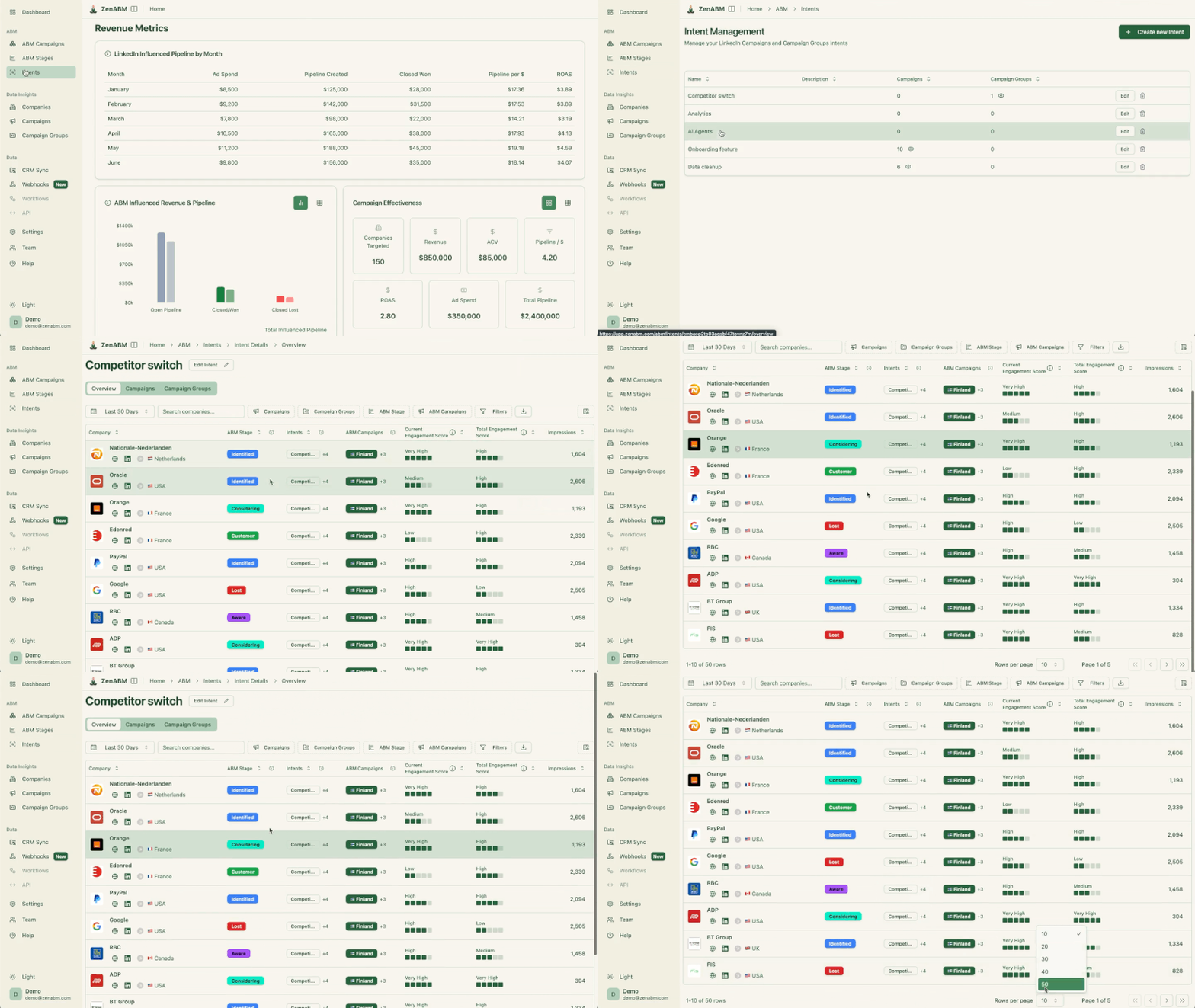
And all this can be accessed directly via your Claude Code or ChatGPT terminal using the ZenABM MCP server:

The weekly prioritization prompt, once your data layer is connected:
Build me this week’s account priority matrix. Axis one: current engagement score. Axis two: ICP fit tier. For the high-engagement, high-fit quadrant, list the accounts with their intent topics and the contacts sales should reach today. For high-fit, low-engagement accounts, tell me which campaigns they are in and whether they are even being reached. Flag anything that moved quadrants since last week.
Advertising is where ABM programs spend most of their budget, and on LinkedIn, it is the step with the deepest AI coverage.
So I am giving it four sub-sections.
One piece of plumbing first: everything below runs through an agent that can see your account-level ad data.
In our stack that is Claude Code connected to the ZenABM MCP server: a five-minute, one-time connection over OAuth or a Bearer token, after which the agent can call 60+ tools spanning companies, campaigns, creatives, job titles, ABM stages, intent signals, deals, and spend.
Read questions change nothing; the write tools (pausing or activating ads) always ask for confirmation first.

Here’s a brief breakdown of the capabilities available:
| Tool group | What the agent uses it for | Example tools |
|---|---|---|
| List and search | Companies, campaigns, ad sets, creatives, CRM deals, contacts, job titles, intent signals, spend. | list_companies, list_campaigns, list_deals |
| Company intelligence | Company-level engagement, ABM stage history, activity logs, timelines. | get_company_overview, get_company_timeline |
| LinkedIn ads performance | CTR, CPC, eCTR, eCPC, spend, and engagement across campaigns, formats, and job titles. | get_campaign_overview, get_creative_performance |
| ABM and revenue | Program pipeline, ROAS, stage movement, influenced deals. | get_abm_campaign_overview, get_abm_stage_history |
| Safe write actions | Pause or activate ads, ad sets, and campaigns, each behind an explicit confirmation. | update_ad_status, update_ad_set_or_campaign_status |

The MCP server is the data plumbing and the skills are the packaged judgment that runs on top of it.
We took the LinkedIn ABM programs at ZenABM and Emilia Korczynka’s program at Userpilot (the one GTM Strategist documented driving $900,000 in pipeline), and shipped their four core workflows as free, open-source Claude skills in the linkedin-abm-skills repo:
| Skill | Command | The job it owns |
|---|---|---|
| ABM Strategy Planning | /abm-strategy-planning |
Stress-tests your revenue goal against your budget and real ad metrics, then proposes the campaign structure, format mix, and how many ads the budget can support. |
| ABM Campaign Ad Design | /abm-campaign-execution |
Turns the strategy into launch-ready output: campaign outline, persona-split ad copy briefs, and designed mockups. |
| ABM Audit | /linkedin-abm-audit |
A 30-day diagnostic of your live account: scorecard, format grading against benchmarks, decaying ads, impression hogs, and a prioritized fix list as a branded HTML and PDF report. |
| ABM Monthly Report | /linkedin-abm-report |
The exec-facing monthly recap: spend, pipeline and deals influenced, best campaigns and formats, top engaged companies, and month-over-month change. |
In Claude Code, two commands install all four:
/plugin marketplace add ZENABM/linkedin-abm-skills
/plugin install linkedin-abm-skills@zenabm
On Claude Desktop or the web app, download the zips from the releases page and upload them under Customize, then Skills, or drop them into a Project.
Two things I want to be upfront about, because they shape how you should use these.
First, they run on realistic sample data out of the box, so you can see exactly what each one produces before connecting anything; pointed at a ZenABM account, they switch to your real numbers through the MCP server.
Second, they encode the thresholds and the mistakes from a real program, not generic best practices, which is why I walk through each skill in the section that owns its job: strategy sizing below, ad design in the creative sub-section, the audit in the optimization sub-section, and the report in step 8.
Targeting: split by persona, and advertise to the 95% too

One campaign across every persona produces unreadable data, so we split campaigns by persona and never went back.
AI helps twice here.
The budget-sizing half of this judgment is exactly what /abm-strategy-planning automates, and I would run it before restructuring a single campaign.
The skill asks for your revenue goal, average deal size, monthly budget, site conversion rate, and qualification and close rates, pulls your live CPM, eCTR, and cost per click when connected to your account, and tells you whether the goal is even reachable at that budget before it proposes anything.
Then it applies the ad-count model the whole program ran on: monthly budget divided by 30, divided by your cost per landing-page click, divided by roughly 4 clicks per ad per day, equals the maximum number of ads you can support at once.
Run more ads than that number, and you underfund every campaign, lose auctions, and never collect enough data to learn whether a message landed.
The skill also guards against the two structural mistakes we made ourselves and documented: audience segments split so small that LinkedIn could not serve them, and budget spread across so many campaigns that none of them ever reached significance.
Getting that sizing math right before launch is worth more than any optimization you will do after, which is why it is the first of the four skills I would run.

Generic AI ads are easy and worthless.
The version that works starts from your account’s proven patterns:
Analyze my 10 best LinkedIn ads by eCTR over the last 90 days. What copy patterns and hooks do they share? Draft 5 new variants per target persona following those patterns, each under 150 characters of intro text, with a one-line rationale tied to the data.
For the visual side without a designer, the free LinkedIn Ad Designer skill by Advanced Client ships 23 pre-built ad patterns (stat highlights, testimonials, before and after comparisons, contrarian hooks) and follows your brand guidelines once uploaded.
Teams using it have reported cutting production from 30 minutes to about 30 seconds per variant, which changes what is testable: eight variants per persona stops being a luxury.
Another skill that can be deployed here is /abm-campaign-execution: Feed it the plan that /abm-strategy-planning produced (or describe your campaigns to it directly) and it turns the strategy into launch-ready output in one pass: the campaign outline, ad copy briefs split by persona, and designed mockups you can hand to LinkedIn Campaign Manager or to a designer for polish.
The point of chaining the two skills is discipline, not convenience: the ad count the strategy skill said you can afford actually gets filled with on-strategy creative in the planned messaging mix, instead of whatever got made that week.
Also, you should set format expectations from real data before judging any variant.
From the ZenABM 2026 LinkedIn ABM benchmarks (211 B2B companies, 161,256 ads, $5.5M in spend across 29 countries):
| Format | Median CTR | Median CPC |
|---|---|---|
| Thought Leader Ads | 2.68% | $2.29 |
| Single image | 0.42% | $13.23 |
| Carousel | 0.32% | $13.30 |
| Video | 0.24% | $15.61 |

The key inference: TLAs dominate click efficiency, and the other formats earn their keep on a different job (awareness and account-level reach), so benchmark each format against its own median, never against TLAs.
Once campaigns run, the optimization loop is where AI earns back the most hours.
Two interfaces, same data.

Run a decaying-ads report. Identify every ad whose CTR or eCTR has declined for 2 or more consecutive weeks while serving more than 1,000 impressions per week, with the weekly trend, current eCPC versus launch, and total spend during the decline. Then show my ads from the last 30 days ranked by CTR and cost per result, flag the bottom five by CTR that have spent more than $500 without engagement from target accounts, and draft the pauses for my confirmation.
Result of a similar prompt I had run:

The packaged version of this entire loop is /linkedin-abm-audit, the third of the four skills.

One command runs the full 30-day diagnostic: a scorecard for the account, the ad-count model from the targeting section checked against your live spend (are you running more ads than the budget can feed), every format graded against the 2026 benchmark medians, the decaying ads, the impression hogs, and a prioritized set of red and green flags with an ordered fix list, delivered as a branded HTML and PDF report you can drop into Slack.
The kill threshold it enforces is the one our program ran on: an ad past 1,000 impressions with an eCTR under 0.4% comes off.
And when you kill an ad, replace it and hold the planned messaging mix (ours was 8 ads: 2 on analytics, 3 on onboarding, 3 on AI features and surveys), because otherwise the account drifts off-strategy one weekly swap at a time, which is a failure mode no dashboard will ever flag for you.
What separates this from LinkedIn’s native optimization is the reason behind each pause.
The agent optimizes on who engaged (a company-level intent signal from your target list), not on surface CTR, which is why it can recommend pausing an ad with a fine CTR that is only reaching the wrong companies.

The delivery problem in ABM advertising is lopsided distribution: a handful of large accounts hog impressions while most of the list barely sees you.
The AI fix is diagnostic plus action.
Ask the agent which companies received more than 5% of total impressions in the last 30 days with an eCTR below the program median, then exclude or cap the saturated non-responders (ZenABM does the exclusion in one click) and re-check the floor by asking which target accounts got fewer than 10 impressions this month.
The impression-hog check is also one of the standing red flags /linkedin-abm-audit surfaces on every run, so if the audit is your weekly habit, you will never need to remember to ask.
If a third of your list is dark, the problem is not creative, it is distribution, and capping the hogs is the cheapest fix on the board.

Stages are what turn a list into a funnel.
Our program ran on a framework Kyle Poyar later published on Growth Unhinged (the tactical ABM guide documents it): accounts move from unaware, through aware and interested, toward considering and open deal, and each stage change triggers a different play.
The framework was never the hard part.
The hard part was the bookkeeping, because moving 400 accounts between stages based on what they did this week is exactly the kind of work that silently stops happening in month three.
One honest warning from that program: over-elaborate stage definitions stranded accounts in limbo, so start with fewer stages and cruder thresholds than feel sophisticated.
This is now fully automatable.
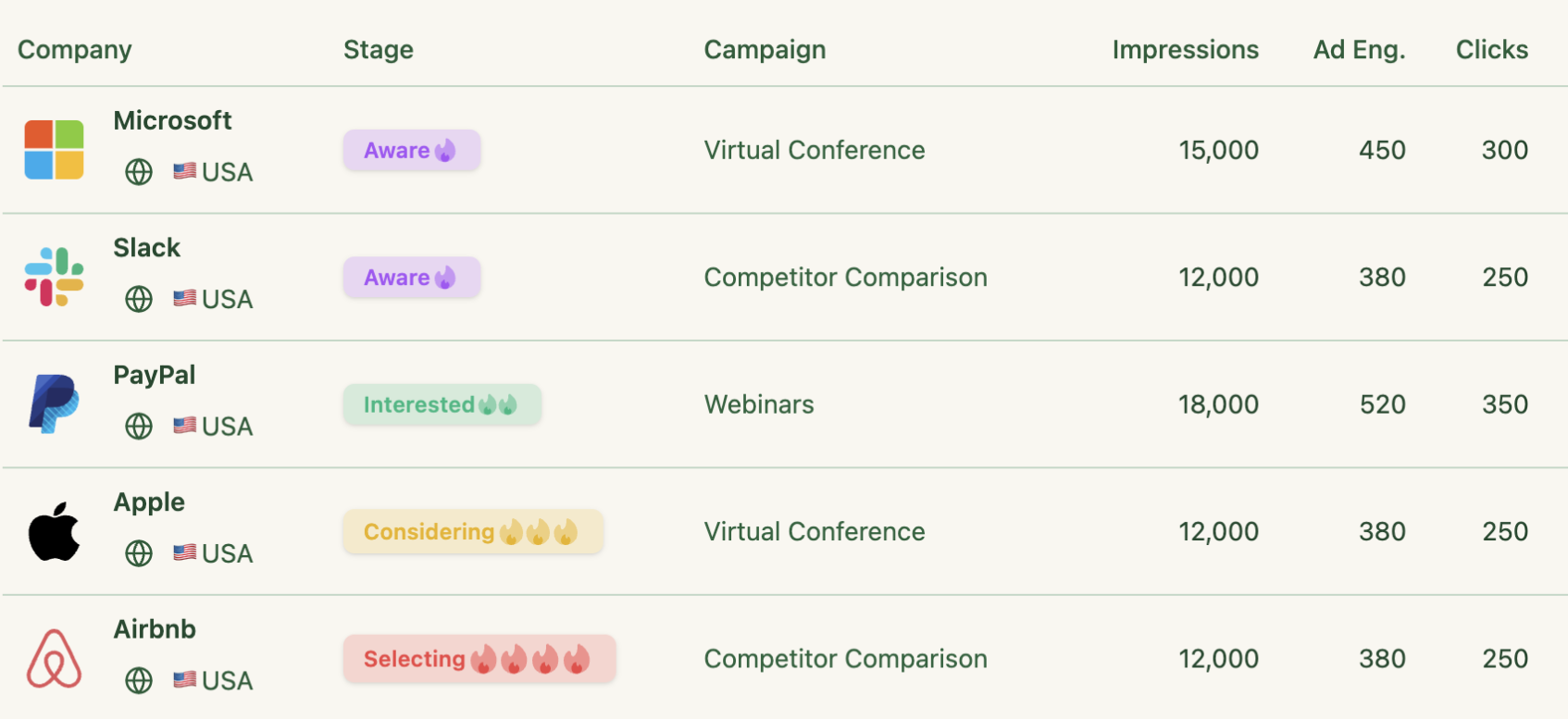
In ZenABM, you define the stage names and the thresholds from any mix of ad engagement, CRM properties, form fills, webinar signups, and deal stages (for example: 5 or more engagements in 30 days moves an account to Interested), and accounts move themselves the moment they qualify.

The bi-directional CRM sync writes the stage and the engagement data to HubSpot or Salesforce as company properties, with webhooks for Clay, Attio, and Pipedrive, so a stage change can fire a BDR task without a human relaying it.
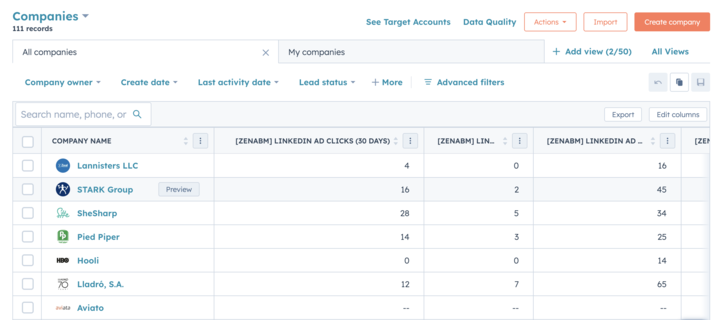

The agent layer sits on top for interrogation: ask which accounts entered Interested this week, which progressed versus stalled, and what the stage history of a specific account looks like before a sales call.
Stage movement is also your earliest, most honest leading indicator (pipeline lags by months; stage velocity moves weekly), which makes it the metric I would put on the team dashboard first.
Accounts do not buy; committees do, and each member of the committee is at a different point in the buying process.
The pre-AI compromise was one message per account tier because nobody had time for more.
That compromise is over.
In the ABM Bootcamp webinar, marketing consultant Katya Tarapovskaia argued for layered segmentation: do not target 100 accounts with one message, segment by persona and by buying-committee stage (awareness versus consideration versus purchase), and use AI tools to tailor the message per layer.
In practice that means the CFO variant leads with payback math while the practitioner variant leads with the workflow, and the awareness-stage account sees education while the considering-stage account sees proof.
Two data inputs make this executable rather than aspirational.
ZenABM’s job-title insights show which personas engaged per campaign (so you know whether the CFO layer is even being reached), and the intent themes from step 3 tell you which message family each account has responded to.

The same can be accessed in your terminal using the ZenABM MCP server and this prompt:
For my accounts in the Considering stage, group them by their strongest intent topic. For each group, draft a persona-split message set (economic buyer, champion, end user) that references the theme the account engaged with. Keep each message under 100 words and tell me which existing case study or asset fits each group best.
One warning from our own program: we overcomplicated this at first, with eight personas and a matrix nobody maintained.
Three personas per account tier, refreshed by the agent monthly, beat the elaborate version that existed only in a slide.

The handoff from marketing to sales is where most ABM value evaporates, because the intent signal is fresh on Monday and stale by Friday.
The automated version closes that gap with a standing weekly cycle.
The free ZenABM outbound agent plugin reads which accounts are actively engaging with your ads, finds ICP-matched contacts at those accounts through Apollo.io (the free tier covers 10,000 records a month), writes personalized emails that reference the specific ads and topics each account engaged with, pushes the sequences to Smartlead, and reruns every Monday without being asked.
The reason this outperforms cold outbound is arithmetic, not magic: every prospect it touches belongs to a company that has already engaged.
Alex Fine, Co-Founder at Understory, published his own numbers running an engagement-triggered version of this play with Clay and Trigify:
“one opportunity for Understory for every 44 people I reach out to via cold email” Alex Fine, Co-Founder, Understory, on LinkedIn
His workflow is worth copying even without the plugin: identify people engaging with content related to your category, qualify them with an AI research agent on company and title, enrich only the qualified ones (he is explicit about not wasting credits on unqualified leads), and validate every address before sending.
The intent signal comes first, and the volume comes last, which is the exact inversion of how outbound teams burned their domains in 2024.

ABM measurement fails in two directions: teams either report vanity ad metrics (clicks went up) or drown in an attribution model nobody trusts.
The workable middle is account-level journey data joined to CRM deals, interrogated in plain English.
Because ZenABM matches ad-engaged companies to deals, the monthly review is one prompt:
Review my ABM program this month versus last month: spend, influenced pipeline, deals opened, closed-won, and pipeline per dollar. Which campaigns were the most common touchpoints before deals opened, and before closed-won? Which deals closed with zero LinkedIn exposure? End with the three changes you would make to next month’s budget, with the data behind each.
Grade the answers against real baselines rather than vibes.
The 2026 benchmarks put median influenced pipeline at $5.21 per dollar spent, top performers at $15.20, and median ROAS at 1.62x, so a program returning $3 per dollar has a diagnosis to run, not a celebration.
Since April 2026, ZenABM’s multi-channel attribution extends the same deduplicated revenue view across Google Ads, Reddit Ads, organic traffic, and AI chatbot referrals, so LinkedIn competes for budget on equal footing instead of winning by being the only channel measured.

For the recurring artifact, /linkedin-abm-report, the fourth of the free ZenABM Claude skills, turns one command into the exec-facing monthly recap: spend, pipeline and deals influenced, the best campaigns, formats, and ads, top engaged companies, every ad set graded against the format benchmarks, month-over-month change, and recommendations for next month.
It runs on the same data and the same math as /linkedin-abm-audit, and that shared foundation is deliberate: the audit is the operator’s weekly to-do list, the report is the exec’s monthly recap, and because both compute from the same source, the numbers never disagree in a leadership meeting.
It is the report your team was supposed to build every month and quietly stopped building.

Everything above compresses into a rollout you can start today.
This is the sequence I would run, having done it the slow way first:
/abm-strategy-planning against your budget and revenue goal before a single dollar moves. Deliverable: a data layer any agent can query, an evidence-based ICP with tiers and disqualifiers, and a campaign plan the budget can actually feed./abm-campaign-execution producing the outlines, copy briefs, and mockups./linkedin-abm-audit as the weekly habit so the checklist runs itself from then on./linkedin-abm-report, graded against the benchmark baselines.From there, the cadence is stable: daily, nothing (the agents watch); weekly, /linkedin-abm-audit, the priority matrix, and the outbound cycle (about an hour total); monthly, the ICP-versus-list reconciliation and /linkedin-abm-report for the pipeline review.
Budget-wise, the whole stack runs lean: the four Claude skills and the plugins are free and open source, Apollo has a workable free tier, ZenABM starts at $59 a month with a 37-day free trial, and Claude Code needs a Claude subscription.
The judgment calls (strategy, offers, final creative taste, and every confirmation click before an account change) stay yours, and I would not have it any other way.
AI-powered ABM is account-based marketing where AI handles the operational work at each step: researching and scoring target accounts, generating persona-specific ads, monitoring account-level engagement, moving accounts through funnel stages, triggering personalized outreach, and reporting pipeline impact. The strategy stays human; the grunt work runs through agents connected to account-level data, typically via MCP servers, chat interfaces like Zena, and open-source plugins.
Across every program step. AI defines ICPs from closed-won deal patterns, builds account dossiers in about 2 minutes instead of 20+, maintains engagement and fit scores continuously, generates ad creative from an account’s own top performers, pauses decaying ads and reallocates budget with human confirmation, automates stage progression and CRM sync, writes intent-referenced outbound, and produces pipeline-level reports on demand. The common requirement is company-level data underneath, since ABM decisions are account-level decisions.
Mostly, with one deliberate exception: account changes should stay confirmation-gated. Through the ZenABM MCP server, an agent can analyze performance, draft pauses, exclusions, and budget moves, and execute them once you approve each change; the outbound and reporting plugins run fully on weekly schedules. Fully autonomous spend changes are technically possible and, in my experience, not worth the risk versus a five-second confirmation click.
Yes. ZenABM publishes four free, open-source Claude skills in the linkedin-abm-skills GitHub repo: /abm-strategy-planning for budget sizing and the campaign plan, /abm-campaign-execution for launch-ready copy briefs and mockups, /linkedin-abm-audit for a 30-day diagnostic with a prioritized fix list, and /linkedin-abm-report for the exec-facing monthly recap. They run on sample data out of the box and switch to your real ad data once connected to a ZenABM account.
It depends on the job. ZenABM covers company-level LinkedIn engagement, intent signals, stages, attribution, Zena, and an MCP server from $59 a month (see pricing); Clay handles ICP research and enrichment; free Claude skills and plugins cover list building (AgentSource), strategy and ad design (/abm-strategy-planning, /abm-campaign-execution), auditing (/linkedin-abm-audit), reporting (/linkedin-abm-report), and outbound. Enterprise predictive platforms like 6sense and Demandbase add third-party intent at five to six figures a year.
No, but it replaces the version of the job that was mostly data janitorial work. The steps AI absorbs are research, scoring upkeep, report building, and routine optimization; the steps it cannot absorb are choosing the market, designing the offer, judging creative, and deciding what a stage threshold should mean. Practically, one marketer with an agent stack now runs a program that took a small team in 2023, which changes team shape more than headcount.
If you want to start where the payoff is highest, wire the data layer first: a free 37-day ZenABM trial includes the company-level engagement tracking, Zena, the MCP server, and the attribution layer this whole system runs on, or book a demo and I will walk you through the setup on your own account.