

©2026 ZenABM - All Rights Reserved.

When Emilia Korczynska (VP of marketing at Userpilot) launched her first ABM program, she had no playbook.
Most ABM content she found was high-level strategy slides: “align sales and marketing,” “target the right accounts,” “personalize your messaging.”
Stuff like this:

None of it told her which buttons to click in LinkedIn Campaign Manager, how many ads to run, or what to do when a target account actually engages.
16 months later, that program had generated $5.29M in pipeline from $490K in ad spend.
But the first three months were painful. The team made every mistake in the book: overcomplicated the account scoring, spread the budget too thin across too many campaigns, and tried to use four channels at once before mastering one.
This post is the zero-to-first-campaign guide she wishes she had when starting out. It covers everything in the order you need to do it, with the specific tools, decisions, and configurations at each step.
What you will learn:
Short on time?
Here’s a quick rundown:

Teams that build ABM programs with LinkedIn as the primary channel get to pipeline faster than teams that try to start with Google Display or 6sense, and here is why.
LinkedIn is the only advertising platform that gives you three things simultaneously:
This means LinkedIn serves as both your primary ABM distribution and measurement channel. You run targeted ads and see which accounts respond on the same platform.
Every other channel requires workarounds (reverse IP, CRM matching, third-party identity graphs) to even identify which companies saw your ads.
As Tim Davidson (B2B Rizz) described when breaking down the 1:1 ABM approach in his post:
“Ideal audience size: 5 to 15K people. Small enough to show up often. Big enough to scale. That is how you get niche famous.”

This is exactly the logic of LinkedIn ABM: precision over volume, with a platform that can actually deliver precision.
The recommendation: build your ABM program on LinkedIn first. Get the targeting, creative, and scoring working. Then layer other channels on top for retargeting and surround sound. Do not try to launch on four platforms simultaneously. You will spread budget and attention too thin. For the complete tactical breakdown, read the full ABM on LinkedIn guide.
Most ABM programs fail before the first ad goes live because the budget is set arbitrarily (“we have $10K per month, let’s see what happens”) rather than reverse-engineered from a pipeline target.
As Maximilian Herczeg (founder at Kamrat) covered in the ZenABM ABM Bootcamp 2026:
“Most LinkedIn ABM campaigns fail before launch because the account list is wrong, the budget is spread too thin, or the goal is vague and not tied to the pipeline.”
Here is the formula that should precede every ABM budget decision:

If the resulting budget exceeds what is available, adjust the goal or the timeline.
The math does not bend to accommodate wishful thinking.
Running a program with insufficient budget to reach your target account list with meaningful frequency is the most common reason that first ABM programs “do not work.”

Your account list is the foundation of your ABM program.
A bad list makes every downstream step pointless. As the saying in B2B ABM goes: “Your list is your strategy.”
Start with firmographics (company size, industry, revenue range, geography), technographics (which tools they use, including CRM, marketing stack, and competitors’ products), and intent signals (hiring patterns, funding rounds, technology adoption signals).
Analyze your best closed-won customers to find common traits.
This is not a theoretical exercise: pull your CRM data and look at what your actual buyers have in common.
As Andrei Zinkevich (Fullfunnel.io) warns:
“The fact that the account fits your firmographic criteria doesn’t mean it’s a good fit. The more disqualifying ‘red flags’ you set up, the better your list will be.”

A 200-person SaaS company growing 50% year-over-year is fundamentally different from a 200-person SaaS company plateauing, even though both look identical in a filter.
This is the most important insight from running a real program: do not start with cold ICP-fit accounts.
Start with accounts that already have context about you.
Prioritize in this order:
As Philip Ilic emphasized in his post:
“For sales-led B2B SaaS, I would always start with a list of your top companies. Putting a looooot of effort into building out your list is super important.”

50% of ABM success comes down to list quality.
The creative and the budget matter, but they cannot save a bad list.

For your first ABM program, target 500 to 3,000 accounts.
Fewer than 500, and LinkedIn’s audience will be too small for efficient delivery.
More than 5,000, and you need a significant budget to reach them with meaningful frequency before engagement signals start emerging.
Your ABM program needs two campaign layers from day one.
This is not optional: without the warm campaign layer, engaged accounts get the same content as cold ones, and the program stalls at awareness.
Emilia Korczynska makes a critical point that most first-timers skip: without a structured naming convention, you cannot track company-level engagement data from the LinkedIn API per campaign.
The ZenABM approach uses a structured naming system that encodes the ABM campaign object, the campaign group (intent level or theme), the campaign (format-specific), and the ad, all automatically generated from properties you define.
This naming architecture is what allows ZenABM to pull intent data at the campaign-group level and push qualitative intent (not just raw clicks) into your CRM.
Emilia adds:
“If you don’t mark which LinkedIn Campaign, Campaign Group and ABM Campaign the asset belongs to when designing it, good luck uploading the right asset to the right place.”
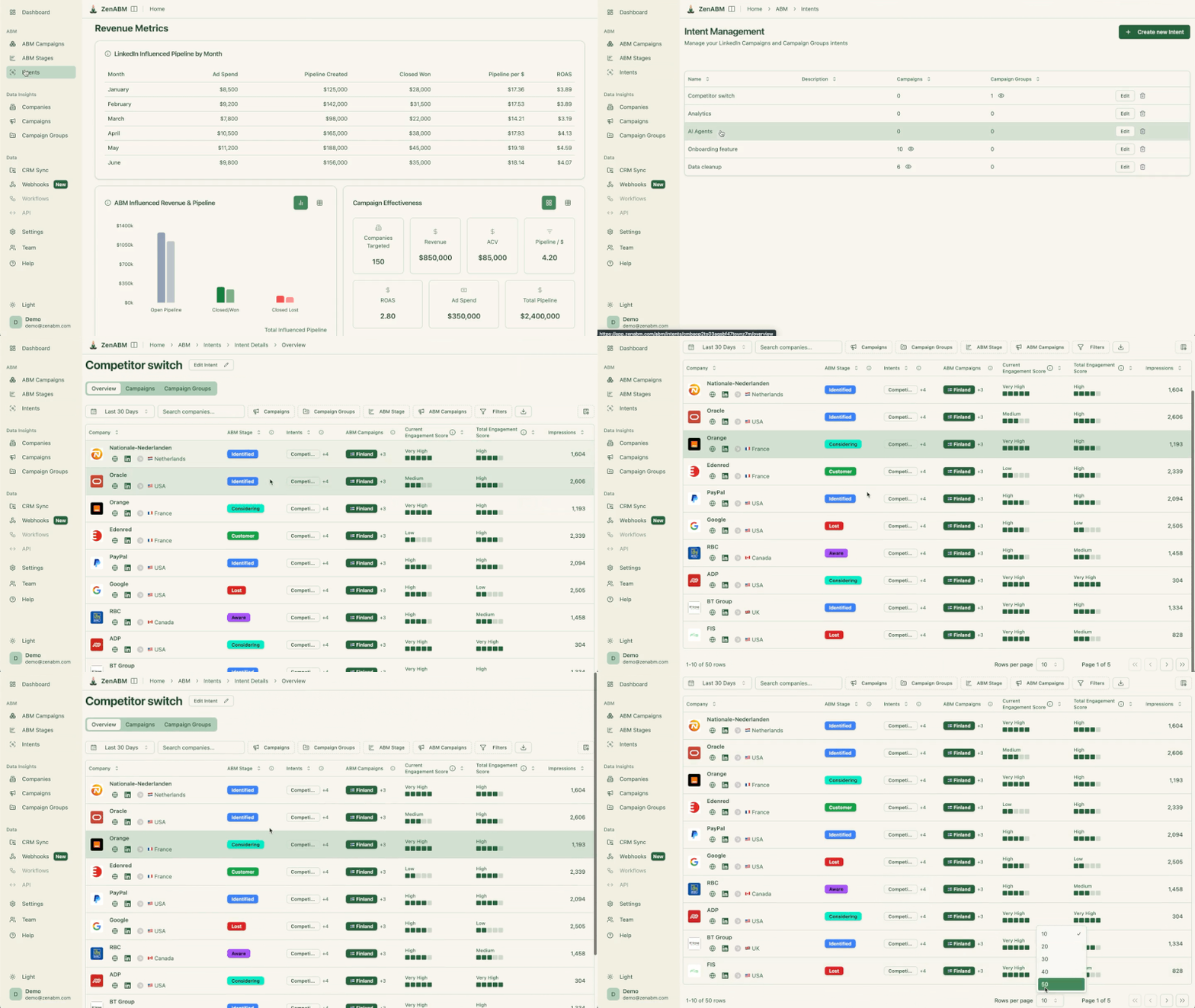
By the way, if you don’t want to name, you can just tag each campaign with an intent in ZenABM:

These four settings are on by default and will silently drain your budget and dilute your targeting if you leave them on:


Target 3 to 4 clicks per ad per day at approximately $8 CPC, which means $25 to $32 per ad per day. If your monthly budget is $10K, you can realistically run 10 to 15 ads for one persona.
Use the ABM Budget Calculator to run your specific numbers.

Based on the ZenABM 2026 Benchmarks Report analysis of 2,828 ads across 211 companies, favor Thought Leader Ads heavily in your mix.
TLAs deliver 2.68% median CTR at $2.29 CPC, compared to 0.42% CTR at $13.23 CPC for single image ads. They are 77% cheaper per click and feel native in the feed, which matters for building trust with target accounts over time.
For a $10K per month budget: roughly 40% TLAs, 50% single image ads, 10% text ads. Scale the mix from there as you gather data. AJ Wilcox (B2Linked) noted from his testing: “6 months into testing with clients and CTRs still remain 2x higher (or more) on Thought Leaders vs traditional company promos.”
Critically, as Emilia documents, running multiple messaging angles in parallel (one focused on productivity, another on cost savings, another comparing to a competitor) is not just good practice; it is the data source that tells you what your target accounts actually care about. The campaign they click most is the intent signal that tells ZenABM which topic to push into your CRM as qualitative intent.



Once your LinkedIn campaigns are running and generating traffic, add retargeting on other channels for the “surround sound” effect.
The approach: create dedicated noindex/nofollow landing pages exclusively for your LinkedIn ABM ads. Install retargeting pixels from Google, Meta, and Reddit on those pages. Anyone who clicks a LinkedIn ad and visits these pages is, by definition, a target account contact. You can then retarget them across platforms at much lower CPMs than LinkedIn.
Keep the landing pages noindex/nofollow to prevent organic traffic from polluting your retargeting audiences. You only want verified target account visitors in those pools, not random organic searchers who happened to land on the same page.
For more detail on this approach, see our ABM social media playbook.
This is where your ABM program goes from “running ads” to “building pipeline.”
Intent signals tell you which accounts are actually paying attention and which are ready for outreach.
ZenABM pulls company-level engagement data from the LinkedIn Ads API and automatically assigns accounts to stages based on engagement thresholds.
The stage framework below is the one Emilia Korczynska designed for Userpilot’s ABM program, and that is now built into ZenABM:
| Stage | Threshold | What It Means and What to Do |
|---|---|---|
| Identified | On your target list | Account exists, not yet reached. Marketing owns this stage. |
| Aware | 50+ impressions | Account has seen your ads multiple times. Continue COLD campaigns. Monitor for engagement escalation. |
| Interested | 5+ clicks or 10+ engagements | Account is actively engaging with your content. BDR outreach triggers here. This is the core handover point. |
| Considering | Demo booked or trial started | Account has taken a conversion action. Sales takes over, shift to WARM campaign content. |
| Selecting | Open deal in CRM | Sales is working the opportunity. Marketing continues supporting the buying committee with ads. |

Beyond quantitative scoring, ZenABM also captures qualitative intent: which specific campaigns the account engaged with.
If your campaigns are segmented by topic (competitor displacement, product education, specific use case), you know not just that Acme Corp is interested but what they are interested in.
This is the data that makes BDR outreach specific rather than generic.
The intent data flows directly from Userpilot’s experience documented in Kyle Poyar’s Growth Unhinged case study:
“We can push both total engagements and which campaigns the account engaged in into company properties on HubSpot. Since the campaigns are already segmented by intent, we can then create a workflow to assign the respective intents in a custom multiple checkboxes company property on the company level based on the campaign names coming in from ZenABM.”
ZenABM pushes these stages, scores, and intent signals into your CRM (HubSpot or Salesforce) as company properties.
This means your CRM always has current data on which accounts are engaged and what they care about, powering both marketing workflows and BDR outreach without anyone manually exporting a report or checking a separate dashboard.

Once you have identified which accounts are in the “Interested” or “Considering” stages, events and gifting become powerful acceleration tactics.
The keyword is acceleration: these tactics work on warm accounts, not cold ones.
Invite engaged accounts to targeted events: webinars, roundtables, workshops, or in-person dinners. The key is selectivity. Do not blast your entire target list.
Target only accounts that ZenABM has flagged as “Interested” or above, which keeps events exclusive and high-signal rather than turning them into webinars with generic audiences.
LinkedIn Event Ads can promote these directly to your target account list.
You can also use the intent data from ZenABM to personalize the invitation based on which campaign theme the account engaged with: “We noticed your team has been looking at [topic]. We are hosting a roundtable on exactly this next week.”
The invitation feels timely because it is.
Emilia shared the timeline approach her team used at Userpilot:
“Week 1: launch ads, Week 3: start outbound emails to engaged accounts, Week 6: invite hot accounts to a webinar or send direct mail.”
Keeping the team aligned on this timeline prevents the most common coordination failure, which is marketing running ads while BDRs have no idea who to contact or when.

Physical or digital gifts to key contacts at interested accounts can break through the noise when the account is already warm.
Tools like Sendoso, Reachdesk, or Postal let you automate gifting workflows triggered by CRM properties, for example automatically sending a personalized gift when an account moves to “Considering” stage in ZenABM.
The principle: a $50 gift to an account that has never heard of you is spam.
The same gift to an account that has engaged with your ads 20 times and attended your webinar is thoughtful and memorable. The ZenABM stage data is what distinguishes between the two situations.
Everything you need to launch, in order:
The full orchestration process, including bidding automation, campaign optimization, and outbound sequences, is covered in our ABM orchestration guide.
Running your first ABM program without a structured playbook means you will learn the hard way: overbuilt account scoring, budget spread too thin, too many channels running before any of them produce signal.
The zero-to-first-campaign path is simpler than most ABM content suggests.
One channel (LinkedIn) until the targeting and scoring work.
A list built on warmth, not just ICP fit.
Two campaign layers from day one.
Four default settings turned off before your first dollar spends.
And ZenABM pulling intent data from the LinkedIn API, so your CRM always knows which accounts are engaged and what they care about, without anyone manually exporting a report.
The $5.29M pipeline Emilia Korczynska built at Userpilot did not come from running a sophisticated multi-channel program from the start. It came from getting the fundamentals right, then layering complexity on top.
Start there.
And let ZenABM support your efforts: Book a demo now or try the tool yourself (37-day free trial).
Some common questions about ABM program setup and their answers:
At minimum: a target account list (500 to 3,000 companies matching your ICP, prioritized by warmth not just fit), a LinkedIn Campaign Manager account with sufficient budget ($8 to $10K per month minimum for one persona), a CRM (HubSpot or Salesforce), and an account scoring tool like ZenABM ($59 per month) to track company-level engagement and intent. You do not need an enterprise ABM platform to start. Userpilot built a $5M pipeline program with this exact stack.
Expect 3 to 4 months before you see meaningful pipeline impact. The first month is setup and data gathering. Months 2 to 3, accounts start progressing through stages. By month 4, you should have enough “Interested” accounts to trigger outbound and see pipeline form. Userpilot’s program hit $900K in pipeline at month 5. Results compound over time as your engagement data and scoring model improve.
No. Use them for retargeting only. Neither platform has native company-level targeting, so you cannot do ABM prospecting on either. The approach is: run LinkedIn ads to dedicated landing pages, install retargeting pixels, then retarget those visitors on Google Display and Meta for brand reinforcement. Keep the landing pages noindex to maintain audience quality.
ZenABM automatically scores accounts based on LinkedIn ad engagement (impressions, clicks, engagements) and assigns them to stages (Identified, Aware, Interested, Considering, Selecting). Accounts that cross engagement thresholds (5+ clicks or 10+ engagements) are flagged as “Interested” and can trigger automated BDR assignment in your CRM. ZenABM also captures which campaigns they engaged with, giving you qualitative intent data for personalized outreach.
$8,000 to $10,000 per month on LinkedIn ad spend for one persona. This supports 10 to 15 ads getting enough daily clicks to optimize and generate meaningful engagement signals. Below this level, budget dilution prevents your ads from reaching target accounts with enough frequency to drive engagement. Add $59 per month for ZenABM. Use the ZenABM ABM Budget Calculator to get precise numbers based on your account count and revenue goals.
Technically yes, but it is difficult. As Emilia Korczynska noted from running Userpilot’s program: “Don’t even think about starting ABM without a marketing ops manager, as the amount of ops work is brutal.” The campaign naming conventions, HubSpot workflow configuration, Clay integrations, ZenABM setup, and retargeting pixel installation all require someone who can work across systems. If you do not have a dedicated ops person, plan to spend the first 4 to 6 weeks on setup before any ads launch.
