Black Friday: up to 50% off ZenABM 💥Get up to 50% off ZenABM with our massive BlackFriday sale! 💥 - only 24-30 November!Get the deal12 Days of ABM Christmas · Report on your 2026 LinkedIn ABM & plan 2027 · Free webinars, 26 Nov – 9 DecSave your seat


Emilia Korczynska is Head of Marketing and co-founder at ZenABM. Before that she was VP of Marketing at Userpilot for nearly 7 years, where she ran a large ABM program primarily on LinkedIn ads.

LinkedIn audience overlap happens when the same people or companies can be reached by more than one of your campaigns. I find it by comparing targeting first, then checking company engagement across ad sets to see which accounts actually got ads from both.
I care about the named accounts, not an overlap percentage, because a percentage tells you nothing you can fix. Some overlap is on purpose (a COLD and a WARM campaign can reach the same account for different jobs), while two prospecting campaigns sending different messages to the same account usually need a cleaner split.
Below are three ways to find those accounts, how to decide which campaign should own each one, and how to add exclusions without cutting an account out of your funnel.
Overlap can be harmless or worth fixing, depending on why the same people or companies are eligible for more than one campaign. Here is how I tell the difference:
Way | What you see | Setup time | Cost | Best for |
|---|---|---|---|---|
Compare targeting by hand | Criteria that could reach the same people or companies | About 20 minutes | Free | A quick check before launch |
Test an audience in Campaign Manager | Estimated size of a shared audience, where you can build it | About 20 minutes | Free | Checking a potential overlap before launch |
Compare company engagement in ZenABM | Visible companies served across campaigns and ad sets | About 20 minutes for the check | Free plan available; paid plans start at $59/month billed annually | Finding named accounts in live delivery |
The times are my own estimates for a first pass, and the ZenABM check depends on the first data sync finishing. The Starter plan costs $69/month if you pay monthly instead of annually.
The way to choose is simple: do you need to know who could overlap, or which companies actually received ads?
Here are the three checks in order, with the decision for each overlapping account:

See which accounts each LinkedIn campaign reaches
ZenABM shows company engagement by campaign and ad set, so you can spot the accounts two campaigns are chasing.

LinkedIn Ads Experts Chat: ask a question about your targeting, or about whether a suspected overlap is deliberate or accidental.
I start from the live ad account and the lists behind it, because overlap is a delivery problem and the audience builder only shows who you asked for. Here is what to have ready:
One naming point first. LinkedIn's current structure uses a campaign (formerly a campaign group) to hold ad sets (formerly campaigns). The comparison happens at the ad set level, so give each ad set its own row in your sheet.

The free check starts with a spreadsheet.
A spreadsheet is enough to catch the obvious leaks before you spend more time on them. I use it to pick pairs worth investigating, never to claim that a particular person saw ads from both.
For example, your sheet might show one prospecting ad set on a matched company list and another on a broader market with the same titles. I mark that pair for investigation rather than assuming every company, or every person at those companies, overlaps.

You get a shortlist of ad sets that could reach the same people or accounts. That is most useful before launch, especially when different people built separate ad sets and gave them different names.
List size also shapes how you build the audience. LinkedIn allows up to 200 companies when you target by company name and up to 300,000 companies in a list upload. Our LinkedIn company targeting guide covers when each option fits.
The sheet cannot show actual delivery. A company can match both definitions and still receive impressions from only one ad set, and different employees at the same company may see each ad.
It also cannot reliably work out an intersection when two audiences describe the same people in different ways. The next method helps when you can express the shared criteria in Campaign Manager.
Campaign Manager can estimate the size of a test audience built from shared targeting criteria. I use it as a pre-launch check, not a live diagnosis, because it estimates what could overlap rather than showing what already does.
Campaign Manager does not give you an overlap report, so the practical route is to rebuild the intersection by hand wherever the targeting options allow it.

The minimum audience size matters when you make the final targeting change. An audience under the inclusion threshold can still tell you that your planned split is too narrow to run.
When the shared conditions can be expressed, you get an estimate of the people who could qualify for both ad sets. LinkedIn's free Insights view also shows which companies make up a large share of an audience before launch.
That company split matters even when the total audience looks healthy. Tim Davidson ran this kind of check before launching to a list of about 540 companies and found that two of them made up 46% of the audience. A few large companies can account for far more of the eligible members than the rest of your list.
An estimate cannot show which companies received impressions from both ad sets. It also gives no reliable overlap percentage when the test audience is broader or narrower than the real intersection.
Once you know which criteria should stay apart, exclude the relevant audience from the ad set that should not own it. ZenABM's Exclusions apply company, job title or industry exclusions across the scope you choose, including new campaigns. That way you do not re-upload a list every time you launch.
The next question is what happened in the live campaigns, and for that I want company delivery data rather than another estimate.
Company engagement data lets you find the visible accounts that received ads from more than one campaign or ad set. This is the check I run when a targeting comparison has turned up a suspicious pair and I need names before I touch any exclusions. It is also the one thing Campaign Manager does not expose: company joined by ad set.
The table below shows the company view filtered by campaign:
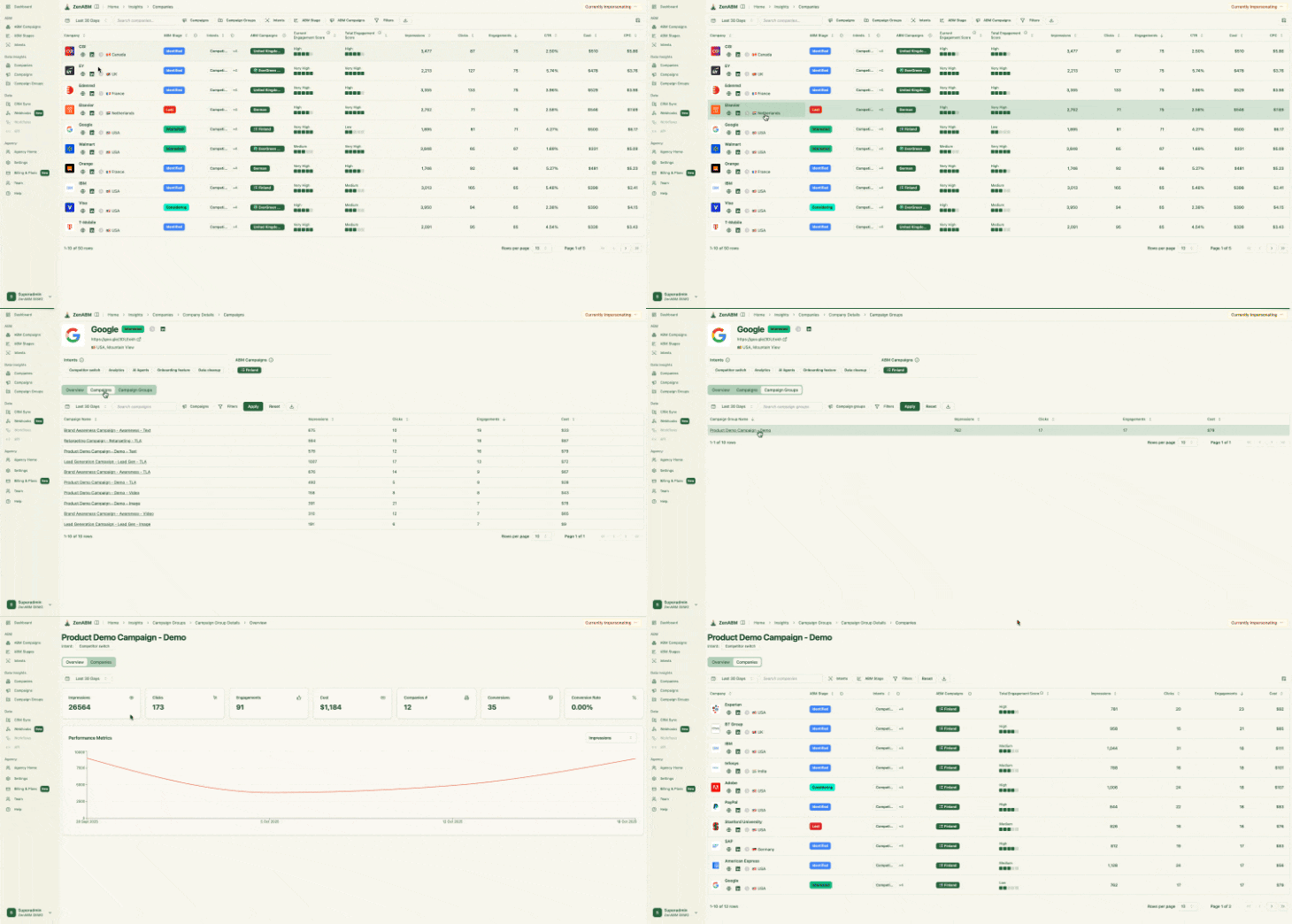
Each ad set's Companies tab lists the companies it reached, with impressions and clicks, so you can compare the same company across two ad sets:

You get a list of visible companies with delivery in more than one place, instead of a list of everyone who could qualify. That makes the team conversation far more concrete: "Should this account receive both messages?" is easier to answer than "Is our overlap percentage too high?"
One distinction matters here. Delivery to the same company does not prove that the same person saw both ads. It shows overlap at the account level, which is the level that counts for an ABM check.
The list is not necessarily complete. LinkedIn hides company data when a company has fewer than 3 interactions in a given period, so an account missing from the comparison is not proof that it had no overlap.
LinkedIn ad data also syncs to ZenABM weekly, on Monday at 00:00 GMT. That makes this a weekly check, not a live warning the moment a company sees a second ad. If you want to repeat it on a schedule, the API and MCP server can pull the same company data for a recurring comparison.
Find accounts reached by multiple campaigns
See how company engagement and scoped exclusions can help you investigate overlap.
I use the free checks to compare targeting before launch. I then compare company engagement to find accounts with visible delivery across live ad sets.
Method | Time | What it shows | When I use it |
|---|---|---|---|
Targeting sheet | About 20 minutes | Possible overlap in audience criteria | Before launch, or as a first diagnosis |
Campaign Manager test audience | About 20 minutes | Estimated size of shared criteria, where the intersection can be built | Before launch |
Company engagement comparison | About 20 minutes once data is available | Named companies with visible delivery across ad sets | Live, account-level investigation |
The free methods are enough when your question is whether two planned audiences could reach the same people. They are not enough when Sales needs the names of accounts that actually got ads from both.
Here are the three ways to check for overlap, with the time each takes and when I use it:

Same stage and competing messages: investigate and fix. Different stages with a purpose: keep the overlap.
For example, an account might still receive a COLD message while it also qualifies for a WARM campaign. That can be intentional, and our LinkedIn retargeting audiences guide explains why. If your plan is to move it fully into WARM, exclude it from COLD once it qualifies.
The catch is that you make this call for the funnel you built. An account excluded from every relevant campaign stops receiving the messages you meant it to see, and over-excluding can hurt as much as the overlap itself.
For each overlapping account I make a decision per stage, then check that the exclusions still match the plan. The goal is to remove unwanted collisions without removing the account from your funnel.
When two campaigns do the same job, pick one to own the account.
ZenABM applies company exclusions in the background, which can take a few minutes, and re-applies them daily at midnight GMT. LinkedIn caps how many exclusions an ad set can hold, and ZenABM cannot raise that. Keep this limit separate from the 300,000-company list upload limit above.
Audience cycling means an engagement threshold decides when an account should get a different message. Agree the threshold first, build the WARM audience from the accounts that meet it, then exclude that audience from COLD if the account should stop receiving the COLD message.
ZenABM's account stages let you define those stages from LinkedIn engagement and, if you connect one, CRM conditions. ZenABM places each account in a stage by your rules, so the stage is computed instead of updated by hand.
Stages recalculate daily, but the LinkedIn engagement feeding the rules follows the weekly sync described above. Also check that your WARM audience reaches LinkedIn's 300 matched members before you rely on it for delivery.
This is the sequence I want the team to agree on before anyone changes a live audience:

Compare the companies receiving ads with your intended list, then investigate unexpected matches and stale exclusions. I run this weekly, because the audience that was right at launch drifts as lists and company records change. The accounts that appear in two campaigns are usually the first sign of a list that needs a cleaner split.
Keep a record of each account, its owner campaign and the reason for any exclusion. When a company's stage changes, review the old exclusion instead of leaving it in place forever.
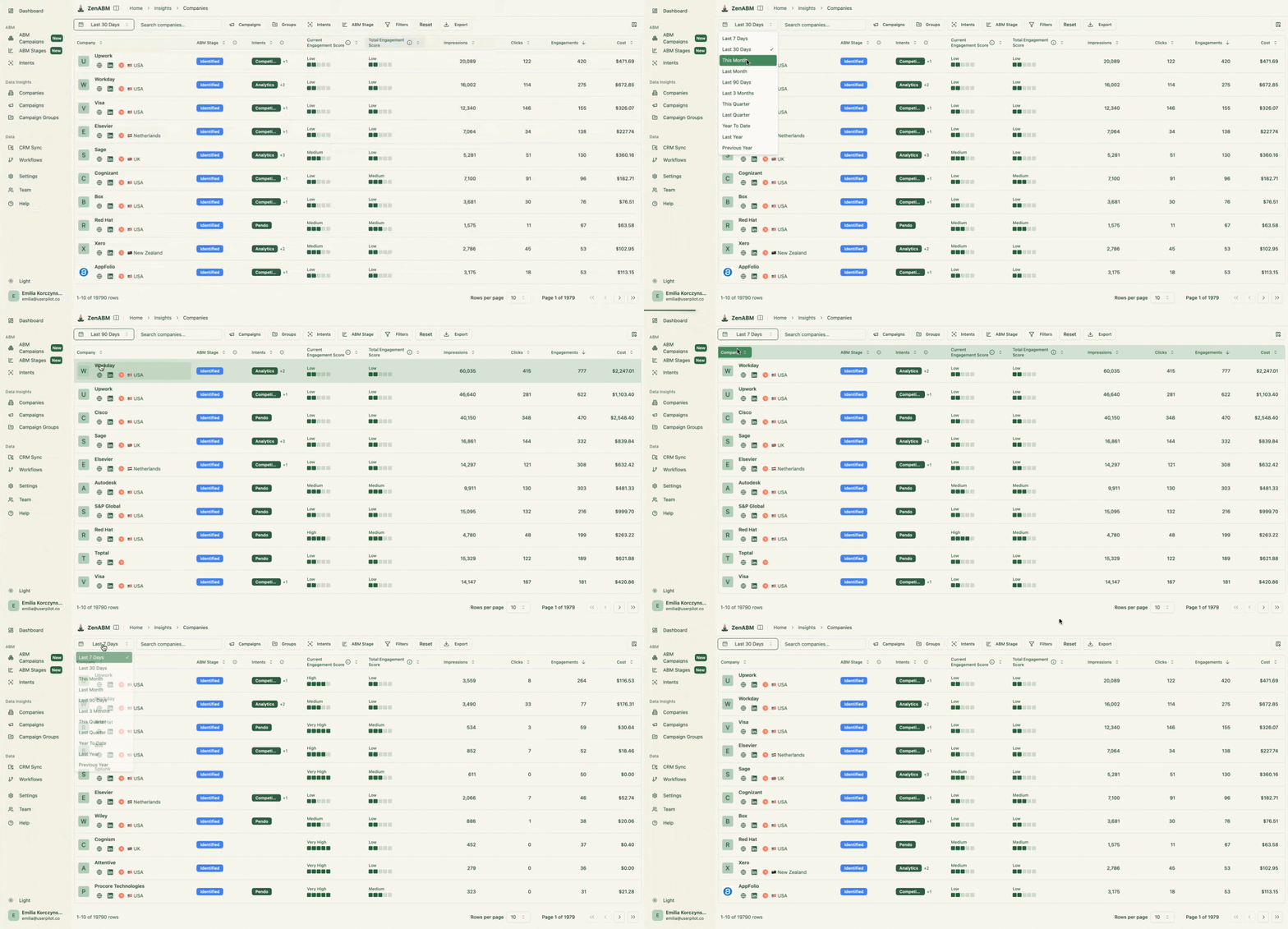
The company table gives you the engagement measures to review alongside that decision:
Most mistakes come from treating an estimate as proof, or from excluding before you decide what the account should receive. I would check these before changing any live audience.
A match rate tells you something about how well a list matched, but I would never use it as proof that the right companies are in the audience. In one HubSpot audience I checked, LinkedIn reported a match above 90%, while only about a third of the companies were actually present.
So compare the matched companies with your source list. If important accounts are missing or unexpected ones appear, deal with that before you blame overlap for weak delivery.
An account can appear in both COLD and WARM because the campaigns have different jobs. Removing it from either one without checking the funnel can cut off a message you meant it to get.
I use the owner rule for competing campaigns at the same stage. For a stage transition, I decide whether the account should get both messages for a while or move entirely to WARM.
A matched audience can include companies you never uploaded. When I compared one of our largest HubSpot audiences with its LinkedIn match, it contained companies we never planned to target, such as the South African Post Office. That can look like an overlap problem when the first issue is the match itself.
Compare unexpected companies with the source list. Exclude a wrong match from the relevant campaigns only after you have checked it is not an account you meant to keep.
Overlap asks whether the same account or person is eligible for, or reached by, several ad sets. Frequency asks how often an audience sees your ads inside one campaign.
An account can receive too many impressions from a single campaign without appearing in another one. Fix that exposure separately from the owner decision, or you may remove an account from the wrong campaign.
LinkedIn switches Audience Expansion on by default wherever it is available, and the LinkedIn Audience Network on by default for new single image, carousel, document and video ad sets. Both can send spend to accounts you never chose. Inspect them on the ad sets you are comparing before you assume every unexpected company comes from overlap.
Budget Savers keeps both settings off across the scope you choose, including ad sets added later, and re-checks every hour. That removes one separate source of leakage while you work through the account list.

A handful of companies can dominate an audience even when the account list looks broad. That is why I inspect the companies behind an audience, not only its total size.
Before launching to a list of about 540 companies, Tim Davidson found that 2 companies made up 46% of the audience.

That was an audience check before launch, not a measured overlap fix with an after result. The lesson for overlap is to look at those big accounts across the campaigns you suspect. If they show up in two campaigns, decide whether each campaign has its own job. Then pick an owner.
ZenABM covers the account-level part of this job once you have compared the targeting. We built it around the company view, so the next step is always a decision about a named account.

Find and review overlapping accounts
Try the company engagement view and see which campaigns are reaching your accounts.

My verdict: start with the free targeting check, then look at company delivery before you exclude named accounts. Keep the overlap that serves your funnel and fix the overlap that sends the same account competing messages.
LinkedIn audience overlap means the same people or companies are eligible for more than one campaign or ad set. A matched company list inside a broad prospecting audience is one example. At company level, the two ad sets may still reach different employees, so I separate shared account eligibility from proof that the same person saw both ads.
LinkedIn says campaigns from the same account are prioritized and filtered before the auction, while practitioners report cost pressure when campaigns target overlapping small audiences. I would not assume a CPM rise proves your campaigns bid against each other. The question that matters is whether the same accounts get competing messages and whether each campaign has a clear job.
Compare the targeting criteria first, then check company engagement across the ad sets you suspect. A Campaign Manager test audience can estimate a shared pool when you can reproduce the intersection, but it does not show delivery. Company engagement identifies visible accounts reached in both places, within LinkedIn's reporting thresholds and the weekly data sync.
Overlap comes from a matched account list sitting inside a broader prospecting audience, duplicate audiences, or role filters that reach some of the same people. Audience Expansion and the Audience Network can add accounts you never chose. It can also be intentional when COLD and WARM campaigns have different jobs, so I compare criteria and exclusions before deciding which kind it is.
Choose the campaign that should own each account at its current stage, then exclude the account from the competing campaign. Check the exclusion scope before saving so the owner can still reach it. If the account belongs in both COLD and WARM for a reason, keep that overlap instead of applying the same exclusion everywhere.
No. Overlap is about eligibility or delivery across campaigns and ad sets, while frequency is about how often ads are shown. An account can be reached by two campaigns without heavy exposure, or get too many impressions from one campaign alone. Check each account's delivery and the purpose of each campaign before choosing which issue to fix.
About the author

