Black Friday: up to 30% off ZenABM 💥Get up to 30% off ZenABM with our massive BlackFriday sale! 💥 - only 27-30 November!Get the deal12 Days of ABM Christmas · Report on your 2026 LinkedIn ABM & plan 2027 · Free webinars, 26 Nov – 9 DecSave your seat


Emilia Korczynska is Head of Marketing and co-founder at ZenABM. Before that she was VP of Marketing at Userpilot for nearly 7 years, where she ran a large ABM program primarily on LinkedIn ads.

Follow up on buying signals within minutes for demo requests and within the week for engaged accounts. I let the signal decide who gets an email and which angle they get, and I never write "I saw you clicked our ad".
We tried mentioning that kind of activity in AI-personalized first lines, and the result was cringe 😅 So the signal now does the routing, and a person writes and approves the words.
Our warm outbound guide explains how LinkedIn ads and outreach work together. Below are the weekly list, the routing rules, the email structure and the human review that make the follow-up happen.
ABM Clay templates: Find contacts at Interested companies or route accounts into sequences by intent.
Claude Code outreach skill: Pull intent accounts, find contacts and draft emails for Smartlead.
The workflow starts with ad engagement and keeps a human decision between the signal and the send:

The rules rest on one question: what does an ad signal actually tell you?
A buying signal from LinkedIn ads tells you that a company has seen or engaged with an ad about a particular topic. It does not tell you that the company is ready to buy, or which person took the action.
I separate awareness from interest because an impression and a click deserve different follow-up. In our program:
These are our rules, not universal thresholds. An Interested company has shown interest in the problems our ads discuss, which is not the same as wanting our product. Someone at that company may simply be researching a topic.
For example, a company that reaches 18 cold feed impressions becomes Aware in our setup. If it also records 2 clicks in the last 30 days, it meets our Interested rule and moves up the follow-up list.
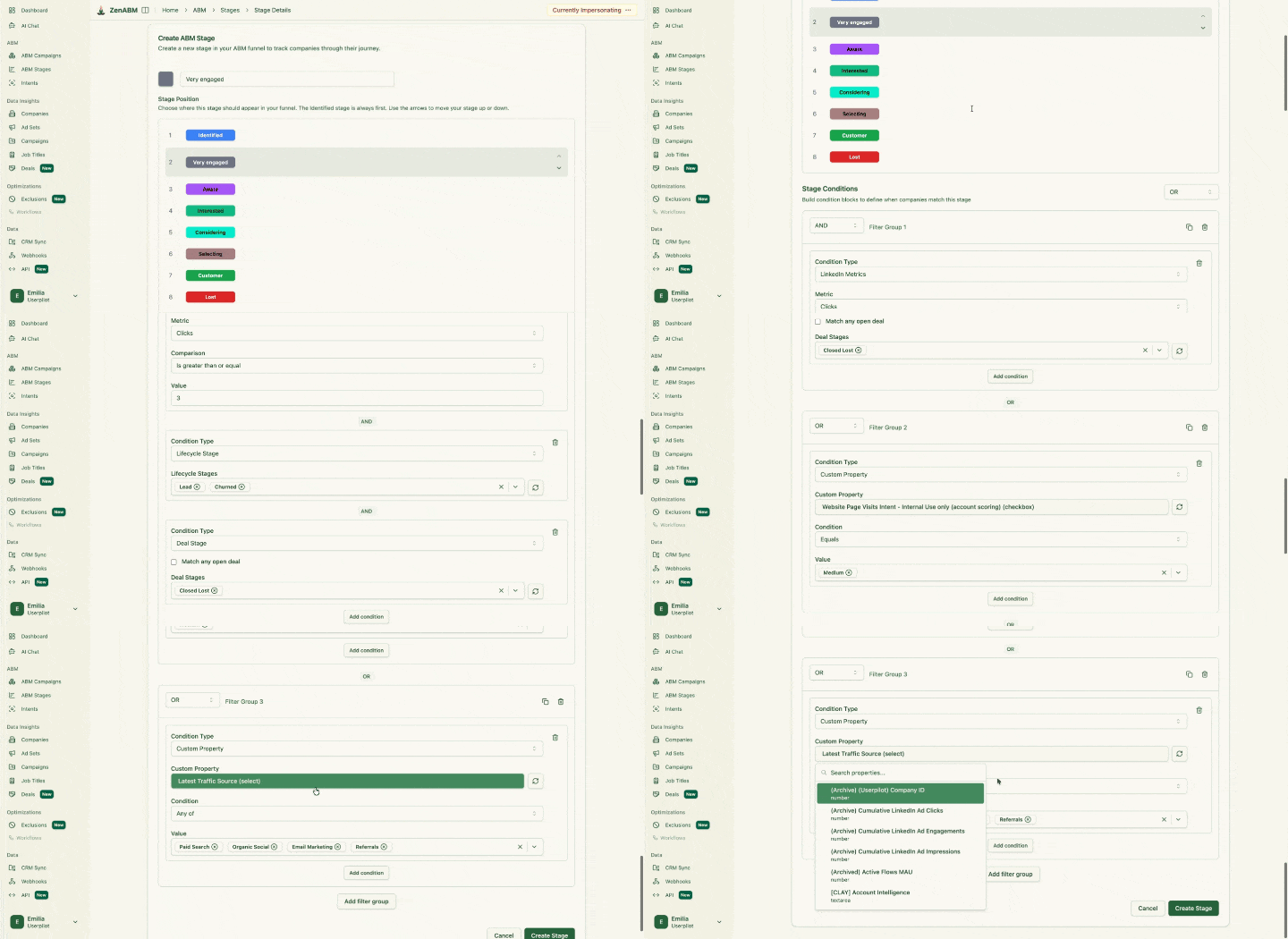
You can maintain stages by checking company engagement and CRM records, then updating each account's stage yourself. I would not, because that is where a small team falls behind. ZenABM account stages calculate the stages you define from ad engagement and CRM conditions, and they recalculate daily.
The stage editor shows how a team can organize its own stages:
LinkedIn's own reporting gives you a starting point for finding accounts, but it does not name the person who clicked. Campaign Manager's company reporting leaves out companies with very few engagements, so it will not give you a complete list of every company that saw or interacted with an ad.
LinkedIn also has separate reporting thresholds for data obtained through its API. ZenABM's CRM sync documentation notes that LinkedIn hides company engagement data below 3 interactions per company in a specific period. Do not assume the Campaign Manager report and an API view use the same threshold or reporting period.
That company versus person distinction matters later. First, you need to decide how quickly each signal deserves a response.
I follow up within minutes when someone asks for a demo or sends a positive reply. For an account that is only engaging with LinkedIn ads, our weekly list gives us time to qualify the company and choose a useful angle.
Signal strength decides response time; intent decides the angle; a human decides the words.
The reason for the split is simple. A lead reached in five minutes is a different lead than the same person the next day, so a direct request cannot wait for a weekly process. An ad impression or click gives you a company to investigate, not permission to treat every employee as an active buyer.
Signal | Response time | Who acts | Channel |
|---|---|---|---|
Demo request | Within minutes | A human owner | Respond to the request and use the contact details provided |
Positive reply | Within minutes | A human owner | Continue the conversation in the reply channel |
Company engaging with ads | Within the week | Marketing or sales after review | Email sequence, alongside warm ads |
Weak signal, such as an impression alone | Nurture rather than immediate outreach | Marketing | Relevant ads and content |
A direct request needs an owner even if it arrives after the Monday list is built, which is why the two paths never share a queue.
The response paths depend on whether the person has asked for contact or the company has only engaged with an ad:

Valentin Dimitrov described two accounts where teams blamed the leads when their own follow-up was the problem. I agree with him: check what happened in the hour after the form fill before you change targeting because a lead did not book.
For the engaged account tier, the ads should keep working while you prepare that first email.
Turn LinkedIn engagement into a follow-up list
See how ZenABM organizes engaged companies and their intent signals for your team.

Yes. I move Aware and Interested accounts into a warm audience so they keep seeing relevant proof while our outreach runs.
Our warm ads show things like customer testimonials and a wall of customer logos. That gives the account another way to understand what we do without adding another sales email to the sequence.
Here is the warm audience step in one visual, showing why engaged accounts keep seeing proof ads while emails go out:

A stage can combine LinkedIn engagement with CRM conditions, which is why I prefer it over native LinkedIn retargeting when my definition of warm includes more than ad activity. Our HubSpot setup follows this process:
There is also a direct route through ZenABM audiences. You define the company conditions, and ZenABM creates a dynamic matched company audience and refreshes it daily. LinkedIn can take up to 48 hours to build and match it, and it must report at least 300 matched members before you can include it as targeting.
The Audiences list shows each dynamic audience with its conditions, match rate and sync status, including an Interested-stage warm audience:

That last check matters. A small group of highly engaged companies may be useful for sales follow-up but too small to run as a separate LinkedIn audience. If that happens, keep the outreach list and use a broader qualifying warm audience rather than assuming the ad set will deliver.
The outbound list still needs to reach your sales tool. You can export qualifying companies and find contacts yourself, or use the free Clay templates linked above to prospect Interested accounts and route intent signals into sequences.
Here is the Interested-stage Clay template receiving companies from ZenABM and finding people at each one:

Read related: ABM follow-up sequences for LinkedIn ad engagement
With the warm ads running in parallel, the next job is deciding which companies make the weekly list.
I build the buying signal follow-up list every Monday from companies that saw our LinkedIn ads in the last 90 days. The goal is to give a human a prioritized list, not to email every company that generated an impression.
As of October 2026, our program had 186 Interested companies from our Q4 campaigns. That is already more than a three-person team can work through by hand, so the process has to be repeatable.
Our company table brings stage, intent and engagement together before we choose who to contact:
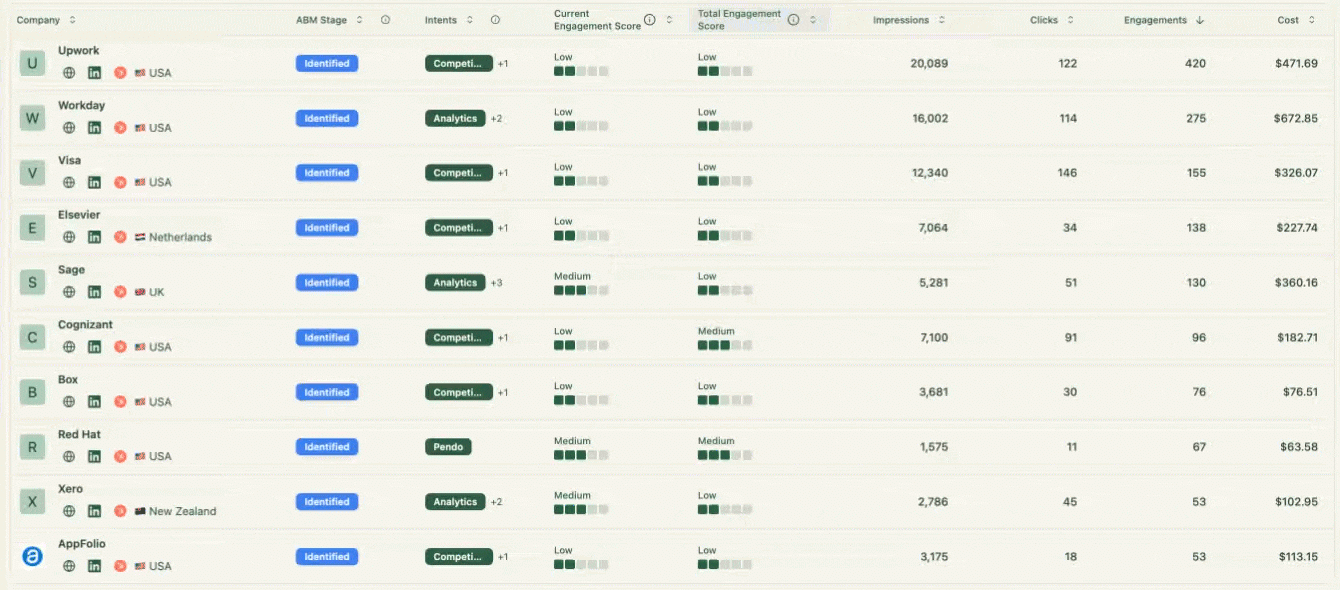
Here is the order we use:
The ad count and company size checks are specific to our business. If you do not sell to teams running LinkedIn ads, replace them with checks that make sense for your own customers.
You can make this list manually by checking the company report, CRM and ad activity, then exporting qualifying accounts into your outreach process. If you automate it, make sure someone still owns the checks and the review.
ZenABM webhooks can send engaged accounts and their signals to Clay or a sales engagement tool, so nobody has to export and upload lists. They fire every Monday after the LinkedIn data sync and can also be triggered manually.
The webhook builder sets which companies go out and which fields each payload carries:

Check that timing against your own list run. The 9 a.m. schedule is our internal agent's setup, so do not assume a webhook arrives at that exact time.
The list tells you who. The intent behind the ads helps choose what each account receives.
I use the topic an account engaged with to select its email sequence. The intent is a guide to a relevant problem, not evidence that a particular contact wants to discuss it.
You can do this by hand: keep a record of the theme for each campaign or ad set, then map an engaged company to the matching sequence. That only works if your campaign names and themes are clear enough for someone else to understand.
ZenABM intent signals do the mapping for you. Each campaign or ad set carries a theme, and when a company engages, the theme becomes an intent on that company and syncs to your CRM.
The Intents view shows companies alongside their stages and engagement metrics:
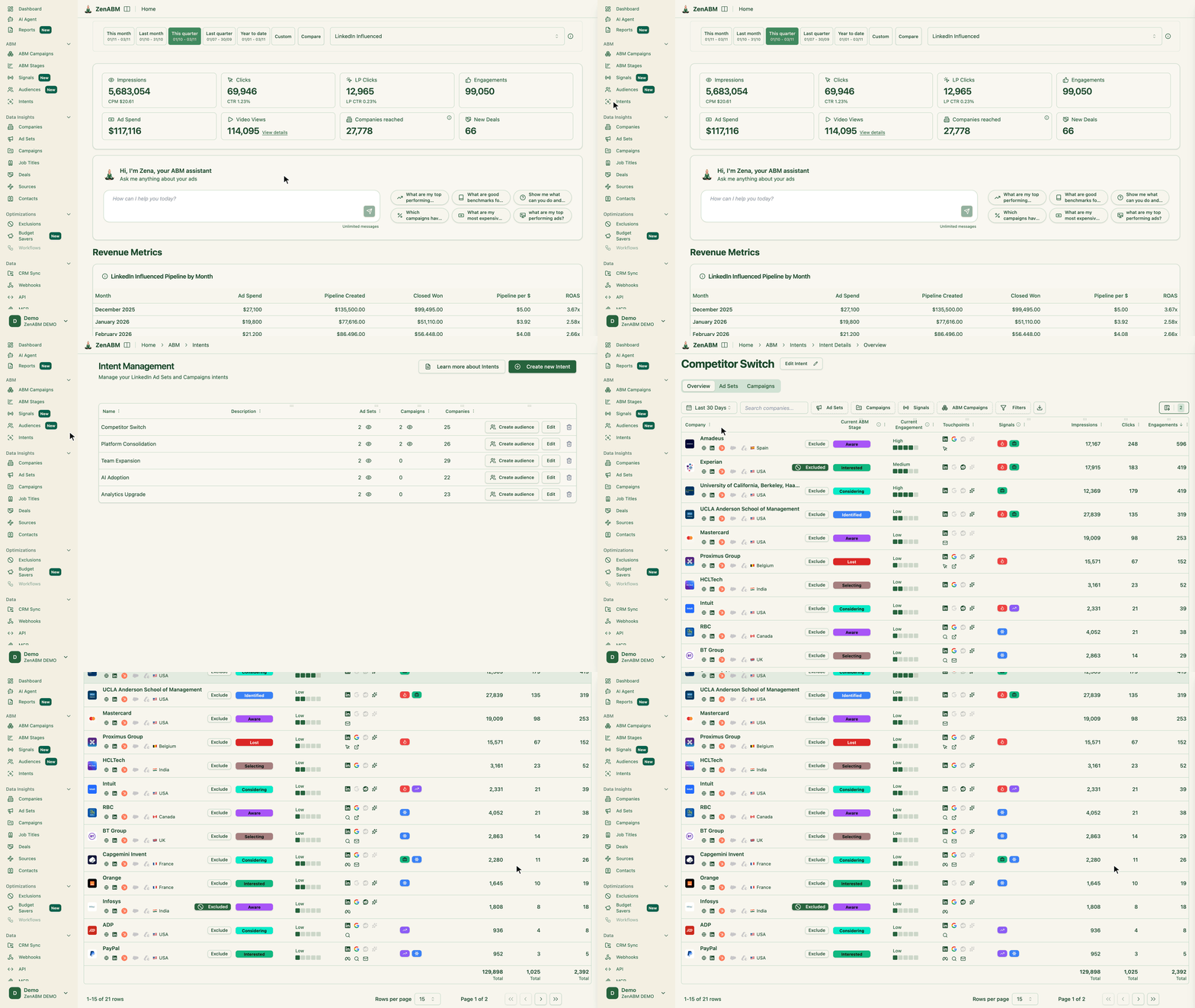
Our four intents are the reasons people buy us, and we run ads on each of them:
Intent | Sequence angle |
|---|---|
ABM | Help with running an account-based program |
LinkedIn ad optimization | Help with improving LinkedIn ad performance |
Creating and managing ads with AI | Help with using AI for campaign work |
Revenue attribution | Help with understanding ad influence on pipeline |
I am terrible at keeping order, so I ended up with a bunch of AI intents tagged at company level. Our outbound agent connects them and funnels every company with an AI intent into one AI sequence. The account gets a consistent angle even if the original campaign labels differ.
I would attach an intent to a campaign when its ad sets share a theme, because a campaign-level intent covers its current and future ad sets. If a campaign carries two messages, put each in its own ad set with its own intent. Keep in mind that LinkedIn's data thresholds make ad set level engagement harder to detect.
This is the same principle behind intent-based outbound: the signal helps you choose a useful conversation, but the email still has to earn the reply.
I write an email that fits the account's likely problem and offers something useful. I never tell the prospect that we saw their company click an ad.
Our sequence has 3 emails. The first introduces us in a way that fits the intent. The follow-up offers something of value: a free Claude skill for that intent, a free consultation or a specific recommendation.
We tried AI-personalized opening lines and dropped them. Telling someone how many LinkedIn campaigns they run, or announcing that they clicked ours, adds surveillance without adding value, and the prospect already knows both facts.
Opener | What it does |
|---|---|
"I saw you clicked our ad 3 times." | Announces tracking and assumes the recipient was the person who clicked |
"We have a free Claude skill that can help audit LinkedIn ads. Would it be useful?" | Offers something related to the topic without claiming to know what the recipient did |
For an account routed to our AI angle, a short email could look like this:
Hi, We built a free Claude skill that reviews LinkedIn ads and returns a prioritized list of fixes. Would it be useful if I sent it over?
The point is the offer, not the greeting. Change the resource and wording to match what you can actually provide, and make sure the recipient's role makes the offer relevant.
That matches what we have seen in our own outreach: an offer the recipient can use gets a better response than a pitch. Lead with something useful before you ask for a meeting.
In our setup, automation routes the accounts while our team writes and reviews the copy. For a manual version, research the company, find suitable contacts and write the emails one by one.
ZenABM's free Outbound Agent for Claude Code offers a middle route: it pulls intent accounts, finds contacts through Apollo.io, drafts personalized emails and pushes them to Smartlead. Its drafts reference what the account engaged with, so edit them if you follow my rule of keeping the tracked action out of the message.
Here is what the Outbound Agent does, and where the human review sits:

A draft is only a starting point, and the person reviewing it owns what actually gets sent.
A human should review each lead and its emails before the sequence sends. In our process, I review the Monday list and edit, approve or reject the copy.
Our review page shows the chosen angle, why it was selected, the data behind it and all 3 emails. Smartlead is only the sending layer; every decision about the list and the copy happens before the send.
Here are the review and pause steps that happen before and after the send:

I look for a mismatch between the account and the offer. An agency needs different copy from a potential customer, for example, and an account already in a trial should never get a cold introduction.
Then the pause rules take over:
Make the owner of those checks explicit. A rule written in a document will not stop a queued email unless someone or something checks the reply, demo and trial status before sending.
Even with a review step, there are a few places where the handoff can break.
The most common mistakes happen when teams treat an account signal as a personal invitation, or stop designing the process after the first reply.
I use this table to check where the problem sits before changing the ads:
Mistake | What it costs | Fix |
|---|---|---|
Announcing the signal | The message can feel intrusive and may name the wrong person | Use the signal to choose the angle, not the opening line |
Treating every signal the same | A demo request waits in the same queue as an ad impression | Give direct requests a human owner within minutes |
Stopping at the reply | Interested conversations can stall before a meeting or deal | Assign an owner and a next action for positive replies |
Blaming the lead or trusting one dashboard metric | A follow-up problem can look like a targeting problem | Check response time, replies and meeting booking after the form fill |
The third mistake is easy to miss because a positive reply feels like progress. Ali Yildirim described a campaign with 19 positive replies and 1 deal, where the gap sat after the reply. I would map the next conversation and its owner before judging a campaign by reply volume alone.
A healthy cost per lead can also sit next to a poor handoff. Ask who responded, when they responded and what happened next before you decide the audience was wrong.
That brings us to the limit of the system: some of the most important decisions cannot be inferred from an engagement event.
Buying signal follow-up cannot reliably decide whether a company is ready to buy or whether a message sounds human. Automation can apply the rules you give it, but you still choose those rules and check the result.
I keep these limits in mind during review:
A stage helps sort the list, but it does not replace that judgement. In the Companies view, a stage sits next to engagement data that the reviewer can inspect:

For the sales handoff, record the account owner, the signal, the next action and when it is due. That gives the person taking over enough context to continue the conversation without pretending the signal answers every question.
Our guide to account-based sales development covers the wider sales and marketing handoff. For this job, the next step is to put the weekly routine in one place.
The workflow starts with stage rules and ends with a human taking over when a prospect responds or begins evaluating. This is the compact version of our routine:
For step 2 by hand, you combine company engagement with stage and CRM information. Then you sort the list. ZenABM Company engagements shows engaged companies with their engagement score, ABM stage and CRM data on one row, so that pull is already done.
The Companies view gives the reviewer a company-level starting point for that list:
The order of those steps matters: qualify and review before sending, then let the response change what happens next.
ZenABM helps with the account-level parts of this follow-up, from organizing LinkedIn engagement to passing qualifying companies to outreach tools. The review and message decisions still belong to your team.
CRM sync puts the stage, intents and LinkedIn ad metrics on the HubSpot company record, where reps already work:

Organize engaged accounts for follow-up
Use ZenABM to see company engagement, stages and intent from your LinkedIn ads.

I would start with a small list your team can actually review, rather than automate a large list you cannot follow up on. Use the signal to make the outreach relevant, then let a human make it worth reading.
Examples of buying signals include a demo request, a lead form submission, a LinkedIn ad click and repeated engagement with ads about a topic. They do not all mean the same thing. I treat a direct request as a reason for immediate human follow-up, while company-level ad engagement is a reason to qualify the account and select a relevant outreach angle.
Follow up within minutes when someone requests a demo or sends a positive reply, and within the week when an account engages with your ads. A direct request comes from a person asking to hear from you. An engaged account belongs on a reviewed list, because you still need to establish fit and find suitable contacts.
No. I use the click to choose the account and the angle, but leave it out of the email. Company-level engagement does not identify the person who clicked, and mentioning the activity can make the message feel intrusive. Offer something relevant to the topic instead, such as a useful resource or a recommendation.
Find suitable contacts at the company and check their roles before reaching out. LinkedIn's company-level ad reporting gives you an account to investigate, not the identity of the person who engaged. We start with contacts already in HubSpot and fill gaps with verified emails, while keeping our account-level pause rules in place.
Our sequences have 3 emails. The first introduces us in a way that fits the likely interest, and later emails offer something useful rather than repeating the same request. Stop a person's sequence when they reply, and pause the whole company if someone books a demo or starts a trial.
Yes. ZenABM gets company-level LinkedIn ad engagement through LinkedIn's official API, without cookies, IP matching or third-party data sources. That gives you company context for follow-up, but it does not identify the individual who clicked an ad. You still need to select appropriate contacts and review the message.
About the author

