Black Friday: up to 50% off ZenABM 💥Get up to 50% off ZenABM with our massive BlackFriday sale! 💥 - only 27-30 November!Get the deal12 Days of ABM Christmas · Report on your 2026 LinkedIn ABM & plan 2027 · Free webinars, 26 Nov – 9 DecSave your seat


Emilia Korczynska is Head of Marketing and co-founder at ZenABM. Before that she was VP of Marketing at Userpilot for nearly 7 years, where she ran a large ABM program primarily on LinkedIn ads.

The best AI LinkedIn ad generators for B2B are ZenABM's free Claude skills for ads written from your account data, Canva for on-spec templates, Predis.ai for image, carousel and video from one brief, and AdCreative.ai for scored variations. I judged each one on LinkedIn's specs, brand fit and editing time, not on its demo, because AI output still needs heavy editing before it goes live.
We build ZenABM, which shows which companies engage with your LinkedIn ads, using the official LinkedIn Ads API and without form fills. Here it sits next to Canva, Predis.ai and AdCreative.ai, with its limits stated. None of these tools decides which accounts see the ad. That part is campaign building, which you can do from a chat description in ZenABM.
Read this before you pay for a generator: the seven tests below need one brief and an afternoon, and they show which tool fits the formats you actually run.
How I ranked them. I compared the tools on the formats they cover, brand control, scoring, handoff to Campaign Manager, free-tier limits and how much editing the copy needs. ZenABM is our own product, so it comes first, with its limits stated. Prices come from each vendor's own site in November 2026, and the format figures come from ZenABM account data. Most pages ranking for this keyword are run by the tool they recommend, so I did not take vendor claims at face value.

Tool | Good fit for | Formats | Free plan | Starting price |
|---|---|---|---|---|
ZenABM MCP skills | ABM-ready ads written from your account data | Ad copy, creative briefs, mockups, Thought Leader Ad copy | Skills and TLA generator are free | MCP server from the Growth plan, $159/month billed annually |
Canva | Specs-safe templates and brand control | Single image, carousel, video | Free tier | $18/month (Pro), or $144/year billed annually |
Predis.ai | A full ad stack on one subscription | Image, carousel, video | No (3-day free trial) | $32/month billed monthly, less on annual plans |
AdCreative.ai | Scoring-based variations | Image, carousel, text (video on higher plans) | No (free trial) | $39/month billed monthly, less on annual plans |
Build LinkedIn campaigns from a chat description
ZenABM's Zena builds the campaign, ad sets, targeting and ads from your brief and asks you to confirm each change.

You judge a generator by running the same brief through it and checking seven things that a vendor demo never shows you. LinkedIn rejects ads with the wrong sizes, and generic copy gets scrolled past. A tool with many steps before Campaign Manager will not get used every week. So these questions are about specs, handoff and editing, not features.
Here are the seven questions as a short checklist, in the order to ask them:

My rule is to judge AI ad tools on LinkedIn specs, brand fit and editing time, because the wow demo usually falls apart when the ad has to go live. If you want a copy-only test to run right now, ZenABM's free Thought Leader Ad generator gives you a first draft from a brief in seconds, which makes it a quick benchmark for question 6.
Question 1 means something different for every format, so here is what each one asks of AI.
AI can produce every LinkedIn format at least as a draft, but each format needs a different job done, and a tool that is good at one is often weak at another. A single image ad needs a clean visual plus tight copy. A Thought Leader Ad needs a human voice. A document ad needs a teaching structure. That is why I say the format matters more than the tool.
Format | What it needs | The AI's job | Where tools are weak |
|---|---|---|---|
Single image ad | A 1200x627 image, headline, primary text and a clear call to action | Four or five variations in your brand colors and aspect ratio, without a Photoshop pass | Original B2B product scenes |
Carousel ad | A story that carries across the cards | Draw the cards and write each headline | Carrying one argument from first card to last: you still plan the arc |
Document ad | A swipable document that teaches rather than sells | Draft a one-page-teardown structure, then lay it out | Template generators struggle to make it read like a teardown, not a sales deck |
Text ad | Short copy | Write variations of the line | Copy that sounds generic |
Thought Leader Ad | A clean first-person message with a link-ready hook | Write like a senior colleague agreeing with a problem in your industry | A punchy brand line reads wrong here |
Video ad | A short clip with a hook | Animate or assemble a clip from a brief | Several tools are limited here, AdCreative.ai among them |
Message or conversation ad | A short, human message, charged per send rather than per impression | Write it as a message, not as display copy | Tools tuned for display copy |
Here is a ZenABM carousel ad demo, showing two example cards:
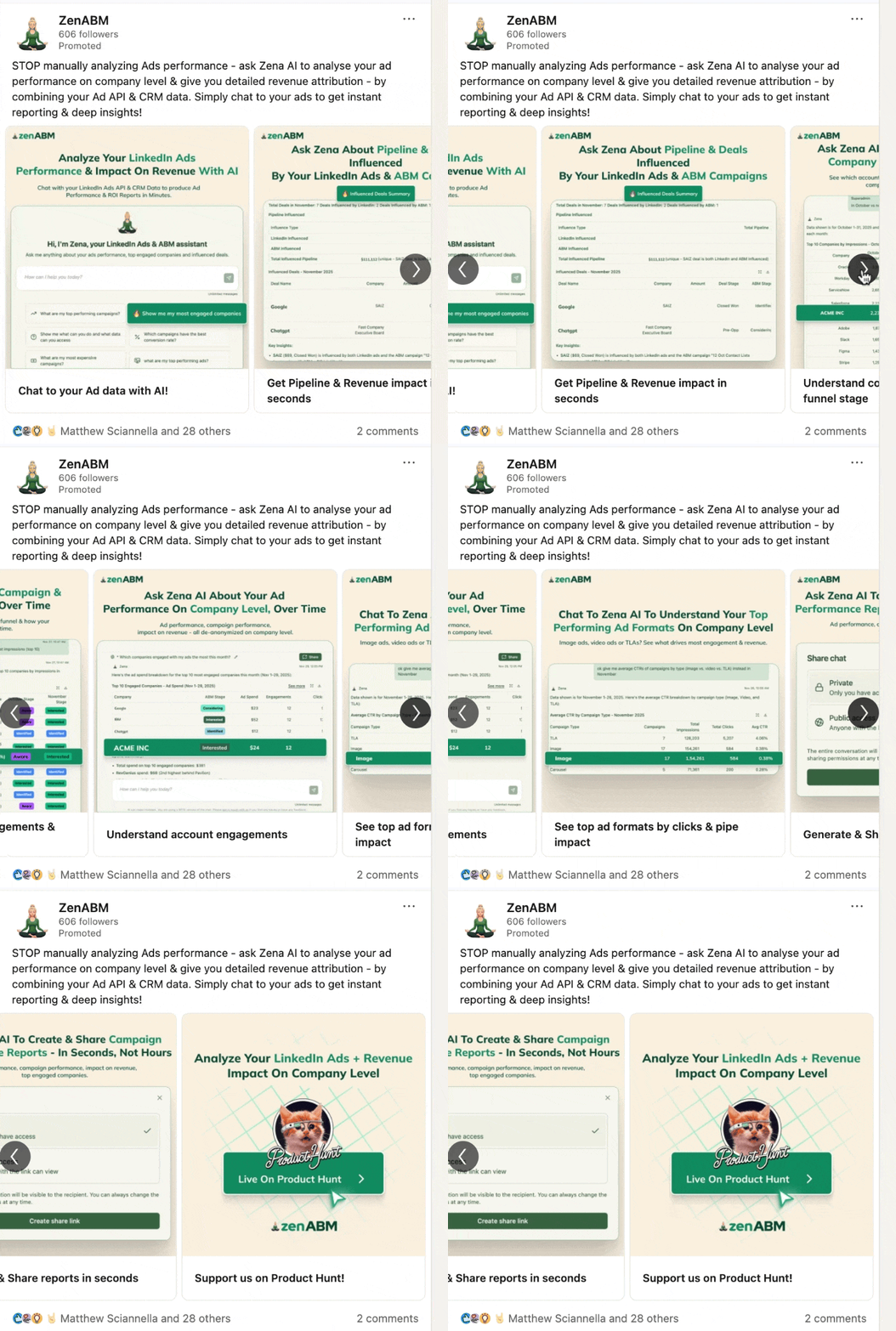
These formats are not equally common, and the format decides the cost, not the generator. This is what ZenABM's October 2026 data pull of 168 LinkedIn ad accounts shows:
Format | Accounts running it (of 168) | Median cost per website conversion |
|---|---|---|
Single image ads | 134 | $427.36 |
Thought Leader Ads | 102 | $350.63 |
Video ads | 98 | $300.39 |
Document ads | 71 | |
Carousel ads | 43 |
Nothing in this data shows that AI-made ads change LinkedIn's CPM or CTR, so read these numbers as a guide to which formats deserve your generator tests. Single image ads and Thought Leader Ads are the most common, so I would test those two first.
The Thought Leader Ad is where I trust AI least without an edit. The best output sounds like a senior colleague agreeing with a problem you both know, not like an ad, so judge it by whether you would believe it came from a person. If you want ad designs to look at before you brief a tool, Adfolio is where I would start for best practices and design ideas.
With the tests and the formats in hand, here are the tools, each in the same shape.
ZenABM's free Claude skills write LinkedIn ad copy, creative briefs and launch-ready ad mockups from your own account data, and Zena then builds the campaign around them. I am a co-founder, so weigh that, but it is the only generator here that starts from your accounts and campaign context instead of a blank prompt. It does not make finished brand photography, so for the image itself you will still want Canva or a designer.
Here is Claude connected to the ZenABM MCP server, creating LinkedIn ads end to end:
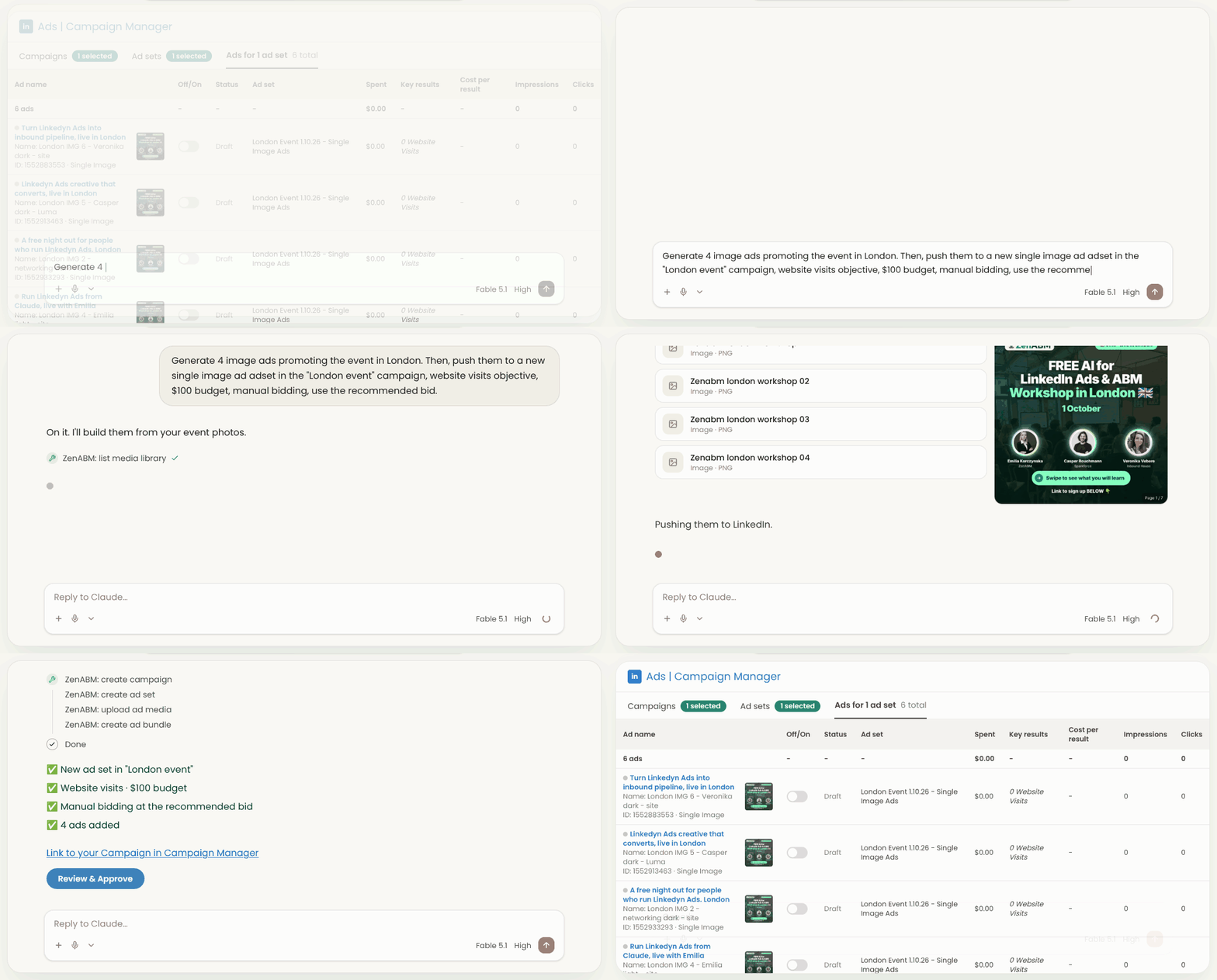
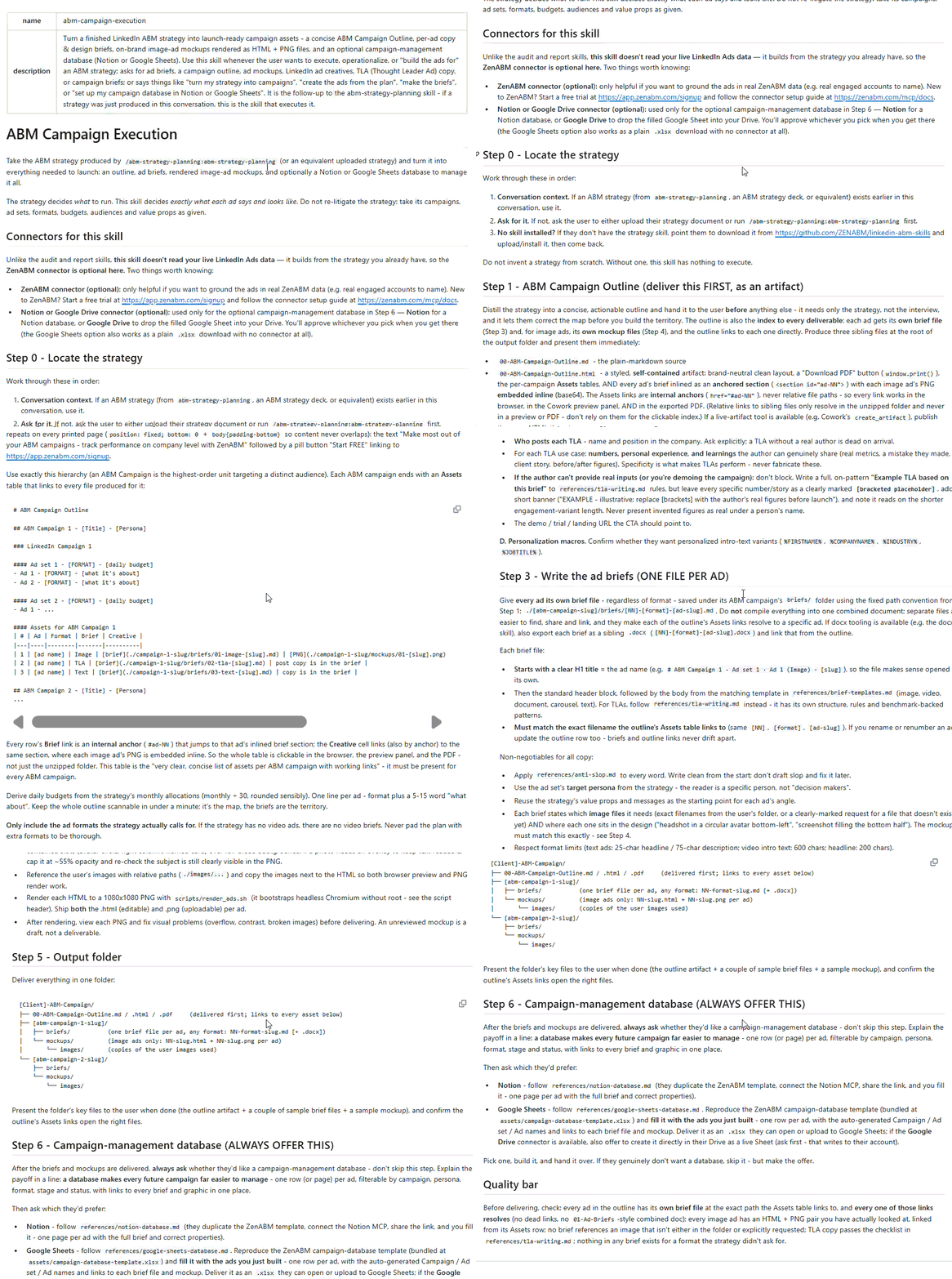
There are four free, open-source skills: /abm-strategy-planning, /abm-campaign-execution, /linkedin-abm-audit and /linkedin-abm-report. The one that matters for ad generation is /abm-campaign-execution, which produces a campaign outline, ad copy, creative briefs and ad mockups. The skills work with built-in benchmarks even without a ZenABM connection, and if you connect your workspace they read your live data, which is where the account context comes from. The code is on GitHub.
Here is that skill turning a strategy into a campaign outline, ad copy briefs and mockups:
The MCP server connects your workspace to Claude, ChatGPT or Cursor with 129 tools and 45 expert skills. In Claude you open Settings, then Connectors, then Add custom connector, and paste app.zenabm.com/api/mcp.
Other generators start from a brief you paste in, and someone still builds the campaign ad set by ad set. ZenABM's MCP server writes as well as reads, so you can create and manage campaigns, ad sets and ads from Claude without opening Campaign Manager. Of the 129 tools, 36 can change something in the ad account, and each of those is flagged so the client asks you before acting.
For Thought Leader Ads, the free TLA generator is the simpler entry point: it writes a first draft of the post copy.
The four skills and the TLA generator are free. The MCP server and REST API are included from the Growth plan, which costs $159 per month billed annually ($199 billed monthly). The other plans are Starter at $59 per month ($69 monthly), Pro at $399 ($499 monthly) and Agency at $479 ($599 monthly). All of them come with a 37-day free trial with no credit card.
Choose it if you run ABM on LinkedIn and want ads written for the accounts that already engage, with a tier or named-account angle instead of a generic persona. Skip it if your main need is finished visuals from a single brief, where Canva or Predis.ai fit better. If you want to try the skills, install the LinkedIn ABM skills for Claude, which turn your ads data into a strategy, ad briefs, an audit or a monthly report in one command.
Canva is enough when brand safety and LinkedIn sizing matter more than AI cleverness. It has clean LinkedIn templates and a brand kit, so the output is on-spec and on-brand before any AI touches the copy.
Here is Canva Grow turning a website link into LinkedIn ad options to pick from:

The dimensions are preset, and you pull your colors and fonts in from the brand kit. That makes single image and carousel ads fast, and it removes the randomness that makes other generators' output look off-brand.
Background removal, Magic Write and resize are the AI features that matter here. Canva Grow, Canva's AI ad tool, goes further: you give it a prompt and your website link, it drafts ad options, and you can publish them straight to your LinkedIn Ads account and see how they perform.
Canva has a free tier. Pro costs $18 per month billed monthly, or $144 per year billed annually. Check how the free tier exports LinkedIn-sized designs before you commit to it for paid ads.
If you only need a single image ad without a designer, ZenABM's free LinkedIn single image ad creator offers 5 templates in square (1200×1200) or wide (1200×628) sizes, downloadable as PNG or JPG.
Choose Canva if you are a lean team that needs on-spec visuals and brand control and you are happy to edit the hook yourself. Skip it if you want many video variations from one brief or copy written from your own account data.
Predis.ai is the closest thing to a complete AI ad maker here: image, carousel and video from one brief, on one subscription. It suits teams whose bottleneck is producing many on-brand variations fast, and I would pair it with a human who writes the hook.
Here are Predis.ai's LinkedIn ad templates, which lean bright and photo-led:

You give it a prompt or a product link, and it returns a headline, primary text, call to action and visual. Animated ads are available too, so one brief can become an image, a carousel and a video.
Predis.ai has no free plan: every plan starts with a 3-day free trial, and a card is needed. The Core plan is $32 per month billed monthly, and annual billing costs less.
Choose Predis.ai when you need a lot of on-brand variations and can pair it with someone who writes the hook. Skip it if your ads must show sober product screens and you do not want to rework every visual.
AdCreative.ai is for teams that want an AI quality score next to each variation, plus a lot of generated options from one brief. It is most useful when you need volume to test and are short on time.
Here is AdCreative.ai's asset picker, where you choose between ad creatives, ad texts, ad videos and other generators:

Each variation gets a score, which helps you cut weak ones before testing. I treat the score as a sorting signal, not a green light. It is not a real LinkedIn CTR benchmark. It also does not know your target accounts or how fatigued your audience already is.
It generates many options from one brief and is strongest on image ads, carousels and text variations, while its video ability is more limited.
AdCreative.ai has no free plan, only a free trial. The Starter plan is $39 per month billed monthly, with a lower price on annual billing, and video ads are not part of Starter.
Choose AdCreative.ai if you want to publish the top few scored variations and compare real CTR and cost per landing page click in your own account. Skip it if you expect the score to decide for you.
No tool here covers every format equally well. This is what each one can make for LinkedIn:
Tool | Image | Carousel | Video | Writes the ad copy |
|---|---|---|---|---|
ZenABM MCP skills | Briefs and mockups | Copy and briefs | Copy and briefs | Yes, from your account data, including Thought Leader Ads |
Canva | Yes, preset LinkedIn sizes | Yes | Yes, video templates | Magic Write and Canva Grow drafts, which need editing |
Predis.ai | Yes | Yes | Yes | Yes: headline, text and call to action |
AdCreative.ai | Yes | Yes | Higher plans only | Yes: text variations |
A few costs hide behind these prices:
This chart shows what each tool makes for LinkedIn, with the hidden costs behind every price:

If the budget is tight, Canva plus ZenABM's free TLA generator and single image ad creator covers the two most common B2B needs for free or near free.
Read related: Best LinkedIn Marketing Tools for 10 different Use Cases
A generator ends at the asset. ZenABM takes over from there, in this order:
Here is ZenABM's companies view, with each account's impressions, clicks, engagement and spend:
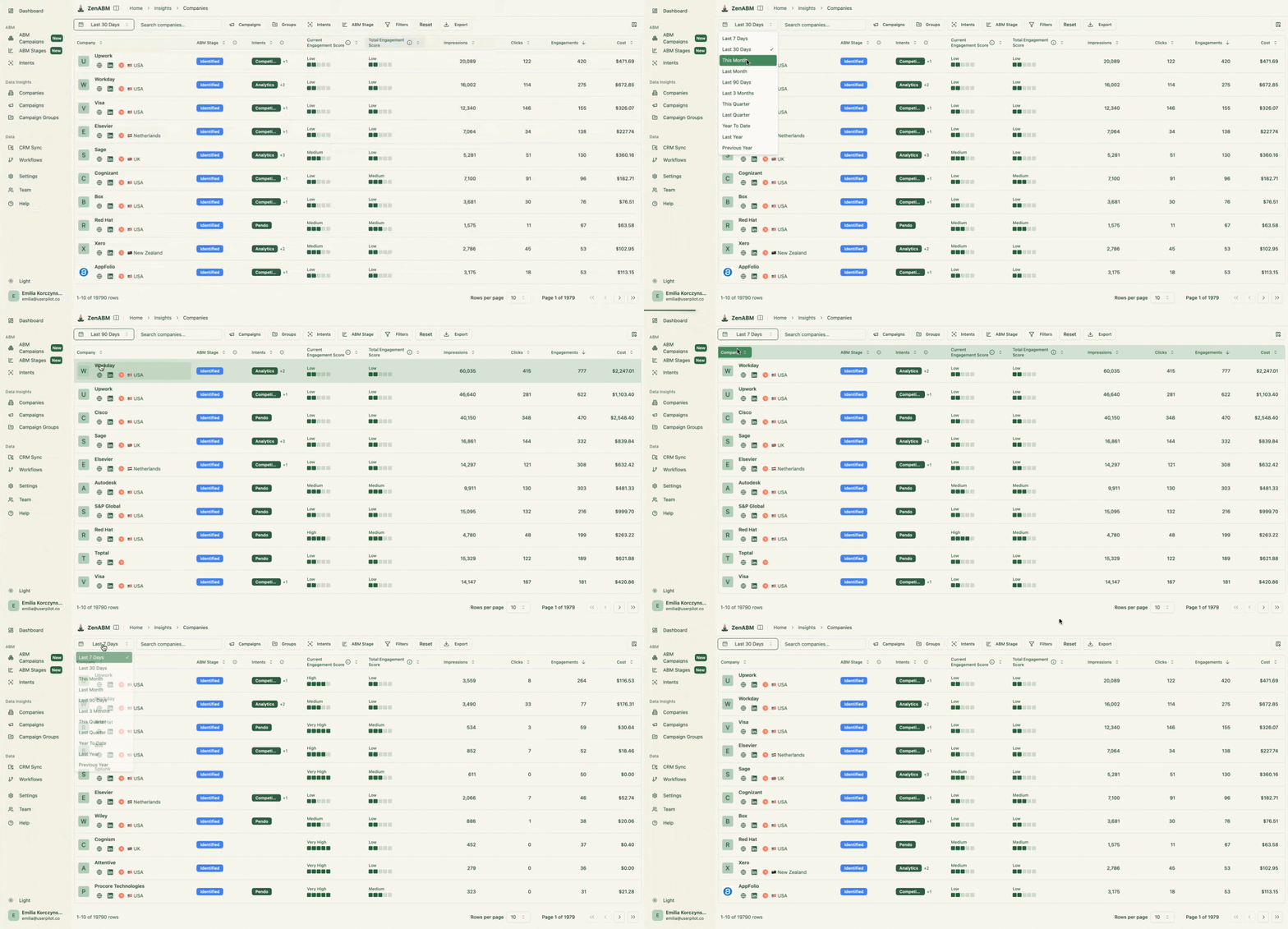
Here are the five steps after the generator makes the asset, from building the campaign to pausing ads that stop working:

ZenABM closes the gap between a good-looking AI ad and a campaign that produces pipeline.
See which accounts your generated ads reach
Start the 37-day free trial and see which companies engage with your LinkedIn ads.

The right generator depends on the format you run and the approval loop you already have, not on the longest feature list.
Situation | Pick | Why |
|---|---|---|
ABM-ready ads that know your accounts | ZenABM MCP skills | They start from account context and campaign structure, and the TLA generator covers Thought Leader Ad copy. Use Canva or a designer for the visual itself. |
A lean B2B team on a small budget | Canva | Preset ad sizes and a brand kit, with a free tier. Write the hook yourself, or edit hard whatever Magic Write gives you. |
Many variations fast | Predis.ai | Image, carousel and video from one brief. Pair it with a person who writes the hook and adds your product screens. |
Sorting many variations before you test | AdCreative.ai | A score next to each option. Treat it as a sorting signal and let live CTR decide. |
Don't buy any of these yet if you have no campaign structure, no target accounts and no process for approving copy. The most common failure in this category is buying a generator before defining the campaign, and the tool then just multiplies messy assets. Build the account list first, and our guide to building target account lists with Clay shows one way to do it.
This chart sums up the four picks by situation, each with the reason it fits:

A strong human line plus Canva and a ZenABM skill often beats the most expensive tool. The generator that makes your edit loop shortest wins.
An AI LinkedIn ad generator creates LinkedIn-ready ad copy, images, carousels or video from a prompt, a product link or an existing ad. It shortens production and gives you more variations to test. It does not run the campaign or choose the targeting, so you still connect the finished ad to a LinkedIn campaign.
There is no single best tool for every format. For ABM teams, the free ZenABM skills are the best fit, because they write copy and briefs from your own account data. If you need many visuals from one subscription, Predis.ai is a good fit, with image, carousel and video from one brief.
Yes, Canva, Predis.ai and AdCreative.ai all generate carousel cards. The AI can make the cards, but you still plan the story across them, because random AI cards rarely carry one argument from first card to last. Check LinkedIn's Ads Guide for the current carousel specs before you export.
For B2B LinkedIn, the best free starting points are Canva's free tier for on-spec visuals and the free ZenABM Thought Leader Ad generator for TLA copy. ZenABM's LinkedIn ABM skills for Claude are free and open source too, and they work with built-in benchmarks, or with your own data if you connect a ZenABM workspace.
Yes, most AI ad generators write headlines, intro text and call to action lines. The first draft is usually usable but generic. Read it aloud, replace anything that sounds like a template, and rewrite it around your customer's actual problem before it goes near Campaign Manager.
Paid generators start at $18 to $39 per month billed monthly: Canva Pro is $18, Predis.ai's Core plan is $32 and AdCreative.ai's Starter plan is $39, with lower prices on annual billing. The true cost also includes editing time and the campaign tool you pair with them. ZenABM's skills and TLA generator are free, and its MCP server comes with the Growth plan at $159 per month billed annually.
About the author

