



AI for LinkedIn ad targeting in ABM is being marketed as a full automation play, where LinkedIn’s own AI and a few third-party agents run the whole thing for you.
I have watched this go wrong.
When you let an unsupervised AI agent make all decisions and not just do the grunt work, it drifts your spend off your own account list.
LinkedIn’s native AI targeting features, in fact, are a big part of the problem.
Predictive Audiences, Audience Expansion, the buyer groups facet, and Accelerate all optimize for cheap conversions, and that is the opposite of what a tight-budget ABM program needs.
So the useful question is not which AI will pick your audience for you.
The useful question is what you do by hand, which native AI features you switch off, and where AI genuinely helps.
Targeting and bidding are not separate either.
If your bid is not right, you never win the auction, and your careful targeting never gets served.
This guide walks all of it, from what ad targeting actually means to how to bid so you reach your accounts, and it ends with the weekly loop that learns from who really engages.
Here is the whole article in one place before we go deep:
Before you decide what to trust, you need to know what LinkedIn actually offers.
AI targeting is a label that covers five different features, and they do very different jobs.
Sorting them out is half the battle, so here is the plain version of each one.

Predictive Audiences are LinkedIn’s replacement for the old lookalike feature.
You hand the model a seed of your best conversions or contacts.
It then builds an audience of members who are likely to convert, and it keeps recalculating that audience over time.

Audience Expansion is a single checkbox that quietly adds members who resemble your defined audience once the campaign is live.
The buyer groups facet lets you target a standardized product-category buying group, something like Cybersecurity Software, without building the committee yourself.
Career-based signals let you reach people who were recently promoted or newly hired into a role.

Accelerate sits above all of it as LinkedIn’s fully AI-run campaign type.
You drop in a landing page, and it drafts an ICP, an audience, creative, bids, and placements, then optimizes on its own.
None of these decides who your target accounts are, which is the strategic core of ABM.
So the honest verdict on each one depends on whether you are running a broad program or a tight one.
Here is how I grade them for a focused account-based program.
| AI feature | ABM verdict | Why |
|---|---|---|
| Predictive Audiences | Depends | Great for expanding a broad program off a clean seed. Risky for a tight one, because it grows the audience past your named accounts. Needs 300 or more members to build. |
| Audience Expansion | Turn off | Adds lookalike members to a campaign you already scoped, which is the opposite of what you want when the account list is the strategy. |
| Buyer groups facet | Depends | A useful shortcut for reaching a committee by product category, but it does not restrict delivery to your accounts on its own. Layer it on the list. |
| Career-based signals | Situational | Genuinely helpful for reaching new-in-role buyers inside your accounts. Noise everywhere else. |
| Accelerate | Mostly avoid | Fine for a one-to-many awareness test with a hard budget cap. Wrong for one-to-few, because it optimizes toward cheap conversions instead of your list. |
The precision that justifies LinkedIn’s premium comes from facets you set by hand.
Most teams reach for an AI audience before they understand what each facet actually selects.
So this is the part I would slow down on.
When you target by industry, title, function, seniority, or skills, you are pulling very different levers. Confusing them is how you end up reaching a whole category when you meant to reach 50 companies.
The account list, built as a matched audience from company names or domains, is the ABM core. It is the only facet that carries your actual strategy.

LinkedIn needs at least 300 matched members to serve a campaign. The smaller the audience, the higher your CPMs run, so tiny lists are expensive to reach.
Industry sits at the opposite end. I
t picks companies by the single industry they list on their own LinkedIn page.
So a filter like Software Development pulls in hundreds of thousands of companies you never wanted, and it files a company you do want under the wrong label, so you miss it.
I treat industry as a seed for AI to narrow, never as the final targeting (the point where we graduate an account off industry and onto the matched list is covered in the industry targeting guide).
It also helps to see which industries actually engaged, and ZenABM’s company-level engagement shows you exactly that, so you narrow from real data rather than a guess.

Company size, growth rate, and revenue are newer firmographic facets.
Each one is a proxy for buying power and readiness, and they are useful for shaping a prospecting layer around the list.
Reaching a person, rather than a company, is where the four main levers diverge.
The tradeoffs are worth knowing.
| Facet | What it actually selects | The tradeoff |
|---|---|---|
| Job title | The title a member wrote on their own profile, mapped to a standardized title. | Precise but small and gameable. Titles are self-reported and inflated, so you miss people who describe the same job differently. |
| Function plus seniority | A department (Marketing, IT) combined with a level (Manager, Director, VP). | Bigger and cheaper to serve, but noisier. A Marketing Director could own brand, demand, or product marketing. |
| Skills | Skills a member lists, or that LinkedIn infers from their profile and activity. | Closer to intent than a title, but broad. It catches people who list a skill they no longer use. |
| Member groups and interests | Behavioral membership and engagement, such as a LinkedIn group or a followed topic. | A genuine behavioral signal, but coverage is thin. It should support the persona layer, not carry it. |
Pro tip: The facet almost nobody uses well is exclusions, and it is the cheapest precision on the platform. Exclude your customers, your competitors, and the obviously wrong-fit companies that are burning budget. ZenABM lets you exclude companies from within its UI within a few clicks.

Here is where AI earns its keep in ABM targeting, and it happens upstream of Campaign Manager.
The account list is a strategic decision, and AI cannot make it for you.
But building and enriching that list is slow, manual work, and AI does it ten times faster than a person clicking through filters.
So instead of asking LinkedIn’s model to guess your audience, you use AI to build the audience, then upload it to Campaign Manager as a matched audience.
The workflow I run has five steps, and each one is something you can do the same day.
First, write the ICP with an AI assistant, so it is explicit rather than a vibe.
Cover the firmographics, the technographics, and the negative signals that disqualify a company.
A prompt like this gets you a usable first pass.
You are helping me define an ideal customer profile for a B2B ABM program. Our product is [one line]. Based on our best current customers [paste 10 to 15 company names], write an explicit ICP: the firmographic filters (industry, employee count, region), the technographic signals that predict fit (tools they use), and the negative signals that should disqualify a company. Output it as filter criteria I can apply in a list-building tool, not as prose.
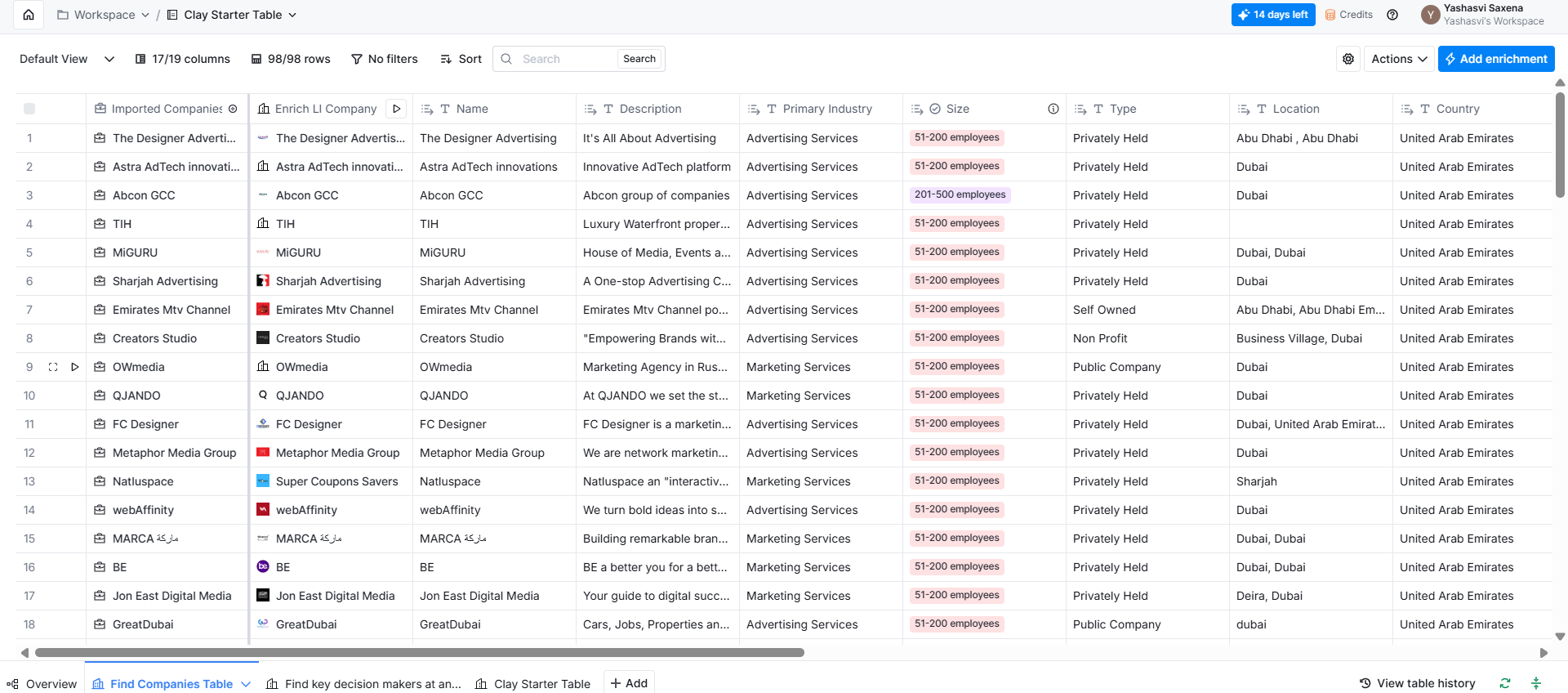
Second, build the list against that ICP in a tool like Clay.
Use firmographic filters and technographic enrichment with a waterfall so you fill in the missing fields.
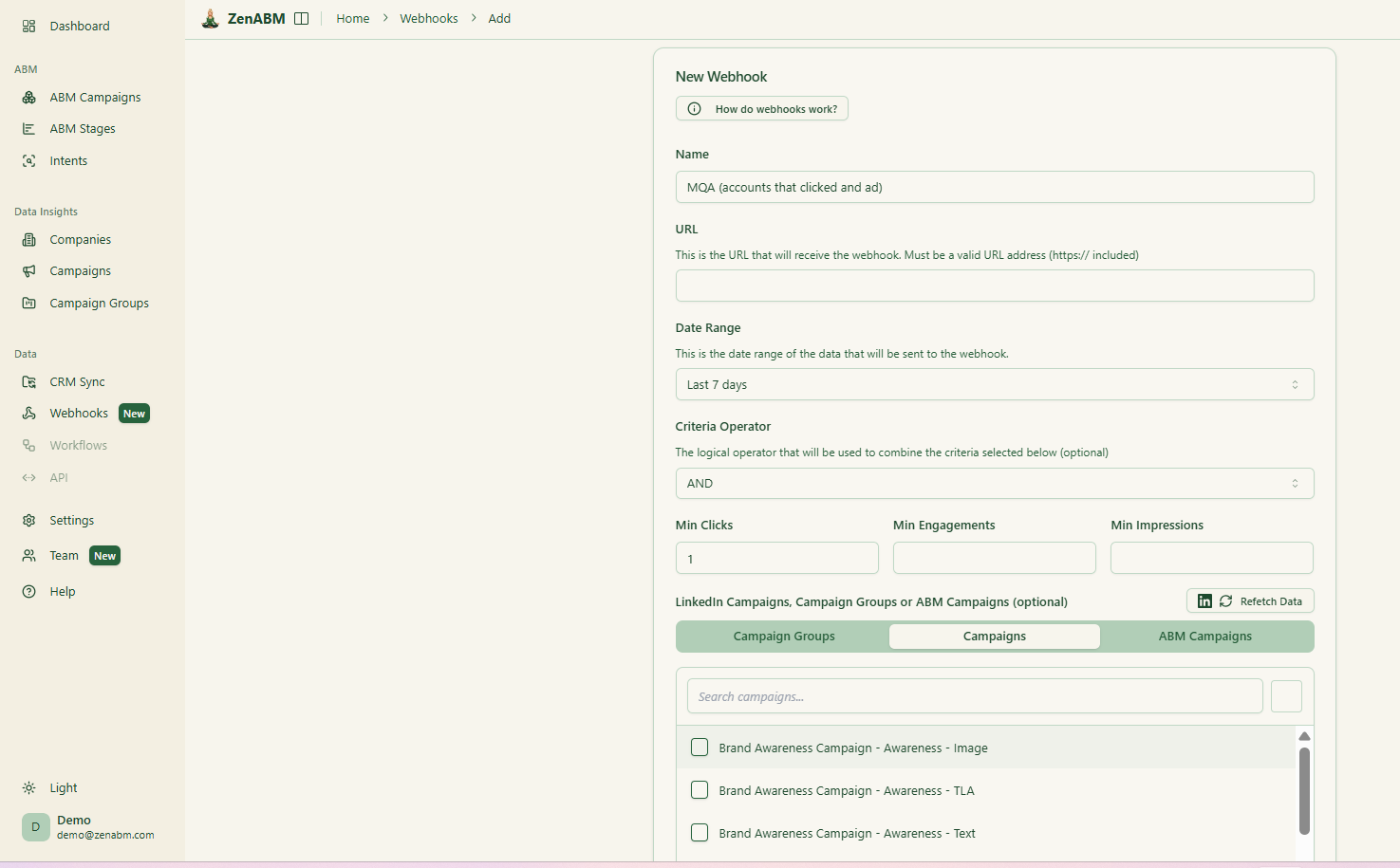
Your best seed is your closed-won and already ad-engaged accounts, and ZenABM’s CRM sync and webhooks push those straight into Clay, Attio, or HubSpot for you.


Third, overlay intent, which the next section covers in full.
Fourth, dedupe the list against your closed-won customers and your open pipeline so you are not paying to target companies you already have.
Fifth, export the result as a matched audience CSV of company names and domains, and upload it in Campaign Manager.
Pro tip: Bilal Ahmad, an ABM practitioner, frames this last mile well with what he calls the truth list.
It is the discipline of separating the accounts that genuinely fit from the wish-list accounts a sales team would love but that will never convert.
AI will happily inflate your list, so the truth-list filter is what keeps it grounded.

Note: One thing to size before you upload anything is how many companies your budget can actually reach and support. A list of 4,000 accounts on a small budget just spreads spend too thin to learn anything. The ZenABM ABM Strategy Planning skill (part of the ZenABM skills package) runs this math for you. It stress-tests your revenue goal against your budget and real ad metrics, then tells you how many ads and how many accounts the budget genuinely supports.

You install the four ZenABM skills into Claude Code with two commands.
/plugin marketplace add ZENABM/linkedin-abm-skills
/plugin install linkedin-abm-skills@zenabm
Once installed, the strategy skill takes your goal in plain language and hands back a campaign structure and an ad-count model, so you know the list is sized to the budget before you spend.
If you would rather not install anything yet, the free ABM budget calculator and the LinkedIn ads count calculator do the core version of the same sizing in the browser.


Reaching one person at each target account is not reaching the buyer.
The average B2B buying group runs to around a dozen people (Gartner), and they rarely agree on their own.
So the second high-value AI move is turning your product into a committee map, then turning that map into LinkedIn selections.
AI is good at the first part if you give it the right prompt.
Our product is [one line] and we sell to [company type]. List the six roles in a typical buying committee for this product (champion, economic buyer, technical buyer, end user, and any others that apply). For each role, give me 10 likely LinkedIn job titles and the job function plus seniority combination I should use as a fallback when the exact titles are too small to serve. Note which role owns budget and which role blocks deals.
With that map in hand, you have two ways to activate it.
The native buyer groups facet reaches a standardized product-category committee in one selection. That is a fast starting point, but it does not restrict delivery to your accounts on its own, so you layer it on top of the matched audience list.
The stronger ABM pattern is manual buyer-group targeting.
You build a separate matched audience per role and run four parallel campaigns, one each for the champion, the economic buyer, the technical buyer, and the end user, with creative written for that role. Each role audience needs at least 300 matched members to serve, and I aim for 600 or more so frequency does not collapse.
This approach only pays off above roughly 50,000 dollars in ACV and with 100 to 1,000 named accounts, because it takes real work to produce distinct creative per role.
The thing is: configured targeting and delivered targeting drift apart.
You can select VP and Director of Marketing, and three weeks later find that half your impressions went to Managers, because those were the cheaper members in the pool.
The ZenABM job title insights show the job titles your ads actually reached.

The /persona-audit skill, part of the ZenABM MCP server, goes further: it reads your configured targeting live from your ad set settings, compares it against real delivery, sums the off-persona leak in dollars, and hands back the exact inclusion and exclusion list to fix it.

You can get the persona audit done using a prompt like this:
Run the persona audit. Our target persona is [e.g. Demand Generation, ABM, and Growth Marketing leaders] at the [e.g. Manager, Director, VP, Head-of] level, in [e.g. B2B SaaS companies, 50–1000 employees]. Secondary/acceptable titles: [e.g. Marketing Ops, Content Marketing]. Anyone in [e.g. Sales, Engineering, HR, students, agencies] is out-of-ICP and shouldn’t be eating spend. Audit the last 30 days. Show me: (1) non-ICP job titles consuming budget, (2) target titles we’re under-reaching, (3) which personas actually engage vs just get impressions, and (4) how real delivery compares to the job-title/function/seniority targeting configured in Campaign Manager per ad set. End with concrete fixes.



Targeting on intent is one of the most misused phrases in ABM.
Intent comes in two forms that behave very differently, and treating them as the same thing is how teams overpay for a signal they cannot verify.
So it is worth being precise about which one you are buying.
Third-party intent is keyword-surge data.
Providers watch content consumption across the web and tell you a company is researching a category.
It is probabilistic and category-level, so it can point you at accounts warming up in your space, but it cannot tell you why. An intent score that says a company is in-market, with no way to check the reason, is a bet on the vendor’s model.
First-party intent is different.
It is the set of companies engaging with your own ads and content.
It is deterministic and account-level, because you can see the specific company and the specific ad it engaged with. In an ABM program, the first-party version is the one I build on, since it is intent you own rather than intent you rent.
Building targeting on intent then becomes a tiering exercise.
You tag your campaigns with intent themes, watch which accounts engage, and route them by heat.
Accounts with strong first-party intent go into a higher-budget one-to-few campaign, and a BDR gets a task. Cold accounts stay in a one-to-many awareness campaign until they warm.
ZenABM first-party intent does exactly this.
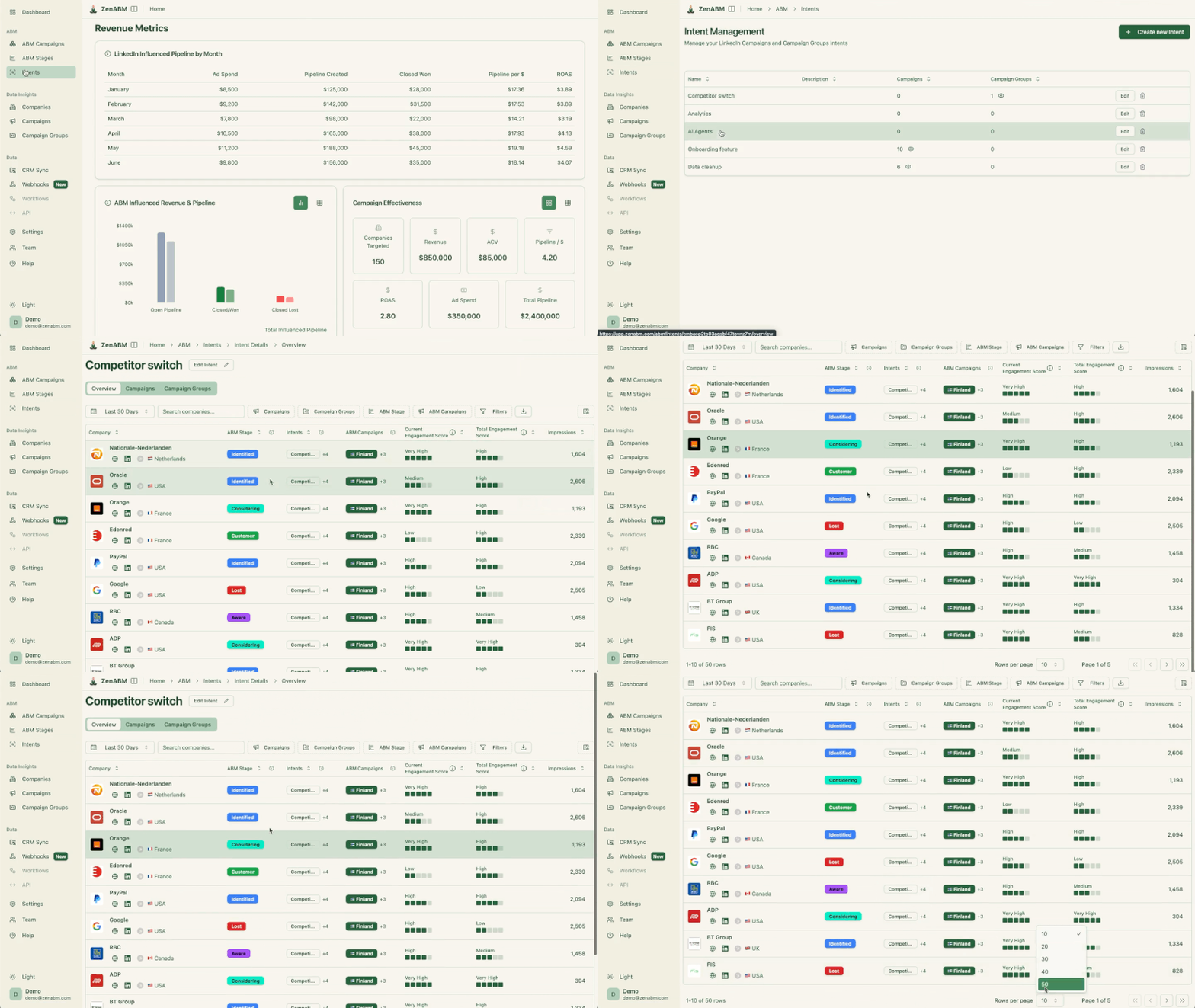
You tag campaigns with themes like Analytics, Security, or AI Features, and any account that engages picks up that intent label. ZenABM then pushes the label into your CRM, so sales sees it too.
Because it comes from your own LinkedIn engagement rather than a third-party keyword surge, it is an intent signal you can defend when someone asks why an account is on the priority list.
To turn intent into a list you can act on, the /intent-report skill from the ZenABM MCP server shows who showed intent, which campaigns feed the most fresh-intent companies per dollar, and which intent themes actually predict deals.
So you are not just collecting labels; you are ranking the inputs that produce pipeline.
Now the toggle-level part.
Knowing the verdict is useless if you cannot find the switch, so this is where the general advice turns into specific things you do or do not click.
You build one in Campaign Manager under Audiences, Create audience, then Predictive.
The seed matters more than anything else.
The technical floor is 300 members, but the model performs poorly below that and stabilizes around 500 or more conversions.
The mistake I keep seeing is seeding it on raw form-fills, which carries whatever junk slipped through into the expansion.
Seed it instead on companies that genuinely engaged, or on closed-won accounts, so the model expands your relevance rather than your noise.
Used this way, one agency reported Predictive Audiences delivered a 21 percent lower cost per lead than standard professional targeting.
AJ Wilcox, founder of the agency B2Linked, likes the feature for a specific reason worth quoting.
“Predictive Audiences, on the other hand, are dynamic, so they re-calculate your audience regularly.” AJ Wilcox, founder, B2Linked, on LinkedIn
He also points out a control most people miss.
When you create one, it comes with a slider for how tight you want LinkedIn to keep the audience.
For ABM, you keep that slider tight, because a loose predictive audience is just Audience Expansion with extra steps.
This is the single checkbox at the bottom of the audience step, and in a tight ABM program you turn it off.
Left on, it adds members who resemble your audience but sit outside your named accounts, so it leaks spend to companies that were never on the list.
The consensus among LinkedIn ads practitioners is to uncheck it for account-based work, and it takes one click.

The Audience Network, or LAN, is a placement toggle.
It serves your ads on third-party apps and sites beyond the LinkedIn feed. It can extend reach cheaply, but it muddies your company-level engagement data and delivers off-platform.
So for a focused program, I turn it off and keep delivery where the engagement data stays clean.
If you do test it, watch placement quality closely.
Accelerate is the fully automated campaign type.
It runs a 10 to 14 day learning period during which it optimizes toward your objective.
For one-to-few ABM, it is the wrong tool, because it will chase cheap conversions and drift off your list.
For a one-to-many awareness test, it can be acceptable, but only if you review the suggested audience before launch, set a hard budget cap, and stand ready to switch to Classic the moment you want real control over targeting.
The practical problem with all four toggles is that they are easy to leave in the wrong state and hard to audit after the fact.
This is where reading your live settings helps.
ZenABM reads your ad set settings straight from Campaign Manager on every call, including whether Audience Expansion and the Audience Network are on, so an agent checks the real current state rather than a stale sync.
The connected /budget-wasters skill then flags exactly these leaks, Audience Expansion or LAN left on, alongside your highest-spend and lowest-engagement ad sets, ordered by the monthly dollars at stake.
Here is something noteworthy: Targeting decides who you are allowed to reach.
Your bid decides whether you actually win the auction to reach them.
You can build a flawless account list and a perfect committee map, and if your bid loses the auction, none of those people ever see the ad.
So in practice, effective targeting is your audience multiplied by your bid, and treating bidding as a separate problem is how a good list underdelivers.
LinkedIn runs a second-price auction.
You set a maximum bid, but you usually pay just above the next-highest bidder rather than your full amount. Campaign Manager gives you three bid strategies, and the choice matters for ABM.
Maximum delivery hands the reins to LinkedIn, and it tends to spend your budget on the cheapest impressions inside your audience, which in a premium account list is often the wrong people.
Cost cap and manual or target CPC give you more control.

For a tight program, I use manual bidding with a floor-finding approach: start the bid low, raise it in small steps until delivery unlocks, and settle at the lowest bid that still reaches your accounts at the frequency you want. For context, B2B CPCs commonly run 5 to 12 dollars and CPMs run 30 to 50 dollars, so a premium ABM audience sits at the higher end and needs a bid that respects that.
AI genuinely helps on the budget side.
Agents can watch delivery, shift spend toward the ad sets and accounts that reach and engage your target list, and flag the eCPC outliers quietly draining budget.
The caution is that bid-automation agents optimize for cost efficiency by default, and cost efficiency in ABM can mean cheaper, worse-fit reach.
So you keep the objective anchored to account engagement rather than raw CPC.
ZenABM reads your bid, cost type, and optimization target live from Campaign Manager, so an agent audits the real current bid rather than a stale sync.
Two skills provided by the ZenABM MCP server cover the rest.
/budget-wasters skill surfaces the eCPC outliers and zero-conversion spenders, ordered by dollars at stake, and can pause the worst after you approve./scaling-planner skill answers the question that decides whether to raise a budget at all: will more spend reach new accounts, or just show the same accounts more ads?It uses ZenABM’s real reach and frequency data (unique members reached and impressions per member) rather than a guess.
Everything above comes together in a loop you run weekly, and the loop is the actual deliverable.
A one-time setup decays the moment your best accounts start engaging, and your worst ones start wasting spend.
There are four steps, and AI does the heavy lifting on the first and the last.


Analyze my last 90 days of LinkedIn ad engagement at the company level. Sort every account into warm, cold, budget-hog, or bad-fit based on engagement relative to spend. List the warm accounts with no open deal in the CRM so I can route them to sales, and give me the exclusion candidates with the total monthly spend I would save by cutting them.
The following MCP server package skills perform these steps so you do not have to prompt each one from scratch.
/account-engagement skill sorts every account into warm, cold, budget-hog, or bad-fit and returns an exclusion candidate list with the total savings, and it can exclude those companies from delivery after you approve./company-deep-dive skill puts everything about one account on a single screen, from campaign membership to intent to funnel stage to deals, and ends with a plain verdict: hand to sales, keep nurturing, or exclude./sales-handoff skill produces the list of accounts sales should call today, scored by stage moves and fresh intent, each with a talking point drawn from the account’s real engagement./revenue-attribution skill ties spend to deduplicated pipeline per campaign.If you would rather build than buy, a real open-source stack exists, though it comes with an honest limit you should know upfront.
LinkedIn gates campaign write access behind partner API approval.
So most of what you find on GitHub for LinkedIn ads is read-only, or it routes through middleware rather than writing to campaigns directly.
That is why the tooling trails what exists for Google and Meta.
Here is what is actually worth installing.
| Tool | Type | What it does for targeting |
|---|---|---|
| awesome-agentic-advertising | Directory | A curated list of MCP servers and agents for ad campaign management across platforms. The best starting map of what exists. |
| ads-mcp | Cross-platform MCP | Over 100 tools across Google, Meta, LinkedIn, and TikTok for campaign creation, performance analysis, and budget optimization from an AI client. |
| Synter Media mcp-server | Cross-platform MCP | Lets Claude or ChatGPT create campaigns, adjust budgets, pause underperformers, and sync audiences across several ad platforms, including LinkedIn. |
| Zapier MCP | Middleware | A universal connector that exposes LinkedIn Ads actions without writing API code. The pragmatic path when native access is the blocker. |
| Apify LinkedIn Ad Library scraper | Research MCP | Pulls competitor ads and their apparent targeting from the Ad Library, useful for shaping your own audience and creative. |
| ZENABM/linkedin-abm-skills | LinkedIn-native skills | LinkedIn-Ads-API-native, with company-level engagement plus four safe write actions behind approval, which is where the read-only tools stop. |
Most of these share the same gap that LinkedIn creates: reading is easy, and writing is gated.
So a cross-platform MCP that promises campaign writes on LinkedIn is often thinner there than on Google or Meta.
The awesome-agentic-advertising directory is the place to check what actually supports LinkedIn writes before you commit to a stack.

ZenABM differs from the generic cross-platform tools because it is built on the LinkedIn Ads API specifically and ships four write actions: pausing an ad, pausing an ad set or campaign, excluding companies, and setting a Budget Saver.
Each one sits behind an explicit confirmation, so an agent can act on the targeting decisions rather than only report them.
If you want to assemble your own targeting agent, the shortest path is to connect the ZenABM MCP server to Claude Code.

Point it at the endpoint https://app.zenabm.com/api/mcp with a Bearer token or OAuth, run /init so it writes a CLAUDE.md describing your data, then discover the workflows.
That discovery step matters.
MCP clients often show prompts only in a slash-command picker and never surface them to the model, so ZenABM ships a list_skills tool that the agent calls when you ask what it can do, plus an /overview meta-skill for scanning the full catalog.
From there, your agent runs the loop with the prompts above, and every write it proposes waits for your approval.
AI compounds whatever you give it.
It compounds your mistakes just as fast as your good decisions, so a few traps are worth naming, because they survive any amount of automation.
These are the ones I see most, and several are from my own program.
None of these is an AI problem, and none of them gets better when you automate them, so you fix them in the setup before you let any model expand anything.
The highest-return AI targeting move you can make this quarter is not a feature you switch on.
It is switching Audience Expansion off, using AI to build one clean account list and one committee map, and then letting company-level engagement pick your next fifty accounts.
The Zena chatbot and the ZenABM MCP server are free to try for 37 days if you want to see which companies your current targeting is actually reaching before you change a thing.
You can also book a demo with us to learn more!
AI assists LinkedIn targeting but should not own it in ABM. Features like Predictive Audiences and the buyer groups facet expand and speed up execution, but none of them decide who your target accounts are, which is the strategic core of an account-based program. The effective pattern is to use AI upstream to build the account list and committee map, keep the targeting facets set by hand, and use AI downstream to read which companies engaged and refine the list from there.
Predictive Audiences are LinkedIn’s AI lookalike feature. They build an audience of members with a high predicted conversion probability from a seed you provide, such as conversions, a contact list, or Insight Tag data. The seed needs at least 300 members to build, and quality improves above roughly 500 conversions. The catch is that the audience is only as good as the seed, so seed it on companies that actually engaged or on closed-won accounts rather than raw form-fills.
Yes, turn Audience Expansion off for a tight ABM program. It is a single checkbox that adds members resembling your audience once the campaign is live, which means it delivers to companies outside your named account list and leaks spend away from your strategy. In account-based work the account list is the whole point, so you keep delivery on it. Unchecking Audience Expansion is one click at the bottom of the audience step.
Buyer group targeting lets you reach a predefined committee of decision-makers rather than a single persona. LinkedIn offers a native buyer groups facet that targets a standardized product category in one selection, and the stronger ABM approach is to build a matched audience per role and run parallel campaigns for the champion, economic buyer, technical buyer, and end user. It matters because the average B2B buying group is around a dozen people, so reaching one contact is not reaching the buyer.
Accelerate is mostly the wrong tool for tight account-based campaigns. It is LinkedIn’s fully automated campaign type, and it optimizes toward cheap conversions during a 10 to 14 day learning period, which pulls delivery off your named account list. It can be acceptable for a one-to-many awareness test if you review the suggested audience, set a hard budget cap, and switch to Classic when you want real control, but for one-to-few ABM you keep manual control of targeting.
Start by separating third-party intent, which is probabilistic keyword-surge data about a category, from first-party intent, which is the companies engaging with your own ads and content. For ABM, build on the first-party version because it is deterministic and account-level, then tier accounts by heat and route the warm ones to a higher-budget campaign and a BDR. Tools that tag campaigns with intent themes and label the accounts that engage let you build this without a third-party keyword feed.
