

©2026 ZenABM - All Rights Reserved.

Most LinkedIn ABM campaigns fail before a single ad goes live.
The targeting is wrong, the budget is too thin, or the goal is “get more leads” rather than a specific pipeline number.
This post is based on a session of the ZenABM ABM Bootcamp 2026, where we talked through how to set your LinkedIn ABM campaign strategy from scratch with Maximillian Herczeg (founder at Kamrat).

You will learn how to reverse-engineer your budget from a revenue goal, how many target accounts you actually need, how to structure your campaigns, and which ad formats to prioritize at each stage.
We’ll also share the ABM stages framework and account scoring mechanism that Emilia Korckzynska (VP of marketing at Userpilot) used in her successful ABM campaigns and still does.
You can watch the full session recording on YouTube here.
Short on time?
Here’s a quick summary:

There are three failure modes seen constantly, and each one can kill a campaign before it has a chance to produce results.
When your monthly spend is spread across 20 ads, no single ad gets enough impressions to learn anything.
You end up with inconclusive data and zero optimization because the algorithm never had enough signal to figure out what works.
A list of 10,000 companies sounds impressive, but if 3,000 of them are bad fit, LinkedIn’s algorithm optimizes toward the bad-fit companies because they are in your audience.
Your CPMs look fine, yet pipeline never materializes because the accounts engaging with your ads were never going to buy.
“Increase brand awareness among enterprise accounts” is not a goal you can build a campaign around.
“$400,000 in influenced pipeline this quarter from 7,000 target accounts” is a goal you can reverse-engineer into a budget, an account list size, and a campaign structure.
Let’s look at how to avoid all three.
Everything in your LinkedIn ABM campaign strategy flows from one number: the pipeline you need to generate.
Start there and work backwards.

Here is the formula I use:
If that budget is not available, you adjust the goal or the timeline rather than the formula, because the math does not bend to accommodate wishful thinking.
You can use the ZenABM free ABM budget calculator to run your own numbers without doing this manually.

Budget determines structure, and this is the part most marketers skip, which is why they end up with 25 ads and a $10,000 budget that can barely serve three of them.
Monthly budget / 30 = daily spend. Daily spend / (average CPC x clicks per ad per day) = maximum ads you can run.
Example: $10,000 per month / 30 = $333 per day. At $8 average CPC and 4 clicks per ad per day: $333 / ($8 x 4) = approximately 10 ads.
With $10,000 per month, you can run 10 ads.
Not 20, not 30, ten. If you create 30 ads, LinkedIn will not serve most of them because your budget will concentrate on the early performers and the rest will get almost no impressions, giving you nothing to learn from.
This constraint is actually helpful because it forces you to be deliberate about which 10 ads matter most.
The recommended starting mix for one persona at $10K per month:
Save carousels and video for when you have more budget or have identified what messaging resonates.
At $10K, focus on the formats that deliver the most signal per dollar.
The most important input to your LinkedIn ABM campaign strategy is not your creative or your bidding strategy; it is your target account list.
I prioritize accounts in this order, from warmest to coldest:
Your list needs to be in your CRM, not a spreadsheet and not a CSV sitting on someone’s desktop.
A LinkedIn ABM campaign strategy has two layers, and getting this structure wrong means you will spend warm-layer budget on cold accounts, or worse, run everything as one undifferentiated campaign and never know what is working.
These are accounts that match your ICP but have not shown engagement yet.
Messaging is focused on building awareness and credibility through thought leadership, problem-solution frameworks, and social proof from recognizable customers.
The goal is to earn impressions and get them to click through to a landing page.
These are accounts that have engaged with your cold layer ads, typically 3 or more clicks in 30 days plus visits to high-intent pages like pricing, demo, or competitor comparison pages.
Messaging can be more direct here: product walkthroughs, competitor comparisons, and specific offers.
The goal is to move them to book a demo or start a trial.
In practice, move your accounts between layers based on engagement thresholds.
An example from Emilia Korczynska (VP of marketing at Userpilot): “Aware” means 50 or more impressions, while “Interested” means 3 or more clicks in 30 days plus at least one high-intent page visit.
At Userpilot, these thresholds are set in ZenABM and synced automatically to HubSpot, so there is no manual work involved in the progression.
Their ABM stages framework is inspired by Kyle Poyar’s approach:

It depends on the budget.
With $10K per month and 10 ads, I would run one persona with two layers.
With $30K per month and 30 ads, I might run two personas with two layers each, which means 15 ads per persona.
I analyzed 211 companies running LinkedIn ABM campaigns in our 2026 benchmarks report.
Here is what the data shows about each format:
| Format | Median CTR | Median CPC | Best Use |
|---|---|---|---|
| Thought Leader Ads | 2.68% | $2.29 | Awareness, credibility building, warm-up |
| Single Image Ads | 0.42% | $13.23 | Product explanation, social proof, offers |
| Carousel Ads | 0.32% | $13.30 | Multi-value-prop storytelling, comparisons |
| Video Ads | 0.24% | $15.61 | UGC-style content, explainer videos |
| Text Ads | – | Very low | De-anonymizing visitors, retargeting |
And the insights that follow:
Account scoring is how you know which accounts are moving through your funnel and which ones your sales team should be reaching out to right now.
The five stages they use at Userpilot:
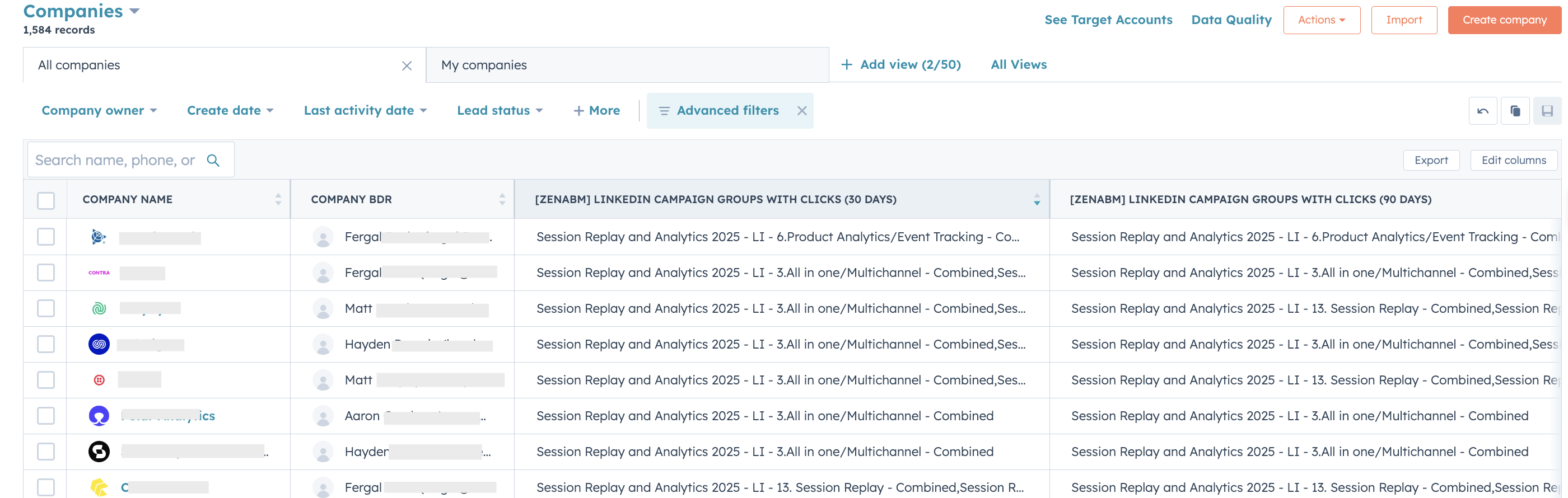
These stage definitions live in ZenABM, and when a company crosses a threshold, it moves stages automatically with the update syncing to HubSpot as a company property.
Your BDR team gets a daily feed of accounts that just hit “Interested” rather than having to manually review campaign dashboards.


For a deeper look at how to structure the full campaign, see how to structure LinkedIn ABM campaigns for pipeline growth.


A good LinkedIn ABM campaign strategy is not just a campaign setup exercise.
It is a budgeting exercise, a targeting exercise, and a pipeline design exercise all at once.
When you start with a clear revenue goal, build the right account list, separate cold and warm layers properly, and define stage progression before launch, LinkedIn becomes far more predictable and a lot less wasteful.
That is also where ZenABM adds real value. It helps turn LinkedIn ABM from a loose media motion into a more operational system by giving you company-level engagement tracking, account scoring, automated ABM stages, CRM sync, and clearer visibility into which target accounts are actually moving toward the pipeline.
If you want a more measurable and more sales-connected LinkedIn ABM program, ZenABM is a strong layer to add.
Try ZenABM for free now (37-day free trial) or book a demo now to know more!
Some common questions about LinkedIn ABM campaign strategy and their answers:
A LinkedIn ABM campaign strategy is a plan for using LinkedIn ads to systematically build awareness and drive pipeline from a defined list of target accounts.
It starts with a revenue goal, reverse-engineers the budget and account list size needed, structures campaigns into cold and warm layers, and defines account scoring criteria for measuring progress through the funnel.
I recommend a minimum of $5,000 per month to see meaningful results, with $10,000 per month as the starting point for a proper ABM program.
Below $5,000, you often cannot run enough ads to serve your audience at the frequency needed to drive awareness.
Use the ZenABM budget calculator to calculate the exact budget for your goals.
Using the median deal open rate of 0.58%, you need roughly 170 target accounts per deal you want to generate.
For 4 deals, that is approximately 700 accounts minimum.
In practice, I recommend building a list of at least 1,000 to 2,000 accounts to give LinkedIn enough signal to serve your ads efficiently and to account for audience churn over time.
Cold campaigns target accounts that match your ICP but have not shown engagement, and the messaging is focused on awareness and credibility building.
Warm campaigns target accounts that have already engaged with your cold ads by clicking, visiting high-intent pages, or being flagged as interested by your account scoring.
Messaging in the warm layer can be more direct and product-specific. Running them separately lets you track what is working at each stage and allocate budget accordingly.
The right metrics are account stage progression (how many accounts moved from Aware to Interested this week), pipeline influenced (deals from accounts that engaged with your ads), and pipeline per dollar spent.
Avoid measuring raw impressions or blended CTR because they tell you nothing about whether your target accounts are actually moving through the funnel.
See how to measure LinkedIn ABM ROI for the full measurement framework.
