Black Friday: up to 50% off ZenABM 💥Get up to 50% off ZenABM with our massive BlackFriday sale! 💥 - only 24-30 November!Get the deal12 Days of ABM Christmas · Report on your 2026 LinkedIn ABM & plan 2027 · Free webinars, 26 Nov – 9 DecSave your seat


Emilia Korczynska is Head of Marketing and co-founder at ZenABM. Before that she was VP of Marketing at Userpilot for nearly 7 years, where she ran a large ABM program primarily on LinkedIn ads.

LinkedIn company engagement retargeting lets you show ads to companies that engaged with your ads, using a rule such as 3 or more clicks in 30 days.
I prefer a time-based rule that combines ad engagement with CRM properties. It gives me a smaller, more relevant audience than a list of everyone who ever clicked. ZenABM Audiences can keep that company list updated as accounts enter and leave.
The catch is that a small audience still needs enough matched members to run. This guide gives you three ways to build the audience, how to pick the engagement threshold and window, and the steps to turn them into a campaign audience.
Way | What you get | Setup time | Cost | Main job |
|---|---|---|---|---|
Export and upload by hand | A company list based on the data you can export | About 10 minutes for the upload, plus cleaning | No separate tool required | A list for a launch |
LinkedIn native audiences | Engagement segments in Campaign Manager, with a company list layer | Up to 48 hours for LinkedIn to build the audience | No separate tool required | Broad engagement segments |
ZenABM | Dynamic company audiences using engagement and CRM rules | Up to 48 hours for LinkedIn to build and match the audience | Free plan available; paid plans start at $59 per month billed annually | Click thresholds, CRM conditions and regular updates |
Build LinkedIn audiences from company engagement
See how ZenABM can turn your engagement and CRM conditions into a LinkedIn audience.


You need LinkedIn engagement data, access to the ad account and an audience large enough for LinkedIn to match. I decide on the rule before opening the audience builder, because the threshold and window determine who can enter.
The 300 figure is a member minimum, not a company minimum, and extra job title or location filters can shrink the audience you can actually reach.
Campaign Manager's forecasted results panel shows the audience size after your filters, which is where you see whether the pool clears the minimum:

There is one more limit to know before you start counting. LinkedIn hides company engagement data when a company has fewer than 3 interactions in a specific period, so an absent company has not necessarily had zero engagement.
That also means the simplest method, a manual export, is only as complete as the company data you can see.
A manual company list works when you already know which accounts qualify and need an audience for a specific launch. I would use it for a list that does not need frequent changes.
The manual setup starts with a company export and ends with a LinkedIn matched audience.
The upload itself takes about 10 minutes. The work around it is deciding which companies belong in the file and fixing the records LinkedIn needs to match.
The export starts in the Companies tab of Campaign Manager:

The manual upload gives you a snapshot of qualifying companies at the time you exported the list. For example, you can export the companies visible in a 30-day view, remove accounts that do not fit, and upload the result for a warm campaign.
The matched audience reaches members at those companies. It does not mean every member personally clicked your ad, so your message can speak to the wider buying committee rather than assuming each person knows you.
The uploaded file does not update itself. If you want a fresh 30-day list a month later, someone has to export, clean and upload it again.
The reporting threshold matters too, because companies whose interactions are hidden will not appear in that export. A CRM list can give you a different starting point, but only if the company records already hold the engagement data your rule needs.
Build LinkedIn audiences from company engagement
See how ZenABM can turn your engagement and CRM conditions into a LinkedIn audience.

LinkedIn’s native engagement segments let you build an audience in Campaign Manager without maintaining a fresh CSV for every update. They are useful when LinkedIn’s engagement levels are enough for the decision you want to make.
The native setup starts with the engagement segment, then adds your target company list where needed.
Company audiences sit in the ad set's audience settings in Campaign Manager, where you include or exclude them:

You can also find engagement audiences under Plan, Audiences and Create audience. Check whether the source you select creates an audience of people who took an action or a company audience, because they reach a buying committee in different ways.
Native company engagement segments give you a relative engagement level, such as a highly engaged group, rather than a threshold you define yourself. Filip Saračević describes LinkedIn’s ready-made company retargeting audiences as a way to start with those segments and then go broad inside only those companies.
That is a quick route to a warm company pool. Adding your target company list matters because an engagement level alone does not tell LinkedIn which companies fit your ICP.
The native engagement level cannot express “3 or more clicks in 30 days AND a particular CRM lifecycle stage.” If that distinction changes the audience you want, you need a method that uses both conditions.
I also find small engagement audiences frustrating. LinkedIn’s reporting threshold can hide activity at individual companies, and a narrow pool can take a long time to reach the member minimum. Extending the window may help, but it also makes the audience less recent.
ZenABM lets you build a company audience from a click threshold and CRM conditions, then sync it to LinkedIn. I prefer this approach when the audience needs to change as accounts become more or less engaged.
Start with a rule you can explain in plain English. For example:
Retarget a company when it has N or more clicks in the last X days.
For an initial test, N can be 3 and X can be 30 days. A company with 3 qualifying clicks in that window meets the engagement part of the rule, and a company with 1 does not. As the window advances, older clicks fall outside it.
The rule can use several types of information. This table shows what each condition contributes:
Rule property | What it means | Example |
|---|---|---|
Company clicks | The number of ad clicks attributed to the company | 3 or more clicks |
Lookback window | How recent those clicks must be | Last 30 days |
CRM lifecycle stage | A CRM condition the company must also meet | MQL |
ABM stage | A stage based on your account rules | Interested |
Deal condition | A CRM deal status you want to include or exclude | Open deal |
The example is deliberately narrow. If the audience is too small, I first inspect which condition is removing companies, then test a longer window or a broader CRM condition rather than assuming the rule is broken.
The audience refreshes daily: companies enter when they match the conditions and leave when they no longer do. That is why you do not have to re-upload company lists.
The daily refresh does not mean fresh LinkedIn engagement arrives every day. ZenABM’s LinkedIn ad data sync runs weekly on Monday, so the rule uses the engagement data from the latest sync. Other conditions can change between those syncs.
You can inspect the companies behind the decision in the Companies view, which shows their stages and engagement metrics:
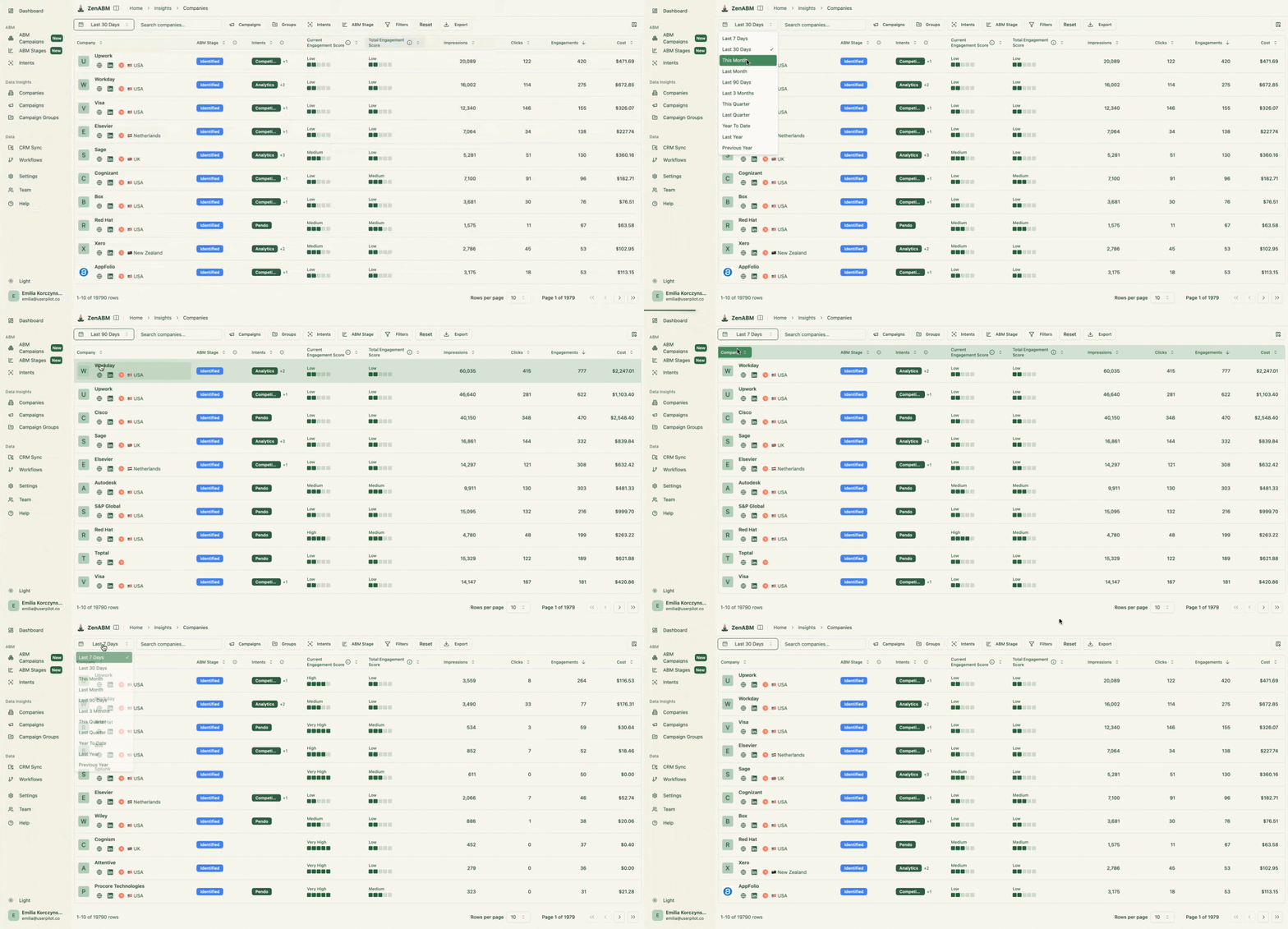
ZenABM cannot remove LinkedIn’s matching requirement or reveal interactions LinkedIn hides below its reporting threshold. A precise rule can therefore produce a useful list that is still too small to run as its own ad set.
The number of audiences you can create depends on your plan. The Attio integration starts on the Growth plan, so check the current pricing and the CRM connection you need before choosing a plan.
I would choose the simplest method that gives you the rule and refresh rate you need. A free manual or native approach is enough if it produces the audience you want without a recurring cleanup job.
Your situation | Way to use | Why |
|---|---|---|
You need a list for a launch | Manual export and upload | You can review the companies before uploading |
LinkedIn’s engagement levels are enough | Native company engagement audience | The segment can update without a repeated CSV upload |
You need a click count and CRM condition | ZenABM audience | You define both conditions in the rule |
You need companies to enter and leave regularly | ZenABM audience | The audience refreshes and syncs daily |
Your warm audience is too small | Broaden the rule or cycle audiences | A separate warm ad set may not have enough matched members |
Size is the reason I would not split every account list into more layers. In my campaigns, I have seen CPMs climb almost 7 times on an audience of 3,500 compared with one of about 170,000.
For a niche list, I sometimes run the cold campaign until it reaches about 70% audience penetration, meaning the share of the audience your ads have reached. Then I move that audience to a product campaign and start a new cold list. The audience penetration measure helps me decide when to make that move.
When the ZenABM audience is the right fit, the warm campaign is set up around it like this:

A company engagement audience is useful when it changes what marketing or sales does next. I use the same qualifying rule to guide follow-up, while keeping the ad audience and the sales list distinct.
A sales list should show which companies met the engagement rule and what they engaged with. Export the qualifying companies, include the relevant campaign or intent where available, and give sales the company records to review.
The list identifies accounts for research. It does not identify which person clicked, so I avoid writing outreach that assumes a particular contact saw a particular ad.
ZenABM’s Company engagements view puts each engaging company’s score, ABM stage and CRM data on one row, which Campaign Manager does not show. The same table carries the engagement metrics sales can use to prioritize its review:
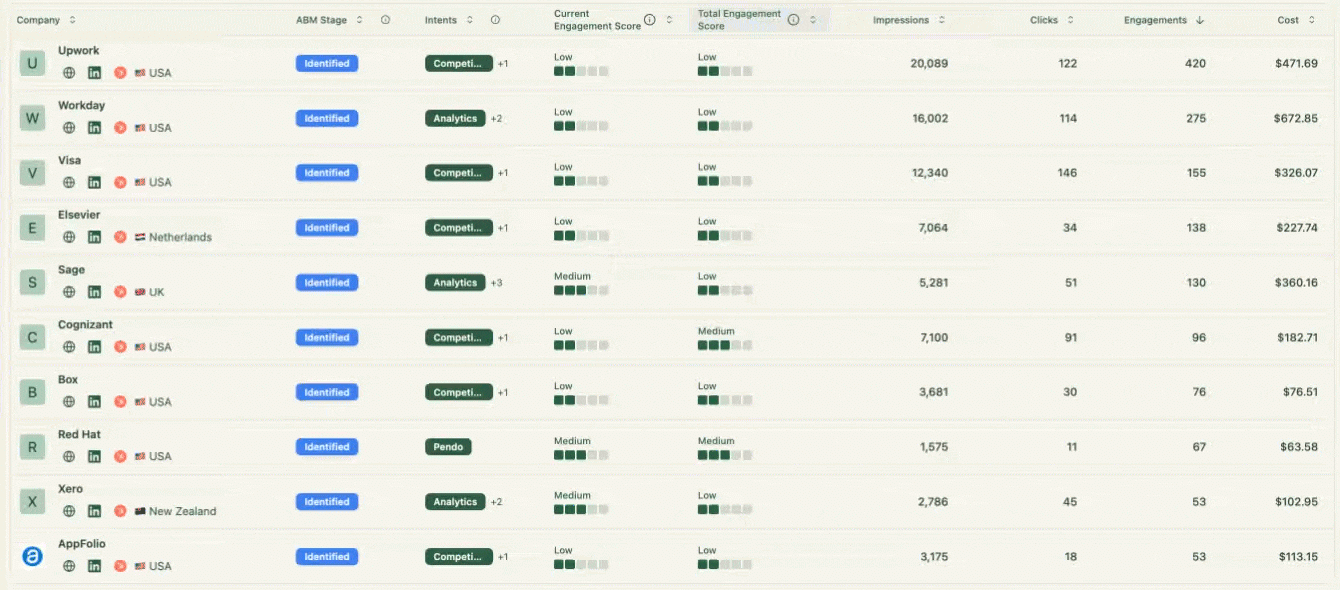
A stage change gives sales a consistent trigger for reviewing an account. Define what makes an account warm, write that stage to the CRM company record, and use your CRM workflow to notify the account owner when the property changes.
For example, the stage could use the same click threshold as the warm audience, with a CRM condition that removes current customers. Agree with sales on the action after the alert, such as researching the account before enrolling contacts in outreach.
Account stages calculate stages from LinkedIn engagement and CRM conditions instead of someone updating them by hand.
A stage can use LinkedIn data without a CRM. You need the CRM connection when the rule depends on CRM properties or when you want the stage on the company record.
Pipeline reporting shows which deals had contact with your retargeting campaign, but I keep influence separate from causation. An account seeing an ad before a deal opened is useful context, and it does not prove that the ad created the deal.
Group the warm campaign separately from cold activity, connect your CRM deals, and review the company touchpoints before each deal opened. ZenABM’s deal dashboard shows campaign touches on a deal timeline:
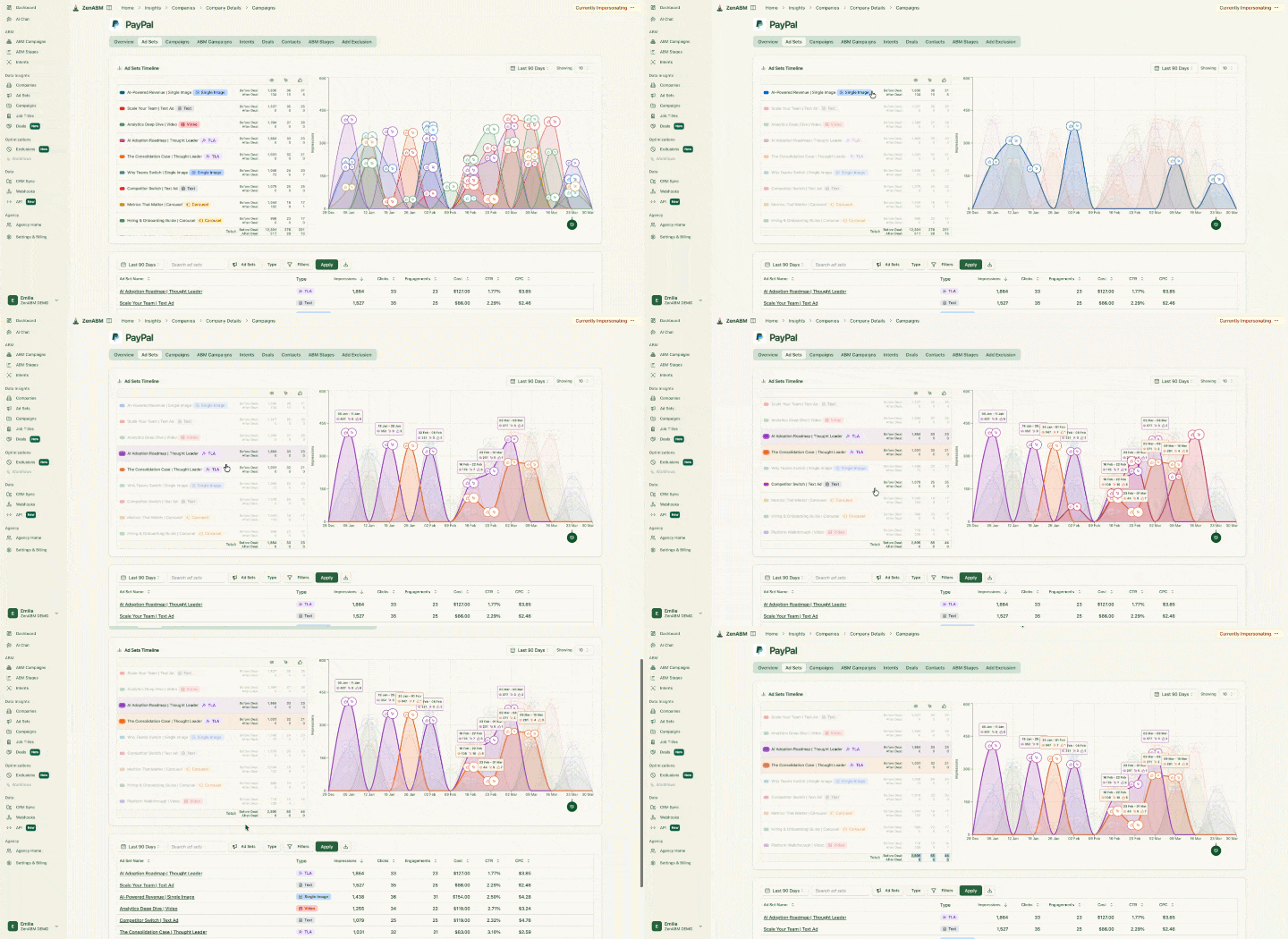
That view lets you investigate the campaigns associated with pipeline rather than judging the warm audience on clicks alone.
The mistakes I check first are audience qualification and separation. A warm audience can look active while reaching accounts that should never have been in it.
Here are the four mistakes and the fix for each:

A single click can be an accidental interaction or an early signal of interest. If you put every click into the same warm pool, you give those accounts the same treatment as companies with repeated engagement.
Start with a rule you can inspect, such as the 3 clicks in 30 days example. Then check the qualifying companies and the matched audience size before deciding whether to loosen or tighten it.
A company that has already engaged may be ready for a more specific product message than one seeing you for the first time. I use the warm audience to answer the next question a buyer might have, rather than repeating the awareness ad.
That does not mean every employee at the company is ready for a demo. The audience is built at company level, so the message still has to make sense to someone meeting you for the first time.
Your CRM can tell you that an engaged company is already a customer, has an open deal or was previously in pipeline. Without that context, a warm campaign can deliver a message that does not fit the account’s relationship with you.
I agree with sales on which of those groups should get a separate message and which should be excluded, and I apply those conditions before judging the audience by its engagement rate.
Cold and warm accounts need distinct targeting if you want to compare their messages. If the warm audience stays eligible for the cold ad set, the same company can receive both, which makes the results harder to read.
Check the inclusion and exclusion settings before launch. Miles Beard described setting the retargeting audiences in a Reddit ad group to excluded instead of included, and it took him a week to notice. The same slip is easy to make in Campaign Manager when you review a setup quickly.
For exclusions you maintain across campaigns, ZenABM can apply Exclusions to the selected scope, including new campaigns, so you do not need to re-upload the same list at each launch.
I paused a four-figure monthly website retargeting budget after finding companies such as Meta and Amazon, along with university students, in the pool. They were visitors, but they were not the accounts I wanted to spend my warm budget on.
The fix was to use CPC text ads for high-intent page visitors, identify the companies behind the impressions, filter them for ICP fit in Clay, and run a campaign to the cleaned list. The cold ABM campaign that received the budget generated $16 in pipeline for every $1 spent.
These are the five steps that took me from website retargeting to a cleaned ABM list:

I would not treat that figure as the return from company engagement retargeting alone. It is the result of the cold ABM campaign after the budget shift, and the lesson here is the qualification step: check who enters the audience before spending more on it.
ZenABM handles the company data and audience updates after you decide what should qualify an account. Each part supports a different step of the job:
ZenABM's Audiences list shows dynamic audiences built from ABM stages, signals and ad impressions:

Build a current LinkedIn company audience
Use your engagement and CRM rules to create an audience that updates as companies qualify.

I would start with a rule your team can explain, check the companies it selects, then decide whether the audience is large enough to run. A useful warm audience needs a reason for each company to be there and a way for it to leave.
LinkedIn company engagement retargeting uses companies’ interactions with your ads to select an audience for another campaign. You might select companies using LinkedIn’s engagement levels or use a rule based on clicks over a defined period. The audience can then reach eligible LinkedIn members at those companies, including people who did not personally click the original ad.
There is no universal click threshold for company retargeting. I would test a rule such as 3 or more clicks in 30 days, inspect the companies it selects and check whether LinkedIn matches enough members. If the audience is too small, a longer window can capture more accounts, although it also includes older engagement.
A 7 to 30-day window is a starting point for recent engagement, while 90 or 180 days can suit a longer sales cycle. I would use a more direct offer for the recent audience and a less demanding message for older engagement. These are starting points, not proof that a company is ready to buy.
LinkedIn can take up to 48 hours to build and match a new audience. It also needs at least 300 matched members before an ad set using that audience can run. Create the audience before your planned launch, then check both the match status and the size after applying any additional targeting conditions.
There is no single best ad format for every retargeting audience. In ZenABM’s October 2026 data pull across 168 LinkedIn ad accounts, Thought Leader Ads had a median all-click CTR of 3.374%, compared with 0.532% for single image ads. Those figures cover the accounts studied, not retargeting alone, and all-click CTR includes clicks that do not reach your landing page.
Keep Audience Expansion and the LinkedIn Audience Network off if you want delivery restricted to the audience you selected. Then watch the audience size, frequency and ad spend as the campaign runs. A small warm pool can become expensive to reach, so I would adjust the audience or budget before assuming that a higher bid is the answer.
About the author

