Black Friday: up to 50% off ZenABM 💥Get up to 50% off ZenABM with our massive BlackFriday sale! 💥 - only 24-30 November!Get the deal12 Days of ABM Christmas · Report on your 2026 LinkedIn ABM & plan 2027 · Free webinars, 26 Nov – 9 DecSave your seat


Emilia Korczynska is Head of Marketing and co-founder at ZenABM. Before that she was VP of Marketing at Userpilot for nearly 7 years, where she ran a large ABM program primarily on LinkedIn ads.

LinkedIn audience sync means your CRM or ABM list updates a LinkedIn Matched Audience on its own, so you stop re-uploading CSVs every time an account changes.
For ABM, I only count it as sync if the audience is dynamic. When an account opens a deal or becomes a customer, the audience should follow without anyone touching it.
I prefer an ABM tool for that job, and we built ZenABM Audiences for exactly this. It shows which companies engage with your LinkedIn ads, from the official LinkedIn Ads API and without form fills, and builds company audiences from that engagement and your CRM data.
HubSpot's native route is a fair place to start if you already pay for HubSpot Marketing. Below you can pick a route for your CRM, set up the rule and check that LinkedIn can actually target the audience.
I would choose the route based on where your audience rules already live:
Route | When it fits | What to check |
|---|---|---|
HubSpot native audience sync | Your lists and rules already live in HubSpot | Company audiences come from target accounts or a tier; contact audiences need Marketing Hub Starter |
ZenABM | You want company audiences based on LinkedIn engagement and CRM conditions | Which CRM fields and ABM stages should control membership |
Warehouse or CDP | Your team already maintains audiences there | Who owns the API connection and refresh process |
CSV upload | You need a one-off audience or a list that will not change | You must upload again when the list changes, and the same LinkedIn minimum applies |
Sync CRM and ABM stage audiences to LinkedIn
ZenABM turns your CRM data and ABM stages into LinkedIn audiences, so you stop uploading lists by hand.

The route you pick decides where the rules live, but LinkedIn's matching requirement applies to every route:

LinkedIn audience sync sends a changing list into ad targeting. Other integrations also use the word "sync", but they move different data for different jobs.
Before you connect anything, I check the direction of the data and the outcome I need:
Integration | What moves | What it changes |
|---|---|---|
Audience sync | Company or contact lists from a source to LinkedIn | Matched Audiences used for targeting or exclusion |
Campaign Manager CRM Sync | CRM sales data into Campaign Manager | Reporting, not audience membership |
Lead form sync | LinkedIn lead form submissions into a CRM | CRM lead records, not audience membership |
This matters when you see CRM data in Campaign Manager and assume your prospecting exclusions are updating too. They are not: they need their own audience rule and connection.
The same idea is on other vendors' roadmaps. Philip Ilic, whose team builds Kiin's LinkedIn Ads connector, lists CRM-connected audiences as a planned feature: LinkedIn audiences that update automatically as leads become opportunities, customers or closed-lost accounts. That is the kind of change I want a synced audience to act on.
The three directions look like this:

There is one more thing people confuse with audience sync. LinkedIn's Conversions API sends conversion events to LinkedIn for measurement, and nothing is written back to your CRM. It does not maintain an audience list, so it is a tracking path, not a sync.
Keep LinkedIn Audiences Current With CRM Data
See how ZenABM builds and refreshes company audiences from your ABM rules.
Dynamic audience sync lets you combine LinkedIn engagement with CRM events when you decide who sees your ads. Native retargeting can be enough when the action you care about is already visible to LinkedIn, such as watching a video or visiting your site.
The difference shows up when your next campaign depends on a deal opening, a trial signup or an account stage. Those are business events, and I would rather bring them into the audience rule than guess from ad engagement alone.
I use COLD for accounts that are still getting to know the problem, and WARM for accounts that have shown enough interest to see more product-specific ads. The move should happen when an account meets your rule, not whenever someone remembers to export a list.
You could do this by hand: check the company's ad engagement, look up its CRM activity, update its stage and upload a new list. The catch is that the list starts aging the moment you upload it.
ZenABM's Account stages take that job over. They move accounts through the stages you define using ad engagement and CRM data, so nobody updates a stage by hand.
The stage editor is where you define the stages that accounts can move through:
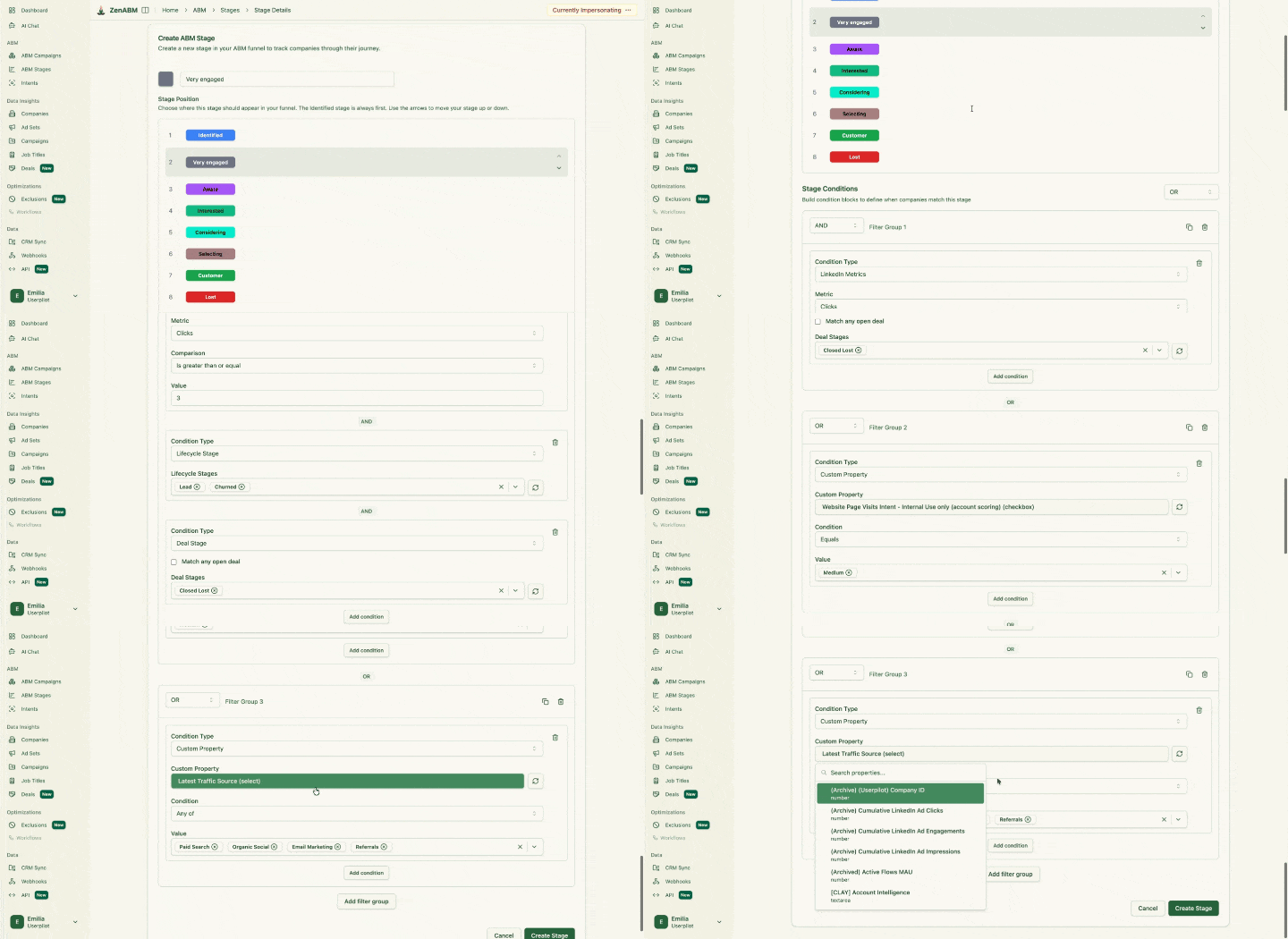
Here is an illustrative case. A company reaches your Interested stage after a pricing-page visit and has an open HubSpot deal. If both are part of the rule you set, it can leave the COLD audience and enter the WARM audience once the data has synced and the audiences refresh.
That does not mean every event reaches LinkedIn at once. ZenABM refreshes audiences daily, but the underlying data has its own schedule. LinkedIn ad data syncs weekly, so allow for that delay when your rule depends on ad engagement.
Once you can combine sources, the audience can reflect the job of each campaign:
A second view backs up the same point. Justin Rowe points out that the useful account questions combine ad exposure with CRM or website activity, and the answers go stale fast. I agree. The value is in keeping that combination current, not in getting a list into Campaign Manager once.
If all you need is to retarget people who watched a video or visited your site, start with LinkedIn's native retargeting. Add a CRM-driven audience when an account's business state should change the campaign it sees.
Connect the source and the ad account, define the rule, send the audience to LinkedIn, then verify it before you add it to an ad set. The sequence is similar across tools, and only the screen where you define the list changes.
I write the rule down before I open any setup screen. That makes it obvious whether the source actually has the fields I need.
For HubSpot's native route, open Marketing > Ads, then Create audience. Choose Company segment (your target accounts or a tier) or Contact segment, then the LinkedIn ad account.
The expected result is a source list connected to the intended ad account. It is not yet proof that LinkedIn has finished matching the audience.
For example, I would start a WARM audience with this rule:
ABM stage = Interested AND lifecycle stage is not Customer
The rule includes an Interested account only while its lifecycle stage is not Customer. It is an illustrative starting point, so use the stage and lifecycle values your team actually maintains.
In ZenABM, open Audiences, describe the conditions to Zena or build them in the editor, and check the estimated audience size before you save. The expected result is a reviewable rule that identifies the companies you intend to send.
The estimate matters because it catches a too-narrow rule before LinkedIn does. After that, ZenABM keeps retargeting and exclusion audiences updated daily from ad engagement and CRM rules, so you do not re-upload company lists.

LinkedIn then builds and matches the audience. The expected result is a segment in the chosen ad account, followed by a matched member count once processing completes. Allow up to 48 hours for the initial build.
Wait until LinkedIn reports at least 300 matched members, because a segment delivers only once it reaches that size. The expected result is an ad set that references the intended audience, not a list sitting unused in Campaign Manager.
In principle the setup is the same across CRMs. What differs is which system can supply the fields and maintain the rule, which is where the next section picks up.
I would choose HubSpot's native setup for a simple HubSpot list, and an ABM audience tool when the rule needs LinkedIn engagement and CRM conditions together. For other CRMs, check the available connection before you assume a native audience sync exists.
Route | How the audience is built | What to check |
|---|---|---|
HubSpot native | Build a HubSpot list and send it through its ads audience setup | HubSpot Marketing access and the list conditions available to your team |
ZenABM with HubSpot | Build a company audience from supported ad, stage and CRM conditions | Connect HubSpot and choose the conditions |
ZenABM with Salesforce | Use ZenABM's Salesforce connection alongside audience rules | Confirm the Salesforce data your rule needs |
ZenABM with Attio | Use ZenABM's Attio connection alongside audience rules | Confirm the Attio attributes and deal statuses your rule needs |
Other CRM or warehouse | Use a supported connection, an API workflow or a CSV | Whether the workflow can bring your CRM fields into the audience source |
HubSpot's native audience setup is a reasonable choice if the list you need already exists there. You open its ads audience flow, choose a company segment (your target accounts or a tier) or a contact segment, pick the ad account, and let LinkedIn match it, which can take up to 48 hours.
HubSpot offers two LinkedIn audience types, and the plan you need depends on which one you use:

My reservation is scope and cost as the program grows. HubSpot's knowledge base limits company audiences to your target accounts or a tier, and contact segment audiences need Marketing Hub Starter or higher, so check the subscription before making HubSpot the center of a large audience workflow. I have not seen this route scale well for big ABM list operations.
The other question is where your stage data comes from. If your audience depends on LinkedIn engagement, that data has to reach the system that maintains the list.
Salesforce offers LinkedIn audience activation through Data 360 with an Ad Audiences add-on license. Check the current options for your setup, then use a connected audience tool or another supported route if you need recurring updates.
ZenABM's Salesforce integration puts the LinkedIn engagement fields you choose on Salesforce accounts and brings opportunities into ZenABM. That gives your team account data to use alongside the audience workflow, instead of maintaining engagement fields from exports.
As far as I know, Attio has no native LinkedIn ad-audience sync either. If your audience depends on Attio company data or deal status, check that your chosen tool can use those conditions.
ZenABM's Attio integration writes LinkedIn engagement and account scores to Attio company records and brings deals back for attribution. It matches companies on domain and starts on the Growth plan, and LinkedIn still has to build and match the audience before you can target it.
For Pipedrive or another CRM, I would first confirm whether your chosen audience tool can reach the exact company fields you need. ZenABM connects to HubSpot, Salesforce and Attio, and a tool having an API does not mean it has a native integration with every CRM.
ZenABM's MCP server and REST API can work with ZenABM data and audiences, but an unsupported CRM needs its own integration work to get data into the workflow. If you cannot maintain that connection, a CSV is a workable one-off option, with manual updates whenever membership changes.
ZenABM's paid plans start at $59 per month billed annually. Check the plan for your route, because the Attio integration, MCP server and REST API start on Growth.
I would start with an audience for the stage you want to move, then add separate rules for deals, customers and intent where the campaign needs them. Keep each rule tied to a decision about which ads an account should see.
Use this as a template, and replace the values with your own CRM and stage names:
Audience | What goes in the rule | Illustrative condition | How to use it |
|---|---|---|---|
WARM stage | The stage that indicates interest | ABM stage = Interested | Include in a WARM ad set; exclude from COLD if appropriate |
Open deal | An active opportunity or deal condition | Deal status = Open | Include in a deal campaign or exclude from prospecting |
Customer exclusion | Your customer lifecycle condition | Lifecycle stage = Customer | Exclude from acquisition ad sets |
Intent audience | A signal tied to a subject or action | Intent signal = Pricing page visit | Show ads relevant to that interest |
You can combine conditions with AND or OR. Use AND when every condition must be true, such as Interested and not a customer. Use OR when either condition should qualify an account, such as a trial signup or a webinar signup.
That choice decides who enters the list:

A WARM inclusion alone does not remove the same company from COLD. If you want the campaigns to be mutually exclusive, apply the WARM audience as an exclusion in the COLD ad set as well.
Then check what happens when a company stops matching. A dynamic audience removes companies that no longer meet the rule, so your stage definitions and CRM data need to reflect the decision you want LinkedIn to make.
A customer exclusion keeps acquisition ads away from accounts you already serve. An open opportunity exclusion does the same job when a separate deal campaign is responsible for those accounts.
For individual companies, job titles or industries that should not see your ads, ZenABM's Exclusions apply team-wide or to the campaigns, ad sets or ABM campaigns you choose. They are re-applied daily. LinkedIn allows up to 200 exclusions per ad set, so check that limit when you plan a large exclusion strategy.
An intent audience groups companies around what they engaged with. That lets you show a relevant follow-up message instead of sending every engaged account to the same WARM campaign.
In ZenABM, the Intents view shows the companies associated with a selected theme and their engagement information:
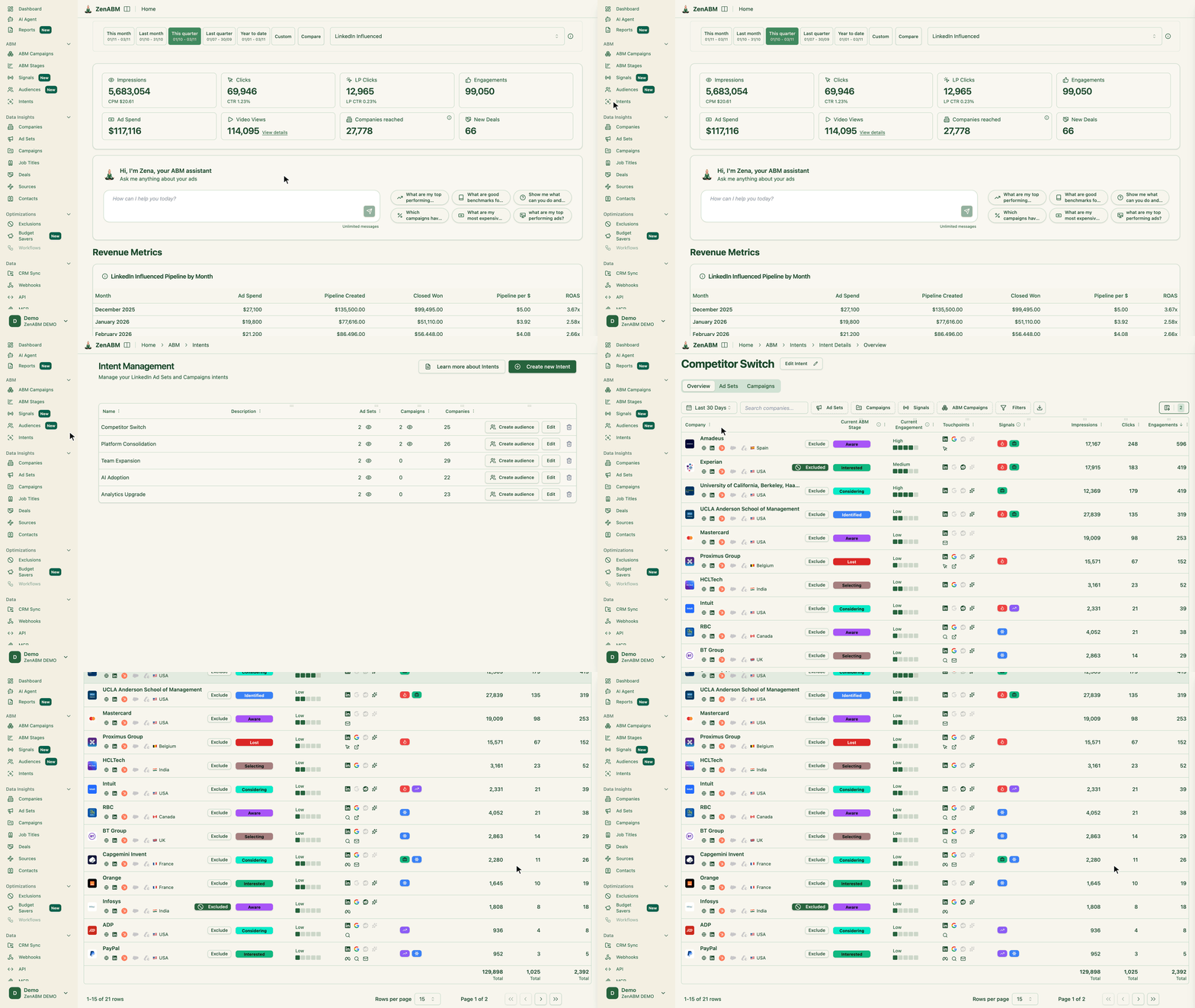
The same signals can also feed outbound. ZenABM's webhooks send engaged companies to Clay every Monday after the weekly LinkedIn sync, so nobody exports and uploads a list. This free Clay template routes each company into a sequence by intent signal.
You can also build an impression-capping audience. ZenABM's example combines 100 or more impressions in the last 30 days with 100 or more employees, then excludes that audience from ad sets. Use a separate rule for each company size band if you want different thresholds.
Check the audience in the source tool and in the same LinkedIn ad account, then confirm that the ad set uses it. A saved rule tells you what should be sent, while LinkedIn's status and matched member count tell you whether it is available for targeting.
I use this checklist before I treat a setup as finished:
Here is the same checklist as a flow, from the correct ad account to the ad set, including the 48-hour wait and the 300 matched member check:

First, check that you are looking at the same ad account you selected in the source tool. Then search for the audience under Plan > Audiences and see whether the initial build is still processing.
If it is missing after processing, check the connection and sync status in the source tool. An audience can exist without being available for targeting yet, so tell a missing segment apart from one that has not reached the matched member minimum.
A company row in your source list is not a LinkedIn member. The estimate in your audience tool helps you judge the size of the source list, but it does not guarantee how many members LinkedIn will match. A list of 200 companies often fails for exactly this reason.
If the audience is too small, review the rule for conditions that are needlessly narrow. You can also combine compatible stages or use a broader audience with suitable exclusions. A contact list is subject to the same 300 matched member requirement.
Check the source tool for an error and confirm that the destination audience still exists in LinkedIn. Some tools show a Not found status when the LinkedIn audience has been deleted, and they do not recreate it unless you add a new sync.
Before you recreate it, check whether your tool refreshes the existing audience or replaces it. Replacing can orphan campaign history and frequency caps, and a new segment may need to be selected again in the ad sets that used the old one. I would verify the actual ad set settings rather than assume a new audience inherited the old one's place.
Audience sync controls who can be targeted or excluded. It does not answer every question about account engagement, and it does not fix missing identity data.
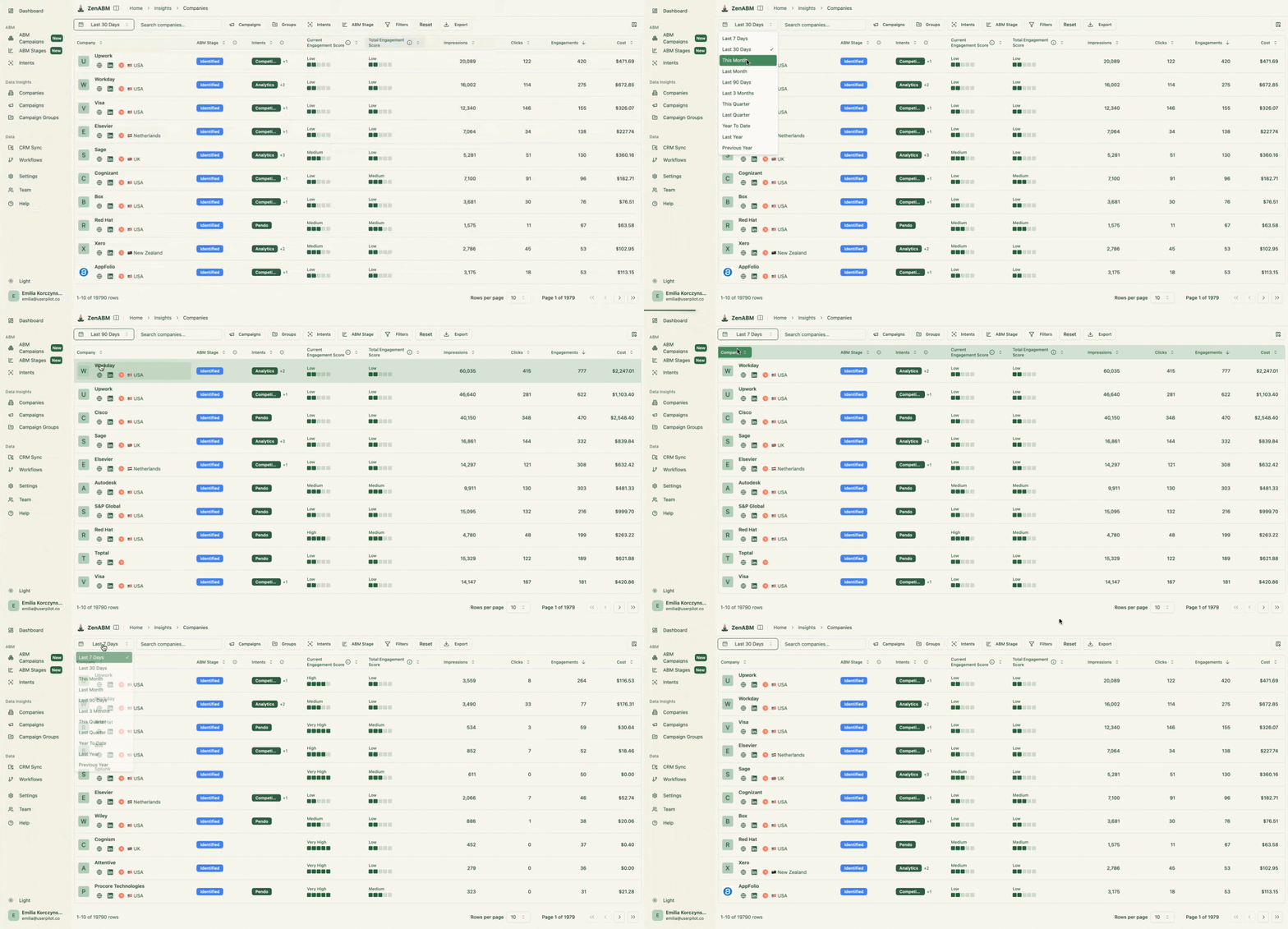
ZenABM's Company engagements view adds the CRM side: it shows engaging companies with their engagement score and ABM stage alongside their ad activity.
The Companies table lets you compare account stages with impressions and clicks:
That last point is why I separate the list from the data that feeds it. An automatic refresh is only as good as the conditions behind it.
We built ZenABM to connect LinkedIn engagement and CRM conditions to the audience decisions an ABM team makes. These are the parts that do the work:
Build Dynamic LinkedIn Audiences From ABM Data
Connect your data and create audiences that refresh as your account rules change.

My verdict: pick the route that can maintain the conditions your campaigns actually need. A synced list saves work, but the real payoff comes when accounts enter and leave the right campaigns on their own.
LinkedIn audience sync automatically sends and updates company or contact lists in LinkedIn Matched Audiences. The source can be a CRM, an ABM tool or another system that maintains the list. You then use the audience for targeting or exclusion in LinkedIn ads. The important check is whether the source keeps updating membership after the first send.
HubSpot's audience sync sends eligible HubSpot lists to LinkedIn for use in ads. In HubSpot, the setup sits under Marketing > Ads. You select the source list and the ad account, then LinkedIn builds and matches the audience. Company audiences come from your target accounts or a tier on any plan, and contact segment audiences need Marketing Hub Starter or higher.
Check the selected ad account and LinkedIn's processing status first. A new audience can take up to 48 hours to build and match. If the segment exists but cannot be selected for targeting, check its matched member count, because LinkedIn needs at least 300 matched members for inclusion. Also confirm that the HubSpot list and connection are still active.
I would verify the current native options before you plan on that route. Salesforce offers it through Data 360 with an Ad Audiences add-on license. As far as I know, Attio has no native sync. A connected audience tool, a supported warehouse or API workflow, or a manual CSV are the alternatives. For recurring sync, check that the route can access and refresh the CRM conditions you need.
You need a lawful basis for processing and sending contact data for ad targeting under the rules that apply to you. Consent may be that basis in some situations, but the requirement depends on your circumstances. Check with your privacy or legal team, and make sure your source list applies any eligibility or opt-in conditions your organization requires.
You can use a contact list, but it still needs at least 300 matched members before LinkedIn allows it as targeting. Switching list type does not remove the minimum. Check that you have enough eligible contacts and a lawful basis to use them, then compare that approach with combining compatible company tiers or broadening the audience.
About the author

