

©2026 ZenABM - All Rights Reserved.
Emilia Korczynska is Head of Marketing and co-founder at ZenABM. Before that she was VP of Marketing at Userpilot for nearly 7 years, where she ran a large ABM program primarily on LinkedIn ads.

Influ2 vs ZenABM comes down to one question: do you want to advertise to named people or to whole companies? Influ2 is a person-based ABM platform: you upload named contacts, Influ2 runs ads to them across several networks and it reports by person. ZenABM reads company-level engagement from the LinkedIn ads you already run in your own Campaign Manager and reports by company.
We build ZenABM, so here is where I sit: I target accounts and filter by job title, because contact-level targeting got very expensive for us and the later-stage contact audiences were too small to run. I haven't run Influ2 myself, so I stick to what its docs, its reviewers and buyers on our calls say. By the end you can judge both against your budget, team and motion, including when to buy neither yet.
Here are the six checks, with what Influ2 and ZenABM each offer on use case, budget, people, size, channel and strategy:

And here is how the two compare on the basics, from main use case and price to contract terms:
Dimension | Influ2 | ZenABM |
|---|---|---|
Main use case | Person-based ads to named contacts, with contact-level reporting and sales alerts | Company-level engagement, stages and deal attribution from your own LinkedIn ads |
Not built for | Reporting on LinkedIn campaigns you run yourself | Buying display or other channels, website personalisation or third-party intent data |
Subscription price | Not published; Vendr median $60,000 a year, range $34,500 to $104,100 | From $59 a month (Starter, annual billing) |
Campaign budget it needs | Not stated by Influ2: its terms say the fee covers access to the platform; third-party reviews say ad spend is billed separately. Ask whether media is in your quote | Your own LinkedIn ad spend, no markup |
Setup time and people | Reviewers call setup complex with a learning curve; needs strong CRM data and internal alignment | Connecting LinkedIn takes about 2 minutes with 90 days of data backfilled; CRM sync about 10 minutes; no contact lists to maintain |
Best company and team size | Mid-market and enterprise with dedicated ad ops | Small to mid-market LinkedIn advertisers (10 to 200 employees); enterprise teams and agencies use it too |
Main channel | LinkedIn, Facebook, Instagram, Google, Bing and Amazon | |
LinkedIn support | Runs ads on LinkedIn for you, through access you grant to your LinkedIn Page | Reads, builds and manages the campaigns in your own account |
Display and programmatic | Multi-channel delivery (Google, Bing and Amazon among them) | Not offered |
Best-fit ABM strategy | 1:1 and 1:few where the buying committee is known | One-to-few and one-to-many at account level, filtered by job title |
CRM sync | Contact-level to Salesforce, HubSpot, Marketo, Dynamics and Eloqua | Company-level to HubSpot, Salesforce and Attio |
AI and MCP | MCP server launched 20 Aug 2026 | MCP server with 129 tools and 45 expert skills, plus the in-app agent Zena |
Contract and free trial | 12-month prepaid, auto-renewing term; no free trial | Monthly or annual billing; 37-day free trial, no credit card; free plan after the trial |
G2 rating |
Before the tool-by-tool view, run six checks against your own situation. Each one ends in a verdict.
The sixth check, strategy, is where the tools really split, and it is where my stance sits. First, each tool on its own.
We built ZenABM, so weigh this with that in mind. You keep running campaigns in your own Campaign Manager, and ZenABM matches the impressions, clicks and engagements to the company behind them through the LinkedIn Ads API and joins them to your CRM records. The trade-off is scope: it runs LinkedIn ads only.
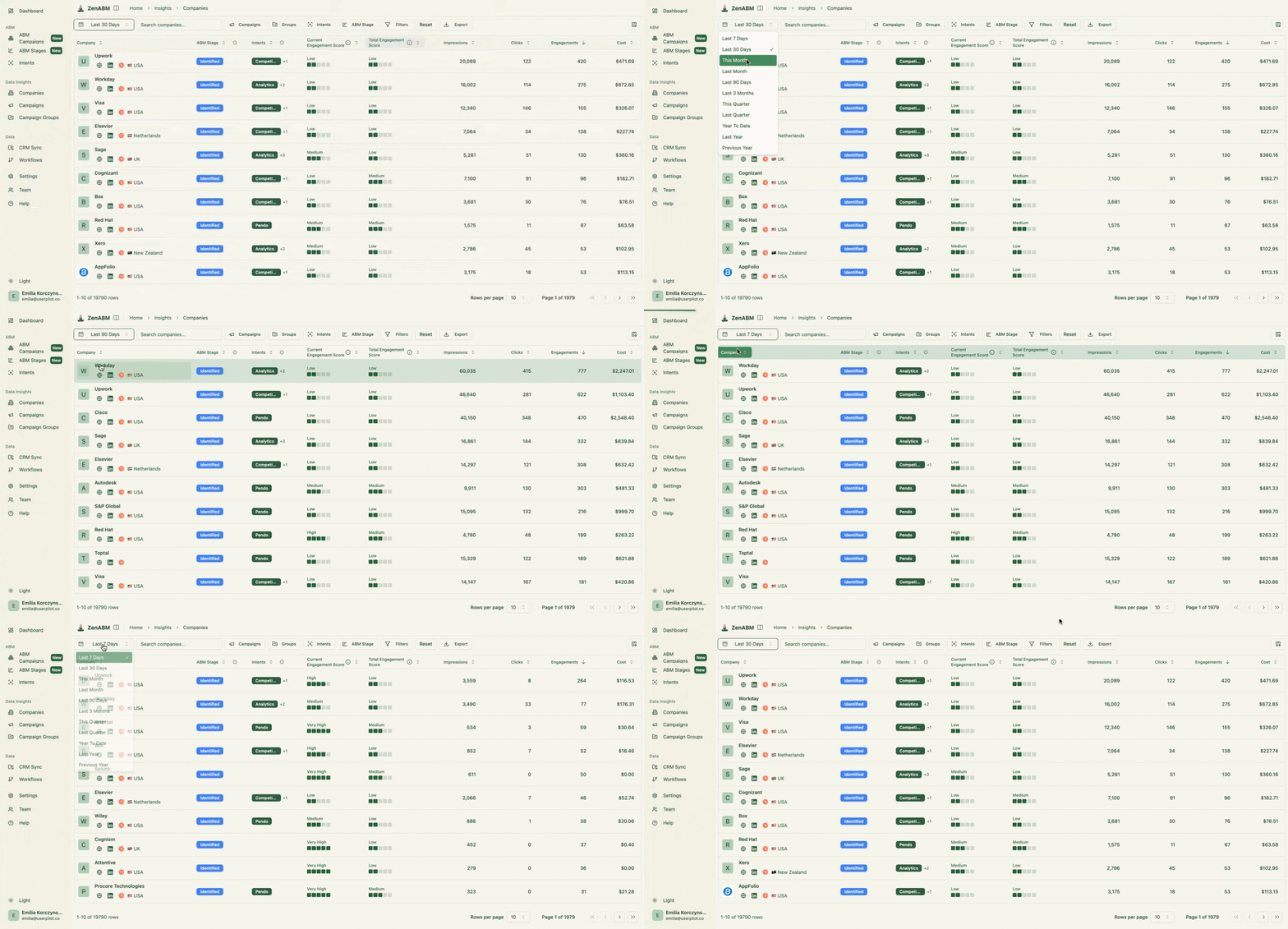
ZenABM's Company engagements view shows every company engaging with your ads, with its engagement score, ABM stage and CRM data on one row, which Campaign Manager doesn't expose. Here is that view, with stage, score, impressions and clicks for each company:
The short version of what you get on top of that company view:
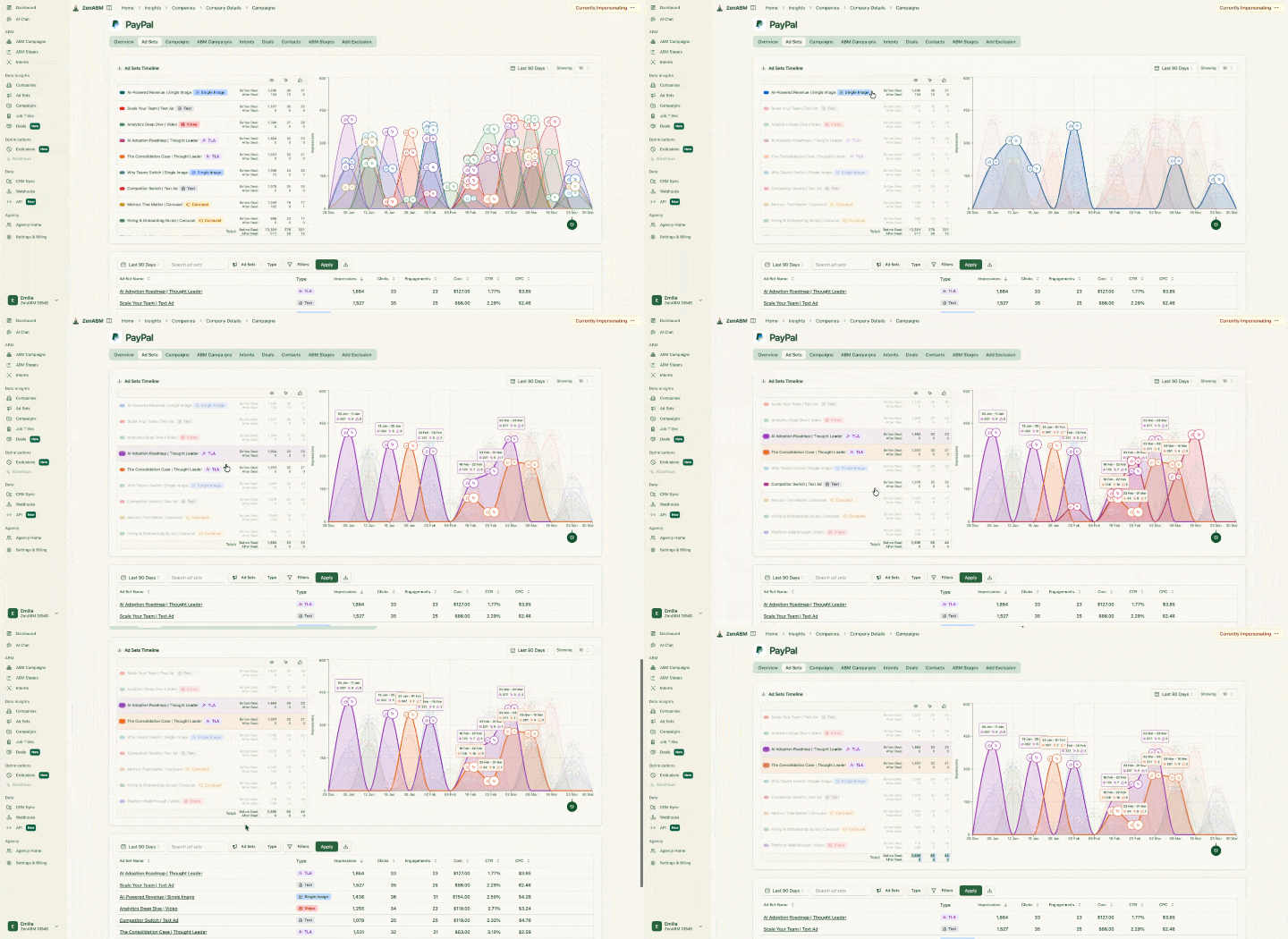
The deal attribution view is the one I'd show a sceptical CFO, because it lays the ad touchpoints behind each deal on one timeline:
ZenABM's plans cost $59 (Starter), $159 (Growth), $399 (Pro) and $479 (Agency) a month on annual billing, or $69, $199, $499 and $599 billed monthly. Every plan has unlimited seats and no markup on ad spend, and the trial runs 37 days with no credit card, followed by a free plan. Zena chats per day depend on the plan (Starter 10, Growth 50, Pro and Agency unlimited), and the MCP server and REST API start at Growth. The current plans are on the ZenABM pricing page.
Choose it if most of your ad budget goes to LinkedIn. It also suits you if you want to see which companies engage with the ads you already run. You get stages, intent and deal attribution without a five-figure contract. Skip it if you need person-level delivery on Google, Meta, Bing or Amazon from one programme.
Influ2 is a person-based ABM platform. You upload a list of named contacts, Influ2 runs ads to them across LinkedIn, Facebook, Instagram, Google, Bing and Amazon, and it reports which person saw or clicked which ad. It was named a Challenger in the 2026 Gartner Magic Quadrant for Account-Based Marketing Platforms, published on 7 October 2026, in its first appearance in the report.
This is the view sales gets, with engagement per named contact:

Influ2 targets mid-market to enterprise teams running 1:1 or 1:few ABM, where reaching specific buying-group members matters more than broad account reach. Its orchestration layer moves each contact to a rule-based next step based on their own engagement, and it pushes alerts to Slack, Teams, Outreach and Salesloft. Contact-level engagement is written to Salesforce, HubSpot, Marketo, Dynamics and Eloqua, so a rep sees which contact engaged with which campaign before reaching out.
Intent comes mainly from first-party ad engagement, with third-party keyword and site signals only in some packages. The Influ2 MCP, launched on 20 August 2026, lets an assistant such as Claude query programmes, people and content, make changes, and build and launch programmes end to end with preview and confirmation. Its Signals Center adds generative AI summaries, and I found no documented resident chat agent.
Katya Tarapovskaia shows the use case it fits: in her ZenABM Bootcamp 2026 session she said she uses Influ2 for contact-level targeting, to track exactly who saw her ads and who clicked. She also said its CPC and CPM are very similar to LinkedIn's, only slightly different and not very expensive.
For revenue, Influ2 counts buying groups influenced and opportunities generated, progressed and won, but only for ads it served and with no multi-touch model:

Influ2 does not publish prices: G2 lists "Contact Us", everything sits behind a demo and a custom quote, and there is no free trial. Vendr shows a median of $60,000 a year with a range of $34,500 to $104,100 across 16 purchases, priced on slots. Per Influ2's Terms of Service, a slot is the opportunity to upload one prospect to target for one month. A software company head of product reported a quote of "around 20K".
The real cost for a year is the subscription plus the media, integration or setup fees, creative services and overage charges Vendr lists, none with an Influ2-published amount. The contract terms matter as much as the number:
A demand-gen agency co-founder told us contact-level tools such as Influ2 cost multiple thousands of dollars a month, which is why they were evaluating alternatives.
Choose it if the programme depends on named decision-makers across several channels, you run 1:1 or 1:few ABM with a known buying committee and you can fund a five-figure contract and a dedicated owner. Skip it if your ABM is company-level, mostly on LinkedIn, or your budget is mostly the licence.
Targeting named individuals does not beat targeting accounts by default, and the reason shows up in where the ads run, what happens to individual data and what each approach costs.
Here is how the two approaches differ on where the ads run, what is stored and how the cost scales:
Named people (Influ2) | Whole accounts (ZenABM) | |
|---|---|---|
Where the ads run | Run by Influ2 on LinkedIn, Facebook, Instagram, Google, Bing and Amazon, to a list of named contacts | In your own Campaign Manager account |
What is stored | Engagement per named individual, written to CRM contact records | Engagement per company and per job title |
How the cost scales | One slot per person per month | Flat plan from $59 a month, plus your own ad spend |
Reach limit | Named lists shrink at match, and LinkedIn needs 300 matched members | Every company your ads reach shows up |
Influ2 runs the ads to a list of named people for you. Its terms say the ad accounts on each network are in the client's name, and its help centre has you grant Influ2 access to your LinkedIn Page and Facebook page. It reports on the programmes it runs, so engagement from campaigns you run yourself in Campaign Manager does not appear in it.
ZenABM does the reverse. It reads the ads you already run in your own account, so every company those ads reach shows up, including companies you never listed.
There is a reach limit on the person side too. A demand-gen agency told us it uploaded about a thousand people to LinkedIn and about three hundred matched. LinkedIn needs 300 matched members before an audience can be used for targeting, so a list that shrinks at match is already near that minimum.
Influ2 stores and reports engagement against a named individual and writes it into CRM contact records. ZenABM matches engagement to the company and, in the job titles view, to the role, not to a named person. Before you choose person-based ads I'd check how individual data is handled: where it is stored, how long it is kept and who can see it. Ask Influ2 those questions in the demo.
Because a slot is one person for one month, a list of 500 named contacts means 500 slots, and cost scales with the number of people you target. If Katya is right that Influ2's click prices are close to LinkedIn's, the difference sits in how you are charged, not in the click price. So ask Influ2 for the cost per reached contact, not the cost per slot.
For an account-level reference point, in ZenABM's latest data pull (October 2026, 168 LinkedIn ad accounts) the median account paid $2.52 per click on Thought Leader Ads against $8.95 on single image ads, counting all clicks.
The case for person-level is real, and it is Influ2's own. Andrei Zinkevich cites Influ2 research that personalised air cover to contacts sales are targeting lifts pipeline conversion by 118%. It shows a 2.44% meeting booked rate at 1 click and 15+ impressions against 1.40% without ad exposure. That is a vendor's research, not a neutral test. Still, Zinkevich takes it seriously: "If we'd have a bigger budget, the one tool I'd to stack is Influ2 to run ads on the contact level." Note the word stack: it sits on top of a budget, not instead of one.
Here is where I land. In ABM, anything one person does is one signal for the account score, and making a named person the unit of measurement narrows that signal. Contact-level targeting got very expensive for us, and later-stage contact audiences were too small to run, so we target accounts and use job title engagement to check the right roles are reached. The one exception I'd honour is a very small buying committee, where person-level targeting may be the only way to reach them.
With the split clear, here is capability by capability. I mark the best fit per category as the type of team each is built for, not as an overall verdict.
Influ2 reports engagement per named contact, with title and buying group, and its journey stages are contact-level, not account stages. On intent, both turn first-party ad engagement into signals synced to the CRM, but ZenABM uses only engagement with your own LinkedIn ads. ZenABM moves every account through the account stages you define, from ad engagement and CRM data, so the stage is computed rather than updated by hand. Neither has a predictive model: ZenABM scoring is rule-based and customisable, and Influ2 ranks by engagement.
Capability | Influ2 | ZenABM |
|---|---|---|
Company-level engagement | No: per named contact, and only for the programmes Influ2 runs | Yes: every engaging company with score, stage, intents and CRM data |
Intent signals | Yes: first-party ad engagement; third-party only in some packages | Yes: first-party engagement with your own LinkedIn ads; third-party not offered |
Account stages and scoring | Partial: contact-level stages; ranks by engagement | Yes: rule-based, customisable stages |
Job title engagement | Yes: engagement shown per contact title | Yes: engagement grouped by job title, with exclusions |
Predictive scoring | No | No |
Best fit: ZenABM for account-level work; Influ2 for named-contact detail.
ZenABM builds and manages campaigns, ad sets and ads with AI and checks audience sizes before you commit. Influ2 documents no LinkedIn Audience Network or Audience Expansion controls and no per-account impression cap.
On exclusions, Influ2 targeting is an upload of named contacts, with no bulk exclusion by company, title or industry. ZenABM's exclusions cover companies, titles and industries. You can apply them team-wide or per campaign, ad set or ABM campaign, and they reach new campaigns too. LinkedIn allows up to 200 per ad set. Budget Savers switches off LinkedIn Audience Network and Audience Expansion, both on by default in Campaign Manager, on every ad set you choose and re-checks hourly.
Impression capping is a routine, not a switch: capping audiences, one per company size band, plus exclusions, which sync to LinkedIn and refresh daily.
Capability | Influ2 | ZenABM |
|---|---|---|
Build and manage campaigns with AI | Yes: builds and launches programmes end to end through its MCP, with preview and confirmation | Yes: Zena or MCP builds campaigns, ad sets and ads in your account, confirmed before going live |
Bidding | Not documented | Yes: reads LinkedIn's suggested bid; Zena changes bids after you confirm |
Budget Savers | Not documented; bills by slot | Yes: Audience Network and Audience Expansion off, re-checked hourly |
Exclusions | No bulk exclusion by company, title or industry | Yes: up to 200 per ad set, scoped team-wide or per campaign |
Impression capping | None documented beyond slot billing | Partial: capping audiences plus exclusions; no per-account switch |
Best fit: ZenABM, for teams running their own LinkedIn campaigns.
Influ2 delivers across LinkedIn, Facebook, Instagram, Google, Bing and Amazon from one programme. ZenABM doesn't buy display or personalise websites, and it reads Google Ads and Reddit Ads touchpoints for attribution only. If your plan needs person-level delivery beyond LinkedIn, ZenABM is the wrong tool.
Capability | Influ2 | ZenABM |
|---|---|---|
Multi-channel ad execution | Yes: LinkedIn, Facebook, Instagram, Google, Bing and Amazon | Not offered |
Website personalisation | Not documented | Not offered |
Third-party intent data | Partial: only in some packages | Not offered |
Best fit: Influ2, for programmes that must deliver ads beyond LinkedIn.
Influ2's reporting counts opportunities for the ads it served. ZenABM's dashboards show ad spend next to influenced pipeline, ROAS and pipeline per dollar, plus a per-deal timeline of touchpoints before each deal opened and closed.
Capability | Influ2 | ZenABM |
|---|---|---|
Dashboards | Partial: buying groups influenced, opportunities generated, progressed and won | Yes: spend, influenced pipeline, ROAS and pipeline per dollar for any period |
Deal and pipeline attribution | Not documented: counts opportunities, no per-deal timeline | Yes: per-deal touchpoint timeline |
Multi-channel revenue attribution | Partial: no multi-touch model; ads it served only | Yes: LinkedIn, Google Ads, Reddit Ads, AI referrals and organic (non-LinkedIn via HubSpot) |
Best fit: ZenABM, for teams that want to prove pipeline from their own ads.
See every company engaging with your existing LinkedIn ads
Influ2 only sees ads it serves. ZenABM shows company engagement from the campaigns you already run, in a demo.

Both have MCP servers, the connection that lets an AI assistant such as Claude work with your account. ZenABM's has 129 tools and 45 expert skills. It also has Zena, the in-app agent, and automated reports every week, month and quarter.
Capability | Influ2 | ZenABM |
|---|---|---|
MCP server | Yes: launched 20 Aug 2026; builds and launches programmes with preview and confirmation | Yes: 129 tools, 45 skills; reads and writes |
In-app AI agent | No resident chat agent documented; generative AI summaries in Signals Center | Yes: Zena |
Automated AI reports | Not documented | Yes: weekly, monthly and quarterly |
Best fit: a tie on MCP; ZenABM for the in-app agent and reports.
Influ2 writes contact-level data to Salesforce, HubSpot, Marketo, Dynamics and Eloqua, which suits a sales team that wants to see the person. ZenABM writes company-level data through CRM sync to HubSpot, Salesforce and Attio, and offers a REST API and webhooks (to Clay, n8n, Zapier, Make, Outreach, Salesloft or your own endpoint).
Capability | Influ2 | ZenABM |
|---|---|---|
CRM sync | Yes: contact-level to Salesforce, HubSpot, Marketo, Dynamics, Eloqua | Yes: company-level to HubSpot, Salesforce, Attio |
API | Not documented | Yes: REST API |
Webhooks | Not documented | Yes: individual or batch delivery |
Best fit: a tie, with a reason: Influ2 covers more CRMs at contact level; ZenABM covers API and webhooks.
ZenABM has an Agency plan and an Agency MCP server that reaches every client workspace from one connection, so reporting doesn't mean one login per client. Influ2 documents no multi-client workspaces, and one agency co-founder told us per-client pricing was a poor fit.
Capability | Influ2 | ZenABM |
|---|---|---|
Multi-client workspaces | Not documented | Yes: Agency plan |
Agency access to all clients | Not documented | Yes: Agency MCP server |
Best fit: ZenABM, for agencies.
G2 reviewers praise Influ2's responsive support (20 mentions), and ZenABM's 37-day trial needs no credit card, so you can test it before talking to anyone.
Best fit: Influ2 for hands-on support; ZenABM for trying before you commit.
Those tables show what each tool lacks. Here is what you give up by choosing the other one.
Here are the three things only Influ2 does and the three things only ZenABM does:

ZenABM costs far less at every level, and the gap is largest before ad spend starts.
Influ2 | ZenABM | |
|---|---|---|
Plan or tier | Slot-based, one custom quote | Starter, Growth, Pro, Agency |
Price | Not published ('Contact Us' on G2); Vendr median $60,000 a year | Annual billing: $59, $159, $399, $479 a month; monthly billing: $69, $199, $499, $599 |
What's included | Software and slots; Vendr lists media, setup, creative services and overage as extra costs | Unlimited seats on all plans; no markup on ad spend |
Limits | Cost scales with contacts targeted | Zena chats per day by plan; MCP server and REST API from Growth |
Contract length | 12-month term, prepaid, auto-renews | Monthly or annual |
Free trial | None | 37 days, no credit card; free plan after |
As a worked example, Pro on annual billing is $399 × 12 = $4,788 a year. Against Vendr's Influ2 median of $60,000, the subscription gap is $60,000 minus $4,788, or $55,212, before any ad spend. Before signing anything, run your own account list and targets through the ABM Budget Calculator to see what a slot-style contract would cost against your budget.
Read related: Influ2 for ABM: Features, Reviews, Feasibility, and Pricing
These gotchas show up after signing, and they sit outside both pro and con lists.
Here are the five gotchas and what to check for each before you sign:
Gotcha | What to check |
|---|---|
Your own LinkedIn campaigns don't show up in Influ2 | Whether you can report from two places |
A prepaid 12-month term | Your match rate before you sign |
It needs CRM data and alignment | Who owns setup and how clean your contact data is |
Person-level audiences shrink late in the funnel | How many named contacts remain at later stages |
Company matching can pick the wrong company | The match rate on your own account list |
Your own LinkedIn campaigns don't show up. If your team already runs LinkedIn campaigns, Influ2 reports only on the programmes it runs, so you'd report from two places.
A prepaid term arrives before you know your match rate. A contract that prepays 12 months and auto-renews can lock in a five-figure spend before you learn how many of your contacts match. As I said above, the agency that uploaded about a thousand people saw about three hundred matched on LinkedIn.
It needs CRM data and alignment. Reviewers describe Influ2 setup as time-consuming. That's an ops project, not an afternoon. An agency co-founder who compared Influ2 and Primer on price told us they would rather not pay for another tool.
Person-level audiences shrink late in the funnel. This is why we moved to accounts filtered by job title: the later the stage, the fewer named contacts remain.
Company matching has its own trap. Account-level tools, ours included, can match the wrong company when several share a name, so check the match rate on your own list. In ZenABM you can connect a company to its HubSpot or Salesforce ID by hand if the match is wrong. Ivan Falco splits the ad layer the same way: persona-level 1:1 ads sit under Influ2 and company-level 1:1 ads under Frontal AI.
So which should you pick? It depends on whether you need named people, how much you can commit and where your ads run.
Here is which tool fits which situation, including when to buy neither yet:
Your situation | Pick |
|---|---|
Named decision-makers across several channels, a known buying committee, a five-figure budget and an owner | Influ2 |
Mostly LinkedIn, and you want company engagement, stages and deal attribution | ZenABM |
An agency or lean team that can't justify contact-level pricing | ZenABM |
A very small buying committee that account targeting can't reach | Influ2 |
No target accounts, no campaign budget beyond the subscription, or nobody to run the tool | Neither yet |
ABM is about whole accounts, so that is where I start. I wouldn't reject person-level targeting outright for tiny committees, but it isn't my default. Before any demo, write down the one job, the campaign budget and the person who will run it. If one of the three is blank, you're not ready to buy.
If you choose accounts, here is how each step runs in ZenABM.
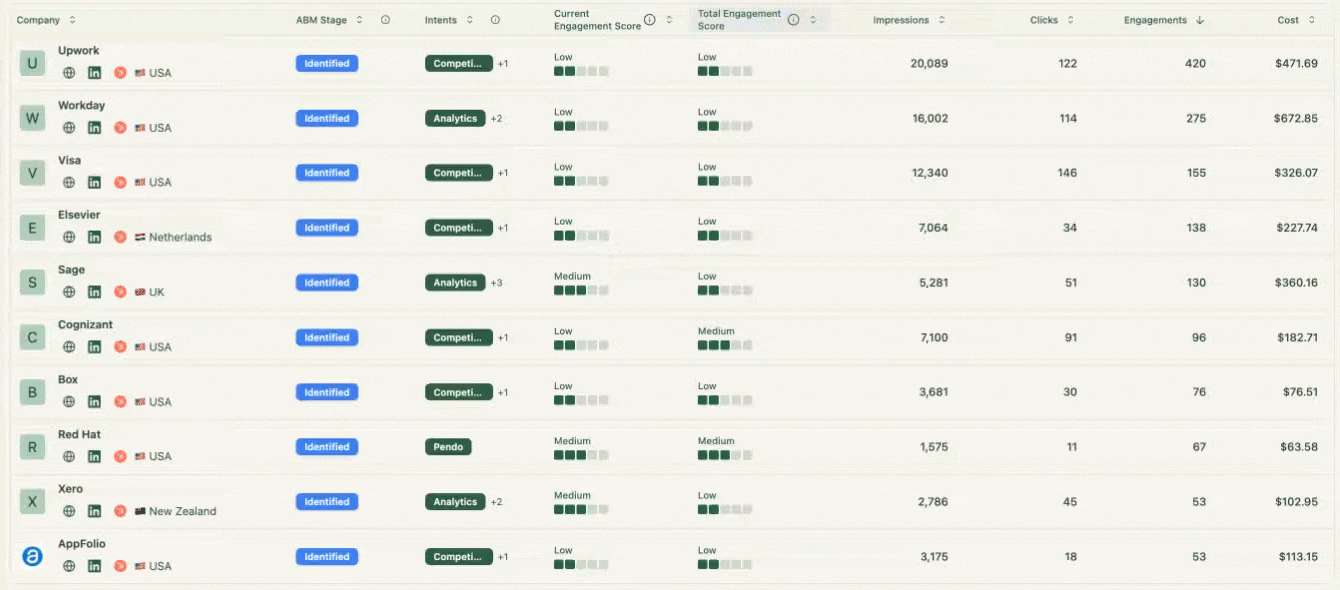
Here is the company table, with stage, intents, engagement score and impressions for each account:
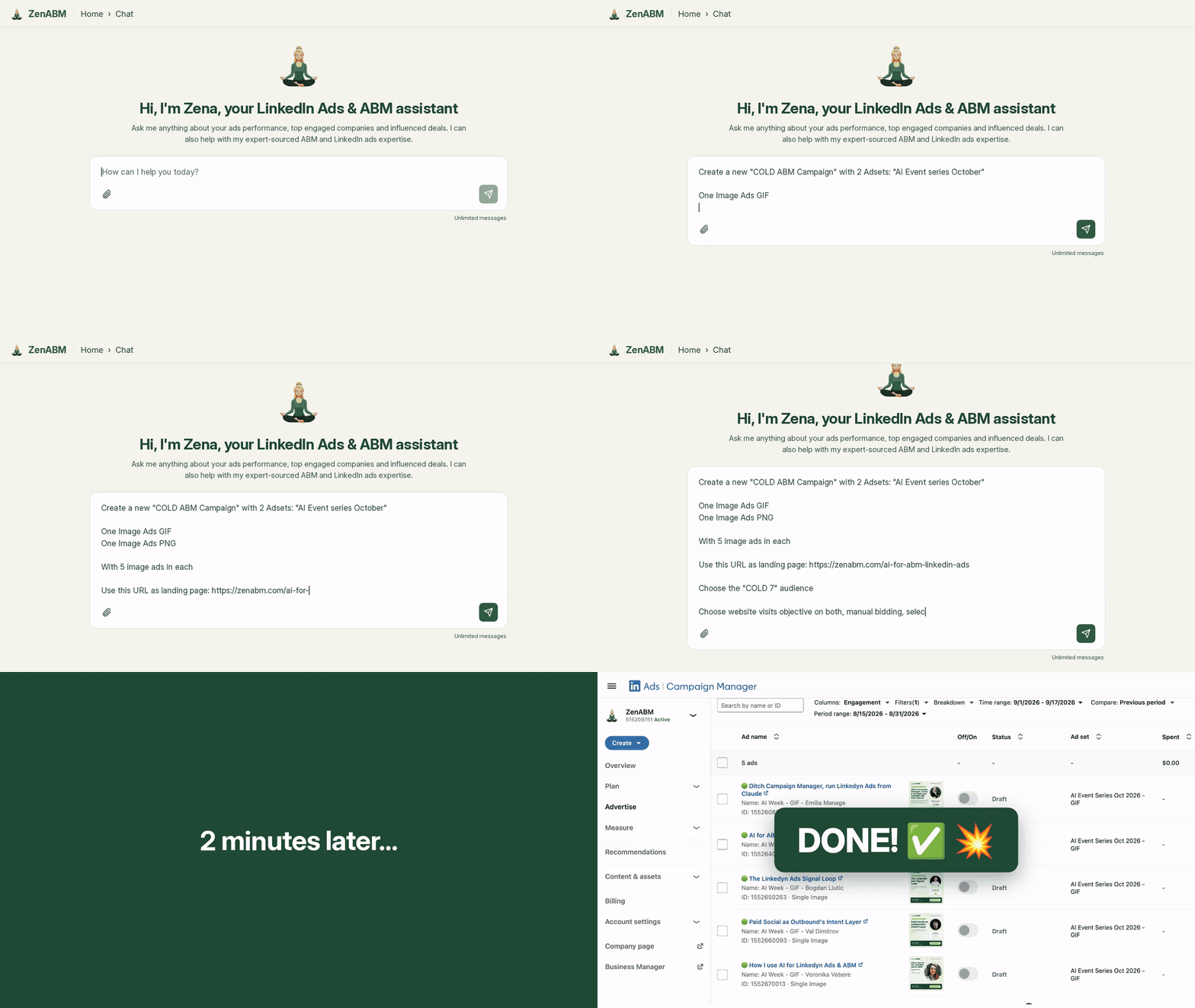
Here is Zena, the in-app assistant, with sample questions about LinkedIn ad performance:
ZenABM starts at $59 a month on annual billing, with a 37-day free trial.
Connect your LinkedIn Ads account and see which companies engage
Start a free 37-day trial and see company engagement from the ads you already run.

Pick the unit first, then the tool: if your ads mostly run on LinkedIn, accounts filtered by job title will tell you more per dollar than a list of names.
Influ2 is a person-based ABM platform. You upload a list of named contacts, and Influ2 runs ads to them across LinkedIn, Facebook, Instagram, Google, Bing and Amazon. It reports which person saw or clicked which ad, moves each contact to a rule-based next step and writes contact-level engagement to your CRM and sales tools.
Vendr shows an Influ2 median of $60,000 a year, with a range of $34,500 to $104,100, on a 12-month prepaid term, and there is no free trial. ZenABM starts at $59 a month on annual billing, with unlimited seats, no markup on ad spend and a 37-day free trial with no credit card.
Yes. Influ2 runs contact-level ads on LinkedIn, Facebook, Instagram, Google, Bing and Amazon for you, after you grant it access to your LinkedIn Page. It reports on the programmes it runs, so it doesn't show company engagement from campaigns you run yourself in Campaign Manager, which is where ZenABM works.
Not as a default. ABM is about whole accounts, and one person's action is one signal for the account score. In our accounts, contact-level targeting got very expensive and later-stage contact audiences were too small to run. For very small buying committees, person-level targeting may be the only way to reach them.
Yes. ZenABM can show which companies engage with your LinkedIn ads and push them to your CRM, while Influ2 serves person-level ads across other channels. Add the contact-level layer only after you have proven account-level engagement and can fund a five-figure annual contract, since the two tools measure different units.
Yes, both have one. Influ2's launched on 20 August 2026 and lets assistants like Claude query programmes and people, and build and launch programmes with preview and confirmation. ZenABM's works with Claude, ChatGPT and Cursor, reads and writes, and sits alongside the in-app agent Zena and 45 expert skills.
About the author

