Black Friday: up to 50% off ZenABM 💥Get up to 50% off ZenABM with our massive BlackFriday sale! 💥 - only 27-30 November!Get the deal12 Days of ABM Christmas · Report on your 2026 LinkedIn ABM & plan 2027 · Free webinars, 26 Nov – 9 DecSave your seat


Emilia Korczynska is Head of Marketing and co-founder at ZenABM. Before that she was VP of Marketing at Userpilot for nearly 7 years, where she ran a large ABM program primarily on LinkedIn ads.

The best LinkedIn ads optimization tools in 2027 are ZenABM, Linklo, Ads2Go, Factors.ai and Fibbler, and the right one depends on the lever you want pulled for you: bids, budgets, pacing, exclusions or account settings. We still waste too much time copying and pasting changes into Campaign Manager, so I care less about feature lists and more about what a tool actually changes in your account.
ZenABM handles bids, budgets, exclusions, settings and schedules, with an approval step. Linklo does hour-level scheduling and pacing for HubSpot teams. Ads2Go changes bids and budgets from your phone. Factors.ai controls impressions and builds account-segment audiences. Fibbler runs rule-based scheduling and company-level engagement reporting. I judged each on three things: which lever it pulls, whether it writes to your LinkedIn account or only reports, and whether you can check that a change really landed. Most "best tools" lists skip the second question, and it matters most.
We build ZenABM, so I rank it by the same tests as everyone else and give it the same honest cons. Read on for a shortlist by job, entry prices and a two-day test that shows whether a tool really changes your ad sets.
Here are the five levers side by side, with the tools that pull each one and the three tests to run:

Short on time? Here is how the five compare.
Tool | Lever it pulls | Writes to LinkedIn or reports only | Entry price | Fits |
|---|---|---|---|---|
ZenABM | Bids, budgets, exclusions, default settings, schedules, campaign building | Writes, after you confirm | $59/mo billed annually ($69 monthly), 37-day free trial | Bids, budgets, exclusions and settings in one place |
Linklo | Hour-level scheduling, pacing with auto-pause, Company Flows, A/B tests | Controls delivery of campaigns built in Campaign Manager | $99/mo for two users, 21-day free trial | Delivery control for HubSpot teams |
Ads2Go | Bids, budgets, pause and enable, ad edits, new campaigns | Writes from iOS and Android, after a confirm step | Free | Quick bid and budget changes from your phone |
Factors.ai | Impression capping, account-segment audiences | Caps delivery and syncs audiences | Not published | Impression control |
Fibbler | Rule-based schedules, impression caps, company-level engagement | Rule-based, not AI writes | $89/mo monthly ($80/mo billed yearly) | Rule-based scheduling and engagement reporting |
How I picked. I started from what Campaign Manager makes you do by hand and kept tools that take over at least one of those jobs. I checked vendor pricing and product pages, expert posts on LinkedIn, buyer questions from our sales calls and our own use. I left out Superads and AdCreative.ai because they cover creative analytics and generation, which deserve their own posts. Outbound tools such as Clay sit outside this category too, because they do outreach, not ad optimization.
It takes over a repeated manual job in your ad account, using the LinkedIn Ads API, and either changes the setting for you or tells you what to change. Which of the two it does is the first thing to find out.
At scale (dozens of ad sets) the manual version turns into a day of tab-switching 😅. These are the five levers a tool can pull, with the manual job behind each:
Lever | The manual job | What a tool can do |
|---|---|---|
Bids | Adjust ad set bids and check them against LinkedIn's suggested bid | Show actual versus suggested bid and change bids in bulk |
Budgets and pacing | Watch daily spend, notice ad sets that stopped spending | Change budgets in bulk, pause on pacing rules, alert you |
Exclusions and impression control | Keep bad-fit companies out and stop big accounts absorbing delivery | Apply exclusions across campaigns and cap impressions per company |
Account settings | Switch off Audience Expansion and the LinkedIn Audience Network on every new ad set | Enforce the settings on current and future ad sets |
Creative | Spot ads that stopped working | Flag decaying ads |
The read side of this job looks like the screenshot below, where an AI client pulls live ad performance through ZenABM's MCP server:
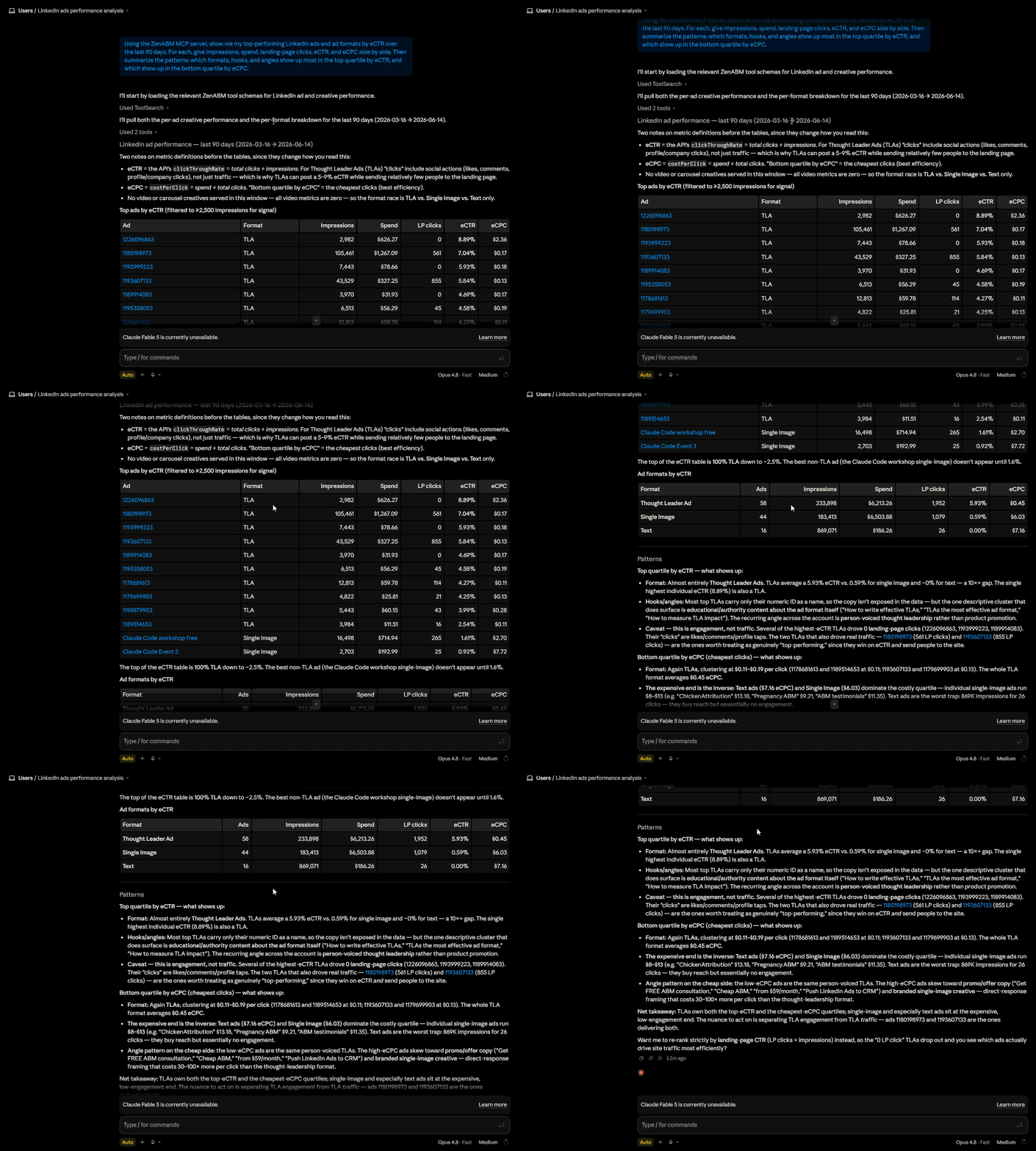
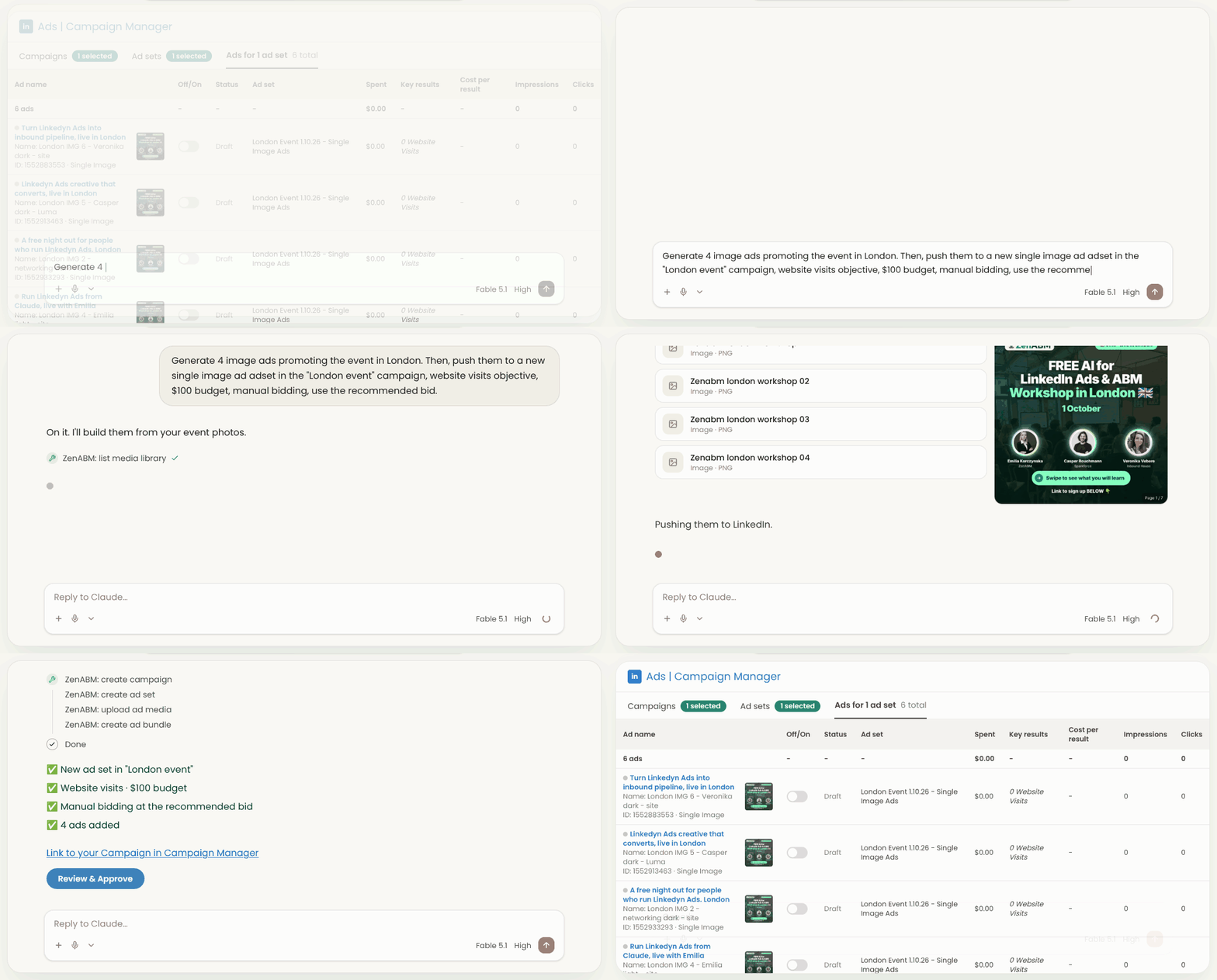
Tools also differ in how far they go. Linklo controls the delivery of campaigns you built in Campaign Manager, with hour-level scheduling, pacing with auto-pause and A/B tests, but builds nothing. Ads2Go puts the everyday jobs on your phone, from bid and budget changes to editing ads and launching new campaigns. ZenABM builds and edits campaigns from a chat, and its MCP server exposes 129 tools, 36 of which can change your ad account.
None of these is a display or programmatic platform, and none replaces your marketing automation. So the real question is which of them you can trust to touch your live spend.
Run three tests: does it write or only recommend, does it show every change with the current and proposed value before it applies, and can you confirm the change landed in each ad set.
I push back hard on automation without context, because recommendations go wrong when the tool does not know what changed in the account and why. Ivars Krutainis makes a related point in a post from 30 September 2026. In it he says: "Until there is any bit of human left in the loop there will be a need for common sense and someone that just says no, wait, stop, let's rework this." That is why I only trust tools that put an approval step before money moves. A freelance consultant told us he checked a bid tool thoroughly for two months before he trusted it, which is a sensible instinct.
Checking by hand is slow, because you open each ad set, read its bid and compare it with the suggested bid range, one tab at a time. ZenABM's Bidding agent checks every bid change against LinkedIn's suggested bid before you commit and changes budgets in bulk, so you skip the tab-by-tab work.
Here is the trial test I would run on any tool before paying:
Here are the four steps in order, with the pass condition:

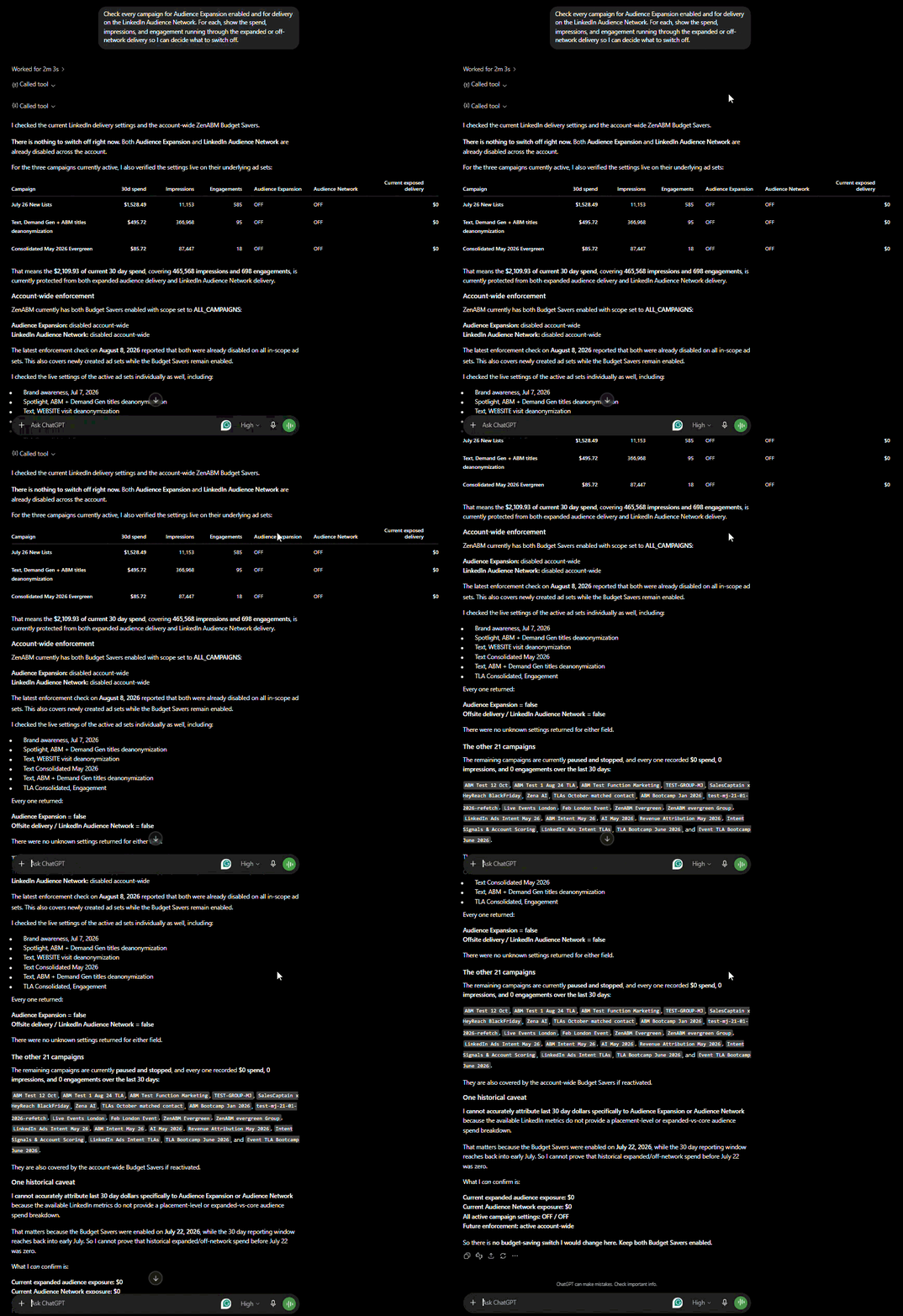
The same check works for account defaults. Here is ChatGPT checking campaign delivery settings, including Audience Expansion and Audience Network, through ZenABM:
Not every tool uses AI to write changes, and that is fine. Linklo and Fibbler lean on rule-based schedules, and a rule you set yourself is easy to audit, which is a safety feature in its own right.
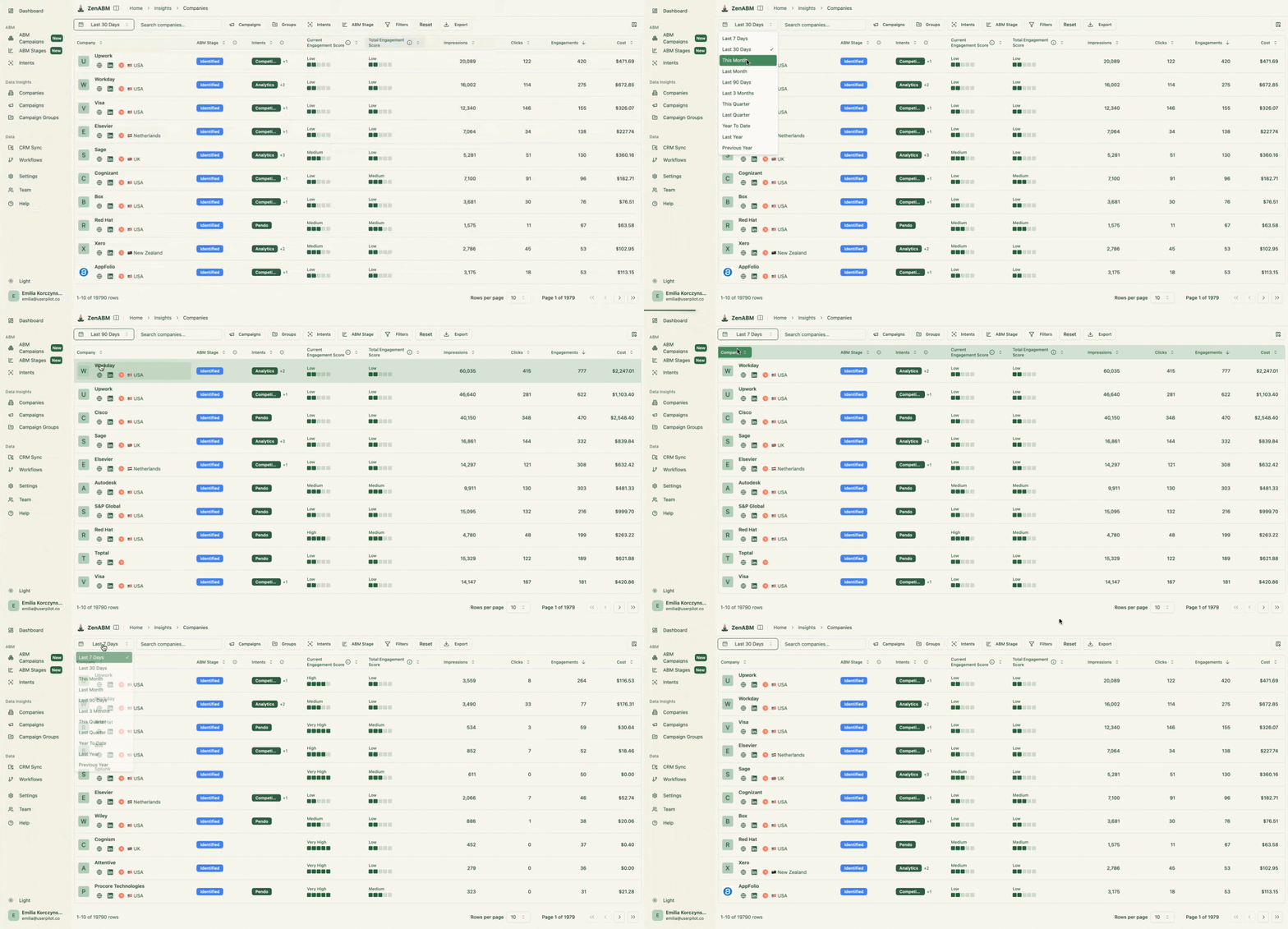
ZenABM covers the most account levers of the five tools here, and it also builds campaigns from a chat. I would pick it if LinkedIn is your main channel and you want every change to go through a confirm step. The Companies view below shows the accounts behind the numbers:
Starter is $59 a month billed annually ($69 billed monthly), Growth is $159 annually ($199 monthly), Pro is $399 annually ($499 monthly) and Agency is $479 annually ($599 monthly). Every plan has a 37-day free trial with no credit card, unlimited seats and no markup on ad spend.
A lean team or agency that runs most of its ad spend on LinkedIn and wants confirm-first changes without clicking through every ad set. Skip it if you need display and programmatic in the same tool.
Linklo controls how campaigns you already built in Campaign Manager deliver, with hour-level scheduling, pacing with auto-pause and A/B tests. It builds nothing. The matrix below shows what Linklo covers and what it leaves out:

Scheduling is a real gap for some teams, as this Reddit discussion about LinkedIn ad scheduling solutions shows:

Core is $99 a month for two users, with a 21-day free trial, no credit card and a monthly plan. Enterprise is custom-priced for more than two users, with invoice payment and annual deals.
A HubSpot team with campaigns already built that mainly needs pacing and dayparting. Skip it if you use another CRM, or if you want to build and edit campaigns from a chat.
See which companies engage with your LinkedIn ads
Connect your ad account and get company-level engagement, bid checks and exclusions in one place.

Ads2Go is a free mobile app for iPhone and Android. It shows spend, leads, cost per lead, CTR and daily trends per account, campaign, ad set and ad, and lets you pause, enable, edit and launch them, with a confirmation step before each change. Here is its goal and bidding sheet, with LinkedIn's recommended bid range next to your bid:

The app is free on iPhone and Android, and no paid plans are listed.
An account owner who wants to fix a pacing problem from a phone. Run the trial test from above first, and skip it if you manage many ad sets in bulk.
Factors.ai caps impressions per account and builds company audiences, which is the lever behind the "big companies eat the budget" problem. It is the tool we used at Userpilot for that job. Here is its impression capping configuration screen:

Here is the workflow that syncs account segments to LinkedIn audiences:

Ask Factors.ai for a quote before you plan around it.
A team with a large target list that sees the same few companies soaking up impressions. Skip it if you only need scheduling.
Fibbler follows rules you set rather than AI writes, and it reports company-level engagement. Its plans include campaign schedules and impression caps. Here is its company engagement table:

Here is Fibbler's analytics dashboard with campaign ROI metrics:

Growth is $89 a month billed monthly or $80 billed yearly, Unlimited is $129 or $100, and Agency is $159 or $130. Agency includes 2 LinkedIn ad accounts, then $69 a month each ($60 on annual billing).
A team that wants predictable rules and company reporting, not an agent. Skip it if you want Salesforce, MCP or several ad accounts on the entry plan.
Tool | Bids | Budgets and pacing | Exclusions and impression control | Account settings | Build campaigns | Needs your approval |
|---|---|---|---|---|---|---|
ZenABM | Yes, checked against suggested bid | Yes, bulk budgets and schedules | Yes, exclusions up to 200 per ad set; capping coming soon | Yes, Audience Expansion and Network off, re-checked hourly | Yes | Yes, confirm first |
Linklo | Not published | Yes, scheduling and auto-pause | Partial, excludes companies by rule | Does not enforce Audience Expansion | No | Rule-based |
Ads2Go | Yes | Yes, budget changes | Not published | Audience Network on or off | Yes, from a phone | Yes, confirm step |
Factors.ai | Not published | Not published | Yes, impression capping | Not published | No | Not published |
Fibbler | Not published | Rule-based schedules | Impression caps | Not published | Not published | Rule-based |
Tool | Starting price | Trial | Pricing model | Best team |
|---|---|---|---|---|
ZenABM | $59/mo billed annually, $69 monthly | 37 days, no card | Per workspace, unlimited seats | Lean teams and agencies |
Linklo | $99/mo for two users | 21 days, no card | Flat plan; Enterprise custom | HubSpot teams |
Ads2Go | Free | Not applicable | Free app | Account owners on the move |
Factors.ai | Not published | Not published | Not published | Large target lists |
Fibbler | $89/mo monthly, $80/mo billed yearly | 30 days, no card | Per plan, per ad account | Teams that want rule-based schedules |
A few traps to watch for:
Read related: AI Agents for LinkedIn Ads: Automating Campaign Ops
Yes, if your target list mixes big and small companies. Large companies win more auctions, so a few of them can absorb a disproportionate share of an ad set's budget without clicking, and Campaign Manager has no per-account cap to stop it.
So the fix is a ceiling plus exclusions: you choose how many impressions you will tolerate per company, find the accounts above it and exclude them.
Ceiling = the impressions cap you choose per company over 30 days
At Userpilot in 2025, capping by company size without splitting campaigns cut our CPMs, and we used Factors.ai's Social Pilot for it. Fibbler also offers impression caps. ZenABM's own per-account cap is coming soon. Today I use exclusions plus impression capping audiences. Each audience covers one company size and has its own threshold, for example 100+ impressions in the last 30 days and 100+ employees. They refresh daily and are excluded from ad sets.
Doing this by hand means exporting company impressions and maintaining exclusion lists in Campaign Manager. ZenABM shows which accounts soak up impressions without clicking, and you can exclude them in a click. Its engagement score is calculated from clicks (counted twice) and engagements, divided by impressions, on a 1 to 5 scale, so many impressions with a bottom-of-scale score marks a budget hog. Exclusions sync to LinkedIn daily, up to 200 per ad set.
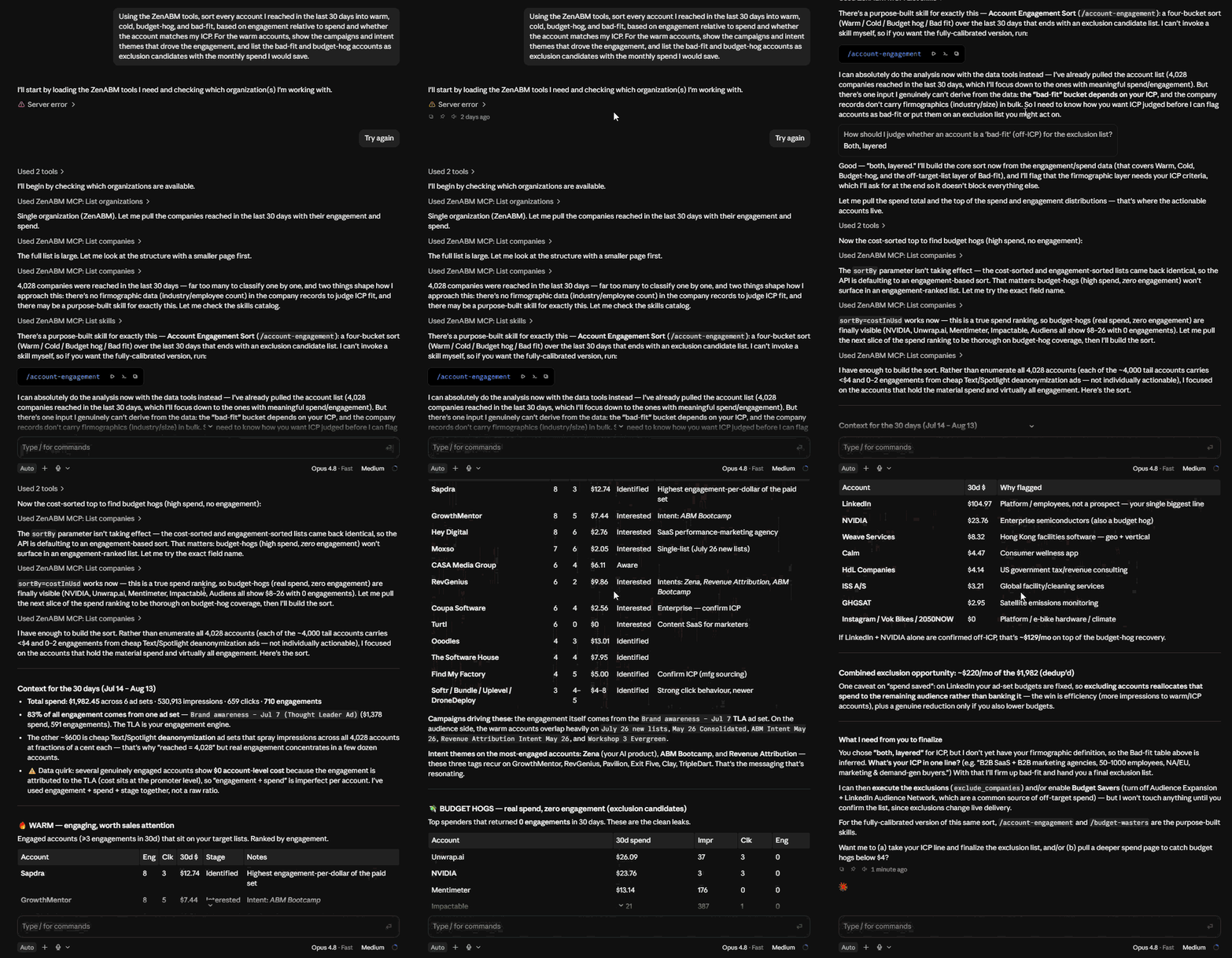
Here are ZenABM's MCP tools sorting accounts by engagement:
Pick by the lever you need, then run the trial test.
Here are the picks by situation:

Situation | Pick | Why |
|---|---|---|
Lean team that mostly needs pacing | Linklo or Fibbler | Hour-level scheduling and rules are easy to audit; Linklo suits HubSpot teams, Fibbler adds company reporting |
Bids, budgets, exclusions and settings in one place | ZenABM | It changes them after you confirm, and builds campaigns too |
Impression control on a big target list | Factors.ai | Capping by company size is what it did for us at Userpilot |
Quick edits on the go | Ads2Go | Free app for bid and budget changes from a phone |
Agency with many clients | ZenABM | Its Agency MCP server reaches every client workspace from one connection, so reporting doesn't mean one login per client |
No target accounts, budget or owner yet | None of them | A tool amplifies a plan, and it cannot replace one |
Change bids, budgets and exclusions with a confirm step
Start a 37-day free trial of ZenABM and run the two-day test on your own ad sets.

Pick the tool for the lever you need, not the longest feature list. Then open the ad set and check that the change landed.
They are tools that sit on top of Campaign Manager and take over repeated jobs such as changing bids and budgets, controlling pacing, applying exclusions and keeping default settings off. Some only recommend changes, while others write them to your account. Ask which kind you are buying before you pay.
Entry prices run from free to about $100 a month. Ads2Go is free, ZenABM starts at $59 a month billed annually, Fibbler at $80 billed yearly ($89 monthly) and Linklo at $99 a month for two users. Every price sits on top of your LinkedIn budget.
You can run LinkedIn ads in Campaign Manager alone. A tool becomes worth it when the manual work grows, for example bulk bid changes, hour-level scheduling or exclusions across many campaigns. If your account is small and stable, I would start with the manual route.
Only with an approval step. Look for a tool that shows the current and proposed value before it writes, and check afterwards that each ad set landed. In ZenABM, the Bidding agent shows the suggested bid, the target and the current bid, and writes only after you confirm.
Factors.ai caps impressions by company size, and we used its Social Pilot at Userpilot in 2025. Fibbler also offers impression caps. ZenABM excludes the accounts that soak up impressions without clicking, and its per-account cap is coming soon.
Yes, if you connect an MCP server. Ivars Krutainis built a Claude pacing tracker that flags campaigns under 90% of daily budget each morning. ZenABM's MCP server exposes 129 tools, and 36 can change your ad account. Each change is flagged so the client asks before acting. You need the Growth plan or above.
About the author

