Black Friday: up to 50% off ZenABM 💥Get up to 50% off ZenABM with our massive BlackFriday sale! 💥 - only 24-30 November!Get the deal12 Days of ABM Christmas · Report on your 2026 LinkedIn ABM & plan 2027 · Free webinars, 26 Nov – 9 DecSave your seat


Emilia Korczynska is Head of Marketing and co-founder at ZenABM. Before that she was VP of Marketing at Userpilot for nearly 7 years, where she ran a large ABM program primarily on LinkedIn ads.

LinkedIn now has its own MCP server for ads, but it is an early beta that needs an approved LinkedIn developer app, so for most marketers a LinkedIn MCP still means a third-party server. The one you pick decides what Claude can read, what it can change and how much risk your LinkedIn account takes on. LinkedIn's other first-party options are narrow: a read-only LinkedIn Ads app inside ChatGPT, and the Hiring Pro connector in Claude, which posts one free job.
I connect HubSpot, Google Ads, LinkedIn Ads data, GA4 and Search Console to Claude myself, and my rule is simple: I approve anything that moves money before an agent applies it. For ads and ABM I use ZenABM's MCP server, which we built, so I flag my bias wherever it matters.
Here is how the options compare:
Tool or option | Built for | What it reaches | Write access | Connection method | Entry price | G2 rating |
|---|---|---|---|---|---|---|
ZenABM | LinkedIn ads and ABM | Ads, company engagement, ABM stages, CRM deals | Yes, changes confirmed first | LinkedIn's official API through ZenABM | MCP from $159/month, billed annually | 5.0/5 from 6 reviews |
Kiin Intelligence | Reporting speed | Ad performance, demographic waste, ad fatigue, company engagement, influenced pipeline | Sources differ: read-only on its sign-up page, preview then confirm on its MCP page | LinkedIn's API (Kiin says it has privileged access) | Free on 1 account; from $99/account/month | No G2 rating found |
LinkedIn's own options | Approved developers, reporting in ChatGPT, a job post | Ads through the MCP beta; ad set performance in ChatGPT; jobs | MCP beta: campaign actions for approved apps; ChatGPT app: read-only; Hiring Pro: posts one job | LinkedIn's own | Not published | Not applicable |
Hosted posting vendors (Taplio) | Publishing content | Posts | Yes, for publishing | Your Taplio account (ask how it reaches LinkedIn) | 50 free MCP calls, then a Taplio plan from $39/month | No G2 rating found |
Scraping platforms and self-hosted servers (Apify) | Prospect data, with account risk | Sales Navigator data and profiles | Varies | Scraping or session access | Apify scrapers: about $1.50 to $50 per 1,000 results; $5 free credit a month | No G2 rating found |
Aggregators (Composio) | Simple automations | Selected LinkedIn actions | Varies by action | Aggregator | Composio: free up to 10,000 calls a month | No G2 rating found |
ZenABM is my own product, so weigh that. I judged every other option on the job it is built for, using vendor docs, pricing pages, GitHub repos and expert posts, not a hands-on test of each server. I would not connect a scraper to a LinkedIn account I care about.
This puts the six options next to each other by job, write access and the risk of each connection method:

Manage LinkedIn ads from Claude with ZenABM
Connect ZenABM's MCP server to Claude or ChatGPT to read company engagement and act on your LinkedIn campaigns from the chat.

Start with the connection. It limits what the server can reach and sets the risk you take on. Justin Rowe defines an MCP server as "a standard way to plug a tool into Claude or ChatGPT so the model can reach in and pull your real numbers instead of guessing from whatever it was trained on." What he leaves open is how that plug reaches LinkedIn, and that is where the five types differ:
Type | What it can reach | Write access | Account risk | Example |
|---|---|---|---|---|
Official API server | Data and actions allowed by the application's LinkedIn permissions (Marketing API or Community Management API) | Depends on permissions | Safe, but limited to what LinkedIn exposes | A Marketing API application |
Browser or cookie scraper | Whatever a signed-in browser session can see | Depends on the server | Violates LinkedIn's terms and carries a real ban risk | A self-hosted session-based server |
Scraping platform | Data collected by a managed scraping service | Depends on the service | In between: it handles blocks and proxies, but the data is still scraped | Apify |
Aggregator | Selected actions across connected apps | Depends on the action | Depends on the specific LinkedIn integration | Composio |
Hosted vendor server | The data and actions the vendor exposes | Depends on the product | Check whether the vendor uses an API or session access | ZenABM or a posting service |
"Hosted" alone tells you nothing about approval. A hosted product can sit on an official API, while another can manage a scraping session for you, so ask which one it is.
Here are the five connection types as lanes from your AI client to LinkedIn, each with its risk and reach:

With an official API, the application can only use the data and permissions it was granted. Manuel Kekeisen says that MCP tools connect to officially supported LinkedIn APIs and documentation, which helps reduce AI hallucinations. He adds that campaign data is protected through OAuth, user consent and API permissions. That gives you a clear access path, although you still have to check what the AI tells you.
A session-based scraper works differently. It uses your signed-in session, which can reach things an official API does not, and the catch is a terms violation or a restricted account.
A scraping platform manages the collection for you, but that does not change how the data was obtained. An aggregator exposes selected actions across many tools, so for either one I would ask for the exact action I need rather than assume the LinkedIn integration covers an ad account.
The second question is what happens when the AI wants to act. Kirill Vdov warns that giving AI direct write access to your campaigns can get you banned from the platform and lose years of data. His examples: an AI that deletes every campaign to build one mega campaign, or puts 6700% more budget in after one good morning. I agree with the caution. I approve money-moving changes before they happen and set alerts for problems such as an ad set that stops spending.
So which option can read an ad account and propose changes for your approval?
ZenABM is the option I would pick when you want to ask questions about LinkedIn ads and company engagement, then make the change in the same conversation. We built it for LinkedIn ABM, and its MCP server exposes both the account data and the campaign actions, with a confirmation before anything touches the account.
Here is Claude building four LinkedIn image ads through the ZenABM MCP and pushing them to a new ad set in Campaign Manager:
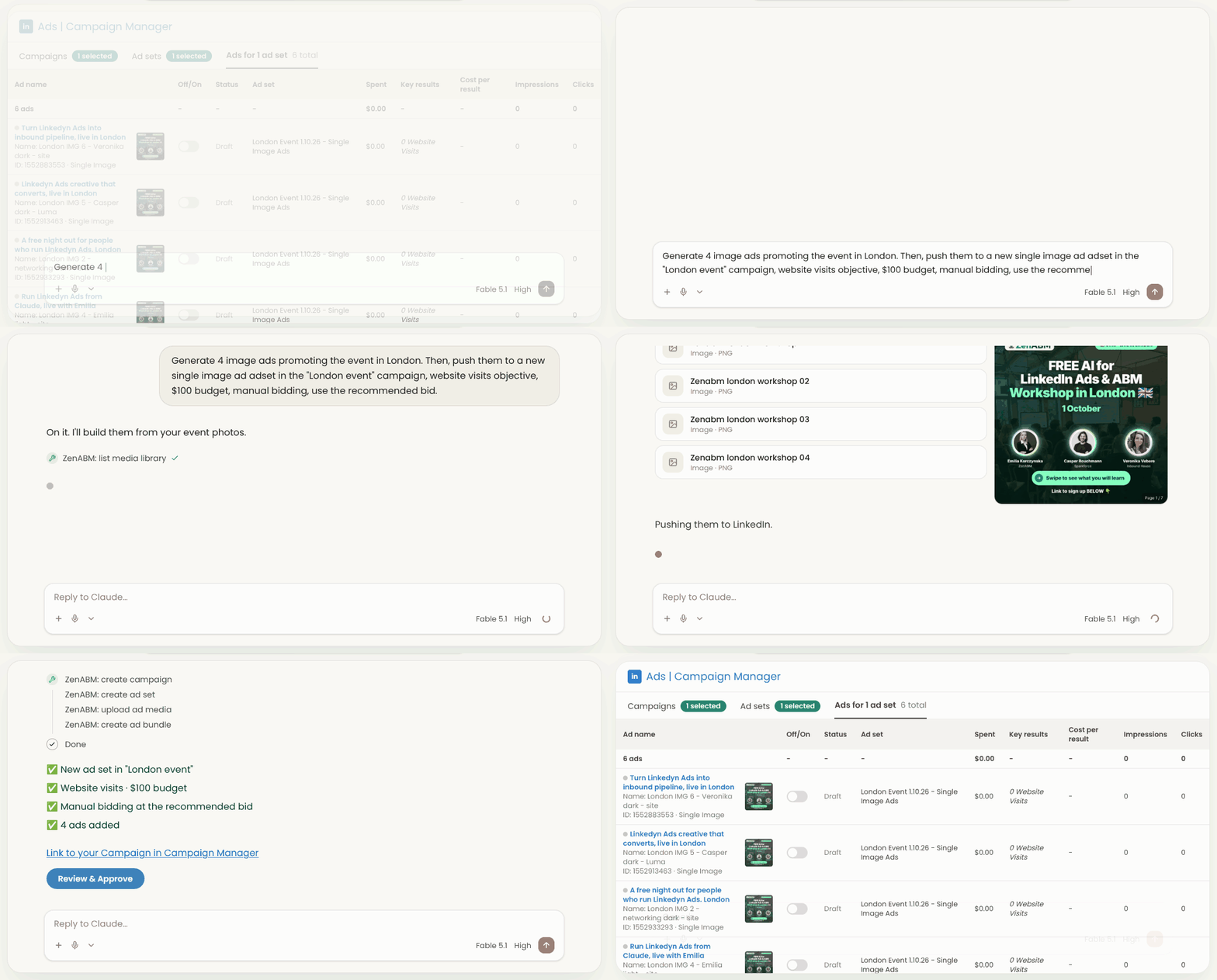
Without an MCP server, analyzing ad data in an AI tool means exporting reports and pasting them into the chat by hand. ZenABM's MCP server connects your LinkedIn ads to Claude, ChatGPT or Cursor. It writes as well as reads, so you can create and manage campaigns, ad sets and ads from Claude without opening Campaign Manager.
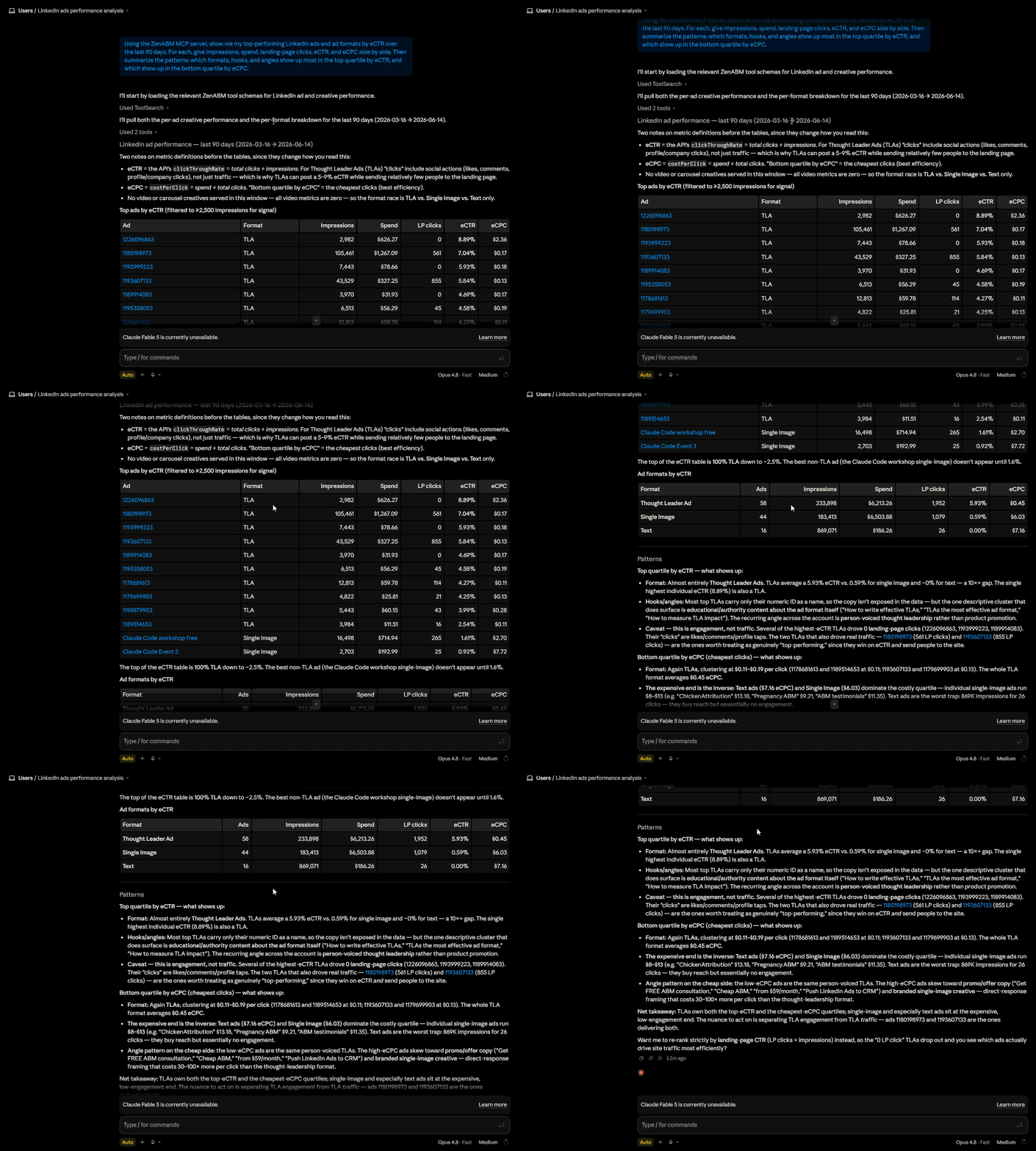
Asking Claude for ad performance through the connection looks like this:
The Starter plan is $59/month billed annually ($69 billed monthly), but the MCP server and REST API start on the Growth plan. The Growth plan is $159/month billed annually ($199 billed monthly), and the Agency plan is $479/month billed annually ($599 billed monthly). All plans have unlimited seats, there are no per-feature add-ons, and ZenABM never takes a cut of your ad spend. A 37-day free trial needs no credit card.
Choose it when LinkedIn ads are a real part of your ABM program and you want to act on what the data shows, not only read a report. Skip it if you only need to publish organic posts or collect Sales Navigator profiles, because other tools in this list are built for those jobs.
Manage LinkedIn ads with ZenABM and Claude
See how the MCP reads your account and proposes campaign changes for your approval.
Kiin Intelligence is the reporting-first option, built for teams that lose too many hours preparing client reports. Philip Ilic built it around LinkedIn ads data, and it turns weekly reporting into one-click reports.
Kiin runs specialist reports on a LinkedIn Ads account, including demographic waste, ad fatigue, company engagement, and influenced pipeline and revenue. Its sign-up page says each one benchmarks your numbers against 1,000+ LinkedIn Ads accounts and $40M+ of annual ad spend. An agency that wants recurring answers without assembling each report by hand is the obvious fit.
Here is Kiin's Thought Leader Ads report inside Claude, with each campaign's landing page CTR and engagement rate next to the benchmarks:

The numbers behind it come from Philip Ilic's own post. Before the connector, 2 team members at his agency spent 4 hours every Friday on weekly client reports, and now they ask for the data and get it in about 30 seconds. When Kiin launched publicly, it hit its 200-account limit straight away.
Tim Davidson uses Kiin for a job title demographic report: job titles by campaign with impressions, clicks, share of spend and estimated spend over the last 7 days, so he can spot the titles to exclude in Campaign Manager.
Kiin is free on one LinkedIn Ads account. Its sign-up page lists Kiin Intelligence from $99 per connected account a month, and an Agency plan at $249 a month for three accounts plus $59 for each extra one, with a 14-day free trial and no card. Its MCP page still names an Analyst tier at $65 per account, so confirm the price when you sign up.
Choose Kiin when the bottleneck is getting recurring reports out to clients and you already know which reports you need. Skip it if you need organic posting, because Kiin is built for LinkedIn Ads only.
LinkedIn now ships three first-party options, and none of them is a general server most advertisers can switch on today. Its MCP server for ads is an early beta for approved developers, its LinkedIn Ads app inside ChatGPT is read-only, and Hiring Pro in Claude posts one free job.
Manuel Kekeisen, who leads independent agency partnerships for DACH at LinkedIn, announced the LinkedIn MCP Server beta. It connects AI agents to LinkedIn's official Marketing APIs for campaigns, reporting and audience insights, and it needs an approved LinkedIn developer application for Advertising, Matched Audiences, Audience Insights, Conversions or Company Intelligence. LinkedIn has not published public docs for it yet, so treat it as an option for teams that already have developer approval.
Inside ChatGPT, the LinkedIn Ads app is in beta and gives read-only access to ad set performance, so you can ask about results but not change anything. In Claude, the LinkedIn Hiring Pro connector lets eligible members draft and post one free job, and nothing is posted until you agree.
Here is what each of LinkedIn's own options does and who can use it:
Option | Where it runs | What it does | Who can use it |
|---|---|---|---|
LinkedIn MCP Server (beta) | MCP clients, with an approved app | Campaigns, reporting and audiences through the Marketing APIs | Teams with an approved LinkedIn developer application |
LinkedIn Ads app | ChatGPT | Read-only ad set performance | ChatGPT users, depending on plan and workspace settings |
LinkedIn Hiring Pro | Claude | Drafts and posts one free job | Eligible LinkedIn members |
If you do not have developer approval, judge any third-party server by its permissions and the actions it supports.
LinkedIn publishes no price for its MCP beta. The LinkedIn Ads app comes with ChatGPT, where availability depends on your plan and workspace settings. The Hiring Pro connector posts one free job; promoting it or managing applicants stays in LinkedIn itself.
Choose the MCP beta if you already have an approved LinkedIn developer app and an engineer to work with it, the ChatGPT app if read-only ad set reporting inside ChatGPT is enough, and Hiring Pro if you only want to post a job. Skip them if you need account-level ABM work, or changes from a tool you can switch on today.
Hosted posting vendors such as Taplio are what I would look at first if the job is publishing posts from Claude. They are built for content teams and founders who want to schedule and publish posts, not for ad account work.
Taplio's MCP runs on your own Taplio account: you sign in to Taplio, not to LinkedIn, and Claude can draft, schedule and pull analytics through it. Nothing reaches LinkedIn until you give Claude permission to schedule or publish. Taplio's pricing page does not say how it reaches LinkedIn, so ask any posting vendor whether it uses LinkedIn's API or a managed session.
Open-source servers show the other path. The stickerdaniel server logs in through a saved browser session and exposes tools such as get_person_profile, search_companies and get_inbox. That is the approach that carries the ban risk, which is why the hosted route is the safer one for posting.
Option | Free allowance or price | Connection | What to check |
|---|---|---|---|
Taplio | 50 free MCP calls, then any Taplio plan (from $39/month, 7-day free trial) | Your Taplio account | Which publishing actions your plan includes, and how it connects |
Open-source session-based server (stickerdaniel) | Free | Needs a saved browser login session | Whether the access method breaks LinkedIn's terms |
For posting, ask the vendor to show how a draft becomes a published post and what approval it needs. Publishing a post and changing an ad budget are different jobs, so use the confirmation checks from the ZenABM section for anything that touches money.
Taplio gives you 50 free MCP calls to start, then the MCP works on any Taplio plan. Plans start at $39 a month with a 7-day free trial. Ask any other posting vendor for its free allowance and price before you compare.
Choose one if you are a content team or founder who wants to publish and schedule posts from Claude. Skip it for ads, ABM or prospect data, because none of that sits in its job.
Sales Navigator has no public API, so every Sales Navigator MCP server relies on Playwright browser automation or internal APIs. That means the data is scraped, it may violate LinkedIn's terms and it carries a ban risk. I treat this as the option to approach with the most caution.
The options differ in who deals with the blocking. A scraping platform such as Apify handles the blocks and proxies for you, but you pay per record and the data is still scraped. A self-hosted open-source server is free but setup-heavy, and it needs your session cookie or a LinkedIn developer app.
Option | How it gets data | What to check | Price |
|---|---|---|---|
Apify Sales Navigator scraper | Managed scraping | Some actors require a Sales Navigator subscription, and scraped access may break LinkedIn's terms | About $1.50 to $50 per 1,000 results, depending on the actor; $5 free platform credit a month |
Self-hosted session-based server | A session or other access you configure | Account access and maintenance are on you | Free |
A managed platform may take care of technical blocks, but I would not read that as protection against LinkedIn restricting your account. Some Apify actors also ask for your li_at session cookie, which ties the scraping to your own account. I would not connect a scraper to an account I care about, because the data is tempting and losing the account over it is a bad trade.
Platform pricing is per record, on top of any Sales Navigator subscription you need. Apify's Sales Navigator scrapers range from about $1.50 to $50 per 1,000 results depending on the actor, and Apify's free plan includes $5 of credit a month. Self-hosted servers cost nothing to license, but they cost your setup time.
For 2,000 results that is $3 on a $1.50 actor and $100 on a $50 one, before the $5 monthly credit, and some actors also need a Sales Navigator subscription.
Choose one only if you need Sales Navigator-style prospect data and accept the terms risk, ideally on an account you can afford to lose. Skip it if the LinkedIn account matters to your business, and use a source that works through an official API instead.
Aggregators such as Zapier and Composio connect many tools to Claude, which makes them a fit for a simple trigger like logging a new lead to a sheet. Their LinkedIn depth is shallow, so I would check each available action before relying on one for ad account work.
Composio's LinkedIn toolkit exposes selected actions, including ad lookups such as targeting facets and audience counts. An audience count answers whether a targeting idea has an audience to reach. It does not tell you which target companies engaged with your ads or what happened before a deal opened, and that is the account-level work an ads MCP does.
Option | Relevant detail | Fit |
|---|---|---|
Composio | Selected LinkedIn actions, including ad targeting facets and audience counts | A defined action that its tool list supports |
Zapier and similar aggregators | LinkedIn Ads actions such as Add Company to Audience, and lead gen form triggers | A simple workflow, after you confirm the current LinkedIn integration supports it |
Zapier's own LinkedIn Ads pages list actions such as Add Company to Audience and triggers for new lead gen form responses. Check its connector list for the exact action you need before you build on it.
Composio is free up to 10,000 tool calls a month for up to 3 members. Check Zapier's current plans for the actions you need.
Choose one for a simple, defined action that its tool list supports, such as passing a lead to a sheet. Skip it if you need campaign management, company engagement or Sales Navigator data.
The summary table gave you the entry points. This one checks whether an option can answer your actual question, before you compare prices. "Not established" means the sources do not show that action.
Option | Ad accounts | Company engagement | Profiles | Posting | Sales Navigator |
|---|---|---|---|---|---|
ZenABM | Yes | Yes | CRM contacts, with HubSpot | No | No |
Kiin Intelligence | Yes (whether it can write: sources differ) | Yes | Not established | No | No |
LinkedIn's own options | MCP beta, and the read-only ChatGPT app | Not established | No | One job post (Hiring Pro) | No |
Hosted posting vendors (Taplio) | No | Not established | Not established | Yes | Not established |
Scraping platforms and self-hosted servers | Varies | Not established | Partial, depending on the server | Varies | Partial, through scraping or session access |
Aggregators (Composio) | Partial, selected actions and lookups | Not established | Varies | Varies | Check the current integration |
The second table covers price and who each option suits:
Option | Pricing model | Connection | Write access | Team fit |
|---|---|---|---|---|
ZenABM | MCP from $159/month billed annually ($199 billed monthly) | Hosted, on LinkedIn's official API | Yes, with confirmation | LinkedIn ABM teams and agencies |
Kiin Intelligence | Free on 1 account; from $99/account/month | LinkedIn's API | Sources differ (read-only per its sign-up page) | Reporting teams and agencies |
LinkedIn's own options | Not published | LinkedIn's own | MCP beta: campaign actions; ChatGPT app: read-only; Hiring Pro: one job post | Teams with an approved developer app; ChatGPT users; hiring teams |
Hosted posting vendors (Taplio) | 50 free MCP calls, then from $39/month | Official API or managed session | Publishing | Content teams |
Scraping platforms and self-hosted servers | Apify: about $1.50 to $50 per 1,000 results; other costs vary | Scraping or session access | Varies | Teams that accept the account risk |
Aggregators (Composio) | Composio: free up to 10,000 calls a month | Aggregator | Varies by action | Teams with one supported workflow |
Price is only part of the cost. These are the hidden ones I would plan for:
Read related: 37 LinkedIn Ads automation workflows you can build with Claude
Pick the server for the job you need done, then test it on read-only questions before you let it change anything. This is how I would match them:
Your situation | My pick | Why |
|---|---|---|
You run LinkedIn ads and ABM and want the AI to make changes | ZenABM | It reads company engagement and campaign data, and every money-moving change is confirmed first. |
You spend Fridays on client reports | Kiin Intelligence | Its one-click reports replaced 2 people times 4 hours of Friday reporting at Philip Ilic's agency. |
You want to publish posts from Claude | A hosted posting vendor such as Taplio | It is built for drafting and scheduling posts, though you should still ask how it connects. |
You have an approved LinkedIn developer app | LinkedIn's MCP beta | It is LinkedIn's own server, though still an early beta gated by developer approval. |
You need Sales Navigator data | A scraping platform, only if you accept the risk | There is no public Sales Navigator API, so every option scrapes. |
You need a simple trigger across tools | An aggregator such as Composio | It fits one defined action and is shallow for ad account work. |
You cannot yet name the job | None yet | You have no way to judge the answers. |
On the last row, Justin Rowe suggests writing your test list first. I like it as an acceptance test because it lets you judge the answer, not just the connection.
This matches each situation to a pick:

Write down the three questions you ask your dashboard every Monday before you connect anything.
For example: which ad sets are underspending, which target companies engaged, and which ads send visitors to the landing page. Compare the AI's answers with the reports you already trust before allowing changes. Gonçalo Prates makes the same point. Even with MCPs connected to your ad channels, you still need to ask good questions and judge whether the output is valid. Context helps too: context engineering for LinkedIn ABM covers how to give the AI the right background.
ZenABM takes you from a question about LinkedIn ads to a reviewed action. What I care about most is that you can start from an outcome, not guess which data to pull.
The persona audit skill checks whether your spend reaches the job titles you target. Here it is running in Claude Code:
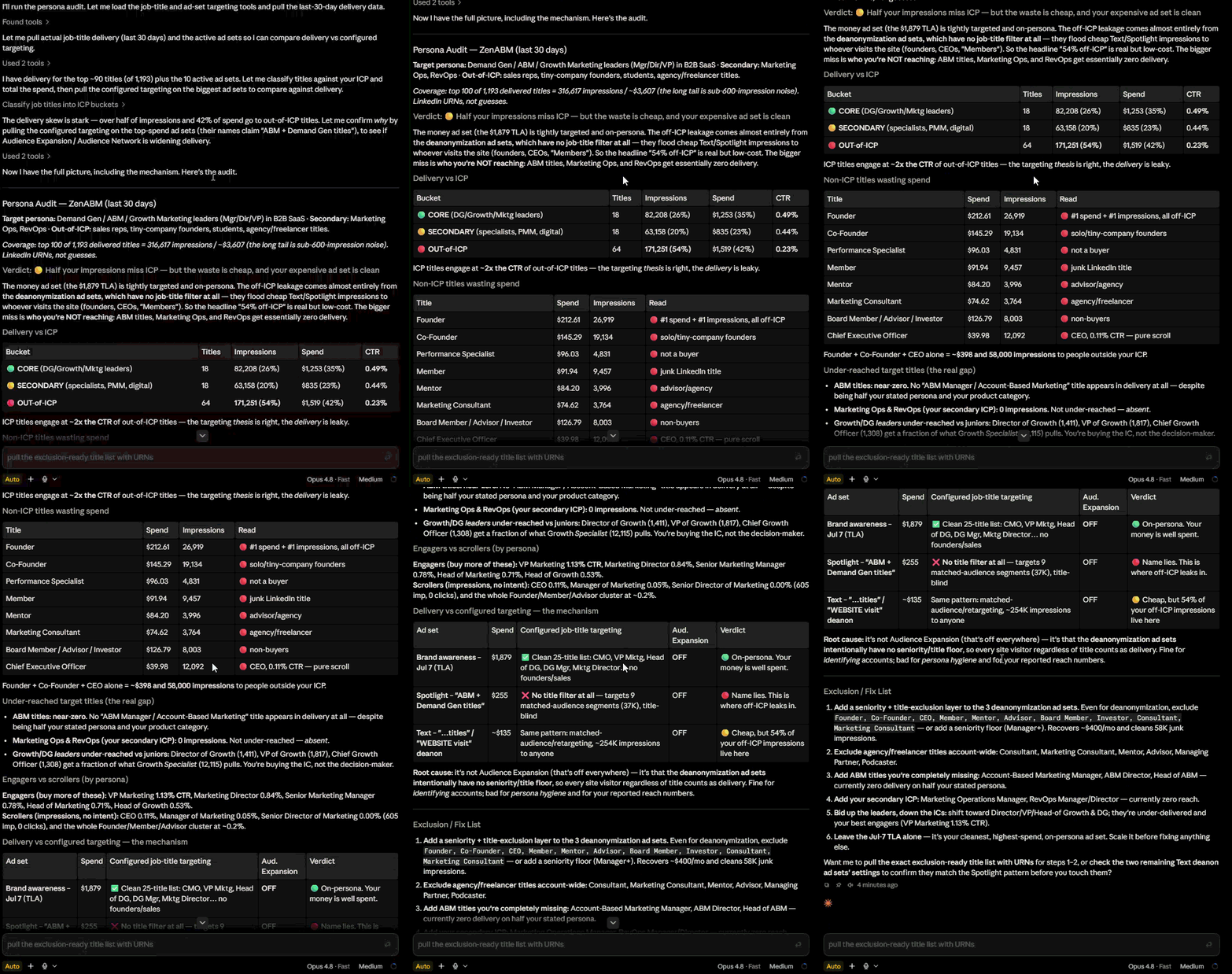
If you want a smaller starting point, the free LinkedIn ABM skills for Claude give you a strategy, campaign execution, an audit and a monthly report as four free open-source skills. Connecting ZenABM is optional, and without it they use built-in benchmarks.
Analyze and manage LinkedIn ads with ZenABM
Connect your account and try the MCP server and skills on your own data.

Pick the server for the job you need done, not the longest tool list. Otherwise you pay for the whole gym and use the treadmill.
Yes, but only as an early beta. LinkedIn's MCP Server beta connects AI agents to its official Marketing APIs and needs an approved LinkedIn developer application, and LinkedIn has not published public docs for it yet. LinkedIn also has a read-only LinkedIn Ads app in ChatGPT and the Hiring Pro connector in Claude, which posts one free job. For most advertisers today, a LinkedIn MCP still means a third-party server.
LinkedIn has not published a URL for its MCP beta, and its ChatGPT and Claude apps are added from those tools' own app directories. For third-party servers the URL is the vendor's endpoint: ZenABM's is https://app.zenabm.com/api/mcp, which you add to Claude, ChatGPT or Cursor. Check the vendor's setup steps and requested permissions before you paste an unfamiliar endpoint into an AI assistant.
Yes, several. Open-source servers on GitHub are free, but they need your session cookie or a LinkedIn developer app and carry ban risk. Taplio gives you 50 free MCP calls and Composio is free up to 10,000 calls a month. ZenABM's four Claude skills are free and open-source, while its MCP server comes with the Growth plan. Free access does not remove setup work, so check how a server connects.
It depends on how the server connects. An application that uses an approved API within its granted permissions is on a different footing from software scraping through a browser session or internal APIs. The latter may violate LinkedIn's terms and put your account at risk. Kirill Vdov warns that direct AI write access can get you banned and lose years of data, so ask the vendor how it connects first.
Some can. ZenABM's MCP can create, edit, duplicate and pause campaigns, ad sets and ads, change bids and budgets, and manage exclusions and audiences. The 36 tools that change the account are flagged, so your AI client asks you to confirm first. Other servers focus on reports or offer only selected actions, so ask to see the exact change you need and how approval works.
No. The four free open-source Claude skills work with their built-in benchmarks, without a ZenABM connection. Connecting ZenABM is optional and lets them use your real LinkedIn ads data. If your goal is to manage campaigns through the MCP, that access starts on the Growth plan.
About the author

