Black Friday: up to 50% off ZenABM 💥Get up to 50% off ZenABM with our massive BlackFriday sale! 💥 - only 24-30 November!Get the deal12 Days of ABM Christmas · Report on your 2026 LinkedIn ABM & plan 2027 · Free webinars, 26 Nov – 9 DecSave your seat


Emilia Korczynska is Head of Marketing and co-founder at ZenABM. Before that she was VP of Marketing at Userpilot for nearly 7 years, where she ran a large ABM program primarily on LinkedIn ads.

Which LinkedIn audience builder you need depends on the job. Clay, Prospeo, Ocean.io, LeadMagic, Icypeas and Apollo build new cold lists, while ZenABM Audiences and HubSpot keep warm audiences in sync from ad engagement and CRM events.
Before you buy any of them, check what actually reached Campaign Manager. LinkedIn showed me over 90% match for a HubSpot audience, yet only a third to 43% of the companies I intended were really in it.
We build ZenABM, so I have a stake in the warm side of this comparison, and I flag where that shapes my ranking.
How I ranked them. ZenABM is my own product, so weigh that: it is the tool I use for warm audiences that update daily. The cold list tools follow in the order of one workflow (seed, expand, enrich), and HubSpot comes last because it only makes sense if your CRM segments already live there.
Start from the job you need done, because buying the wrong type of tool is the mistake I see most often. Here is how I would choose:
This table shows which tool I would start with for each job, and what you can try for free:
Tool | Type | Free entry point | Sync to LinkedIn | Main job |
|---|---|---|---|---|
ZenABM | Warm audience sync | 37 day trial, then a free plan | Audiences refresh daily | Warm retargeting and exclusions |
Clay | Cold list building and enrichment | 100 data credits a month | Ads integration re-syncs every 3 days (Growth plan) | Company list enrichment |
Prospeo | Lookalike list building | 100 credits a month | Upload the exported list yourself | AI lookalikes from your won accounts |
Ocean.io | Lookalike list building | 300 credits for 2 weeks | Upload the exported list yourself | Testing a larger lookalike list |
LeadMagic | Company list building | No trial listed on its pricing page | Upload the exported list yourself | Expanding a list by industry, size and country |
Icypeas | Company list building | 50 signup credits | Upload the exported list yourself | Finding many companies per credit |
Apollo | List building | 900 credits a year | Upload the exported list yourself | Building lists from a large database |
HubSpot audiences | CRM audience sync | Company audiences on any plan; contact audiences need Starter | CRM segments sync to LinkedIn | Existing CRM segments |
I chose these tools around the two jobs (cold list, warm sync) and compared them on what they do for a LinkedIn ABM workflow, not on feature count. The question that decides the shortlist is whether you need to find new accounts or keep an audience current as accounts engage.
Here is that choice as two branches, cold list or warm audience, ending in the same matched-company check before launch:

Build warm LinkedIn audiences from account signals
See how ZenABM keeps retargeting and exclusion audiences current.

ZenABM is what I would use when accounts already engage with your LinkedIn ads and you want them to move into the right audiences without another CSV upload. We built it for the warm half of this problem, so it will not find you new lookalike companies. It also keeps customers and bad-fit accounts out of your spend through exclusions.
The Companies view is where a warm audience starts, because it shows every company engaging with your ads and lets you decide who belongs in a rule:
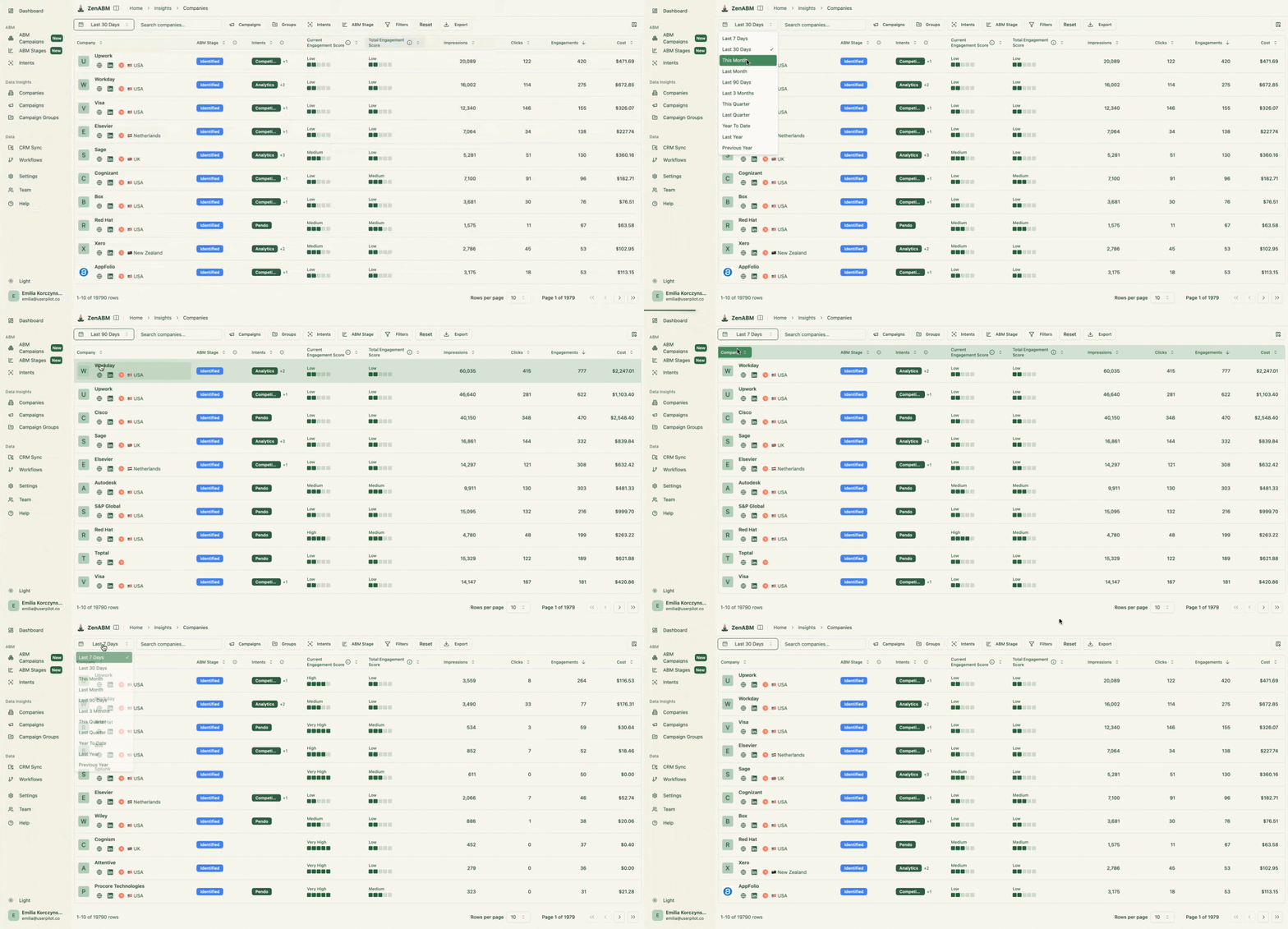
A warm audience needs a rule, and you can write it two ways. You can describe who belongs to Zena (or to Claude, ChatGPT or Cursor through the MCP server), or build the conditions in the editor, and both end in the same reviewable rule. Conditions can mix LinkedIn ad engagement per company, ABM stage, signals, intents, company and contact properties, HubSpot lifecycle and deal stages, and Attio deal statuses, grouped with AND or OR. The estimated audience size updates as you change the rule.
This is why I prefer it to native LinkedIn retargeting. LinkedIn only knows what happened on LinkedIn, while a rule here can also consider CRM events such as a deal opening, so a warm campaign can run on autopilot.
On save, ZenABM creates a dynamic matched company audience and syncs it to LinkedIn. LinkedIn builds and matches it, which can take up to 48 hours. You can exclude the audience as soon as the segment exists, but you can only include it as targeting once LinkedIn reports at least 300 matched members. After that ZenABM refreshes the audience daily: companies that start matching join, and companies that stop matching leave.
Exclusions work the same way at the account level. You can exclude companies, job titles and whole industries, team-wide or for selected campaigns, ad sets or ABM campaigns, for example to remove a company from cold campaigns when sales starts talking to it. Filtering the Companies table by campaign shows which accounts engaged with which campaign, so you can build campaign-specific rules:
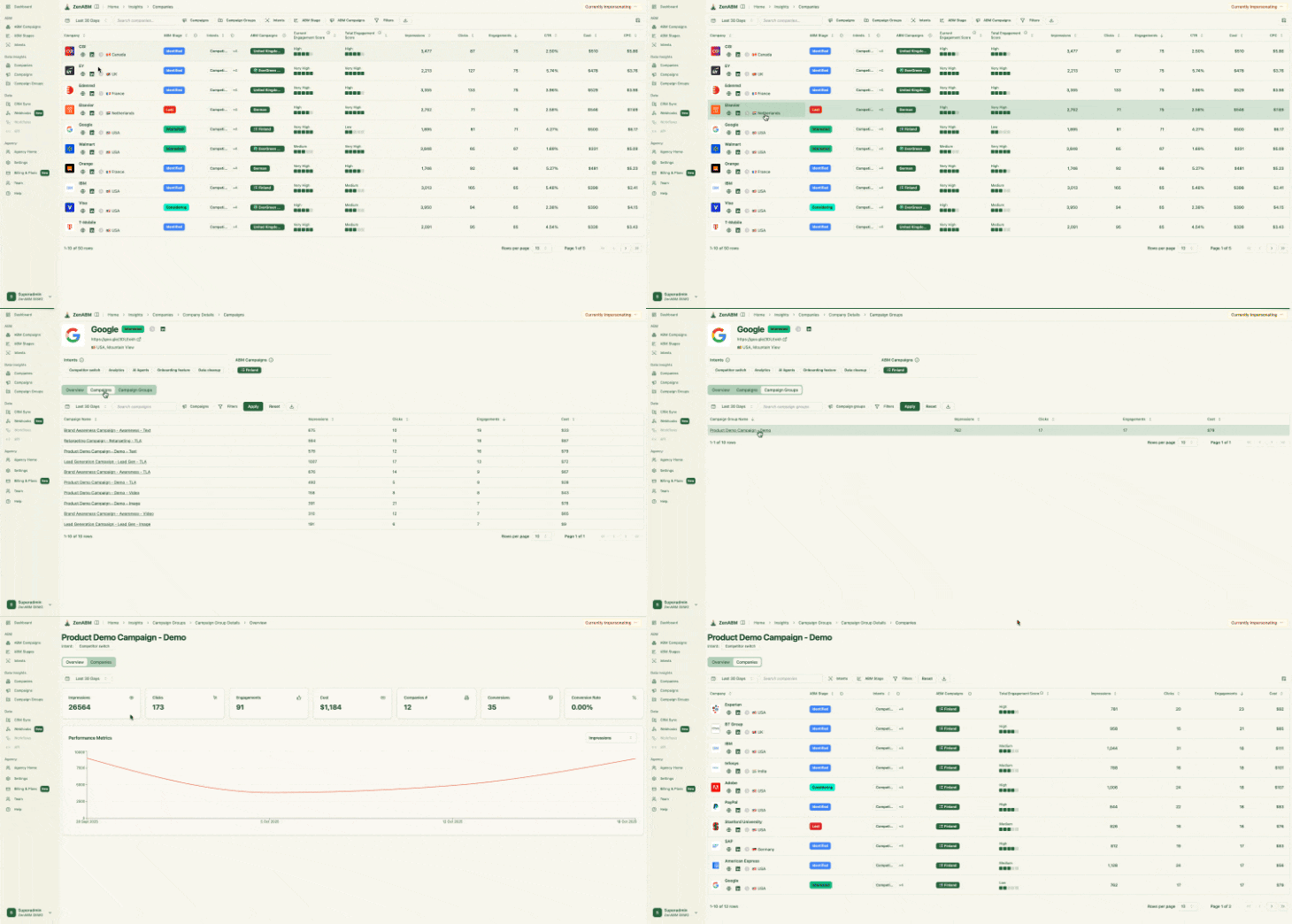
ZenABM re-applies exclusions daily at midnight GMT, and LinkedIn allows up to 200 selections, inclusions and exclusions combined, which ZenABM cannot raise.
ZenABM's Starter plan costs $59 a month billed annually, or $69 a month billed monthly. These are the plans:
Every plan has a 37 day free trial with no credit card, and there is a free plan after the trial. The number of audiences you can create depends on the plan, and ZenABM never takes a cut of your ad spend.
Choose it when LinkedIn is a main ABM channel and someone on your team owns warm audiences as engagement or CRM events change. Skip it as your only tool if your immediate problem is finding the first set of companies to target.
Clay is the one I reach for when a new cold list needs enrichment and a direct push to LinkedIn. It assembles companies from many data sources, so it fits when you want firmographics, technographics and signals in one list before upload.
Clay brings data from different sources into one company list. That helps when you have account names but still need attributes, or LinkedIn company URLs, before matching. The URL is the strongest single match field, so I fill it in before anything else.
The Ads integration pushes the list to Campaign Manager. A recurring sync re-syncs the audience every 3 days (every 7 days when Bing Ads is one of the destinations), adding and removing companies as they qualify or drop out, so closed deals can move into exclusions on the same schedule. Ali Yildirim reports hitting 90% match on LinkedIn with Clay's Ads integration, at least twice what his team got before, because Clay pushes every relevant field instead of just the email address.
ZenABM's audiences refresh daily instead, from ad engagement and CRM rules, so a warm list never goes stale between syncs. We also have two free ABM Clay templates that send Interested-stage companies from ZenABM into Clay for outbound.
Clay's free plan includes 1,200 data credits a year (100 a month), and each enrichment costs 0.5 to 10+ credits, so a small team can build and refresh a short list before paying. Ad audiences need the Growth plan, which starts at $185 a month, and Launch starts at $54 a month. Both prices rise with the number of actions you buy, so check the credit cost of each enrichment before you plan on volume.
Choose Clay when you already have a promising account list and someone who can own the list building workflow. Skip it if you will not use the enriched fields for selection or matching, because enrichment you never use is just work.
Prospeo builds AI lookalike company lists from seed accounts, so it suits a team with a strong base of won accounts. For pure lookalike expansion it is where I would start. One credit exports one company, which keeps your first test small.
Pick won accounts that represent the customer you want more of, not every company that ever bought from you. A lookalike is a candidate and not proof of fit, so check the suggestions against the industries, sizes and countries your sales team can actually serve.
The free plan already includes AI Lookalikes (limited to 5 searches), 28 search filters, 3 intent topics, AI Search, Personas, a Chrome Extension and 50+ AI data fields. My practical play is to use Prospeo for the lookalike step, then move the list into Icypeas or LeadMagic to scale it on industry, company size and country.
Prospeo's pricing is per user:
Pro is $249 a month billed monthly, or $187 billed yearly, per user.
Choose it for the first lookalike step when you have reliable customer examples. Skip it if your won accounts do not show a clear pattern yet, because the lookalikes will only copy the confusion.
Ocean.io does the same seed-based job as Prospeo, starting from your best customers. Its 2 week trial is the one I would pick when 5 free lookalike searches in Prospeo are not enough to prove the list works.
You give Ocean.io examples of companies you want more of, then review the lookalikes it returns. The useful question is whether the suggestions share what made your won accounts a good fit. The first 10 results of each search are free, later results cost 0.2 credits each, and exports are free, so 300 trial credits go a long way for a pilot list.

The same seed-first flow applies afterwards. Start from won accounts, then match industry, size and country in another tool to reach thousands of companies.
Ocean.io's free trial gives you 300 credits for 2 weeks: the first 10 results of each search are free, each further result costs 0.2 credits, and exporting what you loaded is free. The Growth plan starts at $250 a month billed annually, with 60,000 credits a year, and Revenue Navigator is priced on request.
Choose it when you have selected your seed accounts and can review the results within the trial. Skip it until you have those seeds, because a bigger export will not fix a weak starting list.
LeadMagic fits the step after you know which kinds of companies you want. Searching spends no credits in the app from the Essential plan up, so you can explore before you pay for the emails or phone numbers you reveal.
Take the patterns from your seed accounts and search for more companies by industry, size and country. The goal is a wider list your sales team can still work, not extra companies that only make the audience look bigger.
The role it plays in my workflow is the scale step after lookalikes, building a list of thousands of companies.
LeadMagic's pricing page lists no free trial, though third-party listings mention 100 free credits on signup, so check when you create an account. The paid plans are:
Choose it when you have learned which company attributes matter and want to explore more accounts. Keep the list selective enough that sales can work what you add.
Icypeas is the one I would look at when the size of a cold list matters. One credit finds 50 companies, so a small number of credits goes a long way.
Use Icypeas after the lookalike step to find companies that match the industry, size and country patterns you want. As with LeadMagic, the useful output is a qualified company list, not the largest possible export.
Because one credit returns many companies, it suits large cold audiences where volume matters more than bespoke enrichment. It is the scale partner for the seed workflow: Prospeo or Ocean.io produce the lookalikes, then Icypeas multiplies them.
Icypeas gives you 50 credits on signup, and 1 credit finds 50 companies. At that rate 50 credits can find 2,500 companies (50 × 50), which is a discovery count and not a promise that every company will match or fit. Paid plans start at $19 a month for 1,000 credits and go up to $499 a month for 100,000 credits.
Choose it when you need a larger set of cold account candidates and have a clear way to qualify them. Skip it if you have no seed accounts yet, because without a pattern it will only find a lot of the wrong companies.
Apollo is a solid list builder if you can do without lookalikes. Lookalikes sit on its paid plans, so I would not use the free allowance for the seed step. It is the right pick when you know what accounts you want and need a large database to find them.
Apollo lets you build a list from its company and contact data. Before you spend credits, decide whether you need companies or individual contacts.

I recommend company lists for ABM, then using LinkedIn's own targeting (job titles, skills, locations) to reach the right people at those accounts. Contact lists match on email only and hit about 60% at best, while company lists with the LinkedIn URL routinely reach over 90%. Contact lists also cost more enrichment credits.
Apollo gives you 900 free credits a year, and lookalikes are available on paid plans only. Basic costs $49 per user a month billed annually ($65 billed monthly), and Professional costs $79 ($99 billed monthly).
Choose it when you already know which companies or roles you want to find and prefer one large database. Skip it as your lookalike tool, and use Prospeo or Ocean.io for that step.
HubSpot audiences suit a team that already keeps its account segments and lifecycle data in HubSpot. Those segments can sync to LinkedIn, so the audience can follow your CRM instead of a CSV someone uploaded months ago.
A CRM segment can include accounts based on data your team already maintains. That works for a warm audience when, for example, a deal opens and the account should see different ads from a cold prospect. It is the same advantage a dynamic tool has over native LinkedIn retargeting, which cannot see CRM events.

ZenABM can also send an ABM stage to LinkedIn as an audience through HubSpot, so teams that use both can turn a stage into a HubSpot-managed audience.
The plan decides which audiences you can sync. HubSpot's knowledge base lists LinkedIn company segment audiences, built from your target accounts or a company tier, without a plan requirement, while contact segment audiences need Marketing Hub Starter or higher. Starter starts at $20 a seat a month (new customers may get a lower offer), and Professional starts at $800 a month on an annual commitment.
Choose it when your relevant segments already live in HubSpot and your plan supports the sync. Skip it if you would have to buy a marketing subscription just to keep one audience current.
A LinkedIn audience builder either helps you assemble a list to reach new accounts or keeps an audience updated as account signals change. I separate those two jobs before choosing software, because the best cold list tool is rarely the tool that manages your warm audience.
A cold company list starts with accounts that fit your ideal customer profile (ICP). You upload or sync that list as a LinkedIn Matched Audience, then use LinkedIn targeting to choose the people at those companies. I prefer company lists for ABM because every account on the list is one sales can work. In Tim Davidson's seven-month test, an 8,531-company list returned about 3x the revenue of native industry targeting ($1.3M against $403k) on similar spend.
A warm dynamic audience starts from a condition instead, such as an account engaging with your ads or a relevant CRM event. Native LinkedIn retargeting only knows what happened on LinkedIn, while a connected tool can also consider a deal opening or a webinar signup. That is what makes warm sync better for a campaign you want to run on autopilot.
The difference is easiest to see in what feeds each audience:

Two limits matter here. LinkedIn's company name targeting inside the builder is limited to 200 companies, while a list upload can hold up to 300,000. The 300 matched member minimum for including an audience as targeting counts people, not companies, so a big company list can still end up too small after matching and your targeting filters.
I would start with a cold list built from your own won accounts, then use engagement and CRM events to decide who belongs in the warm audience. Here, intent data means signals such as ad engagement or a CRM event, not a guarantee that an account is ready to buy. This flow runs on free credits before you pay for anything.
This seed-first flow is the one I would run before spending a cent, because it starts from accounts that already won. Warm audiences then come after the cold campaign has built engagement.
Here are the seven steps of the seed-first flow in order, from won-account seeds to the weekly check of matched companies:

The matching check is where I would spend the most time. In my HubSpot-pushed audience, LinkedIn reported over 90% match while only a third to 43% of the intended companies were present. A reported percentage and the list of companies you meant to reach answer two different questions.
The biggest difference is whether a tool helps you find a company or keeps that company in the right audience after its status changes. I would not use a free credit count as a substitute for that decision. This table shows how each tool handles refresh and what to check before buying.
Tool | Main job | Refresh or sync | What to check before buying |
|---|---|---|---|
ZenABM | Warm audiences and exclusions | Audiences refresh daily | The matched member count and the audience limit on your plan |
Clay | List building and enrichment | Ads integration re-syncs every 3 days | The credit cost of each enrichment |
Prospeo | Lookalike company discovery | Upload the exported list yourself | Credits needed for the export |
Ocean.io | Lookalike company discovery | Upload the exported list yourself | Trial timing and export allowance |
LeadMagic | Company search and list building | Upload the exported list yourself | Credits needed after the search |
Icypeas | Company discovery at scale | Upload the exported list yourself | Whether the companies found fit your criteria |
Apollo | Company and contact list building | Upload the exported list yourself | Whether you need the paid lookalike feature |
HubSpot audiences | CRM segment sync | CRM segments sync to LinkedIn | Which audiences your plan includes |
ZenABM, Clay and HubSpot keep audiences in sync for you, while the other five need a manual upload:

Tool | Entry point | Paid prices |
|---|---|---|
ZenABM | 37 day trial, then a free plan | Starter $59 a month billed annually ($69 monthly), Growth $159 ($199), Pro $399 ($499), Agency $479 ($599) |
Clay | 100 data credits a month | Launch from $54 a month, Growth (needed for ad audiences) from $185 a month; both rise with the actions you buy |
Prospeo | Free plan, 100 credits a month | Starter $49 billed monthly ($37 billed yearly), Growth $99 billed monthly ($74 billed yearly), per user |
Ocean.io | 300 trial credits for 2 weeks | Growth from $250 a month billed annually (60,000 credits a year); Revenue Navigator priced on request |
LeadMagic | No trial listed on its pricing page | Essential $99 a month ($82.50 billed yearly), Growth $249 ($207.50 billed yearly) |
Icypeas | 50 signup credits, 1 credit finds 50 companies | Basic $19 a month (1,000 credits), Premium $39 (4,000), Advanced $89 (10,000), Hypergrowth $499 (100,000) |
Apollo | 900 credits a year, lookalikes on paid plans | Basic $49 per seat a month billed annually ($65 monthly), Professional $79 ($99 monthly), Organization priced on request |
HubSpot audiences | Company audiences on any plan; contact audiences need Starter | Starter from $20 a seat a month; Professional from $800 a month (annual) |
Two habits keep costs down:
ZenABM covers the steps that come after you know which accounts you want. These are the features I use at each step:
For the step after audience selection, the free ABM strategy planning skill for Claude produces a strategy document with budget, audience size and campaign structure. Ask it for a plan based on your target accounts, then review the proposed audience structure before launch.
Keep warm LinkedIn audiences up to date
Build audiences from account engagement and CRM conditions with ZenABM.

I would pick the tool for the job you need done now, then add the next one only when the workflow needs it.
The best audience builder is the one that gets the right accounts into your campaign and keeps the wrong ones out.
Here is that choice by job:

It is turning your ICP into a group LinkedIn can target. You either build a new company or contact list and upload it as a Matched Audience, or keep a warm retargeting audience synced from CRM and ad engagement. The two jobs need different tools, which is why I split this list into cold list builders and dynamic sync tools.
LinkedIn requires at least 300 matched members before you can include an audience as targeting. That is members, not companies in your file, because matching and your people filters change the final count.
Yes. HubSpot audiences can sync CRM segments to LinkedIn, and ZenABM can send an ABM stage to LinkedIn as an audience through HubSpot. ZenABM can also build dynamic audiences directly from supported engagement and CRM conditions. Check the plan requirements and the matched companies before relying on any sync.
Allow up to 48 hours for LinkedIn to build and match a new synced audience. A tool's refresh schedule is a separate matter: ZenABM refreshes its audiences daily, and Clay's Ads integration re-syncs every 3 days. Neither schedule removes LinkedIn's first matching step or the 300 matched member minimum.
Matched Audiences work with the standard LinkedIn formats, including single image, video, document, carousel, text and Thought Leader Ads. Message and Conversation ads also support audiences, but they are charged per send and land in the inbox instead of the feed. Choose the format for your message first, then check the audience is big enough to serve.
No. High-intent audiences are warm retargeting lists, and they work best after a cold campaign has built awareness. I would build the cold list from accounts sales can serve, then use ad engagement and relevant CRM events to decide which companies move into retargeting.
About the author

