Black Friday: up to 30% off ZenABM 💥Get up to 30% off ZenABM with our massive BlackFriday sale! 💥 - only 27-30 November!Get the deal12 Days of ABM Christmas · Report on your 2026 LinkedIn ABM & plan 2027 · Free webinars, 26 Nov – 9 DecSave your seat


Emilia Korczynska is Head of Marketing and co-founder at ZenABM. Before that she was VP of Marketing at Userpilot for nearly 7 years, where she ran a large ABM program primarily on LinkedIn ads.

Dreamdata MCP lets Claude or ChatGPT run your saved Dreamdata reports and save new ones. It reads attribution data, but it cannot change a LinkedIn campaign, bid or budget.
I connect my data sources to Claude by default, so the first thing I ask about any connection is where it stops. Dreamdata stops at reading and reporting, while a LinkedIn Ads MCP server can also change an ad account, with your confirmation.
Below you get the setup and a set of prompts to start with. You also get the check I run before trusting an answer. And you get a clear line between what Dreamdata MCP can investigate and what needs a connection that can act. If you are setting up Claude for this kind of work, our guide to context engineering for LinkedIn ABM shows how to give it the context behind your questions.
The connection and its limits come down to what Dreamdata lets the assistant read and save:

LinkedIn Ads experts chat: Ask a question about your LinkedIn ad setup or reporting.
LinkedIn ABM skills for Claude: Get free skills for planning, auditing and reporting on LinkedIn ads.
Dreamdata MCP is a hosted connection that lets Claude work with the Dreamdata resources your login can access. MCP is an open standard that lets an AI client call functions exposed by another tool, so Claude pulls your real report data instead of guessing.
"Hosted" means Dreamdata runs the server, so you only connect to a URL, sign in through OAuth and approve the permissions you want to grant. Reading resources is required, and the permissions to save new reports, audiences or dashboards are optional.
Here is how Claude connects to the hosted Dreamdata server, from the server URL to the permissions you approve:

I already connect HubSpot, Google Ads, LinkedIn Ads data, GA4 and Search Console to Claude, and Dreamdata slots in as one more source for attribution questions. The difference is that Dreamdata comes with its own access permissions and report settings.
Here is the setup:
Dreamdata documents the same setup for Claude Code, ChatGPT, Cursor, VS Code, Lovable, Gumloop, Dust, Writer and Langdock.
In Claude, searching the connector directory for Dreamdata brings up its connector card, and the + button starts the connection:

When you sign in, Dreamdata's authorization screen lists each permission separately, so you can allow reading and leave the save permissions off:

Claude can use the Dreamdata MCP to run saved reports, explore the companies and deals behind a metric, query audiences and save new reports. I think of it as a conversational way into attribution data you already have in Dreamdata, so you stop starting every question in the dashboard.
Dreamdata's revenue reporting dashboard is a good example of the data you would be asking about:

The prompts below are starting points, not recorded outputs. Change the report name and period to match your account, then check what Claude actually used.
Starting prompt | What it asks Claude to do | What to check |
|---|---|---|
"Run my saved LinkedIn paid social report for last quarter and list the top 10 companies." | Run a saved report and show its company results. | Report name, period and how the companies are ranked. |
"Which deals sit behind the pipeline number for this campaign?" | Drill into the deals behind a reported metric. | Campaign filter and the definition of the pipeline metric. |
"Show me the company activity behind this result." | Look up the company details behind a result. | Company, date range and activity included. |
"Which companies are in my audience for this campaign?" | Query an audience in plain language. | Audience name and the conditions that define membership. |
"Save a new report for LinkedIn paid social." | Save a new report. | Whether report saving is permitted and which settings the new report uses. |
The last request needs the optional report permission. Saving a new report leaves your existing reports intact, because the MCP cannot edit or delete them. That makes the saved report the thing to watch, since the answer is only as good as the settings behind it.
Analyze LinkedIn ads from Claude
See how ZenABM connects campaign data and approved ad account changes to your AI client.

A Dreamdata MCP answer inherits the attribution model configured in the saved report it ran, and its date range unless you set a custom one. So if you ask for a different model or window and don't say so explicitly, the answer can quietly use the report's own settings.
Say a report is saved with one attribution model and one date range, and you ask in chat for a different model. The reply may read perfectly well and still describe the report's settings, not yours. That is my reading of how saved reports behave, so check it in your own account instead of taking my word for it.
A confident explanation of the wrong report can send you to the wrong campaign decision. Here is the check I run before sharing or acting on an answer:
Here are the four checks in order, ending with the one figure you compare before you act on an answer:

For an account question, I would also inspect the company activity behind the result. Dreamdata's company journey view shows account activity over time and lets you filter by channel, as in this screenshot:

That check tells you whether the answer reflects the report, but it gives the connection no permission to change a LinkedIn campaign.
Dreamdata MCP cannot create, edit or pause LinkedIn campaigns, change bids or budgets, or edit an audience in Campaign Manager. Its scope is attribution data and new reports, so I use it to investigate a result and not to carry out the campaign change.
You want to | Dreamdata MCP | What can do the job |
|---|---|---|
See companies included in a paid social report | Run the relevant saved report. | Dreamdata MCP, subject to your access and report settings. |
Pause a decaying ad | Cannot pause it. | Campaign Manager or an ad account connection with permission to make changes. |
Raise a bid | Cannot change it. | Campaign Manager or an ad account connection with permission to change bids. |
Build a new ad set | Cannot create it in Campaign Manager. | Campaign Manager or an ad account connection with permission to create ad sets. |
Save a new report | Can save one if you grant permission. | Dreamdata MCP. |
Audience data can still be part of your attribution workflow. Dreamdata's Audience Hub shows audience syncs, but that screen is not a permission for its MCP to edit a Campaign Manager audience. Here is the Audience Hub syncs page, which lists audience names, sync status and match rates:

There is also a measurement question I keep separate from campaign changes. A saved attribution report can only answer from the data and settings it contains. So before you treat it as a list of every account your LinkedIn ads reached, check whether it includes impressions and engagement from accounts that never clicked. An account can see your ads without ever visiting your site. If that exposure is missing from the report, you need LinkedIn company engagement data to investigate it.
Dreamdata MCP suits questions about attribution reports, while a LinkedIn Ads MCP also reaches the ad account to read campaign performance and, when authorized, make changes you approve.
I pick the connection by the next decision. If you need to understand a reported pipeline number, start with the attribution report. If you then need to change the ad set, use a connection with access to the ad account.
Task | Dreamdata MCP | ZenABM MCP |
|---|---|---|
Read attribution or company engagement data | Runs attribution reports and looks up company activity. | Reads LinkedIn company engagement and connected CRM data. |
Save reports | Can save new Dreamdata reports with permission. | Zena writes ten reports each cycle, and expert skills return finished analyses. |
Create, edit or pause campaigns and ads | Cannot change them in Campaign Manager. | Can create, edit and pause campaigns, ad sets and ads. |
Change bids and budgets | Cannot change them in Campaign Manager. | Can change bids and budgets with confirmation. |
Confirm changes | No ad account changes to confirm; saving a report needs the optional permission. | The client asks for confirmation before account changes. |
Connect | Hosted server with OAuth sign-in. | OAuth sign-in; no API key needed. |
The read side helps you diagnose an ad before you decide what to change. Here Claude retrieves ad performance through the ZenABM MCP server:
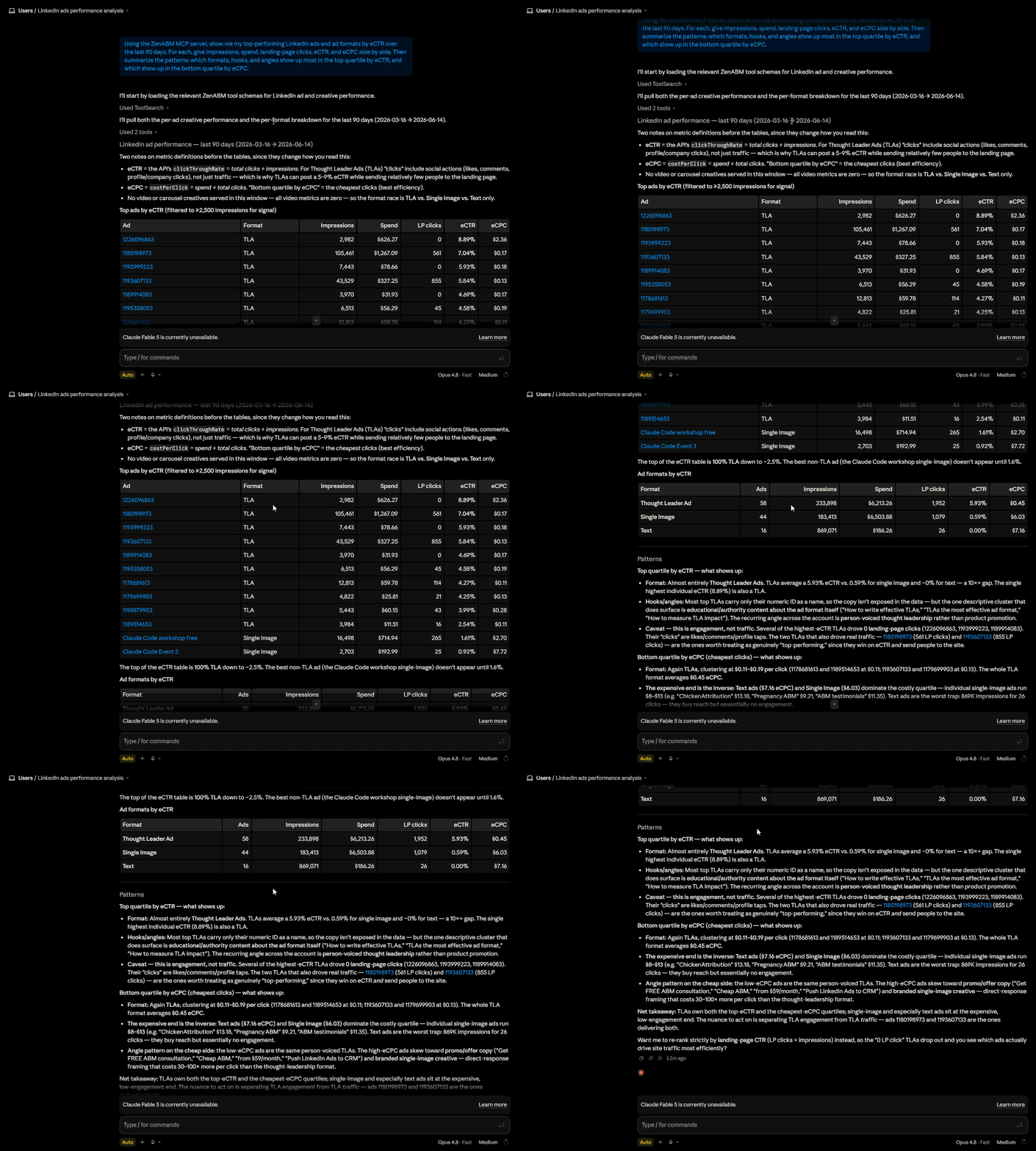
The action side is a separate decision, and I approve any change that moves money before an agent applies it. When we built the ZenABM MCP server, we made it write as well as read, so you can create and manage campaigns, ad sets and ads from Claude without opening Campaign Manager. Below is a request to create image ads in a new ad set:
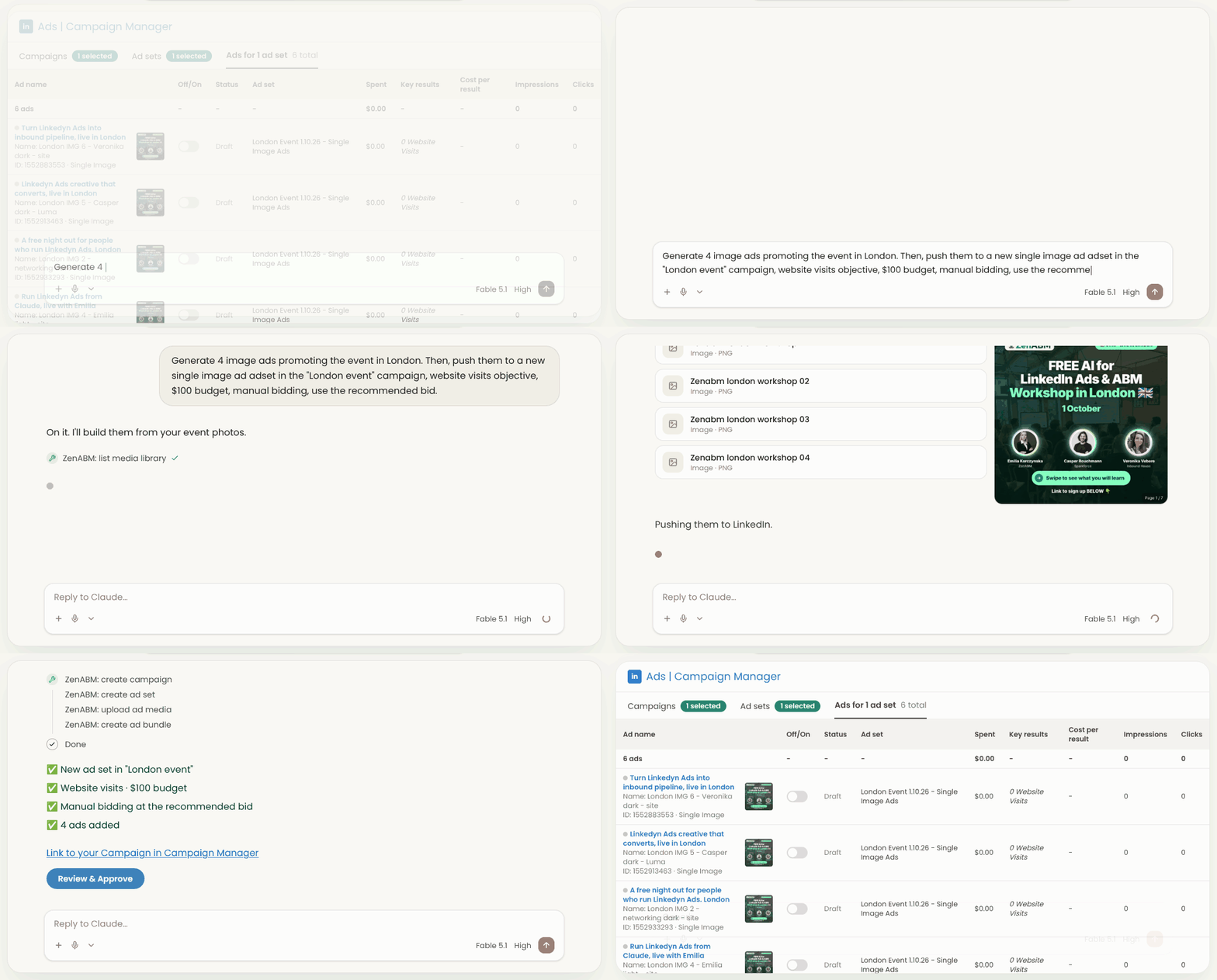
The ZenABM MCP server has 129 tools and 45 expert skills, which are named workflows for jobs such as audits. 93 tools are read only, and 36 can change the account. Of those 36, 24 edit, pause, change budgets or delete something live, while 12 only add something. MCP access starts on the Growth plan.
I have used an agent to compare bids with LinkedIn's suggested bids and check daily spend across 72 ad sets, then bulk adjust bids after approval. That took 20 minutes instead of a day. I also want an alert if an ad set stops spending, because approving a change is not the end of monitoring it.
For more on the connection itself, see our guide to analyzing LinkedIn campaign data with an MCP server. My rule is simple: keep attribution questions in the tool that holds the report, and use ad account access when you need to act.
When an attribution question leads back to your LinkedIn ads, we built ZenABM so you can connect company engagement and CRM deals to the analysis, then act on the campaign if you choose. These are the steps I would follow:
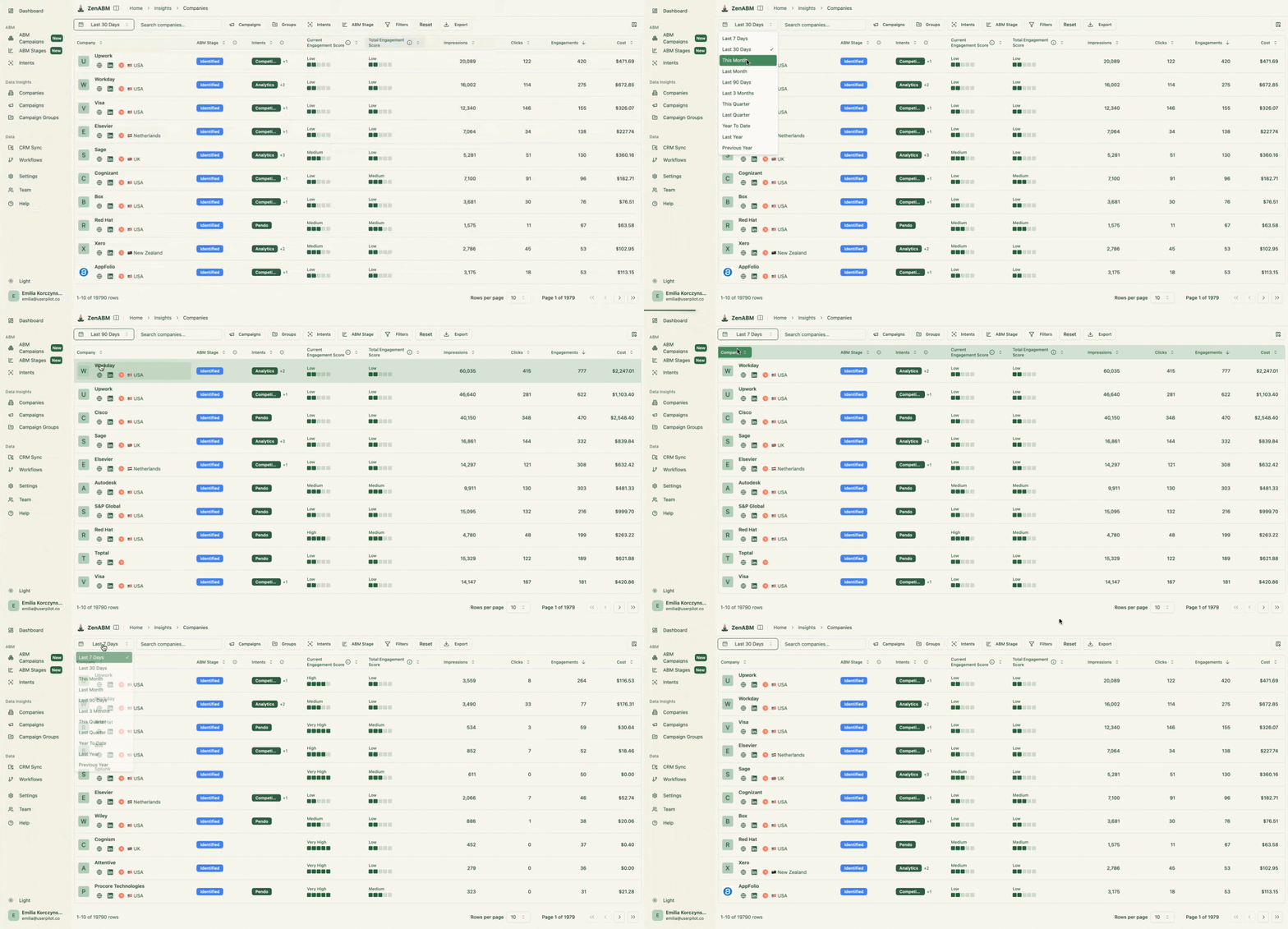
/linkedin-abm-audit reviews your last 30 days of live LinkedIn ads and returns a prioritized fix list.The company view puts engagement metrics next to each account's stage, so you can see which accounts responded before you look at deals. Here is the Companies table with each account's stage, engagement score, impressions, clicks and cost:
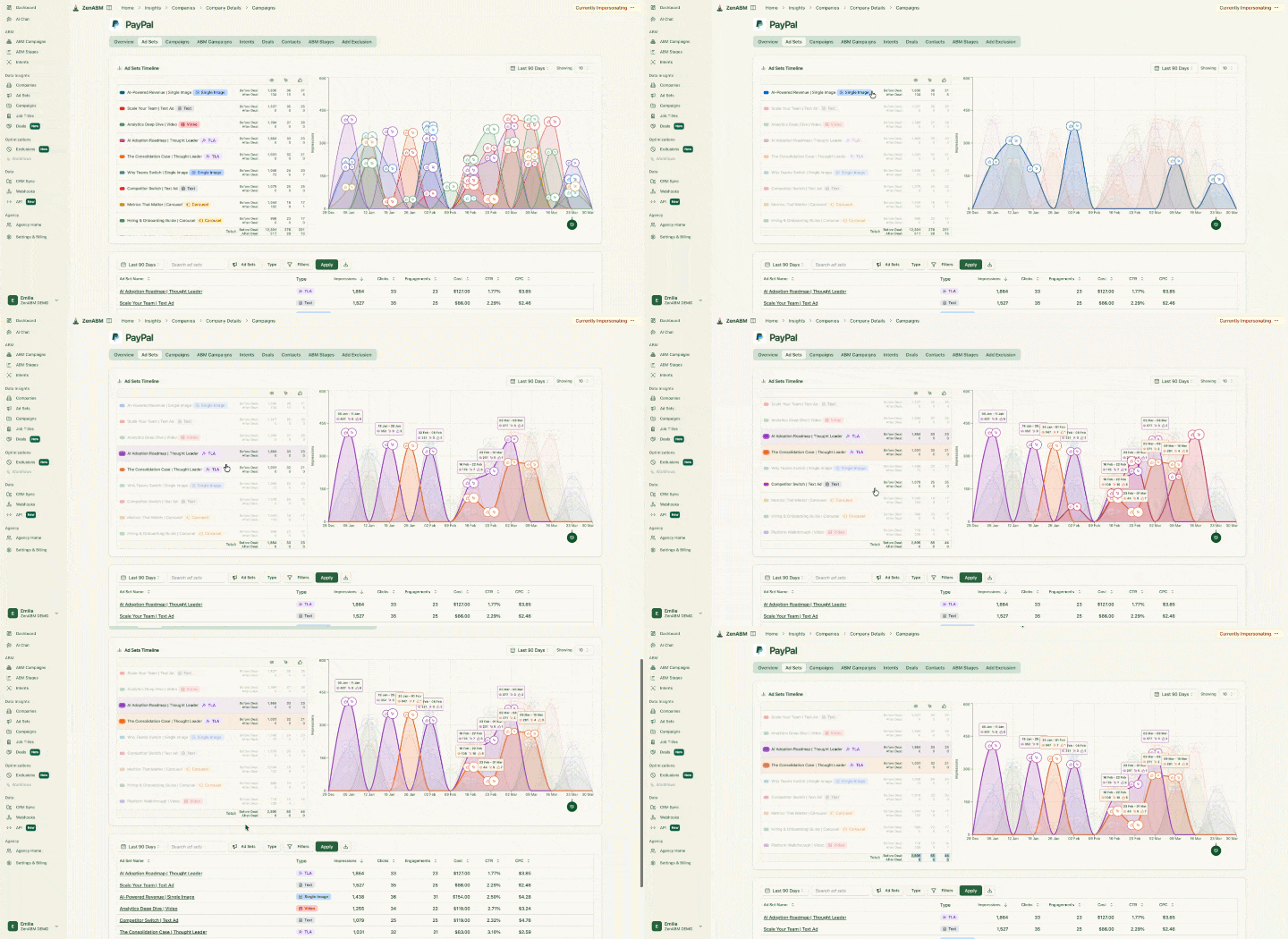
For a deal question, the deal attribution view shows the campaign touches tied to a deal over time, which gives you a place to inspect the activity behind an attribution answer. Here is a deal timeline with each campaign touch tied to a single deal:
Connect LinkedIn engagement to your deal analysis
Use ZenABM to review company engagement and campaign touchpoints alongside CRM deals.

I would use Dreamdata MCP to ask attribution questions and check the underlying report before acting on the answer. For a LinkedIn ad change, I would use a separate connection that can make that specific change and ask for my approval first.
Dreamdata MCP helps you investigate what happened. Changing the campaign takes access to the campaign.
No. Dreamdata MCP can save a new report if you grant the optional permission, but it cannot edit or delete an existing one. I would still check the settings of any newly saved report before sharing it, especially its attribution model, date range and filters.
No. The Dreamdata connection reads attribution data and can save new reports, but it cannot change campaigns, bids, budgets or audiences in Campaign Manager. If your analysis points to a change, make it in Campaign Manager or use a separate ad account connection that has the right permission.
Claude, Claude Code, ChatGPT, Cursor, VS Code, Lovable, Gumloop, Dust, Writer and Langdock can all connect to the hosted Dreamdata MCP server at https://mcp.dreamdata.io/mcp, and in Claude it is also listed in the connector directory. The connection uses OAuth, so you sign in and approve access instead of installing a server yourself. The assistant can only see what your Dreamdata login can see.
You can use them after checking the report that produced them. Open it in Dreamdata and compare the metric, filters, attribution model and date range with your question. I would also compare one figure in the report with the chat answer before using it for a budget decision.
About the author

