

©2026 ZenABM - All Rights Reserved.
Emilia Korczynska is Head of Marketing and co-founder at ZenABM. Before that she was VP of Marketing at Userpilot for nearly 7 years, where she ran a large ABM program primarily on LinkedIn ads.

DemandSense alternatives matter most if you are an in-house demand gen team rather than a freelance LinkedIn Ads expert. DemandSense is a great tool for scheduling, pacing and visitor ID, but in my view it asks for a very sophisticated user, mostly freelance LinkedIn ads specialists. Below are 8 alternatives, grouped by the job you need done, starting with the one that is easiest to start with because AI builds and manages your LinkedIn campaigns.
Here is the full comparison of all the alternatives, with DemandSense as the reference point:
Tool | Category | Starting price | G2 rating | Best for | Replaces from DemandSense |
|---|---|---|---|---|---|
DemandSense (reference) | LinkedIn ad control and visitor ID | $89/mo (Base), $149/mo (Plus) | 5.0/5 (14 reviews) | Expert advertisers who want hourly control | n/a |
ZenABM | LinkedIn-first ABM | From $59/mo | 5.0/5 (6 reviews) | In-house teams that want AI to build and manage LinkedIn ABM, with company engagement, intent signals, stages and deal attribution | Reporting, exclusions, CRM sync, attribution, and adds campaign creation and a write MCP |
Factors.ai | Analytics and attribution | Free plan, then quote only | 4.5/5 (220 reviews) | Teams that want analytics depth across channels | Attribution and company engagement |
Recotap | Full ABM suite | $1,499/mo (annual) | 4.7/5 (57 reviews) | Teams that want web personalisation and third-party intent next to LinkedIn | Engagement, segmentation, attribution |
LinkedScope | LinkedIn analytics and attribution | Not published, 15-day trial | No G2 rating published | Company reach reporting and CRM matching | Company-level reporting, exclusions, impression cap |
Satlo | LinkedIn analytics | From €58/mo | 5.0/5 (1 review) | Lightweight company reporting on a small budget | Company-level reporting |
Linklo | Scheduling and pacing | $99/mo | No G2 rating published | Precise scheduling and pacing | Scheduling, pacing, frequency control |
Campainless | Monitoring and alerts | From $49/mo (verify) | No G2 rating published | Freelancers and agencies that want 24/7 monitoring | Alerts, scheduling, budget visibility |
Dreamdata | Revenue attribution | Free plan, Advanced by quote | 4.7/5 (271 reviews) | Multi-touch attribution across channels | Attribution |
And here is the quick pick by situation:
Your situation | Best alternative | Why |
|---|---|---|
You are an in-house team and want AI to do the LinkedIn work | ZenABM | It builds and edits campaigns, shows engaged companies, scores them and syncs to your CRM, without needing a LinkedIn specialist. |
You only need hourly scheduling and pacing | Linklo or Campainless | Purpose-built for dayparting, pacing and alerts. |
You want company engagement and CRM matching | ZenABM, then LinkedScope or Satlo | They pull company-level LinkedIn ad data and match it to deals. |
You need multi-channel attribution | Dreamdata or Factors.ai | They map the journey across channels, not just LinkedIn. |
You want a full suite with third-party intent | Recotap | Adds web personalisation and Bombora and G2 intent. |
You run an agency with many clients | ZenABM (Agency plan) | One workspace per client and an Agency MCP server that reaches all of them. |

Deanonymize LinkedIn ad engagements, get intent, accounts scoring
37 Days Free Trial | Starting @ $59/month!

The short answer is that DemandSense is built for people who already know how to run LinkedIn Ads at an expert level. Its hourly controls, Bid Reduce, credits and many modules reward someone who lives in them every day.
For an in-house team without a LinkedIn specialist, that same depth becomes friction. Here are the reasons I see most often:
Here is what DemandSense's hour-by-hour reporting looks like, which is the kind of control that experts value:
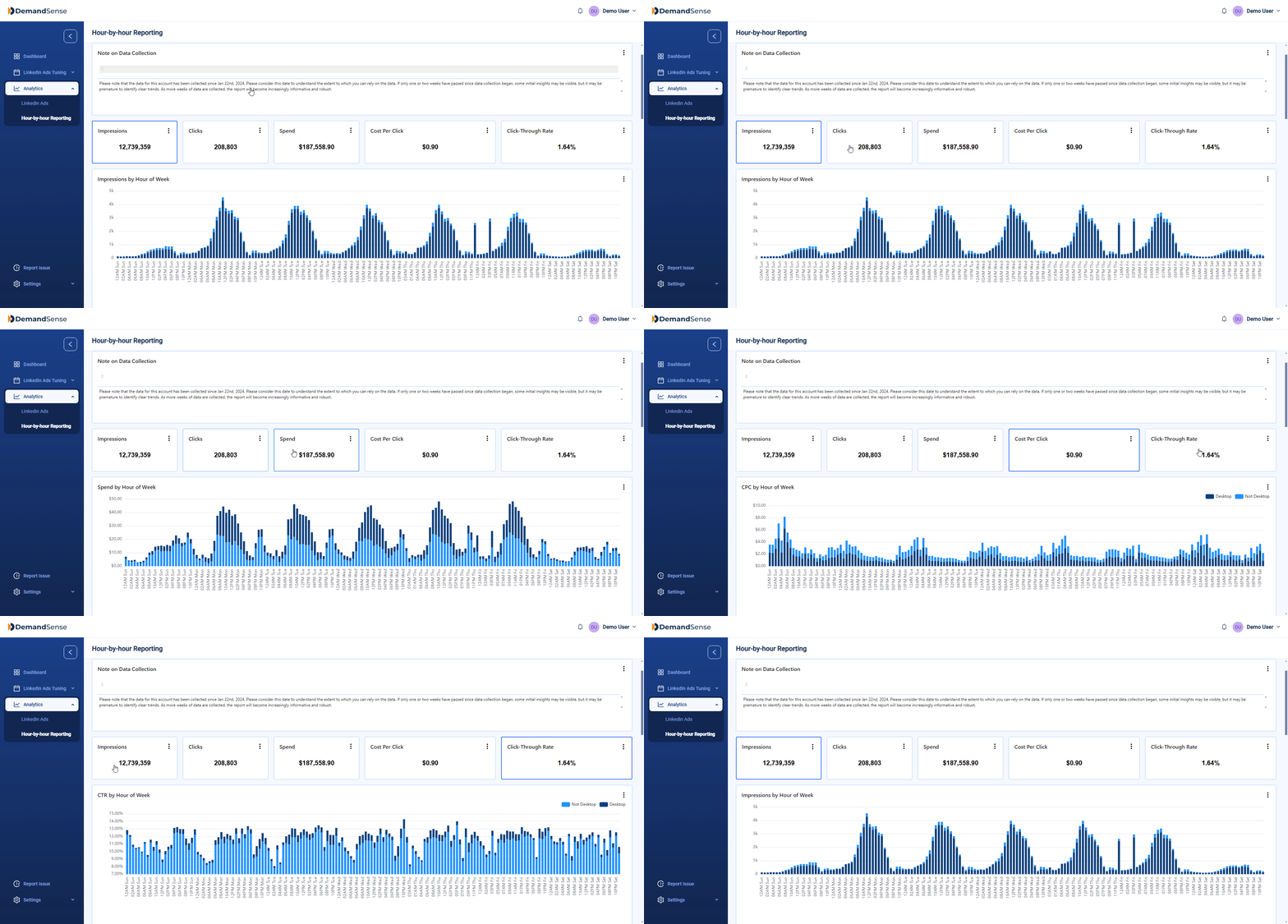
DemandSense does several things well. Hourly ad scheduling lets you stop spend overnight, and a thumbs-down on a company in its reports adds that company to an account-wide exclusion list, so competitors, closed customers and tiny businesses stop eating budget.
Here is the scheduling screen those savings come from:

The same three jobs come up in every LinkedIn programme. Delivery control covers dayparting, budget caps and frequency. Targeting hygiene means excluding bad-fit companies and titles and keeping Audience Network and Audience Expansion off. Measurement means a long lookback, so a January click can connect to an October deal. DemandSense does the first one well, and it has added a 12-month attribution lookback plus Salesforce and Attio sync. The alternatives below split those three jobs differently.
When I was VP of Marketing at Userpilot, I struggled to run ABM on LinkedIn. My husband watched it up close and built ZenABM to fix it. I might be a bit biased as a co-founder, but I also know first-hand what it is like to struggle to find the right tool.
ZenABM is a LinkedIn-first ABM tool built specifically for running ABM campaigns on LinkedIn. It helps small to mid-market companies create, manage and optimise their LinkedIn ads with AI, either in the app or directly from Claude through the MCP server. It shows engagement per company, extracts first-party intent signals and scores accounts automatically. It also hands you revenue attribution and the sales-ready hot accounts, along with what to talk to them about.
G2 rating: 5.0/5 from 6 reviews. Capterra lists ZenABM with 0 reviews.

ZenABM is beginner friendly, and a lot more user friendly than DemandSense. In-house demand gen teams can use it without a LinkedIn Ads specialist, because the skills are built into the MCP and into Zena, an AI agent that runs those skills from one command. DemandSense is great, but it is for a very sophisticated expert audience, mostly freelance LinkedIn ads experts. I do not mean that as a dig, it is simply a different user.
G2 reviewers say the same about ease of use. One writes: "The UI and UX are clean, intuitive, and easy to navigate." A Head of Revenue says: "What I like best about ZenABM is that they understand ABM beyond theory." A VP of Marketing adds: "ZenABM allows me to quickly query my LinkedIn ad performance data with AI,".
ZenABM also costs less. Plans start at $59/month, while DemandSense Base starts at $89/month.
Here is what ZenABM does, in the order you would use it.
ZenABM's Company engagements view matches LinkedIn ad impressions, clicks and engagements to the company behind them. It shows every engaging company with its engagement score, ABM stage, intents and CRM data on one row, which Campaign Manager does not expose. It tracks engagement per company even when nobody from that company likes or comments.
The data comes from LinkedIn's official Ads API, so you get first-party clarity instead of noisy IP or cookie matching. A Syft study suggests IP-based identification accuracy often peaks around 42%.


ZenABM scores every account from its ad engagement and CRM data and keeps the score current. You define ABM stages as rules over LinkedIn engagement and CRM conditions, and ZenABM moves each account through them automatically.


Each ad set carries a theme. When an account engages, ZenABM attributes that theme to the account as an intent signal and syncs it to your CRM, so you see what each account cares about from your own ads. That tells you whether an account responds more to a feature-led, pricing-led or ROI-led message.

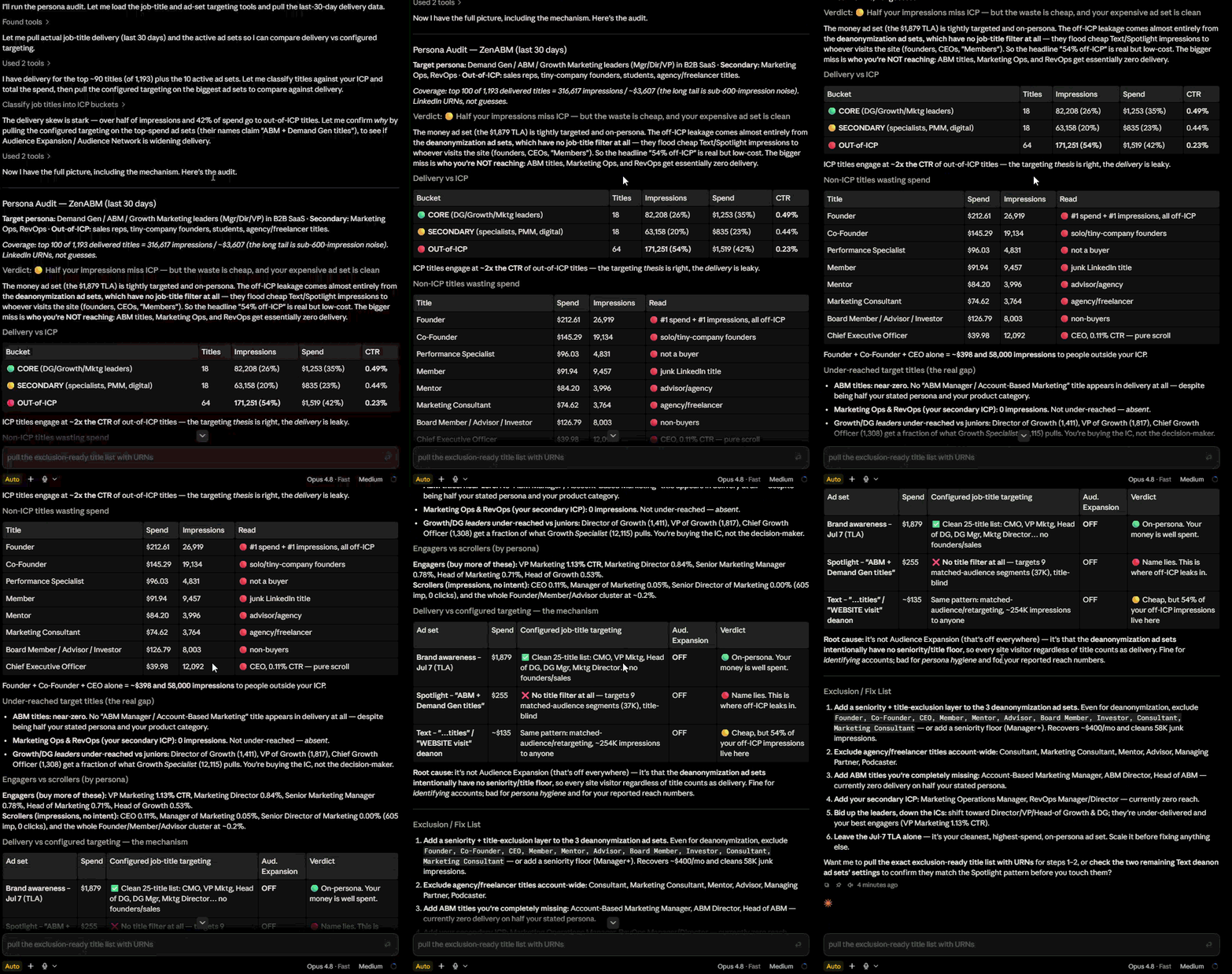
Zena answers questions about your live LinkedIn data in plain language, builds reports, deep-dives accounts and pauses underperforming ads once you confirm. Its expert skills (for example /linkedin-abm-audit, /budget-wasters, /persona-audit, /ad-decay, /weekly-digest and /sales-handoff) each run from one command. The audit grades your account and returns a fix list ordered by dollars at stake.
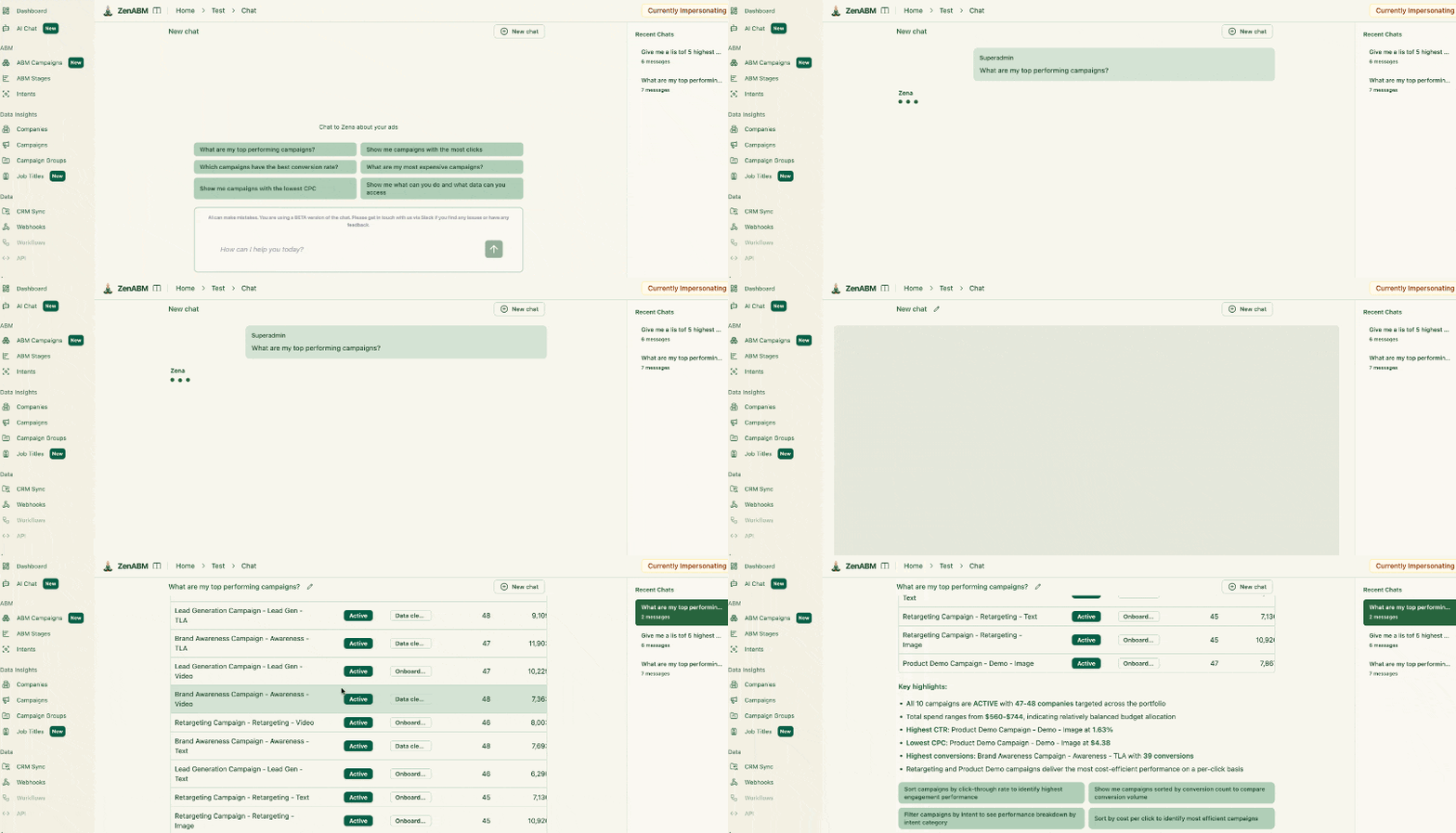
If you use Claude, you can also install the LinkedIn ABM skills for Claude, which are open-source skills for planning, building, auditing and reporting on LinkedIn ABM campaigns.
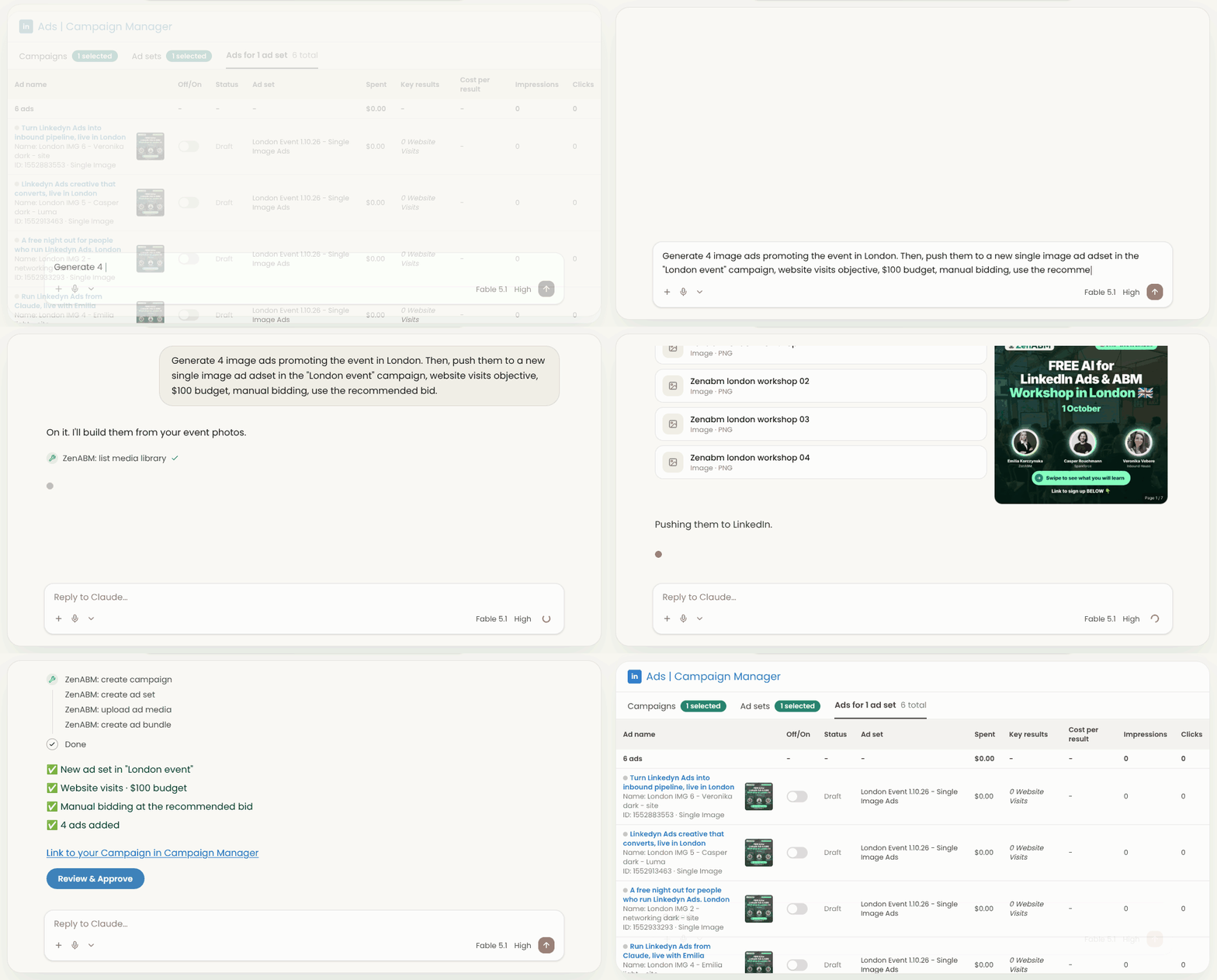
The MCP server connects ZenABM to Claude, ChatGPT or Cursor with 93 tools (69 read-only, 24 write) and 15 expert skills. From Claude you can create, edit, duplicate and pause LinkedIn campaigns, ad sets and ads, change budgets and bids, and manage exclusions. DemandSense's MCP is read-only, which is a deliberate safety choice and, as Justin Rowe notes, hands you the answer but leaves the decision to you. That is the practical difference between getting an answer and getting the work done.
Here is Claude, connected to ZenABM's MCP server, creating image ads end to end:
Skills run from the same connection. Here is the persona audit skill running in Claude Code:
ZenABM's Exclusions apply to companies, job titles and industries across all campaigns, including new ones. Budget Savers keeps LinkedIn Audience Network and Audience Expansion switched off on every ad set, including ones created later.

CRM sync writes engagement, scores, stages and intent onto company records in HubSpot, Salesforce or Attio and creates the properties for you. Webhooks push engaged accounts to Clay or your sales engagement tool, and you can start from our ABM Clay templates.

The deal attribution dashboard shows the impressions, clicks, engagements and spend that touched an account before a deal opened and before it closed. ABM campaign dashboards show spend, pipeline per dollar, ROAS and influenced pipeline per motion.
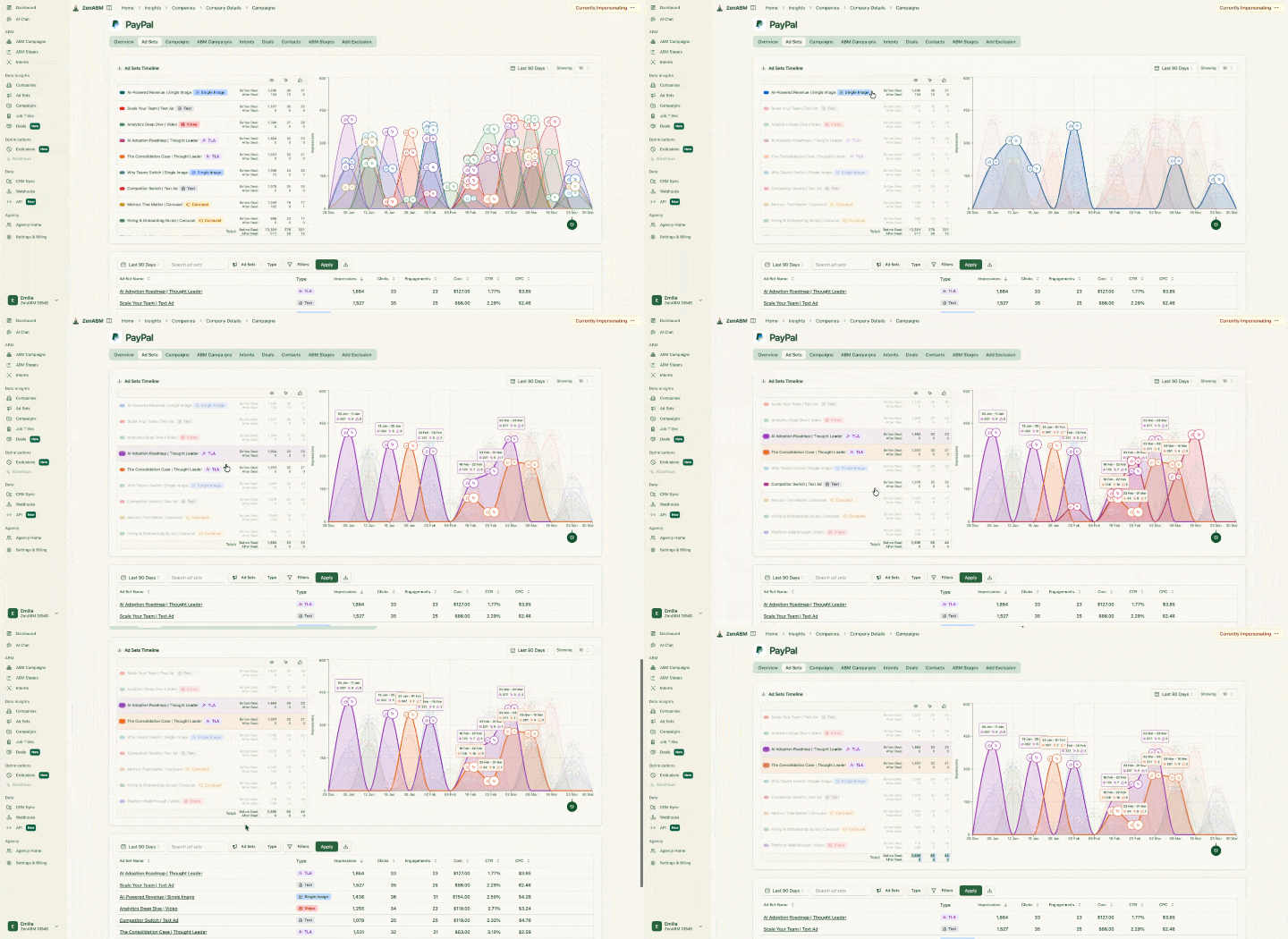
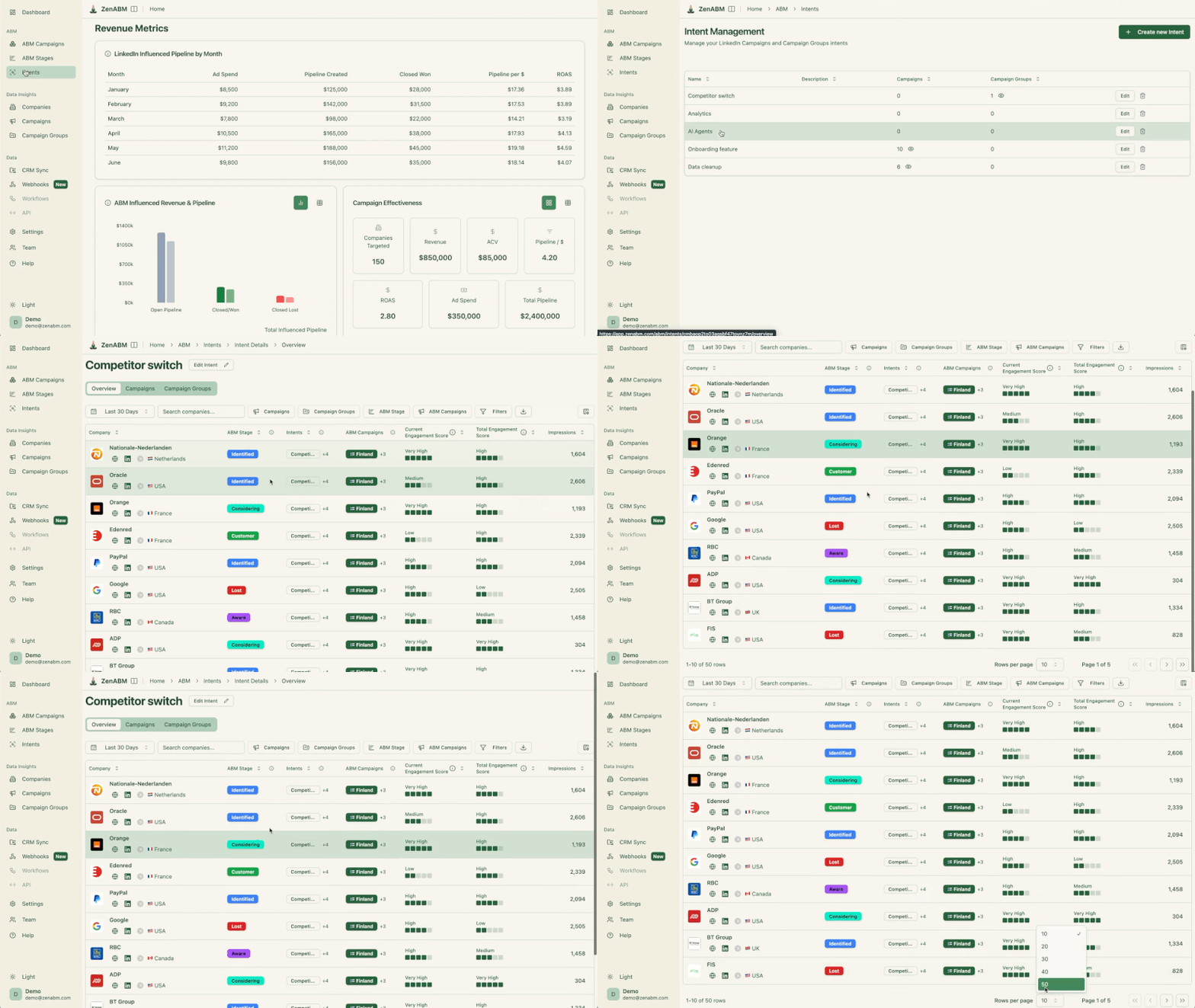

ZenABM also groups engagement by job title, so you can check whether your spend reached the buying committee.

ZenABM plans run from Starter at $59/month (billed annually) through Growth at $159, Pro at $399 and Agency at $479, all billed annually. See pricing for monthly billing and plan details.
ZenABM is LinkedIn-first, so it does not buy display or programmatic ads, personalise websites or sell third-party intent data. Teams that need those usually run ZenABM for LinkedIn next to a display suite. Scheduling and impression capping are coming soon, so if hourly dayparting is non-negotiable, pair ZenABM with Linklo or Campainless.
G2 reviewers raise a few mild points. One says ABM takes time to compound, so results are not always immediate. Another uses Pipedrive and would like that integration. Another says the companies data sometimes loads slowly, and one notes some restrictions from the LinkedIn side that are not ZenABM's fault. The team ships new features fast and keeps improving the product from customer feedback.
ZenABM also fits enterprise teams and agencies. It runs the LinkedIn side of a bigger ABM programme next to a display suite, syncs engagement and stages to the CRM, and applies exclusions team-wide. Agencies get the Agency plan and the Agency MCP server, where one connection reaches every client workspace.
Best for: in-house demand gen teams, enterprise teams running LinkedIn ABM and agencies that want AI to build and manage LinkedIn campaigns.
Skip it if: display advertising is your main channel, in which case you would pair it with a display suite, or you need hourly dayparting today, in which case you would pair it with Linklo or Campainless.
Compared with DemandSense: DemandSense controls the delivery of existing campaigns, while ZenABM runs the whole LinkedIn ABM motion, including creating campaigns, and it is easier for a non-specialist to start with.
Factors.ai is a multi-channel analytics platform that combines website visitor identification, cross-channel attribution and account timelines. Its strength is data depth, since its Company Intelligence API integration includes company-level paid and organic LinkedIn engagement, including organic page engagement.
G2 rating: 4.5/5 from 220 reviews. Reviewers praise real-time identification of high-intent accounts, an intuitive interface and responsive support. They also mention a learning curve and some slow reports and segments on larger datasets.


Factors.ai offers a free plan, with paid tiers (Basic, Growth, Enterprise) quoted on request. Factors.ai's own blog lists Lite at $199/month after the trial, Basic at $6,000/year, Growth at $20,000/year and Enterprise from $30,000/year.

Best for: teams that want analytics depth and cross-channel visibility and have the time to set it up.
Compared with ZenABM: Factors.ai leans towards analytics, takes more effort to set up and is less focused on running ABM campaigns. ZenABM is cheaper, lets you create and manage the LinkedIn campaigns themselves, is built for ABM and is easier to use. See Factors.ai vs ZenABM.
Recotap is an ABM platform that unifies CRM, marketing automation, website and third-party intent (Bombora, G2, TrustRadius) with LinkedIn ad orchestration and 1:1 landing pages. According to Recotap, it is built for mid-market B2B teams.
G2 rating: 4.7/5 from 57 reviews, mostly from Asia-based reviewers. Reviewers praise ease of setup, a clean UI and all-in-one ABM coverage. They mention design constraints, reporting depth and the upfront effort to define orchestration rules.


The Standard plan is $1,499/month billed annually, and Enterprise is custom. Recotap says its AdRadar analytics dashboard is free for the first 60 days. For comparison, ZenABM starts at $59/month.

Best for: teams that want web personalisation and third-party intent next to LinkedIn and have a budget above $10K a year.
Compared with ZenABM: Recotap is a heavier suite with more setup and a much higher entry price. It does web personalisation and Bombora and G2 intent that ZenABM does not, while ZenABM relies on first-party intent from your own ads and is built to create and manage LinkedIn campaigns with AI.
LinkedScope is a LinkedIn Ads analytics and optimisation tool that pulls company names and job titles exposed to your ads through the official API. It also works with Google and Meta Ads.
G2 rating: No G2 rating published.


Pricing is not published. There are Professional, Enterprise and Premium Advisory plans, monthly or annual, with a 15-day free trial and no credit card.
Best for: teams whose main pain is company-level reporting and CRM attribution.
Compared with ZenABM: LinkedScope is reporting-first. ZenABM adds account stages, intent themes from your own ads and campaign creation with AI, and it matches deals with algorithms that tolerate small spelling differences in company names. See ZenABM's CRM sync.
Satlo is a LinkedIn Ads analytics tool that shows company-level engagement beyond LinkedIn's native 25-company limit. It does not do scheduling or frequency capping.
G2 rating: 5.0/5 from 1 review. With a single review there is not enough to infer cons, and the reviewer praises time-saving analytics and ease of use.


Per its G2 profile, Satlo lists plans from €58/month per ad account (Pro includes 2 ad accounts) with a 14-day free trial and a custom Enterprise tier.

Best for: small teams that want affordable company-level reporting.
Compared with ZenABM: Satlo is an insights layer. ZenABM is priced similarly from $59/month and adds ABM stages, deal attribution, exclusions and campaign creation, plus Zena and an MCP that writes.
Linklo is a LinkedIn Ads automation layer on top of Campaign Manager, and the closest replacement for DemandSense's core scheduling job. It covers hour-based scheduling, budget pacing with overspend alerts and auto-pause, A/B testing and Company Flows, which stop a few companies from absorbing most impressions.
G2 rating: No G2 rating published, since Linklo has a G2 profile with no reviews.


The Core plan is $99/month with a 21-day free trial and no card. Enterprise is custom.
Best for: performance marketers who need delivery discipline.
Compared with ZenABM: Linklo is LinkedIn-only and has no campaign creation, intent signals or AI feature. ZenABM covers engagement, intent and attribution, so Linklo pairs well with it if you need hourly dayparting.
Campainless is a LinkedIn Ads monitoring and optimisation tool that watches accounts 24/7 for statistically significant patterns and sends alerts. It generates AI optimisation recommendations that can be pushed live to LinkedIn in one click. Its plans suit freelancers and agencies, tiered by monthly LinkedIn spend.
G2 rating: No G2 rating published, and I found no review-platform ratings for Campainless.

Campainless says pricing is based on monthly LinkedIn spend. The live pricing page lists Professional at $49/month (1 account, up to $10K spend), Business at $99/month (3 accounts, up to $20K) and Agency at $199/month (unlimited accounts). The homepage still shows a "Register for early access" button, so confirm current availability before you commit.
Best for: freelancers and agencies that want always-on monitoring.
Compared with ZenABM: Campainless is not an intent platform. It will not tell you which accounts engaged or what to say to them, which ZenABM does through company engagements and intent signals.
Dreamdata is the most complete attribution tool of this group, built to prove what marketing does to revenue across every channel. I had a demo with their team, and it is clearly built for a RevOps-minded buyer. It is not geared towards managing and running ABM campaigns on LinkedIn, whereas ZenABM is.
G2 rating: 4.7/5 from 271 reviews. Reviewers praise clear customer journey insight and multi-touch attribution. They cite a steep learning curve, limited reporting and long onboarding. One G2 reviewer says the reports can be hard to understand at first:

Another notes it shows the influence of marketing on closed-won deals:


Dreamdata has a free Starter plan (5 seats, 2 months of history, 1 sync). The Advanced plan is a custom quote, and Vendr puts the median at about $35,440 a year (range $27,000 to $96,000).

Best for: teams with RevOps or data support and heavy spend across many channels.
Compared with ZenABM: Dreamdata is deeper on multi-channel attribution but does no LinkedIn campaign management at all, and reviewers describe a long ramp. ZenABM includes multi-channel revenue attribution and a deal attribution dashboard, and it also creates and manages the LinkedIn campaigns.
Here is what each tool does for the capabilities DemandSense users ask about most:
Tool | Scheduling | Impression cap | Company engagement | ABM stages | Intent | CRM sync | Revenue attribution | Campaign creation | MCP |
|---|---|---|---|---|---|---|---|---|---|
DemandSense | Yes, hourly | Yes, per company | Yes | No | Visitor ID, no research intent | HubSpot, Salesforce, Attio | LinkedIn only, 12-month lookback | No | Read-only |
ZenABM | Coming soon | Coming soon | Yes, per company with score, stage and CRM data | Yes, rule-based | First-party, from your own ads | HubSpot, Salesforce, Attio | Deal attribution and multi-channel | Yes, with AI | Reads and writes (93 tools, 15 skills) |
Factors.ai | No | Yes (AdPilot) | Yes | Account scoring | Third-party and first-party | Yes | Yes, multi-touch | No | Agents accessible from Claude and ChatGPT |
Recotap | No | Yes | Yes | Journey stage prediction | Bombora, G2 | Salesforce, HubSpot | Yes | Orchestration | None found |
LinkedScope | No | Yes, per company | Yes | No | Intent Index | Any CRM via webhook | LinkedIn only, no multi-touch | Management features | MCP assistant with confirmation |
Satlo | No | No | Yes | No | Simple score | Salesforce, HubSpot, Marketo | No | No | None found |
Linklo | Yes | Via Company Flows | Via HubSpot sync | No | No | HubSpot only | No | No | None found |
Campainless | Yes | No | No | No | No | None found | No | One-click push of optimisations | None found |
Dreamdata | No | No | Yes | No | Third-party intent | Many | Yes, multi-touch | No | Read-only |

Read related: Fibbler alternatives for LinkedIn ABM and other use cases
Before you pick, here are the criteria I would check, in this order:
If you want a benchmark to judge your own numbers against, the 2026 ABM Benchmarks Report covers 161,256 ads from 211 companies.
DemandSense, Dreamdata and 6sense offer read-only MCPs that answer questions without touching your campaigns. ZenABM's MCP can write, so it creates and manages campaigns, ad sets and ads from Claude. The question to ask any vendor is whether the AI can do the work or only report on it.

Here is which ZenABM capability does which step of running ABM on LinkedIn:
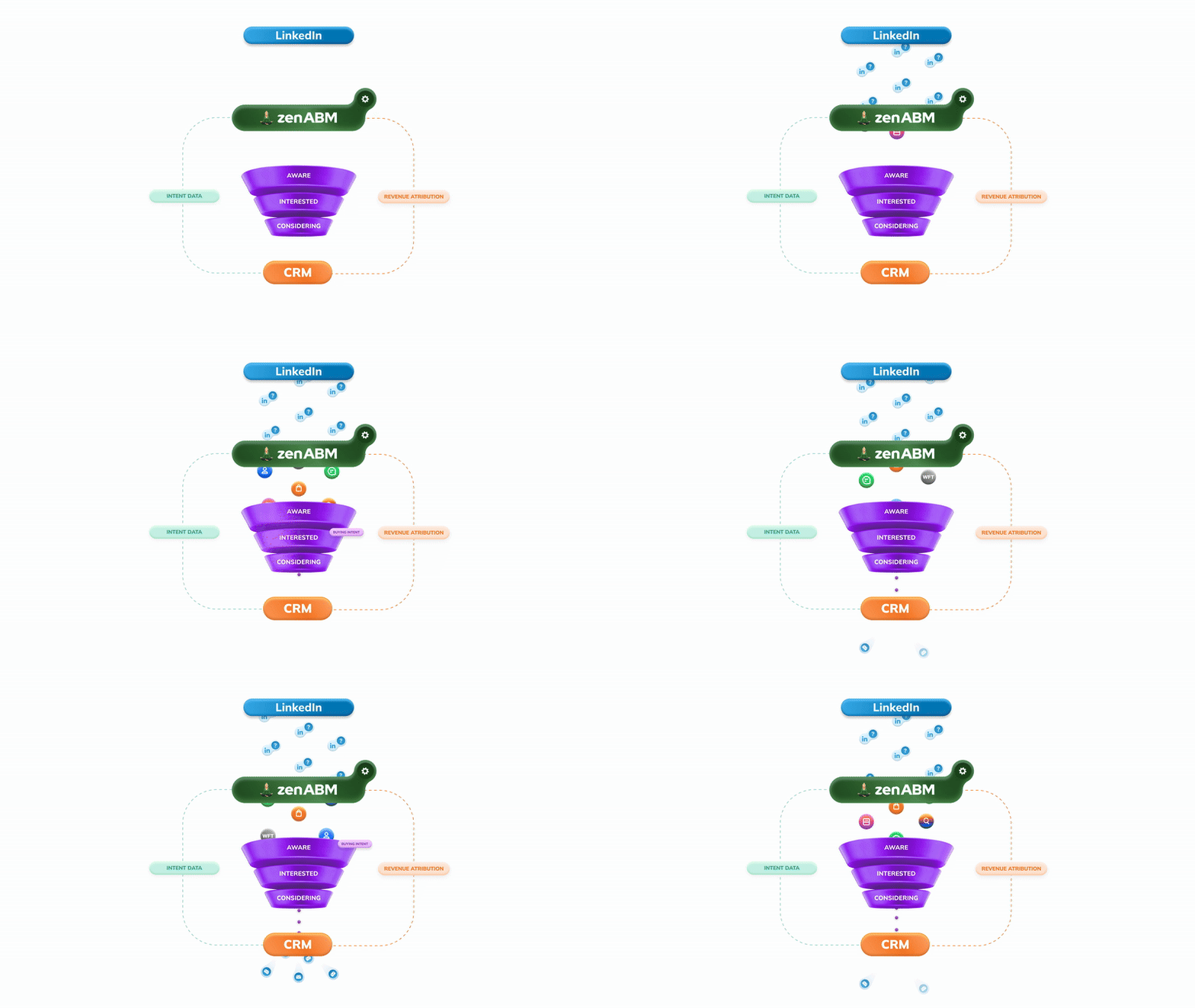
Scheduling and impression capping are coming soon.
Deanonymize LinkedIn ad engagements, get intent, accounts scoring
37 Days Free Trial | Starting @ $59/month!
Pick the tool for the job you need done, not the longest feature list.
Otherwise you pay for the whole gym and use the treadmill 🤷♀️
If you want to go deeper, these guides cover the related topics:
DemandSense is a LinkedIn Ads tool for ad scheduling, pacing, frequency capping and audience tuning, with website visitor identification and revenue attribution. Base is $89/month with 200 credits, and Plus is $149/month with 500 credits. It has a read-only MCP server and a G2 rating of 5.0/5 from 14 reviews.
Choose DemandSense if you are a LinkedIn Ads specialist who wants hourly scheduling and pacing. Choose ZenABM if you want a LinkedIn-first ABM tool that creates and manages campaigns with AI, shows which companies engage and ties them to pipeline. ZenABM starts at $59/month versus $89 for DemandSense, and its MCP can write.
The entry price is low at $89/month, but credits drive the cost, and DemandSense says Plus can rise to $999/month. G2 reviewers also mention a learning curve because of the number of modules, so it rewards experts more than first-time users.
ZenABM includes an Agency plan at $479/month and an Agency MCP server, so one connection reaches every client workspace. Linklo ($99/month) and Campainless (from $49/month, verify availability) cover scheduling and monitoring across ad accounts. Dreamdata and Factors.ai are heavier and quote-based.
Yes. ZenABM's Zena agent and its MCP server create, edit, duplicate and pause LinkedIn campaigns, ad sets and ads, and every change is confirmed before it goes live. DemandSense controls existing campaigns but does not create them, and its MCP is read-only.
LinkedIn-first tools do not buy display ads. Traditional enterprise suites such as Demandbase, 6sense and AdRoll ABM are best for enterprises looking for display advertising at very large scale. Many teams run one of those for display and ZenABM for the LinkedIn side.
About the author

