Black Friday: up to 50% off ZenABM 💥Get up to 50% off ZenABM with our massive BlackFriday sale! 💥 - only 24-30 November!Get the deal12 Days of ABM Christmas · Report on your 2026 LinkedIn ABM & plan 2027 · Free webinars, 26 Nov – 9 DecSave your seat


Emilia Korczynska is Head of Marketing and co-founder at ZenABM. Before that she was VP of Marketing at Userpilot for nearly 7 years, where she ran a large ABM program primarily on LinkedIn ads.

The best Common Room alternative depends on the job. Pick ZenABM for LinkedIn ad engagement, Clay for a DIY stack and Warmly for website visitors. Pick HockeyStack for attribution, Apollo.io for contacts and UserGems for job changes.
I built a Clay system for about $1,600 a month before paying five figures for a platform. It gave mixed results, so a mature platform might have done better. I would still prove which signals predict your deals before buying one.
We build ZenABM, which shows you which companies engage with your LinkedIn ads. I put it first for teams whose signals come from paid LinkedIn engagement. I also say plainly what Common Room does that it does not.
This guide gives you six alternatives, each matched to the Common Room job it replaces, with entry prices where the vendor publishes them.
Common Room puts buyer signals, person profiles and workflows in one place, so the right swap depends on which part you actually use.
This table compares what each option covers and its entry price:
Alternative | Use it for | Common Room job it replaces | Entry price | Main channel |
|---|---|---|---|---|
ZenABM | LinkedIn ad engagement and execution | Account signals, stages and sales handoff | $59/month billed annually, checked October 2026 | LinkedIn Ads |
Clay | Building an outbound stack | Connecting signals, contact research and outreach | Free plan; Launch from $185/month, Growth from $495/month | Depends on your stack |
Warmly | Website visitor identification | Identifying visitors for outbound | From $10,000/year | Website |
HockeyStack | Multi-touch revenue attribution | Attribution reporting | Not published | Web, ads and CRM |
Apollo.io | Contact data and outbound | Contact search and outreach | Free tier | Outbound |
UserGems | Job change tracking | Tracking people who move companies (a narrow job) | From $40,000/year | Job changes |
This table helps you pick by your starting point, which matters more than the longest feature list:
Your situation | Pick | Why |
|---|---|---|
Buying signals come from LinkedIn ad clicks and impressions | ZenABM | It connects ad engagement to accounts and lets you manage campaigns. |
You have a GTM engineer and want to test your own plays | Clay | You can assemble the workflow around the signals you choose. |
Your strongest signal is a visit to your website or pricing page | Warmly | Visitor identification is the job you need to assess first. |
You need to understand the touchpoints behind revenue | HockeyStack | It focuses on attribution across channels. |
You need contacts for an existing signal source | Apollo.io | Its free tier gives you a place to start prospecting. |
Former champions moving companies drive your sales motion | UserGems | It focuses on tracking those moves. |
Community, product and CRM signals all matter to your team | Stay with Common Room | Its person profiles and signal coverage may be the parts you would miss. |
I compared the options by signal source, execution and the work needed to use them. Common Room has a 4.5 out of 5 G2 rating, as recorded in November 2026. I left community platforms off the shortlist because this decision is about buyer signals and outbound.
Here is each job matched to the Common Room alternative that fits it:

Turn LinkedIn ad engagement into outbound signals
See how ZenABM connects engaged companies with campaign themes and account stages.

Teams usually leave Common Room when the contract covers more than they need, or when the job they need done sits outside the platform. I would name that job before replacing anything.
Common Room's pricing page lists the Essential plan and leaves Advanced and Enterprise to a sales call:

Common Room's demos impressed me, and its mix of community, product and CRM signals is useful. The catch is that everyone running the same standard signals ends up sending prospects the same messages.
If LinkedIn ad engagement is the part you need to act on, start with the account data and what you can do with it.
We built ZenABM for teams that use LinkedIn ads to learn which target accounts are engaging and then want to act on that in campaigns and outreach. It comes first because it covers the one thing Common Room does not: running the ads whose engagement you are reading. It does not replace every signal Common Room collects, and I say where below.
The Companies view lists each company that engaged with your ads, with its engagement metrics, so you see who is responding before you do anything else:
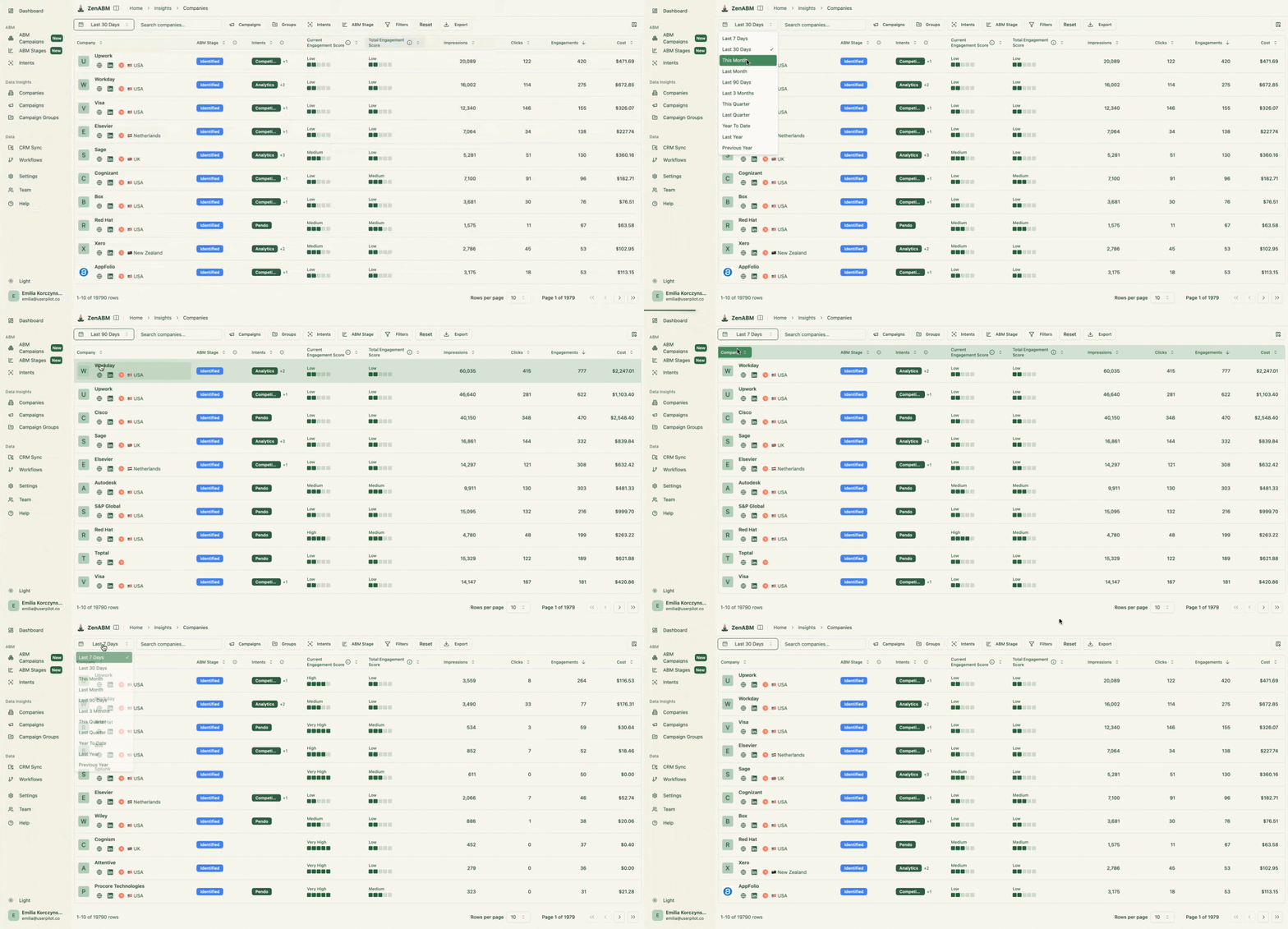
The comparison that matters is what you can do after the engagement arrives. This table compares ZenABM with Common Room's Person360 (its person-level profile builder) and Prospector (its contact database):
Capability | Common Room | ZenABM |
|---|---|---|
Company-level LinkedIn ad data | Yes. Imports impressions, clicks and CTR. | Yes. Shows company engagement and campaign activity. |
Person-level LinkedIn ad engagement | No per-person ad engagement data. | No per-person ad engagement data from LinkedIn. |
Account stages | Partial. Segments and CRM lifecycle stages can approximate them. | Yes. Custom rules calculate stages. |
LinkedIn campaign execution | No. Can export segments to a Matched Audience. | Yes. Can build and edit campaigns with approval. |
Deal-level ad touchpoints | No per-deal ad touchpoint list. | Yes. Shows ad activity before deal creation and close. |
Person profiles and contact search | Yes. Person360 and Prospector cover these jobs. | Partial. CRM contacts are available with HubSpot; prospecting can use another tool. |
Here Claude uses the ZenABM MCP server to create a LinkedIn ad set and image ads:
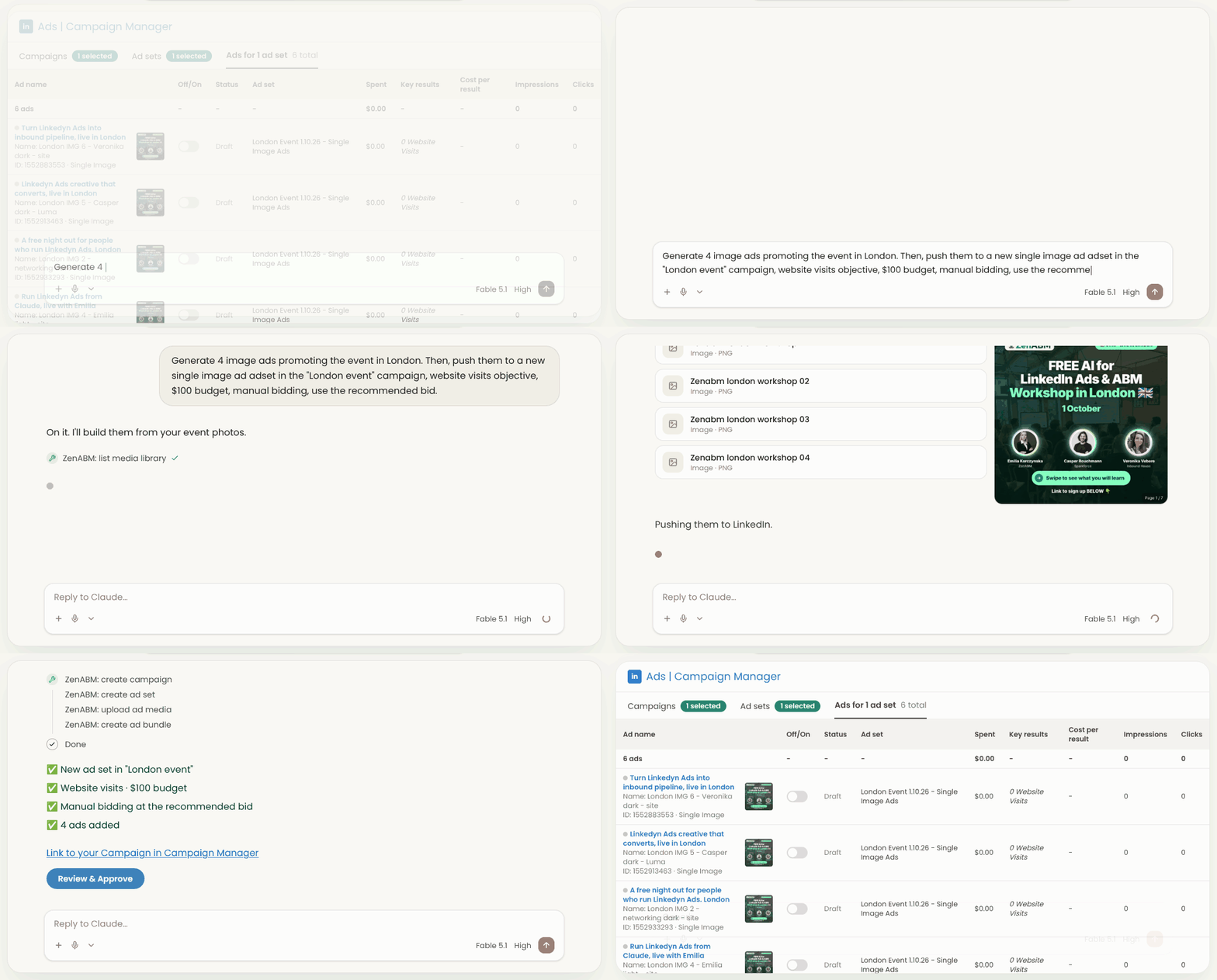
ZenABM starts at $59 a month billed annually ($708 a year), or $69 a month billed monthly, according to ZenABM pricing checked in October 2026. Growth is $159 a month billed annually, Pro $399 and Agency $479, all with unlimited seats, and the MCP server and REST API come from the Growth plan.
The free trial lasts 37 days with no credit card, and a free plan with company-level engagement data and CRM sync continues after it. Your LinkedIn ad budget is separate, and ZenABM never takes a cut of ad spend. For comparison, Common Room Essential costs $2,500 a month billed annually, so compare the jobs and the full stack, not only the subscriptions.
I would choose ZenABM when LinkedIn ads are a real source of buying signals and you want those signals in stages, campaigns and outreach. It sits happily next to Clay or Apollo.io for contacts. Skip it as a full Common Room replacement if your team relies on Person360, community and product signals or Prospector in one platform.
If you would rather build the workflow yourself first, Clay is the next option.
Clay suits a team with someone who can assemble and maintain its own outbound workflow. I built mine in Clay because I did not want to pay a platform's five-figure price before proving that signals predict deals. I still think that is the cheapest way to find out. The catch is that my result was mixed, which I cover in the cons.
Clay can take a signal, find contact information and send contacts to an outreach tool. Teams call that middle step enrichment: adding details such as a person's role or email to a record.
Capability | Common Room | Clay approach |
|---|---|---|
Buyer signals | Combines signals in the platform. | Connect the signal sources you need. |
Person profiles | Person360 brings signals into person profiles. | Requires a workflow and connected data. |
Contact search | Prospector provides a contact database. | Use contact data in your build. |
Outreach | Workflows connect signals to sales tools. | Connect an outreach tool such as Smartlead or HeyReach. |
The manual version starts with an export of engaged accounts. Someone then finds the right people, checks their details and puts them into a sequence.
ZenABM's free Clay templates skip that export: they turn Interested-stage companies and intent signals into contacts and tailored sequences. One template starts with Interested companies, and the other routes companies by intent type, so an account that engaged with an ad gets a different follow-up from one that visited a pricing page.
Clay has a free plan, with Launch from $185 a month and Growth from $495 a month on monthly billing, or $167 and $446 a month billed annually, on Clay's pricing page. Add the cost of every other tool in your build. My own Clay system cost about $1,600 a month in total, which was the cost of my setup and not Clay's list price. I built it because the Common Room cost was always mid to high five figures.
Clay's pricing page shows the monthly plans:

I would choose Clay when you have RevOps or GTM engineering capacity and want to test one specific outbound play. Start with a signal you can explain, then check whether the accounts that receive it become opportunities. Skip the DIY route if nobody can own the workflow.
A Clay build still needs a signal source, and website visits are one of the common ones.
Warmly is a narrower alternative for a team whose main question is who visited its website and whom to contact afterward. I would judge it against that one job and not expect it to replace every Common Room signal.
Warmly focuses on identifying website visitors and turning them into outbound targets. Common Room also offers website deanonymization, alongside its broader person profiles.
Capability | Common Room | Warmly |
|---|---|---|
Website visitor identification | Yes. Limits depend on the plan. | Yes. Visitor identification is its focus. |
Unified community and product signals | Yes, subject to plan and integration access. | — |
LinkedIn campaign execution | No. | No. |
Common Room caps website deanonymization at 1,000 a month on Essential and Advanced and makes it unlimited on Enterprise. Check whether that allowance fits the volume you expect before you assume you need a separate tool.
Warmly's AI Web-Deanonymization plan starts at $10,000 a year billed annually, with visitor identification credits from 10,000 a month. Inbound Chat starts at $20,000 and AI Inbound Autopilot at $30,000 a year. HubSpot agreed to acquire Warmly in June 2026, and Warmly says existing contracts, pricing and integrations stay unchanged for now. Compare the quote with the cost of the signal sources and outreach tools you would still need.
Warmly's pricing page lists an annual starting price for each product:

I would shortlist Warmly when direct traffic or pricing page visits are the signals your sales team wants to act on. Test whether the identified visitors are useful to your team, not whether the dashboard looks busy. Skip it as a full replacement if you mainly need to run ads or combine many signal sources into person profiles.
Visitor identification tells you who appeared, while attribution asks what contributed to a deal.
HockeyStack suits a team replacing the attribution part of Common Room rather than its buyer signal workflow. It is built to analyse touchpoints across web, ads and CRM data. Its newer Revenue Agents also cover prospecting, aimed at enterprise teams.
Its overview dashboard brings channel performance into one view:

HockeyStack is for analysing the touchpoints behind revenue. Common Room's attribution tab reports meetings, pipeline and closed-won revenue sourced or influenced by plays run in Common Room, so it covers a different job.
Capability | Common Room | HockeyStack |
|---|---|---|
Reporting on platform plays | Yes. Reports sourced and influenced outcomes. | — |
Cross-channel attribution | No multi-touch models across channels. | Yes. Covers web, ads and CRM touchpoints. |
Buyer signal workflow | Yes. Combines signals and workflows. | Attribution, plus Revenue Agents for prospecting. |
A demand gen lead we spoke to grouped Common Room and HockeyStack together as attribution tools. I think that is a useful distinction: decide whether you need a history of what contributed to a deal or a workflow that tells sales whom to contact now.
HockeyStack's campaign analytics screen shows how ad campaigns perform inside that history:

HockeyStack does not publish a price list, so contact HockeyStack for a quote.
For LinkedIn-first teams, ZenABM's deal view is a lighter way to inspect the ad touchpoints around individual deals.
I would shortlist HockeyStack if your gap is understanding the path to revenue across channels. Compare the data you need for that analysis with the sources you can actually connect. Skip it if the immediate job is finding people to contact.
If that is the job, look at Apollo.io next.
Apollo.io covers the contact data and outbound part of a Common Room workflow. I would try Apollo.io when you already have a reason to contact an account and just need the people there. Apollo.io does not tell you why that account is worth contacting.
Apollo.io provides contact data and outbound capabilities. Common Room's Prospector also does contact search, and its wider platform combines those records with buyer signals.
Capability | Common Room | Apollo.io |
|---|---|---|
Contact data | Prospector provides a contact database. | Contact data is available, including through a free tier. |
Outbound | Workflows connect signals to sales tools. | Supports outbound execution. |
LinkedIn ad engagement signal | Imports company-level ad metrics. | Use a separate source for the ad signal. |
A contact record gives you someone to reach, but it does not say what their company engaged with in your ads. Someone has to find the engaged account, research a relevant contact and write the follow-up.
ZenABM's free Outbound Agent for Claude Code does that part for you: it turns intent accounts into personalised Smartlead emails each week, using Apollo.io to find contacts.
Apollo.io has a free plan with 900 credits, and paid plans start at $49 per seat a month for Basic and $79 for Professional, billed annually, on Apollo's pricing page. ZenABM's Outbound Agent also needs ZenABM with LinkedIn Ads connected and a Smartlead account, which are separate from Apollo.io.
Apollo.io's pricing page shows the free plan next to the paid seats:

I would choose Apollo.io when the missing piece is finding contacts and starting outreach, especially if you already know which accounts deserve attention. Pair every contact with a real reason to reach out. Skip it as a complete replacement if you need Common Room's combined community, product and CRM signals.
One other focused job remains: tracking people when they move.
UserGems is a focused option for teams that want to track job changes and keep former champions in their prospecting. I would look at it only if that motion drives real pipeline for you, because it covers one job and not the whole Common Room workflow.
UserGems tracks when people change jobs. A team can use that to spot a former champion at a new company and decide whether to reach out.
Capability | Common Room | UserGems |
|---|---|---|
Job change tracking | — | Yes. This is its focus. |
Community and product signals | Yes. Unified from social, community, product and CRM data. | — |
UserGems lists Core at $40,000 a year (about $3,333 a month), Advanced at $75,000 and Elite at $150,000, all billed annually, plus a one-time implementation fee from $3,000, on UserGems' pricing page. Ask what coverage each plan includes, and compare it with the value of the other Common Room capabilities your team would give up.
UserGems publishes annual prices only:

I would evaluate UserGems when champion movement is a meaningful part of your sales motion and you want a dedicated tool for it. Compare the people it helps you find with the opportunities your team can actually follow up. Skip a switch based on job changes alone if you also depend on Common Room's person profiles and other signal sources.
The comparison comes down to which task you keep, which one you rebuild and which one you stop doing. I would use this table to find the gap in your current workflow before you ask anyone for a quote.
Task | Common Room | ZenABM | Another option to assess |
|---|---|---|---|
Connect paid LinkedIn engagement to accounts | Company impressions, clicks and CTR | Company engagement, themes and stages | Not applicable |
Run LinkedIn campaigns | Exports audiences rather than running campaigns | Builds and edits campaigns with approval | Not applicable |
Identify website visitors | Included with plan limits | Own visitor deanonymization is coming soon | Warmly |
Find contacts | Prospector | Use a connected prospecting workflow | Apollo.io |
Analyse cross-channel revenue touchpoints | Reports outcomes from Common Room plays | Deal and company timelines use connected CRM data | HockeyStack |
Track job changes | — | Not applicable | UserGems |
Assemble custom outbound workflows | Platform workflows | Webhooks and templates for sales handoff | Clay |
One LinkedIn detail to check before you switch: a matched audience needs at least 300 matched members before you can use it in a campaign.
Here is the same comparison in one view:

The best alternative is the one that keeps the signal your team acts on and removes work you no longer need. I would pick one primary tool for that job, then add a narrower tool only where there is a real gap.
Choose ZenABM if you want to move from ad engagement to account stages and sales handoff. Clay is a useful companion if you want to build the contact research and sequencing yourself.
Here is which alternative fits which job, and when to stay with Common Room:

Choose Warmly to evaluate a website-led outbound motion. Keep comparing against Common Room if those visits need to sit next to community and product signals in person profiles.
Choose Apollo.io if you already have accounts to pursue and need contacts. Clay is the alternative if you have someone to build a broader workflow around those contacts.
Choose HockeyStack when your question is how web, ads and CRM touchpoints contribute to revenue. ZenABM is what I would assess when the question is which ad activity touched each deal.
Choose UserGems if tracking former champions is the specific job you want to cover. Pair it with another signal source rather than expecting it to replace one.
Stay with Common Room if your team uses Person360 and Prospector alongside organic community, product and CRM signals. That combined coverage may be worth more to you than replacing each part separately.
Before cancelling, I would run the replacement next to Common Room for the last 60 days of the contract. Map each signal, where it goes and who acts on it, then check what would stop working.
ZenABM helps you turn LinkedIn ad engagement into a sales handoff, step by step.
This walkthrough shows themes assigned to engaged companies:
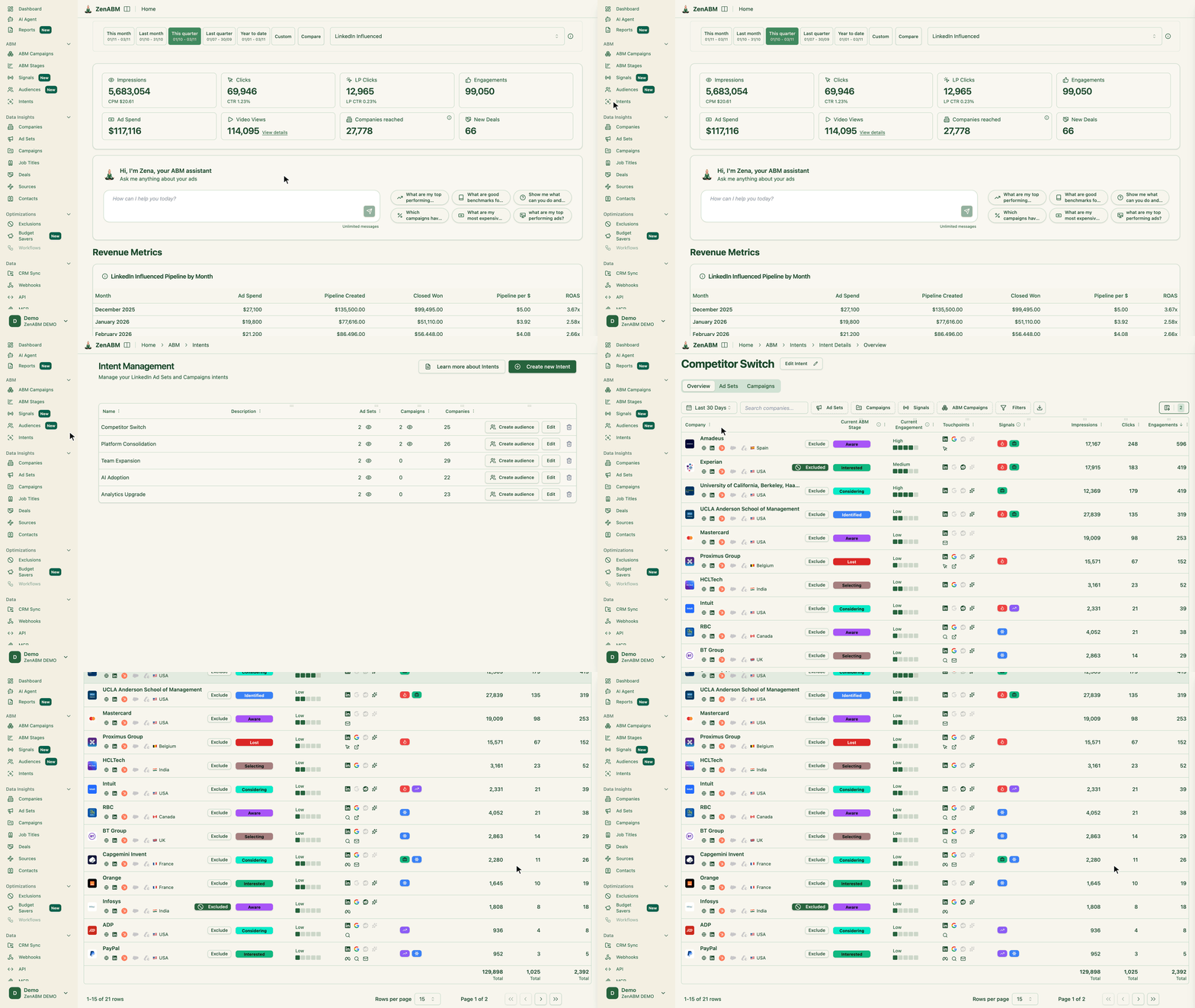
This view shows account stages next to LinkedIn ad engagement:
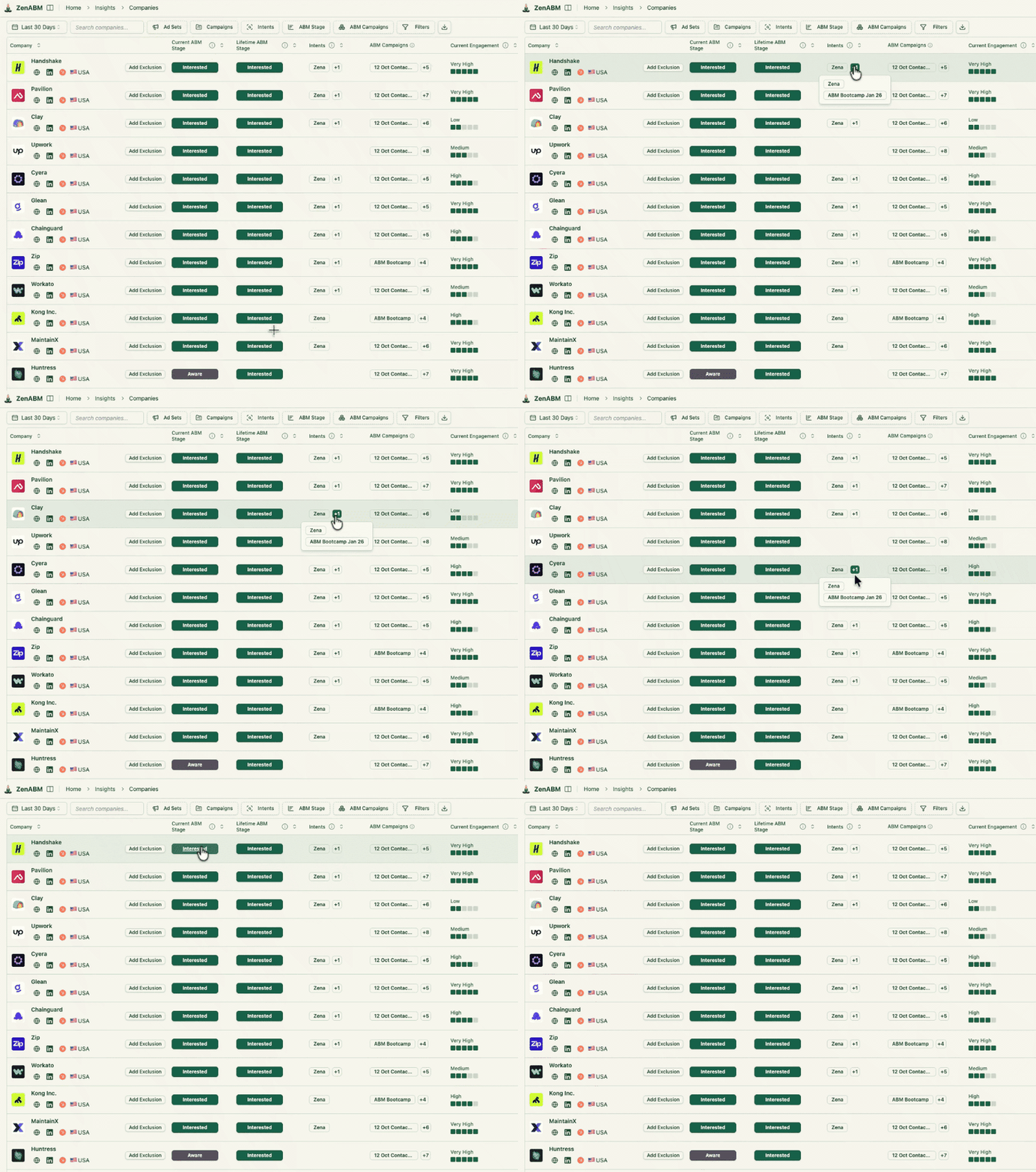
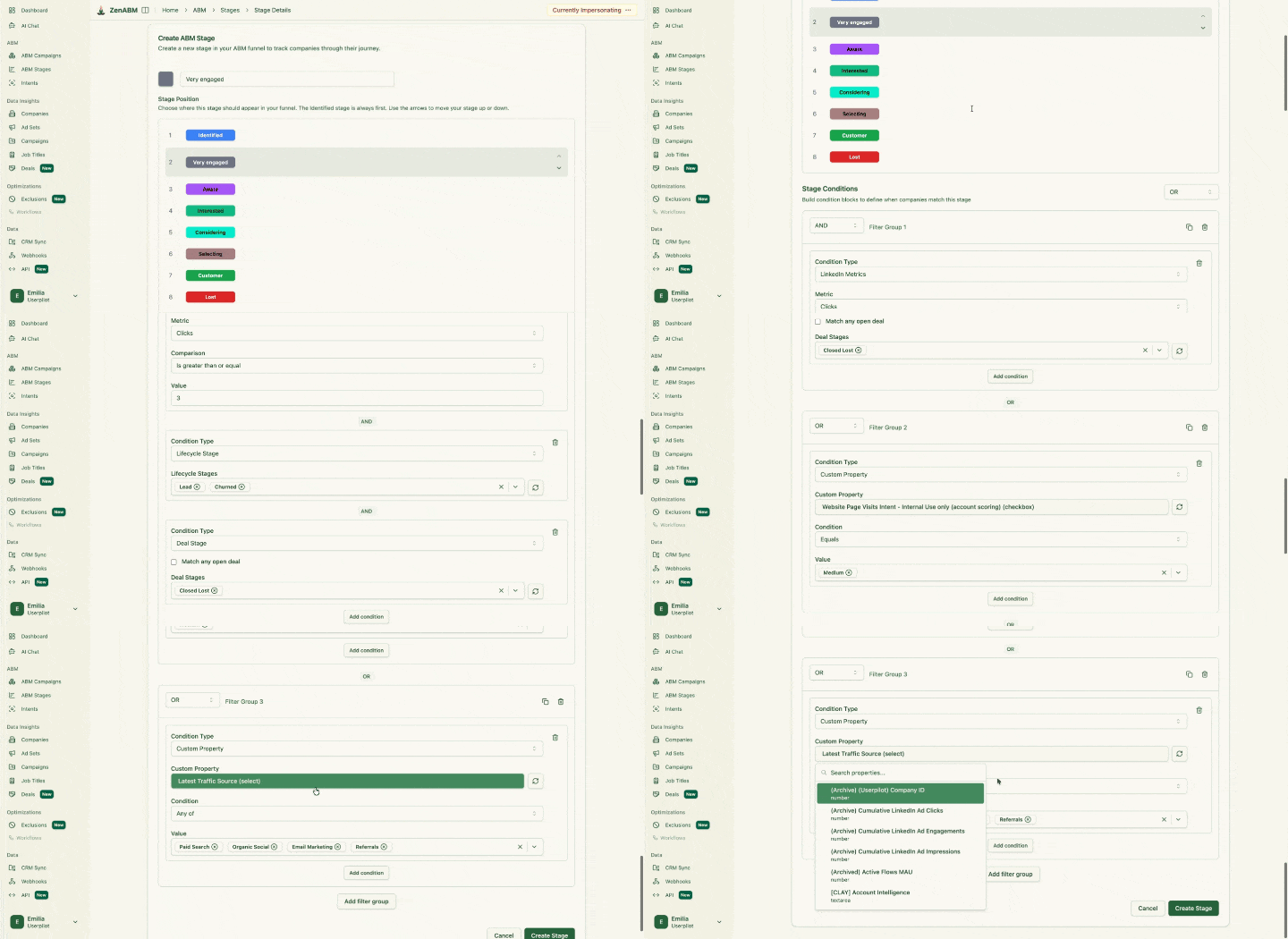
This stage editor lists the custom account stages you define:
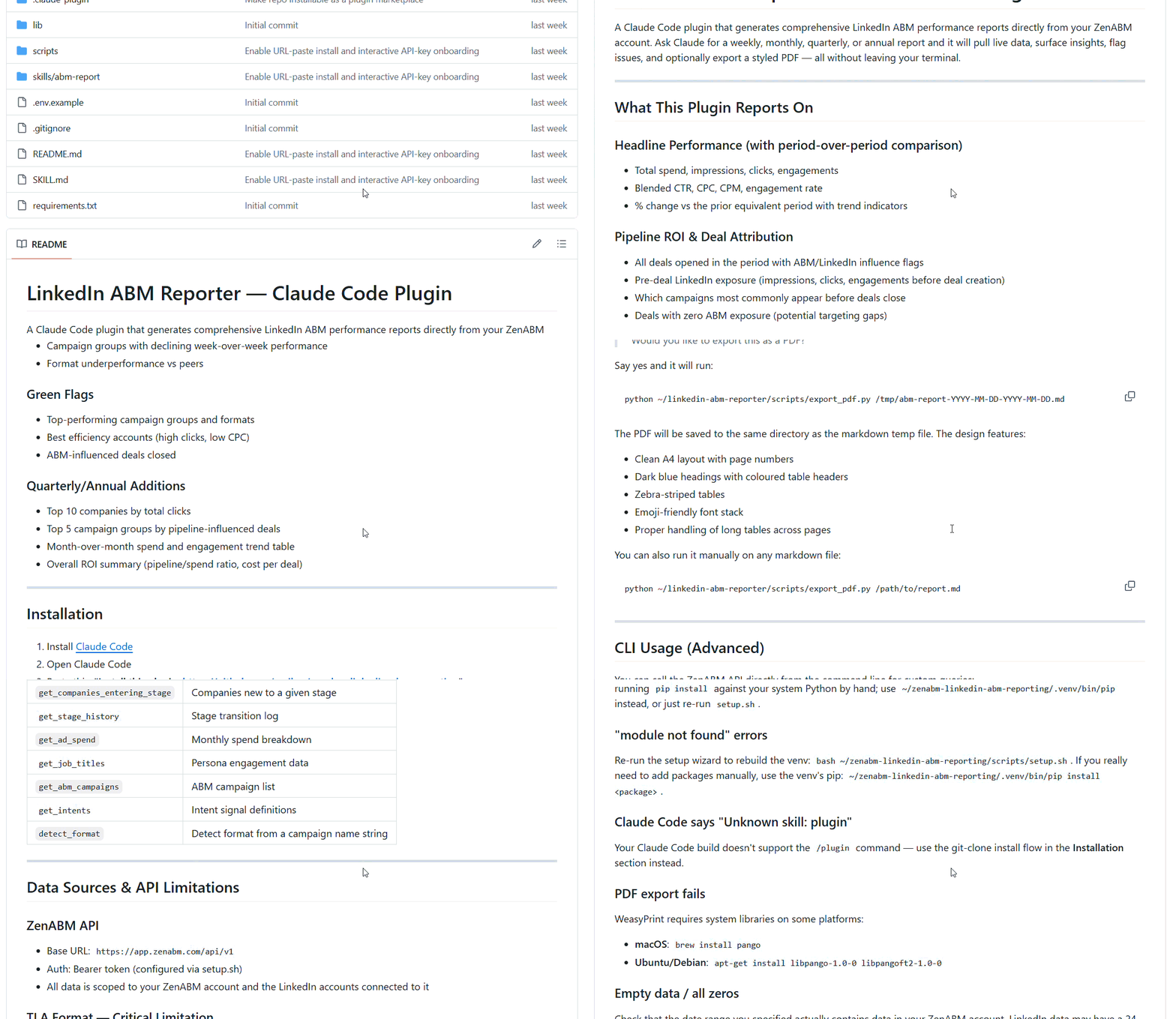
This is the Claude Code plugin repository for the ZenABM Outbound Agent:
For example, a company can click an ad set about a particular problem, meet your Interested stage rule and enter Clay through a webhook. The template then finds contacts and routes them to a sequence based on that signal.
See which accounts engage with your LinkedIn ads
Try ZenABM to connect campaign engagement with account stages and outbound signals.

Buy the smallest tool that does the job you actually use, and prove which signals predict your deals before you pay for a platform.
The best Common Room alternative depends on the job you need to replace. I would choose ZenABM for LinkedIn ad engagement and execution, Clay for a custom outbound build, or Warmly for website visitor identification. HockeyStack, Apollo.io and UserGems cover attribution, contact data and job changes. None of them needs to replace every Common Room feature to be useful.
ZenABM's paid Starter plan starts at $59 a month billed annually, compared with Common Room Essential at $2,500 a month billed annually. My own Clay system cost about $1,600 a month, although that was the cost of my setup and not Clay's list price. Include ad spend and any contact or outreach tools when you compare the total.
Apollo.io has a free tier for contact data, and ZenABM has a free plan after its trial with company-level engagement data and CRM sync. Neither replaces every Common Room signal. Start with the free option that covers your immediate job, then check whether its limits and the rest of your workflow fit.
Yes. Common Room imports company-level LinkedIn ad impressions, clicks and CTR, as well as lead gen form submissions at contact level. That does not give it per-person ad engagement data. It also cannot create or edit LinkedIn campaigns, so a team that needs ad execution must use another tool for that work.
Stay with Common Room if its person profiles and mix of community, product and CRM signals still fit your workflow. Zoom announced the deal on 2 July 2026, and it closed in July 2026. I would judge the subscription on the capabilities your team uses and its current contract, rather than assume the acquisition alone means you should switch.
About the author

