Black Friday: up to 50% off ZenABM 💥Get up to 50% off ZenABM with our massive BlackFriday sale! 💥 - only 24-30 November!Get the deal12 Days of ABM Christmas · Report on your 2026 LinkedIn ABM & plan 2027 · Free webinars, 26 Nov – 9 DecSave your seat


Emilia Korczynska is Head of Marketing and co-founder at ZenABM. Before that she was VP of Marketing at Userpilot for nearly 7 years, where she ran a large ABM program primarily on LinkedIn ads.

The best buying signals software depends on the signal you want. ZenABM fits engagement with your own LinkedIn ads, Zynt fits managed monitoring of company events, Apify fits custom scrapers and Clay fits stacking signals by your own rules.
That is my shortlist, ordered by how well each tool fits a team running LinkedIn ABM.
How I ranked them. I care less about how many signals a tool promises than whether they show up on accounts we actually win. Third-party intent did not work for me in a low-volume niche. That is why I lean on the intent signals that only our own campaigns produce. ZenABM is my own product, so weigh my first pick accordingly.
Here is the shortlist by the job each tool does. MCP stands for Model Context Protocol, a way for an AI client such as Claude to connect to a tool and work with its data.
Tool | Use it for | Signal or data used | Company or person | Entry price |
|---|---|---|---|---|
ZenABM | Signals from your own LinkedIn ads | Ad engagement and campaign themes | Company | $59/month billed annually |
Zynt | Managed monitoring of company events | News, job postings, funding, LinkedIn and X updates | Company | $800/month flat |
Apify | Custom signal collection | Public sources such as job boards and company pages | Depends on the source | $19/month plus usage (free plan with $5 of usage) |
Clay | Enriching and stacking signals by rule | Enrichment from multiple sources | Company and person | From $185/month (free plan available) |
Here is the shortlist with the test I would run before paying for any of it:

Score accounts on their LinkedIn ad engagement
ZenABM turns impressions, clicks and engagements into ABM stages, so you see which accounts are warming up.

ZenABM is the tool we built for teams that want to see which companies engage with their LinkedIn ads and what those companies engage with. I would pick it when your ads already reach target accounts and you want a signal you can tie to CRM records and deals. It is first-party, so it only knows what your own campaigns produced, and that is exactly why you can check it against revenue.
The Companies screen lists each engaging company with its performance numbers, a row-per-company view that LinkedIn Campaign Manager does not give you:
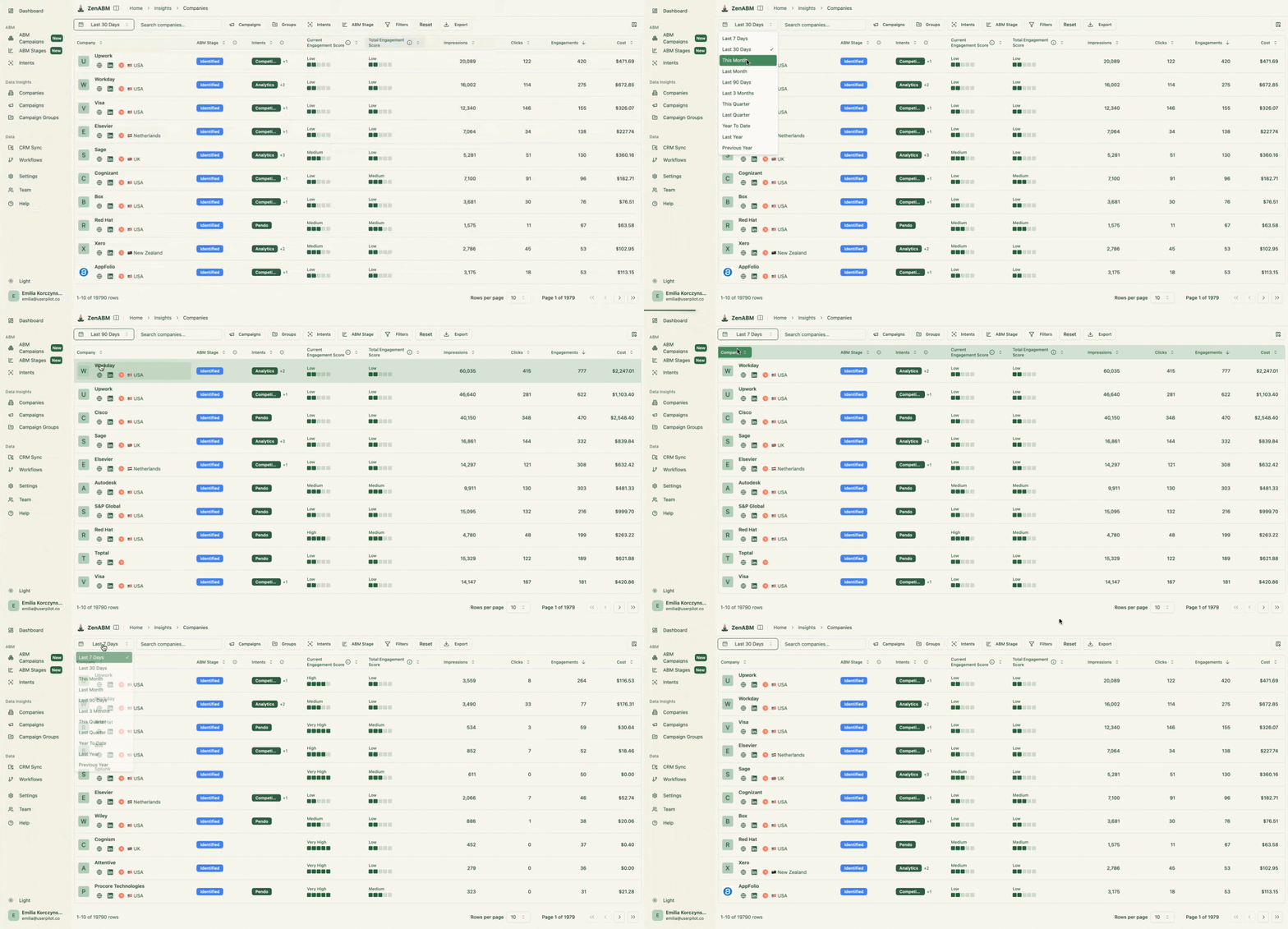
ZenABM matches LinkedIn ad impressions, clicks and engagements to the company behind them. It reads LinkedIn's official API, with no cookies, IP matching or third-party data sources, so what you see is what LinkedIn reports for your own campaigns.
You attach a theme to a campaign or ad set, and when a company engages with it, ZenABM assigns that theme to the company as an intent signal. The Intents walkthrough shows how a theme you set on a campaign becomes an account-level signal:
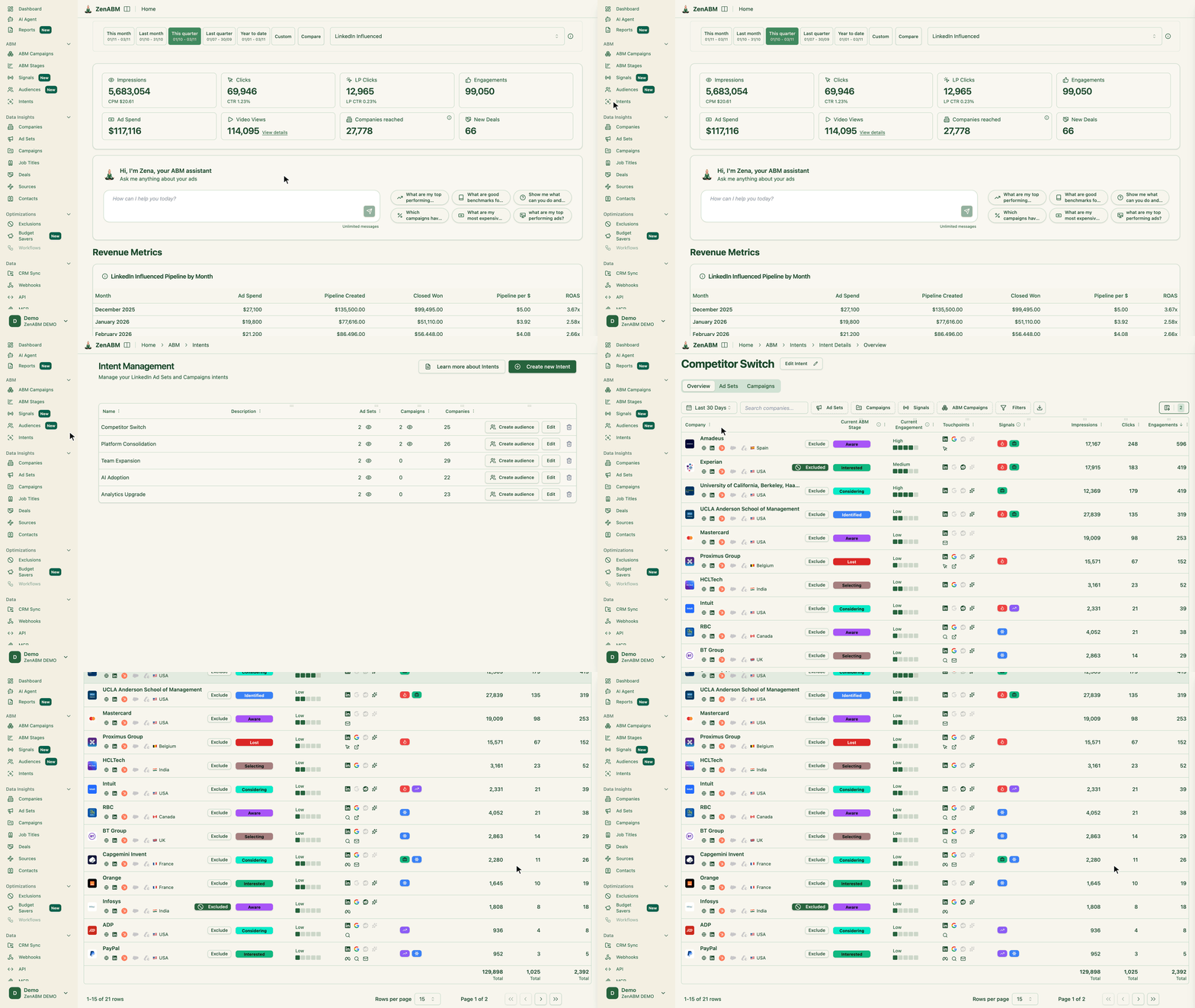
The signals ZenABM tracks per company are:
ZenABM writes engagement, scores, stages and intent onto HubSpot, Salesforce or Attio company records through CRM sync, and creates the properties for you, so nobody imports CSVs every week. It can also push engaged companies to Clay or another tool over webhooks.
For AI clients, ZenABM's MCP server connects the workspace to Claude, ChatGPT or Cursor. It has 129 tools and 45 expert skills, and 36 of the tools can change the ad account, for example by creating a campaign or changing a bid. The client asks you to confirm each of those changes before it goes live. Zena, our in-app AI agent, runs the same skills.
ZenABM plans are per workspace, with unlimited seats on every plan:
Plan | Billed annually | Billed monthly |
|---|---|---|
Starter | $59 per month | $69 per month |
Growth | $159 per month | $199 per month |
Pro | $399 per month | $499 per month |
Agency | $479 per month | $599 per month |
Every plan includes a 37-day free trial with no credit card, and a free plan follows the trial. Your LinkedIn ad spend is separate, and we never take a cut of it. The MCP server and REST API start with the Growth plan. See the current ZenABM pricing for what each plan includes.
Choose ZenABM if LinkedIn ads are a real part of your ABM program and you want company engagement and intent inside your CRM. Skip ZenABM, or at least wait, if you have not started advertising: an external company event will be available sooner than your own engagement data.
See which companies engage with your LinkedIn ads
Book a demo to see how ZenABM turns ad engagement into account signals.

Zynt is a managed monitoring service: you give it your target accounts, it watches public sources for events at those companies and sends you the ones that fit your ICP. I would look at Zynt if you want company events such as funding, hiring or leadership news without building the collection yourself. It answers what is happening at an account, which your own ad engagement cannot.
According to its G2 and Capterra listings, Zynt monitors news, job postings, funding databases, LinkedIn profile and company updates, X, RSS feeds and web search for your accounts. It scores each signal against your ICP, so reps get the events worth acting on rather than every mention. Setup starts with a 30-minute discovery call, and signals can go to HubSpot or Salesforce.

Imagine a target account announces a funding round and starts hiring for a new team. The useful next step is to check whether the company fits your market and whether the new team matches what you sell, rather than sending a sequence only because there was news. Your own ad engagement cannot cover this, because it says nothing about accounts that have not seen your ads yet.
Zynt's listings do not mention an MCP server, so ask about it if your team plans to query signals through an AI client. Ask how a signal is delivered to the CRM and what a rep sees before following up.
ZenABM adds the other half: it shows which companies and which job titles engaged with your LinkedIn ads, so a company event and your own engagement data can sit in one picture.
Zynt's Capterra listing shows one flat rate of $800 per month with a free trial, and its G2 listing says there is no long-term contract. Check which accounts and sources the plan covers, because an event only helps if the provider watches the companies you need to follow.
Choose Zynt when you have a defined list of target accounts and want someone else to watch them for company events. Skip it if you cannot name the accounts yet, or if $800 per month is more than that list is worth to you.
Apify is a scraping platform, so it is the right pick when the event you need sits on a public source and your team has time to build and maintain the collection. Apify gives you the most control of the four tools, and it asks the most from you in return. It also has no LinkedIn Ads data, so it will never show who engaged with a campaign.
Apify runs bots (called actors) that watch job boards, funding databases and public company pages, then push the events into your stack. A scraper watching job postings, for example, can supply a hiring event to a wider workflow.

That flexibility puts the work on your team. You decide which source to watch, how to match each event to the right company, and how to check that the signal is still useful when sales receives it. The quality of a custom signal depends on the actor you use and the freshness of the source, unlike a SaaS tool that curates the data for you.
On AI nativity, Apify has an official MCP server that lets AI clients run Actors, but you still wire its output into Clay or a CRM yourself. Test how its output reaches your CRM or enrichment process before you rely on it for a sales handoff.
Apify has a free plan with $5 of usage, then Starter at $19 per month plus pay-as-you-go usage, Scale at $199 and Business at $999. Add the engineering time to run and maintain the actors when you compare it with a ready-made provider, because that is usually the bigger cost.
Apify suits a team with a GTM engineer or another owner who can build and maintain a custom workflow. Skip it if you want a ready-made list without deciding how the data is collected.
Clay is a data workbench that enriches accounts from many sources and lets you define your own rule-based signals instead of buying a vendor score. I would use it when no single signal is enough and I want to decide how the signals combine. It does not read LinkedIn Ads engagement on its own, so it works best next to a source that does.
Clay can pull job changes, funding, technographic and CRM data into one table, then score each row against your ICP. A rule can combine a company event with your own account criteria, so sales sees a smaller list with a reason behind each row. You can also run AI prompts on each row.
Clay offers an official MCP server for AI clients, documented on its developer site. Check what a client can read and change through it, which is a separate question from the AI prompts you run on each row.
Bilal Ahmad's Clay list-building workshop shows the process I like: pull in the accounts you won, enrich them, score them, map personas, then export and push to LinkedIn ads. His QA step is to correct the model's good-fit output with examples and reasons, then rerun it until it is right about 90 to 95% of the time. If a rule throws out companies you already won, revisit it before you use it to find new ones.
Clay also helps after an account shows interest in your ads. ZenABM's free Clay templates send Interested-stage companies and intent signals into Clay, where contacts are found and passed to Smartlead or HeyReach with no manual export.
The Interested companies template starts with an engaged company, finds contacts by role and prepares them for a sequence. You still choose the personas and review the outreach.
Clay has a free plan, and paid plans start at $185 a month for Launch, with Growth at $495 a month adding webhooks and CRM sync. The total scales with enrichment volume, so a long list with several enrichment steps becomes a usage bill. Estimate the volume your workflow needs before you compare Clay with a flat subscription.

Clay fits a marketer or GTM engineer who wants to combine sources and control the rules. Skip it if you want a finished signal handed to you without maintaining a workflow.
Buying signals software collects events that give you a reason to look at a company or a person, resolves them to the account and routes them to sales or marketing. It can help you prioritize, but the event alone cannot tell you whether the company fits your market or intends to buy.
The main families are job changes and champions, hiring and funding, website visits, research, and engagement with your own ads. They describe different events, so I would not treat them as interchangeable.
A research signal says activity around a topic went up in someone else's network. A click on your ad says someone at an account interacted with a message you chose. A job change says a person moved, which may give sales a new contact but says nothing on its own about their current project.
Intent data is one type of buying signal, and third-party topic research is the weakest one in a niche with low search volume. I also rate reverse-IP identification as too unreliable to score accounts on. The two together are why I put so much weight on signals from my own campaigns.
Contact-data providers such as ZoomInfo, Cognism and Apollo are a different thing again: they tell you who the accounts and people are, not who is in market. Teams usually pair them with a signal source.
These are the four signal families, and each one leads to the same fit check before you act:

No, and this is the limit I would put on every tool above. A hiring surge at a company outside your target market may be real, but it is still a poor reason to spend LinkedIn budget on that account.
Casper Rouchmann makes a related point in his Bootcamp talk on list building: data quality varies by provider and region, with ZoomInfo stronger in the US and Cognism in the EU, but that is not the main point. What you mainly need is a good data provider to get to a list of companies that fit your ICP. I agree. Define the companies you want first, then use signals to decide which ones deserve attention. If you cannot yet name two or three segments you want to pursue, a tool will only amplify the sprawl.
I compare buying signals software on three things: the signal history you can inspect, the work needed to act on it and the full cost. A low subscription price matters less if nobody can verify the signal or get it to where sales works.
The price range is wide. Vendr's median for 6sense is $62,220 a year across 388 purchases, with a range from $11,191 to $175,915. Demandbase's Vendr median is $68,591 a year.
Those are enterprise research-intent platforms, a different budget conversation from ZenABM's $59 per month Starter plan. They also collect different kinds of data, so I would never compare the prices without comparing the signal.
Your total cost can also include enrichment, LinkedIn ad spend and the time someone spends checking records or maintaining a workflow. Ask what each quote includes and which tasks stay with your team.
The test starts with your own recent wins. It will not prove performance across your whole market, but it can expose an obvious mismatch before you commit.

Buying signals feed LinkedIn ads in two directions: they help you choose which companies to target, and they shape retargeting and suppression for accounts already engaging. I would use a signal to make a specific decision rather than add another score nobody acts on.
A hiring or champion signal can help you choose the companies for a LinkedIn audience. Your own ad engagement then tells you which topic deserves a follow-up.
For example, run a campaign around one topic and keep that theme clear in the campaign or ad set. When a company clicks, you can associate the company with that topic and use it to shape a follow-up or a retargeting audience. Done by hand, that means matching the engaged company to the campaign and recording the theme on its account record. ZenABM turns engagement with themed ads into account intent and can sync that intent to your CRM.
LinkedIn needs at least 300 matched members before an audience can be included as targeting. A new audience can take up to 48 hours to build and match, so leave time for that before a launch.
ZenABM's dynamic audiences use engagement, stages and CRM conditions to build retargeting or exclusion audiences, and refresh them daily. You can also use impression-based audiences to stop accounts that already passed a chosen threshold from absorbing more spend.
Here is the path from an ad response to a sales conversation, with the audience decision and the handoff to sales:

It can be checked against deal history, though a relationship is not proof that the ad caused the deal. In ZenABM's study of 7,466 first deals from 118 customers, accounts with 10 or more clicks in the 180 days before the deal had a 3.7x deal open rate compared with other accounts. The same study found a 4.4x deal open rate for accounts with 1,000 or more impressions.
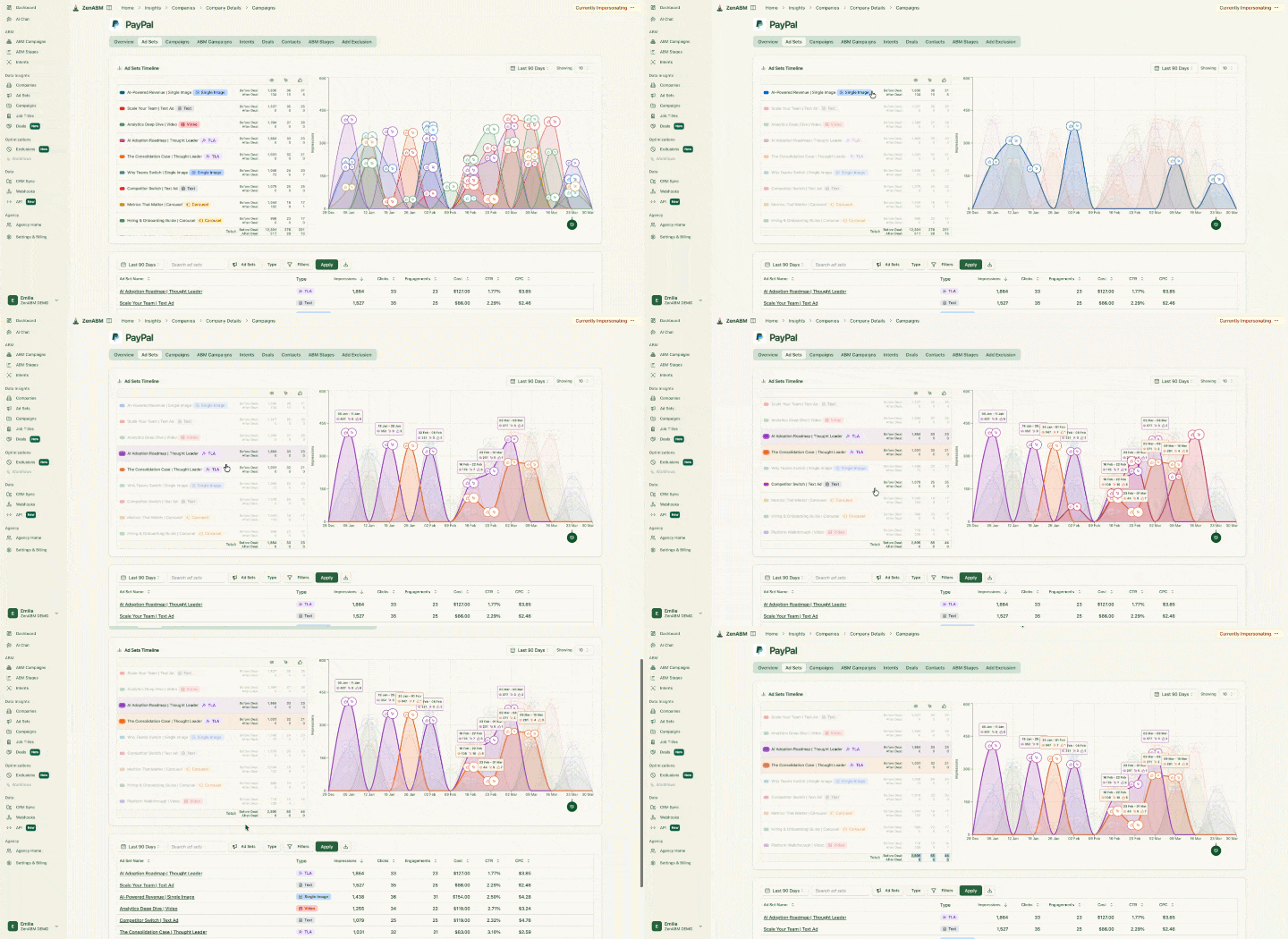
I read these as reasons to investigate your own data, not universal thresholds for declaring an account ready for sales. The deal view shows the campaigns that touched an account over time, which gives you the context for that investigation. This deal attribution dashboard shows a campaign touchpoint timeline for one account:
An ad click is not always a landing page visit, especially on Thought Leader Ads. ZenABM's October 2026 data pull from 168 LinkedIn ad accounts found a median all-click CTR (click-through rate, counting every click on the ad) of 3.374% for Thought Leader Ads against 0.532% for single image ads.
Landing page CTR tells a different story: the median was 0.367% for Thought Leader Ads and 0.37% for single image ads. I check both before treating a high all-click CTR as evidence that a topic drove website visits.
For wider context on your campaign numbers, use the LinkedIn ABM benchmarks report.
ZenABM turns LinkedIn ad activity into account context that marketing and sales can use. Here is what each feature does for you:
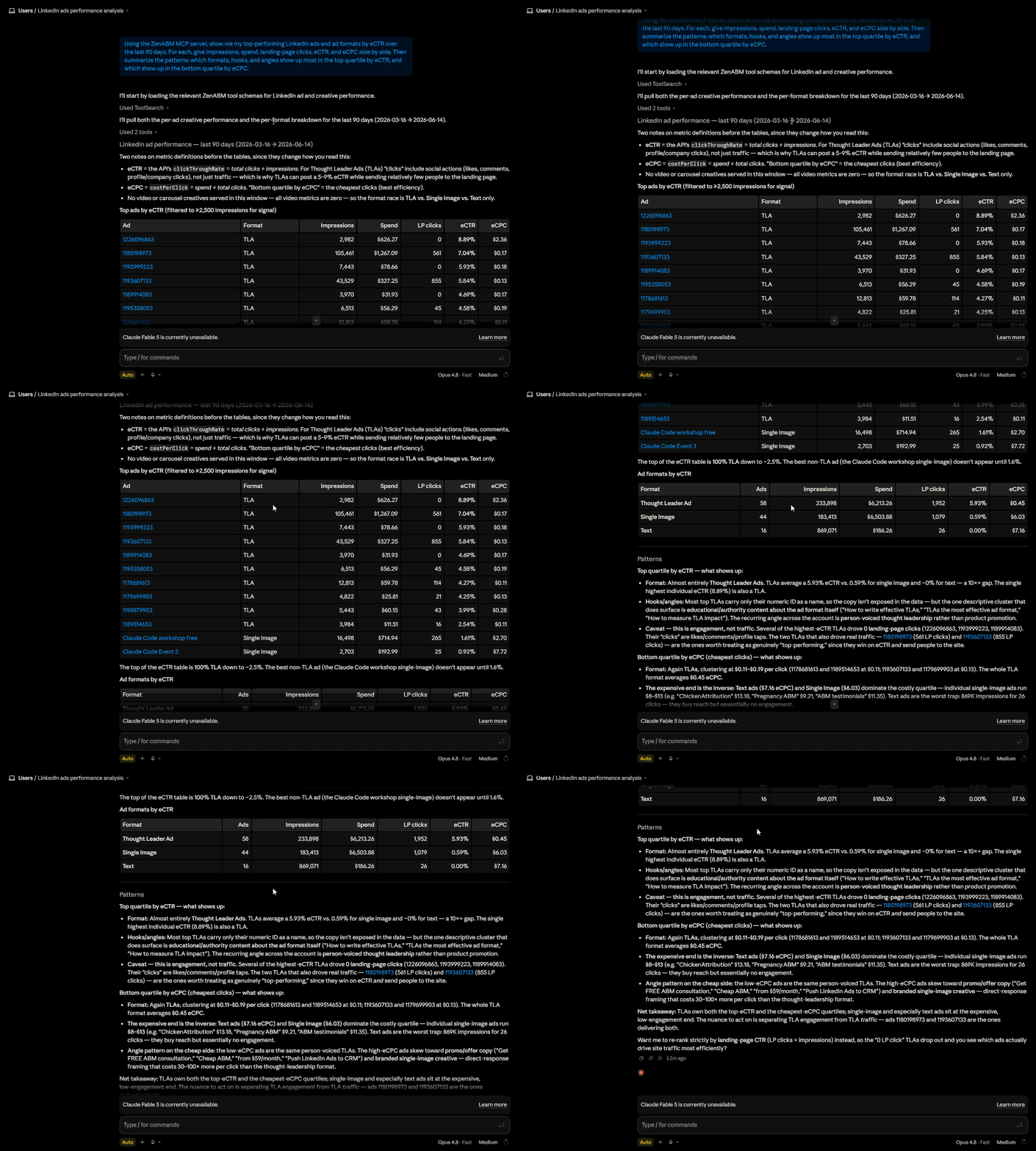
In this example, Claude pulls LinkedIn ad performance through the ZenABM MCP server:
Turn LinkedIn ad engagement into account signals
Try ZenABM to see engaged companies and the topics they respond to.

I choose buying signals software by the event I can act on, then check it against my own accounts. This table maps each situation to a pick, a reason and a case where I would skip it:
Your situation | Pick | Why | Skip it if |
|---|---|---|---|
You run LinkedIn ads and want signals you can verify against revenue | ZenABM | It ties company engagement and intent to CRM records and deals | You have not started advertising |
You want someone else to watch news, hiring and funding at named accounts | Zynt | It monitors public sources for your target accounts and scores events against your ICP | You cannot name your target accounts yet |
You have engineering time and want public sources only | Apify | You build the signal on any source you choose | You want a ready-made list |
You want a no-code layer that scores by your rules | Clay | It stacks many sources and tests rules against your won accounts | You do not want to maintain rules |

I would wait if you cannot name two or three segments to pursue or do not have an owner for the resulting list. If your ads and website have very little traffic, a tool that depends on your own engagement will also have little to work with.
Start with the buying signals your ABM team can monitor, pick the one that gives your team a reason to act, and test it against your last 3 won accounts. A signal earns its place when it helps you make a better decision.
Buying signals software collects events that show an account may be in market, such as hiring, a job change, a funding round, research activity or engagement with your ads. It resolves them to a company or person and routes them to sales and marketing. I use the event to prioritize an account only after checking that the company fits the market I want to reach.
Intent data, usually third-party research or topic interest, is one type of buying signal. Buying signals also include a champion changing jobs, a company hiring, a funding round and an account engaging with your ads. In my experience first-party signals, like clicks on your own LinkedIn ads, are more reliable in low-volume niches because they show an account reacting to your actual message.
It depends on the event you want to track. ZenABM captures company engagement with your LinkedIn ads, and Zynt monitors public company events at your target accounts. Apify supports custom collection from public sources, while Clay combines and enriches data by your rules. Test the signal against your won accounts before you choose.
ZenABM Starter costs $59 per month billed annually, Zynt is $800 per month, Apify starts at $19 per month plus usage, and Clay paid plans start at $185 per month. At the enterprise end, Vendr's median 6sense contract is $62,220 a year. Those products do different jobs, so include ad spend, enrichment and your team's time when you compare any quote.
ZenABM is built on the LinkedIn Ads API. It turns engagement into company-level intent, syncs it to your CRM and shows the ad touchpoints behind deals. In ZenABM's October 2026 data pull from 168 LinkedIn ad accounts, median landing page CTR was 0.367% for Thought Leader Ads and 0.37% for single image ads. That is a reminder to separate landing page visits from all clicks.
About the author

