Black Friday: up to 50% off ZenABM 💥Get up to 50% off ZenABM with our massive BlackFriday sale! 💥 - only 27-30 November!Get the deal12 Days of ABM Christmas · Report on your 2026 LinkedIn ABM & plan 2027 · Free webinars, 26 Nov – 9 DecSave your seat


Emilia Korczynska is Head of Marketing and co-founder at ZenABM. Before that she was VP of Marketing at Userpilot for nearly 7 years, where she ran a large ABM program primarily on LinkedIn ads.

The best AI bidding software for LinkedIn ads is ZenABM's Bidding agent if you want every bid change checked against LinkedIn's suggested bid (the range Campaign Manager recommends for an ad set) and approved by you, Tofu for weekly bid moves you approve, Metadata, Vector or Addie if you want bids changed for you within your limits, and Optmyzr for rules you write. The real choice is whether the tool changes bids itself or asks you first.
I compared them on four checks. Does the tool write to the ad account at all? Does it check against the suggested bid? Does it work on ABM-sized audiences? Does it also cover budgets and ad decay (ads whose performance slides over time)?
Read this before you hand a tool your ad account: on ABM-sized audiences the wrong kind of bid tool moves real money on very little data, and the four checks below catch that before you buy.
How I ranked them. I sorted the tools by who moves the money: tools that ask first come first, then tools that change bids within your limits, then rules you write. ZenABM is our own product, so it leads the ask-first group, and I state its limits below. Facts and prices come from each vendor's own site, checked in November 2026. Tools that only read LinkedIn data or control audiences are out, because they do not change bids.
Here is the three-camp split with the pick for each situation:

Short on time? This table shows how they compare:
Tool | Changes bids itself | Approval step | Entry price | Good fit for |
|---|---|---|---|---|
1. ZenABM | No, writes after you confirm | Every change | From $59/month | Bid changes you approve first |
2. Tofu | Recommends weekly bid moves | Every change | $2,500/month flat | Weekly bid, budget and creative moves |
3. Metadata | Yes, within your limits | Larger moves wait for approval | Not published | Bidding toward CPC, CPL or pipeline targets |
4. Vector Bid Agent | Yes, up to every 15 minutes | Not described | Included in Vector, from $36,000/year | Teams already running audiences in Vector |
5. Addie | Yes, hundreds of adjustments a day | Not described | From $999/month | Hands-off campaigns on LinkedIn, Google and Meta |
6. Optmyzr | Rules you write | Your choice per rule | Priced by ad spend | Rules across several channels |
The word "bidding" hides most of the differences between these tools. A tool that says bidding may only control impressions, scheduling or exclusions, so four checks decide almost everything.
Before the list, here is the job a bid tool is hired for:
The lowest bid that still spends the daily budget.
A bidding agent is built to monitor spend daily and adjust bids up and down every day until it finds that bid. Competitors move, so yesterday's right bid is today's wrong one. Doing it by hand across 200 ad sets is impossible. We all still waste too much time copying and pasting into Campaign Manager 😅.
By hand, it means stepping bids by small amounts every day and checking each change against the suggested bid range, one ad set at a time. ZenABM's Bidding agent does the check for you, so you don't have to work through ad sets one tab at a time.
Here are the four checks, in the order I would ask them:
Asking first has a cost too. A freelance LinkedIn Ads consultant told us the bidding tool they use has no apply-all button, which they found bizarre because they apply each adjustment one by one. So ask any ask-first tool how it handles many changes at once.
Here are the four checks as a short checklist, with the fact behind each one:

Whichever tool you choose, keep a human approval step before money moves. Ivars Krutainis put it this way:
"Until there is any bit of human left in the loop there will be a need for common sense and someone that just says no, wait, stop, let's rework this."
His point is that ads signed off by real enterprises still go out obviously wrong. A bid tool is no different. I agree with him, which is why the list starts with the tool that asks first.
We build ZenABM, so weigh my pick accordingly. I put it first because it is the one tool here whose live behavior I can document line by line: it reads LinkedIn's suggested bid, shows you the change and writes only after you confirm.
Here is Zena, ZenABM's AI agent, answering questions about LinkedIn ad performance, the same chat where you ask for a bid change:
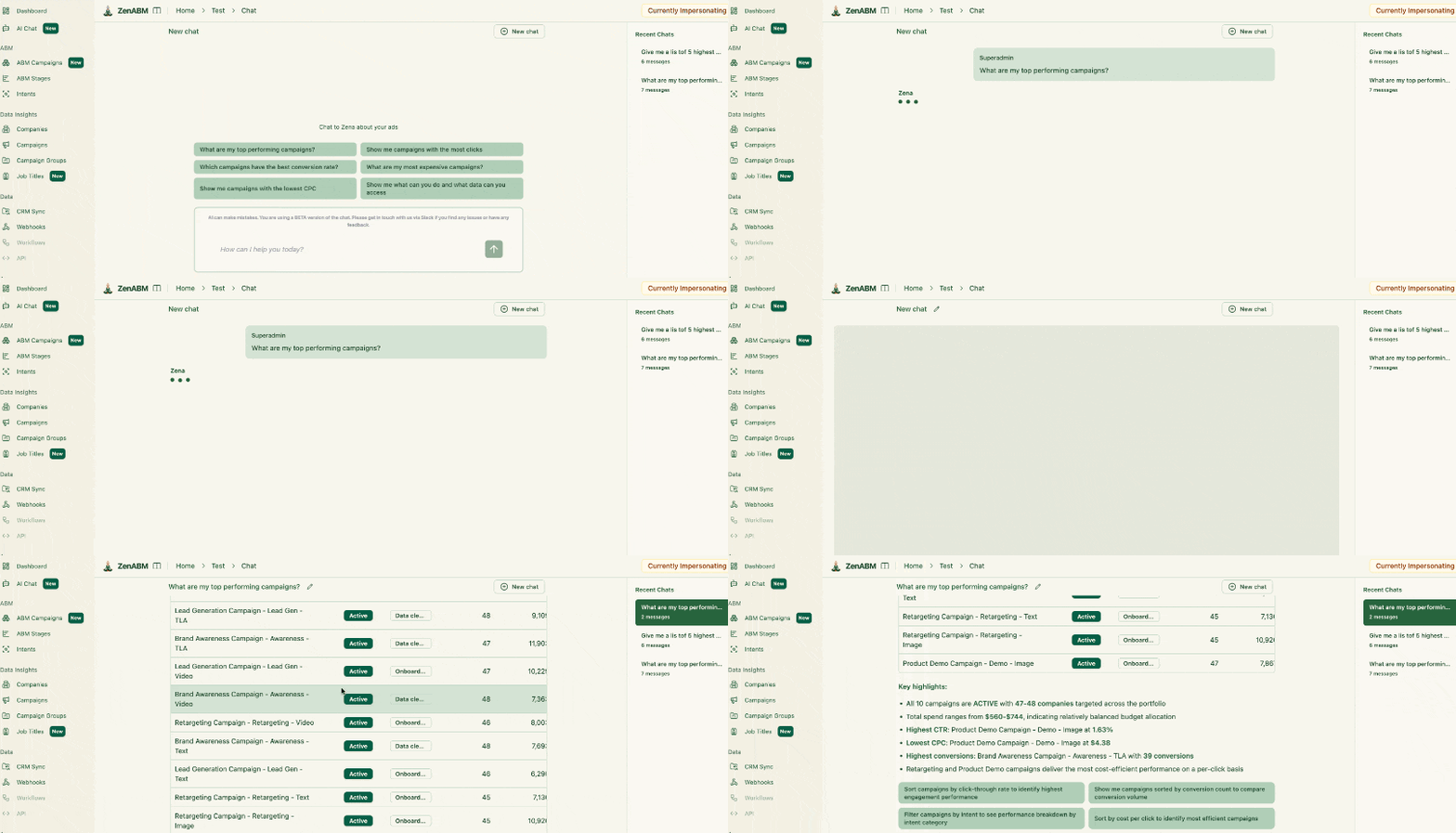
Bid changes checked against the suggested bid. ZenABM reads LinkedIn's suggested bid for any ad set live. It is the same number Campaign Manager shows, along with the allowed bid range and the daily budget limits. You ask Zena for a change (for example, set the bid 10% below suggested). Zena shows the suggested bid, your target and the current bid, and asks you to confirm. Then it writes the new bid to LinkedIn. If your target is below LinkedIn's minimum, Zena proposes the minimum instead.
A bid only applies to manual or cost cap bidding, so if the ad set is on Maximum Delivery, Zena can switch it to manual bidding once you approve. Dynamic Ads have no suggested bid, so this check doesn't apply to them. Every change that touches live spend is confirmed first and logged, so nothing moves without you seeing the old and the new value.
Bulk budget changes. Daily and total budgets can be changed one ad set at a time or as a batch. A campaign-level budget only applies when the campaign uses group budget optimization. Because LinkedIn can spend up to 150% of a daily budget on a strong day, I treat the daily figure as a target and review pacing, not as a ceiling.
Ad decay. Spotting decay by hand means comparing each ad's click-through rate week over week and remembering how often the audience has already seen it. ZenABM's Bidding agent flags an ad when its engagement rate has fallen for consecutive weeks. It checks the drop against the frequency the audience has seen it at. You then choose which ads, ad sets or campaigns to pause.
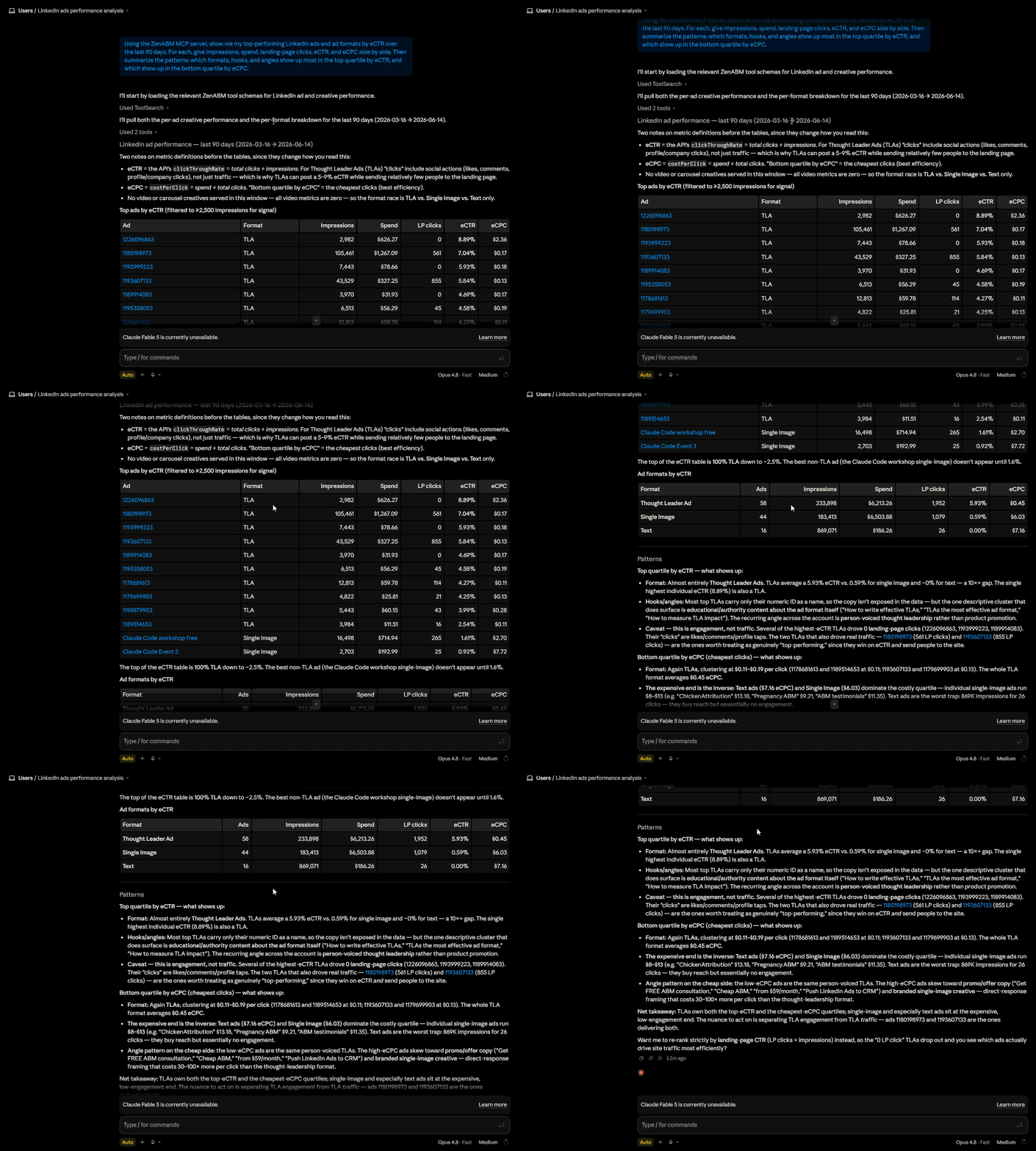
Bidding from the MCP server. Bid and budget changes also work through the MCP server, so you can run them from Claude, ChatGPT or Cursor. The server has 129 tools, and 36 of them can change something in the ad account. Each of those 36 is flagged as a write, so your AI client asks before acting. It also comes with 45 expert skills, including /ad-decay and /budget-wasters.
Here is an AI chat pulling LinkedIn ad performance data from ZenABM, the same connection that carries the bid and budget changes:
ZenABM starts at $59/month on the Starter plan billed annually ($69/month billed monthly), with a 37-day free trial and no credit card. The MCP server and REST API come from the Growth plan, which is $159/month billed annually ($199 monthly). Zena is included on every plan, with daily chat limits that depend on the plan. ZenABM never takes a cut of your ad spend, and there is no markup.
Choose ZenABM if you run LinkedIn-first ABM on lists of target accounts, where audiences are too small for automatic bidding to learn. Choose it too if you want bid and budget changes you can see before they go live. You need one person who approves changes, and that is the point. Skip it if you want a tool that adjusts bids on its own all day, or if most of your spend is outside LinkedIn.
See every bid and budget change next to LinkedIn's suggested bid
Book a demo and watch Zena show the suggested bid, the new bid and a confirm button before anything is written.

Tofu is the other tool that asks first. Tofu Ads Agent plans, builds and launches LinkedIn and Google campaigns from your CRM, then delivers weekly bid, budget and creative moves that stay recommendations until you approve them.
A bid optimization agent is live for LinkedIn, and Tofu also builds audiences from your CRM, writes on-brand creative and launches the campaigns. You can ask for changes and approve them in its app, in Slack or Teams, or from Claude and ChatGPT through its MCP server.
That makes Tofu closer to an outsourced paid media team than to a pure bid tool: the bid agent is one part of a full campaign service.
Tofu Ads Agent costs a flat $2,500 per month, not a share of ad spend, and Tofu recommends a media budget of at least $3,000 to $5,000 a month.
Choose Tofu if you want one agent to build, launch and tune LinkedIn and Google campaigns, with you approving each weekly move. Skip it if you only need bid changes, or if you want a documented check against LinkedIn's suggested bid.
Metadata's Bid Agent changes bids itself, within guardrails you set. You give it a target CPC, CPL or pipeline goal instead of a bid figure, and it makes thousands of small bid adjustments a day.
Here is the Bid Agent dashboard, comparing cost per lead with and without the agent:

You connect the ad account and set the target, then set spend limits, CPC boundaries, pacing rules and approval thresholds. Small moves happen on their own, and a larger move waits for your approval. In my view that is a good deal only when the account has enough conversion volume for the agent to learn from.
It also shifts budget toward the hours that convert best, so set your guardrails before you turn it on.
Metadata does not publish its prices, so ask for a quote. Its trial starts with a bid review on one of your live LinkedIn campaigns.
Choose Metadata if you run high conversion volume, trust the tool to move money and are willing to set guardrails. Skip it for small ABM lists, where I would keep a person in the loop.
Vector's Bid Agent changes your LinkedIn bids itself, up to every 15 minutes, and paces your budget across the week. Your audiences, creative and targeting stay with you, and every adjustment is logged so you can see why it was made.
Here is Vector's chart of cost per click and clicks before the bid agent, during its training days and after it took over:

The Bid Agent replaces Maximum Delivery: instead of spending the whole daily budget, it optimizes for efficiency, outcomes and pacing. It works on the audiences you run in Vector, including ABM lists, CRM imports and retargeting.
It is a strong fit if Vector already builds your LinkedIn audiences. Vector does not describe an approval step, so the limits you set matter more than usual.
The Bid Agent is included in every Vector plan rather than sold on its own. Growth starts at $36,000 a year with one bid agent, and Scale and Enterprise include three and five.
Choose Vector if you already run your LinkedIn audiences in Vector and want an agent to handle the bids. Skip it if you need a standalone bid tool or want to approve each change.
Addie is an AI agent that runs B2B ads on LinkedIn, Google and Meta. It sets up and manages campaigns, builds audiences and makes hundreds of small adjustments a day on every campaign.
The pitch is continuous optimization across three channels from one agent, which suits a team splitting spend between LinkedIn, Google and Meta that doesn't want three workflows. Addie does not describe an approval step for its adjustments.
Addie starts at $999 a month, and you get a free trial by booking a demo. A dedicated advisor is an optional add-on.
Choose Addie if you split spend across LinkedIn, Google and Meta and want one agent to run and tune the campaigns. Skip it on small ABM audiences, where there is little data for any agent to learn from.
A middle path uses rules you write. Optmyzr's Rule Engine for Meta and LinkedIn acts on metrics such as CPL, ROAS or CTR, for example "reduce budget if CPL exceeds $50", and you choose whether each rule waits for your approval or applies itself.
Here are rule templates from Optmyzr's Rule Engine, from raising budgets on converting campaigns to pausing non-converting ad sets:

You write the conditions and the tool applies them, so you can always see why something changed. Rules can run daily, weekly or on a custom schedule, and Meta and LinkedIn tools are included on the Essentials and Premium plans.
Optmyzr prices by monthly ad spend rather than by seat, and G2 lists its entry plan at $209 a month. There is a 14-day free trial with no credit card.
Choose Optmyzr if you manage several ad channels and want rules you control. Skip it if LinkedIn is your main channel and you want a tool that adjusts bids for you.
The summary table covers who moves the money. This one shows what each tool covers beyond bids and what it needs from you:
Tool | Free trial | Channels | Also covers | What it needs from you |
|---|---|---|---|---|
ZenABM | 37 days, no credit card | Bulk budgets, ad decay, Budget Savers | Someone to approve each change | |
Tofu | Not stated | LinkedIn, Google, Meta | Campaign builds, audiences, creative | Weekly approval of its moves |
Metadata | Starts with a bid review | LinkedIn bid agent; ads on 8 channels | Budget pacing | Targets, limits and approval thresholds |
Vector Bid Agent | Not stated | Weekly budget pacing | A Vector plan and audiences | |
Addie | After a demo | LinkedIn, Google, Meta | Campaign setup, audiences | A demo to start |
Optmyzr | 14 days, no credit card | Google, Microsoft, Meta, LinkedIn, Amazon | Budgets, pauses, alerts | Rules you write |
A few traps to watch:
Read related: Best LinkedIn Marketing Tools for 10 different Use Cases, from Outreach, Comments to Ad Optimization
So which should you pick? It comes down to who knows your account better, you or a model. Here is how I would choose:
Situation | Pick | Why |
|---|---|---|
Approval before money moves | ZenABM or Tofu | A human knows the account better than a model, which is true for most ABM teams. ZenABM checks the suggested bid and confirms every change before it writes. Tofu suits you if you also want campaigns built and tuned weekly. |
Hands-off bidding with limits | Metadata or Vector | You have enough conversion volume for an agent to learn from. Metadata lets you set approval thresholds for larger moves, and Vector fits if your audiences already live in Vector. |
Rules across several channels | Optmyzr | You want rules you can read, applied automatically or on approval. |
Whatever you choose, check at ad set level that the automated changes actually applied.
This chart sums up the three situations and the pick for each:

Don't buy any of them yet if you have no defined target accounts, no campaign budget, or nobody who owns checking the changes. If your audience is small and your conversion volume is low, bid manually and cap costs yourself, because that is where automated tools have the least data. A tool that can't confirm changes before they go live is a risk on top of that.
Each step of the job above maps to a ZenABM capability.
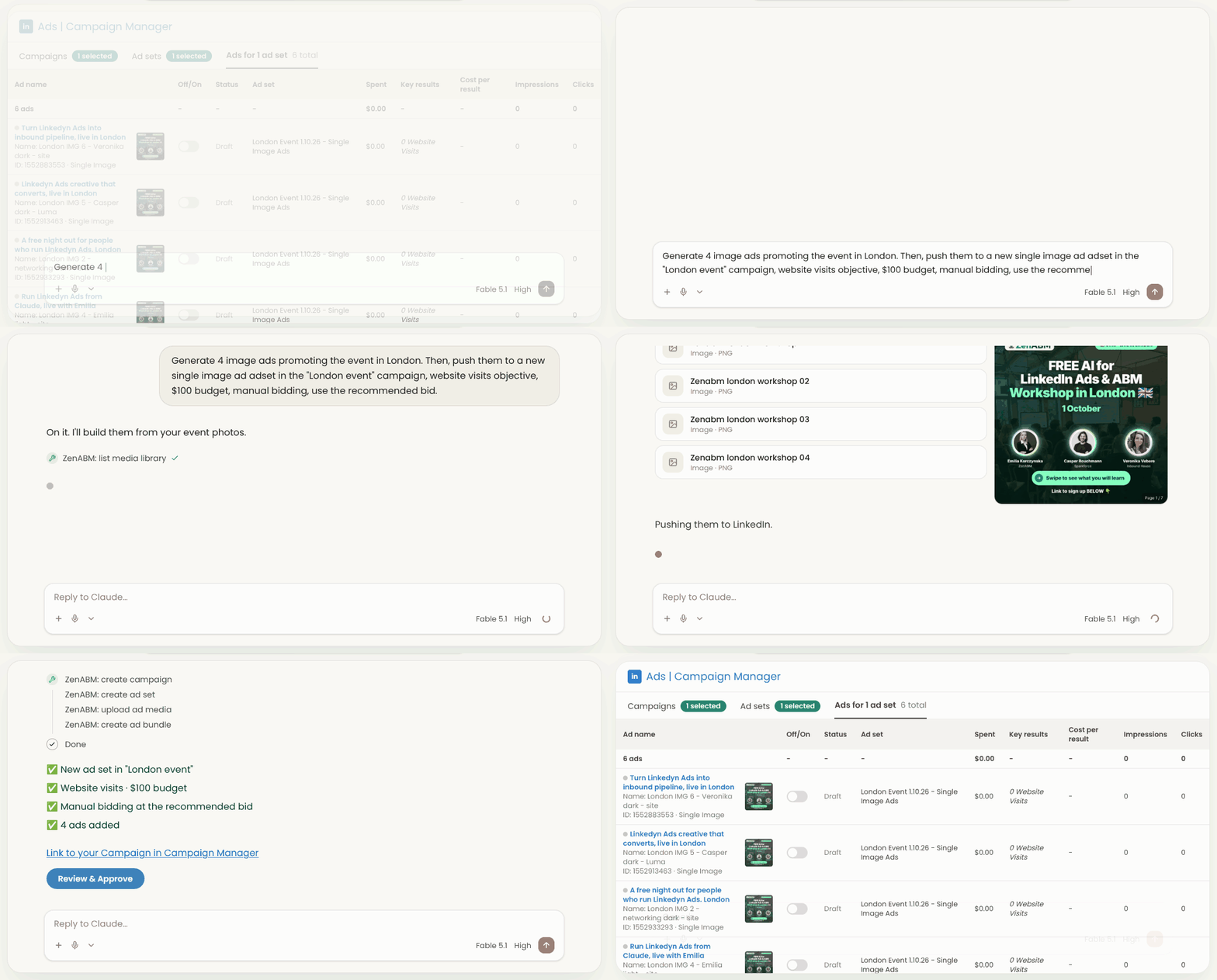
Here is Claude creating LinkedIn ads end to end through the MCP server:
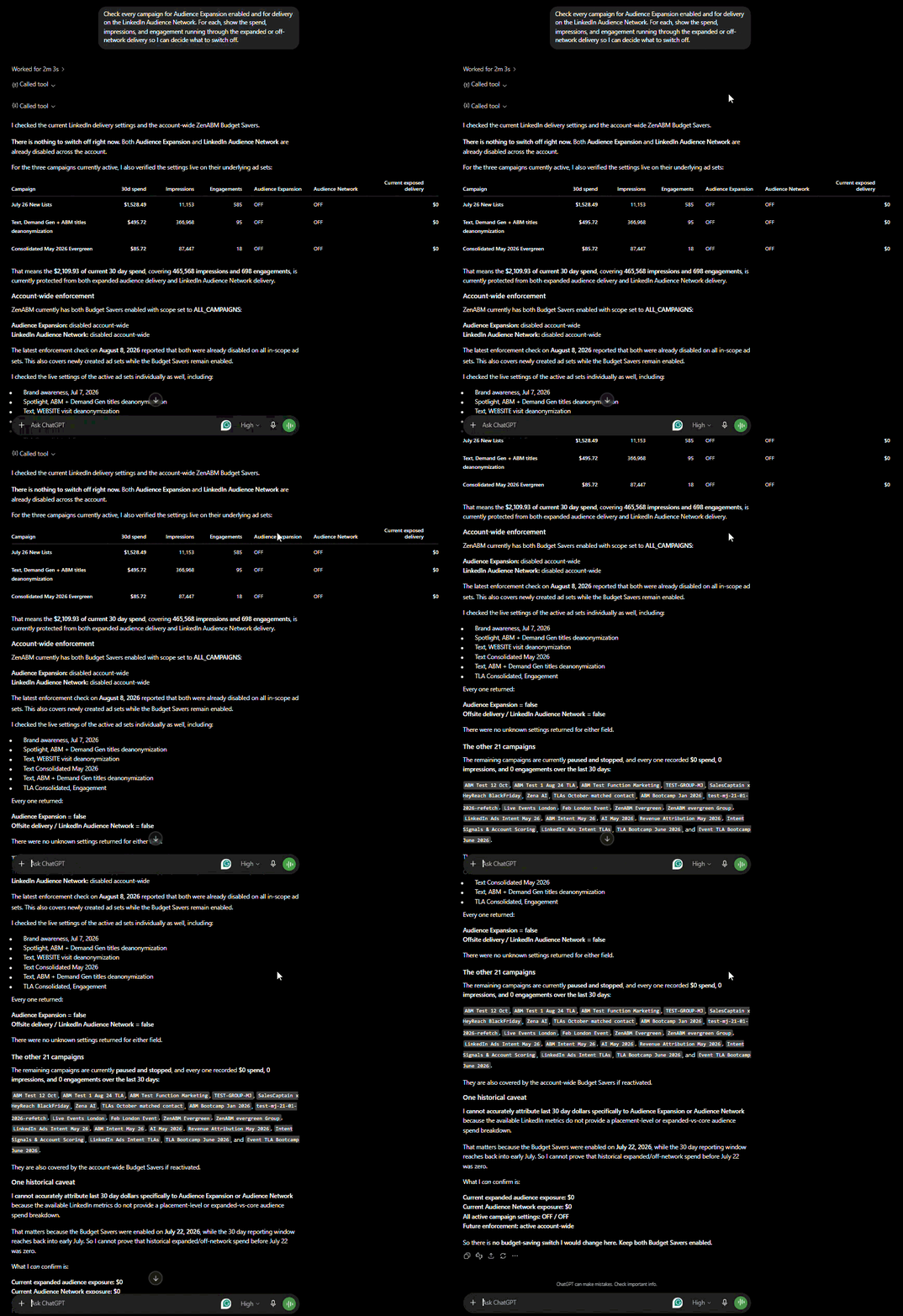
Here is ChatGPT checking campaigns for Audience Expansion and Audience Network delivery through the MCP server:
Watch every bid change land with your approval
Test ZenABM for 37 days on your own campaigns, with no credit card.

Pick the tool for your audience size, not for the longest feature list. If your account list is small, an ask-first tool saves you the checking without giving up control, and an auto-write tool earns its place only when it has conversion volume to learn from. Either way, let nothing move money without a yes.
It depends on your audience size and how much control you want. ZenABM and Tofu ask before changes, and ZenABM checks each one against LinkedIn's suggested bid. Metadata, Vector and Addie change bids themselves within your limits, and Metadata can hold larger moves for approval. Optmyzr runs rules you write across channels. For ABM-sized audiences I would pick a tool that asks first.
Yes. Campaign Manager offers three bidding strategies: Maximum delivery, which is automated, Cost cap and Manual bidding. They are worth testing before you pay for a third-party tool. They work best with enough conversion data, which small ABM account lists often lack.
Not fully. LinkedIn's enhanced manual bidding can move actual bids up to 45% above your bid, which is not the same as handing over the account. Third-party tools can write bids through LinkedIn's API, but with approval and guardrails, so you decide how much control to give up.
It depends on the tool. Vector says its Bid Agent replaces Maximum Delivery and optimizes for efficiency and pacing instead of spending the whole daily budget. In ZenABM a bid only applies to manual or cost cap bidding, because Maximum Delivery ignores it, so Zena can switch the ad set to manual bidding if you approve.
There is no published figure. The practical warning is that on a niche B2B audience the AI may lack the data to bid well and overspend. If your account list is small, bid manually and cap costs yourself, and use an ask-first tool to speed up the checking rather than to hand over control.
It can write. ZenABM's MCP server has 36 tools that change the ad account, each flagged as a write so Claude, ChatGPT or Cursor asks before acting. Read-only analysis never moves spend. That line separates a reporting tool from a real bid agent, so always check which one you are buying.
About the author

