

©2026 ZenABM - All Rights Reserved.

Most guides on how to optimize LinkedIn ads with ChatGPT skip the one thing that matters.
ChatGPT cannot see your ad account.
By default, it has no idea what you spent, which ads are dying, or which companies clicked. So it guesses, and the advice sounds smart while being worth nothing.
I learned this the slow way. My early prompts got me tidy paragraphs about “stronger hooks” and zero decisions.
Two things fixed it.
First, I stopped asking ChatGPT questions it had no data to answer.
Second, I gave it my real data through a LinkedIn ads MCP connector.
This guide covers both.
You get prompts that work today with no setup at all, then the setup that lets ChatGPT read your live account, then the exact prompts I run every week to cut waste and find winners.
A quick overview:

We need to be clear about this before you write a single prompt.
It saves a lot of wasted time.
What it cannot do on its own: see your spend, your ads, your audiences, your clicks, or your CRM. It cannot pause an ad. It does not know your benchmarks.
What it can do with no data: write and rewrite ad copy, pressure-test an offer, plan an audience, critique a landing page, and think through structure.
What it can do with your data: rank ads by real efficiency, find the money you are wasting, spot ads that are dying, catch targeting leaks, and tell you where to move budget.
That last group is where optimization actually lives.
One warning before the prompts. ChatGPT is happy to sound confident about numbers it does not have.
If you ask “which of my ads is best” with no data attached, you will get an answer, and the answer will be fiction.
Start here if you have not connected anything.
These work today in a normal ChatGPT window.
Export a report from Campaign Manager, then run this before you ask anything else. It stops most invented numbers.
Here is a LinkedIn Ads export. Before analyzing anything, read the file and tell me back: the number of rows, the exact column names, the date range covered, and whether each row is an ad, an ad set, or a campaign. Flag any column stored as text instead of a number. Do not calculate anything yet. If I later ask for a metric that is not in this file, say so instead of estimating it.
That last line is the important one.
Several columns you see in the dashboard, including cost per result and bid, never come through in the CSV, which is one reason a budget plan built only on exports tends to drift.
The prompt to find wasted spend:
Using only the columns in this file, list the 10 ad sets with the highest spend and the lowest click through rate. Show spend, impressions, clicks and CTR for each. Rank them by how much monthly spend is at stake. Ignore any ad set under 1,000 impressions, because the sample is too small to judge. Show your working so I can check the maths.
Group every ad in this file by ad format. For each format, give me total spend, total impressions, weighted average CTR, and cost per click. Weight the averages by impressions, not by row count. Tell me which formats have too little data to compare.
Weighting matters.
Without it, one tiny ad set with a freak CTR can look like your best format.
No data needed for this one.
Here is a LinkedIn ad that is underperforming: [paste copy]. My audience is [job titles] at [company type], and their main problem is [pain point]. Rewrite it three ways: one leading with a specific number, one leading with a mistake they are probably making, and one written in first person as a short personal story. Keep each under 100 words. Put any link at the end, not the start.
If you want a head start on the format itself, our free Thought Leader Ad generator drafts the first version for you.

That link instruction comes from real data.
In ZenABM’s analysis of 2,828 Thought Leader Ads, 75 percent of the top performers put the link in the bottom quarter of the text, and 65 percent used first-person voice.
Most “creative problems” are offer problems.
My LinkedIn ad gets clicks but almost no conversions. The offer is [describe it] and the landing page asks for [form fields]. Act as a sceptical buyer in [job title] at a [company type]. Tell me why you would not fill this form in. Then suggest three lower-friction offers I could test instead, and rank them by how much effort each takes me to produce.
I sell [product] to [ICP]. Help me build a LinkedIn targeting plan. List the job titles and seniorities worth targeting, the ones people usually include by mistake, and the exclusions I should add. Then tell me which of these segments are likely to fall below LinkedIn’s 300 member minimum if I split them, and suggest how to group them instead.
Those six will improve most accounts. But none of them can tell you which companies engaged, or what actually turned into a pipeline.
For that, ChatGPT needs your data.
This takes about five minutes and changes what every prompt below can do.
ChatGPT supports custom MCP connectors.
MCP is just the standard that lets an AI app talk to an outside data source. OpenAI now calls these apps, after a rename in December 2025, but the setup is the same.
Developer mode is where custom connectors live. It is available on Plus, Pro, Business, Enterprise, and Edu plans on the web.

Go to Plugins in the sidebar, then click the plus sign to add a custom connector.

Add the server URL, a name, and a short description, then authorize it.
The endpoint is https://app.zenabm.com/api/mcp, and it uses OAuth or a Bearer token.


Ask ChatGPT what tools it now has. It should list the ZenABM tools.

The server exposes your LinkedIn ad performance, company-level engagement, job titles, ABM stages, intent themes, and CRM deals.
It also computes eCTR and eCPC, which Campaign Manager does not show, and it reads your CRM deals so pipeline questions actually have an answer.
It ships 15 ready-made workflows as slash commands too, including /budget-wasters, /ad-decay, /persona-audit, and /scaling-planner.
Custom connectors in ChatGPT are in beta.
Read access works on Plus, Pro, Business, Enterprise, and Edu.
Full write access, the kind that could pause an ad, is limited to Business, Enterprise, and Edu workspaces.
So, on a personal Plus plan, treat ChatGPT as an analyst that recommends changes while you make them in Campaign Manager.
Honestly, that is the setup I would want anyway.
Run these in order.
Each one ends in a decision.
Money you stop losing counts the same as money you earn, and it is faster.
Show my wasted spend: the ad sets with the most spend and the lowest eCTR, and any ad set with rising spend and falling engagement over the last 4 weeks. Rank everything by the monthly dollars at stake so I know what to fix first.


Ad fatigue is slow.
A dashboard hides it for weeks.
Give me a decaying-ads report: every ad whose eCTR has declined for 2 or more consecutive weeks while above 1,000 impressions, ranked by how much spend sits behind the decline. Mark which to pause and which to refresh, and list my top 5 ads by eCTR that I should scale or clone.

The winners list matters as much as the pause list. Budget freed from a tired ad should move to one still working, not back into the average.
Using the ZenABM tools, rank my active ads by eCTR for the last 30 days, with impressions, spend, clicks, CTR, landing-page clicks, eCTR, and eCPC side by side. Call out any ad set that dominates impressions but barely draws landing-page clicks, and the single most efficient unit in the account.

If you are still deciding which formats belong in the account at all, we compare them for ABM in the best LinkedIn ad formats guide.
Then flip it and look at the worst.
List my 10 worst-performing ads by eCPC over the last 30 days, each with impressions, landing-page clicks, and eCTR. For each, tell me whether it is underperforming because of the creative or the audience, and which are past 1,000 impressions with eCTR under 0.4%.

Now the formats.
Rank my LinkedIn ad formats for the last 30 days by eCTR. For each format show impressions, spend, CTR, landing-page clicks, eCTR, and eCPC, then tell me the most efficient format to buy a landing-page click right now and the one format I am overspending on.

Grade the result against the market, not just against yourself.
Grade each of my ad formats against the ZenABM 2026 benchmark medians, for example Thought Leader Ads at a 2.68% CTR and single image ads at 0.42%, and tell me which formats are pulling their weight and which are dragging, with the budget implication of each.

This is where most accounts lose money quietly.
Break my last 30 days of spend down by the job titles the ads actually reached, and show me the non-ICP titles I spent more than $200 on. Compare my configured targeting against real delivery and sum the off-persona leak in dollars.


ZenABM’s job title insights show the same picture inside the app if you would rather not prompt for it.

Then check the opposite problem.
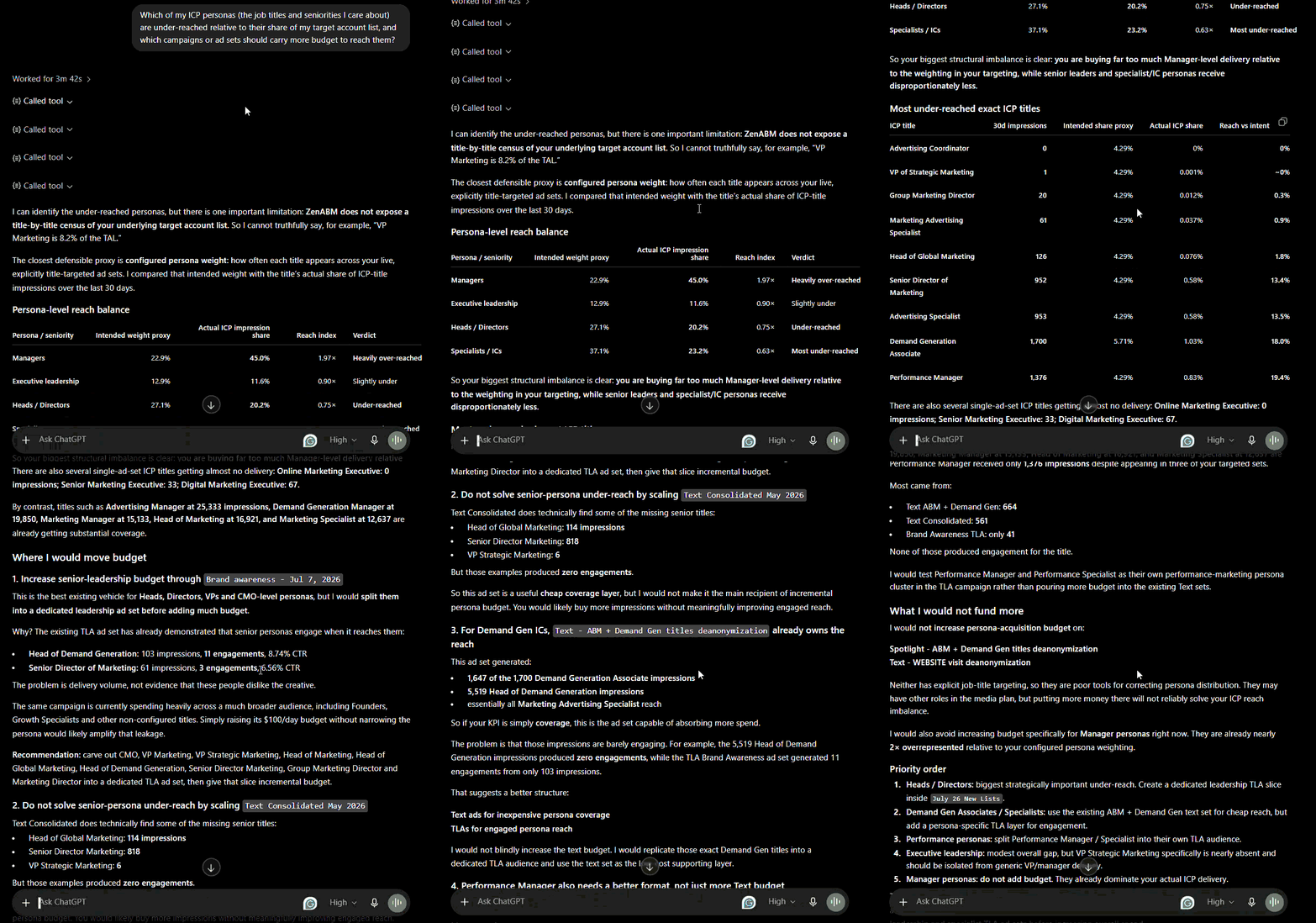
Which of my ICP personas (the job titles and seniorities I care about) are under-reached relative to their share of my target account list, and which campaigns or ad sets should carry more budget to reach them?
And check you are not bidding against yourself.
List my ad sets with audiences under 30,000 or over 100,000, and flag any two ad sets targeting nearly the same audience so I can stop bidding against myself. For each flag, show the spend so I can prioritize the fix.

Audience Expansion and the LinkedIn Audience Network both widen your reach past your target list.


For ABM, that is usually money leaving the building.
Check every campaign for Audience Expansion enabled and for delivery on the LinkedIn Audience Network. For each, show the spend, impressions, and engagement running through the expanded or off-network delivery so I can decide what to switch off.
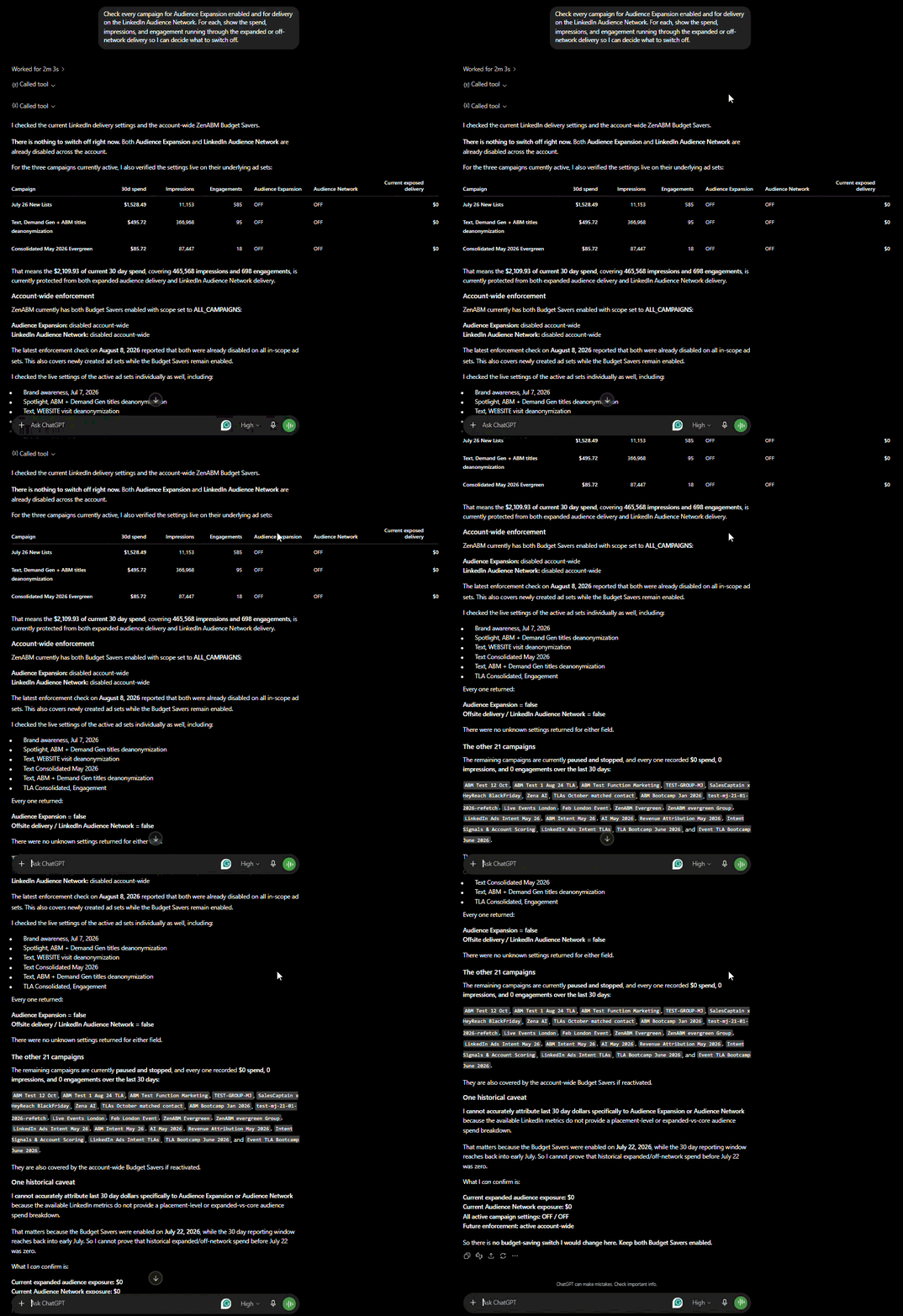
This check works because ZenABM reads your live delivery settings from Campaign Manager on every call, rather than trusting a stale sync. Anything LinkedIn does not return is reported as unknown instead of guessed as off.
List the 10 companies eating the most impressions with the least engagement over the last 30 days, each with their eCTR and the spend behind them, so I can exclude or cap them.

Once you have that list, cap or exclude them. Our impression capping guide walks through the build.
Given my last 30 days, tell me exactly where to move budget: which ad sets to cut (high spend, low eCTR, no pipeline) and which winners to scale (lowest eCPC, highest eCTR, not decaying), with a dollar amount for each move and the reason behind it.
Before you raise a budget, ask whether raising it will reach anyone new. Our LinkedIn ads count calculator also tells you how many ads that budget can genuinely fund.
For my best ad set, tell me whether raising its budget will reach new accounts or just show the same accounts more ads, using audience penetration (reach divided by audience size) and frequency. Give me a sequenced budget step-up with a stop condition for each step.

This is the most useful thing in the article, so it gets its own section.
ChatGPT will default to CTR because CTR is the famous metric. That is a mistake for ABM.
In the ZenABM 2026 benchmark of 211 companies, 161,256 ads and $5.5M in spend, CTR against pipeline came back at a Spearman rho of minus 0.170. That is a slight negative relationship.
Higher CTR did not mean more pipeline.
The reason is simple. Broad, entertaining ads pull clicks from people who will never buy. So an ad that wins on CTR can be the ad that appeals most to people outside your ICP.
Add this line to your prompts:
Rank on eCTR and eCPC, not CTR and CPC. Then, before you name a winner, show me how many of my target accounts each ad actually reached and engaged. If the higher CTR ad reached fewer target accounts, say so and recommend the other one.
That single instruction changes which ad you scale more often than you would expect.
Running ten prompts by hand every Monday does not last. ChatGPT has four features that fix that.
Feature | What to use it for | Why it helps optimization |
|---|---|---|
Projects | Hold your ICP, brand voice, stage thresholds, and rules in one place | Every prompt inherits your standards, so reports stop drifting week to week |
Skills | Save a prompt you rerun, like the weekly waste audit | Turns a five-paragraph prompt into one command |
Custom GPTs | Share a fixed version with your team | A teammate gets your analysis without learning your prompts |
Scheduled Tasks | Run the weekly review automatically | The report waits for you on Monday instead of needing a reminder |
Deep Research is worth a mention too.
It cannot touch your ad account for write actions, but it is good for market and competitor work around your campaigns.
Set your standards once inside a Project:
Save these as my LinkedIn ads defaults for this Project. Always compare the last 7 days with the previous 7. Always report eCTR and eCPC alongside CTR and CPC. Treat any ad above 1,000 impressions with a two week eCTR decline as decaying. Never call an ad a winner from fewer than 1,000 impressions. End every analysis with a recommended action and the dollar amount at stake.
Not everyone will add a connector, and nobody on your leadership team will.
Zena is the AI agent built into ZenABM. It sits on the same company-level ad, stage, intent, and CRM data, and answers the same questions in plain English.
Every prompt above works pasted into its chat box.


Three things make Zena more useful than a chat box for optimization.
Zena carries the ZenABM benchmark data, so when it reports your eCTR it can say whether that is strong for the format.
A report saying “0.38 percent eCTR, below the format median” gives you a decision. A bare “0.38 percent” gives you homework.
This is the proactive layer, and it is the part that replaces your Monday routine.
Zena has your weekly report ready on the dashboard every Monday, a monthly report on the first of the month, and a quarterly one. Each covers what happened, whether pipeline and pipeline per dollar are trending up or down, which campaigns touched the most deals, and the top three risks and opportunities.
Zena separates green flags from red flags continuously.
Green flags are your scale list: the ads driving the biggest eCTR gains, the formats winning right now, and the accounts surging into the Interested and Considering stages.
Red flags are your fix list: decaying ads (Zena’s bar is an eCTR decline for four weeks running, deliberately stricter than the two-week early warning above), campaigns with steady spend but falling engagement, and accounts hogging impressions without engaging.
Each flag carries its action on the same screen. A decaying ad comes with the pause button. An impression hog comes with the exclusion. Nothing happens until you click, which is the same safety model as the connector.
Here is the whole thing in order. It takes about fifteen minutes once your prompts are saved.
Step | What you run | The threshold | The move |
|---|---|---|---|
1 | Weekly headline, this week versus last | Read eCTR, eCPC, pipeline | Sets the agenda for the rest |
2 | Wasted spend audit | High spend, low eCTR | Pause or rework, biggest dollars first |
3 | Decaying ads report | 2 down weeks above 1,000 impressions | Refresh the ad, keep the message |
4 | Kill threshold check | 1,000 impressions, eCTR under 0.4% | Pause without debate |
5 | Job title and persona leak | Non-ICP titles over $200 | Add exclusions |
6 | Settings check | Audience Expansion or LAN on | Switch off for ABM campaigns |
7 | Impression hogs | High impressions, near-zero engagement | Cap or exclude the account |
8 | Budget reallocation | Winners not decaying | Move the freed budget, not a new budget |
One habit to keep: when you pause an ad, replace it and hold your planned message mix.
If your plan is eight ads across three themes, the replacement keeps that split. We lost a quarter’s messaging balance once through pauses that were each individually sensible.
Ask for the total at the end, because it is the number leadership responds to.
If you want the wider reporting rhythm around this, the ABM KPIs guide covers what to report and in what order.
Add up the total monthly spend across everything we just flagged: the overspending ad sets, the impression-hog accounts, the non-ICP job titles, and the decaying ads. Give me one number for reclaimable monthly spend and a short list of the specific changes that produce it.
ChatGPT is a genuinely good LinkedIn ads analyst once it can see your numbers, and a confident bluffer until then.
So do it in that order. Use the no-setup prompts today for copy, offers, and a pasted export. Then connect the data, because the prompts that actually save money need to know which ads are decaying and which companies are eating your budget.
And whatever you do, stop it ranking your ads on CTR.
If you want one thing to run this week, use the wasted spend prompt and then ask for the reclaimable monthly total. Most accounts find something worth a few hundred dollars a month in the first pass, and that pays for the setup immediately.
The company-level and pipeline data are the parts LinkedIn will not hand you. If you want it on your own account, ZenABM is free for 37 days with full functionality, and the ChatGPT connector, eCTR, eCPC, and Zena can all be running before your next optimization review.
You can also book a demo with us to learn more.
Not by default. ChatGPT cannot see your ad account, your spend, or your campaigns unless you connect a data source. You can connect one through a custom MCP connector in developer mode, such as the ZenABM MCP server at https://app.zenabm.com/api/mcp, which takes about five minutes over OAuth. Without a connector, ChatGPT can only work with data you paste in yourself.
Export a report from Campaign Manager and paste it in, but run a checking prompt first that asks ChatGPT to list the columns and date range and to refuse any metric that is not in the file. Then use it for waste analysis, format comparison, ad copy rewrites, offer testing, and audience planning. It cannot tell you which companies engaged or what became pipeline, because that data is not in a Campaign Manager export.
Only on some plans, and I would not recommend it. Full write access on custom connectors is limited to Business, Enterprise and Edu workspaces, while Plus and Pro get read access. Even where writes are available, keep a human approval step. Use ChatGPT to find and rank the changes, then make them yourself, which is also how the ZenABM connector is designed.
Use eCTR and eCPC, which measure the landing page click you actually paid for, rather than CTR and CPC which count likes and comments. Do not let it rank on CTR alone: in the ZenABM 2026 benchmark of 211 companies, CTR against pipeline returned a Spearman rho of minus 0.170, a slight negative relationship. Add target accounts reached as the tiebreaker before naming a winner.
They run on the same data if you connect the same server, so the difference is workflow. ChatGPT is better for teams already living in it, and its Projects, Skills and Scheduled Tasks make routines repeatable in a chat window. Claude Code suits people who want files, charts written by script, and installable plugins. For non-technical teammates, Zena inside ZenABM needs no setup at all.
Weekly for the operator checks: waste, decay, targeting leaks and settings. Monthly for budget reallocation and format grading, since those need a bigger sample. Do not check daily, because below 1,000 impressions per ad there is nothing meaningful to read and you will react to noise. Save the weekly set as a Skill or Scheduled Task so it runs without you remembering.
